Types of Problems
Errors
Usually unrecoverable problems.
Exception
Usually recoverable. It's literally an exception that we need to predict and prepare.
Basics of Error Handling (keywords)
try
Try out this code block.
thorw
Alter for any errors while trying out the code block.
catch
Code to be excecuted in the case of an exception/error.
finally
Code that needs to be executed after the error handling.
Example
Exception class
class OurBadException extends Exception {
	public OurBadException() {
		super("Exception handling is key!");
	}
}
Main class
class OurClass {
    private final Boolean myHandler = true;

    public void thisMethodIsDangerous() throws OurBadException {
        if (myHandler) {
	            throw new OurBadException();
        }
    }
}
throws vs throw
- throws: written after the method name to indicate what kind of exception is to be thrown.
- throw: written to actually throw the exception objects.
Error Catching
public class AnotherException {
    public static void main(String[] args) {
        OurClass ourClass = new OurClass();
        try
        {
            ourClass.thisMethodIsDangerous(); // error is thrown!
        }
        catch (OurBadException e)
        {
            System.out.println(e.getMessage());
        }
        finally
        {
            System.out.println("Error is handled!");
        }

    }
}
Type of Exception
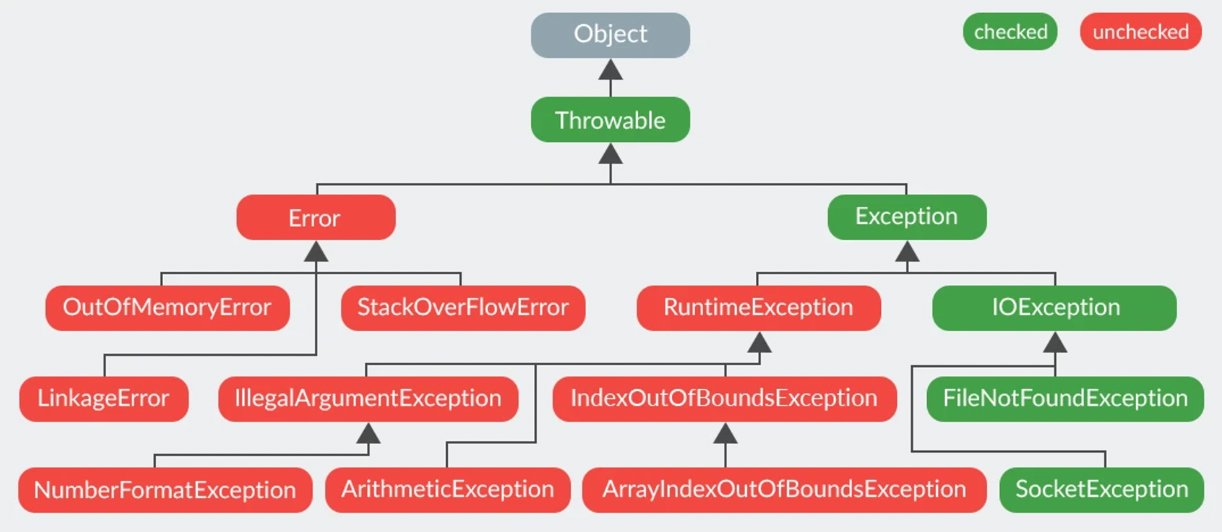
Checked Exception: spredictable and handled.
- example: IOException (thrown when there is an input-output failure).
Unchecked Exceptions: unpredictable and happens during runtime.
- example: ArrayIndexOutOfBoundsException.
Below is a parent-child class relationship of differt classes where the Object class is the parent of all classes below it.
Chained Exception
One exception causing another after another. It is used to group multiple exceptions in one category and to perserve the original and new exceptions together so that devleopers have a wholistic view of the exception.
initCause()
- sets the cause of the current exception to the specified throwable, linking one exception to another in a chain of exceptions.
getCause()
- used to retrieve the cause of an exception, which is another throwable that caused the current exception to be thrown.
Examples
There are two chain exception shown below:
public class main {

    public static void main(String[] args) {
        try
        {
            // Imagine you have a problem that says, "fake exception."
            NumberFormatException ex = new NumberFormatException("fake exception");
            // This problem happened because of another problem that says, "real exception."
            ex.initCause(new NullPointerException("real exception"));
            // Now, cause the fake problem to happen.
            throw ex;
        }
        catch (NumberFormatException ex)
        {
            // When the fake problem happens, catch it and show its details.
            ex.printStackTrace();
            // Also, show the details of the real problem that caused the fake problem.
            ex.getCause().printStackTrace();
        }

        // Now, create and throw another problem, saying, "This is the real reason for exception."
        throw new RuntimeException(new Exception("This is the real reason for exception"));
    }
}
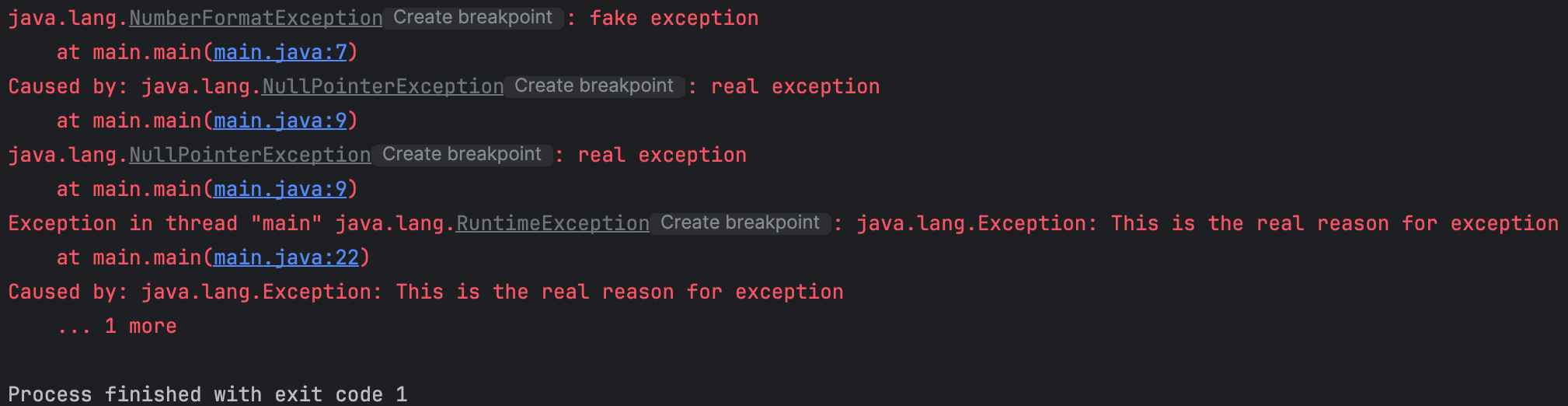
Output:
the first one line is from 'ex.printStackTrace' and
second & third is from 'ex.getCause().printStackTrace();'and
last line is from 'throw new RuntimeException(new Exception("This is the real reason for exception"));'
Generic Class
Class that allows type-flexible attributes and methods
// Define a generic class with a type parameter T
public class Box<T> {
    // A private field to hold the item
    private T item;

    // Constructor to initialize the item
    public Box(T item) {
        this.item = item;
    }

    // Method to get the item
    public T getItem() {
        return item;
    }

    // Method to set a new item
    public void setItem(T item) {
        this.item = item;
    }

    // A method to print the item type and value
    public void printItem() {
        System.out.println("Item: " + item + ", Type: " + item.getClass().getName());
    }
}

// A class to test the Box class
public class Main {
    public static void main(String[] args) {
        // Create a Box for an Integer
        Box<Integer> integerBox = new Box<>(123);
        integerBox.printItem();  // Output: Item: 123, Type: java.lang.Integer

        // Create a Box for a String
        Box<String> stringBox = new Box<>("Hello");
        stringBox.printItem();  // Output: Item: Hello, Type: java.lang.String

        // Create a Box for a Double
        Box<Double> doubleBox = new Box<>(45.67);
        doubleBox.printItem();  // Output: Item: 45.67, Type: java.lang.Double

        // Change the item in the stringBox
        stringBox.setItem("World");
        stringBox.printItem();  // Output: Item: World, Type: java.lang.String
    }
}