
1. BeforeAll (before all of the tests start), AfterAll (after all of the tests start)
2. @Nested (groups the test by relavent categories)
3. @DisplayName (displable text for the test)
4. @Order (explicitly sets the order in which the tests should run)
import org.junit.jupiter.api.*;

@Nested
@DisplayName("Topic 1")
@TestMethodOrder(MethodOrderer.OrderAnnotation.class)
class Test1 {

    @Order(2)
    @Test
    @DisplayName("Test1 - test1()")
    void test1() {
        System.out.println("Test1.test1");
    }

    @Order(1)
    @Test
    @DisplayName("Test1 - test2()")
    void test2() {
        System.out.println("Test1.test2");
    }
}

@Nested
@DisplayName("Topic 2")
class Test2 {
    @Test
    @DisplayName("Test2 - test1()")
    void test1() {
        System.out.println("Test2.test1");
    }

    @Test
    @DisplayName("Test2 - test2()")
    void test2() {
        System.out.println("Test2.test2");
    }
}
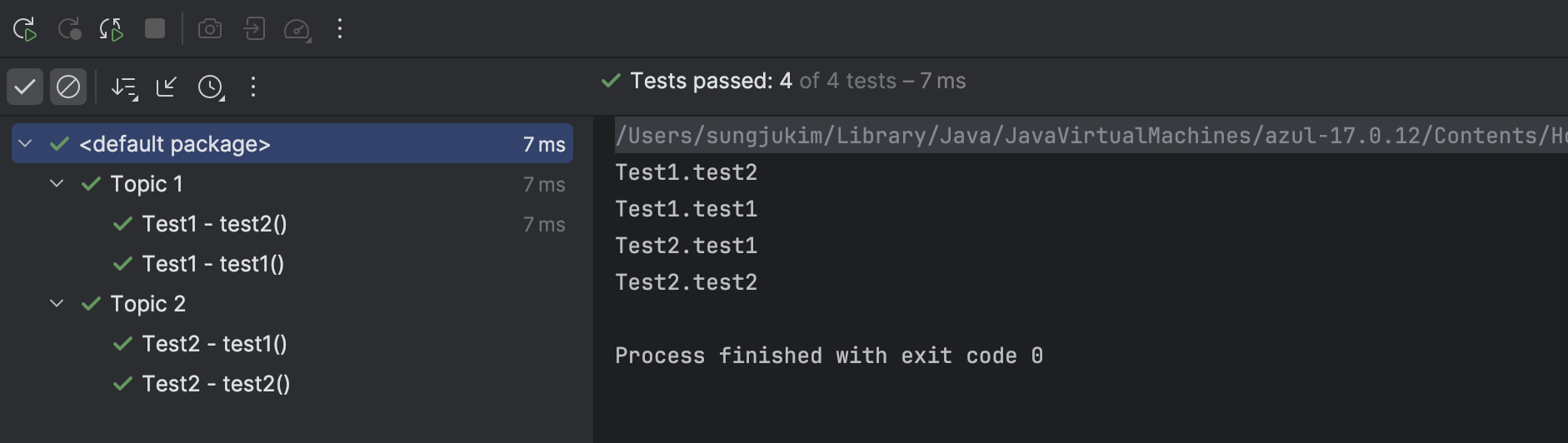
Output
@RepeatedTest & @ParameterizedTest
-
@RepeatedTest:- Definition: This annotation is used to repeat a test a specified number of times. It is useful for running the same test multiple times to ensure stability or detect flaky behavior.
- Example:
@RepeatedTest(5)will run the annotated test method 5 times.
-
@ParameterizedTest:- Definition: This annotation is used to run the same test method multiple times with different arguments. It allows you to pass different sets of input parameters to the test, making it easier to test multiple scenarios without duplicating code.
- Example:
@ParameterizedTestis often used with sources like@ValueSource,@CsvSource, or@MethodSourceto supply input values to the test method.
@ValueSource: Simple, single-parameter inputs.@CsvSource: Multiple inputs per test run using CSV format.
@CsvSource({"1, 'A'", "2, 'B'"})@MethodSource: Complex or dynamic data from a method.
Simple Example of @MethodSource
In the example numberProvider() returns a stream of integers and each value is passed to the testIsEven method in separate test executions.
import org.junit.jupiter.params.ParameterizedTest;
import org.junit.jupiter.params.provider.MethodSource;
import java.util.stream.Stream;

class CalculatorTest {

    @ParameterizedTest
    @MethodSource("numberProvider")
    void testIsEven(int number) {
        // Test logic
        assertTrue(number % 2 == 0);
    }

    static Stream<Integer> numberProvider() {
        return Stream.of(2, 4, 6, 8);
    }
}
Example of Repeated Testing
package com.sparta.junit5practice;

import org.junit.jupiter.api.DisplayName;
import org.junit.jupiter.api.RepeatedTest;
import org.junit.jupiter.api.RepetitionInfo;
import org.junit.jupiter.params.ParameterizedTest;
import org.junit.jupiter.params.provider.ValueSource;

public class RepeatTest {
    @RepeatedTest(value = 5, name = "반복 테스트 {currentRepetition} / {totalRepetitions}")
    void RepeatTest(RepetitionInfo info) {
        System.out.println("Test Repetition : " + info.getCurrentRepetition() + " / " + info.getTotalRepetitions());
    }

    @DisplayName("Test using parameter value")
    @ParameterizedTest
    @ValueSource(ints = {1, 2, 3, 4, 5, 6, 7, 8, 9})
    void parameterTest(int num) {
        System.out.println("5 * num = " + 5 * num);
    }

}
Fully ✨committed✨ developer, always eager to learn!