
외부 스타일 방식
1. 속성선택자
스타일 정보만을 따로 기술하는 .css외부문서를 만들고 link태그를 통해서 연결시켜주는 방식
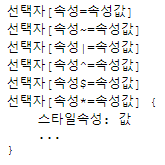
/* css영역 */

/* 1. 속성선택자-------------- */
div요소들 중 name속성값이 name1과 "일치"하는 요소
div[name=name1]{
    background: blue;
}

/* div요소들중 name속성값에 name1이 "포함"되어있는 요소(키워드x) */
div[name~=name1]{
    background: yellow;
}

/* div요소들중 class속성값이 class로 "시작"되는 요소(-으로 구분)*/
div[class|=class]{
    background: gray;
}

/* div요소들 중 name속성값이 na로 "시작"하는 요소 */
div[name^=na]{
    background: wheat;
}

/* div요소들 중 class속성값이 ss로 "끝"나는 요소 */
div[class$=ss]{
    color: white;
}

/* div요소들 중 class속성값에 i가 "포함"되어있는 요소 */
div[class*=i]{
    background: yellow;
    color: red;
}

/* 문제 : class속성값이 div-class인 요소들 중에서 name속성값에 name3가 포함된 요소(배경 : pink) */
.div-class[name~=name3]{
    background: pink;
}
2. 자손(자식)선택자와 후손선택자
요소들이 중첩되어 작성 가능
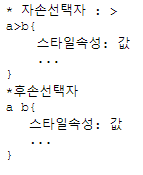
자손 : 바로 하위에 요소들 / 후손 : 하위요소 전부
/* 2.자손 선택자와 후손선택자 --------*/
/* a>b : a요소의 자손들중에서 b요소만 전부 선택 */

/* 아이디가 test1인 요소들의 자손들중 h4만 선택 */
#test1>h4{
    background: black;
}

#test1>ul>li{
    background: blue;
}

/* a b : a요소의 후손들 중에서 b요소 전부 선택 */
#test1 li{
    color: aliceblue;
}
3. 동위(같은레벨) 선택자
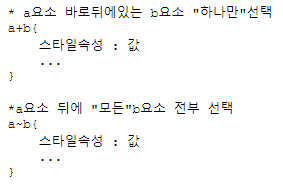
동위관계(같은레벨)에 위치한 특정 요소를 선택할 때 사용
/* 3.동위선택자 --------------------*/
#test2+div{
    background-color: yellow;
}

#test2+ul{
    background-color: yellow;
}/* 바로 뒤에 있는 요소가 아니기 때문에 선택x */

/* #test2~div{
    background-color: antiquewhite;
} */

#test2~ul{
    background-color: yellow;
}
4. 반응선택자
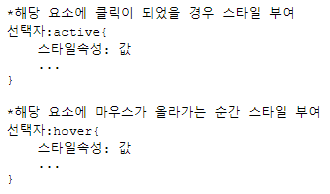
사용자의 움직임에 따라 선택되는 선택자
/* 4.반응선택자 --------------------*/
.area{
    background-color: yellowgreen;
    width: 100px;
    height: 100px;
    cursor: pointer;
}

#active-test:active{
    background: brown;
    color: red;
}

#hover-test:hover{
    background: teal;
    color: antiquewhite;
    scale: 0.98;
}
5. 반응선택자
요소에 상태에 따라서 선택되는 선택자
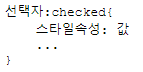
1)체크된 상태(checked)의 요소
/* 5.상태선택자 */
input[type=checkbox]:checked{
    width: 20px;
    height: 20px;
}

input[type=checkbox]:checked+label{
    font-size: 30px;
}
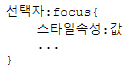
2) 초점(focus)이 맞춰진 input요소 선택
<style>
input[name^=user]:focus{
    background: pink;
}
</style>
<body>
    아이디 : <input type="text" name="userID">
    비밀번호 : <input type="password" name="userPwd">
</body>
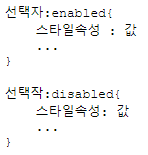
3) 활성(anabled), 비활성(disabled)이 되어있는 요소 선택

<style>
button:enabled{
    background: greenyellow;
}

button:disabled{
    background-color: aqua;
    opacity: 1; (불투명도)
}
</style>
<body>
    <input type="button" value="클릭불가" disabled>
    <button>클릭기능</button>
    <button disabled>클릭기능사용불가</button>
</body>