CloudNet@에서 진행하는 Istio Study 7주차 12장 내용입니다.
📕 This chapter cover
- Scaling the service mesh in multiple clusters
- Resolving the prerequisites to join two clusters
- Setting up common trust between workloads of different clusters
- Discovering cross-cluster workloads
- Configuring Istio’s ingress gateway for east-west traffic
12.1 The benefits of a multi-cluster service mesh
규모가 작은 클러스터 다수의 이점
- 격리성 강화
- 장애 경계
- 규정 준수
- 가용성 및 성능 향상
- 다중 및 하이브리드 클라우드
다중 클러스터 서비스 메시
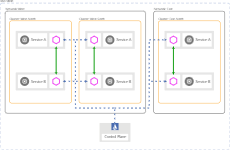
https://istio.io/latest/docs/ops/deployment/deployment-models/#multiple-clusters
여러 클러스터에 걸쳐 있고 워크로드가 클러스터 간에 트래픽을 라우팅하도록 설정하는 메시
메시 연합(다중 메시)
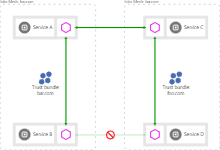
https://istio.io/latest/docs/ops/deployment/deployment-models/#multiple-meshes
- 개별 서비스 메시 2개의 워크로드 간 통신을 노출하고 활성화
- 자동화가 부족하여 서비스 간 트래픽을 수동 설정이 필요
12.2 multi-cluster service mesh
Istio가 다중 클러스터 서비스 메시를 구현하는 방법은 모든 클러스터의 서비스를 퀴리한 다음 이 정보로 서비스 프록시에 클러스터 사이에서 서비스 간 트래픽을 라우팅하는 방법을 설정하는 것이다.
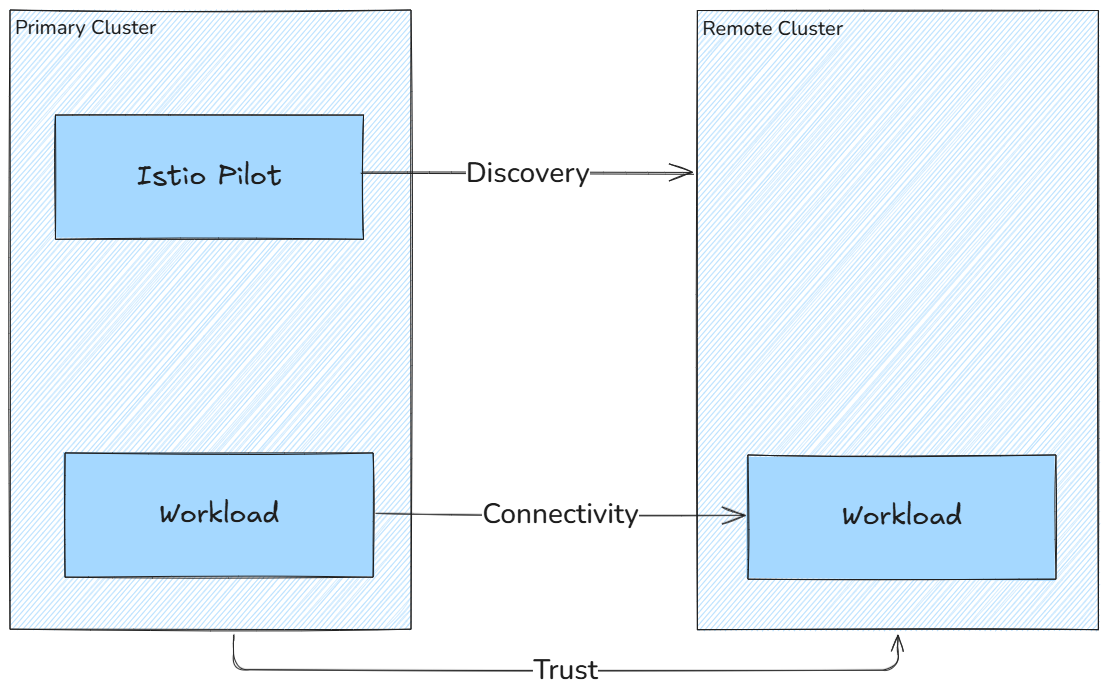
- 클러스터 간 워크로드 디스커버리
- Istio 컨트롤 플레인은 서비스 프록시를 설정하기 위해 동료 K8S 클러스터의 워크로드를 찾아야 한다. (K8S 클러스터 API 서버를 상대편 클러스터의 이스티오 컨트롤 플레인에서 접근할 수 있어야 한다.
- 클러스터 간 워크로드 연결성
- 워크로드는 서로 연결돼 있어야 한다. 워크로드 엔드포인트를 인지하고 있어도 커넥션을 시작할 수 없다면 쓸모가 없다.
- 클러스터 간 공통 신뢰
- Istio의 보안 기능을 활성화하려면 클러스터 간 워크로드가 서로 인증해야 한다.
12.2.1 Istio multi-cluster deployment models
다중 클러스터 서비스 메시에서는 istio 클러스터 유형을 두 가지로 구분
- Primary cluster: Istio 컨트롤 플레인이 설치된 K8S 클러스터
- Remote cluster: 설치된 Istio 컨트롤 플레인과 떨어져 있는 K8S 클러스터
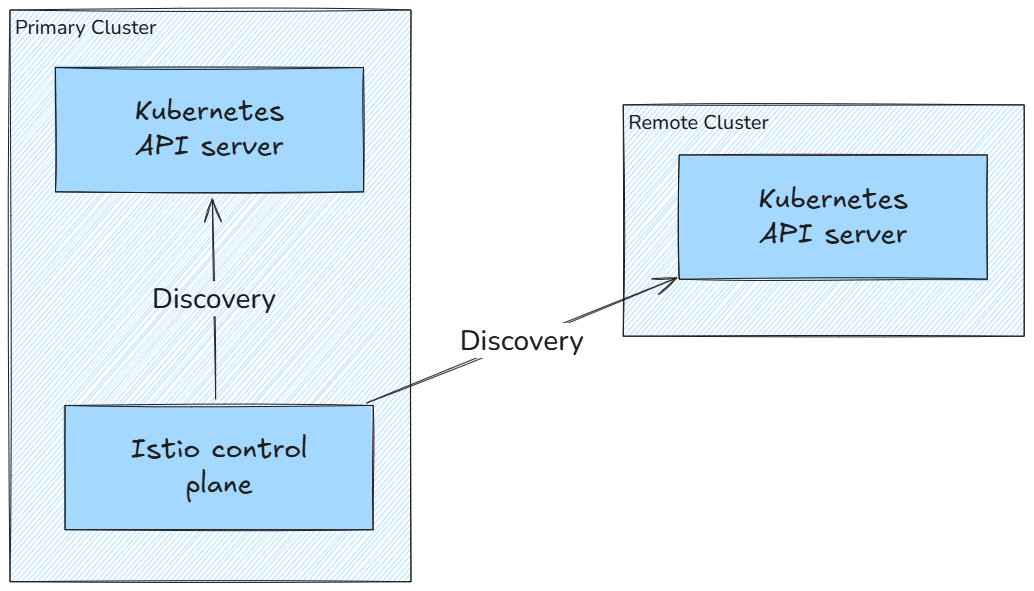
- 가용성 수준에 따라 배포 모델 3가지
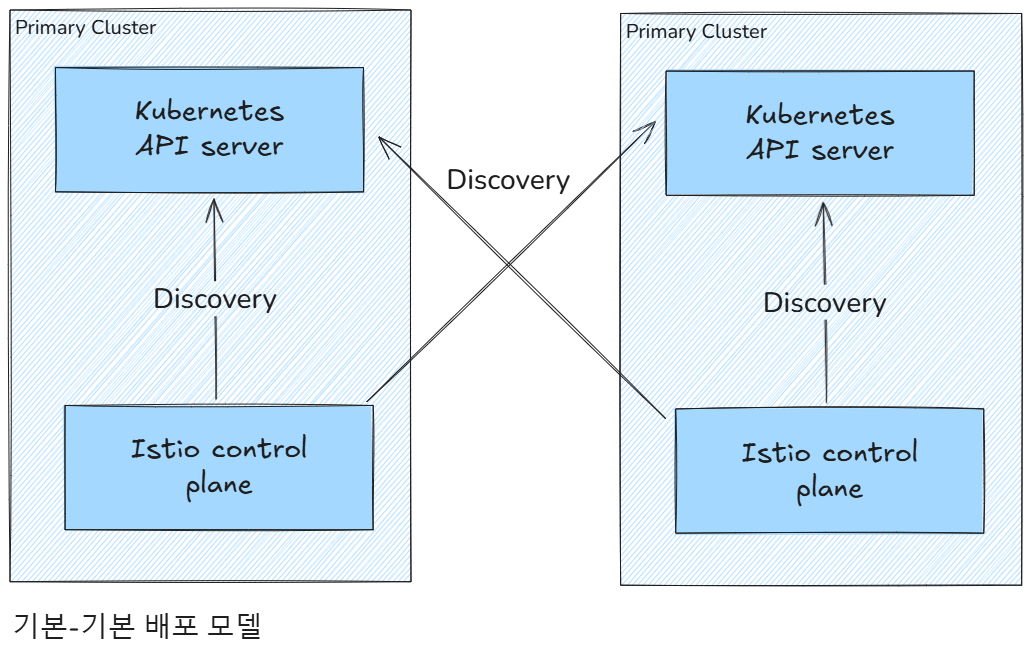
- 기본-원격(컨트롤 플레인 공유) 배포 모델 *primary-remote (shared control plane)
- 기본-기본(복제된 컨트롤 플레인) 배포 모델 *primary-primary (replicated control plane)
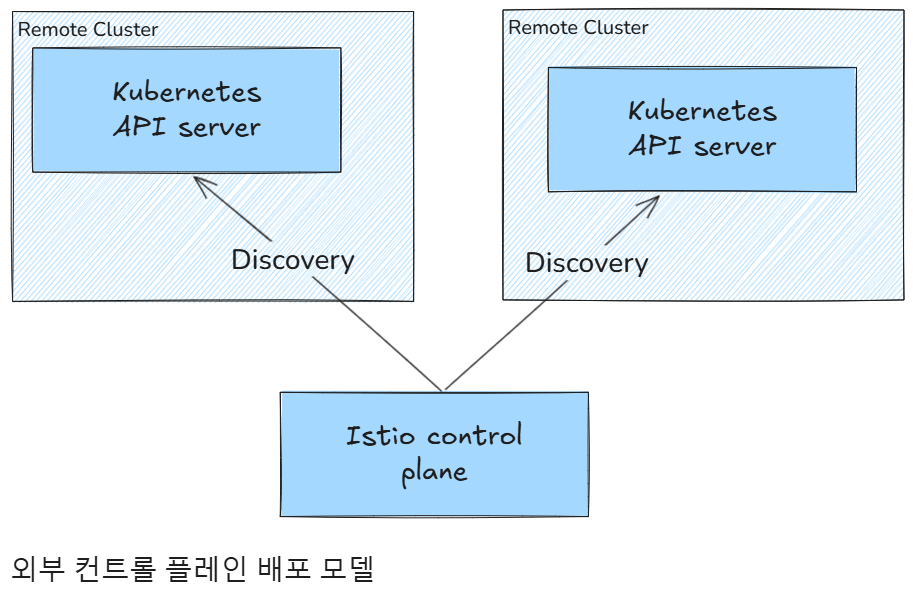
- 외부 컨트롤 플레인 배포 모델 *external control plane
기본-기본(복제된 컨트롤 플레인) 배포 모델 primary-primary (replicated control plane) 에는 컨트롤 플레인이 여럿이므로 가용성이 높지만, 트레이드오프로 리소스가 더 많이 필요하다.
외부 컨트롤 플레인 배포 모델 external control plane 은 모든 클러스터가 컨트롤 플레인과 떨어져 있는 배포 모델이다.
12.2.2 How workloads are discovered in multi-cluster deployments
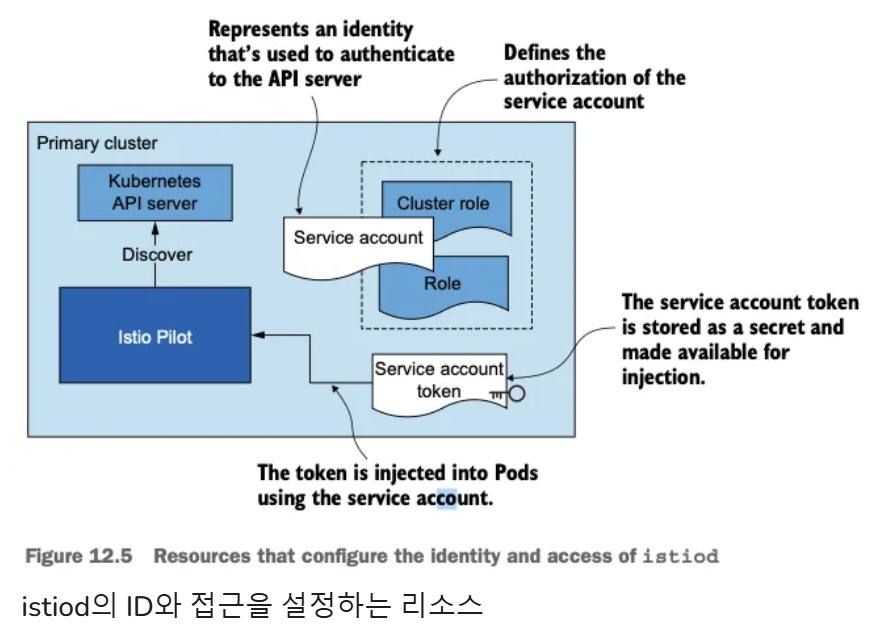
Istio의 컨트롤 플레인은 쿠버네티스 API 서버와 통신해 서비스 뒤의 서비스와 엔드포인트 같은 서비스 프록시 설정 관련 정보를 수집해야 한다.
-
쿠버네티스는 RBAC를 이용해 API 서버로의 접근을 보호한다. 쿠버네티스 RBAC은 광범위한 주제입니다.
-
서비스 어카운트는 기계나 서비스 등 사람이 아닌 클라이언트에 ID를 제공한다.
-
서비스 어카운트 토큰은 서비스 어카운트마다 자동으로 생성돼 해당 ID 클레임을 나타낸다. 토큰은 JWT 형식이며 쿠버네티스가 파드에 주입한다. 파드는 이 토큰을 사용해 API 서버에게 (자신의 신원) 인증할 수 있다.
-
롤 role 과 클러스터롤 clusterrole 은 서비스 어카운트나 일반 사용자 같은 ID에 대한 권한 집합을 정의한다.
아래 그림은 istiod에 인증과 인가를 제공하는 쿠버네티스 리소스를 시각화
-
istiod에 원격 클러스터의 서비스 어카운트 토큰을 제공해야 한다 (구체적인 예제에서 볼 수 있듯이 API 서버로 보안 통신을 시작할 수 있는 인증서와 함께).
-
istiod는 토큰을 사용해 원격 클러스터에 인증하고, 클러스터에서 실행 중인 워크로드를 찾는다.
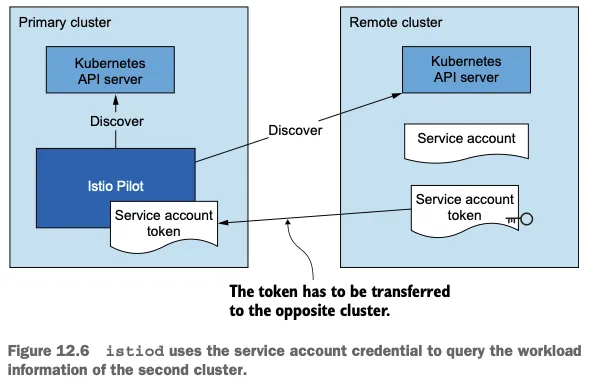
위 과정은 복잡하지만, istioctl이 자동화 해줍니다.
12.2.3 Cross-cluster workload connectivity
-
워크로드가 클러스터를 건너 연결할 수 있어야 한다는 것이다.
-
클러스터가 플랫 네트워크 flat network 에 있다면, 그러나까 단일 네트워크를 공유하거나(Amazon VPC 처럼) 네트워크가 네트워크 피어링 network peering 으로 연결된 경우 등에서는 워크로드가 IP 주소로 연결 할 수 있으므로 조건은 이미 충족됐다!
-
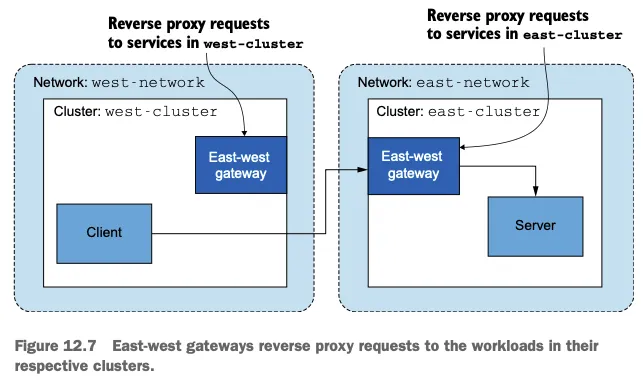
그러나 클러스터가 서로 다른 네트워크에 있다면 네트워크의 에지에 위치해 클러스터 간 트래픽을 프록시해주는 특수한 이스티오 인그레스 게이트웨이를 사용해야 한다.
-
다중 네트워크 메시에서 클러스터를 잇는 인그레스 게이트웨이를 east-west 게이트웨이라고 부른다(아래 그림).
12.2.4 Common trust between clusters
-
마지막 요소는 다중 클러스터 서비스 메시 내 클러스터들이 공통된 신뢰를 가져야 한다는 것이다.
-
공통 신뢰를 가지면 반대편 클러스터의 워크로드들이 상호 인증할 수 있게 된다.
-
반대편 클러스터의 워크로드들 사이에 공통 신뢰를 달성하는 방법에는 두 가지가 있다.
-
첫 번째 방법은 플러그인 CA 인증서라고 부르는, 공통된 루트 CA가 발급한 사용자 정의 인증서를 사용한다.
-
두 번째 방법은 두 클러스터가 인증서를 서명하는 데 사용하는 외부 CA를 통합한다.
PLUG-IN CA CERTIFICATES
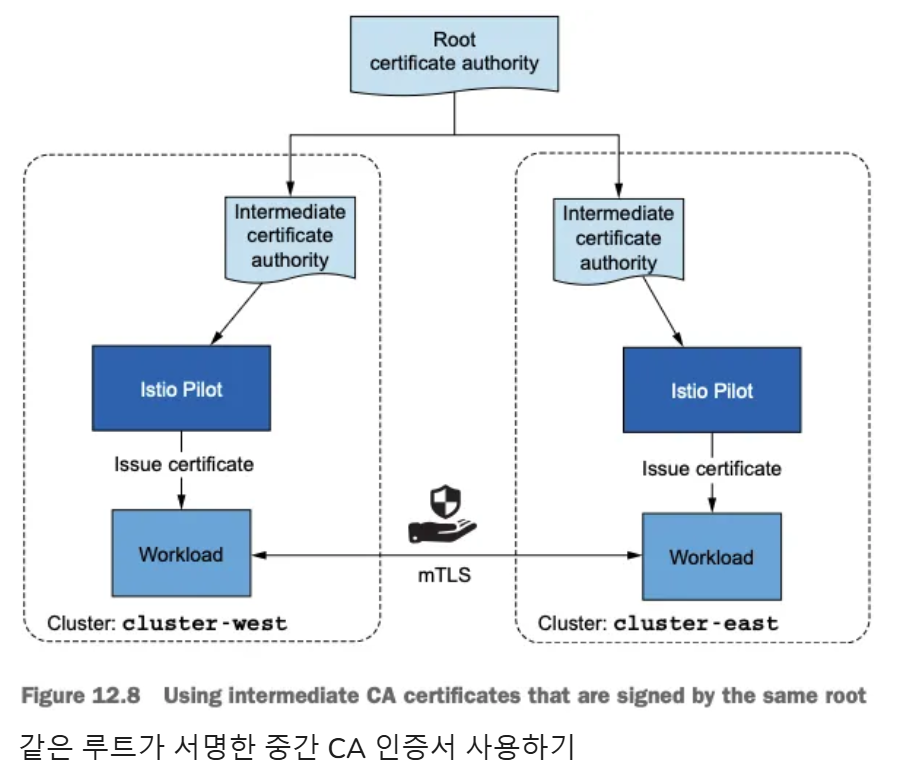
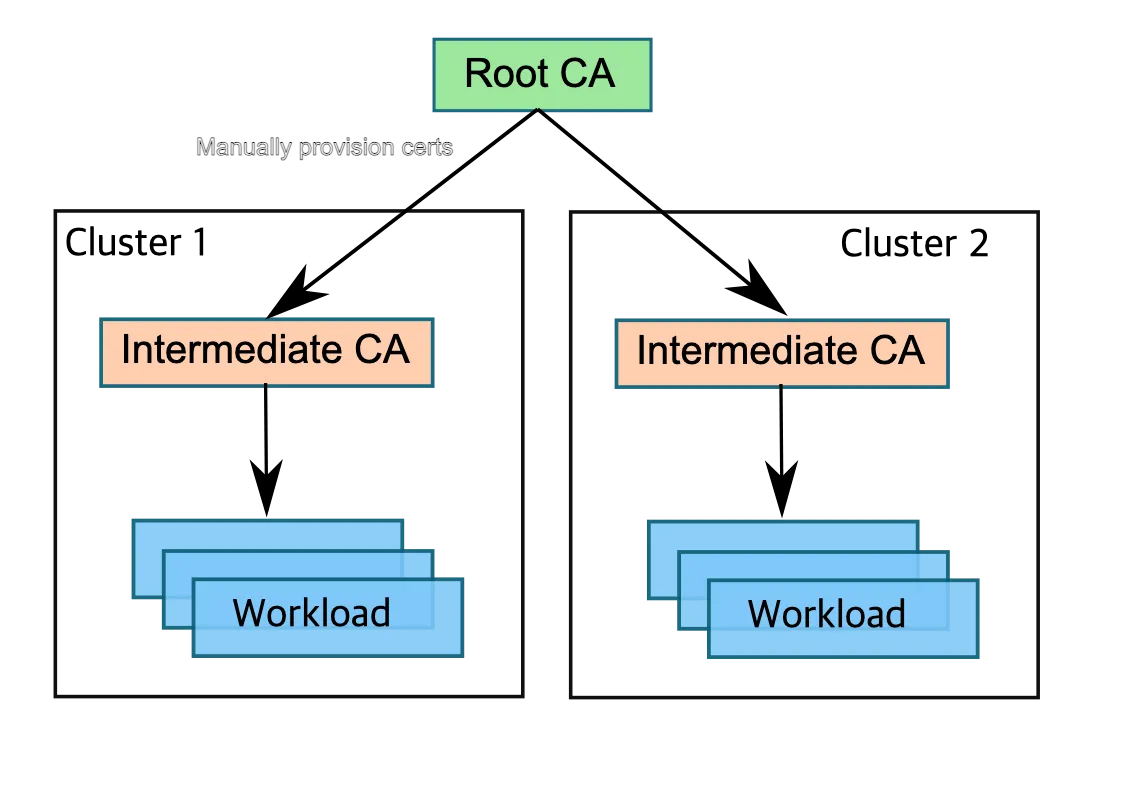
https://istio.io/v1.17/docs/tasks/security/cert-management/plugin-ca-cert/
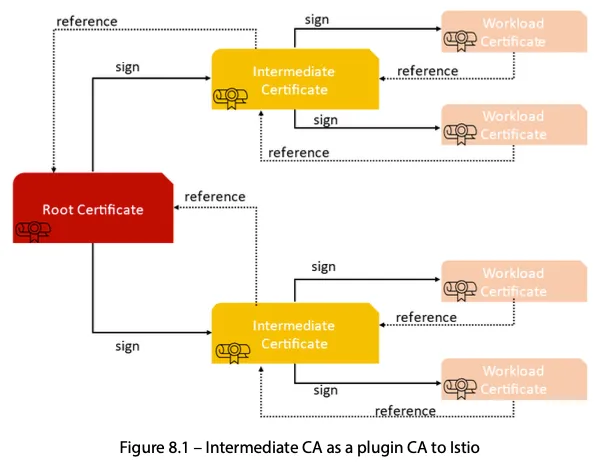
플러그인 중간 CA 인증서를 사용하는 것은 간단하고 쉽지만, 중간 CA가 노출될 보안 위험이 있다.
- 노출 위험은 중간 CA를 메모리에만 올리고 etcd(시크릿 같은 쿠버네티스 리소스를 저장하는 저장소)에 쿠버네티스 시크릿으로 유지하지 않음으로써 줄일 수 있다.
- 더 안전한 대안은 인증서에 서명하는 외부 CA를 통합하는 것이다.
외부 인증 기관 통합
- istiod는 쿠버네티스 CSR 리소스로 저장된 인증서 서명 요청 CSRs 을 검증하고 승인하는 등록 기관 역할을 한다.
- 승인된 쿠버네티스 CSR 리소스는 다음 방법 중 하나로 외부 CA에 제출된다.
cert-manager 사용
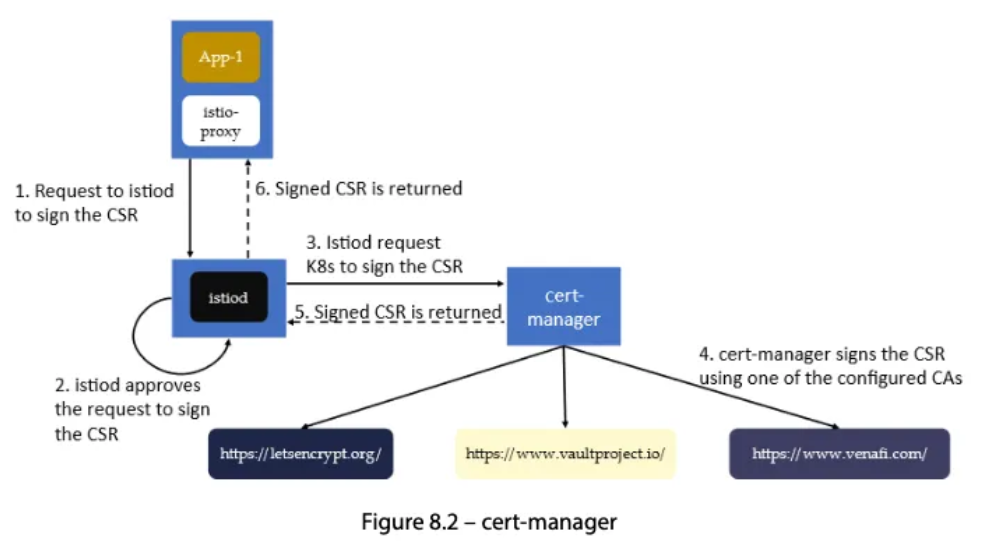
- cert-manager 가 우리의 외부 CA를 지원할 때만 가능하다.
- 지원하는 외부 발급자 확인 https://cert-manager.io/docs/configuration/issuers/
- 지원하는 경우, cert-manager 의 istio-csr로 쿠버네티스 CSR을 지켜보고 서명을 위해 외부 CA에 제출할 수 있다.
맞춤 개발
- 승인된 쿠버네티스 CSR을 지켜보고 이를 서명을 위해 외부 CA에 제출하는 쿠버네티스 컨트롤러를 만든다.
- 그러나 로컬 키가 있는 자체 서명 인증서 대신 외부 CA를 사용하도록 솔루션을 조정해야 한다.
- 외부 CA가 인증서를 서명한 후에는 쿠버네티스 CSR에 저장하는데, istiod가 SDS를 사용해 이를 워크로드에 전달한다.
12.3 Overview of a multi-cluster, multi-network, multi-control-plane service mesh
west-cluster: 사설 네트워크가 us-west 리전에 있는 쿠버네티스 클러스터. 여기서 webapp 서비스를 실행east-cluster: 사설 네트워크가 us-east 리전에 있는 쿠버네티스 클러스터. 여기서 catalog 서비스를 실행
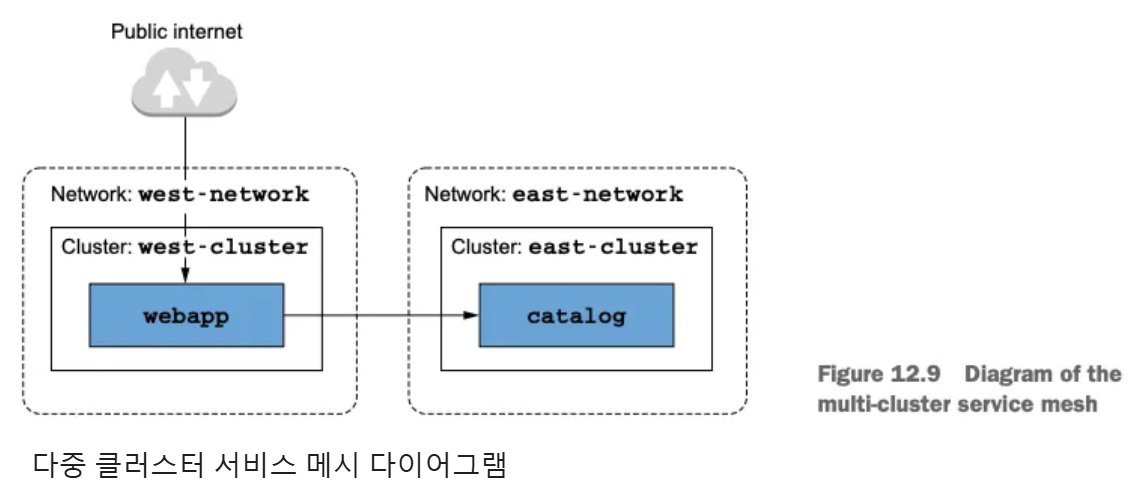
12.3.1 Choosing the multi-cluster deployment model
-
다중 네트워크 인프라는 클러스터 사이를 연결할 수 있게 네트워크를 잇는 east-west 게이트웨이를 사용해야 하지만, 복제 컨트롤 플레인 배포 모델을 사용할지, 단일 컨트롤 플레인을 사용할지 여부는 정해져 있지 않다. 결정은 비즈니스 요구 사항에 달려 있다.
-
ACME의 경우에는 온라인 상점이 아주 인기가 많으며, 서비스가 중단되는 1분마다 수백만 달러의 비용이 발생한다. 따라서 고가용성이 최우선 과제이므로, 이스티오 컨트롤 플레인이 각 클러스터에 배포되는 기본-기본 배포 모델을 사용할 것이다.
종합하면, 우리는 네트워크를 잇는 east-west 게이트웨이를 사용해 다중 클러스터, 다중 네트워크, 다중 컨트롤 플레인 서비스 메시를 구축할 것이고, 기본-기본 배포 모델을 사용할 것이다.
12.3.2 Setting up the cloud infrastructure
-
west k8s 클러스터 배포
-
east k8s 클러스터 배포
-
MetalLB 배포
# MetalLB 배포
kubectl apply -f https://raw.githubusercontent.com/metallb/metallb/v0.14.9/config/manifests/metallb-native.yaml \
  --kubeconfig=./west-kubeconfig

kubectl apply -f https://raw.githubusercontent.com/metallb/metallb/v0.14.9/config/manifests/metallb-native.yaml \
  --kubeconfig=./east-kubeconfig

# 확인
kubectl get crd --kubeconfig=./west-kubeconfig
kubectl get crd --kubeconfig=./east-kubeconfig

kubectl get pod -n metallb-system --kubeconfig=./west-kubeconfig
kubectl get pod -n metallb-system --kubeconfig=./east-kubeconfig


# IPAddressPool, L2Advertisement 설정
cat << EOF | kubectl apply --kubeconfig=./west-kubeconfig -f -
apiVersion: metallb.io/v1beta1
kind: IPAddressPool
metadata:
  name: default
  namespace: metallb-system
spec:
  addresses:
  - 172.18.255.101-172.18.255.120
---
apiVersion: metallb.io/v1beta1
kind: L2Advertisement
metadata:
  name: default
  namespace: metallb-system
spec:
  ipAddressPools:
  - default
EOF

cat << EOF | kubectl apply --kubeconfig=./east-kubeconfig -f -
apiVersion: metallb.io/v1beta1
kind: IPAddressPool
metadata:
  name: default
  namespace: metallb-system
spec:
  addresses:
  - 172.18.255.201-172.18.255.220
---
apiVersion: metallb.io/v1beta1
kind: L2Advertisement
metadata:
  name: default
  namespace: metallb-system
spec:
  ipAddressPools:
  - default
EOF

# 확인
kubectl get IPAddressPool,L2Advertisement -A --kubeconfig=./west-kubeconfig
kubectl get IPAddressPool,L2Advertisement -A --kubeconfig=./east-kubeconfig
12.3.3 Configuring plug-in CA certificates
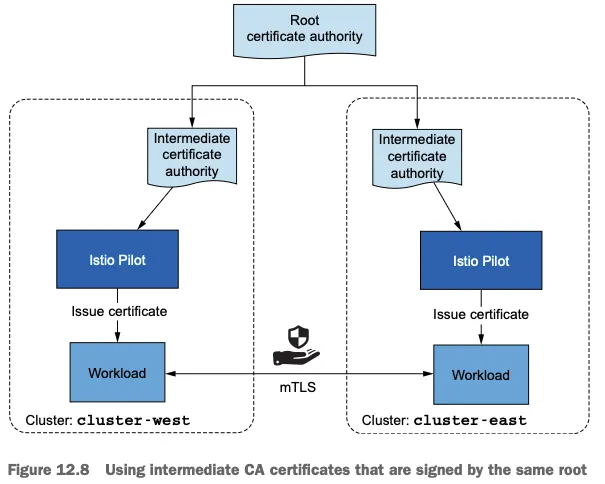
- ca.cert.pem : 중간 CA의 인증서 The intermediate CA’s certificate.
- ca-key.pem : 중간 CA의 개인 키 The intermediate CA’s private key.
- root-cert.pem : 중간 CA를 발급한 루트 CA의 인증서. 루트 CA는 중간 CA들의 인증서를 검증하며, 이것이 클러스터 간 상호 신뢰의 핵심이다
- cert-chain.pem : 중간 CA의 인증서와 루트 인증서를 이어 붙인 신뢰 체인
플러그인 CA 인증서 적용하기
# cat ./ch12/scripts/generate-certificates.sh
#!/bin/bash

set -ex

cert_dir=`dirname "$BASH_SOURCE"`/../certs

echo "Clean up contents of dir './chapter12/certs'"
rm -rf ${cert_dir}

echo "Generating new certificates"
mkdir -p ${cert_dir}/west-cluster
mkdir -p ${cert_dir}/east-cluster

# step CLI 설치 확인 : step CLI가 설치되어 있지 않으면 에러 출력 후 종료.
## macOS : brew install step
if ! [ -x "$(command -v step)" ]; then
  echo 'Error: Install the smallstep cli (https://github.com/smallstep/cli)'
  exit 1
fi

step certificate create root.istio.in.action ${cert_dir}/root-cert.pem ${cert_dir}/root-ca.key \
  --profile root-ca --no-password --insecure --san root.istio.in.action \
  --not-after 87600h --kty RSA

step certificate create west.intermediate.istio.in.action ${cert_dir}/west-cluster/ca-cert.pem ${cert_dir}/west-cluster/ca-key.pem --ca ${cert_dir}/root-cert.pem --ca-key ${cert_dir}/root-ca.key --profile intermediate-ca --not-after 87600h --no-password --insecure --san west.intermediate.istio.in.action --kty RSA
step certificate create east.intermediate.istio.in.action ${cert_dir}/east-cluster/ca-cert.pem ${cert_dir}/east-cluster/ca-key.pem --ca ${cert_dir}/root-cert.pem --ca-key ${cert_dir}/root-ca.key --profile intermediate-ca --not-after 87600h --no-password --insecure --san east.intermediate.istio.in.action --kty RSA

cat ${cert_dir}/west-cluster/ca-cert.pem ${cert_dir}/root-cert.pem > ${cert_dir}/west-cluster/cert-chain.pem
cat ${cert_dir}/east-cluster/ca-cert.pem ${cert_dir}/root-cert.pem > ${cert_dir}/east-cluster/cert-chain.pem- istio-system 네임스페이스를 만든 후 인증서를 cacerts 라는 시크릿으로 배포하여 각 클러스터에 중간 CA를 만들기
# west-cluster 용 인증서 설정하기
kwest create namespace istio-system
kwest create secret generic cacerts -n istio-system \
--from-file=ch12/certs/west-cluster/ca-cert.pem \
--from-file=ch12/certs/west-cluster/ca-key.pem \
--from-file=ch12/certs/root-cert.pem \
--from-file=ch12/certs/west-cluster/cert-chain.pem

# east-cluster 용 인증서 설정하기
keast create namespace istio-system
keast create secret generic cacerts -n istio-system \
--from-file=ch12/certs/east-cluster/ca-cert.pem \
--from-file=ch12/certs/east-cluster/ca-key.pem \
--from-file=ch12/certs/root-cert.pem \
--from-file=ch12/certs/east-cluster/cert-chain.pem

# 확인
for i in west east; do echo ">> k8s cluster : $i <<"; kubectl get ns istio-system --kubeconfig=./$i-kubeconfig; echo; done
for i in west east; do echo ">> k8s cluster : $i <<"; kubectl get secret cacerts  -n istio-system --kubeconfig=./$i-kubeconfig; echo; done
for i in west east; do echo ">> k8s cluster : $i <<"; kubectl view-secret cacerts -n istio-system --all --kubeconfig=./$i-kubeconfig; echo; done
플러그인 인증서가 설정되면 이스티오 컨트롤 플레인을 설치할 수 있다. 컨트롤 플레인은 플러그인 CA 인증서(사용자가 정의한 중간 인증서)를 갖고 워크로드 인증서에 서명한다.
12.3.4 Installing the control planes in each cluster
클러스터 간 연결을 위해 네트워크에 레이블 붙이기
간단한 방법은 이스티오를 설치한 네임스페이스에 네트워크 토폴로지 정보를 레이블로 붙이는 것
- west/east-cluster 의 istio-system 에 topology.istio.io/network=west-network 레이블을 붙인다.
#
kwest label namespace istio-system topology.istio.io/network=west-network
keast label namespace istio-system topology.istio.io/network=east-network

# 확인
for i in west east; do echo ">> k8s cluster : $i <<"; kubectl get ns istio-system --show-labels --kubeconfig=./$i-kubeconfig; echo; done
IstioOperator 리소스를 사용해 컨트롤 플레인 설치하기
IstioOperator 리소스를 사용해 west-cluster 의 Istio 설치를 정의
- west
# cat ./ch12/controlplanes/cluster-west.yaml
apiVersion: install.istio.io/v1alpha1
kind: IstioOperator
metadata:
  name: istio-controlplane
  namespace: istio-system
spec:
  profile: demo
  components:
    egressGateways: # 이그레스 게이트웨이 비활성화
    - name: istio-egressgateway
      enabled: false
  values:
    global:
      meshID: usmesh # 메시 이름
      multiCluster:
        clusterName: west-cluster # 멀티 클러스터 메시 내부의 클러스터 식별자
network: west-network # 이 설치가 이뤄지는 네트워크- east
# cat ./ch12/controlplanes/cluster-east.yaml
apiVersion: install.istio.io/v1alpha1
kind: IstioOperator
metadata:
  name: istio-controlplane
  namespace: istio-system
spec:
  profile: demo
  components:
    egressGateways: # 이그레스 게이트웨이 비활성화
    - name: istio-egressgateway
      enabled: false
  values:
    global:
      meshID: usmesh # 메시 이름
      multiCluster:
        clusterName: east-cluster
      network: east-network
istioctl alias 설정 (iwest, ieast) 및 미리 만들어둔 인증서 적용 확인
docker exec -it west-control-plane istioctl -h
docker exec -it east-control-plane istioctl -h

#
alias iwest='docker exec -it west-control-plane istioctl'
alias ieast='docker exec -it east-control-plane istioctl'

#
iwest proxy-status
NAME                                                   CLUSTER          CDS        LDS        EDS        RDS          ECDS         ISTIOD                      VERSION
istio-ingressgateway-5db74c978c-9qmt9.istio-system     west-cluster     SYNCED     SYNCED     SYNCED     NOT SENT     NOT SENT     istiod-5585445f4c-zf8g6     1.17.8

ieast proxy-status
NAME                                                   CLUSTER          CDS        LDS        EDS        RDS          ECDS         ISTIOD                     VERSION
istio-ingressgateway-7f6f8f8d99-4mlp5.istio-system     east-cluster     SYNCED     SYNCED     SYNCED     NOT SENT     NOT SENT     istiod-85976468f-vp4zg     1.17.8

#
iwest proxy-config secret deploy/istio-ingressgateway.istio-system
RESOURCE NAME     TYPE           STATUS     VALID CERT     SERIAL NUMBER                               NOT AFTER                NOT BEFORE
default           Cert Chain     ACTIVE     true           80349990876331570640723939723244297816      2025-05-17T08:47:28Z     2025-05-16T08:45:28Z
ROOTCA            CA             ACTIVE     true           100900981840825465297757884708490534092     2032-06-25T14:11:35Z     2022-06-28T14:11:35Z

iwest proxy-config secret deploy/istio-ingressgateway.istio-system -o json

#
iwest proxy-config listener deploy/istio-ingressgateway.istio-system
iwest proxy-config route deploy/istio-ingressgateway.istio-system
iwest proxy-config cluster deploy/istio-ingressgateway.istio-system
iwest proxy-config endpoint deploy/istio-ingressgateway.istio-system
iwest proxy-config secret deploy/istio-ingressgateway.istio-system
iwest proxy-config bootstrap deploy/istio-ingressgateway.istio-system
iwest proxy-config ecds deploy/istio-ingressgateway.istio-system

#
ieast proxy-config listener deploy/istio-ingressgateway.istio-system
ieast proxy-config route deploy/istio-ingressgateway.istio-system
ieast proxy-config cluster deploy/istio-ingressgateway.istio-system
ieast proxy-config endpoint deploy/istio-ingressgateway.istio-system
ieast proxy-config secret deploy/istio-ingressgateway.istio-system
ieast proxy-config bootstrap deploy/istio-ingressgateway.istio-system
ieast proxy-config ecds deploy/istio-ingressgateway.istio-system
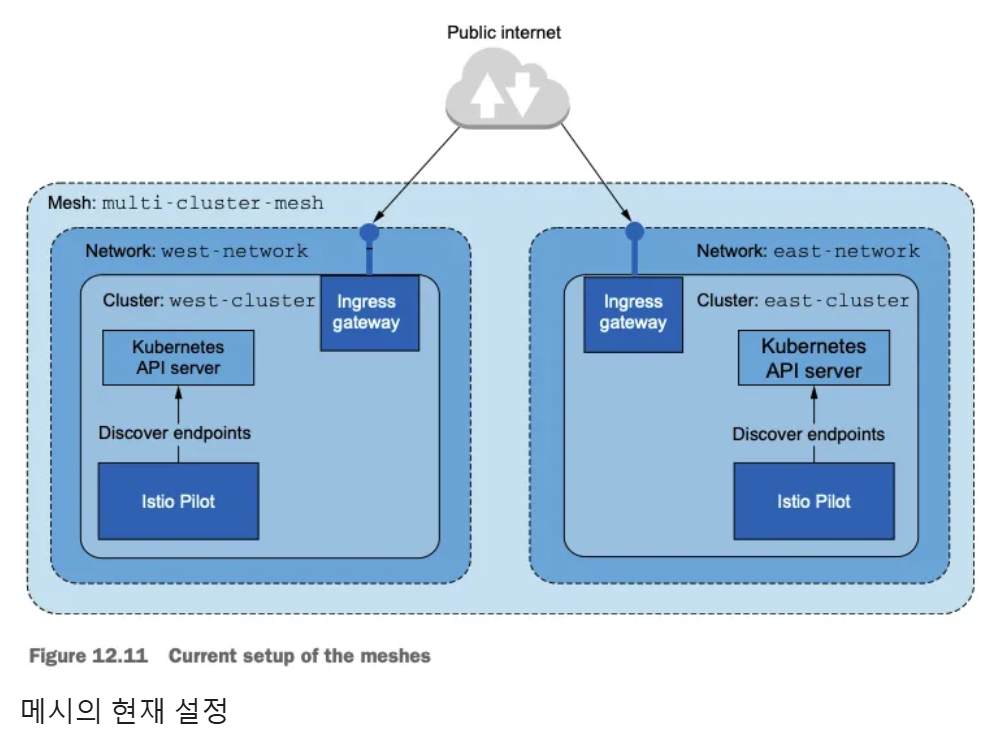
두 클러스터 모두에 컨트롤 플레인을 설치하면 개별 메시 2개를 갖게 되는데, 각자 로컬 서비스만 찾는 istiod 복제복 하나와 수신 트래픽용 게이트웨이 하나를 실행한다.
두 클러스터 모두에 워크로드 실행하기
- west-cluster 에서는 webapp 을 배포
kwest create ns istioinaction
kwest label namespace istioinaction istio-injection=enabled
kwest -n istioinaction apply -f ch12/webapp-deployment-svc.yaml
kwest -n istioinaction apply -f ch12/webapp-gw-vs.yaml
kwest -n istioinaction apply -f ch12/catalog-svc.yaml # Stub catalog service to which webapp makes request
cat ch12/catalog-svc.yaml
piVersion: v1
kind: Service
metadata:
  labels:
    app: catalog
  name: catalog
spec:
  ports:
  - name: http
    port: 80
    protocol: TCP
    targetPort: 3000
  selector:
    app: catalog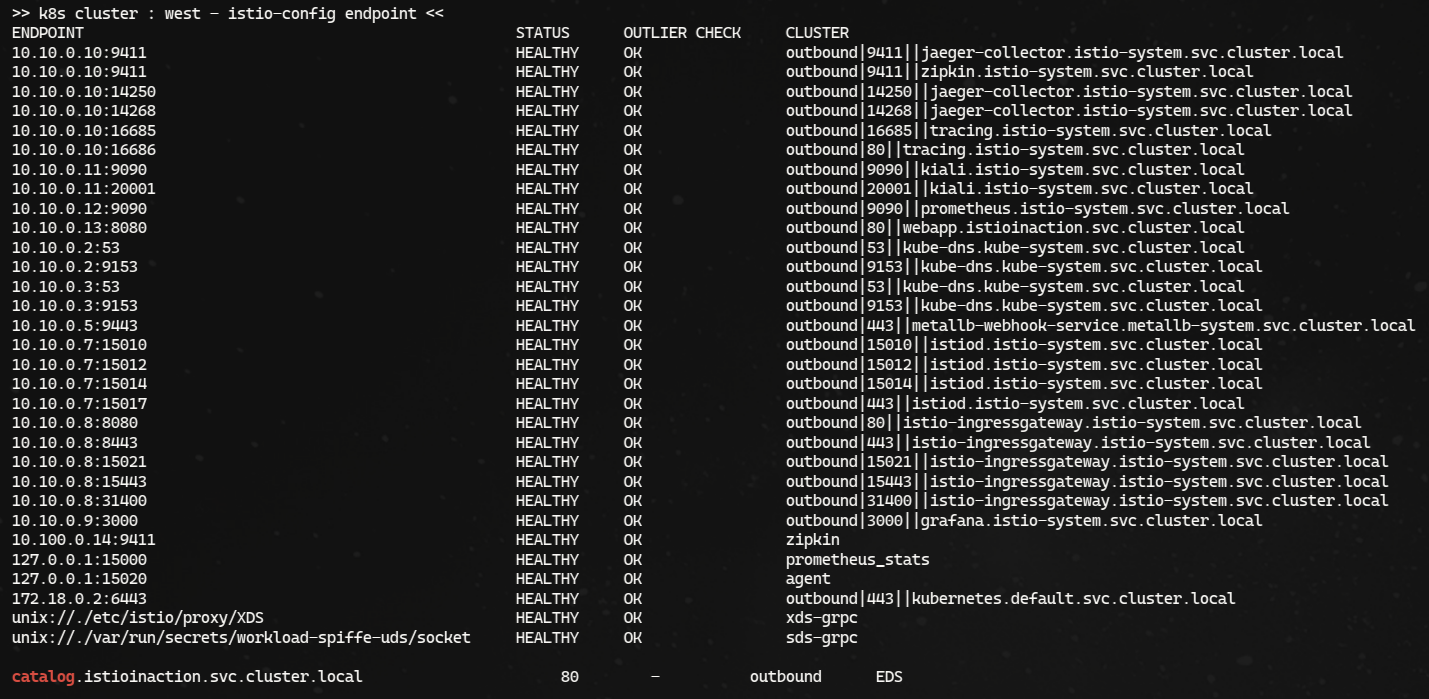
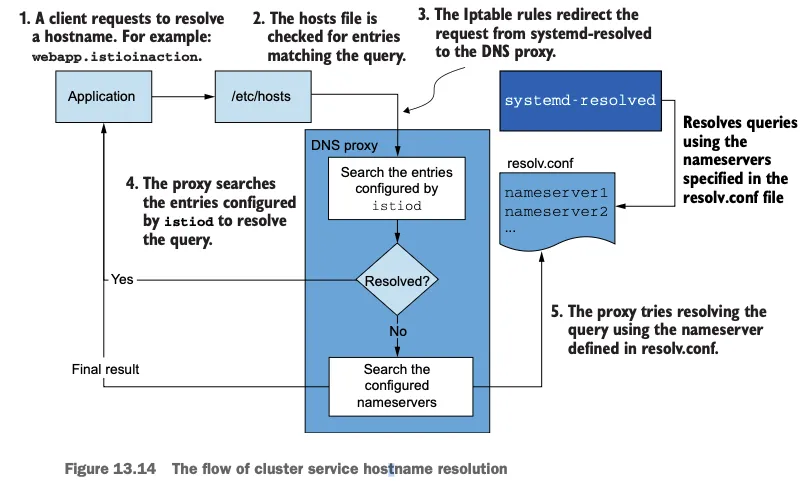
그런데 east-cluster 에서만 실행하려고 하는 catalog 워크로드용 서비스가 필요한 이유는 무엇일까?
- 이 서비스가 없으면 webapp 컨테이너가 FQDN을 IP 주소로 해석할 수 없고, 따라서 트래픽이 애플리케이션을 떠나 프록시로 리다이렉트되는 지점에 도달하기도 전에 요청이 실패하기 때문이다.
- 스텁 catalog 서비스를 추가함으로써, FQDN은 서비스 클러스터 IP로 해석되고, 애플리케이션이 트래픽을 시작해 실제 엔보이 설정을 갖고 클러스터 사이의 라우팅을 처리하는 엔보이 프록시로 리다이렉트될 수 있다.
- east-cluster 에 catalog 서비스를 배포
keast create ns istioinaction
keast label namespace istioinaction istio-injection=enabled
keast -n istioinaction apply -f ch12/catalog.yaml

cat ch12/catalog.yaml
apiVersion: v1
kind: ServiceAccount
metadata:
  name: catalog
---
apiVersion: v1
kind: Service
metadata:
  labels:
    app: catalog
  name: catalog
spec:
  ports:
  - name: http
    port: 80
    protocol: TCP
    targetPort: 3000
  selector:
    app: catalog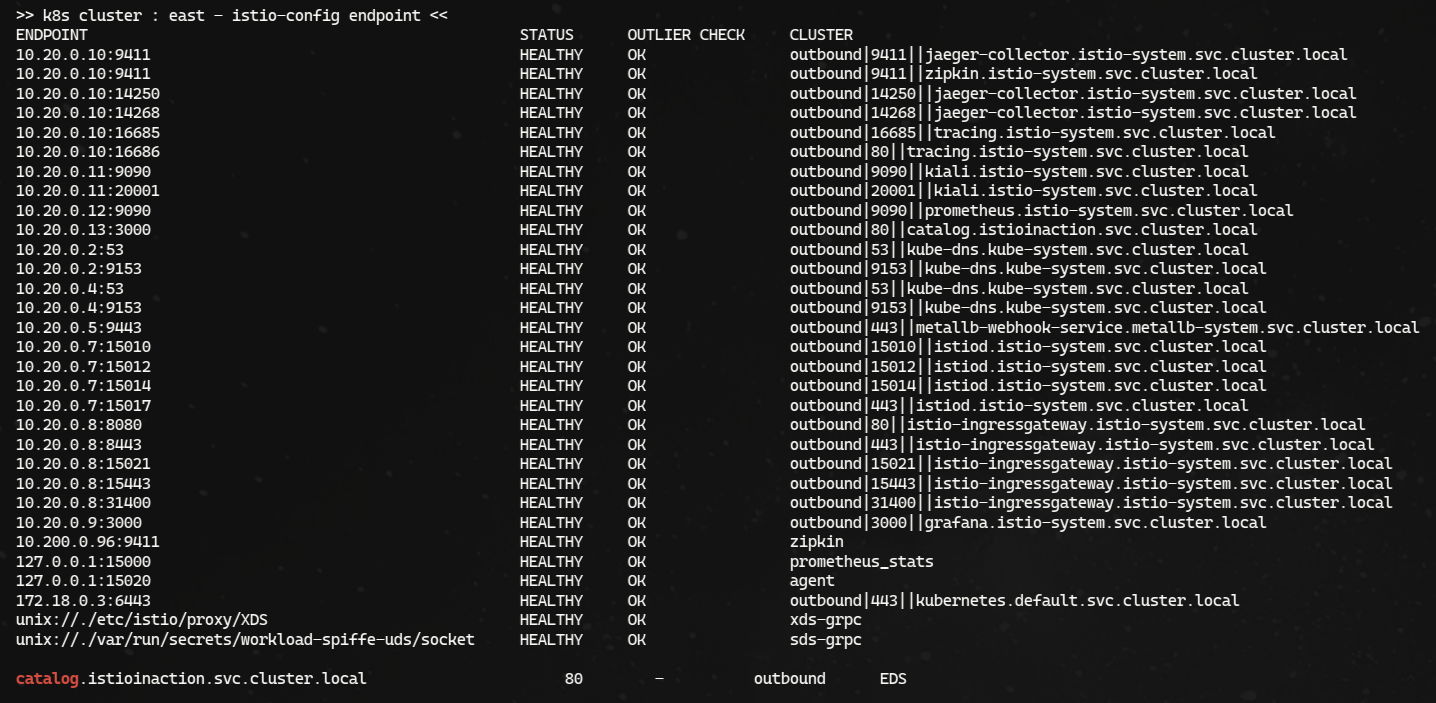
12.3.5 Enabling cross-cluster workload discovery
- Istio가 원격 클러스터에서 정보를 쿼리하기 위해 인증하려면, ID를 정의하는 서비스 어카운트와 권한에 대한 롤 바인딩 role binding 이 필요하다.
- 이런 이유로 이스티오는 설치 시
istio-reader-service-account라는 서비스 어카운트를 최소 권한으로 생성한다.
원격 클러스터 접근용 시크릿 만들기
istioctl에는create-remote-secret명령어가 있는데, 기본istio-reader-service-account서비스 어카운트를 사용해 원격 클러스터 접근용으로 시크릿을 만드는 것이다.- 시크릿을 만들 때는 이스티오를 설치할 때
IstioOperator에서 사용한 클러스터 이름을 지정하는 것이 중요하다.
- kubectl 명령어에 파이프해 west-cluster 에 적용
# west 에 시크릿 생성
ieast x create-remote-secret --name="east-cluster" | kwest apply -f -

# istiod 로그 확인 : 시크릿이 생성되면, 바로 istiod가 이 시크릿을 가지고 새로 추가된 원격 클러스터(east)에 워크로드를 쿼리한다.
kwest logs deploy/istiod -n istio-system | grep 'Adding cluster'- west 확인, 10.20.0.0/16 라우팅 확인

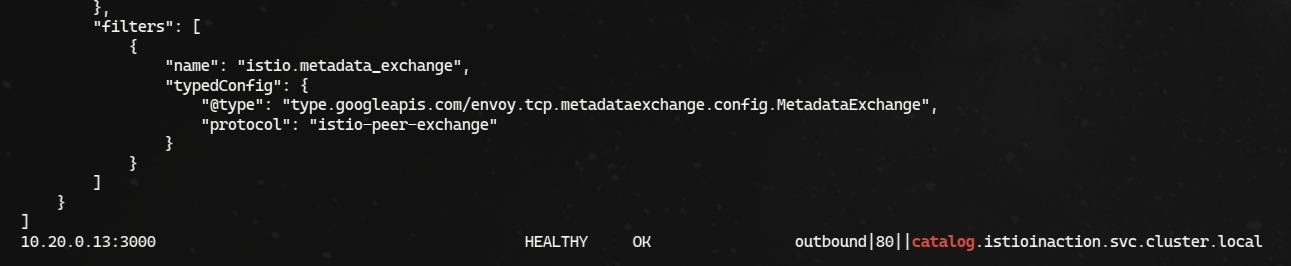
-
east 확인

-
기본-기본 배포 primary-primary deployment 에서는 east 가 west 쿼리 할 수 있게 반대로도 설정
# east 에 시크릿 생성
iwest x create-remote-secret --name="west-cluster" | keast apply -f -

# istiod 로그 확인 : 시크릿이 생성되면, 바로 istiod가 이 시크릿을 가지고 새로 추가된 원격 클러스터(east)에 워크로드를 쿼리한다.
keast logs deploy/istiod -n istio-system | grep 'Adding cluster'

12.3.6 Setting up cross-cluster connectivity
- 인그레스 게이트웨이는 퍼블릭 네트워크에서 시작한 트래픽의 진입점으로, 트래픽을 조직의 내부 네트워크로 보낸다.
- 이런 유형의 트래픽을
north-south 트래픽이라고도 한다. - 한편 서로 다른 내부 네트워크(여기서는 클러스터의 네트워크) 간의 트래픽은
east-west 트래픽이라고 한다
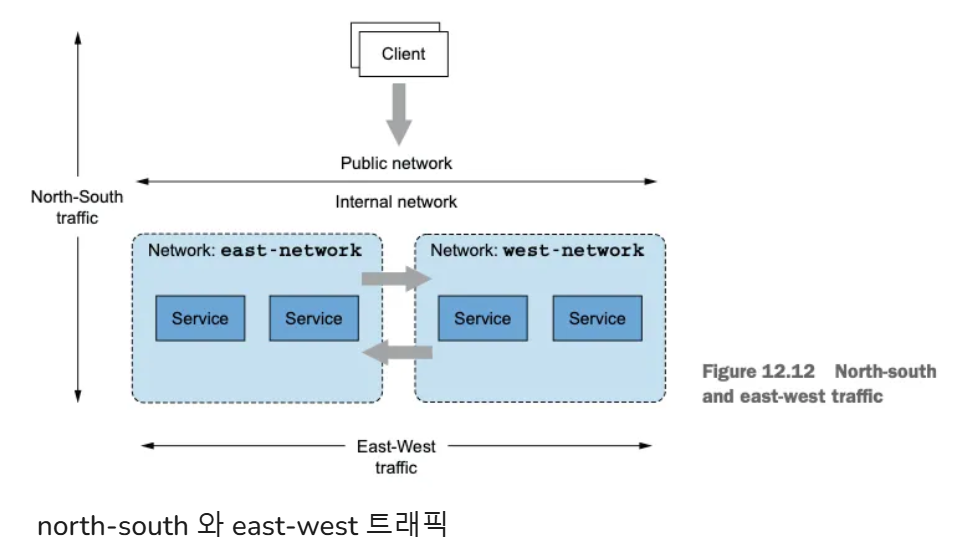
Istio의 east-west 게이트웨이
east-west 게이트웨이의 목적은 클러스터 간 east-west 트래픽의 진입점 역할을 하는 것 뿐 아니라, 이 과정을 서비스 운영 팀에게 투명하게 만드는 것이다.- 이 목표를 달성하려면 게이트웨이는 반드시 다음을 수행해야 한다.
- 클러스터 사이의 정밀한 트래픽 관리
- 암호화된 트래픽 라우팅, 암호화된 상태로 라우팅해야 워크로드 간 상호 인증이 가능하다.
- 그리고 서비스 메시 운영자는 어떤 추가 리소스도 구성할 필요가 없어야 한다! 즉, 어떤 Istio 리소스도 추가 구성할 필요가 없어야 한다.
SNI 클러스터로 east-west 게이트웨이 설정하기
east-west 게이트웨이는 SNI 클러스터를 모든 서비스에 추가 설정한 인그레스 게이트웨이다.- SNI 클러스터는 단순히 보통의 엔보이 클러스터 Envoy clusters 같은 것으로(10장 10.3.2절의 ‘엔보이 클러스터 설정 쿼리하기’ 절 참조), 트래픽이 라우팅될 수 있는 유사 워크로드 집합을 묶는 속성인 방향, 부분집합, 포트, FQDN을 포함한다.
- 그러나 SNI 클러스터에는 한 가지 주요 차이점이 있다. SNI 클러스터는 모든 엔보이 클러스터 정보를 SNI에 인코딩한다.
- 이 덕분에
east-west 게이트웨이는 클러스터가 SNI 안에 지정한 클러스터로 암호화된 트래픽을 라우팅할 수 있는 것이다. - 구체적인 예를 들면, 클라이언트(webapp 같은)가 원격 클러스터의 워크로드(catalog 같은)로 커넥션을 시작할 때 그림 12.13 처럼 겨냥하는 클러스터를 SNI에 인코딩한다.
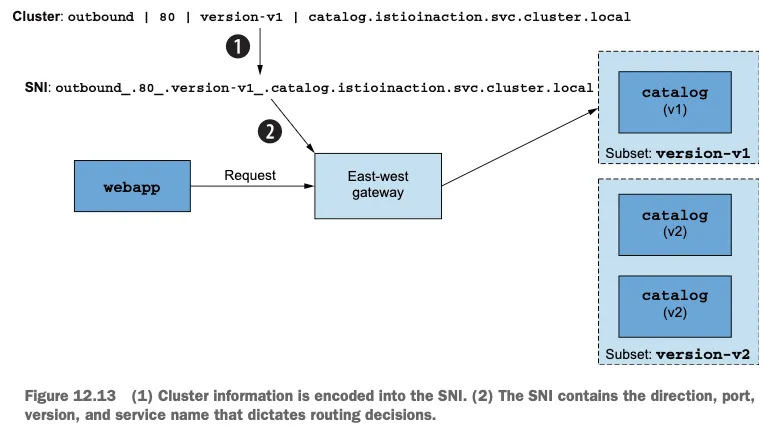
- 클러스터 정보는 SNI에 인코딩된다.
- SNI에는 라우팅 결정을 지시하는 방향, 포트, 버전, 서비스 이름이 포함된다.
클라이언트는 세밀한 라우팅 결정을 내릴 수 있으며, 게이트웨이는 SNI 헤더에서 클러스터 정보를 읽어 트래픽을 클라이언트가 의도한 워크로드로 프록시할 수 있다.
SNI 클러스터가 있는 east-west 게이트웨이 설치하기
SNI 클러스터 설정은 옵트인 기능으로, 다음 IstioOpertor 정의처럼 환경 변수 ISTIO_META_ROUTER_MODE 로 게이트웨이 라우터 모드를 sni-dnat 으로 설정해서 활성화할 수 있다.
# cat ch12/gateways/cluster-east-eastwest-gateway.yaml
apiVersion: install.istio.io/v1alpha1
kind: IstioOperator
metadata:
  name: istio-eastwestgateway # IstioOperator 이름은 앞 선 이스티오 설정 이름과 겹치지 않아야 한다
  namespace: istio-system
spec:
  profile: empty # empty 프로필은 추가 이스티오 구성 요소를 설치하지 않는다
  components:
    ingressGateways:
    - name: istio-eastwestgateway # 게이트웨이 이름
      label:
        istio: eastwestgateway
        app: istio-eastwestgateway
        topology.istio.io/network: east-network
      enabled: true
      k8s:
        env:
        - name: ISTIO_META_ROUTER_MODE # sni-dnat 모드는 트래픽을 프록시하는 데 필요한 SNI 클러스터를 추가한다
          value: "sni-dnat"
        # The network to which traffic is routed
        - name: ISTIO_META_REQUESTED_NETWORK_VIEW # 게이트웨이가 트래픽을 라우팅하는 네트워크
          value: east-network
        service:
          ports:
          ... (생략) ...
  values:
    global:
      meshID: usmesh # 메시, 클러스터, 네트워크 식별 정보
      multiCluster:
        clusterName: east-cluster
network: east-networkISTIO_META_ROUTER_MODE를sni-dnat으로 설정하면 SNI 클러스터를 자동으로 구성한다. 지정하지 않으면standard모드로 돌아가며, 이는 SNI 클러스터를 설정하지 않는다.ISTIO_META_REQUESTED_NETWORK_VIEW는 네트워크 트래픽이 프록시되는 곳을 정의한
IstioOperator 로 east 클러스터에 east-west 게이트웨이를 설치 ```bash cat ch12/gateways/cluster-east-eastwest-gateway.yaml docker cp ./ch12/gateways/cluster-east-eastwest-gateway.yaml east-control-plane:/cluster-east-eastwest-gateway.yaml ieast install -f /cluster-east-eastwest-gateway.yaml --set values.global.proxy.privileged=true -y ```
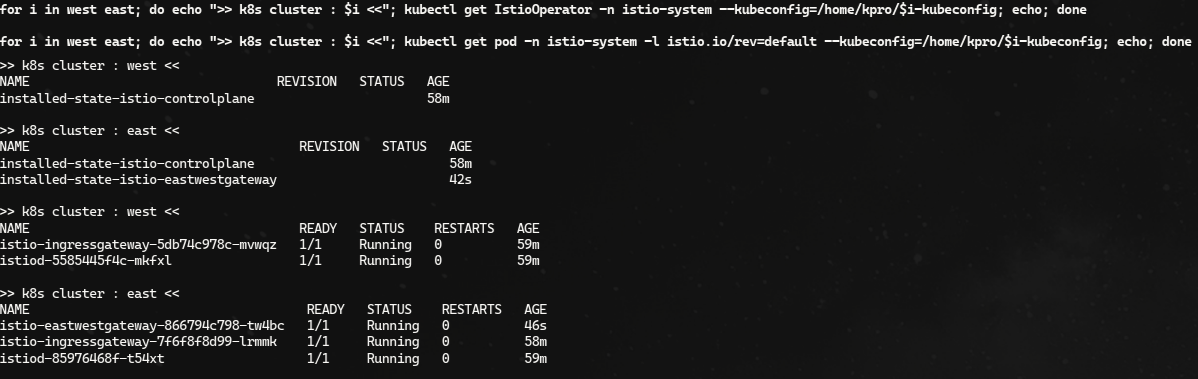
# east 에 istio-ingressgateway  에 istio-config 정보 확인 : west 의 CDS/EDS 모두 알고 있음!
for i in listener route cluster endpoint; do echo ">> east k8s cluster : ingressgateway - istio-config $i <<"; docker exec -it east-control-plane istioctl proxy-config $i deploy/istio-ingressgateway.istio-system; echo; done

# east 에 istio-eastwestgateway 에 istio-config 정보 확인 : webapp(CDS) OK, west 에 EDS 아직 모름!
for i in listener route cluster endpoint; do echo ">> east k8s cluster : eastwestgateway - istio-config $i <<"; docker exec -it east-control-plane istioctl proxy-config $i deploy/istio-eastwestgateway.istio-system; echo; done

ieast proxy-config cluster deploy/istio-eastwestgateway.istio-system | grep istioinaction
catalog.istioinaction.svc.cluster.local                      80        -          outbound      EDS
webapp.istioinaction.svc.cluster.local                       80        -          outbound      EDS

ieast proxy-config cluster deploy/istio-eastwestgateway.istio-system --fqdn webapp.istioinaction.svc.cluster.local -o json
ieast proxy-config cluster deploy/istio-eastwestgateway.istio-system --fqdn webapp.istioinaction.svc.cluster.local -o json | grep sni
                        "sni": "outbound_.80_._.webapp.istioinaction.svc.cluster.local"

ieast proxy-config endpoint deploy/istio-eastwestgateway.istio-system | grep istioinaction
ieast proxy-config endpoint deploy/istio-eastwestgateway.istio-system --cluster 'outbound|80||catalog.istioinaction.svc.cluster.local' -o json


# west 정보 확인
iwest proxy-status

# west 에 istio-ingressgateway 에 istio-config 정보 확인
for i in listener route cluster endpoint; do echo ">> west k8s cluster : ingressgateway - istio-config $i <<"; docker exec -it west-control-plane istioctl proxy-config $i deploy/istio-ingressgateway.istio-system; echo; done
iwest proxy-config cluster deploy/istio-ingressgateway.istio-system | grep istioinaction
iwest proxy-config cluster deploy/istio-ingressgateway.istio-system --fqdn catalog.istioinaction.svc.cluster.local -o json
iwest proxy-config cluster deploy/istio-ingressgateway.istio-system --fqdn catalog.istioinaction.svc.cluster.local -o json | grep sni
"sni": "outbound_.80_._.catalog.istioinaction.svc.cluster.local"- west에서 호출 시도

east-west 게이트웨이를 설치하고 라우터 모드를 sni-dnat으로 설정했으면, 다음 단계는 SNI 자동 통과 모드 SNI auto passthrough mode 를 사용해 east-west 게이트웨이에서 다중 클러스터 상호 TLS 포트를 노출하는 것이다.
SNI 자동 통과로 클러스터 간 트래픽 라우팅하기
SNI 자동 통과는 이스티오 Gateway 리소스로 설정할 수 있다. 다음 정의에서는 SNI 헤더의 값이 *.local 인 모든 트래픽에 대해 SNI 자동 통과를 사용한는데, 이는 모든 쿠버네티스 서비스에 해당한다.
# cat ch12/gateways/expose-services.yaml
apiVersion: networking.istio.io/v1alpha3
kind: Gateway
metadata:
  name: cross-network-gateway
  namespace: istio-system
spec:
  selector:
    istio: eastwestgateway # 셀렉터와 일치하는 게이트웨이에만 설정이 적용된다.
  servers:
    - port:
        number: 15443 # 이스티오에서 15443 포트는 멀티 클러스터 상호 TLS 트래픽 용도로 지정된 특수 포트다
        name: tls
        protocol: TLS
      tls:
        mode: AUTO_PASSTHROUGH # SNI 헤더를 사용해 목적지를 해석하고 SNI 클러스터를 사용한다.
      hosts:
- "*.local" # 정규식 *.local 과 일치하는 SNI에 대해서만 트래픽을 허용한다.- east-cluster의 워크로드를 west-cluster 에 노출
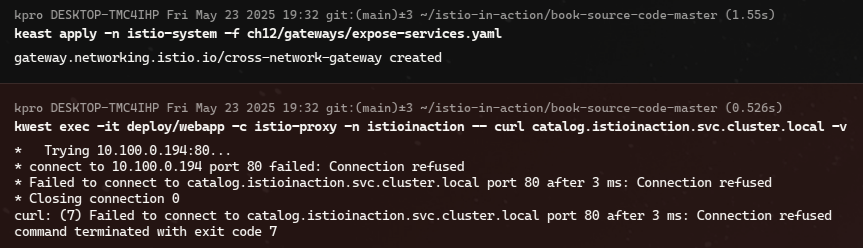
- west-cluster 에 east-west 게이트웨이를 만들고, 그 서비스를 east-cluster 워크로드에 노출.
# IstioOperator 로 west 클러스터에 east-west 게이트웨이를 설치
cat ch12/gateways/cluster-west-eastwest-gateway.yaml
docker cp ./ch12/gateways/cluster-west-eastwest-gateway.yaml west-control-plane:/cluster-west-eastwest-gateway.yaml
iwest install -f /cluster-west-eastwest-gateway.yaml --set values.global.proxy.privileged=true -y

# west 클러스터에 east-west 게이트웨이를 설치 확인
for i in west east; do echo ">> k8s cluster : $i <<"; kubectl get IstioOperator -n istio-system --kubeconfig=./$i-kubeconfig; echo; done
for i in west east; do echo ">> k8s cluster : $i <<"; kubectl get pod -n istio-system -l istio.io/rev=default --kubeconfig=./$i-kubeconfig; echo; done
kwest get IstioOperator -n istio-system installed-state-istio-eastwestgateway -o yaml
iwest proxy-status


# west 클러스터에 적용하자. east-cluster의 워크로드를 west-cluster 에 노출한다.
cat ch12/gateways/expose-services.yaml
kwest apply -n istio-system -f ch12/gateways/expose-services.yaml

ieast pc clusters deploy/istio-eastwestgateway.istio-system | grep catalog
catalog.istioinaction.svc.cluster.local                                       80        -          outbound      EDS
outbound_.80_._.catalog.istioinaction.svc.cluster.local                       -         -          -             EDS

# sni 클러스터 확인
ieast pc clusters deploy/istio-eastwestgateway.istio-system | grep catalog | awk '{printf "CLUSTER: %s\n", $1}'
CLUSTER: catalog.istioinaction.svc.cluster.local
CLUSTER: outbound_.80_._.catalog.istioinaction.svc.cluster.local # catalog 서비스용 SNI 클러스터- SNI 자동 통과로 게이트웨이를 설정했으므로, 게이트웨이에 들어오는 트래픽은 SNI 클러스터를 사용해 의도한 워크로드로 라우팅한다.
- 이스티오 컨트롤 플레인은 이 리소스들의 생성을 지켜보고 있다가, 이제 클러스터 간 트래픽을 라우팅할 수 있는 경로가 존재함을 발견한다.
- 따라서 컨트롤 플레인은 원격 클러스터에서 새로 발견한 엔드포인트로 모든 워크로드를 설정한다.
클러스터 간 워크로드 디스커버리 검증하기
east-cluster 의 east-west 게이트웨이 주소(Service) 확인하기
kwest get svc -n istio-system istio-ingressgateway
NAME                           TYPE           CLUSTER-IP    EXTERNAL-IP      PORT(S)                                                                      AGE
service/istio-ingressgateway   LoadBalancer   10.100.0.82   172.18.255.101   15021:30627/TCP,80:30000/TCP,443:31615/TCP,31400:32694/TCP,15443:32016/TCP   119m

EXT_IP=$(kwest -n istio-system get svc istio-ingressgateway -o jsonpath='{.status.loadBalancer.ingress[0].ip}')
echo $EXT_IP
172.18.255.101

#
docker exec -it mypc curl -s -H "Host: webapp.istioinaction.io" http://$EXT_IP/api/catalog | jq
[
  {
    "id": 1,
    "color": "amber",
...

# 신규 터미널 : 반복 접속
alias kwest='kubectl --kubeconfig=./west-kubeconfig'
EXT_IP=$(kwest -n istio-system get svc istio-ingressgateway -o jsonpath='{.status.loadBalancer.ingress[0].ip}')
while true; do docker exec -it mypc curl -s -H "Host: webapp.istioinaction.io" http://$EXT_IP/api/catalog ; date "+%Y-%m-%d %H:%M:%S" ; sleep 1; echo; done
아래 서비스들 접근 불가가 발생하여 자료로 대신
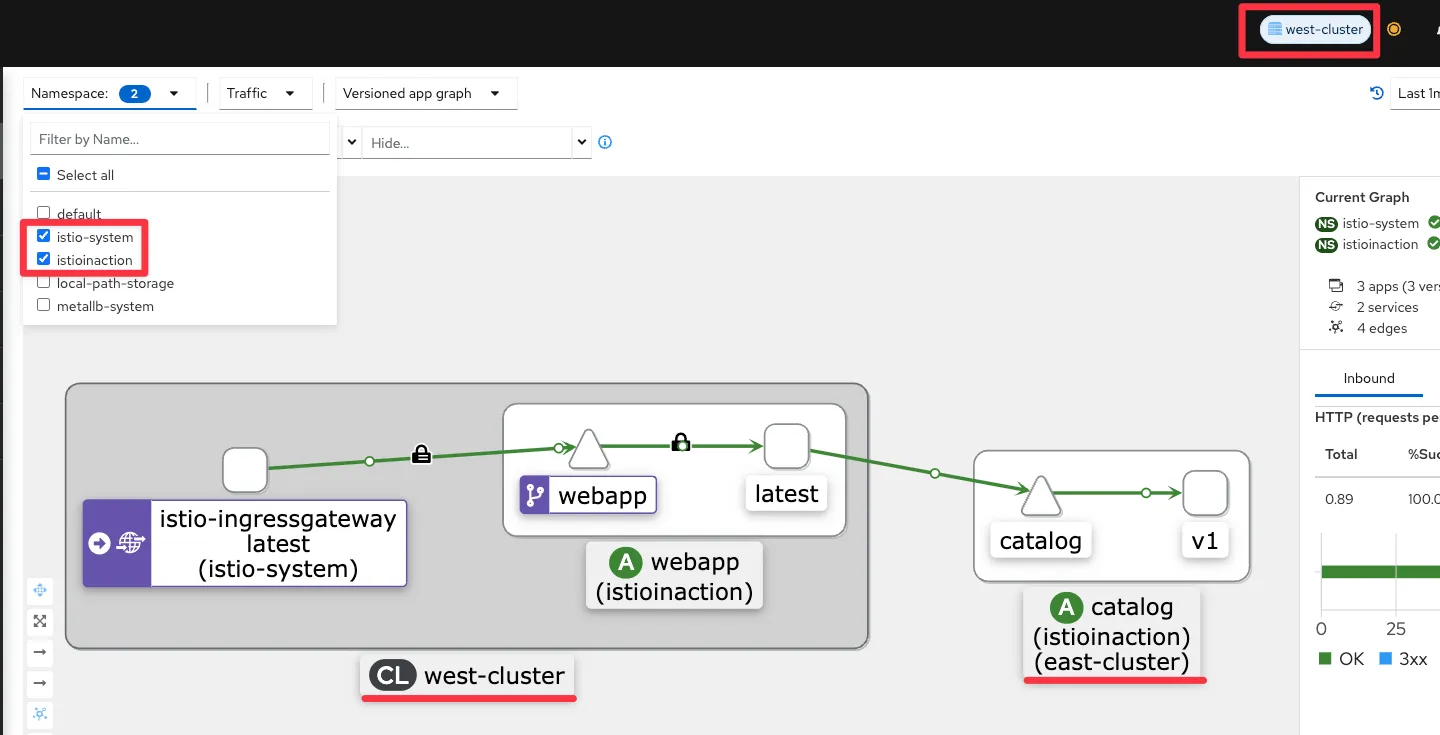
- kiali : west-cluster 확인
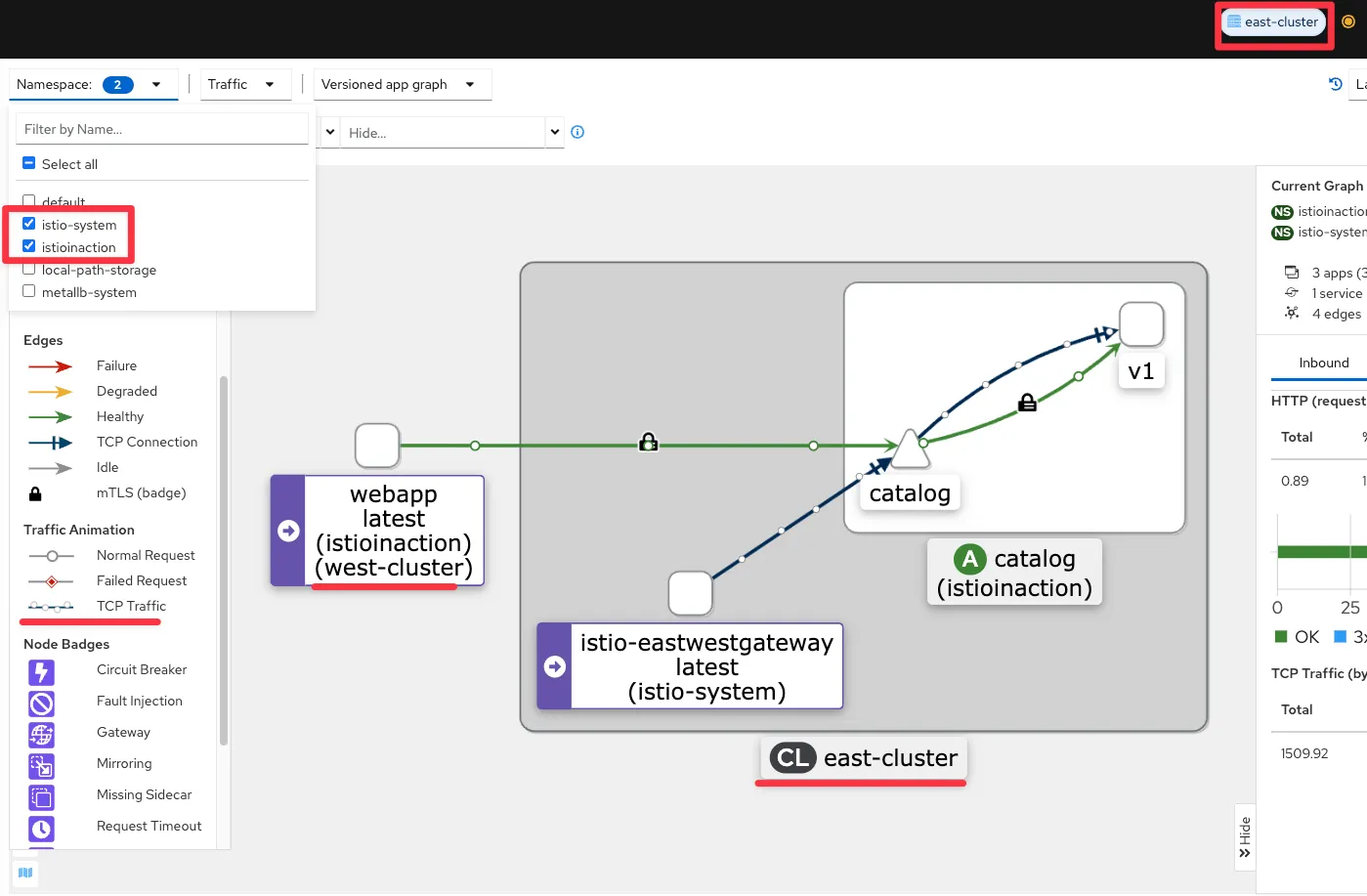
- kiali : east-cluster 확인 , mTLS 통신이며 TCP Traffic 와 HTTP(S) 2개 트래픽 흐름으로 확인됨.
-
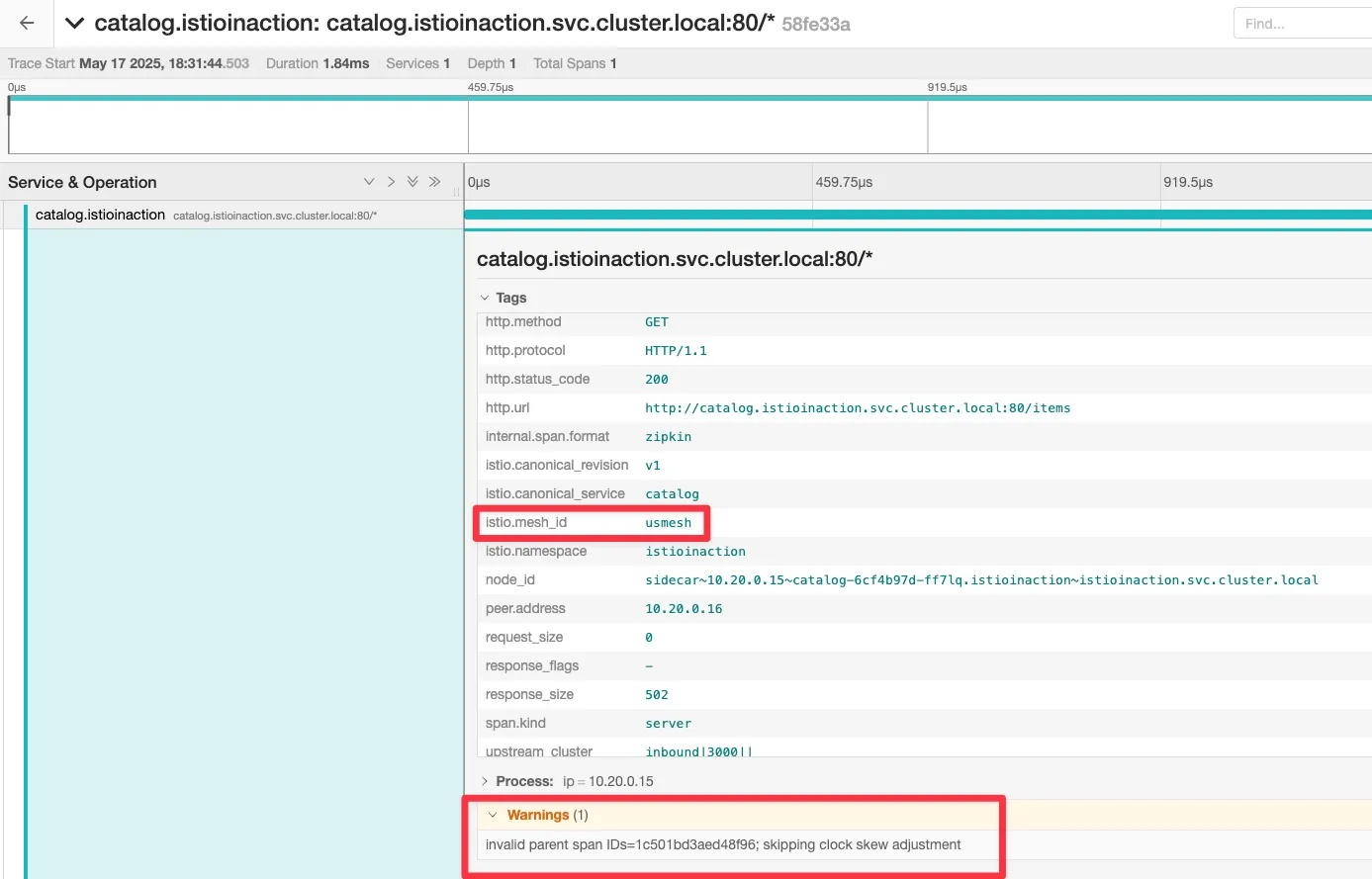
jaeger : west-cluster 확인

-
jaeger : east-cluster 확인
-
west : webapp
kwest exec -it -n istioinaction deploy/webapp -c istio-proxy -- sudo tcpdump -i any tcp -nn
kwest exec -it -n istioinaction deploy/webapp -c istio-proxy -- sudo tcpdump -i lo tcp -nn
kwest exec -it -n istioinaction deploy/webapp -c istio-proxy -- sudo tcpdump -i eth0 tcp -nn
10:31:42.955656 eth0  Out IP 10.10.0.15.36168 > 172.18.255.202.15443: Flags [P.], seq 2756:4134, ack 3577, win 696, options [nop,nop,TS val 3483540647 ecr 101206706], length 1378
10:31:42.957686 eth0  In  IP 172.18.255.202.15443 > 10.10.0.15.36168: Flags [P.], seq 3577:5365, ack 4134, win 826, options [nop,nop,TS val 101207823 ecr 3483540647], length 1788
...

#
keast get svc -n istio-system istio-eastwestgateway
NAME                    TYPE           CLUSTER-IP    EXTERNAL-IP      PORT(S)                                                           AGE
istio-eastwestgateway   LoadBalancer   10.200.0.90   172.18.255.202   15021:32281/TCP,15443:30196/TCP,15012:32628/TCP,15017:32346/TCP   156m
- **east : catalog**
# istio-proxy 에 tcp port 3000 에서 패킷 덤프에 출력 결과를 파일로 저장
keast exec -it -n istioinaction deploy/catalog -c istio-proxy -- sudo tcpdump -i any tcp port 3000 -w /var/lib/istio/data/dump.pcap
keast exec -it -n istioinaction deploy/catalog -c istio-proxy -- ls -l /var/lib/istio/data/

# 출력 결과 파일을 로컬로 다운로드
keast get pod -n istioinaction -l app=catalog -oname
pod/catalog-6cf4b97d-ff7lq

keast cp -n istioinaction -c istio-proxy catalog-6cf4b97d-ff7lq:var/lib/istio/data/dump.pcap ./dump.pcap

# 로컬로 다운 받은 파일을 wireshark 로 불러오기 : XFF 로 요청 Client IP 확인
wireshark dump.pcap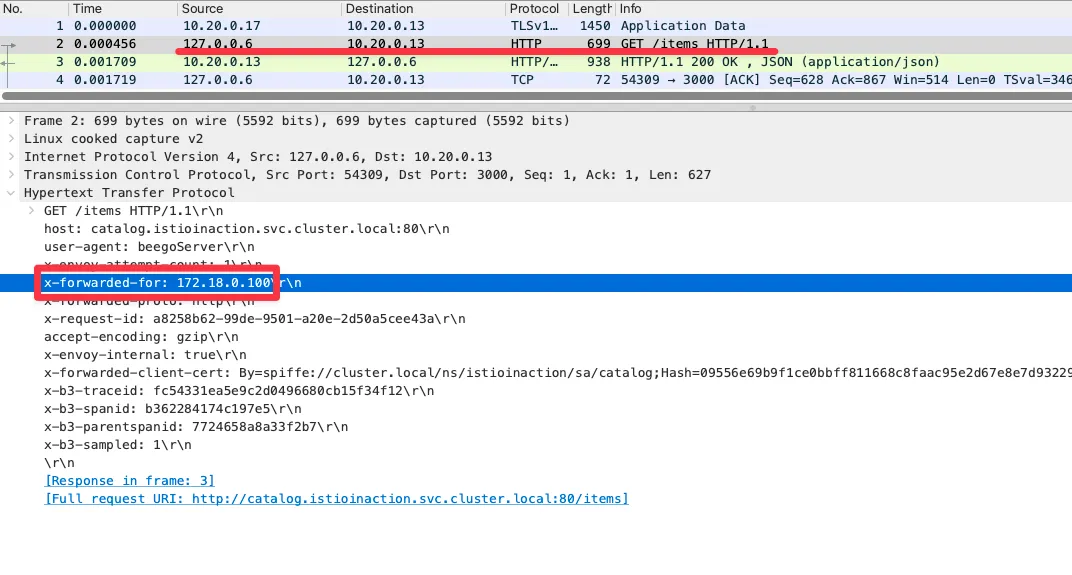
- west의 인그레스 게이트웨이에 요청을 트리거하면 요청이 west-cluster 의 webapp 으로 라우팅됨을 알 수 있다.
- 그런 다음, 요청을 처리하는 east-cluster 의 catalog 워크로드로 해석된다.
- 다중 클러스터 서비스 메시를 설정하는데 필요한 것 요약
- 클러스터 간 워크로드 디스커버리
- 서비스 어카운트 토큰과 인증서가 포함된 kubeconfig 를 사용해 각 컨트롤 플레인에 동료 클러스터에 대한 접근 권한을 제공함으로써 구현한다.
- 이 과정은 istioctl 을 사용해 쉽게 진행했고, east-cluster 에만 적용했다. - 클러스터 간 워크로드 연결
다른 클러스터의 워크로드(다른 네트워크에 위치) 간에 트래픽을 라우팅하도록 east-west 게이트웨이를 설정하고, 이스티오가 워크로드가 위치한 네트워크를 알 수 있도록 각 클러스터에 네트워크 정보 레이블을 지정해 구현한다. - 클러스터 간 신뢰 설정
상대 클러스터와 동일한 루트 신뢰로 중간 인증서를 발급함으로써 설정한다.
- 클러스터 간 워크로드 디스커버리
12.3.7 Load-balancing across clusters
클러스터 간 로드 밸런싱
- west-cluster 에 첫 번째 서비스를 배포
tree ch12/locality-aware/west
ch12/locality-aware/west
├── simple-backend-deployment.yaml
├── simple-backend-dr.yaml
├── simple-backend-gw.yaml
├── simple-backend-svc.yaml
└── simple-backend-vs.yaml

# west-cluster 에 간단한 백엔드 디플로이먼트/서비스를 배포
cat ch12/locality-aware/west/simple-backend-deployment.yaml
...
        - name: "MESSAGE"
          value: "Hello from WEST"
...

cat ch12/locality-aware/west/simple-backend-svc.yaml
kwest apply -f ch12/locality-aware/west/simple-backend-deployment.yaml
kwest apply -f ch12/locality-aware/west/simple-backend-svc.yaml
kwest get deploy -n istioinaction simple-backend-west
kwest get svc,ep -n istioinaction simple-backend

# 트래픽을 허용하기 위해 Gateway, 게이트웨이에서 백엔드 워크로드로 트래픽을 라우팅하기 위해 VirtualService 적용
cat ch12/locality-aware/west/simple-backend-gw.yaml
cat ch12/locality-aware/west/simple-backend-vs.yaml
kwest apply -f ch12/locality-aware/west/simple-backend-gw.yaml
kwest apply -f ch12/locality-aware/west/simple-backend-vs.yaml
kwest get gw,vs,dr -n istioinaction
NAME                                                 AGE
gateway.networking.istio.io/coolstore-gateway        7h15m
gateway.networking.istio.io/simple-backend-gateway   3m10s

NAME                                                               GATEWAYS                     HOSTS                                 AGE
virtualservice.networking.istio.io/simple-backend-vs-for-gateway   ["simple-backend-gateway"]   ["simple-backend.istioinaction.io"]   3m10s
virtualservice.networking.istio.io/webapp-virtualservice ["coolstore-gateway"] ["webapp.istioinaction.io"] - east 서비스 배포
#
tree ch12/locality-aware/east
ch12/locality-aware/east
├── simple-backend-deployment.yaml
└── simple-backend-svc.yaml

# east-cluster 에 서비스를 배포
cat ch12/locality-aware/east/simple-backend-deployment.yaml
...
        - name: "MESSAGE"
          value: "Hello from EAST"
...

cat ch12/locality-aware/east/simple-backend-svc.yaml
keast apply -f ch12/locality-aware/east/simple-backend-deployment.yaml
keast apply -f ch12/locality-aware/east/simple-backend-svc.yaml
keast get deploy -n istioinaction simple-backend-east
keast get svc,ep -n istioinaction simple-backend- 양쪽 클러스터에서 서비스가 실행되면서 인그레스 게이트웨이에 엔드포인트가 설정돼 요청이 양쪽으로 분산된다.
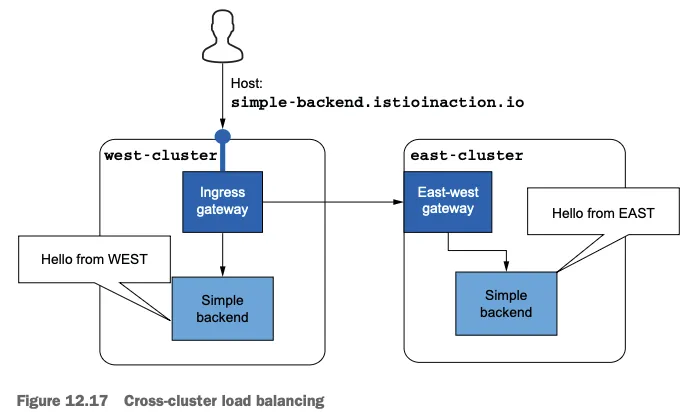
- kiali : west, east
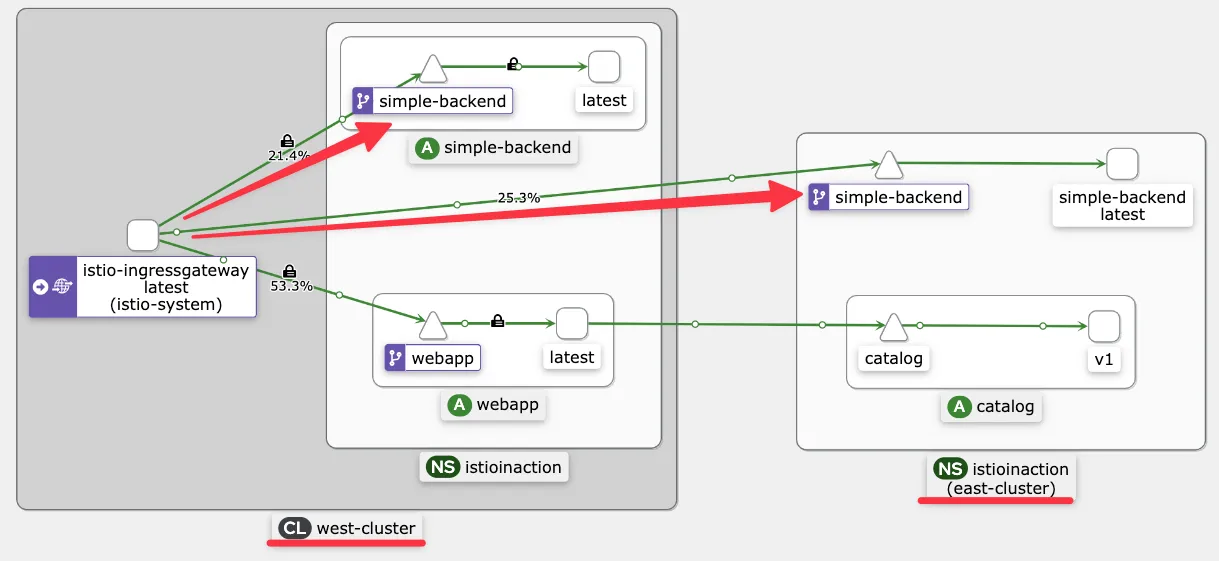
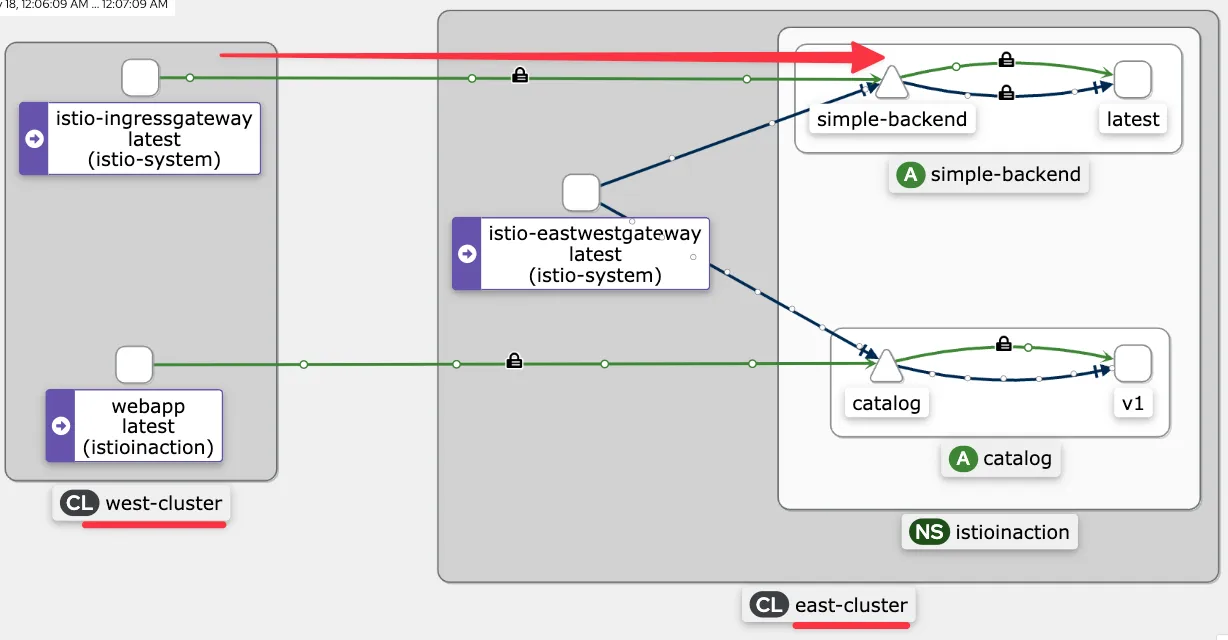
- Istio는 라운드 로빈 알고리즘으로 워크로드 간에 로드 밸런싱한다. 그러므로 트래픽은 고르게 분산된다.
# 10회 요청 후 확인
for i in {1..10}; do docker exec -it mypc curl -s -H "Host: simple-backend.istioinaction.io" http://$EXT_IP | jq ".body" ; echo ; done
for i in {1..10}; do docker exec -it mypc curl -s -H "Host: simple-backend.istioinaction.io" http://$EXT_IP | jq ".body" ; echo ; done | sort | uniq -c
   4 "Hello from EAST"
   6 "Hello from WEST"
클러스터 간 지역 인식 라우팅 검증하기
#
kwest label node west-control-plane 'topology.kubernetes.io/region=westus'
kwest label node west-control-plane 'topology.kubernetes.io/zone=0'
kwest get node -o yaml
...
      topology.kubernetes.io/region: westus
      topology.kubernetes.io/zone: "0"
...

keast label node east-control-plane 'topology.kubernetes.io/region=eastus'
keast label node east-control-plane 'topology.kubernetes.io/zone=0'
keast get node -o yaml
...
      topology.kubernetes.io/region: eastus
      topology.kubernetes.io/zone: "0"
...

# istio eds 에 정보 반영을 위해 파드 재기동하자 : isiotd 가 노드의 지역성 정보 레이블을 엔드포인트 설정할 때 워크로드로 전파.
iwest proxy-config endpoint deploy/istio-ingressgateway.istio-system --cluster 'outbound|80||simple-backend.istioinaction.svc.cluster.local' -o json
...
                "weight": 1,
                "locality": {}
...

kwest rollout restart -n istio-system deploy/istio-ingressgateway
kwest rollout restart -n istio-system deploy/istio-eastwestgateway
kwest rollout restart -n istioinaction deploy/simple-backend-west
keast rollout restart -n istio-system deploy/istio-ingressgateway
keast rollout restart -n istio-system deploy/istio-eastwestgateway
keast rollout restart -n istioinaction deploy/simple-backend-east

iwest proxy-config endpoint deploy/istio-ingressgateway.istio-system --cluster 'outbound|80||simple-backend.istioinaction.svc.cluster.local' -o json
...
                "weight": 1,
                "locality": {
                    "region": "eastus", # east-cluster 에 있는 워크로드의 위치 정보
                    "zone": "0"
                }
   ...
                "weight": 1,
                "locality": {
                    "region": "westus", # west-cluster 에 있는 워크로드의 위치 정보
                    "zone": "0"
                }
...- 엔드포인트 상태를 수동적으로 확인하도록, 이상값 감지를 사용하는 DestinationRole 을 적용

- 요청이 지역 정보를 사용해 동일 클러스터 안에서 라우팅 되는 것을 확인
EXT_IP=$(kwest -n istio-system get svc istio-ingressgateway -o jsonpath='{.status.loadBalancer.ingress[0].ip}')
docker exec -it mypc curl -s -H "Host: simple-backend.istioinaction.io" http://$EXT_IP
docker exec -it mypc curl -s -H "Host: simple-backend.istioinaction.io" http://$EXT_IP | jq ".body"

# 동일 클러스터 안에서 라우팅 되는 것을 확인
for i in {1..20}; do docker exec -it mypc curl -s -H "Host: simple-backend.istioinaction.io" http://$EXT_IP | jq ".body" ; echo ; done | sort | uniq -c
20 "Hello from WEST"- 모든 라우팅 결정을 엔보이 프록시가 내리므로, 컨트롤 플레인이 엔보이 프록시의 설정을 수정했으리라고 결론
iwest proxy-config endpoint deploy/istio-ingressgateway.istio-system --cluster 'outbound|80||simple-backend.istioinaction.svc.cluster.local' -o json
...
                "weight": 1,
                "locality": {
                    "region": "westus", # priority 가 없으면(생략 시), 0으로 우선 순위가 가장 높음
                    "zone": "0"
                }
            ...
                "weight": 1,
                "priority": 1, # priority 0 다음으로, 두 번쨰 우선순위
                "locality": {
                    "region": "eastus",
                    "zone": "0"
                }
클러스터 간 장애 극복 확인하기
- 환경 변수 ERROR_RATE 값을 1로 설정해 요청이 실패하게 만들자
- 시간이 조금 지나면, 이상값 감지가 호스트가 비정상임을 감지하고 트래픽을 우선순위가 두 번째인 east-cluster 워크로드로 라우팅
# 신규 터미널 : 반복 접속 해두기
while true; do docker exec -it mypc curl -s -H "Host: simple-backend.istioinaction.io" http://$EXT_IP | jq ".body" ; date "+%Y-%m-%d %H:%M:%S" ; sleep 1; echo; done
...
"Hello from WEST"
                 2025-05-18 09:31:21

"Hello from EAST" # failover 시점
                 2025-05-18 09:31:23
...


#
kwest -n istioinaction set env deploy simple-backend-west ERROR_RATE='1'
kwest exec -it -n istioinaction deploy/simple-backend-west -- env | grep ERROR
ERROR_RATE=1

#
iwest proxy-config endpoint deploy/istio-ingressgateway.istio-system --cluster 'outbound|80||simple-backend.istioinaction.svc.cluster.local'
ENDPOINT                 STATUS      OUTLIER CHECK     CLUSTER
10.10.0.21:8080          HEALTHY     FAILED            outbound|80||simple-backend.istioinaction.svc.cluster.local
172.18.255.202:15443     HEALTHY     OK                outbound|80||simple-backend.istioinaction.svc.cluster.local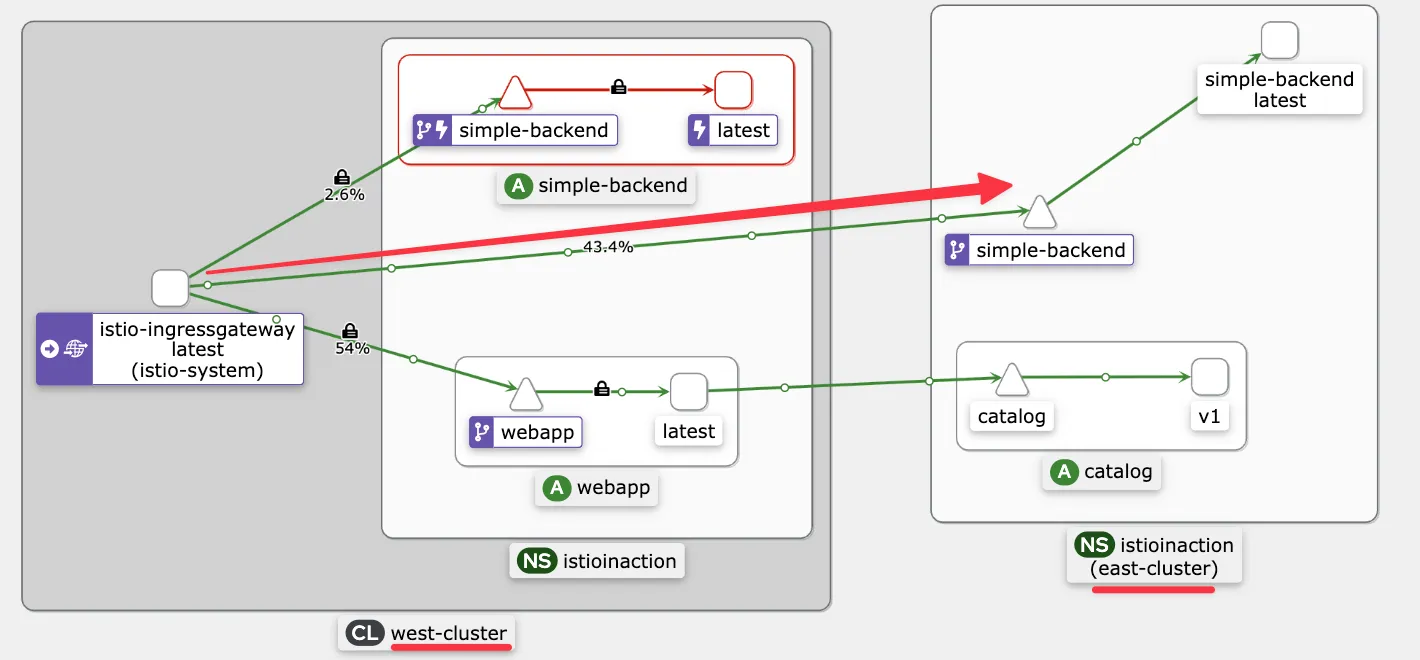
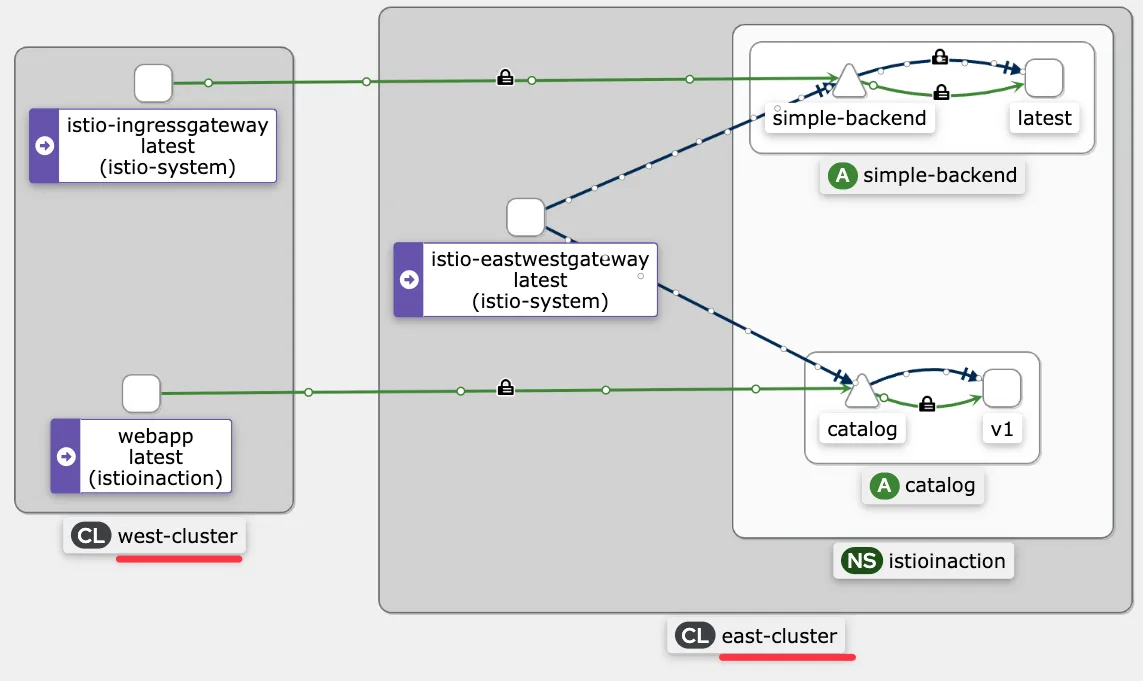
- 클러스터 간 트래픽은 상대 클러스터의 east-west 게이트웨이를 통과하며 SNI 통과로 처리된다는 것을 알 수 있다.
- 원격 클러스터에 도달한 트래픽의 로드 밸런싱에 영향을 미친다.
- 이 호출은 SNI/TCP 커넥션이라 게이트웨이가 TLS 커넥션을 종료하지 않으므로, east-west 게이트웨이는 커넥션을 그대로 백엔드 서비스에 전달할 수 밖에 없다.
- 이렇게 되면 커넥션이 east-west 게이트웨이에서 백엔드 서비스까지 이어지기 때문에 요청 단위로 로드 밸런싱되지 않는다.
인가 정책을 사용해 클러스터 간 접근 제어 확인하기
접근 제어를 하려면 워크로드가 트래픽을 서로 인증해, 트래픽을 승인하거나 거부하는 결정을 내리는 데 사용 가능한 믿을 수 있는 메타데이터를 만들어야 한다는 점
# 적용 전에 west-cluster 서비스를 제거해서 east 에서만 트래픽을 처리하게 하자 >> 이미 위에서 장애 상황이라 안해도 되긴함
kwest delete deploy simple-backend-west -n istioinaction

#
cat ch12/security/allow-only-ingress-policy.yaml
apiVersion: "security.istio.io/v1beta1"
kind: "AuthorizationPolicy"
metadata:
  name: "allow-only-ingress"
  namespace: istioinaction
spec:
  selector:
    matchLabels:
      app: simple-backend
  rules:
  - from:
    - source:
        principals: ["cluster.local/ns/istio-system/sa/istio-ingressgateway-service-account"]

keast apply -f ch12/security/allow-only-ingress-policy.yaml
keast get authorizationpolicy -A- 업데이트가 전파되고 나면, west-cluster 의 워크로드에서 요청을 만들어 정책을 시험해보자. 이를 위해 임시 파드를 실행
#
kwest run netshoot -n istioinaction --rm -it --image=nicolaka/netshoot -- zsh
-----------------------------------
#
curl -s webapp.istioinaction/api/catalog

# 직접 요청하면 실패!
curl -s simple-backend.istioinaction.svc.cluster.local
RBAC: access denied

# istio-ingressgateway 로 요청하면 성공!
curl -s -H "Host: simple-backend.istioinaction.io" http://istio-ingressgateway.istio-system
...

# kiali 등 확인을 위해 반복 접속 실행
watch curl -s simple-backend.istioinaction.svc.cluster.local
watch 'curl -s -H "Host: simple-backend.istioinaction.io" http://istio-ingressgateway.istio-system'- 정책이 인그레스 게이트웨이에서 들어온 트래픽을 허용한 것을 볼 수 있다.
- 이는 워크로드가 클러스터 간에 상호 인증해서 정책이 ID 인증서에 인코딩된 인증 데이터를 접근 제어에 사용할 수 있음을 보여준다.
Summary
- Istio는 단일 컨트롤 플레인(기본-원격), 복제된 컨트롤 플레인(기본-기본), 외부 컨트롤 플레인이라는 세 가지 다중 서비스 메시 배포 모델을 지원한다.
- istio-system 네임스페이스에 중간 인증서를 설치해 플러그인 CA 인증서를 사용하면 클러스터 간에 공통 신뢰를 구축할 수 있다.
- 복제된 컨트롤 플레인 배포 모델에서 클러스터 간 워크로드를 찾는 방법은 원격 클러스터의 서비스 어카운트를 ID로 사용하고 시크릿으로 서비스 어카운트 토큰을 상대편 클러스터에서 사용할 수 있게 하는 것이다.
- east-west 게이트웨이를 사용해 다중 네트워크 서비스 메시의 네트워크를 연결할 수 있다. sni-dnat 라우터 모드는 클러스터 간 트래픽을 세밀한 방식으로 라우팅하도록 SNI 클러스터를 설정한다.
- east-west 게이트웨이는 트래픽을 자동으로 통과시키고 자동으로 설정된 SNI 클러스터를 바탕으로 라우팅하도록 설정할 수 있다.
- Istio의 기능은 클러스터 간에도 단일 클러스터일 때와 같은 방식으로 동작한다.
