JPA를 주로 쓰다가, SSAFY에서 반드시 기술스택으로 myBatis를 쓰라고 해서... 조금 더 불편하지만 myBatis로 프로젝트를 완수해보자!
myBatis는 xml파일만 잘 작성하면(이 부분에서 에러가 제일 많이 발생한다) 큰 문제 없이 사용할 수 있다.
로직을 하나 작성하면서 따라가보자. 먼저 컨트롤러부터!
1. Controller 작성
	// 3번 api. 총 자산 조회
	@GetMapping("/balance")
	@Operation(summary = "3. 총 자산 조회", description = "JWT를 이용해 총 자산을 조회합니다.")
	@ApiResponse(responseCode = "200", description = "요청 성공")
	@ApiResponse(responseCode = "400", description = "요청 실패")
	public ResponseEntity<BalanceDTO> getTotalBalance(@RequestHeader("Authorization") String jwt) {
		log.info("컨트롤러 : 총 자산 조회");
		BalanceDTO response = memberService.getTotalBalance(jwt);
		return ResponseEntity.ok(response);
	}
이런식으로 /api/member/balance 요청을 받으면, MemberController 내부의 /balance 요청에 매핑된다. 여기서 Service로 로직을 보내주자.
2. Service 로직
	public BalanceDTO getTotalBalance(String jwt) {
		Long memberId = jwtUtil.getMemberIdFromJwt(jwt);
		Long total = getTotalBalance(memberId);
		BalanceDTO response = new BalanceDTO(total);
		return response;
	}
서비스에서는 적절한 로직을 수행하고 Dao에게 필요한 데이터들을 DB에서 가져오도록 명령해야 한다. 회원의 총 자산을 조회하기 위해, 자유 입출금 계좌 잔액의 총 합과 적금 계좌 잔액의 총 합을 불러온다. 이를 위해 getTotalBalance 를 실행한다.
	private Long getTotalBalance(Long memberId) {
		Long freeAccountBalance = memberDao.getFreeAccountBalanceSum(memberId);
		Long savingsAccountBalance = memberDao.getSavingsAccountBalanceSum(memberId);
		return freeAccountBalance+savingsAccountBalance;
	}
이런식으로 메서드는 최대한 나눠서 실행해주는게 좋다고 생각한다. 단일 책임의 원칙!!!
3. Dao 인터페이스
public interface MemberDao {

	void regist(String subject);

	Profile login(String subject);

	Long getFreeAccountBalanceSum(Long memberId);

	Long getSavingsAccountBalanceSum(Long memberId);

}
Dao 인터페이스는 추상메서드만 작성해주고, 바로 memberMapper.xml 로 간다
4. Mapper.xml
<?xml version="1.0" encoding="UTF-8" ?>
<!DOCTYPE mapper
  PUBLIC "-//mybatis.org//DTD Mapper 3.0//EN"
  "https://mybatis.org/dtd/mybatis-3-mapper.dtd">
<mapper namespace="com.ssafy.TmT.dao.MemberDao">

	<!-- 사용자 조회 쿼리 -->
	<select id="login" parameterType="String" resultType="Profile">
		SELECT
		member_id AS memberId,
		member_name AS memberName,
		total_balance AS
		totalBalance
		FROM Member
		WHERE subject = #{subject}
	</select>

	<!-- 회원가입 쿼리 -->
	<insert id="regist" parameterType="String">
		INSERT INTO Member (subject,
		member_name)
		VALUES (#{subject}, "testName")
	</insert>

	<!-- FreeAccount 잔액 합계 쿼리 -->
	<select id="getFreeAccountBalanceSum" parameterType="Long"
		resultType="Long">
		SELECT SUM(balance) FROM FreeAccount WHERE member_id = #{memberId}
	</select>

	<!-- SavingsAccount 잔액 합계 쿼리 -->
	<select id="getSavingsAccountBalanceSum" parameterType="Long"
		resultType="Long">
		SELECT SUM(balance) FROM SavingsAccount WHERE member_id = #{memberId}
	</select>

</mapper>
이런식으로, 간단한 연산을 해주는 함수(SUM)를 DB에 호출하면 조금 더 편하게, 원하는 값을 가져올 수 있다. 이런걸 집계함수 라고 한다.
5. 설정파일
나는 application.yaml 을 사용하지만, application properties 를 사용해도 된다.

여기서 mybatis에 관한 설정만 조금 추가하면 완성이다!
나같은 경우에는
1. mapper.xml 파일들 위치 설정
2. DTO 패키지 위치 설정(이거때문에 리팩토링했다)
3. DB 데이터를 카멜케이스로 인식하는 설정
이렇게 3가지만 적용했다. 다른 다양한 설정들도 많으니, 하나씩 찾아보면 좋을 것 같다.
6. Postman
이렇게 만들어진 요청에 JWT를 담아서 Postman으로 보내준다면~
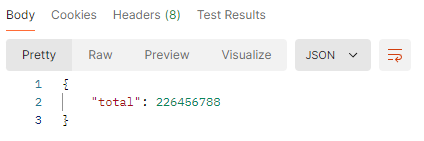
요렇게 내가 원하는 값을 꺼내올 수 있다.
후기
myBatis가 편한 부분도 확실히 있다고 느껴진다. 데이터를 내가 원하는 형태로 가져오는 과정이 편리하고, configuration 조정을 통해 카멜케이스로의 변환도 간편하다. 다만, 에러가 너무 많이 발생해서 처음 환경을 구축하는게 너~~~무 불편하더라.