출처: https://nomadcoders.co/python-for-beginners/lectures/3789

Repl.it이 아닌 Colab 환경에서 작성하여 수정된 부분이 있습니다.
we work remotely
파일에서 extractors 새 폴더 생성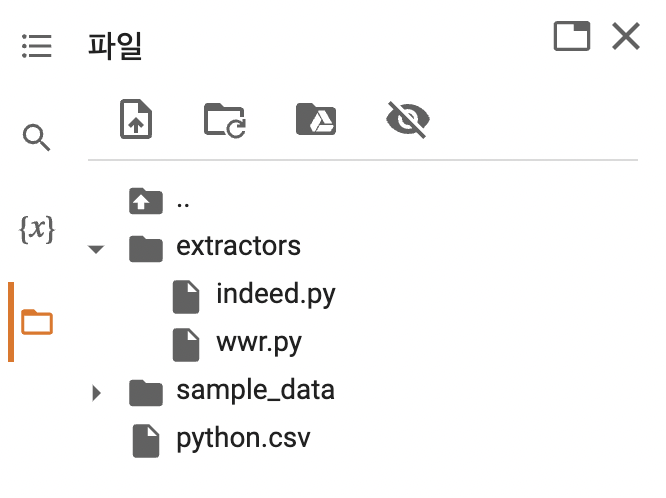
%%writefile extractors/wwr.pyfrom requests import get
from bs4 import BeautifulSoup
def extract_wwr_jobs(keyword):
base_url = 'https://weworkremotely.com/remote-jobs/search?term='
response = get(f"{base_url}{keyword}")
if response.status_code != 200:
print("can't request website")
else:
results = []
soup = BeautifulSoup(response.text, 'html.parser')
jobs = soup.find_all('section', class_='jobs')
for job in jobs:
job_posts = job.find_all('li')
job_posts.pop(-1) # <li class="view-all">
for post in job_posts:
anchors = post.find_all('a')
anchor = anchors[1]
link = anchor['href']
company, kind, region = anchor.find_all('span', class_='company')
title = anchor.find('span', class_='title')
job_data = {
'link': f"https://weworkremotely.com{link}",
'company': company.string.replace(',', ' '),
'location': region.string.replace(',', ' '),
'position': title.string.replace(',', ' ')
}
results.append(job_data)
return resultsindeed
%%writefile extractors/indeed.pyfrom requests import get
from selenium import webdriver
from bs4 import BeautifulSoup
def wtf_selenium():
options = webdriver.ChromeOptions()
options.add_argument('--headless')
options.add_argument('--no-sandbox')
options.add_argument('--disable-dev-shm-usage')
# https://www.whatismybrowser.com/detect/what-is-my-user-agent/
options.add_argument(<my-user-agent>)
browser = webdriver.Chrome('/usr/lib/chromium-browser/chromedriver', options=options)
return browser
def get_page_count(keyword):
browser = wtf_selenium()
browser.get(f'https://kr.indeed.com/jobs?q={keyword}&limit=50')
soup = BeautifulSoup(browser.page_source, 'html.parser')
pagination = soup.find('nav', class_='css-jbuxu0 ecydgvn0')
pages = pagination.find_all('div', recursive=False)
if pages == []:
return 1
count = len(pages)
if count >= 5:
return 5
else:
return count
def extract_indeed_jobs(keyword):
browser = wtf_selenium()
pages = get_page_count(keyword)
print("Found", pages, "pages")
results = []
for page in range(pages):
base_url = 'https://kr.indeed.com/jobs'
final_url = f'{base_url}?q={keyword}&start={page*10}'
browser.get(final_url)
soup = BeautifulSoup(browser.page_source, 'html.parser')
job_list = soup.find('ul', class_='jobsearch-ResultsList')
jobs = job_list.find_all('li', recursive = False)
for job in jobs:
zone = job.find('div', class_='mosaic-zone')
if zone == None:
anchor = job.select_one('h2 a')
title = anchor['aria-label']
link = anchor['href']
company = job.find('span', class_='companyName')
location = job.find('div', class_='companyLocation')
# location에 더보기가 있어 flex로 감싸져 있는 경우
if location.string == None:
for i in location:
location = i
break
else:
location = location.string
job_data = {
'link': f'https://kr.indeed.com{link}',
'company': company.string.replace(',', ' '),
'location': location.replace(',', ' '),
'position': title.replace(',', ' ')
}
results.append(job_data)
return results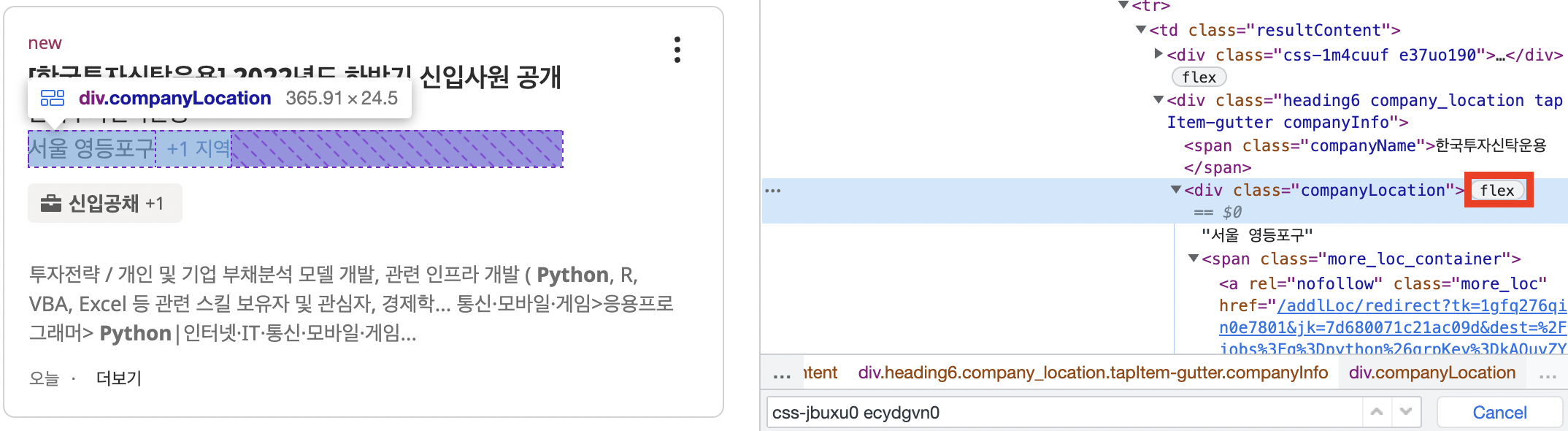
write to file
from extractors.indeed import extract_indeed_jobs
from extractors.wwr import extract_wwr_jobs

keyword = input("What do you want to search for? ")

indeed = extract_indeed_jobs(keyword)
wwr = extract_wwr_jobs(keyword)
jobs = indeed + wwr

file = open(f"{keyword}.csv", "w")
file.write("Position,Company,Location,URL\n")

for job in jobs:
    file.write(f"{job['position']},{job['company']},{job['location']},{job['link']}\n")

file.close