k8s deploy 3주차-1
kubeadm
Kubernetes 클러스터를 표준 방식으로 “부트스트랩(초기 구성)” 하기 위한 공식 도구
kubeadm workflow
[OS 준비]
   ↓
[containerd 설치]
   ↓
[kubeadm init]
   ↓
[kubectl 설정]
   ↓
[CNI 설치]
   ↓
[kubeadm join (worker)]
Vagrantfile (vagrant up)
# Base Image  https://portal.cloud.hashicorp.com/vagrant/discover/bento/rockylinux-10.0
BOX_IMAGE = "bento/rockylinux-10.0" # "bento/rockylinux-9"
BOX_VERSION = "202510.26.0"
N = 2 # max number of Worker Nodes

Vagrant.configure("2") do |config|
# ControlPlane Nodes
    config.vm.define "k8s-ctr" do |subconfig|
      subconfig.vm.box = BOX_IMAGE
      subconfig.vm.box_version = BOX_VERSION
      subconfig.vm.provider "virtualbox" do |vb|
        vb.customize ["modifyvm", :id, "--groups", "/K8S-Upgrade-Lab"]
        vb.customize ["modifyvm", :id, "--nicpromisc2", "allow-all"]
        vb.name = "k8s-ctr"
        vb.cpus = 4
        vb.memory = 3072 # 2048 2560 3072 4096
        vb.linked_clone = true
      end
      subconfig.vm.host_name = "k8s-ctr"
      subconfig.vm.network "private_network", ip: "192.168.10.100"
      subconfig.vm.network "forwarded_port", guest: 22, host: "60000", auto_correct: true, id: "ssh"
      subconfig.vm.synced_folder "./", "/vagrant", disabled: true
    end

# Worker Nodes
  (1..N).each do |i|
    config.vm.define "k8s-w#{i}" do |subconfig|
      subconfig.vm.box = BOX_IMAGE
      subconfig.vm.box_version = BOX_VERSION
      subconfig.vm.provider "virtualbox" do |vb|
        vb.customize ["modifyvm", :id, "--groups", "/K8S-Upgrade-Lab"]
        vb.customize ["modifyvm", :id, "--nicpromisc2", "allow-all"]
        vb.name = "k8s-w#{i}"
        vb.cpus = 2
        vb.memory = 2048
        vb.linked_clone = true
      end
      subconfig.vm.host_name = "k8s-w#{i}"
      subconfig.vm.network "private_network", ip: "192.168.10.10#{i}"
      subconfig.vm.network "forwarded_port", guest: 22, host: "6000#{i}", auto_correct: true, id: "ssh"
      subconfig.vm.synced_folder "./", "/vagrant", disabled: true
    end
  end

end- vagrant status 상태 확인
kubeadm 으로 k8s 구성 절차
- [공통] 사전 설정
- [공통] CRI 설치 : containerd
- [공통] kubeadm, kubelet 및 kubectl 설치
- [controlplane node} kubeadm으로 k8s 클러스터 구성 → Flannel CNI 설치
- [worker nodes] kubeadm으로 k8s 클러스터 join
- 모니터링 tool 설치
- sample application 배포
- kubeadm 인증서 갱신
주요 설치 정보
| 항목 | 버전 | k8s 버전 호환성 |
|---|---|---|
| Rocky Linux | 10.0-1.6 | RHEL 10 소스 기반 배포판으로 RHEL 정보 참고 |
| containerd | v2.1.5 | CRI Version(v1), k8s 1.32~1.35 지원 - Link |
| runc | v1.3.3 | 정보 조사 필요 https://github.com/opencontainers/runc |
| kubelet | v1.32.11 | k8s 버전 정책 문서 참고 - Docs |
| kubeadm | v1.32.11 | 상동 |
| kubectl | v1.32.11 | 상동 |
| helm | v3.18.6 | k8s 1.30.x ~ 1.33.x 지원 - Docs |
| flannel cni | v0.27.3 | k8s 1.28~ 이후 - Release |
1. [공통] 사전 설정
기본 정보 확인
vagrant ssh k8s-ctr

vagrant@k8s-ctr:~$ whoami
vagrant
vagrant@k8s-ctr:~$ id
uid=1000(vagrant) gid=1000(vagrant) groups=1000(vagrant) context=unconfined_u:unconfined_r:unconfined_t:s0-s0:c0.c1023
vagrant@k8s-ctr:~$ pwd
/home/vagrant
vagrant@k8s-ctr:~$ lscpu
Architecture:             x86_64
  CPU op-mode(s):         32-bit, 64-bit
  Address sizes:          46 bits physical, 48 bits virtual
  Byte Order:             Little Endian
CPU(s):                   4
  On-line CPU(s) list:    0-3
Vendor ID:                GenuineIntel
  Model name:             Intel(R) Core(TM) Ultra 5 125H
    CPU family:           6
    Model:                170
    Thread(s) per core:   1
    Core(s) per socket:   4
    Socket(s):            1
    Stepping:             4
    BogoMIPS:             5990.39
    Flags:                fpu vme de pse tsc msr pae mce cx8 apic sep mtrr pge mca cmov pat pse36 clflush mmx fxsr sse sse2 ht syscall nx rdtscp lm constant_tsc
                           rep_good nopl xtopology nonstop_tsc cpuid tsc_known_freq pni pclmulqdq ssse3 fma cx16 pcid sse4_1 sse4_2 movbe popcnt aes xsave avx f
                          16c rdrand hypervisor lahf_lm abm 3dnowprefetch ibrs_enhanced fsgsbase bmi1 avx2 bmi2 invpcid rdseed adx clflushopt sha_ni arat md_cle
                          ar flush_l1d arch_capabilities
Virtualization features:
  Hypervisor vendor:      KVM
  Virtualization type:    full
Caches (sum of all):
  L1d:                    192 KiB (4 instances)
  L1i:                    256 KiB (4 instances)
  L2:                     8 MiB (4 instances)
  L3:                     72 MiB (4 instances)
NUMA:
  NUMA node(s):           1
  NUMA node0 CPU(s):      0-3
Vulnerabilities:
  Gather data sampling:   Not affected
  Itlb multihit:          Not affected
  L1tf:                   Not affected
  Mds:                    Not affected
  Meltdown:               Not affected
  Mmio stale data:        Not affected
  Reg file data sampling: Not affected
  Retbleed:               Mitigation; Enhanced IBRS
  Spec rstack overflow:   Not affected
  Spec store bypass:      Vulnerable
  Spectre v1:             Mitigation; usercopy/swapgs barriers and __user pointer sanitization
  Spectre v2:             Mitigation; Enhanced / Automatic IBRS; RSB filling; PBRSB-eIBRS SW sequence; BHI SW loop, KVM SW loop
  Srbds:                  Not affected
  Tsx async abort:        Not affected
vagrant@k8s-ctr:~$ free -h
               total        used        free      shared  buff/cache   available
Mem:           2.9Gi       399Mi       2.5Gi        16Mi       142Mi       2.5Gi
Swap:          3.0Gi          0B       3.0Gi
vagrant@k8s-ctr:~$ lsblk
NAME   MAJ:MIN RM SIZE RO TYPE MOUNTPOINTS
sda      8:0    0  64G  0 disk
├─sda1   8:1    0   1M  0 part
├─sda2   8:2    0   3G  0 part [SWAP]
└─sda3   8:3    0  61G  0 part /
vagrant@k8s-ctr:~$ df -hT
Filesystem     Type      Size  Used Avail Use% Mounted on
/dev/sda3      xfs        61G  2.5G   59G   4% /
devtmpfs       devtmpfs  4.0M     0  4.0M   0% /dev
tmpfs          tmpfs     1.5G     0  1.5G   0% /dev/shm
tmpfs          tmpfs     594M   17M  578M   3% /run
tmpfs          tmpfs     1.0M     0  1.0M   0% /run/credentials/systemd-journald.service
tmpfs          tmpfs     1.0M     0  1.0M   0% /run/credentials/getty@tty1.service
tmpfs          tmpfs     297M  8.0K  297M   1% /run/user/1000

vagrant@k8s-ctr:~$ ip -br -c -4 addr
lo               UNKNOWN        127.0.0.1/8
enp0s3           UP             10.0.2.15/24
enp0s8           UP             192.168.10.100/24
vagrant@k8s-ctr:~$ hostnamectl
     Static hostname: k8s-ctr
           Icon name: computer-vm
             Chassis: vm 🖴
          Machine ID: 267e3ac749e44adf90fc30d4902e0fe2
             Boot ID: e2c356225e9a48b6a0785cca009f6f3f
      Virtualization: oracle
    Operating System: Rocky Linux 10.0 (Red Quartz)
         CPE OS Name: cpe:/o:rocky:rocky:10::baseos
      OS Support End: Thu 2035-05-31
OS Support Remaining: 9y 4month 1w 2d
              Kernel: Linux 6.12.0-55.39.1.el10_0.x86_64
        Architecture: x86-64
     Hardware Vendor: innotek GmbH
      Hardware Model: VirtualBox
    Firmware Version: VirtualBox
       Firmware Date: Fri 2006-12-01
        Firmware Age: 19y 1month 2w 5d
vagrant@k8s-ctr:~$ uname -r
6.12.0-55.39.1.el10_0.x86_64
vagrant@k8s-ctr:~$ rpm -aq | grep release
rocky-release-10.0-1.6.el10.noarch
vagrant@k8s-ctr:~$ mount | grep cgroup
cgroup2 on /sys/fs/cgroup type cgroup2 (rw,nosuid,nodev,noexec,relatime,seclabel,nsdelegate,memory_recursiveprot)
vagrant@k8s-ctr:~$ systemd-cgls --no-pager
CGroup /:
-.slice
├─user.slice
│ └─user-1000.slice
│   ├─user@1000.service …
│   │ └─init.scope
│   │   ├─5018 /usr/lib/systemd/systemd --user
│   │   └─5020 (sd-pam)
│   └─session-4.scope
│     ├─5013 sshd-session: vagrant [priv]
│     ├─5035 sshd-session: vagrant@pts/0
│     ├─5036 -bash
│     └─5100 systemd-cgls --no-pager
├─init.scope
│ └─1 /usr/lib/systemd/systemd --switched-root --system --deserialize=47
└─system.slice
  ├─irqbalance.service
  │ └─764 /usr/sbin/irqbalance
  ├─libstoragemgmt.service
  │ └─765 /usr/bin/lsmd -d
  ├─vboxadd-service.service
  │ ├─869 /usr/bin/VBoxDRMClient
  │ └─871 /usr/sbin/VBoxService --pidfile /var/run/vboxadd-service.sh
  ├─systemd-udevd.service …
  │ └─udev
  │   └─634 /usr/lib/systemd/systemd-udevd
  ├─dbus-broker.service
  │ ├─753 /usr/bin/dbus-broker-launch --scope system --audit
  │ └─760 dbus-broker --log 4 --controller 9 --machine-id 267e3ac749e44adf90fc30d4902e0fe2 --max-bytes 536870912 --max-fds 4096 --max-matches 131072 --audit
  ├─polkit.service
  │ └─931 /usr/lib/polkit-1/polkitd --no-debug --log-level=err
  ├─chronyd.service
  │ └─786 /usr/sbin/chronyd -F 2
  ├─auditd.service
  │ ├─680 /usr/sbin/auditd
  │ └─683 /usr/sbin/sedispatch
  ├─tuned.service
  │ └─963 /usr/bin/python3 -Es /usr/sbin/tuned -l -P
  ├─systemd-journald.service
  │ └─586 /usr/lib/systemd/systemd-journald
  ├─atd.service
  │ └─991 /usr/sbin/atd -f
  ├─sshd.service
  │ └─959 sshd: /usr/sbin/sshd -D [listener] 0 of 10-100 startups
  ├─crond.service
  │ └─992 /usr/sbin/crond -n
  ├─NetworkManager.service
  │ └─3523 /usr/sbin/NetworkManager --no-daemon
  ├─gssproxy.service
  │ └─958 /usr/sbin/gssproxy -i
  ├─rsyslog.service
  │ └─1007 /usr/sbin/rsyslogd -n
  ├─firewalld.service
  │ └─763 /usr/bin/python3 -sP /usr/sbin/firewalld --nofork --nopid
  ├─systemd-userdbd.service
  │ ├─ 626 /usr/lib/systemd/systemd-userdbd
  │ ├─5069 systemd-userwork: waiting...
  │ ├─5070 systemd-userwork: waiting...
  │ └─5076 systemd-userwork: waiting...
  ├─rpcbind.service
  │ └─674 /usr/bin/rpcbind -w -f
  ├─system-getty.slice
  │ └─getty@tty1.service
  │   └─993 /sbin/agetty -o -- \u --noreset --noclear - linux
  └─systemd-logind.service
    └─767 /usr/lib/systemd/systemd-logind
vagrant@k8s-ctr:~$ pstree
systemd─┬─NetworkManager───3*[{NetworkManager}]
        ├─VBoxDRMClient───4*[{VBoxDRMClient}]
        ├─VBoxService───8*[{VBoxService}]
        ├─agetty
        ├─atd
        ├─auditd─┬─sedispatch
        │        └─2*[{auditd}]
        ├─chronyd
        ├─crond
        ├─dbus-broker-lau───dbus-broker
        ├─firewalld───{firewalld}
        ├─gssproxy───5*[{gssproxy}]
        ├─irqbalance───{irqbalance}
        ├─lsmd
        ├─polkitd───3*[{polkitd}]
        ├─rpcbind
        ├─rsyslogd───2*[{rsyslogd}]
        ├─sshd───sshd-session───sshd-session───bash───pstree
        ├─systemd───(sd-pam)
        ├─systemd-journal
        ├─systemd-logind
        ├─systemd-udevd
        ├─systemd-userdbd───3*[systemd-userwor]
        └─tuned───3*[{tuned}]
vagrant@k8s-ctr:~$ lsns
        NS TYPE   NPROCS   PID USER    COMMAND
4026531834 time        2  5036 vagrant -bash
4026531835 cgroup      2  5036 vagrant -bash
4026531836 pid         2  5036 vagrant -bash
4026531837 user        2  5036 vagrant -bash
4026531838 uts         2  5036 vagrant -bash
4026531839 ipc         2  5036 vagrant -bash
4026531840 net         2  5036 vagrant -bash
4026531841 mnt         2  5036 vagrant -bash
Time, NTP 설정 (root 권한 전환)
인증서 만료 시간, 로그 타임스탬프 등 모든 노드에 동기화된 시간 필요
root@k8s-ctr:~# timedatectl status
               Local time: Mon 2026-01-19 12:57:37 UTC
           Universal time: Mon 2026-01-19 12:57:37 UTC
                 RTC time: Mon 2026-01-19 12:57:36
                Time zone: UTC (UTC, +0000)
System clock synchronized: yes
              NTP service: active
          RTC in local TZ: yes

Warning: The system is configured to read the RTC time in the local time zone.
         This mode cannot be fully supported. It will create various problems
         with time zone changes and daylight saving time adjustments. The RTC
         time is never updated, it relies on external facilities to maintain it.
         If at all possible, use RTC in UTC by calling
         'timedatectl set-local-rtc 0'.

root@k8s-ctr:~# timedatectl set-local-rtc 0
root@k8s-ctr:~# timedatectl status
               Local time: Mon 2026-01-19 12:57:58 UTC
           Universal time: Mon 2026-01-19 12:57:58 UTC
                 RTC time: Mon 2026-01-19 12:57:59
                Time zone: UTC (UTC, +0000)
System clock synchronized: yes
              NTP service: active
          RTC in local TZ: no

root@k8s-ctr:~# date
Mon Jan 19 12:58:55 PM UTC 2026
# 시스템 시간은 UTC기준, 표시만 KST
root@k8s-ctr:~# timedatectl set-timezone Asia/Seoul
root@k8s-ctr:~# date
Mon Jan 19 09:59:09 PM KST 2026

root@k8s-ctr:~# timedatectl status
               Local time: Mon 2026-01-19 21:59:41 KST
           Universal time: Mon 2026-01-19 12:59:41 UTC
                 RTC time: Mon 2026-01-19 12:59:42
                Time zone: Asia/Seoul (KST, +0900)
System clock synchronized: yes
              NTP service: active
          RTC in local TZ: no
root@k8s-ctr:~# timedatectl set-ntp true
root@k8s-ctr:~# timedatectl status
               Local time: Mon 2026-01-19 21:59:53 KST
           Universal time: Mon 2026-01-19 12:59:53 UTC
                 RTC time: Mon 2026-01-19 12:59:54
                Time zone: Asia/Seoul (KST, +0900)
System clock synchronized: yes
              NTP service: active
          RTC in local TZ: no

# (^# 현재 시간 기준으로 실제 사용중인 서버 )
oot@k8s-ctr:~# chronyc sources -v

  .-- Source mode  '^' = server, '=' = peer, '#' = local clock.
 / .- Source state '*' = current best, '+' = combined, '-' = not combined,
| /             'x' = may be in error, '~' = too variable, '?' = unusable.
||                                                 .- xxxx [ yyyy ] +/- zzzz
||      Reachability register (octal) -.           |  xxxx = adjusted offset,
||      Log2(Polling interval) --.      |          |  yyyy = measured offset,
||                                \     |          |  zzzz = estimated error.
||                                 |    |           \
MS Name/IP address         Stratum Poll Reach LastRx Last sample
===============================================================================
^- kr.timeadjust.org             3   6   377   108   -441us[ -545us] +/- 9750us
^- mail.innotab.com              3   7   377    45  -3294us[-3294us] +/-   34ms
^- ec2-3-39-176-65.ap-north>     2   7   377    42  +9015us[+9015us] +/-   19ms
^* 211.108.117.211               2   7   377    46  -3291us[-3398us] +/- 7794us

root@k8s-ctr:~# chronyc tracking
Reference ID    : D36C75D3 (211.108.117.211)
Stratum         : 3
Ref time (UTC)  : Mon Jan 19 12:59:26 2026
System time     : 0.000011721 seconds slow of NTP time
Last offset     : -0.000106691 seconds
RMS offset      : 0.042579301 seconds
Frequency       : 494.371 ppm fast
Residual freq   : -0.018 ppm
Skew            : 1.921 ppm
Root delay      : 0.006719356 seconds
Root dispersion : 0.000892390 seconds
Update interval : 64.2 seconds
Leap status : Normal| 컬럼 | 의미 |
|---|---|
^ - | 외부 서버, 현재는 미선택 |
| Name/IP | NTP 서버 |
| Stratum | 서버 계층 (낮을수록 좋음) |
| Poll | 동기화 주기 (2^n 초) |
| Reach | 통신 성공 비트마스크 |
| LastRx | 마지막 응답 시간(초 전) |
| Last sample | 오차 정보 |
SELinux 설정, 방화벽 (firewalld) 끄기
root@k8s-ctr:~# getenforce
Enforcing
root@k8s-ctr:~# sestatus
SELinux status:                 enabled
SELinuxfs mount:                /sys/fs/selinux
SELinux root directory:         /etc/selinux
Loaded policy name:             targeted
Current mode:                   enforcing
Mode from config file:          enforcing
Policy MLS status:              enabled
Policy deny_unknown status:     allowed
Memory protection checking:     actual (secure)
Max kernel policy version:      33
root@k8s-ctr:~# setenforce 0
root@k8s-ctr:~# getenforce
Permissive
root@k8s-ctr:~# sestatus
SELinux status:                 enabled
SELinuxfs mount:                /sys/fs/selinux
SELinux root directory:         /etc/selinux
Loaded policy name:             targeted
Current mode:                   permissive
Mode from config file:          enforcing
Policy MLS status:              enabled
Policy deny_unknown status:     allowed
Memory protection checking:     actual (secure)
Max kernel policy version:      33

# 재부팅시에도 Permissive 적용
root@k8s-ctr:~# cat /etc/selinux/config | grep ^SELINUX
SELINUX=enforcing
SELINUXTYPE=targeted
root@k8s-ctr:~# sed -i 's/^SELINUX=enforcing/SELINUX=permissive/' /etc/selinux/config
root@k8s-ctr:~# cat /etc/selinux/config | grep ^SELINUX
SELINUX=permissive
SELINUXTYPE=targeted

# 방화벽 끄기 (네트워크 변수 제거)
**systemctl disable --now firewalld**
systemctl status firewalld
SELinux: root 권한을 포함한 모든 프로세스의 행동을 정책으로 강제 통제하는 커널 보안 시스템
기존 리눅스 보안의 경우 root 의 경우 모든 권한을 다 가지고 있어서 서비스 단위 격리인 SELinux를 통한 보안 관리
| 모드 | 의미 | 차단 | 로그 |
|---|---|---|---|
| enforcing | 정책 강제 | O | O |
| permissive | 감시만 | X | O |
| disabled | 완전 비활성 | X | X |
Swap 비활성화
root@k8s-ctr:~# lsblk
NAME   MAJ:MIN RM SIZE RO TYPE MOUNTPOINTS
sda      8:0    0  64G  0 disk
├─sda1   8:1    0   1M  0 part
├─sda2   8:2    0   3G  0 part [SWAP]
└─sda3   8:3    0  61G  0 part /
root@k8s-ctr:~# free -h
               total        used        free      shared  buff/cache   available
Mem:           2.9Gi       399Mi       2.4Gi        16Mi       234Mi       2.5Gi
Swap:          3.0Gi          0B       3.0Gi
root@k8s-ctr:~# lsblk
NAME   MAJ:MIN RM SIZE RO TYPE MOUNTPOINTS
sda      8:0    0  64G  0 disk
├─sda1   8:1    0   1M  0 part
├─sda2   8:2    0   3G  0 part
└─sda3   8:3    0  61G  0 part /
root@k8s-ctr:~# free -h
               total        used        free      shared  buff/cache   available
Mem:           2.9Gi       396Mi       2.4Gi        16Mi       234Mi       2.5Gi
Swap: 0B 0B 0B- kubeadm은 kubelet이 swap이 켜진 상태에서 정확한 자원 관리(CPU/Memory)를 할 수 없기 때문에 swap을 금지
kernel module 및 kernel paramenter 설정 (네트워크 설정)
root@k8s-ctr:~# lsmod
Module                  Size  Used by
rfkill                 40960  1
nft_fib_inet           12288  0
nft_fib_ipv4           12288  1 nft_fib_inet
nft_fib_ipv6           12288  1 nft_fib_inet
nft_fib                12288  3 nft_fib_ipv6,nft_fib_ipv4,nft_fib_inet
nft_reject_inet        12288  0
nf_reject_ipv4         16384  1 nft_reject_inet
nf_reject_ipv6         20480  1 nft_reject_inet
nft_reject             12288  1 nft_reject_inet
nft_ct                 28672  0
nft_chain_nat          12288  0
nf_nat                 69632  1 nft_chain_nat
nf_conntrack          204800  2 nf_nat,nft_ct
nf_defrag_ipv6         24576  1 nf_conntrack
nf_defrag_ipv4         12288  1 nf_conntrack
nf_tables             389120  8 nft_ct,nft_reject_inet,nft_fib_ipv6,nft_fib_ipv4,nft_chain_nat,nft_reject,nft_fib,nft_fib_inet
intel_rapl_msr         20480  0
intel_rapl_common      53248  1 intel_rapl_msr
intel_uncore_frequency_common    16384  0
intel_pmc_core        126976  0
intel_vsec             20480  1 intel_pmc_core
pmt_telemetry          16384  1 intel_pmc_core
iTCO_wdt               16384  0
vmwgfx                495616  1
iTCO_vendor_support    12288  1 iTCO_wdt
pmt_class              16384  1 pmt_telemetry
lpc_ich                32768  0
rapl                   24576  0
sunrpc                905216  1
drm_ttm_helper         16384  2 vmwgfx
e1000                 200704  0
i2c_piix4              36864  0
pcspkr                 12288  0
ttm                   110592  2 vmwgfx,drm_ttm_helper
i2c_smbus              20480  1 i2c_piix4
joydev                 28672  0
sg                     53248  0
loop                   45056  0
fuse                  253952  1
dm_multipath           53248  0
dm_mod                245760  1 dm_multipath
nfnetlink              20480  2 nf_tables
vsock_loopback         12288  0
vmw_vsock_virtio_transport_common    61440  1 vsock_loopback
vmw_vsock_vmci_transport    49152  0
vsock                  65536  5 vmw_vsock_virtio_transport_common,vsock_loopback,vmw_vsock_vmci_transport
vmw_vmci              118784  1 vmw_vsock_vmci_transport
xfs                  3203072  1
sd_mod                 90112  1
ata_generic            16384  0
crct10dif_pclmul       12288  1
crc32_pclmul           12288  0
ahci                   57344  1
ata_piix               45056  0
libahci                69632  1 ahci
crc32c_intel           16384  0
libata                512000  4 ata_piix,libahci,ahci,ata_generic
ghash_clmulni_intel    16384  0
vboxguest             512000  2
video                  81920  0
wmi                    32768  1 video
serio_raw              20480  0

root@k8s-ctr:~# lsmod | grep -iE 'overlay|br_netfilter'
root@k8s-ctr:~# modprobe overlay
root@k8s-ctr:~# modprobe br_netfilter
root@k8s-ctr:~# lsmod | grep -iE 'overlay|br_netfilter'
br_netfilter           36864  0
bridge                417792  1 br_netfilter
overlay               245760  0

root@k8s-ctr:~# cat <<EOF | tee /etc/modules-load.d/k8s.conf
overlay
br_netfilter
EOF
overlay
br_netfilter
root@k8s-ctr:~# tree /etc/modules-load.d/
/etc/modules-load.d/
└── k8s.conf

root@k8s-ctr:~# cat <<EOF | tee /etc/sysctl.d/k8s.conf
net.bridge.bridge-nf-call-iptables  = 1
net.bridge.bridge-nf-call-ip6tables = 1
net.ipv4.ip_forward                 = 1
EOF
net.bridge.bridge-nf-call-iptables  = 1
net.bridge.bridge-nf-call-ip6tables = 1
net.ipv4.ip_forward                 = 1
root@k8s-ctr:~# tree /etc/sysctl.d/
/etc/sysctl.d/
├── 99-sysctl.conf -> ../sysctl.conf
└── k8s.conf

1 directory, 2 files

root@k8s-ctr:~# sysctl --system
* Applying /usr/lib/sysctl.d/10-default-yama-scope.conf ...
* Applying /usr/lib/sysctl.d/10-map-count.conf ...
* Applying /usr/lib/sysctl.d/50-coredump.conf ...
* Applying /usr/lib/sysctl.d/50-default.conf ...
* Applying /usr/lib/sysctl.d/50-libkcapi-optmem_max.conf ...
* Applying /usr/lib/sysctl.d/50-pid-max.conf ...
* Applying /usr/lib/sysctl.d/50-redhat.conf ...
* Applying /etc/sysctl.d/99-sysctl.conf ...
* Applying /etc/sysctl.d/k8s.conf ...
* Applying /etc/sysctl.conf ...
kernel.yama.ptrace_scope = 0
vm.max_map_count = 1048576
kernel.core_pattern = |/usr/lib/systemd/systemd-coredump %P %u %g %s %t %c %h
kernel.core_pipe_limit = 16
fs.suid_dumpable = 2
kernel.sysrq = 16
kernel.core_uses_pid = 1
net.ipv4.conf.default.rp_filter = 2
net.ipv4.conf.enp0s3.rp_filter = 2
net.ipv4.conf.enp0s8.rp_filter = 2
net.ipv4.conf.lo.rp_filter = 2
net.ipv4.conf.default.accept_source_route = 0
net.ipv4.conf.enp0s3.accept_source_route = 0
net.ipv4.conf.enp0s8.accept_source_route = 0
net.ipv4.conf.lo.accept_source_route = 0
net.ipv4.conf.default.promote_secondaries = 1
net.ipv4.conf.enp0s3.promote_secondaries = 1
net.ipv4.conf.enp0s8.promote_secondaries = 1
net.ipv4.conf.lo.promote_secondaries = 1
net.ipv4.ping_group_range = 0 2147483647
net.core.default_qdisc = fq_codel
fs.protected_hardlinks = 1
fs.protected_symlinks = 1
fs.protected_regular = 1
fs.protected_fifos = 1
net.core.optmem_max = 81920
kernel.pid_max = 4194304
kernel.kptr_restrict = 1
net.ipv4.conf.default.rp_filter = 1
net.ipv4.conf.enp0s3.rp_filter = 1
net.ipv4.conf.enp0s8.rp_filter = 1
net.ipv4.conf.lo.rp_filter = 1
net.bridge.bridge-nf-call-iptables = 1
net.bridge.bridge-nf-call-ip6tables = 1
net.ipv4.ip_forward = 1

root@k8s-ctr:~# sysctl net.bridge.bridge-nf-call-iptables
net.bridge.bridge-nf-call-iptables = 1
root@k8s-ctr:~# sysctl net.ipv4.ip_forward
net.ipv4.ip_forward = 1- 기본 리눅스 설정에서는 브리지를 지나는 패킷이 iptables를 안 거침
- br_netfilter : 브리지를 지나는 트래픽도 iptables로 보내게 만드는 스위치
- /etc/modules-load.d/k8s.conf, /etc/sysctl.d/k8s.conf 저장을 통해서 영구 설정 (재부팅 하는 경우 커널 설정이 날라가기 때문에)
[Pod]
  ↓
[Linux Bridge]
  ↓  (br_netfilter)
[iptables 규칙]
  ↓
[ip_forward]
  ↓
[다른 Pod / 외부]
hosts 설정
root@k8s-ctr:~# cat /etc/hosts
# Loopback entries; do not change.
# For historical reasons, localhost precedes localhost.localdomain:
127.0.0.1   localhost localhost.localdomain localhost4 localhost4.localdomain4
::1         localhost localhost.localdomain localhost6 localhost6.localdomain6
# See hosts(5) for proper format and other examples:
# 192.168.1.10 foo.example.org foo
# 192.168.1.13 bar.example.org bar
127.0.1.1 k8s-ctr k8s-ctr

root@k8s-ctr:~# sed -i '/^127\.0\.\(1\|2\)\.1/d' /etc/hosts

root@k8s-ctr:~# cat /etc/hosts
# Loopback entries; do not change.
# For historical reasons, localhost precedes localhost.localdomain:
127.0.0.1   localhost localhost.localdomain localhost4 localhost4.localdomain4
::1         localhost localhost.localdomain localhost6 localhost6.localdomain6
# See hosts(5) for proper format and other examples:
# 192.168.1.10 foo.example.org foo
# 192.168.1.13 bar.example.org bar

root@k8s-ctr:~# cat << EOF >> /etc/hosts
192.168.10.100 k8s-ctr
192.168.10.101 k8s-w1
192.168.10.102 k8s-w2
EOF

root@k8s-ctr:~# cat /etc/hosts
# Loopback entries; do not change.
# For historical reasons, localhost precedes localhost.localdomain:
127.0.0.1   localhost localhost.localdomain localhost4 localhost4.localdomain4
::1         localhost localhost.localdomain localhost6 localhost6.localdomain6
# See hosts(5) for proper format and other examples:
# 192.168.1.10 foo.example.org foo
# 192.168.1.13 bar.example.org bar
192.168.10.100 k8s-ctr
192.168.10.101 k8s-w1
192.168.10.102 k8s-w2

#확인
root@k8s-ctr:~# ping -c 1 k8s-w1
PING k8s-w1 (192.168.10.101) 56(84) bytes of data.
64 bytes from k8s-w1 (192.168.10.101): icmp_seq=1 ttl=64 time=6.75 ms

--- k8s-w1 ping statistics ---
1 packets transmitted, 1 received, 0% packet loss, time 0ms
rtt min/avg/max/mdev = 6.753/6.753/6.753/0.000 ms
root@k8s-ctr:~# ping -c 1 k8s-w2
PING k8s-w2 (192.168.10.102) 56(84) bytes of data.
64 bytes from k8s-w2 (192.168.10.102): icmp_seq=1 ttl=64 time=11.7 ms

--- k8s-w2 ping statistics ---
1 packets transmitted, 1 received, 0% packet loss, time 0ms
rtt min/avg/max/mdev = 11.655/11.655/11.655/0.000 ms
2. [공통] CRI 설치 : containerd
containerd 란
컨테이너를 실제로 실행·중지·관리하는 핵심 엔진
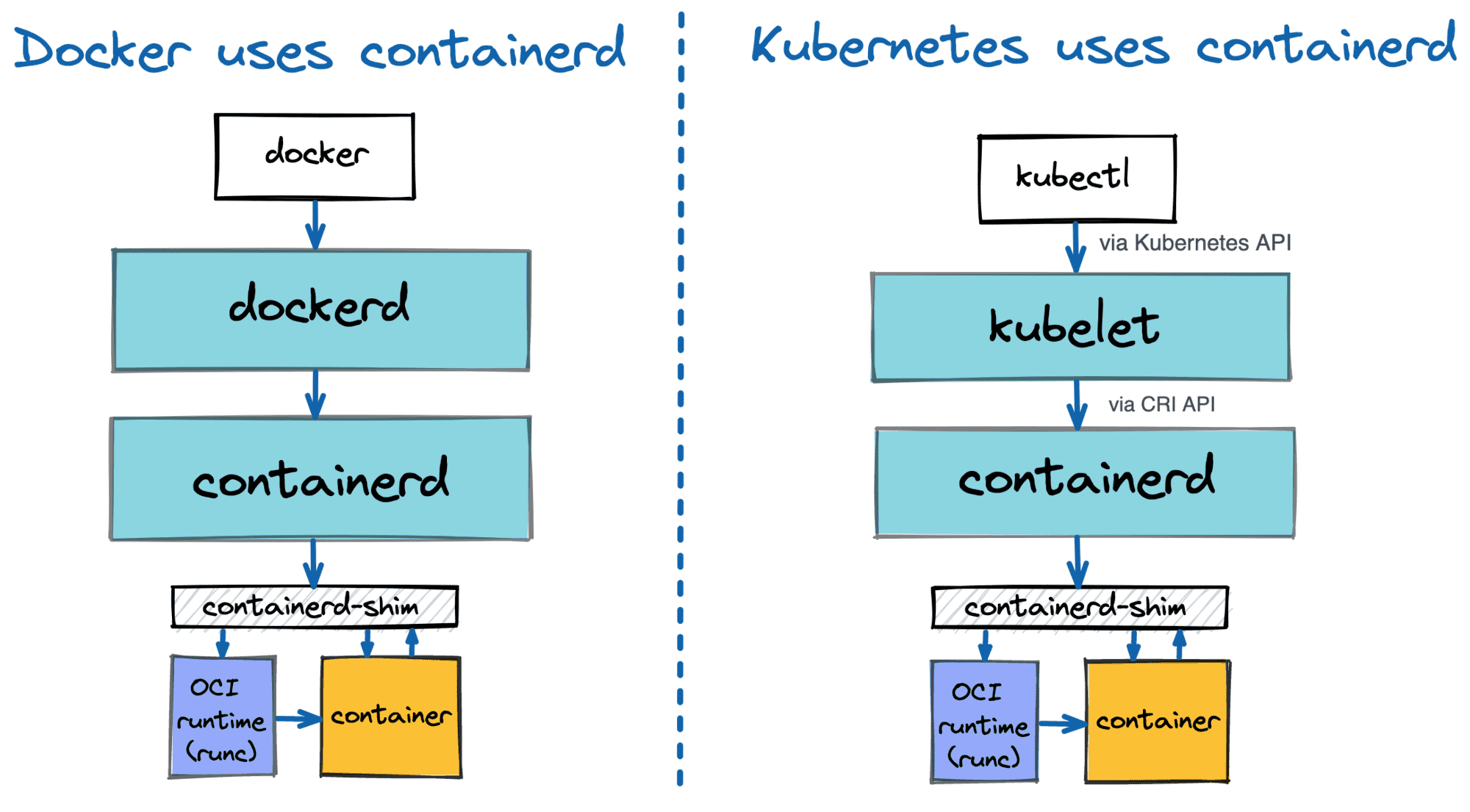
출처 : https://labs.iximiuz.com/courses/containerd-cli/ctr/image-management
- Containerd 와 K8S(1.32~1.34) 호환 버전 확인(2.1.0+, 2.0.1+, 1.7.24+, 1.6.36+…) - Docs
Kubernetes Version containerd Version CRI Version 1.32* 2.1.0+, 2.0.1+, 1.7.24+, 1.6.36+ v1 1.33 2.1.0+, 2.0.4+, 1.7.24+, 1.6.36+ v1 1.34 2.1.3+, 2.0.6+, 1.7.28+, 1.6.39+ v1 1.35 2.2.0+, 2.1.5+, 1.7.28+ v1 - Daemon Configuration : /etc/containerd/config.toml
Configuration Version Minimum containerd version 1 v1.0.0 2 v1.3.0 3 v2.0.0
containerd 설치 (v 2.1.5)
root@k8s-ctr:~# dnf --version
4.20.0

root@k8s-ctr:~# yum --version
4.20.0

root@k8s-ctr:~# dnf repolist
repo id                                                                          repo name
appstream                                                                        Rocky Linux 10 - AppStream
baseos                                                                           Rocky Linux 10 - BaseOS
extras                                                                           Rocky Linux 10 - Extras

root@k8s-ctr:~# tree /etc/yum.repos.d/
/etc/yum.repos.d/
├── rocky-addons.repo
├── rocky-devel.repo
├── rocky-extras.repo
└── rocky.repo

1 directory, 4 files

root@k8s-ctr:~# dnf config-manager --add-repo https://download.docker.com/linux/centos/docker-ce.repo
Adding repo from: https://download.docker.com/linux/centos/docker-ce.repo

# docker-ce-stable 추가 확인
root@k8s-ctr:~# dnf repolist
repo id                                                                             repo name
appstream                                                                           Rocky Linux 10 - AppStream
baseos                                                                              Rocky Linux 10 - BaseOS
docker-ce-stable                                                                    Docker CE Stable - x86_64
extras                                                                              Rocky Linux 10 - Extras

root@k8s-ctr:~# tree /etc/yum.repos.d/
/etc/yum.repos.d/
├── docker-ce.repo
├── rocky-addons.repo
├── rocky-devel.repo
├── rocky-extras.repo
└── rocky.repo

1 directory, 5 files
root@k8s-ctr:~# cat /etc/yum.repos.d/docker-ce.repo
[docker-ce-stable]
name=Docker CE Stable - $basearch
baseurl=https://download.docker.com/linux/centos/$releasever/$basearch/stable
enabled=1
gpgcheck=1
gpgkey=https://download.docker.com/linux/centos/gpg

[docker-ce-stable-source]
name=Docker CE Stable - Sources
baseurl=https://download.docker.com/linux/centos/$releasever/source/stable
enabled=0
gpgcheck=1
gpgkey=https://download.docker.com/linux/centos/gpg

[docker-ce-test]
name=Docker CE Test - $basearch
baseurl=https://download.docker.com/linux/centos/$releasever/$basearch/test
enabled=0
gpgcheck=1
gpgkey=https://download.docker.com/linux/centos/gpg

[docker-ce-test-source]
name=Docker CE Test - Sources
baseurl=https://download.docker.com/linux/centos/$releasever/source/test
enabled=0
gpgcheck=1
gpgkey=https://download.docker.com/linux/centos/gpg

root@k8s-ctr:~# dnf makecache
Docker CE Stable - x86_64                                                                                                                         100 kB/s |  17 kB     00:00
Rocky Linux 10 - BaseOS                                                                                                                           6.9 kB/s | 4.3 kB     00:00
Rocky Linux 10 - AppStream                                                                                                                        5.8 kB/s | 4.3 kB     00:00
Rocky Linux 10 - Extras                                                                                                                           3.1 kB/s | 3.1 kB     00:01
Metadata cache created.

root@k8s-ctr:~# dnf list --showduplicates containerd.io
Last metadata expiration check: 0:01:55 ago on Mon 19 Jan 2026 11:00:08 PM KST.
Available Packages
containerd.io.x86_64                                                               1.7.23-3.1.el10                                                                docker-ce-stable
containerd.io.x86_64                                                               1.7.24-3.1.el10                                                                docker-ce-stable
containerd.io.x86_64                                                               1.7.25-3.1.el10                                                                docker-ce-stable
containerd.io.x86_64                                                               1.7.26-3.1.el10                                                                docker-ce-stable
containerd.io.x86_64                                                               1.7.27-3.1.el10                                                                docker-ce-stable
containerd.io.x86_64                                                               1.7.28-1.el10                                                                  docker-ce-stable
containerd.io.x86_64                                                               1.7.28-2.el10                                                                  docker-ce-stable
containerd.io.x86_64                                                               1.7.29-1.el10                                                                  docker-ce-stable
containerd.io.x86_64                                                               2.1.5-1.el10                                                                   docker-ce-stable
containerd.io.x86_64                                                               2.2.0-2.el10                                                                   docker-ce-stable
containerd.io.x86_64                                                               2.2.1-1.el10                                                                   docker-ce-stable

dnf install -y containerd.io-***2.1.5-1.el10***

# 설치된 파일 확인
root@k8s-ctr:~# which runc && runc --version
/usr/bin/runc
runc version 1.3.3
commit: v1.3.3-0-gd842d771
spec: 1.2.1
go: go1.24.9
libseccomp: 2.5.3
root@k8s-ctr:~# which containerd && containerd --version
/usr/bin/containerd
containerd containerd.io v2.1.5 fcd43222d6b07379a4be9786bda52438f0dd16a1
root@k8s-ctr:~# which containerd-shim-runc-v2 && containerd-shim-runc-v2 -v
/usr/bin/containerd-shim-runc-v2
containerd-shim-runc-v2:
  Version:  v2.1.5
  Revision: fcd43222d6b07379a4be9786bda52438f0dd16a1
  Go version: go1.24.9

root@k8s-ctr:~# which ctr && ctr --version
/usr/bin/ctr
ctr containerd.io v2.1.5
root@k8s-ctr:~# cat /etc/containerd/config.toml
#   Copyright 2018-2022 Docker Inc.

#   Licensed under the Apache License, Version 2.0 (the "License");
#   you may not use this file except in compliance with the License.
#   You may obtain a copy of the License at

#       http://www.apache.org/licenses/LICENSE-2.0

#   Unless required by applicable law or agreed to in writing, software
#   distributed under the License is distributed on an "AS IS" BASIS,
#   WITHOUT WARRANTIES OR CONDITIONS OF ANY KIND, either express or implied.
#   See the License for the specific language governing permissions and
#   limitations under the License.

disabled_plugins = ["cri"]

#root = "/var/lib/containerd"
#state = "/run/containerd"
#subreaper = true
#oom_score = 0

#[grpc]
#  address = "/run/containerd/containerd.sock"
#  uid = 0
#  gid = 0

#[debug]
#  address = "/run/containerd/debug.sock"
#  uid = 0
#  gid = 0
#  level = "info"
root@k8s-ctr:~# tree /usr/lib/systemd/system | grep containerd
├── containerd.service
root@k8s-ctr:~# cat /usr/lib/systemd/system/containerd.service
# Copyright The containerd Authors.
#
# Licensed under the Apache License, Version 2.0 (the "License");
# you may not use this file except in compliance with the License.
# You may obtain a copy of the License at
#
#     http://www.apache.org/licenses/LICENSE-2.0
#
# Unless required by applicable law or agreed to in writing, software
# distributed under the License is distributed on an "AS IS" BASIS,
# WITHOUT WARRANTIES OR CONDITIONS OF ANY KIND, either express or implied.
# See the License for the specific language governing permissions and
# limitations under the License.

[Unit]
Description=containerd container runtime
Documentation=https://containerd.io
After=network.target dbus.service

[Service]
ExecStartPre=-/sbin/modprobe overlay
ExecStart=/usr/bin/containerd

Type=notify
Delegate=yes
KillMode=process
Restart=always
RestartSec=5

# Having non-zero Limit*s causes performance problems due to accounting overhead
# in the kernel. We recommend using cgroups to do container-local accounting.
LimitNPROC=infinity
LimitCORE=infinity

# Comment TasksMax if your systemd version does not supports it.
# Only systemd 226 and above support this version.
TasksMax=infinity
OOMScoreAdjust=-999

[Install]
WantedBy=multi-user.target

# 기본 설정 생성 및 systemdCgroup 생성
**containerd config default | tee /etc/containerd/config.toml

root@k8s-ctr:~# cat /etc/containerd/config.toml | grep -i systemdcgroup
            SystemdCgroup = false
root@k8s-ctr:~# sed -i 's/SystemdCgroup = false/SystemdCgroup = true/g' /etc/containerd/config.toml
root@k8s-ctr:~# cat /etc/containerd/config.toml | grep -i systemdcgroup
            SystemdCgroup = true**

# systemd unit 파일 최신 상태 읽기
**systemctl daemon-reload**

# containerd start 와 enabled
**systemctl enable --now containerd**

systemctl status containerd --no-pager

# containerd의 유닉스 도메인 소켓 확인

root@k8s-ctr:~# containerd config dump | grep -n containerd.sock
11:  address = '/run/containerd/containerd.sock'
root@k8s-ctr:~# ls -l /run/containerd/containerd.sock
srw-rw----. 1 root root 0 Jan 19 23:09 /run/containerd/containerd.sock
root@k8s-ctr:~# ss -xl | grep containerd
u_str LISTEN 0      4096        /run/containerd/containerd.sock.ttrpc 21594            * 0
u_str LISTEN 0      4096              /run/containerd/containerd.sock 21595            * 0
root@k8s-ctr:~# ss -xnp | grep containerd
u_str ESTAB 0 0 * 22553 * 21579 users:(("containerd",pid=5560,fd=2),("containerd",pid=5560,fd=1)) - systemCgroup :컨테이너의 자원(cgroup)을 systemd에게 맡기겠다는 의미
3. 공통] kubeadm, kubelet 및 kubectl 설치 (v1.32.11)
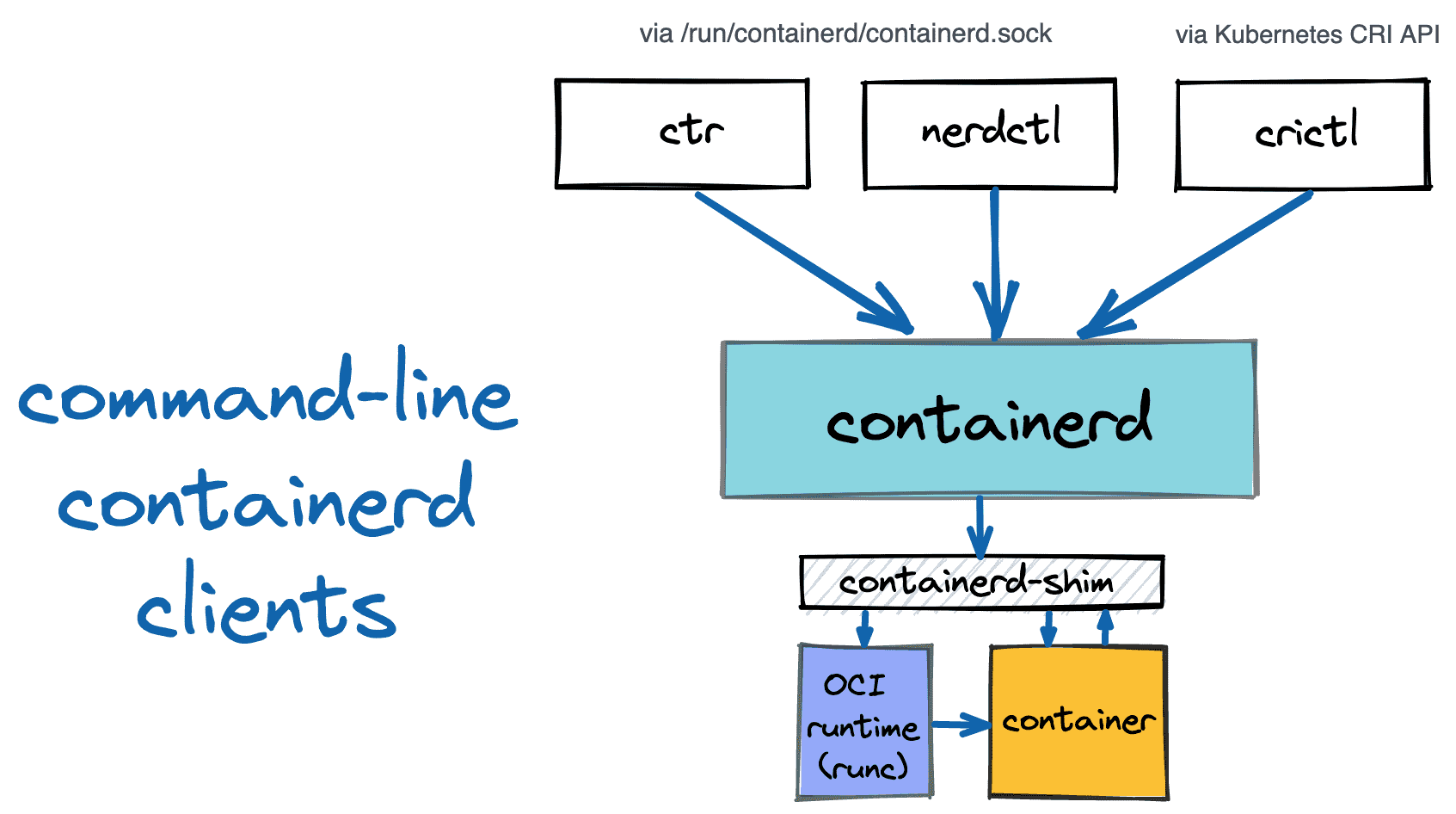
출처 : https://iximiuz.com/en/tags/?tag=crictl
# exclude => dnf update 시 kubectl 자동 업그레이드 방지
root@k8s-ctr:~# dnf repolist
tree /etc/yum.repos.d/
cat <<EOF | tee /etc/yum.repos.d/kubernetes.repo
[kubernetes]
name=Kubernetes
baseurl=https://pkgs.k8s.io/core:/stable:/v1.32/rpm/
enabled=1
gpgcheck=1
gpgkey=https://pkgs.k8s.io/core:/stable:/v1.32/rpm/repodata/repomd.xml.key
exclude=kubelet kubeadm kubectl cri-tools kubernetes-cni
EOF
repo id                                                                             repo name
appstream                                                                           Rocky Linux 10 - AppStream
baseos                                                                              Rocky Linux 10 - BaseOS
docker-ce-stable                                                                    Docker CE Stable - x86_64
extras                                                                              Rocky Linux 10 - Extras
/etc/yum.repos.d/
├── docker-ce.repo
├── rocky-addons.repo
├── rocky-devel.repo
├── rocky-extras.repo
└── rocky.repo

1 directory, 5 files
[kubernetes]
name=Kubernetes
baseurl=https://pkgs.k8s.io/core:/stable:/v1.32/rpm/
enabled=1
gpgcheck=1
gpgkey=https://pkgs.k8s.io/core:/stable:/v1.32/rpm/repodata/repomd.xml.key
exclude=kubelet kubeadm kubectl cri-tools kubernetes-cni
root@k8s-ctr:~# dnf makecache
Docker CE Stable - x86_64                                                                                                                          11 kB/s | 2.0 kB     00:00
Kubernetes                                                                                                                                         18 kB/s |  19 kB     00:01
Rocky Linux 10 - BaseOS                                                                                                                           4.8 kB/s | 4.3 kB     00:00
Rocky Linux 10 - AppStream                                                                                                                        4.7 kB/s | 4.3 kB     00:00
Rocky Linux 10 - Extras                                                                                                                           5.2 kB/s | 3.1 kB     00:00
Metadata cache created.

# **--disableexcludes : exclude 규칙을 일회성 무시
root@k8s-ctr:~# dnf install -y kubelet kubeadm kubectl --disableexcludes=kubernetes**

# kubelet 활성화 (실제 기동은 kubeadm init 후에 시작됨)
**root@k8s-ctr:~# systemctl enable --now kubelet
Created symlink '/etc/systemd/system/multi-user.target.wants/kubelet.service' → '/usr/lib/systemd/system/kubelet.service'.
root@k8s-ctr:~# ps -ef |grep kubelet
root        5823    5080  0 23:14 pts/1    00:00:00 grep --color=auto kubelet
root@k8s-ctr:~# which kubeadm && kubeadm version -o yaml
/usr/bin/kubeadm
clientVersion:
  buildDate: "2025-12-16T18:06:36Z"
  compiler: gc
  gitCommit: 2195eae9e91f2e72114365d9bb9c670d0c08de12
  gitTreeState: clean
  gitVersion: v1.32.11
  goVersion: go1.24.11
  major: "1"
  minor: "32"
  platform: linux/amd64

root@k8s-ctr:~# which kubectl && kubectl version --client=true
/usr/bin/kubectl
Client Version: v1.32.11
Kustomize Version: v5.5.0
root@k8s-ctr:~# which kubelet && kubelet --version
/usr/bin/kubelet
Kubernetes v1.32.11
root@k8s-ctr:~# which crictl && crictl version
/usr/bin/crictl
WARN[0000] Config "/etc/crictl.yaml" does not exist, trying next: "/usr/bin/crictl.yaml"
WARN[0000] runtime connect using default endpoints: [unix:///run/containerd/containerd.sock unix:///run/crio/crio.sock unix:///var/run/cri-dockerd.sock]. As the default settings are now deprecated, you should set the endpoint instead.
Version:  0.1.0
RuntimeName:  containerd
RuntimeVersion:  v2.1.5
RuntimeApiVersion:  v1

root@k8s-ctr:~# cat << EOF > /etc/crictl.yaml
runtime-endpoint: unix:///run/containerd/containerd.sock
image-endpoint: unix:///run/containerd/containerd.sock
EOF

root@k8s-ctr:~# crictl info | jq
{
  "cniconfig": {
    "Networks": [
      {
        "Config": {
          "CNIVersion": "0.3.1",
          "Name": "cni-loopback",
          "Plugins": [
            {
              "Network": {
                "ipam": {},
                "type": "loopback"
              },
              "Source": "{\"type\":\"loopback\"}"
            }
          ],
          "Source": "{\n\"cniVersion\": \"0.3.1\",\n\"name\": \"cni-loopback\",\n\"plugins\": [{\n  \"type\": \"loopback\"\n}]\n}"
        },
        "IFName": "lo"
      }
    ],
    "PluginConfDir": "/etc/cni/net.d",
    "PluginDirs": [
      "/opt/cni/bin"
    ],
    "PluginMaxConfNum": 1,
    "Prefix": "eth"
  },
  "config": {
    "cdiSpecDirs": [
      "/etc/cdi",
      "/var/run/cdi"
    ],
    "cni": {
      "binDir": "",
      "binDirs": [
        "/opt/cni/bin"
      ],
      "confDir": "/etc/cni/net.d",
      "confTemplate": "",
      "ipPref": "",
      "maxConfNum": 1,
      "setupSerially": false,
      "useInternalLoopback": false
    },
    "containerd": {
      "defaultRuntimeName": "runc",
      "ignoreBlockIONotEnabledErrors": false,
      "ignoreRdtNotEnabledErrors": false,
      "runtimes": {
        "runc": {
          "ContainerAnnotations": [],
          "PodAnnotations": [],
          "baseRuntimeSpec": "",
          "cgroupWritable": false,
          "cniConfDir": "",
          "cniMaxConfNum": 0,
          "io_type": "",
          "options": {
            "BinaryName": "",
            "CriuImagePath": "",
            "CriuWorkPath": "",
            "IoGid": 0,
            "IoUid": 0,
            "NoNewKeyring": false,
            "Root": "",
            "ShimCgroup": "",
            "SystemdCgroup": true
          },
          "privileged_without_host_devices": false,
          "privileged_without_host_devices_all_devices_allowed": false,
          "runtimePath": "",
          "runtimeType": "io.containerd.runc.v2",
          "sandboxer": "podsandbox",
          "snapshotter": ""
        }
      }
    },
    "containerdEndpoint": "/run/containerd/containerd.sock",
    "containerdRootDir": "/var/lib/containerd",
    "device_ownership_from_security_context": false,
    "disableApparmor": false,
    "disableHugetlbController": true,
    "disableProcMount": false,
    "drainExecSyncIOTimeout": "0s",
    "enableCDI": true,
    "enableSelinux": false,
    "enableUnprivilegedICMP": true,
    "enableUnprivilegedPorts": true,
    "ignoreDeprecationWarnings": [],
    "ignoreImageDefinedVolumes": false,
    "maxContainerLogLineSize": 16384,
    "netnsMountsUnderStateDir": false,
    "restrictOOMScoreAdj": false,
    "rootDir": "/var/lib/containerd/io.containerd.grpc.v1.cri",
    "selinuxCategoryRange": 1024,
    "stateDir": "/run/containerd/io.containerd.grpc.v1.cri",
    "tolerateMissingHugetlbController": true,
    "unsetSeccompProfile": ""
  },
  "golang": "go1.24.9",
  "lastCNILoadStatus": "cni config load failed: no network config found in /etc/cni/net.d: cni plugin not initialized: failed to load cni config",
  "lastCNILoadStatus.default": "cni config load failed: no network config found in /etc/cni/net.d: cni plugin not initialized: failed to load cni config",
  "runtimeHandlers": [
    {
      "features": {
        "recursive_read_only_mounts": true,
        "user_namespaces": true
      }
    },
    {
      "features": {
        "recursive_read_only_mounts": true,
        "user_namespaces": true
      },
      "name": "runc"
    }
  ],
  "status": {
    "conditions": [
      {
        "message": "",
        "reason": "",
        "status": true,
        "type": "RuntimeReady"
      },
      {
        "message": "Network plugin returns error: cni plugin not initialized",
        "reason": "NetworkPluginNotReady",
        "status": false,
        "type": "NetworkReady"
      },
      {
        "message": "",
        "reason": "",
        "status": true,
        "type": "ContainerdHasNoDeprecationWarnings"
      }
    ]
  }
}

#** kubernetes-cni : 파드 네트워크 구성을 위한 CNI 바이너리 파일 확인
**root@k8s-ctr:~# tree /opt/cni
/opt/cni
└── bin
    ├── bandwidth
    ├── bridge
    ├── dhcp

2 directories, 20 files
root@k8s-ctr:~# tree /etc/cni/
/etc/cni/
└── net.d

2 directories, 0 files

root@k8s-ctr:~# cat /usr/lib/systemd/system/kubelet.service
[Unit]
Description=kubelet: The Kubernetes Node Agent
Documentation=https://kubernetes.io/docs/
Wants=network-online.target
After=network-online.target

[Service]
ExecStart=/usr/bin/kubelet
Restart=always
StartLimitInterval=0
RestartSec=10

[Install]
WantedBy=multi-user.target
root@k8s-ctr:~# cat /usr/lib/systemd/system/kubelet.service.d/10-kubeadm.conf
# Note: This dropin only works with kubeadm and kubelet v1.11+
[Service]
Environment="KUBELET_KUBECONFIG_ARGS=--bootstrap-kubeconfig=/etc/kubernetes/bootstrap-kubelet.conf --kubeconfig=/etc/kubernetes/kubelet.conf"
Environment="KUBELET_CONFIG_ARGS=--config=/var/lib/kubelet/config.yaml"
# This is a file that "kubeadm init" and "kubeadm join" generates at runtime, populating the KUBELET_KUBEADM_ARGS variable dynamically
EnvironmentFile=-/var/lib/kubelet/kubeadm-flags.env
# This is a file that the user can use for overrides of the kubelet args as a last resort. Preferably, the user should use
# the .NodeRegistration.KubeletExtraArgs object in the configuration files instead. KUBELET_EXTRA_ARGS should be sourced from this file.
EnvironmentFile=-/etc/sysconfig/kubelet
ExecStart=
ExecStart=/usr/bin/kubelet $KUBELET_KUBECONFIG_ARGS $KUBELET_CONFIG_ARGS $KUBELET_KUBEADM_ARGS $KUBELET_EXTRA_ARGS

root@k8s-ctr:~# ls -l /run/containerd/containerd.sock
srw-rw----. 1 root root 0 Jan 19 23:09 /run/containerd/containerd.sock
root@k8s-ctr:~# ss -xl | grep containerd
u_str LISTEN 0      4096        /run/containerd/containerd.sock.ttrpc 21594            * 0
u_str LISTEN 0      4096              /run/containerd/containerd.sock 21595            * 0
root@k8s-ctr:~# ss -xnp | grep containerd
u_str ESTAB 0      0                                                 * 22553            * 21579 users:(("containerd",pid=5560,fd=2),("containerd",pid=5560,fd=1))**
4. [controlplane node} kubeadm으로 k8s 클러스터 구성 → Flannel CNI 설치
Customizing components with the kubeadm API
[k8s-ctr] kubeadm init 수행
Control Plane을 안전하게 만들고, 다른 노드가 합류할 수 있는 최소한의 클러스터를 완성하는 과정
- 사전검사
- 컨테이너 런타임 응답 확인
- root 권한 확인
- kubelet version kubeadm 호환 check
- 인증서 및 키 생성
- CA 인증서
- API 인증서
- kubelet ↔ API server 인증
- etcd 통신 암호화
- front-proxy 인증서
- kubeconfig 파일 생성 (각 컴포넌트가 api server에 접근하는 신분증 생성
- bootstrap-kubelet.conf (kubelet 초기 합류용)
- controller-manager.conf
- scheduler.conf
- admin.conf / super-admin.conf (kubelet용)
- control plan 구성 요소 (static pods)
- kube-system 네임스페이스
- static pod
- 가장 높은 우선순위
- kubelet 시작 및 control plane 대기
- kubelet 재시작
- Static Pod manifest 감지
- API Server가
/healthz또는/livez정상 응답할 때까지 대기
- kubeadm 설정 저장
- kube-system 네임스페이스
- kubeadm-config configMap
- control plane 노드 표시
- 라벨링 및 테인트 적용
- 부트스트랩 토큰 및 노드 조인 준비
- 다른 노드들이 안전하게 합류할 수 있게 준비
- 필수 에드온 설치
- kube-proxy
- service 트래픽 처리
- daemonSet으로 배포
- CoreDNS
- pod ↔ service DNS 해석
- kube-dns 이름 유지
- kube-proxy
# 기본 환경 정보 출력 저장
crictl images
crictl ps
cat /etc/sysconfig/kubelet
tree /etc/kubernetes  | tee -a etc_kubernetes-1.txt
tree /var/lib/kubelet | tee -a var_lib_kubelet-1.txt
tree /run/containerd/ -L 3 | tee -a run_containerd-1.txt
pstree -alnp | tee -a pstree-1.txt
systemd-cgls --no-pager | tee -a systemd-cgls-1.txt
lsns | tee -a lsns-1.txt
ip addr | tee -a ip_addr-1.txt
ss -tnlp | tee -a ss-1.txt
df -hT | tee -a df-1.txt
findmnt | tee -a findmnt-1.txt
sysctl -a | tee -a sysctl-1.txt

# kubeadm configuration 파일 작성
cat << EOF > kubeadm-init.yaml
apiVersion: kubeadm.k8s.io/**v1beta4**
kind: **InitConfiguration**
**bootstrapTokens:**
- token: "123456.1234567890123456"
  ttl: "0s"
  usages:
  - signing
  - authentication
**nodeRegistration:**
  **kubeletExtraArgs:
    - name: node-ip
      value: "192.168.10.100"**  # 미설정 시 10.0.2.15 맵핑
  criSocket: "unix:///run/containerd/containerd.sock"
**localAPIEndpoint:**
  advertiseAddress: "192.168.10.100"
---
apiVersion: kubeadm.k8s.io/v1beta4
kind: **ClusterConfiguration**
kubernetesVersion: "**1.32.11**"
networking:
  podSubnet: "**10.244.0.0/16**"
  serviceSubnet: "**10.96.0.0/16**"
EOF

# 컨테이너 이미지 미리 다운로드 (작업 시간 단축을 위함)
kubeadm config images pull

# k8s controlplane 초기화 설정 수행
**kubeadm init --config="kubeadm-init.yaml"

#crictl 확인**
root@k8s-ctr:~# crictl images
IMAGE                                     TAG                 IMAGE ID            SIZE
registry.k8s.io/coredns/coredns           v1.11.3             c69fa2e9cbf5f       18.6MB
registry.k8s.io/etcd                      3.5.24-0            8cb12dd0c3e42       23.7MB
registry.k8s.io/kube-apiserver            v1.32.11            7757c58248a29       29.1MB
registry.k8s.io/kube-controller-manager   v1.32.11            0175d0a8243db       26.7MB
registry.k8s.io/kube-proxy                v1.32.11            4d8fb2dc57519       31.2MB
registry.k8s.io/kube-scheduler            v1.32.11            23d6a1fb92fda       21.1MB
registry.k8s.io/pause                     3.10                873ed75102791       320kB

root@k8s-ctr:~# crictl ps
CONTAINER           IMAGE               CREATED             STATE               NAME                      ATTEMPT             POD ID              POD
  NAMESPACE
9f1329104f4ae       4d8fb2dc57519       7 seconds ago       Running             kube-proxy                0                   958bf2efbfd85       kube-proxy-c4b54
  kube-system
9b7714f2c6830       23d6a1fb92fda       48 seconds ago      Running             kube-scheduler            0                   a5b607c4828ed       kube-scheduler-k8s-ctr
  kube-system
736da55ad80d0       0175d0a8243db       48 seconds ago      Running             kube-controller-manager   0                   e4b7229d7e6ce       kube-controller-manager-k8s-ctr   kube-system
0354be9cb8630       7757c58248a29       48 seconds ago      Running             kube-apiserver            0                   cde1626416b16       kube-apiserver-k8s-ctr
  kube-system
5a814b3302f25       8cb12dd0c3e42       48 seconds ago      Running             etcd                      0                   2100dcb7840e4       etcd-k8s-ctr
  kube-system
  # kubeconfig 작성
**mkdir -p /root/.kube
cp -i /etc/kubernetes/admin.conf /root/.kube/config
chown $(id -u):$(id -g) /root/.kube/config**

**kubectl cluster-info**
Kubernetes control plane is running at https://192.168.10.100:6443
CoreDNS is running at https://192.168.10.100:6443/api/v1/namespaces/kube-system/services/kube-dns:dns/proxy

root@k8s-ctr:/etc/kubernetes# kubectl cluster-info
Kubernetes control plane is running at https://192.168.10.100:6443
CoreDNS is running at https://192.168.10.100:6443/api/v1/namespaces/kube-system/services/kube-dns:dns/proxy

To further debug and diagnose cluster problems, use 'kubectl cluster-info dump'.
root@k8s-ctr:/etc/kubernetes# kubectl get node -owide
NAME      STATUS     ROLES           AGE     VERSION    INTERNAL-IP      EXTERNAL-IP   OS-IMAGE                        KERNEL-VERSION                 CONTAINER-RUNTIME
k8s-ctr   NotReady   control-plane   2m56s   v1.32.11   192.168.10.100   <none>        Rocky Linux 10.0 (Red Quartz)   6.12.0-55.39.1.el10_0.x86_64   containerd://2.1.5
root@k8s-ctr:/etc/kubernetes# kubectl get nodes -o json | jq ".items[] | {name:.metadata.name} + .status.capacity"
{
  "name": "k8s-ctr",
  "cpu": "4",
  "ephemeral-storage": "62374Mi",
  "hugepages-2Mi": "0",
  "memory": "3036928Ki",
  "pods": "110"
}
root@k8s-ctr:/etc/kubernetes# kubectl get pod -n kube-system -owide
NAME                              READY   STATUS    RESTARTS   AGE     IP               NODE      NOMINATED NODE   READINESS GATES
coredns-668d6bf9bc-nwdj8          0/1     Pending   0          2m52s   <none>           <none>    <none>           <none>
coredns-668d6bf9bc-qvqxx          0/1     Pending   0          2m52s   <none>           <none>    <none>           <none>
etcd-k8s-ctr                      1/1     Running   0          3m4s    192.168.10.100   k8s-ctr   <none>           <none>
kube-apiserver-k8s-ctr            1/1     Running   0          2m54s   192.168.10.100   k8s-ctr   <none>           <none>
kube-controller-manager-k8s-ctr   1/1     Running   0          3m2s    192.168.10.100   k8s-ctr   <none>           <none>
kube-proxy-c4b54                  1/1     Running   0          2m52s   192.168.10.100   k8s-ctr   <none>           <none>
kube-scheduler-k8s-ctr            1/1     Running   0          3m3s    192.168.10.100   k8s-ctr   <none>           <none>
root@k8s-ctr:/etc/kubernetes# kubectl get svc -n kube-system
NAME       TYPE        CLUSTER-IP   EXTERNAL-IP   PORT(S)                  AGE
kube-dns   ClusterIP   10.96.0.10   <none>        53/UDP,53/TCP,9153/TCP   2m59s

root@k8s-ctr:/etc/kubernetes#kubectl -n kube-public get rolee
NAME                                   CREATED AT
kubeadm:bootstrap-signer-clusterinfo   2026-01-20T12:53:41Z
system:controller:bootstrap-signer     2026-01-20T12:53:39Z
root@k8s-ctr:/etc/kubernetes# kubectl -n kube-public get rolebinding
NAME                                   ROLE                                        AGE
kubeadm:bootstrap-signer-clusterinfo   Role/kubeadm:bootstrap-signer-clusterinfo   3m47s
system:controller:bootstrap-signer     Role/system:controller:bootstrap-signer     3m48s
[k8s-ctr] k8s 관련 작업 편의성 설정 : 자동 완성, kubecolor, kubectx, kubens, kube-ps, helm, k9s 설치
echo "sudo su -" >> /home/vagrant/.bashrc

# Source the completion
source <(kubectl completion bash)
source <(kubeadm completion bash)
echo 'source <(kubectl completion bash)' >> /etc/profile
echo 'source <(kubeadm completion bash)' >> /etc/profile

root@k8s-ctr:/etc/kubernetes# alias k=kubectl
complete -o default -F __start_kubectl k
echo 'alias k=kubectl' >> /etc/profile
echo 'complete -o default -F __start_kubectl k' >> /etc/profile
k get node
NAME      STATUS     ROLES           AGE     VERSION
k8s-ctr   NotReady   control-plane   5m48s   v1.32.11

#kubecolor 설치
dnf install -y 'dnf-command(config-manager)'
dnf config-manager --add-repo https://kubecolor.github.io/packages/rpm/kubecolor.repo
dnf repolist
dnf install -y kubecolor
**kubecolor get node**

alias kc=kubecolor
echo 'alias kc=kubecolor' >> /etc/profile
**kc get node**
**kc describe node

dnf install -y git**
**git clone https://github.com/ahmetb/kubectx /opt/kubectx**
ln -s /opt/kubectx/kubens /usr/local/bin/kubens
ln -s /opt/kubectx/kubectx /usr/local/bin/kubectx

**git clone https://github.com/jonmosco/kube-ps1.git /root/kube-ps1**
cat << "EOT" >> /root/.bash_profile
source /root/kube-ps1/kube-ps1.sh
KUBE_PS1_SYMBOL_ENABLE=true
function get_cluster_short() {
  echo "$1" | cut -d . -f1
}
KUBE_PS1_CLUSTER_FUNCTION=get_cluster_short
KUBE_PS1_SUFFIX=') '
PS1='$(kube_ps1)'$PS1
EOT

다시 접속
vagrant ssh k8s-ctr
kubectl config rename-context "kubernetes-admin@kubernetes" "HomeLab"

(⎈|HomeLab:N/A) root@k8s-ctr:~# kubens default
Context "HomeLab" modified.
Active namespace is "default".
(⎈|HomeLab:default) root@k8s-ctr:~#

# helm3 설치
**curl -fsSL https://raw.githubusercontent.com/helm/helm/main/scripts/get-helm-3 | DESIRED_VERSION=v3.18.6 bash**
helm version
version.BuildInfo{Version:"v3.18.6", GitCommit:"b76a950f6835474e0906b96c9ec68a2eff3a6430", GitTreeState:"clean", GoVersion:"go1.24.6"}

# k9s 설치
CLI_ARCH=amd64
if [ "$(uname -m)" = "aarch64" ]; then CLI_ARCH=arm64; fi
wget https://github.com/derailed/k9s/releases/latest/download/k9s_linux_${CLI_ARCH}.tar.gz
tar -xzf k9s_linux_*.tar.gz
ls -al k9s
chown root:root k9s
mv k9s /usr/local/bin/
chmod +x /usr/local/bin/k9s- kubecolor :
kubectl명령어 출력을 색상으로 구분해 주는 도구 - kubectx: 클러스터 전환 도구
- kubens : 네임스페이스 전환 도구
- kube-ps1 : 터미널 프롬프트에 현재 Kubernetes 클러스터와 네임스페이스 정보를 표시해주는 도구
[k8s-ctr] Flannel CNI 설치 v0.27.3
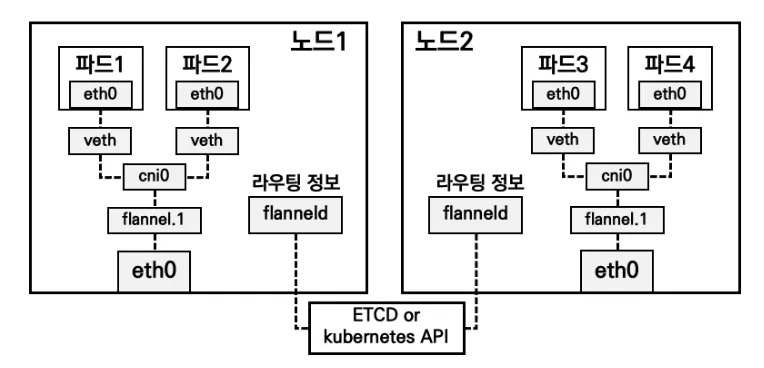
- cni0 (브리지):
- cni0는 Kubernetes CNI 플러그인이 사용하는 기본 가상 브리지입니다
- 기본적으로 컨테이너의 가상 네트워크 인터페이스(veth)들이 이 브리지를 통해 연결됩니다.
- cni0는 노드 내부에서 실행되는 여러 컨테이너(파드)가 서로 통신할 수 있도록 네트워크 연결을 제공합니다.
- veth (가상 이더넷):
- veth는 Virtual Ethernet Pair의 줄임말로, 네트워크 인터페이스 쌍입니다. 각 파드는 자신의 veth 인터페이스를 가집니다.
- veth 쌍은 하나의 인터페이스가 클러스터 내의 cni0 브리지와 연결되고, 다른 하나는 파드 내부의 네트워크 인터페이스로 연결됩니다. 이렇게 연결된 네트워크 인터페이스들은 서로 통신할 수 있습니다.
- veth 인터페이스는 cni0 브리지와 연결된 파드들의 네트워크 트래픽을 해당 브리지로 전송하여 다른 파드들과 통신할 수 있도록 합니다.
- flannel.1 (Flannel 네트워크 인터페이스):
- flannel.1은 Flannel 네트워크 플러그인이 생성하는 인터페이스입니다. Flannel은 Kubernetes의 네트워크 플러그인 중 하나로, Pod 네트워크를 관리합니다.
- Flannel은 기본적으로 각 노드에 고유한 IP 서브넷을 할당하여, 다른 노드의 파드와 통신할 수 있도록 합니다. flannel.1은 이 서브넷을 노드 내부에서 관리하는 네트워크 인터페이스입니다.
- flannel.1 인터페이스는 Kubernetes 클러스터의 모든 노드에서 cni0와 연결되어 있습니다. 이를 통해 Flannel은 각 파드에 서브넷을 할당하고, 다른 노드의 파드와의 통신을 가능하게 만듭니다.
**kc describe pod -n kube-system kube-controller-manager-k8s-ctr**

Command:
  kube-controller-manager
  --allocate-node-cidrs=true
  --authentication-kubeconfig=/etc/kubernetes/controller-manager.conf
  --authorization-kubeconfig=/etc/kubernetes/controller-manager.conf
  --bind-address=127.0.0.1
  --client-ca-file=/etc/kubernetes/pki/ca.crt
  --cluster-cidr=10.244.0.0/16
  --cluster-name=kubernetes
  --cluster-signing-cert-file=/etc/kubernetes/pki/ca.crt
  --cluster-signing-key-file=/etc/kubernetes/pki/ca.key
  --controllers=*,bootstrapsigner,tokencleaner
  --kubeconfig=/etc/kubernetes/controller-manager.conf
  --leader-elect=true
  --requestheader-client-ca-file=/etc/kubernetes/pki/front-proxy-ca.crt
  --root-ca-file=/etc/kubernetes/pki/ca.crt
  --service-account-private-key-file=/etc/kubernetes/pki/sa.key
  --service-cluster-ip-range=10.96.0.0/16
  --use-service-account-credentials=true

  **helm repo add flannel https://flannel-io.github.io/flannel**
(⎈|HomeLab:default) root@k8s-ctr:~# helm repo update
Hang tight while we grab the latest from your chart repositories...
...Successfully got an update from the "flannel" chart repository
Update Complete. ⎈Happy Helming!⎈
(⎈|HomeLab:default) root@k8s-ctr:~# kubectl create namespace kube-flannel
namespace/kube-flannel created

# ip link 확인
(⎈|HomeLab:default) root@k8s-ctr:~# ip link show
1: lo: <LOOPBACK,UP,LOWER_UP> mtu 65536 qdisc noqueue state UNKNOWN mode DEFAULT group default qlen 1000
    link/loopback 00:00:00:00:00:00 brd 00:00:00:00:00:00
2: enp0s3: <BROADCAST,MULTICAST,UP,LOWER_UP> mtu 1500 qdisc fq_codel state UP mode DEFAULT group default qlen 1000
    link/ether 08:00:27:f8:37:7b brd ff:ff:ff:ff:ff:ff
    altname enx080027f8377b
3: enp0s8: <BROADCAST,MULTICAST,UP,LOWER_UP> mtu 1500 qdisc fq_codel state UP mode DEFAULT group default qlen 1000
    link/ether 08:00:27:12:e7:1d brd ff:ff:ff:ff:ff:ff
    altname enx08002712e71d

(⎈|HomeLab:default) root@k8s-ctr:~# cat << EOF > flannel.yaml
podCidr: "10.244.0.0/16"
flannel:
  cniBinDir: "/opt/cni/bin"
  cniConfDir: "/etc/cni/net.d"
  args:
  - "--ip-masq"
  - "--kube-subnet-mgr"
  - "--iface=enp0s8"
  backend: "vxlan"
EOF
(⎈|HomeLab:default) root@k8s-ctr:~# helm install flannel flannel/flannel --namespace kube-flannel --version 0.27.3 -f flannel.yaml
NAME: flannel
LAST DEPLOYED: Tue Jan 20 22:11:21 2026
NAMESPACE: kube-flannel
STATUS: deployed
REVISION: 1
TEST SUITE: None

# 확인
helm list -A
helm get values -n kube-flannel flannel
**kubectl get ds,pod,cm -n kube-flannel -owide**
kc describe cm -n kube-flannel kube-flannel-cfg
**kc describe ds -n kube-flannel

(⎈|HomeLab:default) root@k8s-ctr:~# ls -l /opt/cni/bin/
total 66912
-rwxr-xr-x. 1 root root 3309880 Dec 12  2024 bandwidth
-rwxr-xr-x. 1 root root 3777952 Dec 12  2024 bridge
-rwxr-xr-x. 1 root root 9449208 Dec 12  2024 dhcp
-rwxr-xr-x. 1 root root 3446480 Dec 12  2024 dummy
-rwxr-xr-x. 1 root root 3789192 Dec 12  2024 firewall
-rwxr-xr-x. 1 root root 2907995 Jan 20 22:11 flannel

(⎈|HomeLab:default) root@k8s-ctr:~# kubectl get pod -n kube-system -owide
NAME                              READY   STATUS    RESTARTS   AGE   IP               NODE      NOMINATED NODE   READINESS GATES
coredns-668d6bf9bc-nwdj8          1/1     Running   0          32m   10.244.0.2       k8s-ctr   <none>           <none>
coredns-668d6bf9bc-qvqxx          1/1     Running   0          32m   10.244.0.3       k8s-ctr   <none>           <none>
etcd-k8s-ctr                      1/1     Running   0          32m   192.168.10.100   k8s-ctr   <none>           <none>
kube-apiserver-k8s-ctr            1/1     Running   0          32m   192.168.10.100   k8s-ctr   <none>           <none>
kube-controller-manager-k8s-ctr   1/1     Running   0          32m   192.168.10.100   k8s-ctr   <none>           <none>
kube-proxy-c4b54                  1/1     Running   0          32m   192.168.10.100   k8s-ctr   <none>           <none>
kube-scheduler-k8s-ctr            1/1     Running   0          32m   192.168.10.100   k8s-ctr   <none>           <none>**
[k8s-ctr] 노드 정보 확인, 기본 환경 정보 출력 비교, sysctl 변경 확인
# 기본 환경 정보 출력 저장
cat /etc/sysconfig/kubelet
tree /etc/kubernetes  | tee -a etc_kubernetes-2.txt
tree /var/lib/kubelet | tee -a var_lib_kubelet-2.txt
tree /run/containerd/ -L 3 | tee -a run_containerd-2.txt
pstree -alnp | tee -a pstree-2.txt
systemd-cgls --no-pager | tee -a systemd-cgls-2.txt
lsns | tee -a lsns-2.txt
ip addr | tee -a ip_addr-2.txt
ss -tnlp | tee -a ss-2.txt
df -hT | tee -a df-2.txt
findmnt | tee -a findmnt-2.txt
sysctl -a | tee -a sysctl-2.txt

vi -d etc_kubernetes-1.txt etc_kubernetes-2.txt
vi -d var_lib_kubelet-1.txt var_lib_kubelet-2.txt
vi -d run_containerd-1.txt run_containerd-2.txt
vi -d pstree-1.txt pstree-2.txt
vi -d systemd-cgls-1.txt systemd-cgls-2.txt
vi -d lsns-1.txt lsns-2.txt
vi -d ip_addr-1.txt ip_addr-2.txt
vi -d ss-1.txt ss-2.txt
vi -d df-1.txt df-2.txt
vi -d findmnt-1.txt findmnt-2.txt
[k8s-ctr] 인증서 확인
(⎈|HomeLab:default) root@k8s-ctr:~# kc describe cm -n kube-system kubeadm-config
caCertificateValidityPeriod: 87600h0m0s
certificateValidityPeriod: 8760h0m0s
certificatesDir: /etc/kubernetes/pki

(⎈|HomeLab:default) root@k8s-ctr:~# kubeadm certs check-expiration
[check-expiration] Reading configuration from the "kubeadm-config" ConfigMap in namespace "kube-system"...
[check-expiration] Use 'kubeadm init phase upload-config --config your-config.yaml' to re-upload it.

CERTIFICATE                EXPIRES                  RESIDUAL TIME   CERTIFICATE AUTHORITY   EXTERNALLY MANAGED
admin.conf                 Jan 20, 2027 12:52 UTC   364d            ca                      no
apiserver                  Jan 20, 2027 12:52 UTC   364d            ca                      no
apiserver-etcd-client      Jan 20, 2027 12:52 UTC   364d            etcd-ca                 no
apiserver-kubelet-client   Jan 20, 2027 12:52 UTC   364d            ca                      no
controller-manager.conf    Jan 20, 2027 12:52 UTC   364d            ca                      no
etcd-healthcheck-client    Jan 20, 2027 12:52 UTC   364d            etcd-ca                 no
etcd-peer                  Jan 20, 2027 12:52 UTC   364d            etcd-ca                 no
etcd-server                Jan 20, 2027 12:52 UTC   364d            etcd-ca                 no
front-proxy-client         Jan 20, 2027 12:52 UTC   364d            front-proxy-ca          no
scheduler.conf             Jan 20, 2027 12:52 UTC   364d            ca                      no
super-admin.conf           Jan 20, 2027 12:52 UTC   364d            ca                      no

CERTIFICATE AUTHORITY   EXPIRES                  RESIDUAL TIME   EXTERNALLY MANAGED
ca                      Jan 18, 2036 12:52 UTC   9y              no
etcd-ca                 Jan 18, 2036 12:52 UTC   9y              no
front-proxy-ca          Jan 18, 2036 12:52 UTC   9y              no

(⎈|HomeLab:default) root@k8s-ctr:~# tree /etc/kubernetes/
/etc/kubernetes/
├── admin.conf
├── controller-manager.conf
├── kubelet.conf
├── manifests
│   ├── etcd.yaml
│   ├── kube-apiserver.yaml
│   ├── kube-controller-manager.yaml
│   └── kube-scheduler.yaml
├── pki
│   ├── apiserver.crt
│   ├── apiserver-etcd-client.crt
│   ├── apiserver-etcd-client.key
│   ├── apiserver.key
│   ├── apiserver-kubelet-client.crt
│   ├── apiserver-kubelet-client.key
│   ├── ca.crt
│   ├── ca.key
│   ├── etcd
│   │   ├── ca.crt
│   │   ├── ca.key
│   │   ├── healthcheck-client.crt
│   │   ├── healthcheck-client.key
│   │   ├── peer.crt
│   │   ├── peer.key
│   │   ├── server.crt
│   │   └── server.key
│   ├── front-proxy-ca.crt
│   ├── front-proxy-ca.key
│   ├── front-proxy-client.crt
│   ├── front-proxy-client.key
│   ├── sa.key
│   └── sa.pub
├── scheduler.conf
└── super-admin.conf

cat /etc/kubernetes/pki/ca.crt | openssl x509 -text -noout
Certificate:
    Data:
        Version: 3 (0x2)
        Serial Number: 1977181997189148076 (0x1b705c8d06c1adac)
        Signature Algorithm: sha256WithRSAEncryption
        Issuer: CN=kubernetes
        Validity
            Not Before: Jan 20 12:47:41 2026 GMT
            Not After : Jan 18 12:52:41 2036 GMT
        Subject: CN=kubernetes
        Subject Public Key Info:
            Public Key Algorithm: rsaEncryption
                Public-Key: (2048 bit)
                Modulus:
                    00:9b:59:1c:89:7f:11:6d:a1:ba:d1:fc:e7:ea:5a:
                    6c:af:f6:12:c7:69:2a:a1:c5:a4:8e:53:1a:af:8d:
                    d4:d6:f0:98:31:05:b0:7f:56:cb:27:cf:f8:d9:5e:
                    3f:4a:8e:31:e7:78:8e:bf:52:7b:a5:b3:a2:36:9a:
                    39:be:6c:c9:f1:11:b9:7e:6c:66:1a:53:09:63:e0:
                    ef:bf:b5:48:78:8a:ac:b8:a2:3b:fb:da:e5:10:a8:
                    40:b6:12:26:9e:98:50:e8:8d:f1:a9:98:88:2b:8b:
                    fc:50:d9:b6:a2:a0:32:9d:b0:80:37:b0:9d:3d:b6:
                    9c:7e:6a:a2:00:d3:e9:f7:d8:a1:7f:2b:26:96:1b:
                    25:88:33:07:37:5d:14:51:bb:9e:ca:fa:98:cd:f1:
                    8f:3c:a2:e6:06:ea:32:38:e7:9a:79:4e:05:b8:0b:
                    dd:0c:1a:da:ae:dc:87:9a:66:cb:23:bd:79:ac:d1:
                    9d:77:20:f8:41:50:dd:f0:4d:6f:62:d4:d9:49:d5:
                    52:d1:c1:7e:58:76:f9:64:de:e1:4e:45:47:59:cb:
                    b8:bb:7c:9b:e0:76:cc:9f:cf:8c:61:21:aa:45:28:
                    97:62:a7:39:7e:df:78:78:b3:ac:b6:92:94:2e:b2:
                    98:50:cb:38:d1:9f:e0:9f:54:18:57:a0:a3:33:12:
                    d7:d9
                Exponent: 65537 (0x10001)
        X509v3 extensions:
            X509v3 Key Usage: critical
                Digital Signature, Key Encipherment, Certificate Sign
            X509v3 Basic Constraints: critical
                CA:TRUE
            X509v3 Subject Key Identifier:
                D6:DA:0B:67:E6:2D:1E:70:D9:7F:D4:02:84:8F:00:C2:35:93:50:23
            X509v3 Subject Alternative Name:
                DNS:kubernetes
    Signature Algorithm: sha256WithRSAEncryption
    Signature Value:
        0a:02:2a:22:c6:12:f9:f8:43:30:e7:53:b3:56:5b:6a:58:31:
        39:56:4e:d3:8b:e4:0a:fc:69:88:ff:04:31:93:f3:1f:35:55:
        00:14:41:f0:72:89:3d:87:e0:fd:15:8d:07:68:bb:2b:91:97:
        c4:5d:5a:63:9d:63:48:9a:b4:86:64:6e:23:29:7e:cf:f6:89:
        03:f7:e0:92:ac:42:dd:8e:8c:05:23:22:29:59:98:8b:b4:8a:
        95:06:b7:40:5b:44:93:0c:4b:44:38:eb:b3:cb:e8:b9:b3:bf:
        7b:f0:27:2e:1c:33:4e:30:b7:cc:8b:d4:5e:05:08:c6:55:ad:
        65:4a:0a:c5:4c:3c:f7:cb:1c:08:59:2d:94:62:74:6c:59:d0:
        05:f4:5c:ef:4d:4d:8a:97:9f:4f:0f:58:dc:1f:54:d7:c2:b9:
        f1:95:ae:13:99:3f:48:80:ea:93:b6:64:af:65:56:1d:ca:ab:
        69:91:37:68:3c:63:67:a4:16:9d:7d:eb:c8:32:19:40:bd:45:
        24:6f:0e:eb:54:15:2f:97:68:8d:f7:fd:73:6f:72:af:61:f1:
        24:52:09:14:c9:5d:4a:44:67:e8:c4:af:79:19:28:36:27:1f:
        b6:54:29:02:fa:7c:37:c2:a8:d0:6e:f4:db:18:49:30:90:c4:
        55:c2:c0:c2
[k8s-ctr] kubeconfig 확인
# 관리자 용도
cat /etc/kubernetes/admin.conf
cat /etc/kubernetes/super-admin.conf

# kcm
cat /etc/kubernetes/controller-manager.conf

# scheduler
cat /etc/kubernetes/scheduler.conf

# kubelet
**cat /etc/kubernetes/kubelet.conf

(⎈|HomeLab:default) root@k8s-ctr:~# ls -l /var/lib/kubelet/pki
total 12
-rw-------. 1 root root 2826 Jan 20 21:53 kubelet-client-2026-01-20-21-53-09.pem
lrwxrwxrwx. 1 root root   59 Jan 20 21:53 kubelet-client-current.pem -> /var/lib/kubelet/pki/kubelet-client-2026-01-20-21-53-09.pem
-rw-r--r--. 1 root root 2262 Jan 20 21:53 kubelet.crt
-rw-------. 1 root root 1679 Jan 20 21:53 kubelet.key
(⎈|HomeLab:default) root@k8s-ctr:~#**
[k8s-ctr] static pod 확인 : etcd, kube-apiserver, kube-scheduler,kube-controller-manager
⎈|HomeLab:default) root@k8s-ctr:~# tree /etc/kubernetes/manifests/
/etc/kubernetes/manifests/
├── etcd.yaml
├── kube-apiserver.yaml
├── kube-controller-manager.yaml
└── kube-scheduler.yaml

1 directory, 4 files

(⎈|HomeLab:default) root@k8s-ctr:~# kubectl get pod -n kube-system -owide
NAME                              READY   STATUS    RESTARTS   AGE   IP               NODE      NOMINATED NODE   READINESS GATES
coredns-668d6bf9bc-nwdj8          1/1     Running   0          43m   10.244.0.2       k8s-ctr   <none>           <none>
coredns-668d6bf9bc-qvqxx          1/1     Running   0          43m   10.244.0.3       k8s-ctr   <none>           <none>
etcd-k8s-ctr                      1/1     Running   0          44m   192.168.10.100   k8s-ctr   <none>           <none>
kube-apiserver-k8s-ctr            1/1     Running   0          44m   192.168.10.100   k8s-ctr   <none>           <none>
kube-controller-manager-k8s-ctr   1/1     Running   0          44m   192.168.10.100   k8s-ctr   <none>           <none>
kube-proxy-c4b54                  1/1     Running   0          43m   192.168.10.100   k8s-ctr   <none>           <none>
kube-scheduler-k8s-ctr            1/1     Running   0          44m   192.168.10.100   k8s-ctr   <none>           <none>

(⎈|HomeLab:default) root@k8s-ctr:~# ss -tnlp | grep apiserver
LISTEN 0      4096                *:6443             *:*    users:(("kube-apiserver",pid=6629,fd=3))

(⎈|HomeLab:default) root@k8s-ctr:~# kubectl get leases.coordination.k8s.io -n kube-system kube-scheduler -o yaml
apiVersion: coordination.k8s.io/v1
kind: Lease
metadata:
  creationTimestamp: "2026-01-20T12:53:43Z"
  name: kube-scheduler
  namespace: kube-system
  resourceVersion: "3621"
  uid: 82ef3db7-ff64-46e5-bd76-742b4ae18cdc
spec:
  acquireTime: "2026-01-20T12:53:43.858993Z"
  holderIdentity: k8s-ctr_66a98164-3d07-4f28-9674-f992fb407fe1
  leaseDurationSeconds: 15
  leaseTransitions: 0
  renewTime: "2026-01-20T13:38:25.782358Z"
(⎈|HomeLab:default) root@k8s-ctr:~# kubectl get leases.coordination.k8s.io -n kube-system kube-scheduler
NAME             HOLDER                                         AGE
kube-scheduler   k8s-ctr_66a98164-3d07-4f28-9674-f992fb407fe1   44m
필수 애드온 설치 (coredns, kube-proxy) 확인
(⎈|HomeLab:default) root@k8s-ctr:~# kubectl get deploy -n kube-system coredns -owide
NAME      READY   UP-TO-DATE   AVAILABLE   AGE   CONTAINERS   IMAGES                                    SELECTOR
coredns   2/2     2            2           45m   coredns      registry.k8s.io/coredns/coredns:v1.11.3   k8s-app=kube-dns

(⎈|HomeLab:default) root@k8s-ctr:~# kubectl get pod -n kube-system -l k8s-app=kube-dns -owide
NAME                       READY   STATUS    RESTARTS   AGE   IP           NODE      NOMINATED NODE   READINESS GATES
coredns-668d6bf9bc-nwdj8   1/1     Running   0          45m   10.244.0.2   k8s-ctr   <none>           <none>
coredns-668d6bf9bc-qvqxx   1/1     Running   0          45m   10.244.0.3   k8s-ctr   <none>           <none>

(⎈|HomeLab:default) root@k8s-ctr:~# curl -s http://10.96.0.10:9153/metrics | head
# HELP coredns_build_info A metric with a constant '1' value labeled by version, revision, and goversion from which CoreDNS was built.
# TYPE coredns_build_info gauge
coredns_build_info{goversion="go1.21.11",revision="a6338e9",version="1.11.3"} 1
# HELP coredns_cache_entries The number of elements in the cache.
# TYPE coredns_cache_entries gauge
coredns_cache_entries{server="dns://:53",type="denial",view="",zones="."} 1
coredns_cache_entries{server="dns://:53",type="success",view="",zones="."} 0
# HELP coredns_cache_misses_total The count of cache misses. Deprecated, derive misses from cache hits/requests counters.
# TYPE coredns_cache_misses_total counter
coredns_cache_misses_total{server="dns://:53",view="",zones="."} 1

(⎈|HomeLab:default) root@k8s-ctr:~# kubectl get ds -n kube-system -owide
NAME         DESIRED   CURRENT   READY   UP-TO-DATE   AVAILABLE   NODE SELECTOR            AGE   CONTAINERS   IMAGES                                SELECTOR
kube-proxy   1         1         1       1            1           kubernetes.io/os=linux   45m   kube-proxy   registry.k8s.io/kube-proxy:v1.32.11   k8s-app=kube-proxy

## conntrack 전용 툴 설치
**dnf install -y conntrack-tools**
conntrack -V- conntrack : 네트워크에서 발생하는 연결을 추적하는 Linux 커널 모듈
5.[worker nodes] kubeadm으로 k8s 클러스터 join
사전 설정
vagrant@k8s-w2:~$ echo "sudo su -" >> /home/vagrant/.bashrc
sudo su -
root@k8s-w2:~# timedatectl set-local-rtc 0
root@k8s-w2:~# timedatectl set-timezone Asia/Seoul
root@k8s-w2:~# setenforce 0
root@k8s-w2:~# sed -i 's/^SELINUX=enforcing/SELINUX=permissive/' /etc/selinux/config
root@k8s-w2:~# systemctl disable --now firewalld
Removed '/etc/systemd/system/multi-user.target.wants/firewalld.service'.
Removed '/etc/systemd/system/dbus-org.fedoraproject.FirewallD1.service'.
root@k8s-w2:~# swapoff -a
root@k8s-w2:~# sed -i '/swap/d' /etc/fstab
root@k8s-w2:~# modprobe overlay
root@k8s-w2:~# modprobe br_netfilter
root@k8s-w2:~# cat <<EOF | tee /etc/modules-load.d/k8s.conf
overlay
br_netfilter
EOF
overlay
br_netfilter
root@k8s-w2:~# cat <<EOF | tee /etc/sysctl.d/k8s.conf
net.bridge.bridge-nf-call-iptables  = 1
net.bridge.bridge-nf-call-ip6tables = 1
net.ipv4.ip_forward                 = 1
EOF
net.bridge.bridge-nf-call-iptables  = 1
net.bridge.bridge-nf-call-ip6tables = 1
net.ipv4.ip_forward                 = 1
root@k8s-w2:~# sysctl --system >/dev/null 2>&1
root@k8s-w2:~# sed -i '/^127\.0\.\(1\|2\)\.1/d' /etc/hosts
root@k8s-w2:~# cat << EOF >> /etc/hosts
192.168.10.100 k8s-ctr
192.168.10.101 k8s-w1
192.168.10.102 k8s-w2
EOF
root@k8s-w2:~# cat /etc/hosts
# Loopback entries; do not change.
# For historical reasons, localhost precedes localhost.localdomain:
127.0.0.1   localhost localhost.localdomain localhost4 localhost4.localdomain4
::1         localhost localhost.localdomain localhost6 localhost6.localdomain6
# See hosts(5) for proper format and other examples:
# 192.168.1.10 foo.example.org foo
# 192.168.1.13 bar.example.org bar
192.168.10.100 k8s-ctr
192.168.10.101 k8s-w1
192.168.10.102 k8s-w2
CRI 설치
root@k8s-w2:~# dnf config-manager --add-repo https://download.docker.com/linux/centos/docker-ce.repo
Adding repo from: https://download.docker.com/linux/centos/docker-ce.repo
root@k8s-w2:~# dnf install -y containerd.io-2.1.5-1.el10
Docker CE Stable - x86_64                                                                                                                          31 kB/s |  16 kB     00:00
Dependencies resolved.
==================================================================================================================================================================================
 Package                                     Architecture                         Version                                    Repository                                      Size
==================================================================================================================================================================================
Installing:
 containerd.io                               x86_64                               2.1.5-1.el10                               docker-ce-stable                                34 M

Transaction Summary
==================================================================================================================================================================================
Install  1 Package

Total download size: 34 M
Installed size: 116 M
Downloading Packages:
containerd.io-2.1.5-1.el10.x86_64.rpm                                                                                                             9.5 MB/s |  34 MB     00:03
----------------------------------------------------------------------------------------------------------------------------------------------------------------------------------
Total                                                                                                                                             9.5 MB/s |  34 MB     00:03
Docker CE Stable - x86_64                                                                                                                         9.6 kB/s | 1.6 kB     00:00
Importing GPG key 0x621E9F35:
 Userid     : "Docker Release (CE rpm) <docker@docker.com>"
 Fingerprint: 060A 61C5 1B55 8A7F 742B 77AA C52F EB6B 621E 9F35
 From       : https://download.docker.com/linux/centos/gpg
Key imported successfully
Running transaction check
Transaction check succeeded.
Running transaction test
Transaction test succeeded.
Running transaction
  Preparing        :                                                                                                                                                          1/1
  Installing       : containerd.io-2.1.5-1.el10.x86_64                                                                                                                        1/1
  Running scriptlet: containerd.io-2.1.5-1.el10.x86_64                                                                                                                        1/1

Installed:
  containerd.io-2.1.5-1.el10.x86_64

Complete!
root@k8s-w2:~# containerd config default | tee /etc/containerd/config.toml
sed -i 's/SystemdCgroup = false/SystemdCgroup = true/g' /etc/containerd/config.toml
version = 3
root = '/var/lib/containerd'
state = '/run/containerd'
temp = ''
disabled_plugins = []
required_plugins = []
oom_score = 0
imports = []

[grpc]
  address = '/run/containerd/containerd.sock'
  tcp_address = ''
  tcp_tls_ca = ''
  tcp_tls_cert = ''
  tcp_tls_key = ''
  uid = 0
  gid = 0
  max_recv_message_size = 16777216
  max_send_message_size = 16777216

[ttrpc]
  address = ''
  uid = 0
  gid = 0

[debug]
  address = ''
  uid = 0
  gid = 0
  level = ''
  format = ''

[metrics]
  address = ''
  grpc_histogram = false

[plugins]
  [plugins.'io.containerd.cri.v1.images']
    snapshotter = 'overlayfs'
    disable_snapshot_annotations = true
    discard_unpacked_layers = false
    max_concurrent_downloads = 3
    concurrent_layer_fetch_buffer = 0
    image_pull_progress_timeout = '5m0s'
    image_pull_with_sync_fs = false
    stats_collect_period = 10
    use_local_image_pull = false
...

root@k8s-w2:~# systemctl daemon-reload
root@k8s-w2:~# systemctl enable --now containerd
Created symlink '/etc/systemd/system/multi-user.target.wants/containerd.service' → '/usr/lib/systemd/system/containerd.service'.
Kubeadm, kubelet 및 kubectl 설치
root@k8s-w2:~# cat <<EOF | tee /etc/yum.repos.d/kubernetes.repo
[kubernetes]
name=Kubernetes
baseurl=https://pkgs.k8s.io/core:/stable:/v1.32/rpm/
enabled=1
gpgcheck=1
gpgkey=https://pkgs.k8s.io/core:/stable:/v1.32/rpm/repodata/repomd.xml.key
exclude=kubelet kubeadm kubectl cri-tools kubernetes-cni
EOF
[kubernetes]
name=Kubernetes
baseurl=https://pkgs.k8s.io/core:/stable:/v1.32/rpm/
enabled=1
gpgcheck=1
gpgkey=https://pkgs.k8s.io/core:/stable:/v1.32/rpm/repodata/repomd.xml.key
exclude=kubelet kubeadm kubectl cri-tools kubernetes-cni
root@k8s-w2:~# dnf install -y kubelet kubeadm kubectl --disableexcludes=kubernetes
Kubernetes                                                                                                                                         14 kB/s |  19 kB     00:01
Dependencies resolved.
==================================================================================================================================================================================
 Package                                     Architecture                        Version                                            Repository                               Size
==================================================================================================================================================================================
Installing:
 kubeadm                                     x86_64                              1.32.11-150500.1.1                                 kubernetes                               12 M
 kubectl                                     x86_64                              1.32.11-150500.1.1                                 kubernetes                               11 M
 kubelet                                     x86_64                              1.32.11-150500.1.1                                 kubernetes                               15 M
Installing dependencies:
 cri-tools                                   x86_64                              1.32.0-150500.1.1                                  kubernetes                              7.1 M
 kubernetes-cni                              x86_64                              1.6.0-150500.1.1                                   kubernetes                              8.0 M

Transaction Summary
==================================================================================================================================================================================
Install  5 Packages

Total download size: 53 M
Installed size: 290 M
Downloading Packages:
(1/5): cri-tools-1.32.0-150500.1.1.x86_64.rpm                                                                                                     3.1 MB/s | 7.1 MB     00:02
(2/5): kubeadm-1.32.11-150500.1.1.x86_64.rpm                                                                                                      4.2 MB/s |  12 MB     00:02
(3/5): kubectl-1.32.11-150500.1.1.x86_64.rpm                                                                                                      3.6 MB/s |  11 MB     00:03
(4/5): kubernetes-cni-1.6.0-150500.1.1.x86_64.rpm                                                                                                 4.4 MB/s | 8.0 MB     00:01
(5/5): kubelet-1.32.11-150500.1.1.x86_64.rpm                                                                                                      5.6 MB/s |  15 MB     00:02
----------------------------------------------------------------------------------------------------------------------------------------------------------------------------------
Total                                                                                                                                              11 MB/s |  53 MB     00:04
Kubernetes                                                                                                                                        3.1 kB/s | 1.7 kB     00:00
Importing GPG key 0x9A296436:
 Userid     : "isv:kubernetes OBS Project <isv:kubernetes@build.opensuse.org>"
 Fingerprint: DE15 B144 86CD 377B 9E87 6E1A 2346 54DA 9A29 6436
 From       : https://pkgs.k8s.io/core:/stable:/v1.32/rpm/repodata/repomd.xml.key
Key imported successfully
Running transaction check
Transaction check succeeded.
Running transaction test
Transaction test succeeded.
Running transaction
  Preparing        :                                                                                                                                                          1/1
  Installing       : kubernetes-cni-1.6.0-150500.1.1.x86_64                                                                                                                   1/5
  Installing       : cri-tools-1.32.0-150500.1.1.x86_64                                                                                                                       2/5
  Installing       : kubeadm-1.32.11-150500.1.1.x86_64                                                                                                                        3/5
  Installing       : kubelet-1.32.11-150500.1.1.x86_64                                                                                                                        4/5
  Running scriptlet: kubelet-1.32.11-150500.1.1.x86_64                                                                                                                        4/5
  Installing       : kubectl-1.32.11-150500.1.1.x86_64                                                                                                                        5/5
  Running scriptlet: kubectl-1.32.11-150500.1.1.x86_64                                                                                                                        5/5

Installed:
  cri-tools-1.32.0-150500.1.1.x86_64 kubeadm-1.32.11-150500.1.1.x86_64 kubectl-1.32.11-150500.1.1.x86_64 kubelet-1.32.11-150500.1.1.x86_64 kubernetes-cni-1.6.0-150500.1.1.x86_64

Complete!
root@k8s-w2:~# systemctl enable --now kubelet
Created symlink '/etc/systemd/system/multi-user.target.wants/kubelet.service' → '/usr/lib/systemd/system/kubelet.service'.
root@k8s-w2:~# cat << EOF > /etc/crictl.yaml
runtime-endpoint: unix:///run/containerd/containerd.sock
image-endpoint: unix:///run/containerd/containerd.sock
EOF
kubeadm으로 k8s join
- 클러스터에 워커 노드를 추가하려면 먼저 마스터 노드에서
kubeadm init을 실행하고, 이 과정에서 생성된 토큰과 API 서버 주소를 사용하여 워커 노드를 클러스터에 추가합니다. - 공개 정보 조회: 사용자가 입력한 토큰과
-discovery-token-ca-cert-hash를 사용하여 API 서버의kube-public/cluster-infoConfigMap을 익명으로 요청합니다.
# 기본 환경 정보 출력 저장
crictl images
crictl ps
cat /etc/sysconfig/kubelet
tree /etc/kubernetes  | tee -a etc_kubernetes-1.txt
tree /var/lib/kubelet | tee -a var_lib_kubelet-1.txt
tree /run/containerd/ -L 3 | tee -a run_containerd-1.txt
pstree -alnp | tee -a pstree-1.txt
systemd-cgls --no-pager | tee -a systemd-cgls-1.txt
lsns | tee -a lsns-1.txt
ip addr | tee -a ip_addr-1.txt
ss -tnlp | tee -a ss-1.txt
df -hT | tee -a df-1.txt
findmnt | tee -a findmnt-1.txt
sysctl -a | tee -a sysctl-1.txt

root@k8s-w2:~# NODEIP=$(ip -4 addr show enp0s8 | grep -oP '(?<=inet\s)\d+(\.\d+){3}')
root@k8s-w2:~# echo $NODEIP
cat << EOF > kubeadm-join.yaml
apiVersion: kubeadm.k8s.io/v1beta4
kind: JoinConfiguration
discovery:
  bootstrapToken:
    token: "123456.1234567890123456"
    apiServerEndpoint: "192.168.10.100:6443"
    unsafeSkipCAVerification: true
nodeRegistration:
  criSocket: "unix:///run/containerd/containerd.sock"
  kubeletExtraArgs:
    - name: node-ip
      value: "$NODEIP"
EOF
cat kubeadm-join.yaml
192.168.10.102
apiVersion: kubeadm.k8s.io/v1beta4
kind: JoinConfiguration
discovery:
  bootstrapToken:
    token: "123456.1234567890123456"
    apiServerEndpoint: "192.168.10.100:6443"
    unsafeSkipCAVerification: true
nodeRegistration:
  criSocket: "unix:///run/containerd/containerd.sock"
  kubeletExtraArgs:
    - name: node-ip
      value: "192.168.10.102"
[k8s-ctr] k8s-w1/w2 관련 정보 확인
(⎈|HomeLab:default) root@k8s-ctr:~# kubectl get node -owide
NAME      STATUS   ROLES           AGE   VERSION    INTERNAL-IP      EXTERNAL-IP   OS-IMAGE                        KERNEL-VERSION                 CONTAINER-RUNTIME
k8s-ctr   Ready    control-plane   71m   v1.32.11   192.168.10.100   <none>        Rocky Linux 10.0 (Red Quartz)   6.12.0-55.39.1.el10_0.x86_64   containerd://2.1.5
k8s-w1    Ready    <none>          11m   v1.32.11   192.168.10.101   <none>        Rocky Linux 10.0 (Red Quartz)   6.12.0-55.39.1.el10_0.x86_64   containerd://2.1.5
k8s-w2    Ready    <none>          56s   v1.32.11   192.168.10.102   <none>        Rocky Linux 10.0 (Red Quartz)   6.12.0-55.39.1.el10_0.x86_64   containerd://2.1.5
(⎈|HomeLab:default) root@k8s-ctr:~# kubectl get nodes -o jsonpath='{range .items[*]}{.metadata.name}{"\t"}{.spec.podCIDR}{"\n"}{end}'
k8s-ctr 10.244.0.0/24
k8s-w1  10.244.1.0/24
k8s-w2  10.244.2.0/24
(⎈|HomeLab:default) root@k8s-ctr:~# ip -c route | grep flannel
10.244.1.0/24 via 10.244.1.0 dev flannel.1 onlink
10.244.2.0/24 via 10.244.2.0 dev flannel.1 onlink
(⎈|HomeLab:default) root@k8s-ctr:~# ping -c 1 10.244.1.0
PING 10.244.1.0 (10.244.1.0) 56(84) bytes of data.
64 bytes from 10.244.1.0: icmp_seq=1 ttl=64 time=13.8 ms

--- 10.244.1.0 ping statistics ---
1 packets transmitted, 1 received, 0% packet loss, time 0ms
rtt min/avg/max/mdev = 13.764/13.764/13.764/0.000 ms
(⎈|HomeLab:default) root@k8s-ctr:~# kc describe node k8s-w1
Name:               k8s-w1
Roles:              <none>
Labels:             beta.kubernetes.io/arch=amd64
                    beta.kubernetes.io/os=linux
                    kubernetes.io/arch=amd64
                    kubernetes.io/hostname=k8s-w1
                    kubernetes.io/os=linux
Annotations:        flannel.alpha.coreos.com/backend-data: {"VNI":1,"VtepMAC":"92:2e:45:1f:a9:b3"}
                    flannel.alpha.coreos.com/backend-type: vxlan
                    flannel.alpha.coreos.com/kube-subnet-manager: true
                    flannel.alpha.coreos.com/public-ip: 192.168.10.101
                    kubeadm.alpha.kubernetes.io/cri-socket: unix:///run/containerd/containerd.sock
                    node.alpha.kubernetes.io/ttl: 0
                    volumes.kubernetes.io/controller-managed-attach-detach: true
CreationTimestamp:  Tue, 20 Jan 2026 22:53:26 +0900
Taints:             <none>
Unschedulable:      false
Lease:
  HolderIdentity:  k8s-w1
  AcquireTime:     <unset>
  RenewTime:       Tue, 20 Jan 2026 23:05:46 +0900
Conditions:
  Type                 Status  LastHeartbeatTime                 LastTransitionTime                Reason                       Message
  ----                 ------  -----------------                 ------------------                ------                       -------
  NetworkUnavailable   False   Tue, 20 Jan 2026 22:54:53 +0900   Tue, 20 Jan 2026 22:54:53 +0900   FlannelIsUp                  Flannel is running on this node
  MemoryPressure       False   Tue, 20 Jan 2026 23:05:12 +0900   Tue, 20 Jan 2026 22:53:26 +0900   KubeletHasSufficientMemory   kubelet has sufficient memory available
  DiskPressure         False   Tue, 20 Jan 2026 23:05:12 +0900   Tue, 20 Jan 2026 22:53:26 +0900   KubeletHasNoDiskPressure     kubelet has no disk pressure
  PIDPressure          False   Tue, 20 Jan 2026 23:05:12 +0900   Tue, 20 Jan 2026 22:53:26 +0900   KubeletHasSufficientPID      kubelet has sufficient PID available
  Ready                True    Tue, 20 Jan 2026 23:05:12 +0900   Tue, 20 Jan 2026 22:54:48 +0900   KubeletReady                 kubelet is posting ready status
Addresses:
  InternalIP:  192.168.10.101
  Hostname:    k8s-w1
Capacity:
  cpu:                2
  ephemeral-storage:  62374Mi
  hugepages-2Mi:      0
  memory:             2008360Ki
  pods:               110
Allocatable:
  cpu:                2
  ephemeral-storage:  58863491385
  hugepages-2Mi:      0
  memory:             1905960Ki
  pods:               110
System Info:
  Machine ID:                 3167d9687f8e4b379b3259fefd80b8d1
  System UUID:                51d1acd0-1a13-994f-b2db-ee2ec1f68d31
  Boot ID:                    7098240a-4834-4101-b8ef-ec2de9dc6116
  Kernel Version:             6.12.0-55.39.1.el10_0.x86_64
  OS Image:                   Rocky Linux 10.0 (Red Quartz)
  Operating System:           linux
  Architecture:               amd64
  Container Runtime Version:  containerd://2.1.5
  Kubelet Version:            v1.32.11
  Kube-Proxy Version:         v1.32.11
PodCIDR:                      10.244.1.0/24
PodCIDRs:                     10.244.1.0/24
Non-terminated Pods:          (2 in total)
  Namespace                   Name                     CPU Requests  CPU Limits  Memory Requests  Memory Limits  Age
  ---------                   ----                     ------------  ----------  ---------------  -------------  ---
  kube-flannel                kube-flannel-ds-mt8hp    100m (5%)     0 (0%)      50Mi (2%)        0 (0%)         12m
  kube-system                 kube-proxy-npk7d         0 (0%)        0 (0%)      0 (0%)           0 (0%)         12m
Allocated resources:
  (Total limits may be over 100 percent, i.e., overcommitted.)
  Resource           Requests   Limits
  --------           --------   ------
  cpu                100m (5%)  0 (0%)
  memory             50Mi (2%)  0 (0%)
  ephemeral-storage  0 (0%)     0 (0%)
  hugepages-2Mi      0 (0%)     0 (0%)
Events:
  Type     Reason                   Age                From             Message
  ----     ------                   ----               ----             -------
  Normal   Starting                 11m                kube-proxy
  Warning  InvalidDiskCapacity      12m                kubelet          invalid capacity 0 on image filesystem
  Normal   NodeAllocatableEnforced  12m                kubelet          Updated Node Allocatable limit across pods
  Normal   NodeHasSufficientMemory  12m (x8 over 12m)  kubelet          Node k8s-w1 status is now: NodeHasSufficientMemory
  Normal   NodeHasNoDiskPressure    12m (x8 over 12m)  kubelet          Node k8s-w1 status is now: NodeHasNoDiskPressure
  Normal   NodeHasSufficientPID     12m (x7 over 12m)  kubelet          Node k8s-w1 status is now: NodeHasSufficientPID
  Normal   RegisteredNode           12m                node-controller  Node k8s-w1 event: Registered Node k8s-w1 in Controller
(⎈|HomeLab:default) root@k8s-ctr:~# kubectl get pod -A -owide | grep k8s-w2
kube-flannel   kube-flannel-ds-kjq9j             1/1     Running   0          91s   192.168.10.102   k8s-w2    <none>           <none>
kube-system    kube-proxy-q479v                  1/1     Running   0          91s   192.168.10.102   k8s-w2    <none>           <none>
[k8s-w1/w2 노드 정보 확인, 기본 환경 정보 출력 비교, sysctl 변경 확인
# # kubelet 활성화 확인
systemctl status kubelet --no-pager

# 기본 환경 정보 출력 저장
cat /etc/sysconfig/kubelet
**tree /etc/kubernetes  | tee -a etc_kubernetes-2.txt**
*/etc/kubernetes
├── kubelet.conf
├── manifests
└── pki
    └── ca.crt*
**cat /etc/kubernetes/kubelet.conf**

tree /var/lib/kubelet | tee -a var_lib_kubelet-2.txt
tree /run/containerd/ -L 3 | tee -a run_containerd-2.txt
pstree -alnp | tee -a pstree-2.txt
systemd-cgls --no-pager | tee -a systemd-cgls-2.txt
lsns | tee -a lsns-2.txt
ip addr | tee -a ip_addr-2.txt
ss -tnlp | tee -a ss-2.txt
df -hT | tee -a df-2.txt
findmnt | tee -a findmnt-2.txt
sysctl -a | tee -a sysctl-2.txt

vi -d etc_kubernetes-1.txt etc_kubernetes-2.txt
vi -d var_lib_kubelet-1.txt var_lib_kubelet-2.txt
vi -d run_containerd-1.txt run_containerd-2.txt
vi -d pstree-1.txt pstree-2.txt
vi -d systemd-cgls-1.txt systemd-cgls-2.txt
vi -d lsns-1.txt lsns-2.txt
vi -d ip_addr-1.txt ip_addr-2.txt
vi -d ss-1.txt ss-2.txt
vi -d df-1.txt df-2.txt
vi -d findmnt-1.txt findmnt-2.txt
6. 모니터링 tool 설치
metrics-server 설치
helm repo add metrics-server https://kubernetes-sigs.github.io/metrics-server/
helm upgrade --install metrics-server metrics-server/metrics-server --set 'args[0]=--kubelet-insecure-tls' -n kube-system
kube-prometheus-stack 설치
# repo 추가
helm repo add prometheus-community https://prometheus-community.github.io/helm-charts

# 파라미터 파일 생성
cat <<EOT > monitor-values.yaml
**prometheus**:
  prometheusSpec:
    **scrapeInterval**: "**20s**"
    **evaluationInterval**: "**20s**"
    externalLabels:
      cluster: "myk8s-cluster"
  **service**:
    type: NodePort
    nodePort: **30001**

**grafana**:
  defaultDashboardsTimezone: Asia/Seoul
  adminPassword: **prom-operator**
  **service**:
    type: NodePort
    nodePort: **30002**

**alertmanager:
  enabled: true
defaultRules:
  create: true**

kubeProxy:
  enabled: false
****prometheus-windows-exporter:
  prometheus:
    monitor:
      enabled: false
EOT
cat monitor-values.yaml

# 배포
helm install kube-prometheus-stack prometheus-community/kube-prometheus-stack --version **80.13.3** \
-f **monitor-values.yaml** --create-namespace --namespace **monitoring

(⎈|HomeLab:default) root@k8s-ctr:~# kubectl exec -it sts/prometheus-kube-prometheus-stack-prometheus -n monitoring -c prometheus -- prometheus --version
prometheus, version 3.9.1 (branch: HEAD, revision: 9ec59baffb547e24f1468a53eb82901e58feabd8)
  build user:       root@61c3a9212c9e
  build date:       20260107-16:08:09
  go version:       go1.25.5
  platform:         linux/amd64
  tags:             netgo,builtinassets
(⎈|HomeLab:default) root@k8s-ctr:~# kubectl exec -it -n monitoring deploy/kube-prometheus-stack-grafana -- grafana --version
grafana version 12.3.1**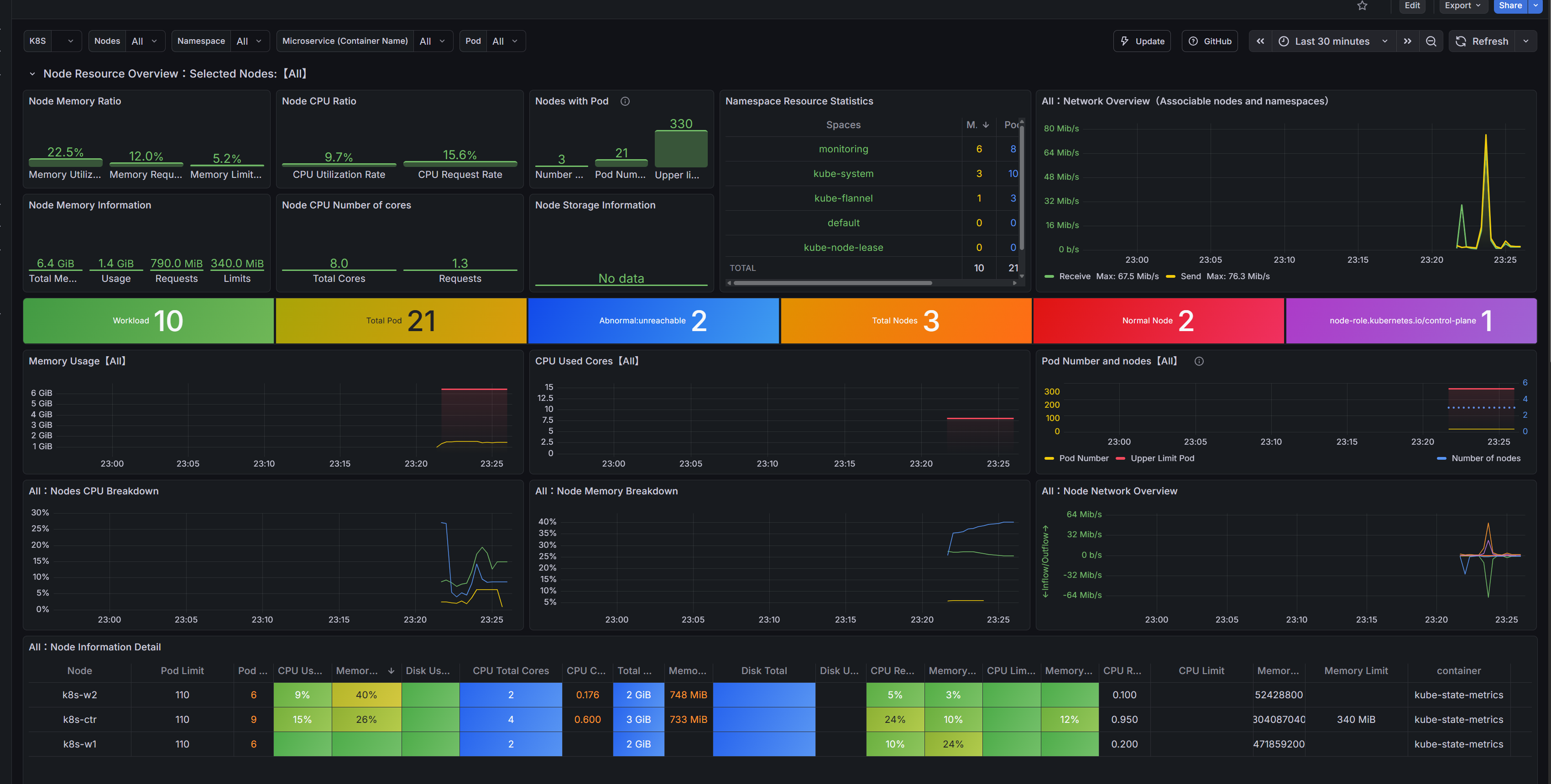
kube-controller-manager, etcd, kube-scheduler 메트릭 수집 설정
**sed -i 's|--bind-address=127.0.0.1|--bind-address=0.0.0.0|g' /etc/kubernetes/manifests/kube-controller-manager.yaml**
**cat /etc/kubernetes/manifests/kube-controller-manager.yaml | grep bind-address**
    *- --bind-address=**0.0.0.0***

# kube-scheduler bind-address 127.0.0.1 => 0.0.0.0 변경
**sed -i 's|--bind-address=127.0.0.1|--bind-address=0.0.0.0|g' /etc/kubernetes/manifests/kube-scheduler.yaml**
**cat /etc/kubernetes/manifests/kube-scheduler.yaml | grep bind-address**
    *- --bind-address=**0.0.0.0***

# etcd metrics-url(http) 127.0.0.1 에 192.168.10.100 추가
****sed -i 's|--listen-metrics-urls=http://127.0.0.1:2381|--listen-metrics-urls=http://127.0.0.1:2381,http://192.168.10.100:2381|g' /etc/kubernetes/manifests/etcd.yaml
**cat /etc/kubernetes/manifests/etcd.yaml | grep listen-metrics-urls
***    - --listen-metrics-urls=http://127.0.0.1:2381,**http://192.168.10.100:2381***
k8s 인증서 위치 확인
(⎈|HomeLab:default) root@k8s-ctr:~# kubeadm certs check-expiration
[check-expiration] Reading configuration from the "kubeadm-config" ConfigMap in namespace "kube-system"...
[check-expiration] Use 'kubeadm init phase upload-config --config your-config.yaml' to re-upload it.

CERTIFICATE                EXPIRES                  RESIDUAL TIME   CERTIFICATE AUTHORITY   EXTERNALLY MANAGED
admin.conf                 Jan 20, 2027 12:52 UTC   364d            ca                      no
apiserver                  Jan 20, 2027 12:52 UTC   364d            ca                      no
apiserver-etcd-client      Jan 20, 2027 12:52 UTC   364d            etcd-ca                 no
apiserver-kubelet-client   Jan 20, 2027 12:52 UTC   364d            ca                      no
controller-manager.conf    Jan 20, 2027 12:52 UTC   364d            ca                      no
etcd-healthcheck-client    Jan 20, 2027 12:52 UTC   364d            etcd-ca                 no
etcd-peer                  Jan 20, 2027 12:52 UTC   364d            etcd-ca                 no
etcd-server                Jan 20, 2027 12:52 UTC   364d            etcd-ca                 no
front-proxy-client         Jan 20, 2027 12:52 UTC   364d            front-proxy-ca          no
scheduler.conf             Jan 20, 2027 12:52 UTC   364d            ca                      no
super-admin.conf           Jan 20, 2027 12:52 UTC   364d            ca                      no

CERTIFICATE AUTHORITY   EXPIRES                  RESIDUAL TIME   EXTERNALLY MANAGED
ca                      Jan 18, 2036 12:52 UTC   9y              no
etcd-ca                 Jan 18, 2036 12:52 UTC   9y              no
front-proxy-ca          Jan 18, 2036 12:52 UTC   9y              no

(⎈|HomeLab:default) root@k8s-ctr:~# tree /var/lib/kubelet/pki/
/var/lib/kubelet/pki/
├── kubelet-client-2026-01-20-21-53-09.pem
├── kubelet-client-current.pem -> /var/lib/kubelet/pki/kubelet-client-2026-01-20-21-53-09.pem
├── kubelet.crt
└── kubelet.key

1 directory, 4 files
x509 certificate exporter 소개
- 인증서 만료 기간 메트릭 노출 A Prometheus exporter for certificates focusing on expiration monitoring
- 만료 전 알람 지원 종류 Get notified before they expire:
- 시크릿(TLS) : TLS Secrets from a Kubernetes cluster
- PEM 인코딩된 파일 : PEM encoded files, by path or scanning directories
- 인증서 및 파일 참조 포함된 kubeconfig : Kubeconfigs with embedded certificates or file references
- 지원 메트릭 종류 The following metrics are available:
x509 certificate exporter 설치
kubectl label node k8s-w1 worker="true" --overwrite
kubectl label node k8s-w2 worker="true" --overwrite
kubectl get nodes -l worker=true

NAME     STATUS   ROLES    AGE   VERSION
k8s-w1   Ready    <none>   37m   v1.32.11
k8s-w2   Ready    <none>   26m   v1.32.11

cat << EOF > cert-export-values.yaml
# -- hostPaths Exporter
hostPathsExporter:
  hostPathVolumeType: **Directory**

  daemonSets:
    **cp**:
      nodeSelector:
        **node-role.kubernetes.io/control-plane: ""**
      tolerations:
      - effect: NoSchedule
        key: node-role.kubernetes.io/control-plane
        operator: Exists
      watchFiles:
      - /var/lib/kubelet/pki/kubelet-client-current.pem
      - /var/lib/kubelet/pki/kubelet.crt
      - /etc/kubernetes/pki/apiserver.crt
      - /etc/kubernetes/pki/apiserver-etcd-client.crt
      - /etc/kubernetes/pki/apiserver-kubelet-client.crt
      - /etc/kubernetes/pki/ca.crt
      - /etc/kubernetes/pki/front-proxy-ca.crt
      - /etc/kubernetes/pki/front-proxy-client.crt
      - /etc/kubernetes/pki/etcd/ca.crt
      - /etc/kubernetes/pki/etcd/healthcheck-client.crt
      - /etc/kubernetes/pki/etcd/peer.crt
      - /etc/kubernetes/pki/etcd/server.crt
      watchKubeconfFiles:
      - /etc/kubernetes/admin.conf
      - /etc/kubernetes/controller-manager.conf
      - /etc/kubernetes/scheduler.conf

    **nodes**:
      nodeSelector:
        **worker: "true"**
      watchFiles:
      - /var/lib/kubelet/pki/kubelet-client-current.pem
      - /etc/kubernetes/pki/ca.crt

prometheusServiceMonitor:
  create: true
  scrapeInterval: 15s
  scrapeTimeout: 10s
  extraLabels:
    release: kube-prometheus-stack

prometheusRules:
  create: true
  warningDaysLeft: 28
  criticalDaysLeft: 14
  extraLabels:
    release: kube-prometheus-stack

grafana:
  createDashboard: true
secretsExporter:
  enabled: false
EOF

(⎈|HomeLab:default) root@k8s-ctr:~# helm list -n monitoring
NAME                            NAMESPACE       REVISION        UPDATED                                 STATUS          CHART                                   APP VERSION
kube-prometheus-stack           monitoring      1               2026-01-20 23:17:45.72722722 +0900 KST  deployed        kube-prometheus-stack-80.13.3           v0.87.1
x509-certificate-exporter       monitoring      1               2026-01-20 23:31:26.943689699 +0900 KST deployed        x509-certificate-exporter-3.19.1        3.19.1
(⎈|HomeLab:default) root@k8s-ctr:~# kubectl get cm -n monitoring x509-certificate-exporter-dashboard
NAME                                  DATA   AGE
x509-certificate-exporter-dashboard   1      116s
(⎈|HomeLab:default) root@k8s-ctr:~# kubectl get ds -n monitoring -l app.kubernetes.io/instance=x509-certificate-exporter
NAME                              DESIRED   CURRENT   READY   UP-TO-DATE   AVAILABLE   NODE SELECTOR                            AGE
x509-certificate-exporter-cp      1         1         1       1            1           node-role.kubernetes.io/control-plane=   2m1s
x509-certificate-exporter-nodes   2         2         2       2            2           worker=true                              2m1s
(⎈|HomeLab:default) root@k8s-ctr:~# kubectl get pod -n monitoring -l app.kubernetes.io/instance=x509-certificate-exporter -owide
NAME                                    READY   STATUS    RESTARTS   AGE     IP           NODE      NOMINATED NODE   READINESS GATES
x509-certificate-exporter-cp-ngwgj      1/1     Running   0          2m11s   10.244.0.4   k8s-ctr   <none>           <none>
x509-certificate-exporter-nodes-7vs9t   1/1     Running   0          2m11s   10.244.1.6   k8s-w1    <none>           <none>
x509-certificate-exporter-nodes-7z4gl   1/1     Running   0          2m11s   10.244.2.6   k8s-w2    <none>           <none>
프로메테우스 확인
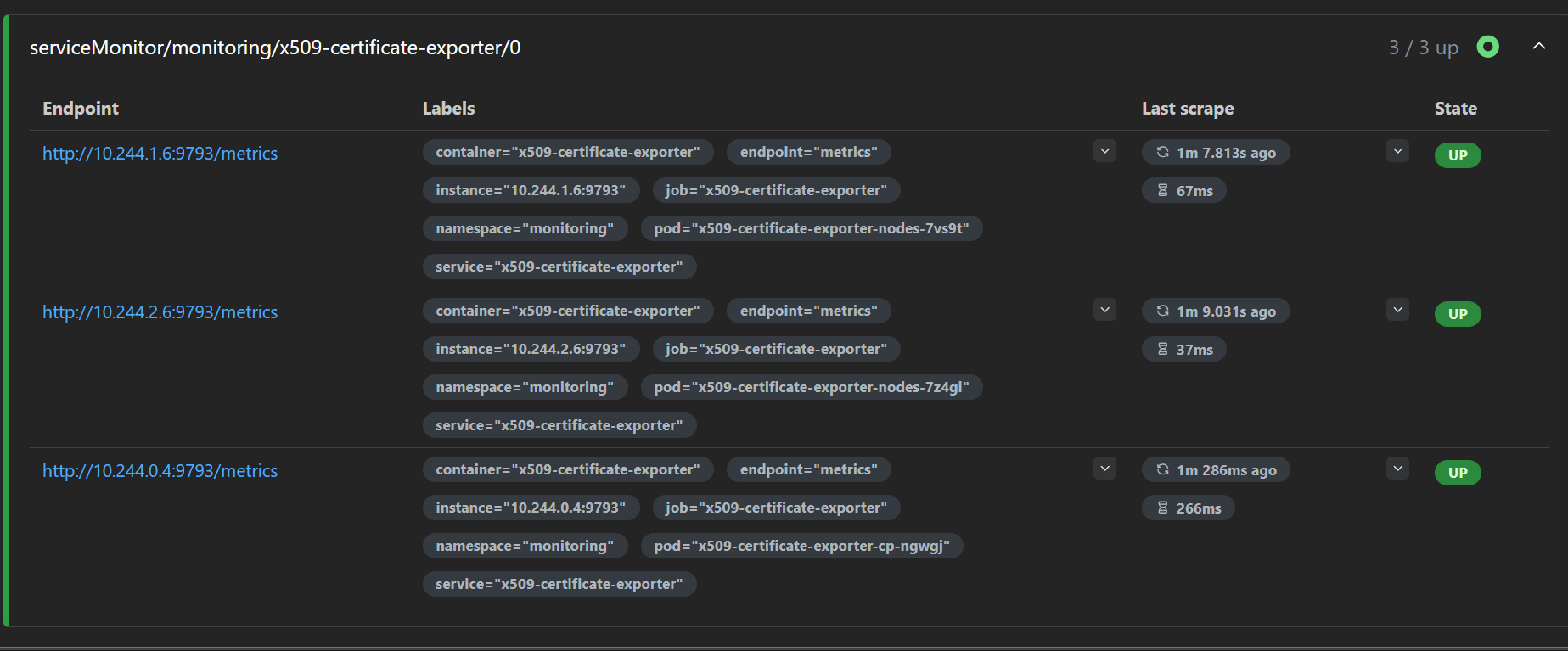
그라파나 확인
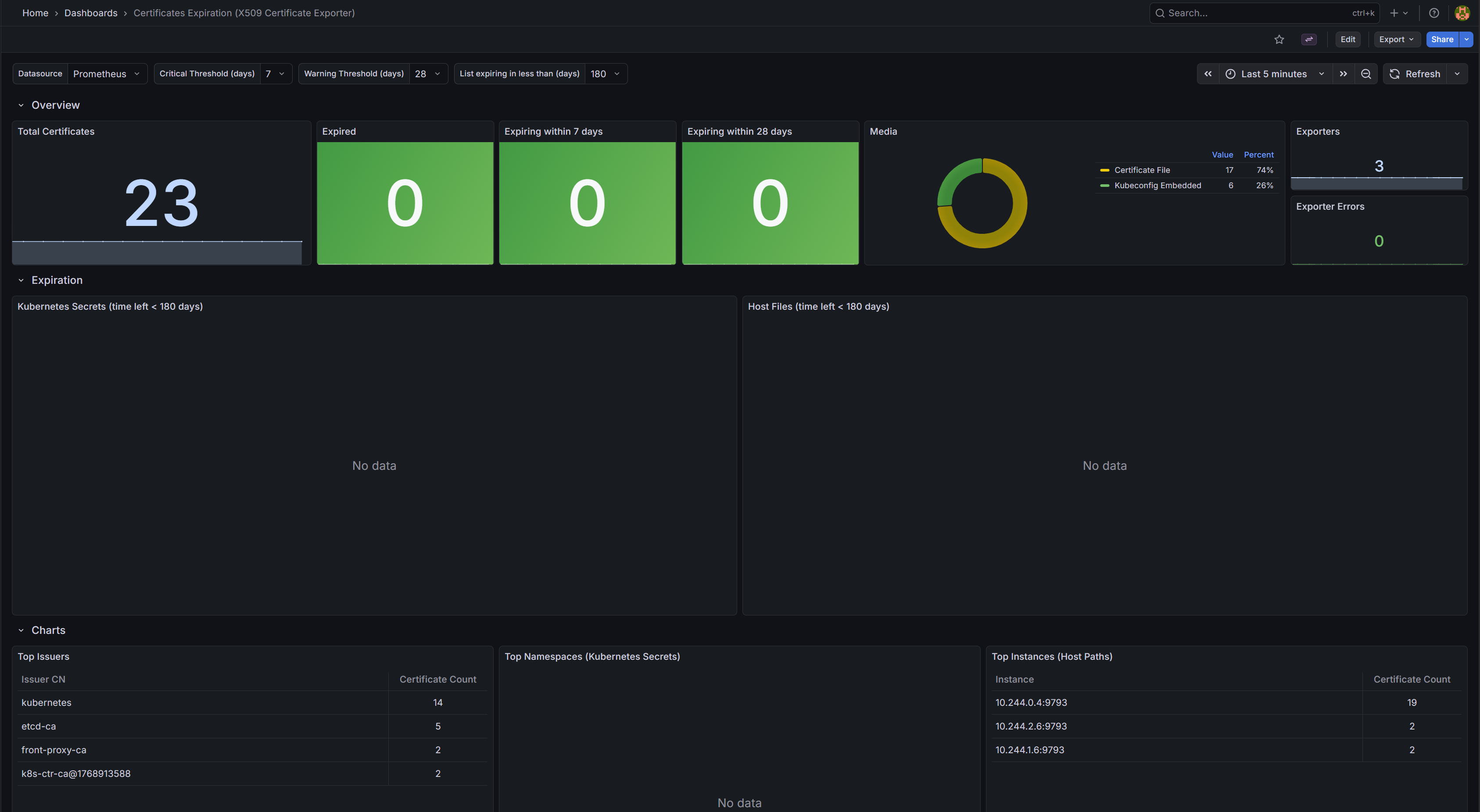
7. sample application 배포
# 샘플 애플리케이션 배포
**cat << EOF | kubectl apply -f -**
apiVersion: apps/v1
kind: Deployment
metadata:
  name: **webpod**
spec:
  **replicas: 2**
  selector:
    matchLabels:
      app: **webpod**
  template:
    metadata:
      labels:
        app: **webpod**
    spec:
      **affinity**:
****        **podAntiAffinity**:
          **required**DuringSchedulingIgnoredDuringExecution:
          - labelSelector:
              matchExpressions:
              - key: app
                operator: In
                values:
                - sample-app
            **topologyKey**: "kubernetes.io/hostname"
      containers:
      - name: **webpod**
        image: **traefik/whoami**
        ports:
        - containerPort: **80**
---
apiVersion: v1
kind: Service
metadata:
  name: **webpod**
  labels:
    app: **webpod**
spec:
  selector:
    app: **webpod**
  ports:
  - protocol: TCP
    port: **80**
    targetPort: **80**
  type: **ClusterIP
EOF**
애플리케이션 확인
(⎈|HomeLab:default) root@k8s-ctr:~# kubectl get deploy,svc,ep webpod -owide
NAME                     READY   UP-TO-DATE   AVAILABLE   AGE   CONTAINERS   IMAGES           SELECTOR
deployment.apps/webpod   2/2     2            2           37s   webpod       traefik/whoami   app=webpod

NAME             TYPE        CLUSTER-IP    EXTERNAL-IP   PORT(S)   AGE   SELECTOR
service/webpod   ClusterIP   10.96.26.80   <none>        80/TCP    37s   app=webpod

NAME               ENDPOINTS                     AGE
endpoints/webpod   10.244.1.7:80,10.244.2.7:80   37s
(⎈|HomeLab:default) root@k8s-ctr:~# SVCIP=$(kubectl get svc webpod -o jsonpath='{.spec.clusterIP}')
echo $SVCIP

# 통신 확인
curl -s $SVCIP
curl -s $SVCIP | grep Hostname
10.96.26.80
Hostname: webpod-697b545f57-xs5wj
IP: 127.0.0.1
IP: ::1
IP: 10.244.1.7
IP: fe80::ec37:7cff:fea4:7372
RemoteAddr: 10.244.0.0:42447
GET / HTTP/1.1
Host: 10.96.26.80
User-Agent: curl/8.9.1
Accept: */*

Hostname: webpod-697b545f57-xs5wj
8. kubeadm 인증서 갱신
현재 인증서 정보 확인 : 인증서 파일 생성일
Hostname: webpod-697b545f57-xs5wj
(⎈|HomeLab:default) root@k8s-ctr:~# kc describe cm -n kube-system kubeadm-config | grep -i cert
caCertificateValidityPeriod: 87600h0m0s
certificateValidityPeriod: 8760h0m0s
certificatesDir: /etc/kubernetes/pki
(⎈|HomeLab:default) root@k8s-ctr:~# kubeadm certs check-expiration -v 6
I0120 23:42:53.580712   36762 loader.go:402] Config loaded from file:  /etc/kubernetes/admin.conf
I0120 23:42:53.599233   36762 envvar.go:172] "Feature gate default state" feature="ClientsAllowCBOR" enabled=false
I0120 23:42:53.600125   36762 envvar.go:172] "Feature gate default state" feature="ClientsPreferCBOR" enabled=false
I0120 23:42:53.600159   36762 envvar.go:172] "Feature gate default state" feature="InformerResourceVersion" enabled=false
I0120 23:42:53.600172   36762 envvar.go:172] "Feature gate default state" feature="WatchListClient" enabled=false
[check-expiration] Reading configuration from the "kubeadm-config" ConfigMap in namespace "kube-system"...
[check-expiration] Use 'kubeadm init phase upload-config --config your-config.yaml' to re-upload it.
I0120 23:42:53.717942   36762 round_trippers.go:560] GET https://192.168.10.100:6443/api/v1/namespaces/kube-system/configmaps/kubeadm-config?timeout=10s 200 OK in 92 milliseconds
I0120 23:42:53.729789   36762 kubeproxy.go:55] attempting to download the KubeProxyConfiguration from ConfigMap "kube-proxy"
I0120 23:42:53.754989   36762 round_trippers.go:560] GET https://192.168.10.100:6443/api/v1/namespaces/kube-system/configmaps/kube-proxy?timeout=10s 200 OK in 24 milliseconds
I0120 23:42:53.777923   36762 kubelet.go:74] attempting to download the KubeletConfiguration from ConfigMap "kubelet-config"
I0120 23:42:53.820584   36762 round_trippers.go:560] GET https://192.168.10.100:6443/api/v1/namespaces/kube-system/configmaps/kubelet-config?timeout=10s 200 OK in 41 milliseconds
I0120 23:42:53.842076   36762 loader.go:402] Config loaded from file:  /etc/kubernetes/kubelet.conf
I0120 23:42:53.851461   36762 cert_rotation.go:140] Starting client certificate rotation controller
I0120 23:42:53.936744   36762 round_trippers.go:560] POST https://192.168.10.100:6443/apis/authentication.k8s.io/v1/selfsubjectreviews?timeout=10s 201 Created in 82 milliseconds
I0120 23:42:53.986875   36762 round_trippers.go:560] GET https://192.168.10.100:6443/api/v1/nodes/k8s-ctr?timeout=10s 200 OK in 24 milliseconds
I0120 23:42:54.025371   36762 round_trippers.go:560] GET https://192.168.10.100:6443/api/v1/namespaces/kube-system/pods?fieldSelector=spec.nodeName%3Dk8s-ctr&labelSelector=component%3Dkube-apiserver%2Ctier%3Dcontrol-plane 200 OK in 24 milliseconds

I0120 23:42:54.035808   36762 certs.go:360] Overriding the cluster certificate directory with the value from command line flag --cert-dir: /etc/kubernetes/pki
I0120 23:42:54.059159   36762 certs.go:473] validating certificate period for CA certificate
I0120 23:42:54.072790   36762 loader.go:402] Config loaded from file:  /etc/kubernetes/admin.conf
I0120 23:42:54.075654   36762 certs.go:473] validating certificate period for etcd CA certificate
I0120 23:42:54.082106   36762 loader.go:402] Config loaded from file:  /etc/kubernetes/controller-manager.conf
I0120 23:42:54.083962   36762 certs.go:473] validating certificate period for front-proxy CA certificate
I0120 23:42:54.100583   36762 loader.go:402] Config loaded from file:  /etc/kubernetes/scheduler.conf
I0120 23:42:54.105944   36762 loader.go:402] Config loaded from file:  /etc/kubernetes/super-admin.conf
CERTIFICATE                EXPIRES                  RESIDUAL TIME   CERTIFICATE AUTHORITY   EXTERNALLY MANAGED
admin.conf                 Jan 20, 2027 12:52 UTC   364d            ca                      no
apiserver                  Jan 20, 2027 12:52 UTC   364d            ca                      no
apiserver-etcd-client      Jan 20, 2027 12:52 UTC   364d            etcd-ca                 no
apiserver-kubelet-client   Jan 20, 2027 12:52 UTC   364d            ca                      no
controller-manager.conf    Jan 20, 2027 12:52 UTC   364d            ca                      no
etcd-healthcheck-client    Jan 20, 2027 12:52 UTC   364d            etcd-ca                 no
etcd-peer                  Jan 20, 2027 12:52 UTC   364d            etcd-ca                 no
etcd-server                Jan 20, 2027 12:52 UTC   364d            etcd-ca                 no
front-proxy-client         Jan 20, 2027 12:52 UTC   364d            front-proxy-ca          no
scheduler.conf             Jan 20, 2027 12:52 UTC   364d            ca                      no
super-admin.conf           Jan 20, 2027 12:52 UTC   364d            ca                      no

CERTIFICATE AUTHORITY   EXPIRES                  RESIDUAL TIME   EXTERNALLY MANAGED
ca                      Jan 18, 2036 12:52 UTC   9y              no
etcd-ca                 Jan 18, 2036 12:52 UTC   9y              no
front-proxy-ca          Jan 18, 2036 12:52 UTC   9y              no
(⎈|HomeLab:default) root@k8s-ctr:~# tree /etc/kubernetes/pki/
/etc/kubernetes/pki/
├── apiserver.crt
├── apiserver-etcd-client.crt
├── apiserver-etcd-client.key
├── apiserver.key
├── apiserver-kubelet-client.crt
├── apiserver-kubelet-client.key
├── ca.crt
├── ca.key
├── etcd
│   ├── ca.crt
│   ├── ca.key
│   ├── healthcheck-client.crt
│   ├── healthcheck-client.key
│   ├── peer.crt
│   ├── peer.key
│   ├── server.crt
│   └── server.key
├── front-proxy-ca.crt
├── front-proxy-ca.key
├── front-proxy-client.crt
├── front-proxy-client.key
├── sa.key
└── sa.pub

2 directories, 22 files
(⎈|HomeLab:default) root@k8s-ctr:~# ls -l /etc/kubernetes/pki/etcd/
ls -l /etc/kubernetes/pki
total 32
-rw-r--r--. 1 root root 1094 Jan 20 21:52 ca.crt
-rw-------. 1 root root 1675 Jan 20 21:52 ca.key
-rw-r--r--. 1 root root 1123 Jan 20 21:52 healthcheck-client.crt
-rw-------. 1 root root 1671 Jan 20 21:52 healthcheck-client.key
-rw-r--r--. 1 root root 1196 Jan 20 21:52 peer.crt
-rw-------. 1 root root 1679 Jan 20 21:52 peer.key
-rw-r--r--. 1 root root 1196 Jan 20 21:52 server.crt
-rw-------. 1 root root 1679 Jan 20 21:52 server.key
total 56
-rw-r--r--. 1 root root 1281 Jan 20 21:52 apiserver.crt
-rw-r--r--. 1 root root 1123 Jan 20 21:52 apiserver-etcd-client.crt
-rw-------. 1 root root 1675 Jan 20 21:52 apiserver-etcd-client.key
-rw-------. 1 root root 1675 Jan 20 21:52 apiserver.key
-rw-r--r--. 1 root root 1176 Jan 20 21:52 apiserver-kubelet-client.crt
-rw-------. 1 root root 1675 Jan 20 21:52 apiserver-kubelet-client.key
-rw-r--r--. 1 root root 1107 Jan 20 21:52 ca.crt
-rw-------. 1 root root 1679 Jan 20 21:52 ca.key
drwxr-xr-x. 2 root root  162 Jan 20 21:52 etcd
-rw-r--r--. 1 root root 1123 Jan 20 21:52 front-proxy-ca.crt
-rw-------. 1 root root 1679 Jan 20 21:52 front-proxy-ca.key
-rw-r--r--. 1 root root 1119 Jan 20 21:52 front-proxy-client.crt
-rw-------. 1 root root 1679 Jan 20 21:52 front-proxy-client.key
-rw-------. 1 root root 1675 Jan 20 21:52 sa.key
-rw-------. 1 root root  451 Jan 20 21:52 sa.pub
수동 인증서 갱신
# 사전 백업
(⎈|HomeLab:default) root@k8s-ctr:~# cp -r /etc/kubernetes/pki /etc/kubernetes/pki.backup.$(date +%F)
ls -l /etc/kubernetes/pki.backup.$(date +%F)
total 56
-rw-r--r--. 1 root root 1281 Jan 20 23:44 apiserver.crt
-rw-r--r--. 1 root root 1123 Jan 20 23:44 apiserver-etcd-client.crt
-rw-------. 1 root root 1675 Jan 20 23:44 apiserver-etcd-client.key
-rw-------. 1 root root 1675 Jan 20 23:44 apiserver.key
-rw-r--r--. 1 root root 1176 Jan 20 23:44 apiserver-kubelet-client.crt
-rw-------. 1 root root 1675 Jan 20 23:44 apiserver-kubelet-client.key
-rw-r--r--. 1 root root 1107 Jan 20 23:44 ca.crt
-rw-------. 1 root root 1679 Jan 20 23:44 ca.key
drwxr-xr-x. 2 root root  162 Jan 20 23:44 etcd
-rw-r--r--. 1 root root 1123 Jan 20 23:44 front-proxy-ca.crt
-rw-------. 1 root root 1679 Jan 20 23:44 front-proxy-ca.key
-rw-r--r--. 1 root root 1119 Jan 20 23:44 front-proxy-client.crt
-rw-------. 1 root root 1679 Jan 20 23:44 front-proxy-client.key
-rw-------. 1 root root 1675 Jan 20 23:44 sa.key
-rw-------. 1 root root  451 Jan 20 23:44 sa.pub
(⎈|HomeLab:default) root@k8s-ctr:~# mkdir /etc/kubernetes/backup-conf.$(date +%F)
cp /etc/kubernetes/*.conf /etc/kubernetes/backup-conf.$(date +%F)
ls -l /etc/kubernetes/backup-conf.$(date +%F)
total 36
-rw-------. 1 root root 5658 Jan 20 23:44 admin.conf
-rw-------. 1 root root 5682 Jan 20 23:44 controller-manager.conf
-rw-------. 1 root root 1974 Jan 20 23:44 kubelet.conf
-rw-------. 1 root root 5626 Jan 20 23:44 scheduler.conf
-rw-------. 1 root root 5678 Jan 20 23:44 super-admin.conf

kubeadm certs check-expiration
[check-expiration] Reading configuration from the "kubeadm-config" ConfigMap in namespace "kube-system"...
[check-expiration] Use 'kubeadm init phase upload-config --config your-config.yaml' to re-upload it.

CERTIFICATE                EXPIRES                  RESIDUAL TIME   CERTIFICATE AUTHORITY   EXTERNALLY MANAGED
admin.conf                 Jan 20, 2027 12:52 UTC   364d            ca                      no
apiserver                  Jan 20, 2027 12:52 UTC   364d            ca                      no
apiserver-etcd-client      Jan 20, 2027 12:52 UTC   364d            etcd-ca                 no
apiserver-kubelet-client   Jan 20, 2027 12:52 UTC   364d            ca                      no
controller-manager.conf    Jan 20, 2027 12:52 UTC   364d            ca                      no
etcd-healthcheck-client    Jan 20, 2027 12:52 UTC   364d            etcd-ca                 no
etcd-peer                  Jan 20, 2027 12:52 UTC   364d            etcd-ca                 no
etcd-server                Jan 20, 2027 12:52 UTC   364d            etcd-ca                 no
front-proxy-client         Jan 20, 2027 12:52 UTC   364d            front-proxy-ca          no
scheduler.conf             Jan 20, 2027 12:52 UTC   364d            ca                      no
super-admin.conf           Jan 20, 2027 12:52 UTC   364d            ca                      no

CERTIFICATE AUTHORITY   EXPIRES                  RESIDUAL TIME   EXTERNALLY MANAGED
ca                      Jan 18, 2036 12:52 UTC   9y              no
etcd-ca                 Jan 18, 2036 12:52 UTC   9y              no
front-proxy-ca          Jan 18, 2036 12:52 UTC   9y              no
(⎈|HomeLab:default) root@k8s-ctr:~# kubeadm certs renew all
[renew] Reading configuration from the "kubeadm-config" ConfigMap in namespace "kube-system"...
[renew] Use 'kubeadm init phase upload-config --config your-config.yaml' to re-upload it.

certificate embedded in the kubeconfig file for the admin to use and for kubeadm itself renewed
certificate for serving the Kubernetes API renewed
certificate the apiserver uses to access etcd renewed
certificate for the API server to connect to kubelet renewed
certificate embedded in the kubeconfig file for the controller manager to use renewed
certificate for liveness probes to healthcheck etcd renewed
certificate for etcd nodes to communicate with each other renewed
certificate for serving etcd renewed
certificate for the front proxy client renewed
certificate embedded in the kubeconfig file for the scheduler manager to use renewed
certificate embedded in the kubeconfig file for the super-admin renewed

Done renewing certificates. You must restart the kube-apiserver, kube-controller-manager, kube-scheduler and etcd, so that they can use the new certificates.
(⎈|HomeLab:default) root@k8s-ctr:~# kubeadm certs check-expiration
[check-expiration] Reading configuration from the "kubeadm-config" ConfigMap in namespace "kube-system"...
[check-expiration] Use 'kubeadm init phase upload-config --config your-config.yaml' to re-upload it.

CERTIFICATE                EXPIRES                  RESIDUAL TIME   CERTIFICATE AUTHORITY   EXTERNALLY MANAGED
admin.conf                 Jan 20, 2027 14:45 UTC   364d            ca                      no
apiserver                  Jan 20, 2027 14:45 UTC   364d            ca                      no
apiserver-etcd-client      Jan 20, 2027 14:45 UTC   364d            etcd-ca                 no
apiserver-kubelet-client   Jan 20, 2027 14:45 UTC   364d            ca                      no
controller-manager.conf    Jan 20, 2027 14:45 UTC   364d            ca                      no
etcd-healthcheck-client    Jan 20, 2027 14:45 UTC   364d            etcd-ca                 no
etcd-peer                  Jan 20, 2027 14:45 UTC   364d            etcd-ca                 no
etcd-server                Jan 20, 2027 14:45 UTC   364d            etcd-ca                 no
front-proxy-client         Jan 20, 2027 14:45 UTC   364d            front-proxy-ca          no
scheduler.conf             Jan 20, 2027 14:45 UTC   364d            ca                      no
super-admin.conf           Jan 20, 2027 14:45 UTC   364d            ca                      no

CERTIFICATE AUTHORITY   EXPIRES                  RESIDUAL TIME   EXTERNALLY MANAGED
ca                      Jan 18, 2036 12:52 UTC   9y              no
etcd-ca                 Jan 18, 2036 12:52 UTC   9y              no
front-proxy-ca          Jan 18, 2036 12:52 UTC   9y              no
(⎈|HomeLab:default) root@k8s-ctr:~# ls -lt /etc/kubernetes/pki/
total 56
-rw-r--r--. 1 root root 1119 Jan 20 23:45 front-proxy-client.crt
-rw-------. 1 root root 1675 Jan 20 23:45 front-proxy-client.key
-rw-r--r--. 1 root root 1176 Jan 20 23:45 apiserver-kubelet-client.crt
-rw-------. 1 root root 1675 Jan 20 23:45 apiserver-kubelet-client.key
-rw-r--r--. 1 root root 1123 Jan 20 23:45 apiserver-etcd-client.crt
-rw-------. 1 root root 1675 Jan 20 23:45 apiserver-etcd-client.key
-rw-r--r--. 1 root root 1281 Jan 20 23:45 apiserver.crt
-rw-------. 1 root root 1675 Jan 20 23:45 apiserver.key
-rw-------. 1 root root 1675 Jan 20 21:52 sa.key
-rw-------. 1 root root  451 Jan 20 21:52 sa.pub
drwxr-xr-x. 2 root root  162 Jan 20 21:52 etcd
-rw-r--r--. 1 root root 1123 Jan 20 21:52 front-proxy-ca.crt
-rw-------. 1 root root 1679 Jan 20 21:52 front-proxy-ca.key
-rw-r--r--. 1 root root 1107 Jan 20 21:52 ca.crt
-rw-------. 1 root root 1679 Jan 20 21:52 ca.key
(⎈|HomeLab:default) root@k8s-ctr:~# ls -lt /etc/kubernetes/pki/etcd
total 32
-rw-r--r--. 1 root root 1196 Jan 20 23:45 server.crt
-rw-------. 1 root root 1675 Jan 20 23:45 server.key
-rw-r--r--. 1 root root 1196 Jan 20 23:45 peer.crt
-rw-------. 1 root root 1679 Jan 20 23:45 peer.key
-rw-r--r--. 1 root root 1123 Jan 20 23:45 healthcheck-client.crt
-rw-------. 1 root root 1675 Jan 20 23:45 healthcheck-client.key
-rw-r--r--. 1 root root 1094 Jan 20 21:52 ca.crt
-rw-------. 1 root root 1675 Jan 20 21:52 ca.key

(⎈|HomeLab:default) root@k8s-ctr:~# ls -lt /etc/kubernetes/*.conf
-rw-------. 1 root root 5678 Jan 20 23:45 /etc/kubernetes/super-admin.conf
-rw-------. 1 root root 5630 Jan 20 23:45 /etc/kubernetes/scheduler.conf
-rw-------. 1 root root 5678 Jan 20 23:45 /etc/kubernetes/controller-manager.conf
-rw-------. 1 root root 5658 Jan 20 23:45 /etc/kubernetes/admin.conf
-rw-------. 1 root root 1974 Jan 20 21:53 /etc/kubernetes/kubelet.conf
(⎈|HomeLab:default) root@k8s-ctr:~# ls -l /etc/kubernetes/admin.conf
ls -l /etc/kubernetes/backup-conf.$(date +%F)/admin.conf
vi -d /etc/kubernetes/backup-conf.$(date +%F)/admin.conf /etc/kubernetes/admin.conf
-rw-------. 1 root root 5658 Jan 20 23:45 /etc/kubernetes/admin.conf
-rw-------. 1 root root 5658 Jan 20 23:44 /etc/kubernetes/backup-conf.2026-01-20/admin.conf
2 files to edit
control-plane static pod 재기동 & admin.conf kubeconfig 재적용
(⎈|HomeLab:default) root@k8s-ctr:~# cp -r /etc/kubernetes/manifests /etc/kubernetes/manifests.backup.$(date +%F)
ls -l /etc/kubernetes/manifests.backup.$(date +%F)
total 16
-rw-------. 1 root root 2576 Jan 20 23:47 etcd.yaml
-rw-------. 1 root root 3603 Jan 20 23:47 kube-apiserver.yaml
-rw-------. 1 root root 3102 Jan 20 23:47 kube-controller-manager.yaml
-rw-------. 1 root root 1655 Jan 20 23:47 kube-scheduler.yaml
(⎈|HomeLab:default) root@k8s-ctr:~# ls -l /etc/kubernetes/manifests.backup.$(date +%F)
total 16
-rw-------. 1 root root 2576 Jan 20 23:47 etcd.yaml
-rw-------. 1 root root 3603 Jan 20 23:47 kube-apiserver.yaml
-rw-------. 1 root root 3102 Jan 20 23:47 kube-controller-manager.yaml
-rw-------. 1 root root 1655 Jan 20 23:47 kube-scheduler.yaml
(⎈|HomeLab:default) root@k8s-ctr:~# watch -d crictl ps
(⎈|HomeLab:default) root@k8s-ctr:~# rm -rf /etc/kubernetes/manifests/*.yaml
(⎈|HomeLab:default) root@k8s-ctr:~# crictl ps
CONTAINER           IMAGE               CREATED             STATE               NAME                        ATTEMPT             POD ID              POD
                                          NAMESPACE
6ba0797e6a08f       15c7865d224b3       16 minutes ago      Running             x509-certificate-exporter   0                   1b3f682727083       x509-certificate-exporter-cp-ngwgj                     monitoring
e83e86465595a       8cb12dd0c3e42       19 minutes ago      Running             etcd                        0                   c233ff095f01e       etcd-k8s-ctr                                           kube-system
bb73edab033ec       23d6a1fb92fda       20 minutes ago      Running             kube-scheduler              0                   79c30ae3439ae       kube-scheduler-k8s-ctr                                 kube-system
e84d23cadfcdf       2715d223fd463       29 minutes ago      Running             node-exporter               0                   346fe6e503de8       kube-prometheus-stack-prometheus-node-exporter-bssx8   monitoring
5bd94b5344f19       c69fa2e9cbf5f       About an hour ago   Running             coredns                     0                   171b68789da36       coredns-668d6bf9bc-qvqxx                               kube-system
6d663596e9615       c69fa2e9cbf5f       About an hour ago   Running             coredns                     0                   b8d53ab7293f6       coredns-668d6bf9bc-nwdj8                               kube-system
138fad6ad9fb9       5de71980e553f       About an hour ago   Running             kube-flannel                0                   634c0c0682b2f       kube-flannel-ds-dxtbs                                  kube-flannel
9f1329104f4ae       4d8fb2dc57519       2 hours ago         Running             kube-proxy                  0                   958bf2efbfd85       kube-proxy-c4b54                                       kube-system
0354be9cb8630       7757c58248a29       2 hours ago         Running             kube-apiserver              0                   cde1626416b16       kube-apiserver-k8s-ctr                                 kube-system
(⎈|HomeLab:default) root@k8s-ctr:~# cp /etc/kubernetes/manifests.backup.$(date +%F)/*.yaml /etc/kubernetes/manifests
tree /etc/kubernetes/manifests
/etc/kubernetes/manifests
├── etcd.yaml
├── kube-apiserver.yaml
├── kube-controller-manager.yaml
└── kube-scheduler.yaml

1 directory, 4 files
(⎈|HomeLab:default) root@k8s-ctr:~# crictl ps
kubectl get pod -n kube-system -owide -v=6
CONTAINER           IMAGE               CREATED             STATE               NAME                        ATTEMPT             POD ID              POD
                                          NAMESPACE
6ba0797e6a08f       15c7865d224b3       16 minutes ago      Running             x509-certificate-exporter   0                   1b3f682727083       x509-certificate-exporter-cp-ngwgj                     monitoring
e84d23cadfcdf       2715d223fd463       30 minutes ago      Running             node-exporter               0                   346fe6e503de8       kube-prometheus-stack-prometheus-node-exporter-bssx8   monitoring
5bd94b5344f19       c69fa2e9cbf5f       About an hour ago   Running             coredns                     0                   171b68789da36       coredns-668d6bf9bc-qvqxx                               kube-system
6d663596e9615       c69fa2e9cbf5f       About an hour ago   Running             coredns                     0                   b8d53ab7293f6       coredns-668d6bf9bc-nwdj8                               kube-system
138fad6ad9fb9       5de71980e553f       About an hour ago   Running             kube-flannel                0                   634c0c0682b2f       kube-flannel-ds-dxtbs                                  kube-flannel
9f1329104f4ae       4d8fb2dc57519       2 hours ago         Running             kube-proxy                  0                   958bf2efbfd85       kube-proxy-c4b54                                       kube-system
0354be9cb8630       7757c58248a29       2 hours ago         Running             kube-apiserver              0                   cde1626416b16       kube-apiserver-k8s-ctr                                 kube-system
I0120 23:48:52.632521   39793 loader.go:402] Config loaded from file:  /root/.kube/config
I0120 23:48:52.638159   39793 envvar.go:172] "Feature gate default state" feature="WatchListClient" enabled=false
I0120 23:48:52.638768   39793 envvar.go:172] "Feature gate default state" feature="ClientsAllowCBOR" enabled=false
I0120 23:48:52.638799   39793 envvar.go:172] "Feature gate default state" feature="ClientsPreferCBOR" enabled=false
I0120 23:48:52.638819   39793 envvar.go:172] "Feature gate default state" feature="InformerResourceVersion" enabled=false
I0120 23:49:10.687071   39793 round_trippers.go:560] GET https://192.168.10.100:6443/api/v1/namespaces/kube-system/pods?limit=500  in 17995 milliseconds
^C
(⎈|HomeLab:default) root@k8s-ctr:~# ls -l /root/.kube/config
ls -l /etc/kubernetes/admin.conf
ls -l /etc/kubernetes/backup-conf.$(date +%F)/admin.conf
-rw-------. 1 root root 5641 Jan 20 22:03 /root/.kube/config
-rw-------. 1 root root 5658 Jan 20 23:45 /etc/kubernetes/admin.conf
-rw-------. 1 root root 5658 Jan 20 23:44 /etc/kubernetes/backup-conf.2026-01-20/admin.conf
(⎈|HomeLab:default) root@k8s-ctr:~# yes | cp  /etc/kubernetes/admin.conf ~/.kube/config ; echo
chown $(id -u):$(id -g) ~/.kube/config
kubectl config rename-context "kubernetes-admin@kubernetes" "HomeLab"
kubens default
cp: overwrite '/root/.kube/config'?
Context "kubernetes-admin@kubernetes" renamed to "HomeLab".
Unable to connect to the server: net/http: TLS handshake timeout
error: no namespace exists with name "default".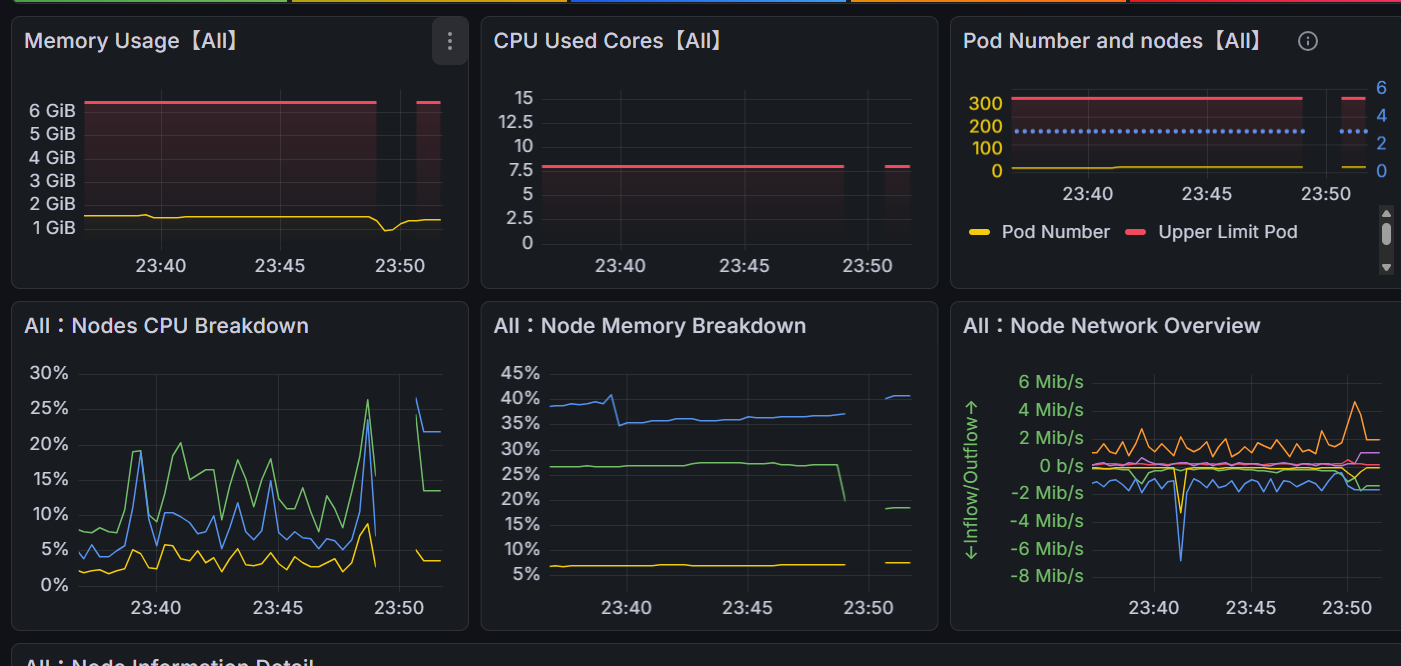
- 수동인증서 갱신시 매트릭 수집 X