❌개발 중 에러
1. RPC failed; HTTP 400 curl 22
문제
error: RPC failed; HTTP 400 curl 22 The requested URL returned error: 400
send-pack: unexpected disconnect while reading sideband packet
fatal: the remote end hung up unexpectedly
Github repo에 푸시 중 만난 에러입니다. 기본 버퍼의 크기를 초과하는 데이터를 전송하려고 했기 때문에 발생했습니다.
문제 해결
git config --global http.postBuffer 524288000명령어를 통해 기본 버퍼 크기를 500MB로 늘렸습니다
❌배포 중 에러
1. React Hook 종속성 누락 경고
문제
17:6  Warning: React Hook useEffect has a missing dependency: 'mdFilePath'. Either include it or remove the dependency array.  react-hooks/exhaustive-deps
./src/components/notion/Renderer.tsx
기존 코드에서 종속성 배열이 빈채로 배포를 시도 했기 때문에 발생한 경고입니다.
// 수정 전
  useEffect(() => {
    fetch(mdFilePath)
      .then((response) => response.text())
      .then((text) => setMarkdown(text));
  }, []);
문제 해결
useEffect 내부에서 사용하는 상태나 props는 종속성 배열에 명시해야 합니다. 외부에서 전달받은 mdFilePath props가 변경될 때 효과가 재실행되도록 보장하지 않으면 예기치 않은 동작이 발생할 수 있기 때문입니다.
// 수정 후
  useEffect(() => {
    fetch(mdFilePath)
      .then((response) => response.text())
      .then((text) => setMarkdown(text));
  }, [mdFilePath]);
2. 명시적 'any' 타입 사용 금지 (Unexpected any)
문제
8:14  Error: Unexpected any. Specify a different type.  @typescript-eslint/no-explicit-any
./src/lib/notion.ts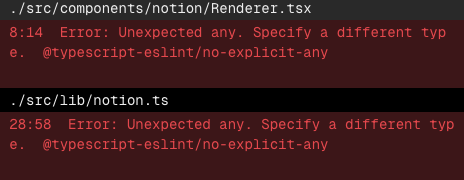
위 에러는 TypeScript 에서 any 타입을 사용할 때 발생합니다. any 타입은 타입 안전성을 제공하지 않기 때문에 TypeScript의 Strick mode, ESLint 규칙에 의해 에러가 발생하게 됩니다.
문제 해결
const eslintConfig = [
  ...compat.extends("next/core-web-vitals", "next/typescript"),
  {
    rules: {
      "@typescript-eslint/no-explicit-any": "off", // 해당 ESLint 규칙을 비활성화하여 에러를 해결합니다.
    },
  },
];
Notion API를 통해 DB Data를 any타입으로 가져온 것이 문제였는데 타입을 지정해주거나 위 처럼 규칙을 비활성화해서 문제를 해결할 수 있습니다.
TypeScript는 명시적 타입 지정을 통해 개발 단계에서 타입 안정성을 보장하는 것이 핵심 목적이므로, 규칙을 비활성화 하여 any 타입을 사용하기 보단 타입을 제대로 지정하는게 중요합니다.
3. 동적 라우팅 Params 타입 에러
문제
Type error: Type 'ProjectDetailPageProps' does not satisfy the constraint 'PageProps'.
  Types of property 'params' are incompatible.
    Type '{ slug: string; }' is missing the following properties from type 'Promise<any>': then, catch, finally, [Symbol.toStringTag]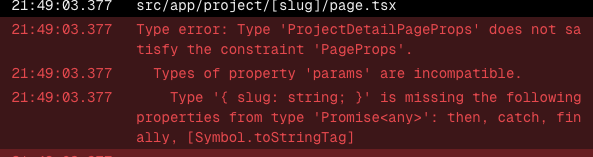
Next.js 15에서 App Router를 사용해 동적 경로(예: [slug]) 페이지를 구현하면서, params에 대한 타입 오류가 발생했습니다
// 기존 방식
interface DetailPageProps {
  params: { slug: string };
}
export default function DetailPagem ({ params }: DetailPageProps) {
  const slug = params.slug; // 동기식으로 바로 접근 가능
  // ...
}
문제 해결
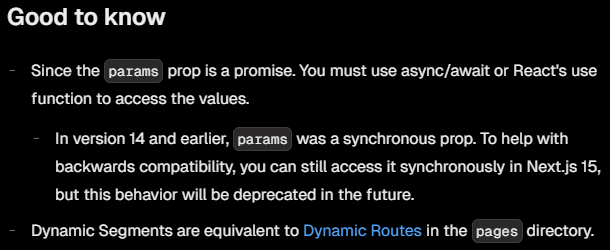
공식 문서의 내용을 보면 14 이하 버전에서는 params를 동기적으로 접근했습니다. 하지만 15 버전 부터는 비동기식으로 접근하도록 변경되었습니다.
// Next.js 15부터 적용되는 방식
interface DetailPageProps {
  params: Promise<{ slug: string }>;
}
export default async function DetailPagem ({ params }: DetailPageProps) {
  const slug = (await params).slug;
  // ...
}
4. Git에서 대소문자 변경 후 "Module not found" 에러
문제
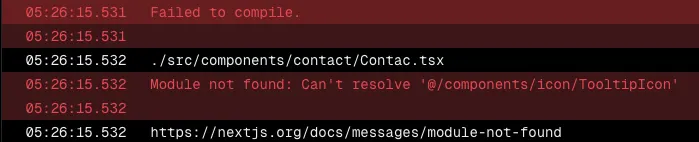
코드 리팩토링 중 파일 이름을 대소문자로 수정하는 과정에서 발생한 에러입니다.
Github repo를 살펴보면 변경된 대소문자가 repo에 적용되지 않았습니다. 기본적으로 파일 이름의 대소문자를 구분하지 않기 때문입니다. Vercel은 위 repo를 기준으로 빌드 및 배포를 진행하니 Module not found 에러가 발생한 것입니다.
문제 해결
git config core.ignorecase falseGithub 설정에 대소문자를 무시하지 않도록 설정합니다.
git rm -r --cached .캐시를 지워 새로운 변경 사항을 인식시켜준 뒤 변경된 파일 이름으로 다시 push하면 해결됩니다.
5. Next.js 및 Vercel 빌드 시 fetch 실패 문제
문제
Next.js와 Vecel 빌드 시 fetch가 실패하는 문제가 발생했습니다.
SSG 방식으로 빌드 시점에 페이지를 미리 렌더링하는데 내부 API를 사용한 fetch를 하게 되면 빌드 시점 기준으로 endpoint가 생성되지 않았기 때문에 fetch를 실패하게 됩니다.
문제 해결
외부 라이브러리를 통해 바로 Data를 받아오도록 수정하여 문제를 해결했습니다.