컴포넌트 스캔
지금까지는 스프링 빈을 등록할 때 자바 코드의 @Bean이나 XML의 을 통해 설정 정보에 직접 등록할 스프링 빈을 나열했지만, 이 과정은 반복이 많고 누락 문제도 발생한다. 그래서 스프링은 설정 정보 없이 자동으로 빈을 등록하는 컴포넌트 스캔과 자동으로 의존관계를 주입하는 @Autowired 기능을 제공한다.
1. 컴포넌트 스캔과 의존관계 자동 주입
컴포넌트 스캔은 @Component 애노테이션이 붙은 클래스를 스캔해 스프링 빈으로 동록한다.
🖥️ AutoAppConfig
@Configuration
@ComponentScan(
        basePackages = "hello.core.member",
        basePackageClasses = AutoAppConfig.class,
        excludeFilters = @Filter(type = FilterType.ANNOTATION, classes = Configuration.class)
)
public class AutoAppConfig {
}- 컴포넌트 스캔을 사용하려면
@ComponentScan을 설정 정보에 붙이면 됨 - 컴포넌트 스캔을 사용하면 @Configuration(의 소스코드에 @Component가 있음)이 붙은 설정 정보도 자동 등록되어, 앞서 만들었던 AppConfig도 실행되어버림 -> excludeFilters를 이용해 제외함
- 모든 자바 클래스를 다 컴포넌트 스캔하면 오래 걸리므로 탐색할 시작 위치를 지정할 수 있음
- basePackages : 탐색할 패키지의 시작 위치 지정
- basePackageClasses : 지정한 클래스의 패키지가 탐색 시작 위치
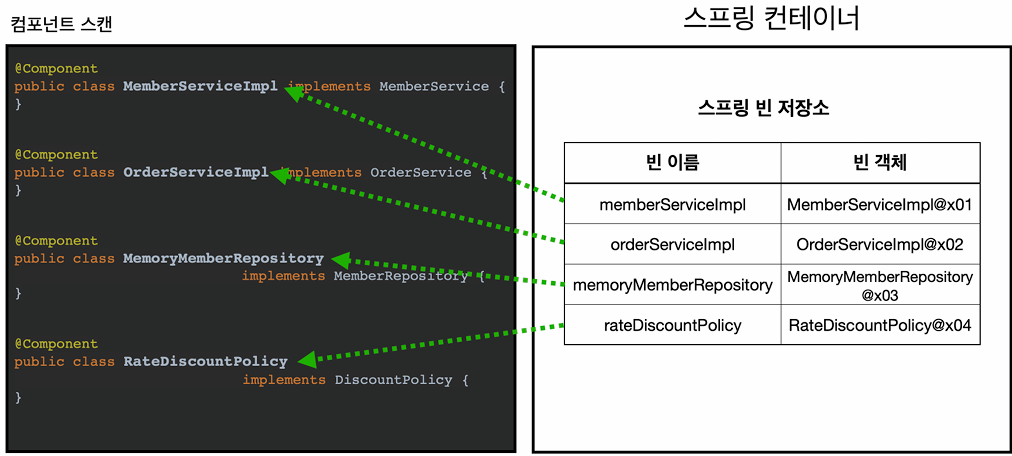 @ComponentScan은 @Component가 붙은 모든 클래스를 스프링 빈으로 등록한다. 이때 스프링 빈의 기본 이름은 클래스 명을 사용하되 맨 앞글자만 소문자로 사용한다. 직접 지정하려면 @Component("")로 부여하면 된다.
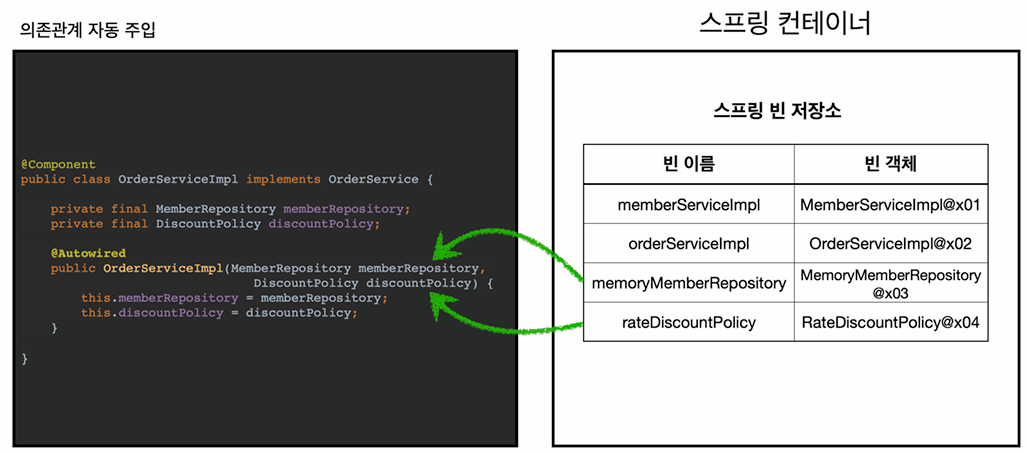 생성자에 @Autowired를 지정하면, 스프링 컨테이너가 자동으로 해당 스프링 빈을 찾아 주입한다. (= getBean(MemberRepository))
👉 @Controller, @Service, @Repository, @Configuration는 @Component를 포함한다. 애노테이션에는 상속관계라는 것은 없어 애노테이션이 특정 애노테이션을 들고 있는 것을 인식하는 것은 자바 언어가 지원하는 기능이 아니라 스프링이 지원하는 기능이다.
2. 필터
🖥️ MyIncludeComponent
@Target(ElementType.TYPE)
@Retention(RetentionPolicy.RUNTIME)
@Documented
public @interface MyIncludeComponent {
}
🖥️ BeanA
@MyIncludeComponent
public class BeanA {
}
🖥️ ComponentFilterAppConfig
@Configuration
@ComponentScan(
      includeFilters = @Filter(type = FilterType.ANNOTATION, classes = MyIncludeComponent.class),
      excludeFilters = @Filter(type = FilterType.ANNOTATION, classes = MyExcludeComponent.class),
                    // @Filter(type = FilterType.ASSIGNABLE_TYPE, classes = BeanA.class)
)
static class ComponentFilterAppConfig {
}- includeFilters는 컴포넌트 스캔 대상을 추가로 지정하고, excludeFilter는 스캔에서 제외할 대상을 지정함
- includeFilters에 MyIncludeComponent 애노테이션을 추가해 BeanA가 스프링 빈에 등록되는 것임
- 만약 BeanA도 제외하고 싶다면 주석처럼 하면 됨
📌 FilterType
- ANNOTATION: 기본값, 애노테이션을 인식해서 동작함
ex)org.example.SomeAnnotation - ASSIGNABLE_TYPE: 지정한 타입과 자식 타입을 인식해서 동작함
ex)org.example.SomeClass - ASPECTJ: AspectJ 패턴 사용
ex)org.example..*Service+ - REGEX: 정규 표현식
ex)org\.example\.Default.* - CUSTOM: TypeFilter 이라는 인터페이스를 구현해서 처리
ex)org.example.MyTypeFilter
3. 중복 등록과 충돌
컴포넌트 스캔에서 같은 빈 이름을 등록하면 어떻게 될까❓
- 자동 빈 등록일 경우 :
ConflictingBeanDefinitionException예외 발생 - 수동 빈 등록 vs 자동 빈 등록 : 수동 빈이 자동 빈을 오버라이딩함. 즉, 수동 빈 등록이 우선권을 가짐
-> 현실은 개발자가 의도적으로 설정한 것 보다는 여러 설정들이 꼬여 수동 등록 되기 때문에 잡기 어려운 버그가 발생하므로 최근 스프링 부트에서는 오류가 나도록 기본값을 바꿈