Spring Framework(3)
pom.xml 설정
<?xml version="1.0" encoding="UTF-8"?>
<project xmlns="http://maven.apache.org/POM/4.0.0" xmlns:xsi="http://www.w3.org/2001/XMLSchema-instance"
	xsi:schemaLocation="http://maven.apache.org/POM/4.0.0 https://maven.apache.org/maven-v4_0_0.xsd">
	<modelVersion>4.0.0</modelVersion>
	<groupId>com.anno</groupId>
	<artifactId>ex01</artifactId>
	<name>P03_annotation</name>
	<packaging>war</packaging>
	<version>1.0.0-BUILD-SNAPSHOT</version>
	<properties>
		<java-version>11</java-version>
		<org.springframework-version>5.2.1.RELEASE</org.springframework-version>
		<org.aspectj-version>1.6.10</org.aspectj-version>
		<org.slf4j-version>1.6.6</org.slf4j-version>
	</properties>
	<dependencies>
		<!-- Spring -->
		<dependency>
			<groupId>org.springframework</groupId>
			<artifactId>spring-context</artifactId>
			<version>${org.springframework-version}</version>
			<exclusions>
				<!-- Exclude Commons Logging in favor of SLF4j -->
				<exclusion>
					<groupId>commons-logging</groupId>
					<artifactId>commons-logging</artifactId>
				 </exclusion>
			</exclusions>
		</dependency>
		<dependency>
			<groupId>org.springframework</groupId>
			<artifactId>spring-webmvc</artifactId>
			<version>${org.springframework-version}</version>
		</dependency>
		<!-- https://mvnrepository.com/artifact/org.projectlombok/lombok -->
		<dependency>
		    <groupId>org.projectlombok</groupId>
		    <artifactId>lombok</artifactId>
		    <version>1.18.22</version>
		    <scope>provided</scope>
		</dependency>
		<!-- AspectJ -->
		<dependency>
			<groupId>org.aspectj</groupId>
			<artifactId>aspectjrt</artifactId>
			<version>${org.aspectj-version}</version>
		</dependency>
		<!-- JSON -->
		<dependency>
			<groupId>com.fasterxml.jackson.core</groupId>
			<artifactId>jackson-databind</artifactId>
			<version>2.9.6</version>
		</dependency>

		<dependency>
			<groupId>com.fasterxml.jackson.dataformat</groupId>
			<artifactId>jackson-dataformat-xml</artifactId>
			<version>2.9.6</version>
		</dependency>

		<dependency>
			<groupId>com.google.code.gson</groupId>
			<artifactId>gson</artifactId>
			<version>2.8.2</version>
		</dependency>
		<!-- Logging -->
		<dependency>
			<groupId>org.slf4j</groupId>
			<artifactId>slf4j-api</artifactId>
			<version>${org.slf4j-version}</version>
		</dependency>
		<dependency>
			<groupId>org.slf4j</groupId>
			<artifactId>jcl-over-slf4j</artifactId>
			<version>${org.slf4j-version}</version>
		</dependency>
		<dependency>
			<groupId>org.slf4j</groupId>
			<artifactId>slf4j-log4j12</artifactId>
			<version>${org.slf4j-version}</version>
		</dependency>
		<!-- Log4j -->
		<dependency>
			<groupId>log4j</groupId>
			<artifactId>log4j</artifactId>
			<version>1.2.17</version>
		</dependency>

		<!-- https://mvnrepository.com/artifact/org.bgee.log4jdbc-log4j2 -->
		<dependency>
			<groupId>org.bgee.log4jdbc-log4j2</groupId>
			<artifactId>log4jdbc-log4j2-jdbc4</artifactId>
			<version>1.16</version>
		</dependency>
		<!-- @Inject -->
		<dependency>
			<groupId>javax.inject</groupId>
			<artifactId>javax.inject</artifactId>
			<version>1</version>
		</dependency>

		<!-- Servlet -->
		<dependency>
			<groupId>javax.servlet</groupId>
			<artifactId>javax.servlet-api</artifactId>
			<version>3.1.0</version>
			<scope>provided</scope>
		</dependency>
		<dependency>
			<groupId>javax.servlet.jsp</groupId>
			<artifactId>jsp-api</artifactId>
			<version>2.1</version>
			<scope>provided</scope>
		</dependency>
		<dependency>
			<groupId>javax.servlet</groupId>
			<artifactId>jstl</artifactId>
			<version>1.2</version>
		</dependency>

		<!-- Test -->
		<dependency>
			<groupId>org.springframework</groupId>
			<artifactId>spring-test</artifactId>
			<version>5.1.20.RELEASE</version>
		</dependency>

		<dependency>
			<groupId>org.springframework</groupId>
			<artifactId>spring-test</artifactId>
			<version>5.1.20.RELEASE</version>
		</dependency>

		<dependency>
			<groupId>junit</groupId>
			<artifactId>junit</artifactId>
			<version>4.12</version>
			<scope>test</scope>
		</dependency>
		<!-- https://mvnrepository.com/artifact/javax.xml/jaxb-api -->
		<dependency>
			<groupId>javax.xml</groupId>
			<artifactId>jaxb-api</artifactId>
			<version>2.1</version>
		</dependency>
		<!-- https://mvnrepository.com.artifact/com.zaxxer/HikariCP -->
		<dependency>
			<groupId>com.zaxxer</groupId>
			<artifactId>HikariCP</artifactId>
			<version>2.7.4</version>
		</dependency>

		<!-- mybatis -->
		<!-- https://mvnrepository.com/artifact/org.mybatis/mybatis -->
		<dependency>
			<groupId>org.mybatis</groupId>
			<artifactId>mybatis</artifactId>
			<version>3.4.6</version>
		</dependency>

		<!-- https://mvnrepository.com/artifact/org.mybatis/mybatis-spring -->
		<dependency>
			<groupId>org.mybatis</groupId>
			<artifactId>mybatis-spring</artifactId>
			<version>1.3.2</version>
		</dependency>
		<dependency>
			<groupId>org.springframework</groupId>
			<artifactId>spring-tx</artifactId>
			<version>${org.springframework-version}</version>
		</dependency>
		<dependency>
			<groupId>org.springframework</groupId>
			<artifactId>spring-jdbc</artifactId>
			<version>${org.springframework-version}</version>
		</dependency>

		<!-- Thumbnailator -->
		<dependency>
			<groupId>net.coobird</groupId>
			<artifactId>thumbnailator</artifactId>
			<version>0.4.8</version>
		</dependency>

		<!-- Quartz -->
		<dependency>
			<groupId>org.quartz-scheduler</groupId>
			<artifactId>quartz</artifactId>
			<version>2.3.0</version>
		</dependency>
		<dependency>
			<groupId>org.quartz-scheduler</groupId>
			<artifactId>quartz-jobs</artifactId>
			<version>2.3.0</version>
		</dependency>
	</dependencies>
    <build>
        <plugins>
            <plugin>
                <artifactId>maven-eclipse-plugin</artifactId>
                <version>2.9</version>
                <configuration>
                    <additionalProjectnatures>
                        <projectnature>org.springframework.ide.eclipse.core.springnature</projectnature>
                    </additionalProjectnatures>
                    <additionalBuildcommands>
                        <buildcommand>org.springframework.ide.eclipse.core.springbuilder</buildcommand>
                    </additionalBuildcommands>
                    <downloadSources>true</downloadSources>
                    <downloadJavadocs>true</downloadJavadocs>
                </configuration>
            </plugin>
            <plugin>
                <groupId>org.apache.maven.plugins</groupId>
                <artifactId>maven-compiler-plugin</artifactId>
                <version>3.5.1</version>
                <configuration>
                    <source>11</source>
                    <target>11</target>
                    <compilerArgument>-Xlint:all</compilerArgument>
                    <showWarnings>true</showWarnings>
                    <showDeprecation>true</showDeprecation>
                </configuration>
            </plugin>
            <plugin>
                <groupId>org.codehaus.mojo</groupId>
                <artifactId>exec-maven-plugin</artifactId>
                <version>1.2.1</version>
                <configuration>
                    <mainClass>org.test.int1.Main</mainClass>
                </configuration>
            </plugin>
        </plugins>
    </build>
</project>
factory-method 속성은 해당 클래스의 static 메서드를 사용해서 빈을 생성할 때 사용합니다
int day = calendar.get(Calendar.Day_OF_WEEK);
switch(day) {
case 1:
return new Sundat();
case 2:
return Monday.getInstance();
getInstance(); 월요일은 final, instance 사용하여 하나의 객체로 내부에서만 사용 가능하게 만듭니다
private staic final Monday instance = new Monday

private Monday() {}

public static Monday get Instance() {
	return instance;
    }
bean.xml 에서 factory-method 빈생성
<bean id ="day" class="com.di.ex04.Day" factory-method="getInstance"></bean>Bean.xml 방법
	<property name="name">
		<value>유저_A</value>
</property><property name="name" value="유저_B"/>이 두방법은 같은 형식으로 전달이 된다
main 출력
	BirthDTO userA = (BirthDTO)context.getBean("userA");
		System.out.println(userA);
BirthDTO userB = context.getBean("userB", BirthDTO.class);
System.out.println(userB);두 개의 출력 방식 같은 방식이다
애노테이션( annotation )
- 메타데이터를 프로그램에 추가하는 방법으로,
코드에 대한 추가 정보를 제공하거나 컴파일러, 런타임 환경에 특정 동작을 지시합니다
주요 annotation
- @Component
클래스에 선언하며, 해당 클래스를 자동으로 빈으로 등록합니다.
xml 파일 생성
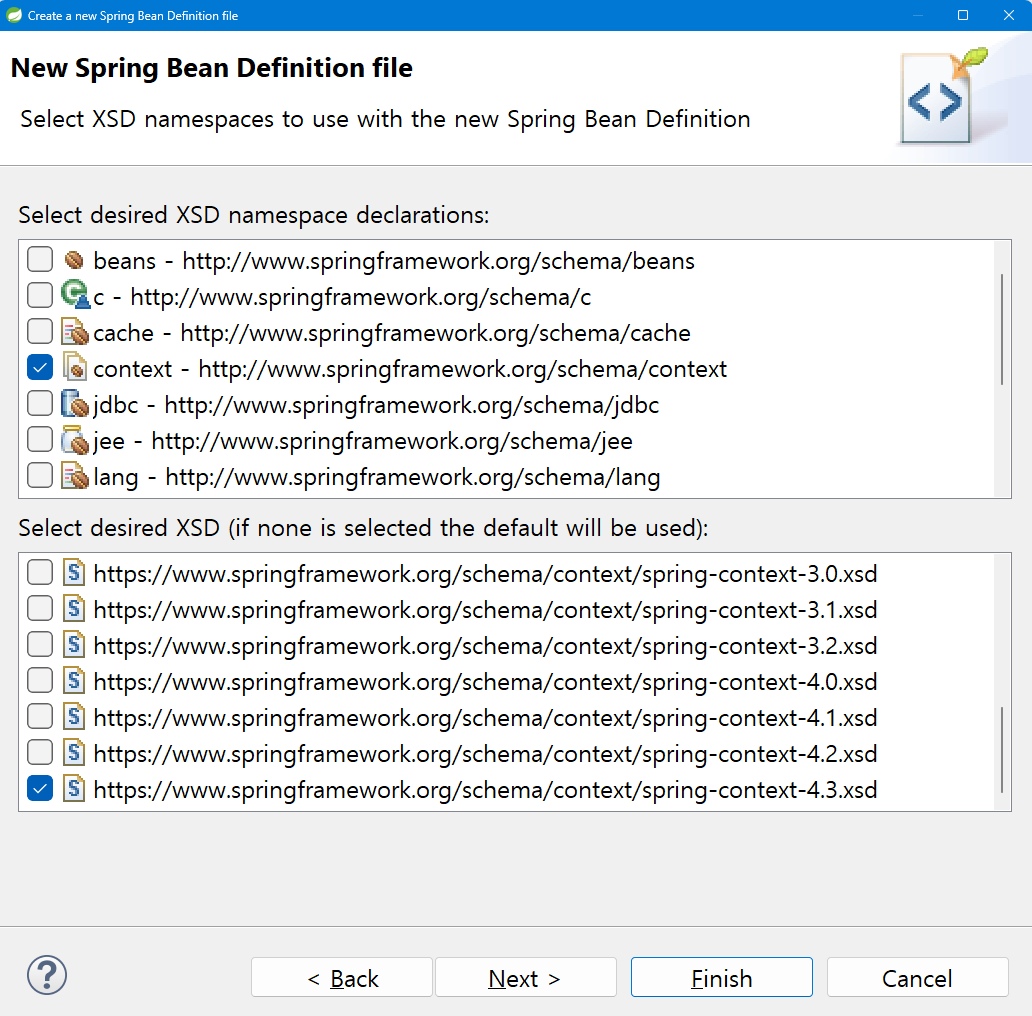
.xml 파일 생성시 'context' namespaces 체크
https://www.springframework.org/schema/context/spring-context-4.3.xsd 꼭 체크!
@Component 를 사용하려면 애리의 태그를 작성합니다 base-package 는 어느 범위에 있는 객체를 생성해 줄 것인지를 선언합니다 팩키지 내의 클래스 위에 @Component 애노테이션을 선언합니다
<context:component-scan base-package="패키지 경로를작성"/>
@Autowired
@Autowired 애노테이션이 붙은 인스턴스 변수는
의존관계를 자동으로 설정합니다
스프링이 자동으로 해당 타입의 빈을 찾아서 주입합니다.
해당 변수의 타입과 일치하는 컨텍스트 내의 빈을 찾아 인스턴스 변수에 주입합니다
@Resource(name="bean name")
이름으로 bean 을 주입할 수 있습니다.
@Autowired 는 타입으로 주입하지만, @Resource 는 이름으로 주입합니다.
xmlns:p="http://www.springframework.org/schema/p"
- p 네임스페이스는 속성을 설정하는 요소를 제공합니다@Service
내부에서 비즈니스 로직을 처리하는 서비스 계층의 컴포넌트임을 나타냅니다.
@Component 하위 애노테이션의 입니다
@Configuration
> 설정 클래스를 지정하는데 사용됩니다
  해당 클래스 내부에 @Bean 을 정의할 수 있게 합니다
  @Bean 애노테이션을 사용하여 메서드를 정의하며,
  해당 메서드의 반환값이 Spring 컨테이너에 의해 관리되는 bean 이됩니다
@Bean
메서드가 생성한 객체를 자동으로 bean 으로 등록
Main 구현
	AnnotationConfigApplicationContext context =
			 new AnnotationConfigApplicationContext();
AnnotationConfigApplicationContext class
	 - 자바 기반의 설정 클래스를 사용하여 스프링 컨데이너를 생성하고 관리합니다.
	 - 자바 애노테이션을 기반으로 한 설정을 읽어서 빈으로 등록하고 관리합니다.
@Configuration, @Component, @Service .....
     context.scan("com.anno.ex05"); // 이두 개는 같다 <context:component-scan base-package="com.anno.ex05"/> 같은 역할
     @Configuration, @Component, @Service 등의 애노테이션이 붙은 클래스를 찾아서 빈으로 등록
context.refresh();
컨테이너를 초기화하고, scan 된 빈의 인스턴스를 생성하고 의존성을 주입합니다.
한번만 호출해야 합니다. 여러번 호출시 예외 발생

코딩 일기장