asyncio를 이용한 비동기 프로그래밍 이해하기
파이썬의 asyncio 모듈을 사용하여 동기(Synchronous)와 비동기(Asynchronous) 방식의 차이점을 알아보고 실무적인 사용법을 정리합니다.
1. 동기(Synchronous) vs 비동기(Asynchronous)
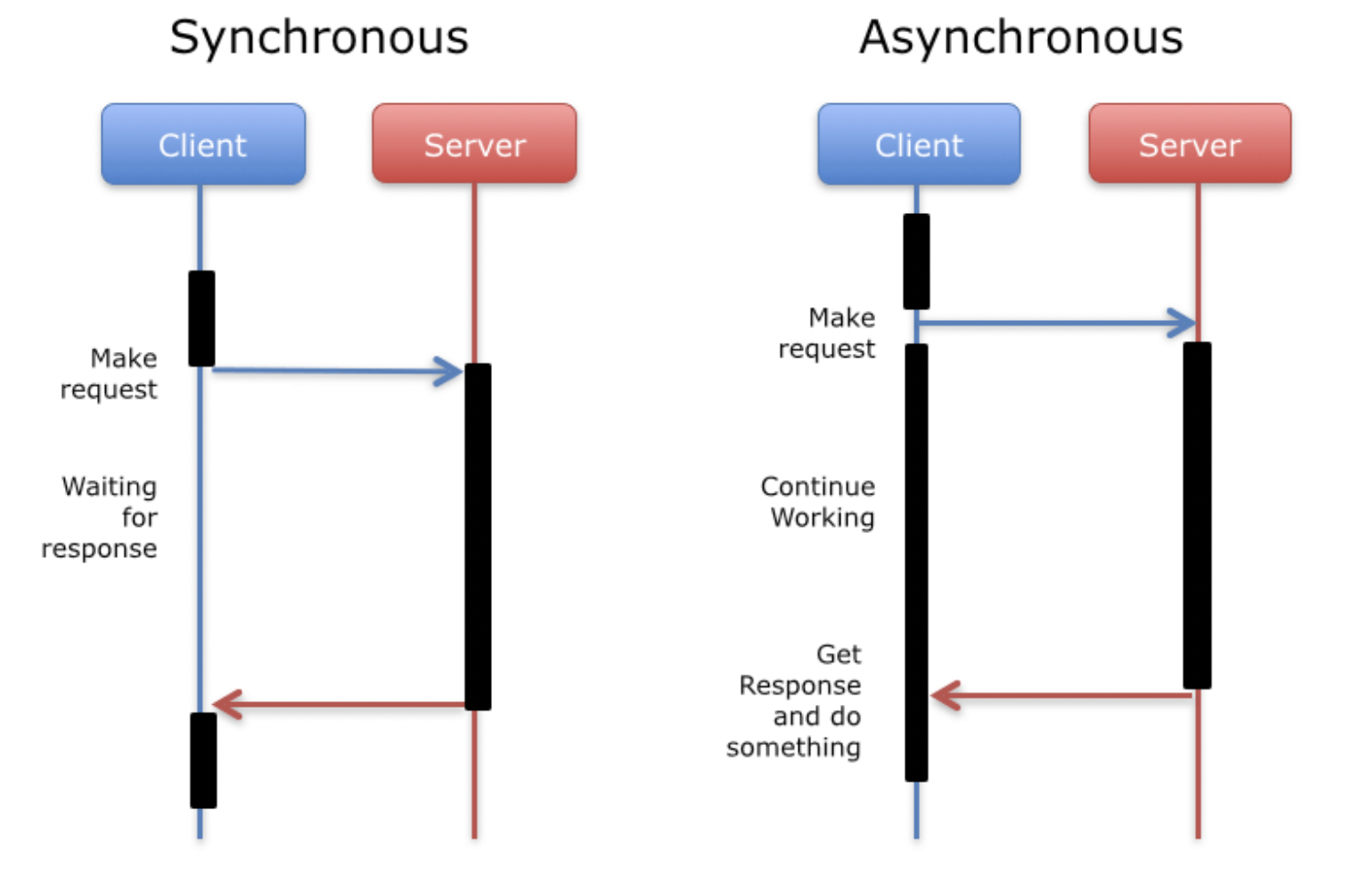
🌐 동기 프로그래밍 (Synchronous)
- 개념: 작업을 순차적으로 처리합니다. 앞선 작업이 완료되어야 다음으로 넘어갑니다.
- 장점: 설계가 간단하고 디버깅이 쉽습니다.
- 단점: I/O 작업(네트워크, 파일 읽기 등)처럼 시간이 걸리는 작업 시 전체 프로세스가 멈춥니다(Blocking).
⚡ 비동기 프로그래밍 (Asynchronous)
- 개념: 작업을 시작한 뒤 완료를 기다리지 않고 다음 작업을 수행합니다. 결과는 나중에 통지받습니다.
- 장점: 자원을 효율적으로 사용하며, 여러 작업을 동시에 처리할 때 성능이 극대화됩니다.
- 단점: 코드 흐름이 복잡해질 수 있으며 디버깅이 상대적으로 까다롭습니다.
2. 파이썬의 비동기 문법 (async / await)
파이썬 3.5부터 async와 await 키워드가 공식 도입되어 비동기 프로그래밍을 지원합니다.
코루틴(Coroutine) 정의 및 호출
	import asyncio
    import time

    # async def로 선언하면 코루틴 객체를 리턴하는 함수가 됩니다.
    async def hello():
        print('hello python!')

    # 일반적인 호출 방식으로는 실행되지 않습니다.
    # await hello() 또는 asyncio.run(hello())를 사용해야 합니다.
3. 동기 방식 예제 (time.sleep)
동기 방식에서는 모든 작업 시간이 합산되어 나타납니다.
    def sync_work(icon, seconds=0):
        print(f'{icon} {seconds}초 작업 시작')
        start = time.time()
        time.sleep(seconds)  # 작업이 끝날 때까지 여기서 멈춤
        end = time.time()
        print(f"{icon} 작업종료: {end-start:.3f}초 소요")

    def sync_all():
        sync_work('🍆', 3)
        sync_work('🍊', 1)
        sync_work('🥦', 2)

    start = time.time()
    sync_all()
    end = time.time()
    print(f'>>> 총 경과시간: {end - start:.3f}초')
    # 결과: 약 6초 (3+1+2)
4. 비동기 방식 예제 (asyncio.sleep)
비동기 방식에서는 대기 시간 동안 다른 작업을 수행하므로, 가장 오래 걸리는 작업 시간을 기준으로 전체 작업이 완료됩니다.
    async def async_work(icon, seconds=0):
        print(f'{icon} {seconds}초 작업 시작')
        start = time.time()
        await asyncio.sleep(seconds)  # 대기하는 동안 제어권을 넘김
        end = time.time()
        print(f'{icon} 작업종료: {end - start:.3f}초 소요')
        return f'{icon}-{seconds}작업'

    async def async_all():
        # Task를 생성하여 비동기 실행을 예약합니다.
        task1 = asyncio.create_task(async_work('🍆', 3))
        task2 = asyncio.create_task(async_work('🍊', 1))
        task3 = asyncio.create_task(async_work('🥦', 2))

        # gather를 통해 여러 비동기 작업을 동시에 기다리고 결과값을 모읍니다.
        result = await asyncio.gather(task1, task2, task3)
        return result

    start = time.time()
    # 주피터/코랩 환경이 아닐 경우 asyncio.run(async_all()) 사용
    result = await async_all()
    end = time.time()
    print(f'>>> 총 경과시간: {end - start:.3f}초')
    print(f'결과 리스트: {result}')
    # 결과: 약 3초 (가장 긴 작업인 3초에 수렴)
요약
- 동기: 순차적 실행 (3+1+2 = 6초)
- 비동기: 병렬적 대기 (max(3, 1, 2) = 3초)
- 핵심: I/O Bound 작업이 많은 현대 애플리케이션에서
asyncio는 성능 향상의 필수 요소입니다.

Hard Trying