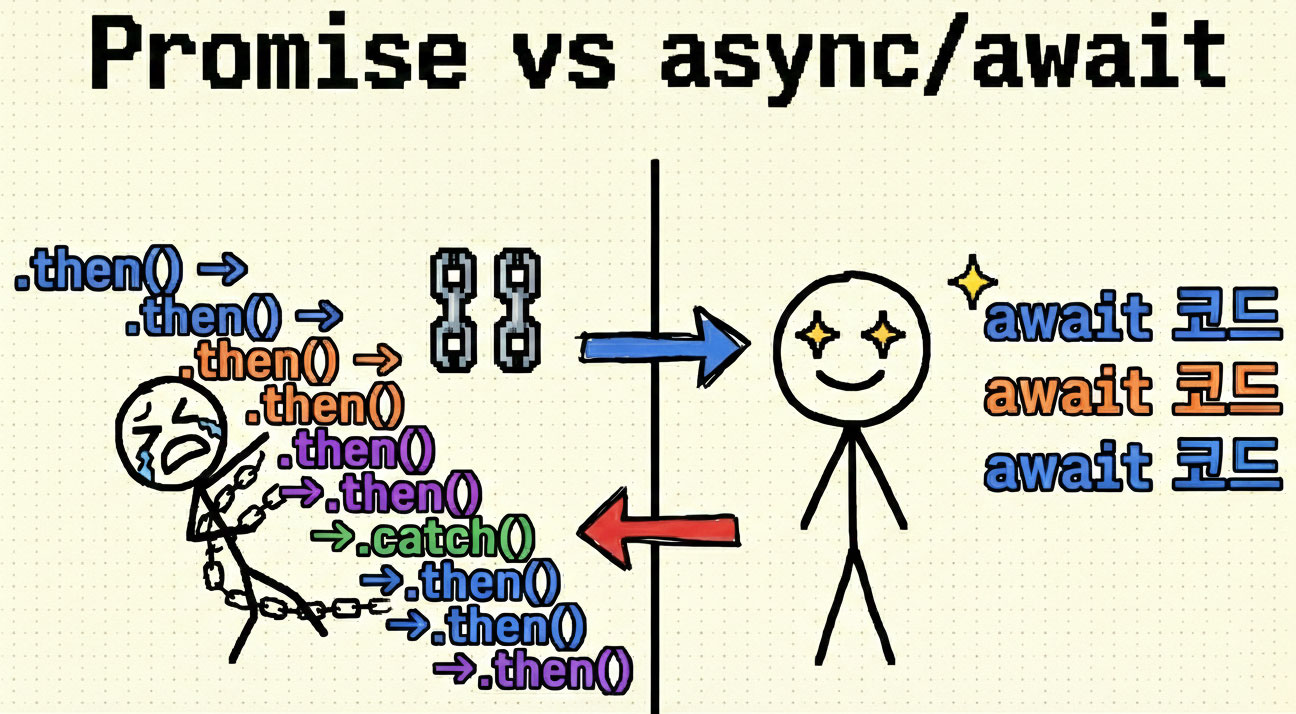
지난 글에서 이벤트 루프가 Node.js의 비동기 처리 심장부라는 것을 배웠다.
Promise가 Microtask Queue에 들어가고, setTimeout보다 먼저 실행된다는 것도 알았다.
하지만 Promise를 사용하다 보면 이런 코드를 만나게 된다 :(
🤔 Promise 체이닝의 고통

fetchUser()
  .then(user => fetchPosts(user.id))
  .then(posts => fetchComments(posts[0].id))
  .then(comments => processComments(comments))
  .then(result => console.log('완료:', result))
  .catch(error => console.error('에러:', error));

// 읽기 어렵다...
// 디버깅하기 어렵다...
이 문제를 해결하는 것이 async/await다.
💡 async/await란?
async/await는 Promise의 문법적 설탕(Syntactic Sugar)이다.
❌ Promise 체이닝

function getCommentCount(userId) {
  return fetchUser(userId)
    .then(user => fetchPosts(user.id))
    .then(posts => fetchComments(posts[0].id))
    .then(comments => comments.length)
    .catch(error => {
      console.error('에러:', error);
      throw error;
    });
}
✅ async/await
async function getCommentCount(userId) {
try {
const user = await fetchUser(userId);
const posts = await fetchPosts(user.id);
const comments = await fetchComments(posts[0].id);
return comments.length;
} catch (error) {
console.error('에러:', error);
throw error;
}
}
// 마치 동기 코드처럼 읽힌다!핵심: Promise를 더 읽기 쉽게 만든다. 동기 코드처럼 보이지만 비동기로 동작한다.
🏗️ Promise 복습
async/await를 제대로 이해하려면 Promise를 알아야 한다.
📚 Promise의 3가지 상태
💬 Promise란?
미래에 완료될 작업을 나타내는 객체다.
성공(resolve) 또는 실패(reject) 둘 중 하나의 결과를 가진다.
실생활 예시: 피자 배달
🍕 피자 주문으로 이해하기

const pizzaOrder = new Promise((resolve, reject) => {
  console.log('주문 접수! (Pending)');

  setTimeout(() => {
    const delivered = Math.random() > 0.2;

    if (delivered) {
      resolve('🍕 피자 도착!');  // Fulfilled
    } else {
      reject('❌ 배달 실패!');   // Rejected
    }
  }, 3000);
});

pizzaOrder
  .then(result => console.log(result))   // 성공 시
  .catch(error => console.error(error)); // 실패 시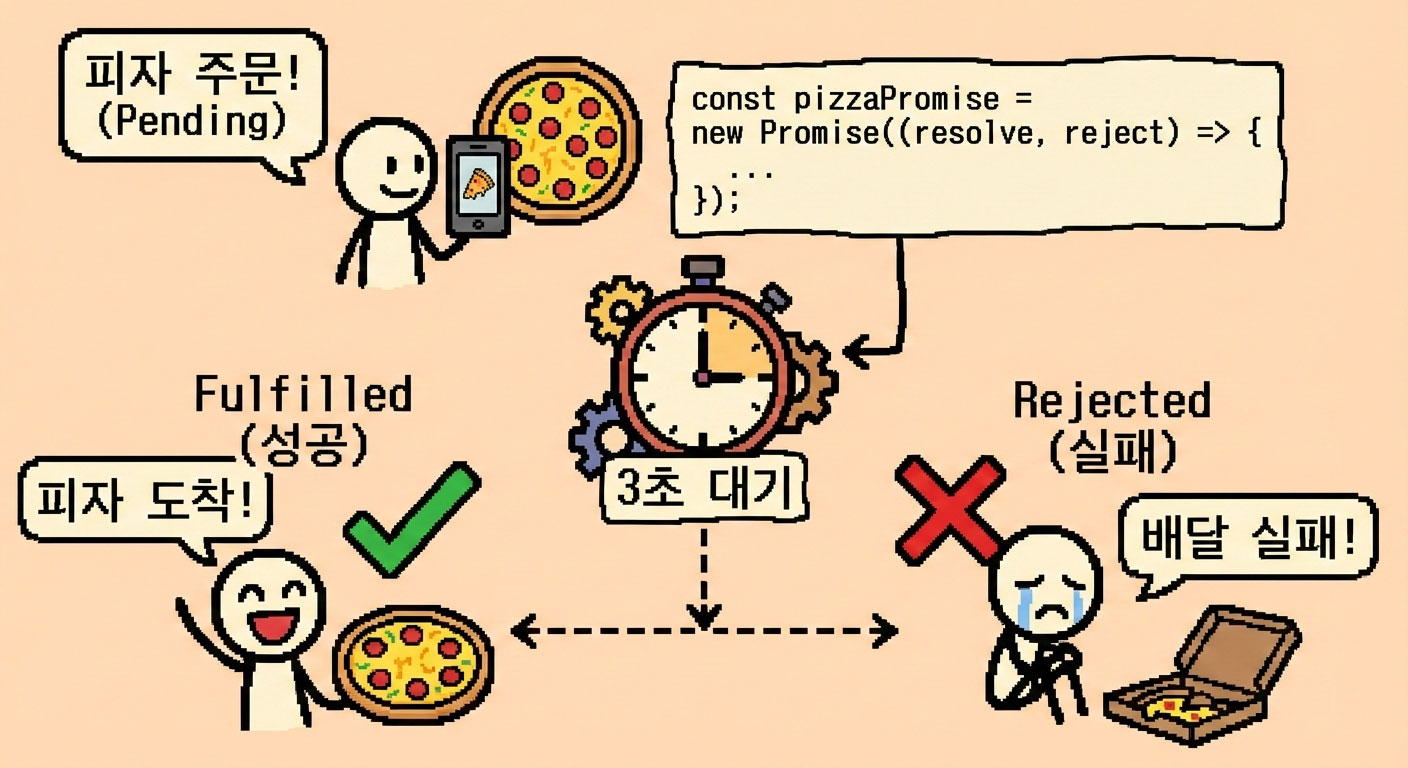
🎨 기본 문법
🔑 async 함수
💬 async 함수란?
async키워드를 붙인 함수다.
항상 Promise를 반환한다.
// 일반 함수
function normal() {
  return 'hello';
}
console.log(normal());  // 'hello'

// async 함수
async function asyncFunc() {
  return 'hello';
}
console.log(asyncFunc());  // Promise {<fulfilled>: 'hello'}

// async 함수는 자동으로 Promise로 감싸진다
asyncFunc().then(result => console.log(result));  // 'hello'
핵심 규칙
✨ async 함수의 특징

1️⃣ 항상 Promise를 반환
   async function test() { return 'hi'; }
   // = Promise.resolve('hi')

2️⃣ return은 자동으로 resolve
   return 'success';  // Promise가 'success'로 이행

3️⃣ throw는 자동으로 reject
   throw new Error('failed');  // Promise가 Error로 거부
⏰ await 키워드
💬 await란?
Promise가 완료될 때까지 함수 실행을 일시 중지한다.
async 함수 내부에서만 사용 가능하다.
async function example() {
  console.log('1. 시작');

  const result = await fetchData();  // Promise 완료까지 대기

  console.log('2. 완료:', result);   // 완료 후 실행
}

// await 없이 사용하면?
async function wrong() {
  const promise = fetchData();  // await 빠짐!
  console.log(promise);         // Promise {<pending>}
  console.log(promise.name);    // undefined ❌
}
핵심
✨ await의 특징

1️⃣ Promise의 결과값을 추출
   const data = await fetch('/api');
   // data는 응답 본문 (Promise가 아님!)

2️⃣ 함수 실행은 중지하지만 Call Stack은 블로킹 안 함
   // await 중에도 다른 코드 실행 가능!

3️⃣ Promise가 reject되면 에러를 던짐
   try { await failPromise(); }
   catch (e) { console.error(e); }
🎭 비유로 이해하기: 레스토랑 주문
🍽️ 레스토랑 주문 시스템

// Promise 방식 (복잡)
주문하기()
  .then(주문번호 => 음식조리(주문번호))
  .then(음식 => 포장하기(음식))
  .then(포장된음식 => 가져가기(포장된음식));

// async/await 방식 (자연스러움)
async function 주문받기() {
  const 주문번호 = await 주문하기();
  const 음식 = await 음식조리(주문번호);
  const 포장된음식 = await 포장하기(음식);
  가져가기(포장된음식);
}
실제 코드로 보면:
🍝 피자 주문 예제

// async/await 방식
async function orderPizza() {
  try {
    const pizza = await selectPizza('페퍼로니');
    console.log('선택:', pizza);

    const cookedPizza = await cookPizza(pizza);
    console.log('조리 완료:', cookedPizza);

    const deliveredPizza = await deliverPizza(cookedPizza);
    console.log('배달 완료:', deliveredPizza);

    return deliveredPizza;
  } catch (error) {
    console.error('주문 실패:', error);
  }
}

// 순서대로 읽히고 이해하기 쉽다!
🔄 내부 동작: Event Loop와의 상호작용
async function test() {
  console.log('A');
  await Promise.resolve();
  console.log('B');
}

test();
console.log('C');

// 출력: A → C → B
왜 C가 B보다 먼저?
⏱️ 실행 순서 분석

1️⃣ test() 호출
   Stack: [test]
   출력: "A"

2️⃣ await Promise.resolve() 만남
   → Promise를 Microtask Queue에 등록
   → test 함수 일시 중지
   → Stack에서 제거됨!
   Stack: []
   Microtask Queue: [test 재개 콜백]

3️⃣ console.log('C') 실행
   Stack: [console.log]
   출력: "C"
   Stack: []

4️⃣ Event Loop가 Microtask 확인
   → test 함수 재개
   Stack: [test]
   출력: "B"

핵심: await는 함수를 중지하지만 Stack은 블로킹하지 않는다!
⚠️ 에러 처리
async/await에서 에러 처리는 try-catch를 사용한다.
async function fetchData() {
  try {
    const response = await fetch('/api');
    const data = await response.json();
    return data;
  } catch (error) {
    console.error('에러:', error);

    // 에러 타입별 처리
    if (error.name === 'NetworkError') {
      console.error('네트워크 에러');
    }

    throw error;  // 다시 던지거나
    // return null;  // 기본값 반환
  } finally {
    // 성공/실패 관계없이 항상 실행
    hideLoading();
  }
}
실생활 예시: 은행 이체
💰 은행 이체 시스템

async function transferMoney(fromAccount, toAccount, amount) {
  try {
    // 1. 잔액 확인
    const balance = await checkBalance(fromAccount);

    if (balance < amount) {
      throw new Error('잔액 부족');
    }

    // 2. 출금
    await withdraw(fromAccount, amount);

    // 3. 입금
    await deposit(toAccount, amount);

    console.log('이체 완료!');

  } catch (error) {
    console.error('이체 실패:', error.message);

    // 실패 시 롤백 처리
    await rollback(fromAccount, toAccount);

  } finally {
    // 항상 실행: 거래 내역 저장
    await saveTransaction();
  }
}
🚀 순차 vs 병렬: 성능의 핵심
⏱️ 순차 실행 (느림)
❌ 불필요한 대기

async function slow() {
  const user = await fetchUser();      // 1초
  const posts = await fetchPosts();    // 1초
  const comments = await fetchComments(); // 1초
  // 총 3초 (서로 독립적인데도!)
}
실생활 예시: 아침 준비
🌅 비효율적인 아침 준비

async function inefficientMorning() {
  await 샤워하기();          // 10분
  await 커피끓이기();        // 5분
  await 옷입기();            // 3분
  // 총 18분 소요
}

// 샤워하는 동안 커피를 끓일 수 있는데!
⚡ 병렬 실행 (빠름)
✅ 동시 실행

async function fast() {
  // 동시에 시작!
  const [user, posts, comments] = await Promise.all([
    fetchUser(),
    fetchPosts(),
    fetchComments()
  ]);
  // 총 ~1초!
}
실생활 예시: 효율적인 아침 준비
🌅 효율적인 아침 준비

async function efficientMorning() {
  // 커피 끓이기 시작 (기계가 알아서)
  const coffeePromise = 커피끓이기();

  // 커피 끓는 동안 다른 일
  await 샤워하기();          // 10분
  await 옷입기();            // 3분

  // 커피 완료 대기 (이미 끓고 있었음)
  const coffee = await coffeePromise;

  // 총 13분 소요 (5분 절약!)
}
🎯 Promise.all, race, allSettled
🏁 다양한 병렬 실행 패턴

// 1️⃣ Promise.all - 모두 성공해야 함
async function useAll() {
  try {
    const [a, b, c] = await Promise.all([
      fetchA(),  // 성공
      fetchB(),  // 성공
      fetchC()   // 실패 → 전체 실패!
    ]);
  } catch (error) {
    console.error('하나라도 실패하면 여기로');
  }
}

// 2️⃣ Promise.race - 가장 빠른 것만
async function useRace() {
  const fastest = await Promise.race([
    fetchFromServer1(),  // 2초
    fetchFromServer2(),  // 1초 ← 선택됨!
    fetchFromServer3()   // 3초
  ]);
  console.log('가장 빠른 응답:', fastest);
}

// 3️⃣ Promise.allSettled - 실패 여부 관계없이 모두
async function useAllSettled() {
  const results = await Promise.allSettled([
    fetchA(),  // 성공
    fetchB(),  // 실패
    fetchC()   // 성공
  ]);

  results.forEach((result, index) => {
    if (result.status === 'fulfilled') {
      console.log(`${index}: 성공`, result.value);
    } else {
      console.log(`${index}: 실패`, result.reason);
    }
  });
}
실생활 예시로 이해하기:
🎬 영화관 좌석 예매

// Promise.all - 친구 3명 모두 예매 성공해야 함
async function bookSeatsForAll() {
  try {
    const [seat1, seat2, seat3] = await Promise.all([
      bookSeat('A1'),
      bookSeat('A2'),
      bookSeat('A3')  // 실패하면 전체 취소!
    ]);
    console.log('모두 예매 완료!');
  } catch {
    console.log('한 명이라도 실패하면 전체 취소');
  }
}

// Promise.race - 여러 서버 중 가장 빠른 것
async function fastestServer() {
  const data = await Promise.race([
    fetch('https://server1.com/api'),
    fetch('https://server2.com/api'),
    fetch('https://server3.com/api')
  ]);
  // 가장 빠르게 응답한 서버 데이터 사용
}

// Promise.allSettled - 실패해도 계속 진행
async function loadDashboard() {
  const results = await Promise.allSettled([
    fetchUserInfo(),      // 성공
    fetchNotifications(), // 실패해도 OK
    fetchMessages()       // 성공
  ]);

  // 성공한 것만 화면에 표시
  results.forEach((result, i) => {
    if (result.status === 'fulfilled') {
      displayData(result.value);
    } else {
      console.log(`${i}번째 로드 실패 (계속 진행)`);
    }
  });
}
📊 혼합 패턴 (실전)
💡 의존성 고려한 최적화

async function smartFetch(userId) {
  // 1. 먼저 사용자 정보 필요 (순차)
  const user = await fetchUser(userId);

  // 2. 사용자 정보를 바탕으로 병렬 요청
  const [posts, friends, settings] = await Promise.all([
    fetchPosts(user.id),
    fetchFriends(user.id),
    fetchSettings(user.id)
  ]);

  // 3. 첫 번째 게시글의 댓글 (순차)
  const comments = posts[0]
    ? await fetchComments(posts[0].id)
    : [];

  return { user, posts, friends, settings, comments };
}

// 최적화된 실행 흐름:
// ├─ 1초: user 로드
// ├─ 1초: posts + friends + settings 병렬 로드
// └─ 1초: comments 로드
// 총 3초 (순차로 하면 5초 이상!)
⚠️ 흔한 실수와 주의사항
🚫 1. forEach에서 await 사용 금지
❌ 동작하지 않음

async function wrong(userIds) {
  userIds.forEach(async (id) => {
    const user = await fetchUser(id);
    console.log(user);
  });
  console.log('완료');  // 모든 처리 전에 출력됨!
}

✅ for...of 사용

async function correct(userIds) {
  for (const id of userIds) {
    const user = await fetchUser(id);
    console.log(user);
  }
  console.log('완료');  // 모든 처리 후 출력
}

✅ 병렬 처리 (더 빠름)

async function parallel(userIds) {
  const users = await Promise.all(
    userIds.map(id => fetchUser(id))
  );
  users.forEach(user => console.log(user));
  console.log('완료');
}
왜? forEach는 Promise를 기다리지 않고 즉시 종료된다.
💡 forEach의 내부 동작

// forEach 내부 구현 (간략화)
Array.prototype.forEach = function(callback) {
  for (let i = 0; i < this.length; i++) {
    callback(this[i], i, this);
    // async 함수가 반환한 Promise를 무시!
  }
  // Promise를 기다리지 않고 즉시 종료
};
🚫 2. await 빠뜨리기
❌ await 없음

async function wrong() {
  const user = fetchUser();  // await 빠짐!
  console.log(user);         // Promise {<pending>}
  console.log(user.name);    // undefined ❌
}

✅ await 사용

async function correct() {
  const user = await fetchUser();
  console.log(user);         // { id: 1, name: 'Alice' }
  console.log(user.name);    // 'Alice' ✅
}
🚫 3. 불필요한 순차 실행
❌ 독립적인 작업을 순차로

async function slow() {
  const userData = await fetchUserData();    // 1초
  const weatherData = await fetchWeather();  // 1초
  const newsData = await fetchNews();        // 1초
  // 총 3초 (서로 관련 없는데!)
}

✅ 병렬로 실행

async function fast() {
  const [userData, weatherData, newsData] = await Promise.all([
    fetchUserData(),
    fetchWeather(),
    fetchNews()
  ]);
  // 총 ~1초!
}
🚫 4. Top-level await (주의)
⚠️ 최상위에서 await 사용

// ❌ CommonJS에서는 불가
const data = await fetchData();  // SyntaxError!

// ✅ ES Modules에서만 가능
// package.json에 "type": "module" 필요
const data = await fetchData();  // OK

// ✅ 또는 async 함수로 감싸기
(async () => {
  const data = await fetchData();
  console.log(data);
})();

// ✅ Node.js에서 권장하는 패턴
async function main() {
  const data = await fetchData();
  console.log(data);
}

main().catch(console.error);
🎯 실전 팁
💡 Best Practices

1️⃣ 독립적인 작업은 Promise.all로 병렬 실행
   const [a, b] = await Promise.all([fetchA(), fetchB()]);

2️⃣ try-catch-finally로 명확한 에러 처리
   finally는 로딩 상태 해제에 유용

3️⃣ forEach 대신 for...of 또는 map + Promise.all
   forEach는 await를 기다리지 않음

4️⃣ await 빠뜨리지 않기
   Promise 객체인지 실제 값인지 확인

5️⃣ 의존성 있는 작업은 순차, 없으면 병렬
   성능 최적화의 핵심
🎓 핵심 요약
🎯 async/await 핵심 3줄

1. async 함수는 항상 Promise를 반환한다
2. await는 Promise를 기다리되 Stack은 블로킹하지 않는다
3. 독립적인 작업은 Promise.all로 병렬 실행하라
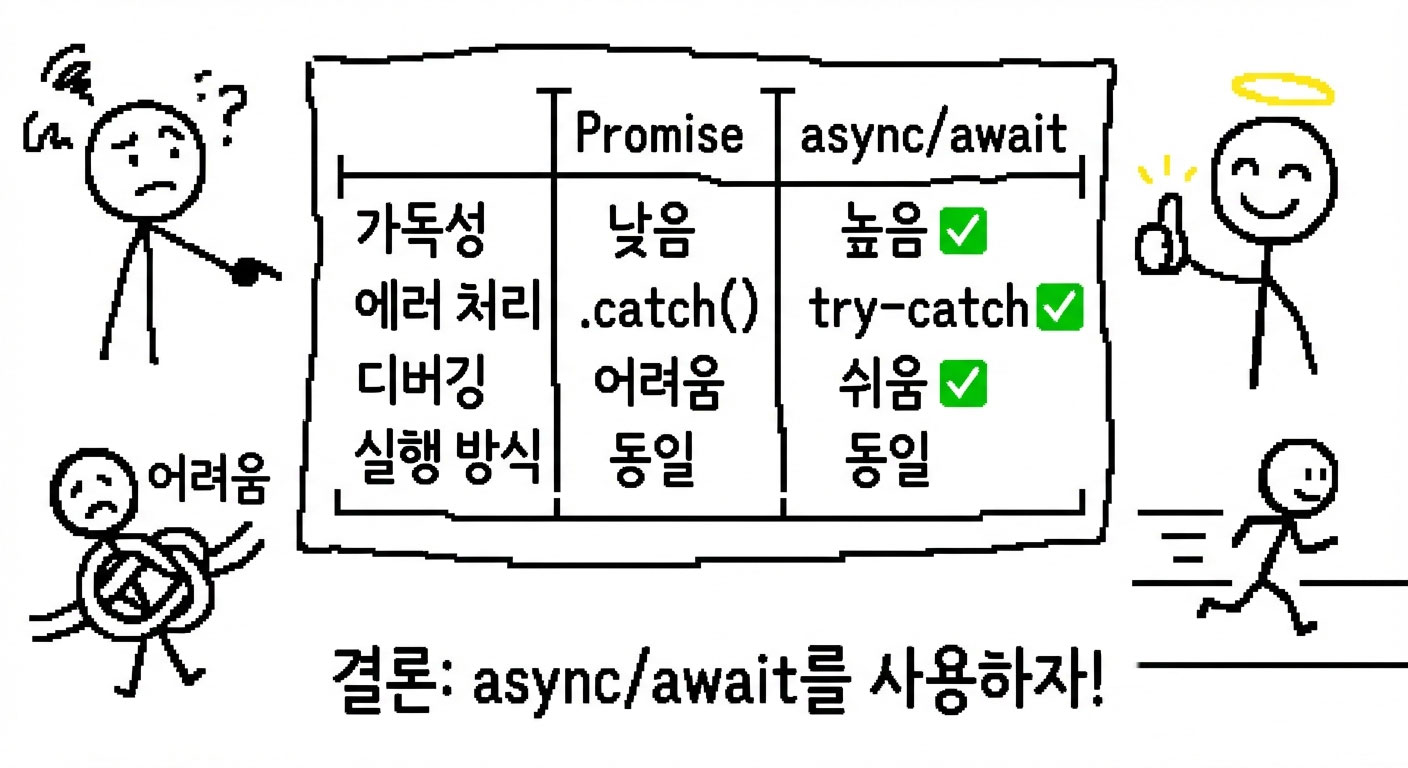
Promise vs async/await:
🎬 마무리
지난 글:
└─ 이벤트 루프: 비동기의 핵심

이번 글:
├─ async/await: Promise를 읽기 쉽게
├─ Promise 3가지 상태
├─ 순차 vs 병렬: 성능 최적화
├─ Promise.all/race/allSettled
└─ 흔한 실수: forEach, await 누락

다음 글:
└─ Worker Threads: 진짜 멀티 스레딩
다음 글에서는 Worker Threads로 진짜 병렬 처리를 구현해보자!

눈코딩 재밌게 합시다!