jsp
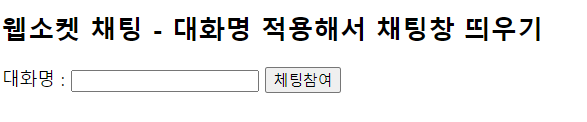
	<h2>웹소켓 채팅 - 대화명 적용해서 채팅창 띄우기</h2>
	대화명 : <input type="text" id="chatId"/>
	<button onclick="chatWinOpen();">체팅참여</button>

	<script>
		function chatWinOpen(){
			var id = document.getElementById("chatId");
			if(id.value==""){
				alert("대화명을 입력 후 채팅창을 열어주세요.");
				id.focus();
				return;
			}

			window.open("chatWindow.jsp?chatId="+id.value,"","width=320, height=400");
			id.value="";
		}
	</script>
class
package webSocket;
import java.io.IOException;
import java.util.Collections;
import java.util.HashSet;
import java.util.Set;
import javax.websocket.OnClose;
import javax.websocket.OnError;
import javax.websocket.OnMessage;
import javax.websocket.OnOpen;
import javax.websocket.Session;
import javax.websocket.server.ServerEndpoint;
@ServerEndpoint("/ChatingServer")
public class ChatServer {
private static Set<Session> clients
=Collections.synchronizedSet(new HashSet<Session>());
@OnOpen //클라이언트 접속 시 실행
public void onOpen(Session session) {
clients.add(session);
System.out.println("웹소켓연결 : "+session.getId());
}
@OnMessage //메세지 받으면 실행
public void onMessege(String message, Session session) throws IOException {
System.out.println("메세지 전송"+session.getId()+":"+message);
synchronized(clients){
for(Session client:clients) {
//내가 보낸 메세지가 아니면
if(!client.equals(session)) {
client.getBasicRemote().sendText(message);
}
}
}
}
@OnClose//클라이언트와 연결이 끊기면 실행
public void onClose(Session session) {
clients.remove(session);
System.out.println("웹소켓종료 : "+session.getId());
}
@OnError //에러발생 시 실행
public void onError(Throwable e) {
System.out.println("에러발생");
e.printStackTrace();
}
}jsp
<script>
var webSocket = new WebSocket(
"ws://localhost:8090/webSocket/ChatingServer" //톰캣서버
);
let chatWindow,chatMessage,chatId;
window.onload = function(){
chatWindow = document.getElementById("chatWindow");
chatMessage = document.getElementById("chatMessage");
chatId = document.getElementById("chatId").value;
}
//서버와의 연결 종료
function disconnect(){
webSocket.close();
}
//엔터 키 입력 처리
function enterKey(){
if(window.event.keyCode == 13){ //13은 'Enter' 키의 코드 값
sendMessage();
}
}
//메시지 전송
function sendMessage(){
chatWindow.innerHTML += "<div class='myMsg'>"+chatMessage.value+"</div>";
webSocket.send(chatId + '|' + chatMessage.value);
chatMessage.value = "";
chatWindow.scrollTop = chatWindow.scrollHeight;
}
webSocket.onopen = function(event){
chatWindow.innerHTML += "웹소켓 서버에 연결되었습니다.<br>";
}
webSocket.onclose = function(event){
chatWindow.innerHTML +="웹소켓 서버가 종료되었습니다.<br>";
}
//에러 발생 시 실행
webSocket.onerror = function(event){
alert(event.data);
chatWindow.innerHTML = "채팅 중 에러가 발생했습니다.<br>";
}
//메시지를 받았을 때 실행
webSocket.onmessage = function(event){
var message = event.data.split("|"); // 대화명과 메시지 분리
var sender = message[0]; // 보낸 사람의 대화명
var content = message[1]; // 메시지 내용
if(content != ""){
if(content.match("/")){ //귓속말
if(content.match(("/" + chatId))){
var temp = content.replace(("/" + chatId), "[귓속말] : ");
chatWindow.innerHTML += "<div>" + sender + "" + temp + "</div>";
}
}else{ // 일반 대화
chatWindow.innerHTML += "<div>" + sender + " : " + content + "</div>";
}
}
chatWindow.scrollTop = chatWindow.scrollHeight;
}
</script>
<style>
#chatWindow{
border : 1px solid black;
width: 270px;
height: 310px;
overflow: scroll;
padding: 5px;
}
#chatMessage{
width:236px;
height: 30px;
}
#sendBtn{
height: 30px;
position: relative;
top:2px;
left:-2px;
}
#chatId{
width: 158px;
height: 24px;
border : 1px solid #AAAAAA;
background-color: #EEEEEE;
}
.myMsg{
text-align: right;
}
</style>
</head>
<body>
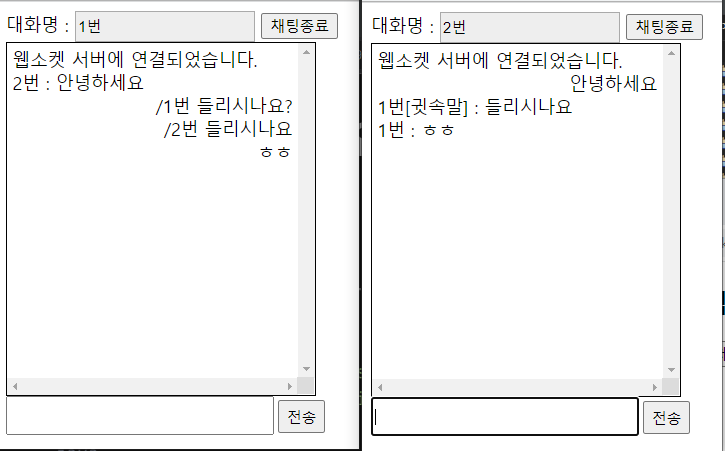
대화명 : <input type="text" id="chatId" value="${param.chatId }" readonly />
<button id="closeBtn" onclick="disconnect();">채팅종료</button>
<div id="chatWindow"></div>
<div>
<input type="text" id="chatMessage" onkeyup="enterKey();">
<button id="sendBtn" onclick="sendMessage();">전송</button>
</div>
</body>

화이탱!