Tensor
텐서는 배열이나 행렬과 매우 유사한 특수한 자료구조이다. PyTorch에서는 텐서를 사용하여 모델의 입력과 출력, 그리고 모델의 매개변수들을 부호화한다. 텐서는 NumPy의 ndarray와 유사하다
import torch
import numpy as np
텐서 초기화
데이터로 부터 직접 생성하기
data =[[1,2],[3,4]]
x_data = torch.tensor(data)
Numpy 배열로부터 생성하기
np_array = np.array(data)
x_np = torch.from_numpy(np_array)
다른 텐서로부터 생성하기
x_ones = torch.ones_like(x_data) # x_data의 속성을 유지한다
print(f"Ones Tensor: \n{x_ones}\n")

x_rand = torch.rand_like(x_data, dtype=torch.float) # x_data의 속성을 덮어쓴다
print(f"Random Tensor: \n {x_rand} \n")
random 또는 constant 값 사용하기
shape은 텐서의 차원(dimension)을 나타내는 tuple로 아래 함수들에서는 출력 텐서의 차원을 결정한다
shape = (2,3,)
rand_tensor = torch.rand(shape)
ones_tensor = torch.ones(shape)
zeros_tensor = torch.zeros(shape)

print(f"Random Tensor: \n {rand_tensor}\n")
print(f"Ones Tensor: \n {ones_tensor}\n")
print(f"Zeros Tensor: \n {zeros_tensor}\n")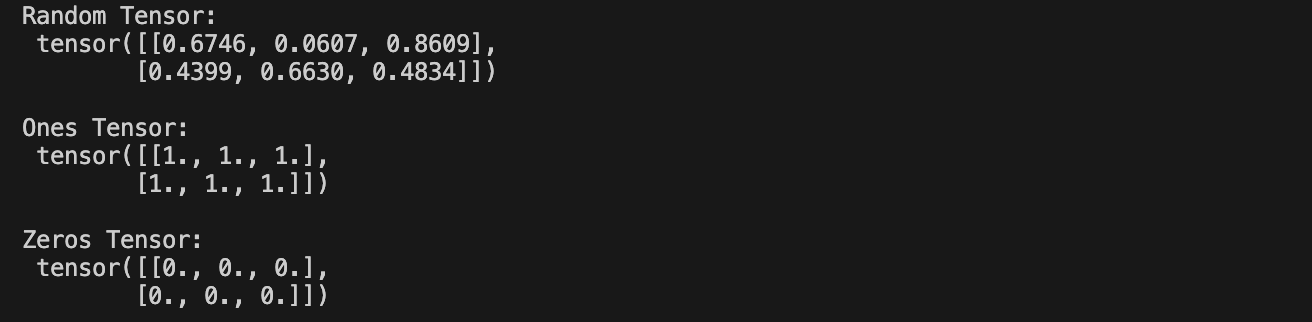
텐서의 속성
텐서의 속성은 텐서의 모양, 자료형 및 어느 장치에 저장되는지를 나타낸다
tensor = torch.rand(3,4)

print(f"Shape of tensor: {tensor.shape}")
print(f"Datatype of tensor: {tensor.dtype}")
print(f"Device tensor is stored on: {tensor.device}")
텐서 연산
각 연산들은 cpu보다 빠른 gpu에서 실행할 수 있다.(colab에서)
기본적으로 텐서는 cpu에 생성되고 .to 사용하면 gpu로 텐서를 명시적으로 이동할 수도 있다.
if torch.cuda.is_avaible():
    tensor = tensor.to("cuda")
numpy식의 표준 인덱싱과 슬라이싱
tensor = torch.ones(4,4)
print(f"First row: {tensor[0]}")
print(f"First column: {tensor[:, 0]}")
print(f"Last column: {tensor[..., -1]}")
tensor[:,1] = 0
print(tensor)
t1 = torch.cat([tensor, tensor, tensor], dim=1)
print(t1)
산술 연산
# 두 텐서간의 행렬곱을 계산하자

y1 = tensor @ tensor.T
y2 = tensor.matmul(tensor.T)

y3 = torch.rand_like(y1)
torch.matmul(tensor, tensor.T, out=y3)

#요소별 곱을 계산하자
z1 = tensor * tensor
z2 = tensor.mul(tensor)
z3 = torch.rand_like(tensor)
torch.mul(tensor, tensor, out=z3)
단일 요소 텐서
텐서의 모든 값을 하나로 집계하여 요소가 하나인 텐서의 경우, item()을 사용하여 Python 숫자 값으로 변환할 수 있다
#단일 요소
agg = tensor.sum()
agg_item= agg.item()
print(agg_item,type(agg_item))
바꿔치기 연산
연산 결과를 피연산자에 저장하는 연산을 바꿔치기 연산이라고 부른다.
예를들어 x.copy_(y , x.t_() 는 x를 저장한다
# 바꿔치기 연산
print(f"{tensor} \n")
tensor.add_(5)
print(tensor)
바꿔치기 연산은 메모리를 일부 절약하지만 기록이 즉시 삭제되어 도함수 계산에 문제가 발생할 수 있다
Numpy 변환
cpu 상의 텐서와 numpy 배열은 메모리 공간을 공유하기 때문에 하나를 변경하면 다른 하나도 변경된다
텐서를 numpy배열로 변환하기
t= torch.ones(5)
print(f"t: {t}")
n= t.numpy()
print(f"n: {n}")
텐서의 변경 사항이 numpy 배열에 반영된다
t.add_(1)
print(f"t: {t}")
print(f"n: {n}")
인공지능.관심 있습니다.