AWS S3는 Amazon Web Services(AWS)에서 제공하는 객체 스토리지 서비스로, 확장성, 보안성, 내구성이 뛰어난 클라우드 기반 저장소입니다.
1. AWS S3란?
Amazon S3(Simple Storage Service)는 오브젝트 스토리지 서비스로, 데이터를 오브젝트(Object) 단위로 저장하고 관리하는 방식입니다. 주로 파일 서버에 이용됩니다.
✔ S3(Simple Storage Service)는 클라우드 기반 객체 스토리지 서비스
✔ 다양한 파일 유형(이미지, 동영상, 로그 파일, 백업 파일 등)을 저장 가능
✔ 무제한 저장 가능 (전체 볼륨과 객체 수 제한 없음)
✔ RESTful API 기반으로 쉽게 데이터를 업로드/다운로드 가능
✔ 전 세계 리전(Region)에 분산 저장되어 높은 내구성 보장
✅ (1) 버킷 (Bucket)
- S3에서 파일을 저장하는 최상위 컨테이너
- 하나의 AWS 계정에 여러 개의 버킷 생성 가능
- 버킷 이름은 전 세계적으로 유일해야 함
- 버킷 단위로 퍼블릭/프라이빗 설정 가능
📌 예제: 버킷 구조
s3://my-bucket-name/
    ├── images/
    │   ├── profile1.jpg
    │   ├── product2.png
    ├── videos/
    │   ├── intro.mp4
✅ (2) 객체 (Object)
- S3에 저장되는 개별 파일
- 하나의 객체는 파일 데이터 + 메타데이터로 구성됨
- 각 객체는 버킷 내에서 고유한 키(Key)를 가짐
📌 객체 URL 예시
https://s3.ap-northeast-2.amazonaws.com/my-bucket-name/images/profile1.jpg2. AWS 동작 방식
MultipartFile 업로드 방식
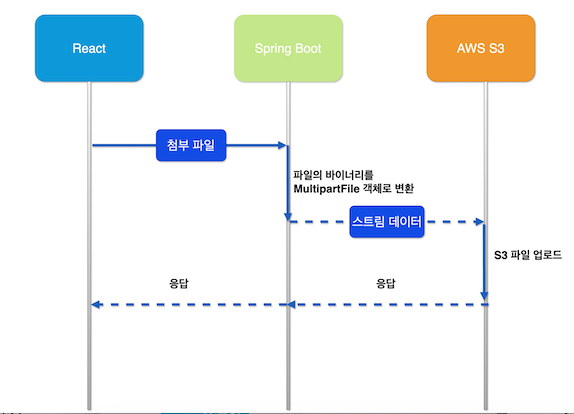
MultipartFile 업로드는 Spring Boot에서는 MultipartFile 인터페이스를 이용하여 클라이언트가 업로드한 파일을 처리할 수 있습니다.
이 방식은 파일을 서버에서 직접 저장하거나, AWS S3 같은 외부 스토리지에 업로드할 때 사용됩니다.
-
React (프론트엔드)
• 사용자가 파일을 선택하고 첨부 파일을 FormData로 변환하여 Spring Boot 서버로 전송. -
Spring Boot (백엔드)
• React에서 받은 파일 데이터를 MultipartFile 객체로 변환.
• MultipartFile을 사용하여 AWS S3에 스트림 데이터로 업로드. -
AWS S3 (저장소)
• Spring Boot에서 받은 스트림 데이터를 S3 버킷에 저장.
• 업로드 완료 후 S3 파일 URL을 반환. -
응답 처리
• S3에서 반환된 파일 URL을 React에 응답.
• React는 해당 URL을 데이터베이스에 저장하거나 미리보기 이미지로 표시.
3. 동작 과정
Spring Boot
📌 AWS S3 연동을 위한 의존성 추가 (Gradle)
    implementation 'software.amazon.awssdk:s3:2.20.0' // S3 모듈: S3 스토리지 연동 (파일 업로드 및 다운로드 기능 제공)
    implementation 'software.amazon.awssdk:auth:2.20.0' // Auth 모듈: IAM 인증 처리 (AWS 자격 증명 및 인증 관리)
📌 AWS S3 연동 및 Multipart 파일 업로드를 위한 Spring Boot 설정 (application.yml)
# 파일 업로드 설정
servlet:
    multipart:
      enabled: true                 # 파일 업로드 활성화
      max-file-size: 50MB           # 파일 최대 크기 설정
      max-request-size: 50MB        # 전체 요청의 최대 크기 설정 (파일 + 추가 데이터 포함)

# AWS S3 연동 설정
cloud:
    aws:
      credentials:
        access-key: ${AWS_ACCESS_KEY}   # AWS 접근 키 (환경 변수 사용 권장)
        secret-key: ${AWS_SECRET_KEY}   # AWS 시크릿 키 (환경 변수 사용 권장)
      region:
        static: ap-northeast-2          # AWS S3 리전 (서울 리전)
      s3:
        bucket: ${AWS_S3_BUCKET}        # 사용할 S3 버킷 이름
S3Config
- AWS S3와 연동하기 위한 설정 파일입니다.
S3와의 통신을 위해 AWS SDK for Java v2를 사용하며, S3Client를 생성하여 애플리케이션에서 사용할 수 있도록 설정합니다.
import org.springframework.beans.factory.annotation.Value;
import org.springframework.context.annotation.Bean;
import org.springframework.context.annotation.Configuration;
import software.amazon.awssdk.auth.credentials.AwsBasicCredentials;
import software.amazon.awssdk.auth.credentials.StaticCredentialsProvider;
import software.amazon.awssdk.regions.Region;
import software.amazon.awssdk.services.s3.S3Client;

@Configuration
public class S3Config {

    @Value("${cloud.aws.region.static}")
    private String region;

    @Value("${cloud.aws.credentials.access-key}")
    private String accessKey;

    @Value("${cloud.aws.credentials.secret-key}")
    private String secretKey;

    @Bean
    public S3Client s3Client() {
        return S3Client.builder()
                .region(Region.of(region))
                .credentialsProvider(StaticCredentialsProvider.create(
                        AwsBasicCredentials.create(accessKey, secretKey)))
                .build();
    }

}
S3Service
- AWS S3에 파일을 업로드하고 삭제하는 기능을 제공하는 서비스 클래스입니다.
파일을 MultipartFile로 받아서 S3에 업로드하고, 저장된 파일의 URL을 반환하는 구조입니다.
import lombok.RequiredArgsConstructor;
import lombok.extern.slf4j.Slf4j;
import org.springframework.beans.factory.annotation.Value;
import org.springframework.stereotype.Service;
import org.springframework.web.multipart.MultipartFile;
import software.amazon.awssdk.core.sync.RequestBody;
import software.amazon.awssdk.services.s3.S3Client;
import software.amazon.awssdk.services.s3.model.PutObjectRequest;
import software.amazon.awssdk.services.s3.model.S3Exception;

import java.io.IOException;
import java.util.UUID;


@Service
@RequiredArgsConstructor
@Slf4j
public class S3Service {


    @Value("${cloud.aws.s3.bucket}")
    private String bucket;

    @Value("${cloud.aws.region.static}")
    private String region;

    private final S3Client s3Client;

    /**
     * S3에 파일 업로드
     * @param file
     * @return
     */
    public String uploadFile(MultipartFile file){
        String fileName = UUID.randomUUID()+"_"+file.getOriginalFilename(); // 파일명 중복 방지
        try {
            s3Client.putObject(PutObjectRequest.builder().bucket(bucket).key(fileName).build()
                    , RequestBody.fromBytes(file.getBytes())); //파일을 바이트 배열로 변환하여 업로드합니다.
            log.info("files uploaded to S3: {}", fileName);
            return getPublicUrl(fileName);
        } catch (S3Exception | IOException e) {
            log.error("파일 업로드 실패 : {}",e.getMessage());
            throw new RuntimeException("파일 업로드 중 오류가 발생했습니다.",e);
        }

    }

    /**
     * S3에 파일 삭제
     * @param fileName
     * @return fileName
     */
    public String deleteFile(String fileName){
        try{
            s3Client.deleteObject(builder -> builder.bucket(bucket).key(getPublicUrl(fileName)));
            log.info("files deleted from S3: {}", fileName);
            return getPublicUrl(fileName);
        }catch (S3Exception e){
            log.error("파일 삭제 실패 : {}",e.getMessage());
            throw new RuntimeException("파일 삭제 중 오류가 발생했습니다.",e);
        }

    }


    private String getPublicUrl(String fileName) {
        return String.format("https://%s.s3.%s.amazonaws.com/%s", bucket,region,fileName);
    }

}
ProductController
- AWS S3를 활용하여 파일을 업로드하면서 상품을 등록하는 API입니다.
클라이언트(React)에서 상품 정보를 JSON과 파일을 함께 전송하면,
Spring Boot에서 @RequestPart를 사용해 이를 처리하고, AWS S3에 이미지를 저장한 후 상품을 등록합니다
import com.farmorai.backend.dto.ProductDto;
import com.farmorai.backend.service.ProductService;
import com.farmorai.backend.service.S3Service;
import lombok.RequiredArgsConstructor;
import lombok.extern.slf4j.Slf4j;
import org.springframework.http.HttpStatus;
import org.springframework.http.ResponseEntity;
import org.springframework.web.bind.annotation.*;
import org.springframework.web.multipart.MultipartFile;

import java.util.List;
import java.util.Optional;


@Slf4j
@RestController
@RequestMapping("/api/product")
@RequiredArgsConstructor
public class ProductController {

    private final ProductService productService;
    private final S3Service s3Service;

    @GetMapping("/list")
    public ResponseEntity<List<ProductDto>> getProductList() {
        return ResponseEntity.ok(productService.getProductList());
    }

    @GetMapping("/{productId}")
    public ResponseEntity<ProductDto> getProductById(@PathVariable Long productId) {
        Optional<ProductDto> product = productService.getProductById(productId);
        return ResponseEntity.ok(product.orElseThrow());
    }


    @PostMapping
    public ResponseEntity<String> registerProduct(@RequestPart("product") ProductDto productDto,
                                                  @RequestPart("file") MultipartFile file) {
        log.info("productDto = {}",productDto);
        log.info("file = {}",file);
        productDto.setImageUrl(s3Service.uploadFile(file));
        productService.registerProduct(productDto);
        return ResponseEntity.status(HttpStatus.CREATED).body("상품이 등록되었습니다.");
    }

}
React
상품 정보를 입력하고 이미지를 업로드하여 Spring Boot 서버에 전송하는 기능을 포함하고 있습니다.
클라이언트에서 FormData를 이용하여 상품 정보(JSON) + 이미지 파일을 함께 업로드하는 구조입니다.
✔ 상품 정보 입력 (이름, 품종, 카테고리, 가격, 재고, 설명)
✔ 이미지 업로드 (미리보기 지원)
✔ FormData를 활용하여 상품 정보와 파일을 서버로 전송 (multipart/form-data)
✔ JWT 인증 토큰 (Authorization: Bearer )을 포함하여 API 호출
import { useState } from "react";
import { Container, Form, Button, Row, Col, Card, InputGroup } from "react-bootstrap";
import { FaTag, FaMoneyBillWave, FaSeedling, FaLayerGroup, FaBoxes } from "react-icons/fa";
import {ProductForm} from "../../model/product.ts";
import axios from "axios";
import {API_BASE_URL} from "../../api/memberApi.ts";
import {getCookie} from "../../util/cookieUtill.ts";
// ✅ 등록 가능한 딸기 품종 목록
const strawberryVarieties = [
"죽향", "금실", "메리퀸", "아리향", "비타베리", "육보",
"장희", "만년설", "설향", "골드벨", "킹스베리"
];
// ✅ 상품 카테고리 목록
const productCategories = ["유기농", "고당도", "제철", "특대형", "일반"];
const ProductRegisterPage = () => {
const [formData, setFormData] = useState<ProductForm>({
name: "",
variety: "",
price: 0,
stock: 0,
description: "",
imageUrl: null,
previewUrl: "",
});
// ✅ 입력값 변경 핸들러
const handleChange = (e: React.ChangeEvent<HTMLInputElement | HTMLTextAreaElement | HTMLSelectElement>) => {
setFormData({
...formData,
[e.target.name]: e.target.value,
});
};
// ✅ 이미지 업로드 핸들러 (FileReader API 사용)
const handleFileChange = (e: React.ChangeEvent<HTMLInputElement>) => {
if (e.target.files && e.target.files.length > 0) {
const file = e.target.files[0];
const reader = new FileReader();
reader.readAsDataURL(file); // base64로 변환
reader.onloadend = () => {
setFormData({
...formData,
imageUrl: file,
previewUrl: reader.result as string, // base64 URL 저장
});
};
}
};
// ✅ 폼 제출 핸들러
const handleSubmit = async (e: React.FormEvent) => {
e.preventDefault();
console.log("📌 등록할 상품 데이터:", formData.imageUrl);
if(!formData.imageUrl){
alert("❌ 이미지를 업로드하세요.");
return;
}
const productData = {
name: formData.name,
variety: formData.variety,
price: formData.price,
stock: formData.stock,
description: formData.description,
}
const data = new FormData();
data.append("product", new Blob([JSON.stringify(productData)], { type: "application/json" }));
data.append("file", formData.imageUrl);
try {
const res = await axios.post(`${API_BASE_URL}/product`, data, {
headers: {
"Authorization": `Bearer ${getCookie("jwt")}`,
"Content-Type": "multipart/form-data",
},
});
alert("✅ 상품이 성공적으로 등록되었습니다.");
console.log("상품 등록 결과:", res.data);
} catch (error) {
console.error("상품 등록 실패:", error);
alert("❌ 상품 등록에 실패했습니다. 다시 시도하세요.");
}
};
return (
<Container fluid className="py-5 d-flex justify-content-center">
<Row className="justify-content-center w-100" style={{ maxWidth: "1200px" }}>
<Col md={10}>
<Card className="p-5 border-0 rounded-4">
<h2 className="fw-bold text-center mb-4 text-danger display-5">🍓 상품 등록</h2>
<p className="text-center text-muted mb-4 fs-4">
신선한 딸기를 등록하고 고객들에게 판매하세요!
</p>
<Form onSubmit={handleSubmit}>
{/* 🔹 상품명 입력 */}
<Form.Group className="mb-4">
<Form.Label className="fw-bold">상품명</Form.Label>
<InputGroup className="w-100">
<InputGroup.Text className="bg-primary text-white"><FaTag /></InputGroup.Text>
<Form.Control
type="text"
name="name"
placeholder="예: 유기농 설향 딸기"
value={formData.name}
onChange={handleChange}
required
style={{ height: "50px", fontSize: "18px" }}
/>
</InputGroup>
</Form.Group>
{/* 🔹 딸기 품종 선택 */}
<Form.Group className="mb-4">
<Form.Label className="fw-bold">딸기 품종</Form.Label>
<InputGroup className="w-100">
<InputGroup.Text className="bg-success text-white"><FaSeedling /></InputGroup.Text>
<Form.Select
name="variety"
value={formData.variety}
onChange={handleChange}
required
style={{ height: "50px", fontSize: "18px" }}
>
<option value="">📌 품종을 선택하세요</option>
{strawberryVarieties.map((variety, index) => (
<option key={index} value={variety}>{variety}</option>
))}
</Form.Select>
</InputGroup>
</Form.Group>
{/* 🔹 카테고리 선택 */}
<Form.Group className="mb-4">
<Form.Label className="fw-bold">카테고리</Form.Label>
<InputGroup className="w-100">
<InputGroup.Text className="bg-secondary text-white"><FaLayerGroup /></InputGroup.Text>
<Form.Select
name="category"
onChange={handleChange}
required
style={{ height: "50px", fontSize: "18px" }}
>
<option value="">📌 카테고리를 선택하세요</option>
{productCategories.map((category, index) => (
<option key={index} value={category}>{category}</option>
))}
</Form.Select>
</InputGroup>
</Form.Group>
{/* 🔹 가격 입력 */}
<Form.Group className="mb-4">
<Form.Label className="fw-bold">가격 (₩)</Form.Label>
<InputGroup className="w-100">
<InputGroup.Text className="bg-warning text-dark"><FaMoneyBillWave /></InputGroup.Text>
<Form.Control
type="number"
name="price"
placeholder="예: 7000"
value={formData.price}
onChange={handleChange}
required
style={{ height: "50px", fontSize: "18px" }}
/>
</InputGroup>
</Form.Group>
{/* 🔹 수량 입력 */}
<Form.Group className="mb-4">
<Form.Label className="fw-bold">수량</Form.Label>
<InputGroup className="w-100">
<InputGroup.Text className="bg-info text-white"><FaBoxes /></InputGroup.Text>
<Form.Control
type="number"
name="stock"
placeholder="예: 50"
value={formData.stock}
onChange={handleChange}
required
style={{ height: "50px", fontSize: "18px" }}
/>
</InputGroup>
</Form.Group>
{/* 🔹 상품 설명 */}
<Form.Group className="mb-4">
<Form.Label className="fw-bold">상품 설명</Form.Label>
<Form.Control
as="textarea"
name="description"
rows={4}
placeholder="상품의 특징과 신선도를 설명하세요."
value={formData.description}
onChange={handleChange}
required
style={{ fontSize: "16px" }}
/>
</Form.Group>
{/* 🔹 이미지 업로드 */}
<Form.Group className="mb-4">
<Form.Label className="fw-bold">상품 이미지</Form.Label>
<Form.Control type="file" accept="image/*" onChange={handleFileChange} required />
</Form.Group>
{/* 🔹 이미지 미리보기 */}
{formData.previewUrl && (
<div className="text-center mb-4">
<img
src={formData.previewUrl}
alt="미리보기"
className="rounded-3 shadow"
style={{ width: "100%", maxWidth: "500px", height: "auto" }}
/>
</div>
)}
{/* 🔹 등록 버튼 */}
<Button variant="danger" type="submit" className="w-100 fw-bold py-3 fs-4">
상품 등록
</Button>
</Form>
</Card>
</Col>
</Row>
</Container>
);
};
export default ProductRegisterPage;