1) 리액트(3000)와 express(5000)
notice-express(5000) -> Back-End
notice-react(3000) -> Front-End
화면이 출력되는 것은 3000번에 처리된다.
MySQL은 5000번(express f/w > nodejs)에서 처리된다.
2) 리액트(3000)와 톰캣(스프링) (8000,9000)
Front-End와 Back-End
앞단 서버(3000) - 뒷단 서버(5000) - 3306(MySQL)
준비물
NodeJS백엔드 구성하기 + mySQL
1) node --version
2) npm --version npm install -> package.json 의존성 라이브러리
환경구성
npm install [모듈명] -g : 모듈을 전역적으로 설치할 때
-> 특정 프로젝트가 아닌 전체 프로젝트에서 공통으로 사용할 수 있는
npm install [모듈명] --save : 현재 작업중인 프로젝트에만 설치할 때
3) npm install : package.json에 있는 라이브러리를 모두 설치한다.
4) express프레임웤을 활용한 프로젝트 자동생성하기
npm install express-generator -g
5) 실제 프로젝트 생성하기
express -e 프로젝트명
6) 파일업로드 모듈과 MySQL설치
npm install formidable mysql2 --save
7) nodemon 설치
실행할 때 npm start 매번 귀찮다.
npm install nodemon
만약 3000포트가 이미 사용하고 있으면 해당 포트를 강제 종료 하는 방법
netstat -ano|findstr :3000(죽일 포트번호) -> 엔터하면 pid값이 맨 끝에 있음.
taskkill /f /pid 00000(5자리)
📌 DBeaver 사용해보기
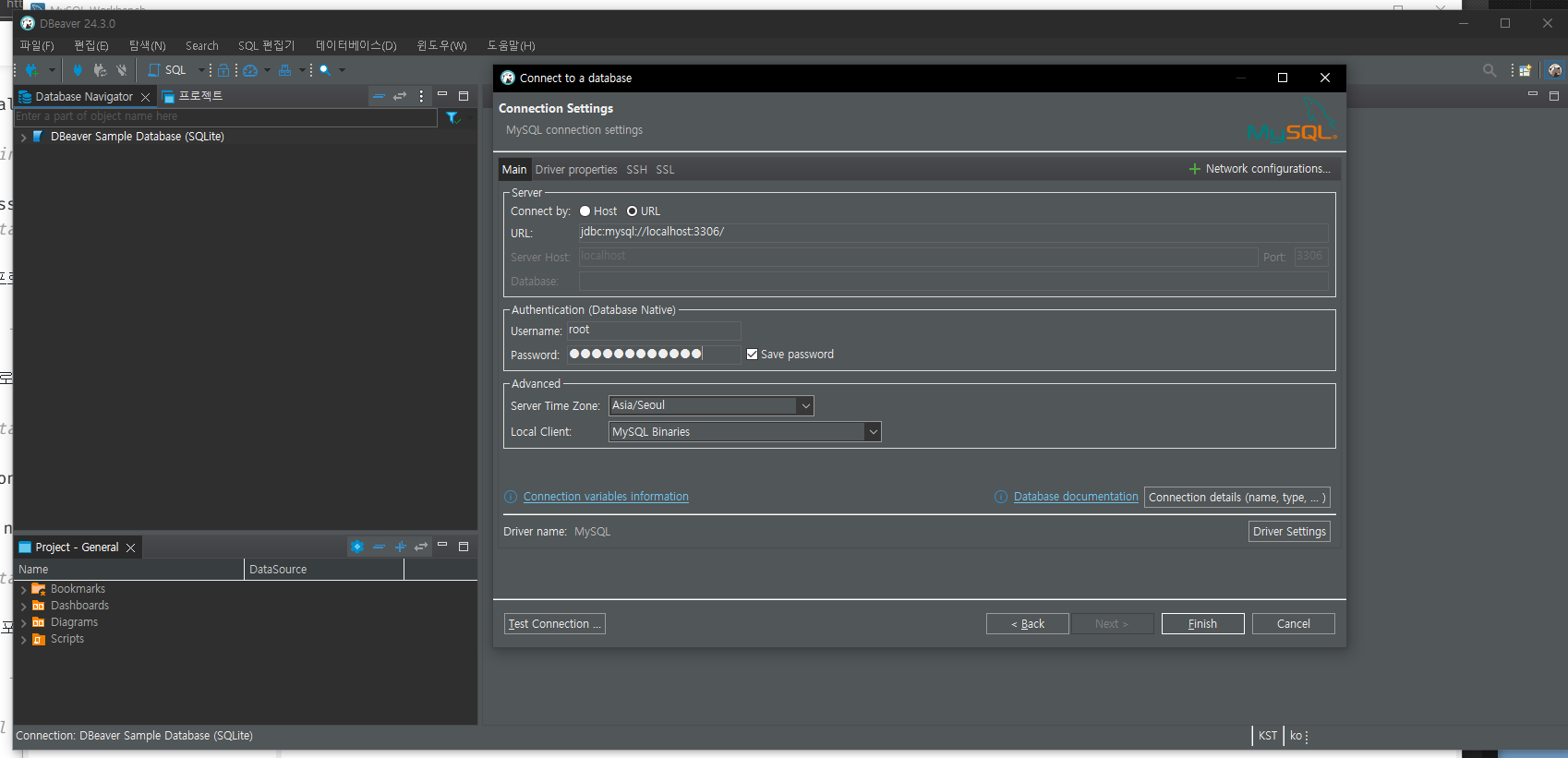
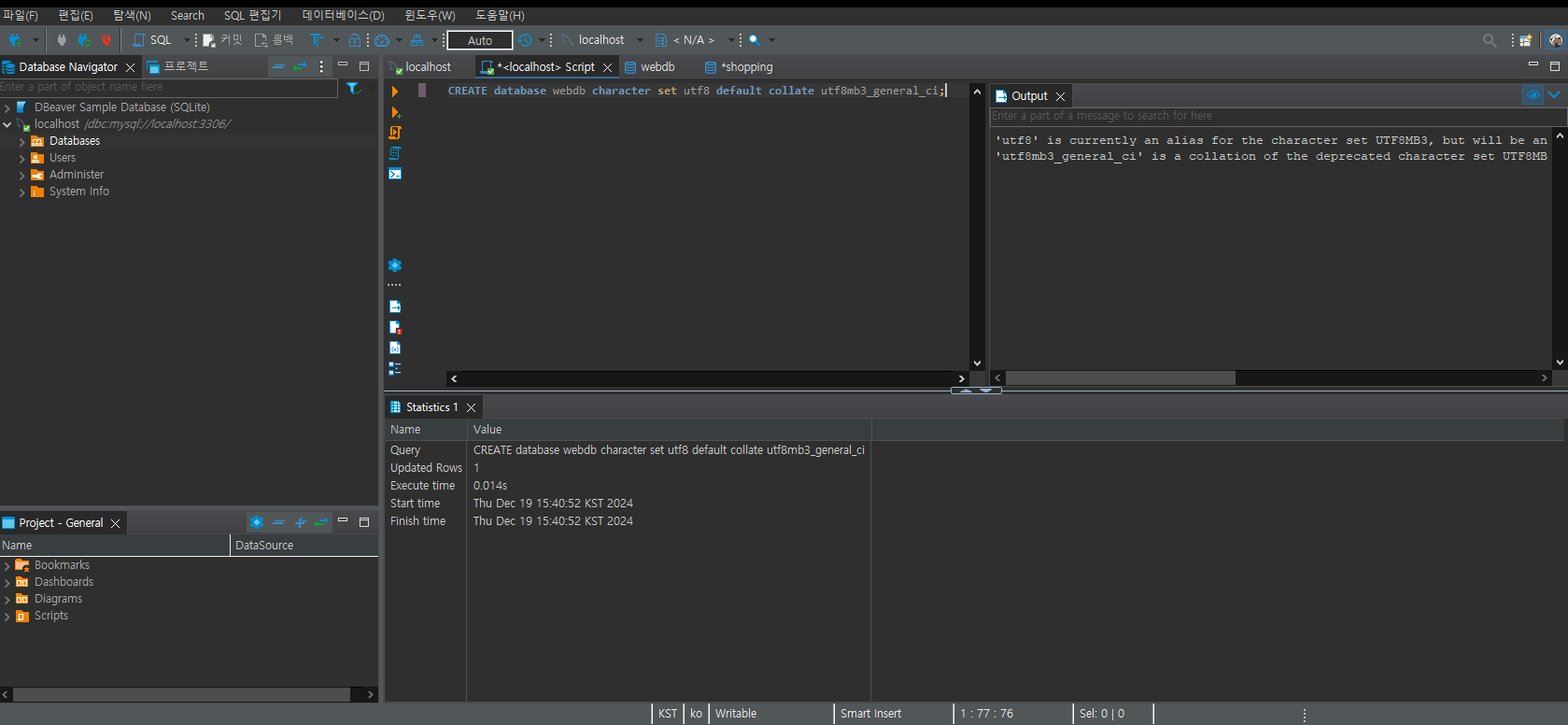
CREATE database webdb character set utf8 default collate utf8mb3_general_ci;


use webdb;


CREATE TABLE notice(
    n_no bigint AUTO_INCREMENT PRIMARY KEY,
    n_title varchar(50),
    n_writer varchar(30),
    n_content varchar(500)
);


insert into notice(n_title,n_writer,n_content) values('제목1','작성자1','내용1');

insert into notice(n_title,n_writer,n_content) values('제목2','작성자2','내용2');

insert into notice(n_title,n_writer,n_content) values('제목3','작성자3','내용3');


commit;-
데이터베이스 생성해주기
-
insert문 사용해서 데이터 삽입해주기
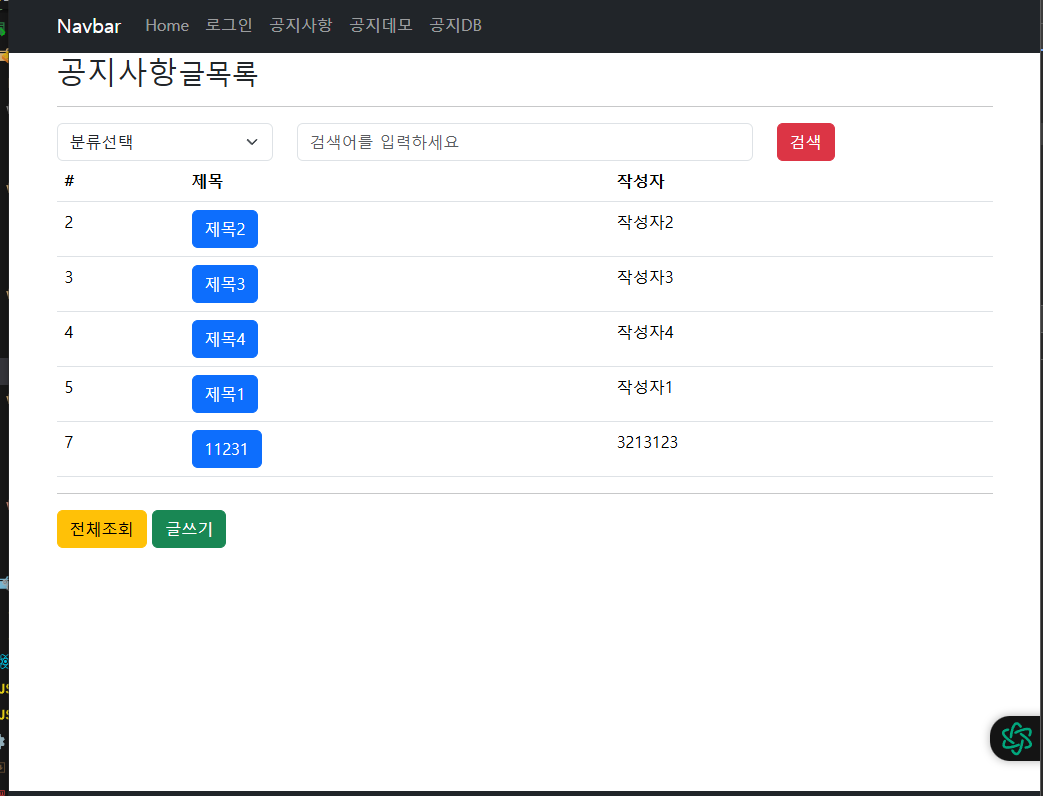
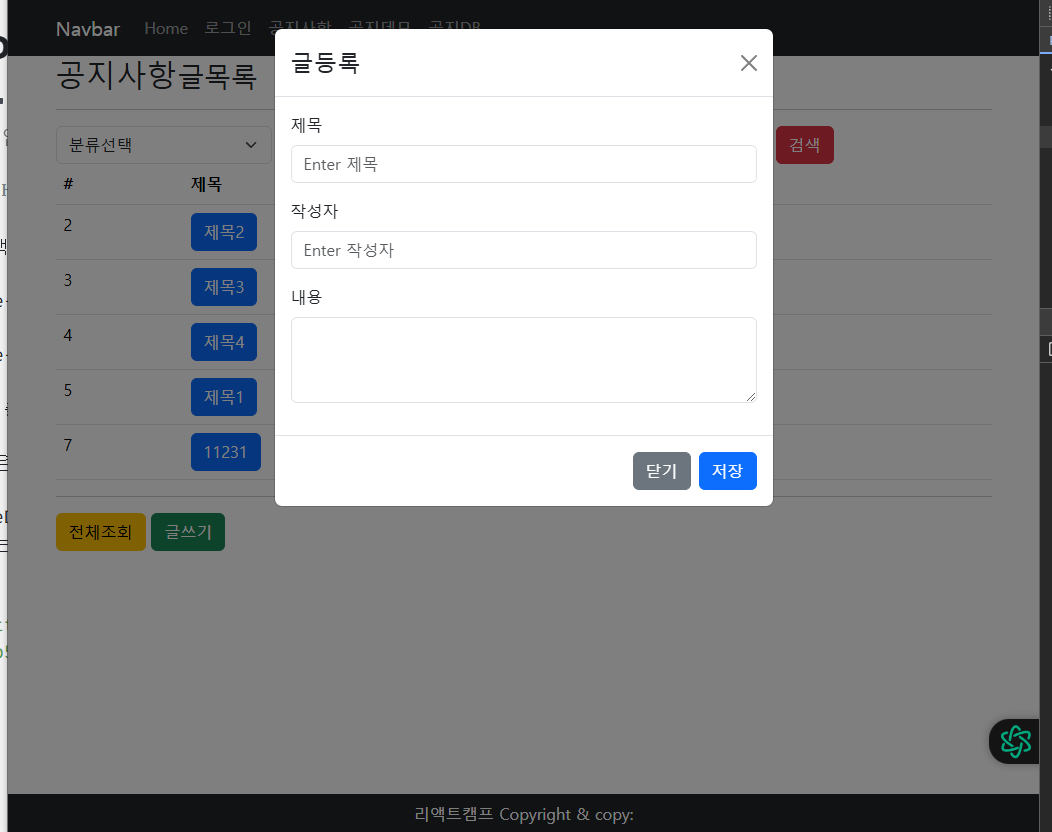
NoticeDBList.jsx -> 글쓰기 버튼 -> Modal창 -> n_title, n_writer, n_content 입력(n_no는 입력받는 값이 아니다) 왜냐하면 MySQL에서는 pk -> auto_increment 사용
📌 NoticeDBList.jsx
import React, { useEffect, useState } from 'react'
import { noticeInsertDB, noticeListDB } from '../../service/dbLogic'
import Footer from '../include/Footer'
import Header from '../include/Header'
import NoticeDBItem from './NoticeDBItem'
import { Button, Form, Modal } from 'react-bootstrap'
const NoticeDBList = () => {
const [notices, setNotices] = useState([])
//const [notices, setNotices] = useState({})
const [gubun,setGubun] = useState("")
const [keyword,setKeyword] = useState("")
const [notice, setNotice] = useState({
n_no: 0,
n_title: '',
n_writer: '',
n_content: ''
})
const [show, setShow] = useState(false);
const handleClose = () => setShow(false);
const handleShow = () => setShow(true);
//선언부
//Realtime database이용시에는 필요없는 코드임
const [refresh, setRefresh] = useState(0)
useEffect(() => {
const notice = {
n_no: 0,
n_title: '',
n_writer: '',
n_content:''
}
const asynDB = async() => {
const res = await noticeListDB(notice)
console.log(res.data)
setNotices(res.data)
}
asynDB();
console.log(notices)
},[])
const noticeList = () =>{
}
const noticeAdd = async(event) =>{
event.preventDefault()
const res = await noticeInsertDB(notice)
console.log(res);
handleClose()
setRefresh(prev=>prev+1)
}
//조건 검색 구현하기
const noticeSearch = () => {
const gubun = document.querySelector("#gubun").value
const keyword = document.querySelector("#keyword").value
console.log(`${gubun}, ${keyword}`) // - false -> !false, 제목!
//구분을 선택하지 않은 경우 선택하도록 유도한다.
if(!gubun){
alert('구분을 선택하세요')
//구분(n_title,n_writer,n_content)을 선택하지 않으면
return;
}
//구분(gubun)과 입력값(keyword)에 대한 초기화 처리할 것.
//구분을 선택하고 입력값을 입력한 뒤에는 그 조건에 따라 필터링된 결과를 useState담기
//mdn filter API - 깊은 복사 인가 아니면 얕은 복사 인가?
//입력한 값이 db에 저장되어 있다. - 목록을 가져오는 것은 db에서 가져온다.
//조건을 수렴하는 결과만 필터링한 뒤 setNotices(result)하고 있다.
//db에서 가져온 것이 아니다.
const result = Object.values(notices).filter(notice =>{
if(!notice) return false
switch(gubun){
case 'n_title':
return notice.n_title && notice.n_title.includes(keyword)
case 'n_writer':
return notice.n_writer && notice.n_writer.includes(keyword)
case 'n_content':
return notice.n_content && notice.n_content.includes(keyword)
default:
return false
}
})
console.log("검색 결과"+JSON.stringify(result));
setNotices(result)
setGubun("")
setKeyword("")
}
const handleChangeForm = (event) => {
event.preventDefault()
//사용자가 폼에 입력한 값을 notice useState훅에 담기
setNotice({
...notice,
[event.target.name]: event.target.value
})
}
//파라미터에 event 객체는 이벤트가 감지 되었을 때 주입받는다.
//만일 주입을 못 받으면 null출력된다 아니다 undefinded
const hadleGubun = (event) => {
console.log(event.target.value); // n_title, n_writer, n_content - 왜냐면 select 콤보이니까..
setGubun(event.target.value)
noticeList()
}
const hadleKeyword = (event) =>{
console.log(event.target.value); //사용자가 입력한 문자열
setKeyword(event.target.value)
noticeList()
}
return (
<>
<Header/>
<div className='container'>
<div className='page-header'>
<h2>공지사항<small>글목록</small></h2>
<hr />
</div>
<div className="row">
<div className="col-sm-3">
<select className="form-select" id="gubun" value={gubun} onChange={hadleGubun}>
<option value="">분류선택</option>
<option value="n_title">제목</option>
<option value="n_writer">작성자</option>
<option value="n_content">내용</option>
</select>
</div>
<div className="col-sm-6">
<input type="text" className="form-control" placeholder="검색어를 입력하세요" value={keyword} id="keyword" onChange={hadleKeyword}/>
</div>
<div className="col-sm-3">
<button type="button" className="btn btn-danger" onClick={noticeSearch}>검색</button>
</div>
</div>
<table className="table table-hover">
<thead>
<tr>
<th>#</th>
<th>제목</th>
<th>작성자</th>
</tr>
</thead>
{/* 데이터셋 연동하기 */}
{/* props로 넘어온 상태값이 빈 깡통이면 실행하지 않기 */}
<tbody>
{notices && Object.keys(notices).map(key => (
<NoticeDBItem key={key} notice={notices[key]} />
))}
</tbody>
{/* 데이터셋 연동하기 */}
</table>
<hr />
<div className='list-footer'>
<button className="btn btn-warning" onClick={noticeList}>전체조회</button>
<button className="btn btn-success" onClick={handleShow}>글쓰기</button>
</div>
</div>
<Footer/>
{/* ================ [[ 공지등록 모달 시작 ]] =================*/}
<Modal show={show} onHide={handleClose} animation={false}>
<Modal.Header closeButton>
<Modal.Title>글등록</Modal.Title>
</Modal.Header>
<Modal.Body>
<Form id="f_board">
<Form.Group className="mb-3" controlId="boardTitle">
<Form.Label>제목</Form.Label>
<Form.Control type="text" name="n_title" onChange={handleChangeForm} placeholder="Enter 제목" />
</Form.Group>
<Form.Group className="mb-3" controlId="boardWriter">
<Form.Label>작성자</Form.Label>
<Form.Control type="text" name="n_writer" onChange={handleChangeForm} placeholder="Enter 작성자" />
</Form.Group>
<Form.Group className="mb-3" controlId="boardContent">
<Form.Label>내용</Form.Label>
<textarea className="form-control" name='n_content' onChange={handleChangeForm} rows="3"></textarea>
</Form.Group>
</Form>
</Modal.Body>
<Modal.Footer>
<Button variant="secondary" onClick={handleClose}>
닫기
</Button>
<Button variant="primary" onClick={noticeAdd}>
저장
</Button>
</Modal.Footer>
</Modal>
{/* ================ [[ 공지등록 모달 끝 ]] =================*/}
</>
)
}
export default NoticeDBList📌 dbLogic.js
서버와 통신하기 위해서 axios를 사용한다. -> 외부에서 처리하기 때문에 Promise 비동기처리
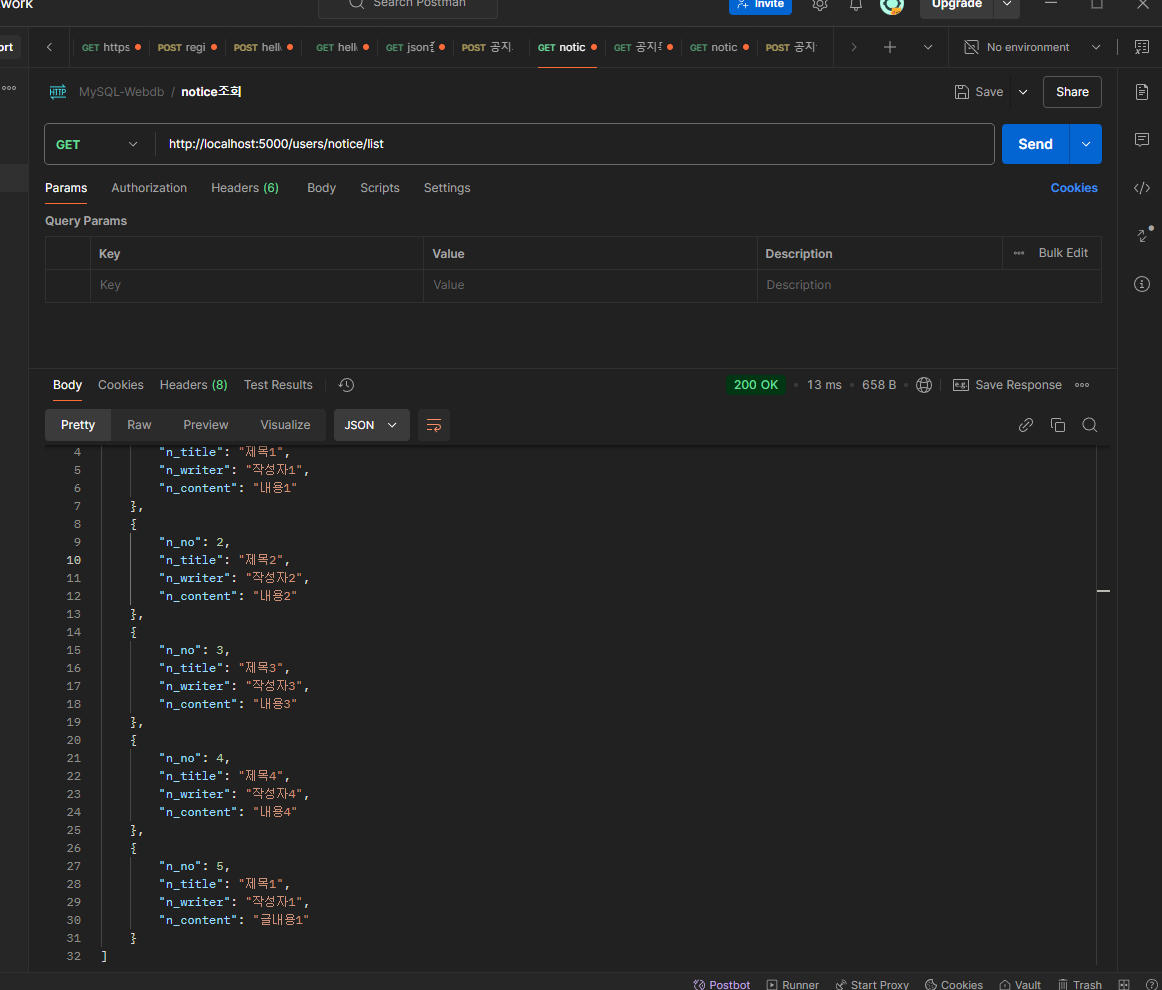
Postman으로 GET방식으로 먼저 테스트 실행 -> 200성공 응답
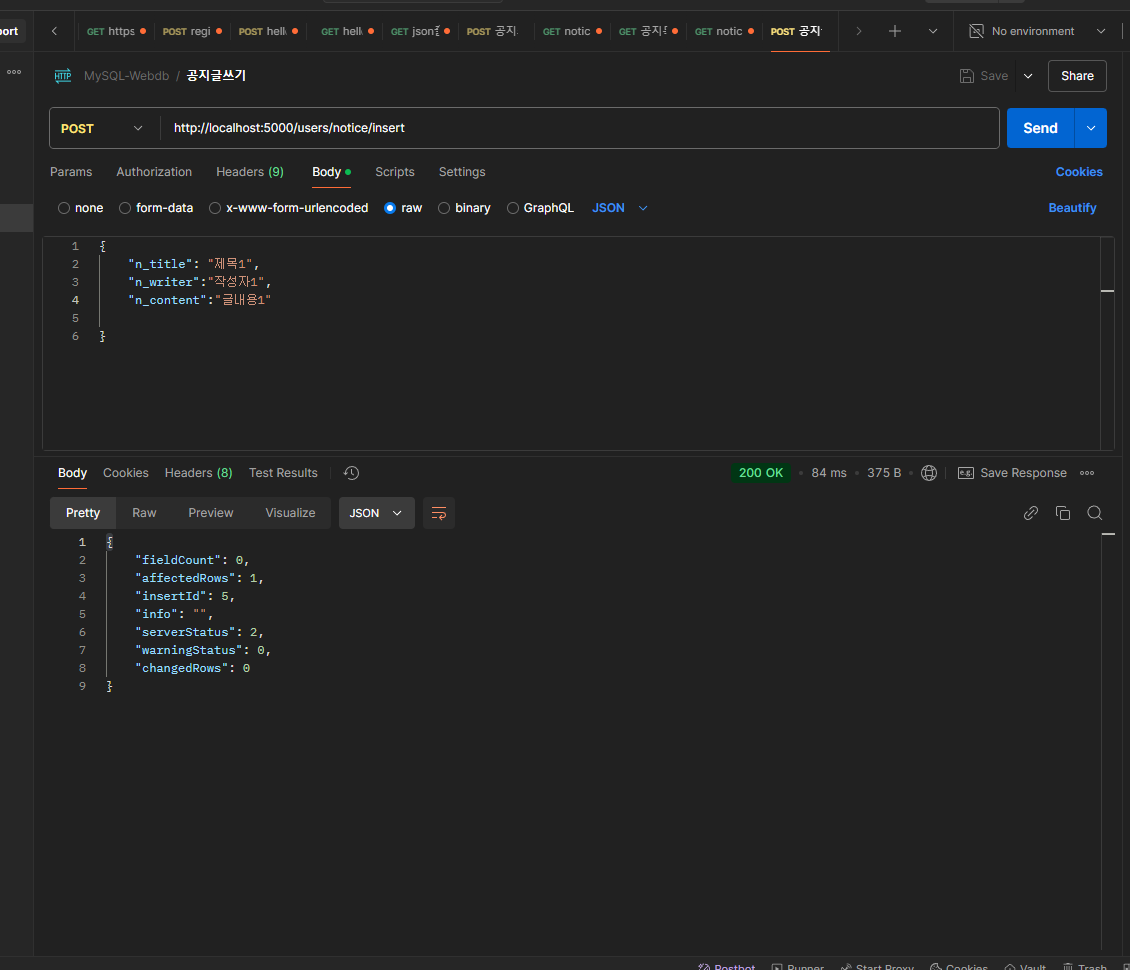
Postman으로 POST방식으로 먼저 테스트 실행 -> 200성공 응답
import axios from "axios";

export const noticeListDB = (params) => {
  //파라미터 값을 출력해 보기 - SELECT * FROM notice WHERE n_content like '%'||?||'%'
  console.log(params);
  return new Promise((resolve, reject) => {
    try {
      const response = axios({
        method: "get",
        url: process.env.REACT_APP_EXPRESS_IP + "users/notice/list",
        params: params,
      });
      resolve(response); //성공했을 때
    } catch (error) {
      reject(error); //실패했을 때
    } //end of try..catch
  });
};

export const noticeInsertDB = (notice) => {
  console.log(notice);
  return new Promise((resolve, reject) => {
    try {
      const response = axios({
        method: "post",
        url: process.env.REACT_APP_EXPRESS_IP + "users/notice/insert",
        headers: {
          "Content-Type": "application/json", //json 형식으로
        },
        data: notice,
      });
      resolve(response); //성공했을 때
    } catch (error) {
      reject(error); //실패했을 때
    } //end of try..catch
  });
};
📌 users.js
서버측 코드
var express = require('express');
var router = express.Router();
var db = require('../db')

/* GET users listing. */
router.get('/', function(req, res, next) {
  res.send('respond with a resource');
});

//공지사항 전체 조회
//GET -> http://localhost:5000/users/notice/list
router.get('/notice/list', function(req, res) {
  var sql='select * from notice';
  db.get().query(sql, function(err, rows) {
    if (err) return res.sendStatus(400);
    console.log(rows);
    // res.render('index', { title: 'Express' }); 페이지를 출력할 떄
    res.send(rows) //데이터셋을 출력할 때
  });
});


//GET -> http://localhost:5000/users/notice/list:id
router.get('/notice/list/:id', function(req, res) {
  const n_no = req.params.id;
  var sql='select * from notice where n_no = ?';
  db.get().query(sql, n_no ,function(err, rows) {
    if (err) return res.sendStatus(400);
    console.log(rows);
    // res.render('index', { title: 'Express' }); 페이지를 출력할 떄
    res.send(rows) //데이터셋을 출력할 때
  });
});


//POST -> http://localhost:5000/users/notice/insert
//공지글 쓰기
router.post('/notice/insert',function(req,res){
  const values = [
    req.body.n_title,
    req.body.n_writer,
    req.body.n_content
  ]
  const sql  = "insert into notice(n_title,n_writer,n_content) values(?)"
  db.get().query(sql,[values],function(err,result){
    if(err){
      console.error("Database error :", err)
      return res.sendStatus(500)
    }else{
      console.log('insert result :',result);
      res.send(result)
    }

  })
})


module.exports = router;