하나의 repository에 로컬 폴더와 Colab 저장소 같이 쓰기
결론은, colab으로 올렸던 버전 pull 해오고 로컬 폴더에서는 git commit -am '커밋 메시지'로 업데이트 해주기!
아래는 git commit -am 을 찾게된 배경이자 나와 똑같은 의문을 가진 분이 계신 경우를 위해 적는 히스토리다.
나는 환경 설정에 아직 익숙하지 않아서, import가 안 되는 라이브러리가 있으면 colab으로 넘어가서 코드를 실행한다.
colab에서 작업한 파일을 바로 repository에 commit할 수 있는데, 그러면 내 로컬 폴더에는 그 파일이 없는 것이고 -> 그러면 로컬폴더에는 코랩에 있는 파일이 없는 것이고 -> 그러면 로컬에서 git bash 창을 열어서 colab에서 넘겼던 파일을 업로드 해줘야 하는 것이다.
A라는 레포지토리에
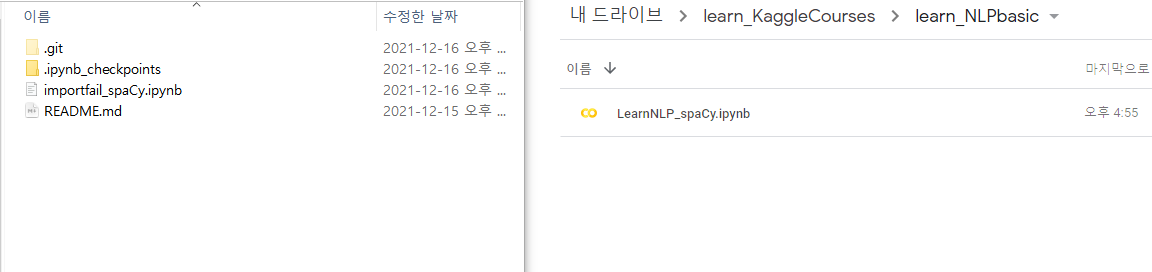
내 개인 로컬 폴더에서 작업한 파일 importfail_spaCy.ipynb가 있고, 이 파일은 A저장소에 올라가 있는 상황.
이후 코랩에서 작업한 LearnNLP_spaCy.ipynb를 코랩에서 직접 A저장소에 올리기.
그 다음에, 다시 내 개인 로컬 폴더에 새로운 파일로 작업하고 싶은데, 코랩으로 올린 LearnNLP_spaCy.ipynb 이게 없어서, A저장소에 올라온 작업기록을 pull해야 하는 상황이다.
로컬 폴더에서 git bash창을 열어 log를 보면, importfail_spaCy.ipynb만 추가했던 기록이 있다.
로컬사용자이름@-LAPTOP MINGW64 ~/TIL/learn_NLPbasic (master)
$ git log
commit febe992be9f90a389b35b22666a61af230e3dcf2 (HEAD -> master, origin/master)
Author: songgplant <global email 명령어로 입력한 내 이메일 주소>
Date:   Thu Dec 16 17:03:27 2021 +0900

    edit spacy
그러면 이 상태에서 colab에서 바로 올려버린 파일 commit한 것을 업데이트해주고자 pull 해온다.
로컬사용자이름@-LAPTOP MINGW64 ~/TIL/learn_NLPbasic (master)
$ git pull
remote: Enumerating objects: 5, done.
remote: Counting objects: 100% (5/5), done.
remote: Compressing objects: 100% (3/3), done.
remote: Total 3 (delta 0), reused 0 (delta 0), pack-reused 0
Unpacking objects: 100% (3/3), 3.36 KiB | 286.00 KiB/s, done.
From https://github.com/songgplant/learn_NLPbasic
 + febe992...39ac19d master     -> origin/master  (forced update)
CONFLICT (modify/delete): LearnNLP_spaCy.ipynb deleted in HEAD and modified in 39ac19d720bd22935bd088894bf63f0bf9cc26b7. Version 39ac19d720bd22935bd088894bf63f0bf9cc26b7 of LearnNLP_spaCy.ipynb left in tree.
Automatic merge failed; fix conflicts and then commit the result.
오, 정상적으로 pull되었다.
status로 상태를 본다. 모르는 말이 써있다. diverged, unmerged paths.. 합쳐지지 않은 path가 있고 git add나 git commit -a를 하세요. 라고 써있다.
로컬사용자이름@-LAPTOP MINGW64 ~/TIL/learn_NLPbasic (master|MERGING)
$ git status
On branch master
Your branch and 'origin/master' have diverged,
and have 1 and 1 different commits each, respectively.
  (use "git pull" to merge the remote branch into yours)

You have unmerged paths.
  (fix conflicts and run "git commit")
  (use "git merge --abort" to abort the merge)

Unmerged paths:
  (use "git add/rm <file>..." as appropriate to mark resolution)
        deleted by us:   LearnNLP_spaCy.ipynb

no changes added to commit (use "git add" and/or "git commit -a")
무서워서 다시 pull해본다. pull이 잘못된 건 아닐까?하고
로컬사용자이름@-LAPTOP MINGW64 ~/TIL/learn_NLPbasic (master|MERGING)
$ git pull
error: Pulling is not possible because you have unmerged files.
hint: Fix them up in the work tree, and then use 'git add/rm <file>'
hint: as appropriate to mark resolution and make a commit.
fatal: Exiting because of an unresolved conflict.
pull은 불가능하다. 이미 pull된 상태다. 나는 pull = 자동으로 업데이트 끝,완료!더이상 끝 손 안 대도 된다~ 라는 것인 줄 알았던 게 문제였다.
그래서 헛고생을 한번 더 한다. merge하기
로컬사용자이름@-LAPTOP MINGW64 ~/TIL/learn_NLPbasic (master|MERGING)
$ git merge
error: Merging is not possible because you have unmerged files.
hint: Fix them up in the work tree, and then use 'git add/rm <file>'
hint: as appropriate to mark resolution and make a commit.
fatal: Exiting because of an unresolved conflict.
역시 안 된다. pull로 가져온 파일을 "가져왔습니다~"하고 먼저 기록 commit해줘야 한다고 생각하면 편하다.
그래도 혹시 모르니 커밋 메시지는 'merge'
로컬사용자이름@-LAPTOP MINGW64 ~/TIL/learn_NLPbasic (master|MERGING)
$ git commit -am 'merge'
[master 9418bac] merge
이제 깔끔한 git status를 본다. 확인했으면 push한다.
로컬사용자이름@-LAPTOP MINGW64 ~/TIL/learn_NLPbasic (master)
$ git status
On branch master
Your branch is ahead of 'origin/master' by 2 commits.
  (use "git push" to publish your local commits)

nothing to commit, working tree clean

로컬사용자이름@-LAPTOP MINGW64 ~/TIL/learn_NLPbasic (master)
$ git push origin master
Enumerating objects: 10, done.
Counting objects: 100% (9/9), done.
Delta compression using up to 8 threads
Compressing objects: 100% (6/6), done.
Writing objects: 100% (6/6), 3.88 KiB | 3.88 MiB/s, done.
Total 6 (delta 1), reused 0 (delta 0), pack-reused 0
remote: Resolving deltas: 100% (1/1), done.
To https://github.com/songgplant/learn_NLPbasic.git
   39ac19d..9418bac  master -> master
성공. git log로 확인해보면
Colaboratory를 통해 생성됨을 가져와서 나의 코랩에서만 작업했던 파일이 업데이트 되었고,
그 뒤에 merge 메시지로 pull한 것이 처리된 것을 볼 수 있다..
로컬사용자이름@-LAPTOP MINGW64 ~/TIL/learn_NLPbasic (master)
$ git log
commit 9418bac4bb482bf84dfdfc757f610606e4ba354a (HEAD -> master, origin/master)
Merge: febe992 39ac19d
Author: songgplant <global email 명령어로 입력한 내 이메일 주소>
Date:   Thu Dec 16 17:12:19 2021 +0900

    merge

commit 39ac19d720bd22935bd088894bf63f0bf9cc26b7
Author: songgplant <85278188+songgplant@users.noreply.github.com>
Date:   Thu Dec 16 17:04:20 2021 +0900

    Colaboratory를 통해 생성됨

commit febe992be9f90a389b35b22666a61af230e3dcf2 (HEAD -> master, origin/master)
Author: songgplant <global email 명령어로 입력한 내 이메일 주소>
Date:   Thu Dec 16 17:03:27 2021 +0900

    edit spacy
로컬 폴더에 colab으로 올린 파일이 들어온 걸 확인한다.
.PNG)
결론은, colab으로 올렸던 버전 pull 해오고 로컬 폴더에서는 git commit -am '커밋 메시지'로 업데이트 해주기!
( -am 옵션은 -amend의 약자로 과거의 commit을 수정하는 명령어입니다.)
[참고]https://taewooblog.tistory.com/entry/git-%EA%B9%83-merge-%EC%97%90%EB%9F%AC-Pull-is-not-possible-because-you-have-unmerged-files