CSS
HTML 문서의 스타일(크기, 모양, 색상 등)을 지정하는 태그
head 태그 안에 css 작성할 수 있음 (head 안에 style 태그)
.class지정 {스타일 속성}
border-collapse: collapse; (테투리 사이에 생긴 공백 채워줌)
<head>
	<style>
        .tb {
            border: 2px solid black;
            border-collapse: collapse;
        }

        .tb thead {
            background-color: aquamarine;
        }

        .tb tbody {
            background-color: yellow;
        }

	    .tb tfoot {
            background-color: tomato;
            color: red;
	    }

	    .tb th, .tb3 td {
		    border: 1px solid blue;
	    }
	</style>
</head>
표 관련 태그
table 태그
- 웹 문서에서 자료 정리를 위해 주로 사용하는 태그
- 행과 열로 이루어져 있으며, 행과 열이 교차하는 지점, 표의 내용이 들어가는 한 칸을 셀(cell)이라고 함.
- table 태그는 테이블을 나타내는 행과 열이 작성될 수 있는 영역을 지정함.
tr 태그
Table Row의 약자로 한 행을 나타내는 태그
td 태그
- Table Data의 약자로 한 행의 한 컬럼(== cell)을 나타내는 태그
th 태그
- Table Header 약자로 컬럼명을 표시하는 용도의 태그
- 기본 성질은 td태그와 같으나 추가적으로 굵은 글씨, 가운데 정렬이 이루어짐.
table 태그 안에 border="1"
- table 태그와 내부에 작성되는 td, th 태그에 검정 테두리를 추가하는 속성
- 지정된 값에 따라 테두리 굵기(px)를 지정
(픽셀 단위)
<table border="1">
	<tr> <!-- 1행 -->
		<th>브라우저</th> <!-- 1행 1열 -->
		<th>제조사</th> <!-- 1행 2열 -->
		<th>제조사 홈페이지</th> <!-- 1행 3열 -->
	</tr>

	<tr> <!-- 2행 -->
		<td>Chrome</td> <!-- 2행 1열 -->
		<td>Google</td> <!-- 2행 2열 -->
 		<td>www.google.com</td> <!-- 2행 3열 -->
	</tr>

	<tr> <!-- 3행 -->
		<td>Edge</td> <!-- 3행 1열 -->
		<td>MS</td> <!-- 3행 2열 -->
		<td>www.microsoft.com</td> <!-- 3행 3열 -->
	</tr>

	<tr> <!-- 4행 -->
		<td>Safari</td> <!-- 4행 1열 -->
		<td>Apple</td> <!-- 4행 2열 -->
		<td>www.apple.com</td> <!-- 4행 3열 -->
	</tr>
</table>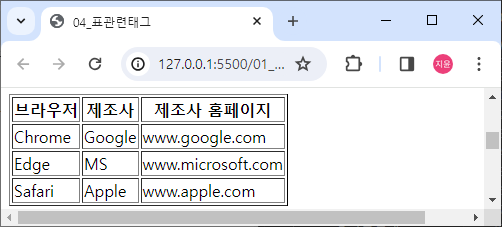
행 병합(rowspan) : 상하 병합
열 병합(colspan) : 좌우 병합
(td/th 태그에서만 작성 가능한 속성)
width 속성 : 넓이 속성
height 속성 : 높이 속성
<table border="1">
	<tr> <!-- 1행 -->
		<th width="70px">이름</th>
		<th width="210px"></th>
		<th width="140px" height="140px" rowspan="2">사진</th>
        <!-- 사진 아래 행까지 병합 -->
	</tr>

	<tr> <!-- 2행 -->
 		<th>연락처</th>
		<td>010-1111-1111</td>
	</tr>

	<tr>
		<th height="35px">주소</th>
		<td colspan="2"></td>
        <!-- 시작한 곳부터 2칸 병합(좌우) -->
	</tr>

	<tr>
		<th height="140px">자기소개</th>
		<td colspan="2"></td>
	</tr>
</table>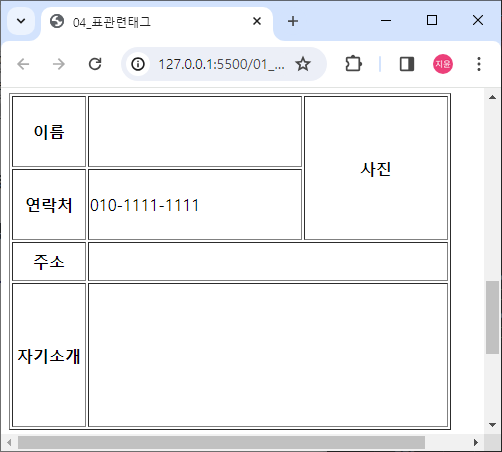
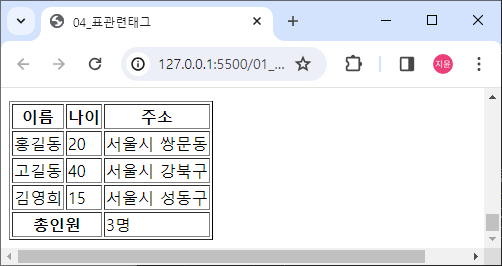
테이블 구조 설정 태그
thead 태그
테이블의 상단 부분 영역(컬럼명)
tbody 태그
테이블의 중단 부분 영역(실제 값, 내용)
tfoot 태그
테이블의 하단 부분 영역(합계)
<table>
	<thead>
		<tr> <!-- 1행 -->
			<th>이름</th>
			<th>나이</th>
			<th>주소</th>
		</tr>
	</thead>

	<tbody>
		<tr> <!-- 2행 -->
			<td>홍길동</td>
			<td>20</td>
			<td>서울시 쌍문동</td>
		</tr>

		<tr> <!-- 3행 -->
			<td>고길동</td>
			<td>40</td>
			<td>서울시 강북구</td>
		</tr>

		<tr> <!-- 4행 -->
 			<td>김영희</td>
			<td>15</td>
			<td>서울시 성동구</td>
		</tr>

	</tbody>

	<tfoot>
		<tr>
			<th colspan="2">총인원</th>
			<td>3명</td>
		</tr>
	</tfoot>
</table>