연습문제1
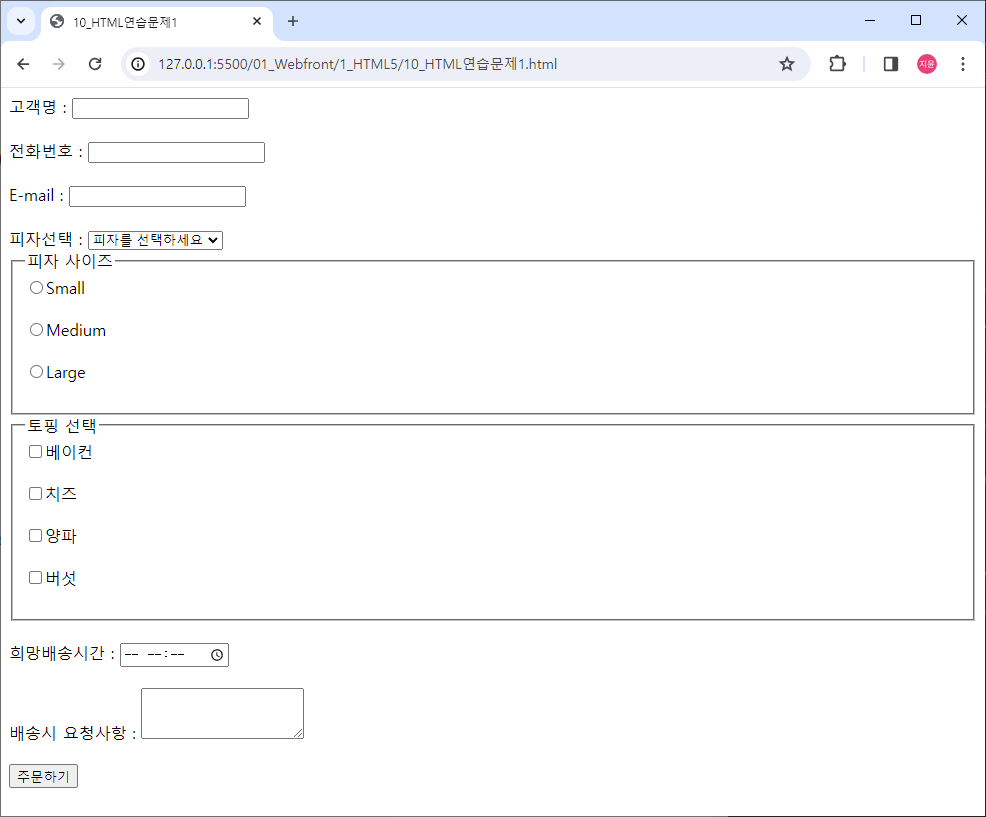
분석하기
1. 전체가 한번에 서버로 넘어가는 값이기 때문에 하나의 form태그로 묶어줌
2. 태그 속성 알맞게 사용하기
<body>
	<form>
		고객명 : <input> <br><br><!-- 기본 text 속성 -->

		전화번호 : <input type="tel"> <br><br>

		E-mail : <input type="email"> <br><br>

		피자선택 :
		<select>
			<option>페퍼로니</option>
			<option>고르곤졸라</option>
			<option>고구마</option>
			<option>포테이토</option>
			<option>쉬림프</option>
			<option selected>피자를 선택하세요</option>
		</select>

		<fieldset>
			<legend>피자 사이즈</legend>
                <label>
                    <input type="radio" name="size">Small
                </label>
                <br><br>
                <label>
                    <input type="radio" name="size">Medium
                </label>
                <br><br>
                <label>
                    <input type="radio" name="size">Large
                </label>
                <br><br>
		</fieldset>

        <fieldset>
                <legend>토핑 선택</legend>
                <label>
                    <input type="checkbox" name="topping">베이컨
                </label>
                <br><br>
                <label>
                    <input type="checkbox" name="topping">치즈
                </label>
                <br><br>
                <label>
                    <input type="checkbox" name="topping">양파
                </label>
                <br><br>
                <label>
                    <input type="checkbox" name="topping">버섯
                </label>
                <br><br>
            </fieldset> <br>

		희망배송시간 : <input type="time"> <br><br>

		배송시 요청사항 : <textarea rows="3" cols="20"></textarea> <br><br>

		<button type="submit">주문하기</button>
	</form>
</body>
연습문제2
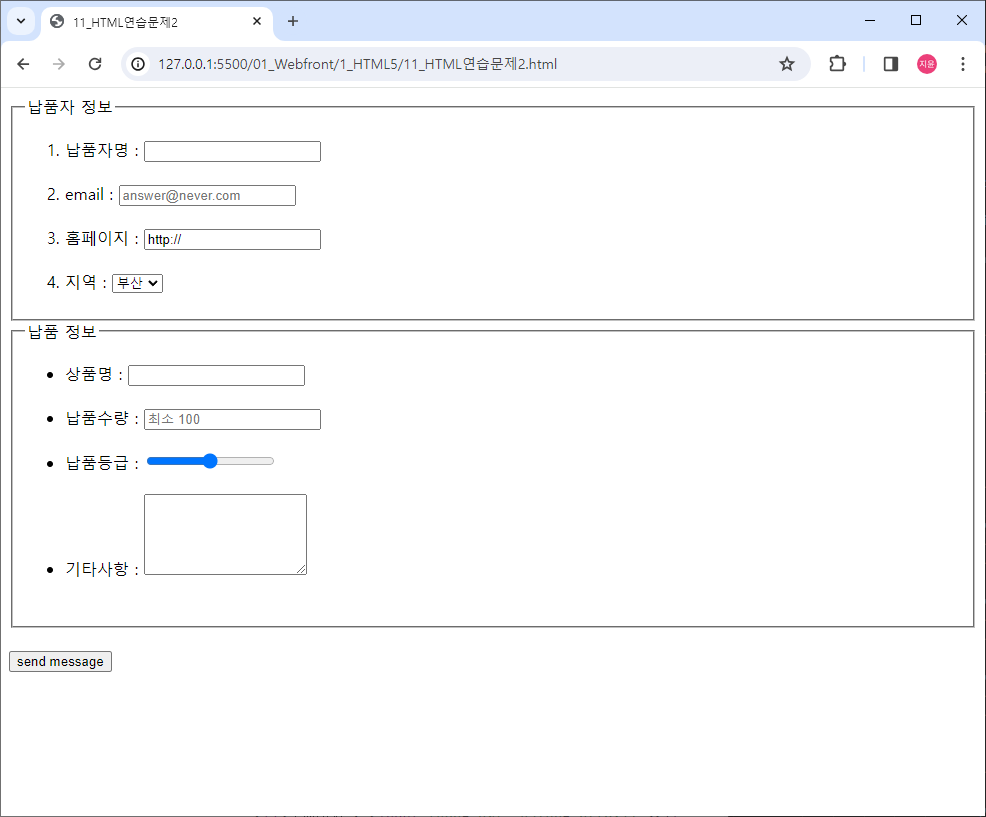
<body>
	<form>
		<fieldset>
			<legend>납품자 정보</legend>
                <ol>
                    <li>납품자명 : <input type="text"></li> <br>

                    <li>email : <input type="email" placeholder="answer@never.com"></li> <br>

                    <li>홈페이지 : <input type="url" value="http://"></li> <br>

                    <li>지역 :
                        <select>
                            <option>서울</option>
                            <option selected>부산</option>
                            <option>대구</option>
                            <option>인천</option>
                            <option>광주</option>
                            <option>대전</option>
                            <option>울산</option>
                        </select>
                    </li>
                </ol>
		</fieldset>

		<fieldset>
			<legend>납품 정보</legend>
                <ul>
                    <li>상품명 : <input></li> <br>

                    <li>납품수량 : <input placeholder="최소 100"></li> <br>

                    <li>납품등급 : <input type="range" max="6" min="0" step="1"></li> <br>

                    <li>기타사항 : <textarea cols="20" rows="5"></textarea></li> <br>
                </ul>
		</fieldset>
		<br>
		<button type="submit">send message</button>
	</form>
</body>
연습문제3
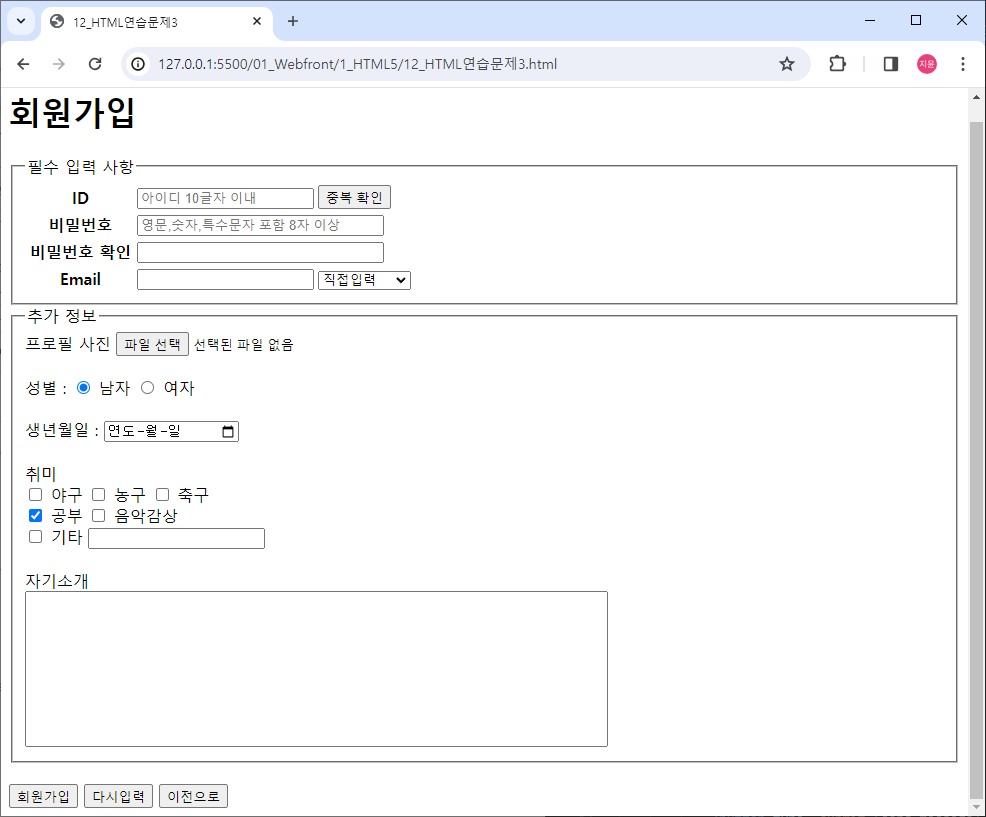
<body>
	<form>
        <h1>회원가입</h1>

        <fieldset>
            <legend>필수 입력 사항</legend>
            <table>
                <tr> <!-- 1행 -->
                    <th width="105px">ID</th>
                    <td>
                        <input placeholder="아이디 10글자 이내">
                    </td>
                    <td>
                        <button type="button">중복 확인</button>
                    </td>

                </tr>

                <tr> <!-- 2행 -->
                    <th>비밀번호</th>
                    <td colspan="2">
                        <input size="30" type="password" placeholder="영문,숫자,특수문자 포함 8자 이상">
                    </td>
                </tr>

                <tr> <!-- 3행 -->
                    <th>비밀번호 확인</th>
                    <td colspan="2">
                        <input size="30" type="password">
                    </td>
                </tr>

                <tr> <!-- 4행 -->
                    <th>Email</th>
                    <td>
                        <input type="email">
                    </td>
                    <td>
                        <select>
                            <option>직접입력</option>
                            <option>naver.com</option>
                            <option>gmail.com</option>
                            <option>hanmail.net</option>
                        </select>
                    </td>
                </tr>
            </table>
        </fieldset>

        <fieldset>
            <legend>추가 정보</legend>
            프로필 사진 <input type="file"> <br><br>

            성별 :
            <label>
                <input checked type="radio" name="gender"> 남자
            </label>

            <label>
                <input type="radio" name="gender"> 여자
            </label> <br><br>

            생년월일 : <input type="date" style="width: 130px;"> <br><br>

            취미 <br>

            <label>
                <input type="checkbox" name="hobby"> 야구
            </label>
            <label>
                <input type="checkbox" name="hobby"> 농구
            </label>
            <label>
                <input type="checkbox" name="hobby"> 축구
            </label>
            <br>
            <label>
                <input checked type="checkbox" name="hobby"> 공부
            </label>
            <label>
                <input type="checkbox" name="hobby"> 음악감상
            </label>
            <br>
            <label>
                <input type="checkbox" name="hobby"> 기타
            </label>
                <input size="20">
            <br><br>
            자기소개
            <br>
            <textarea rows="10" cols="80" style="resize: none;"></textarea>
        </fieldset>

        <br>
        <button type="submit">회원가입</button>
        <button type="reset">다시입력</button>
        <button onclick="moveToAnotherPage()">이전으로</button>
        <script>
            function moveToAnotherPage() {
                var nextPageUrl = 'http://127.0.0.1:5500/1_HTML5/11_HTML%EC%97%B0%EC%8A%B5%EB%AC%B8%EC%A0%9C2.html';
                window.location.href = nextPageUrl;
            }
        </script>
        <!-- 자바스크립트로 이전페이지 이동 연결 -->
	</form>
</body>
문제를 풀면서 고민됐던 부분
- 글자를 중간에 쓰는 법을 몰라 고민하였음.
- input 태그 속성에 width를 넣어도 크기가 변하지 않음.
해결 방법
- 저번에 배웠던 표를 생각해서 th 태그를 사용하여 해결함.
- size 속성을 입력하여 해결함.