boardDetail.html
        <!-- 댓글 영역-->
        <th:block th:replace="~{board/comment}"></th:block>
boardDetail.html 에 script 추가
<script src="/js/board/comment.js"></script>boardDetail.html script 내추럴 템플릿에 구문 추가
    <script th:inline="javascript">
        const userDefaultImage = /*[[#{user.default.image}]]*/ "기본이미지";
    </script>
comment.html
<div id="commentArea">
	<!-- 댓글 목록 -->
	<div class="comment-list-area">

		<ul id="commentList">

			<!-- 대댓글(자식)인 경우 child-comment 클래스 추가 -->
			<li class="comment-row"
					th:each="comment : ${board.commentList}"
					th:classappend="${comment.parentCommentNo} != 0 ? child-comment"
					th:object="${comment}">

				<th:block th:if="*{commentDelFl} == 'Y'">
					삭제된 댓글 입니다
				</th:block>

				<th:block th:if="*{commentDelFl} == 'N'">
					<p class="comment-writer">
						<!-- 프로필 이미지 없을 경우 -->
						<img th:unless="*{profileImg}" th:src="#{user.default.image}">
						<!-- 프로필 이미지 있을 경우 -->
						<img th:if="*{profileImg}" th:src="*{profileImg}">

						<span th:text="*{memberNickname}">닉네임</span>
						<span class="comment-date" th:text="*{commentWriteDate}">작성일</span>
					</p>

					<p class="comment-content" th:text="*{commentContent}">댓글 내용</p>

					<!-- 버튼 영역 -->
					<div class="comment-btn-area">
						<button th:onclick="|showInsertComment(*{commentNo}, this)|">답글</button>

						<th:block th:if="${session.loginMember != null and session.loginMember.memberNo == comment.memberNo}">
							<button th:onclick="|showUpdateComment(*{commentNo}, this)|">수정</button>
							<button th:onclick="|deleteComment(*{commentNo})|">삭제</button>
						</th:block>
						<!-- 로그인 회원과 댓글 작성자가 같은 경우 -->

					</div>
				</th:block>

			</li>

		</ul>
	</div>


	<!-- 댓글 작성 부분 -->
	<div class="comment-write-area">
		<textarea id="commentContent"></textarea>
		<button id="addComment">
			댓글<br>
			등록
		</button>
	</div>

</div>
REST(REpresentational State Transfer) API
댓글 영역 전부 비동기 요청
- 자원(데이터,파일)을 이름(요청 주소)으로
구분(representational) 하여
자원의 상태(State)를 주고 받는 것(Transfer)
-> 자원의 이름(주소)를 명시하고
HTTP Method(GET,POST,PUT,DELETE) 를 이용해
지정된 자원에 대한 CRUD 진행
자원의 이름(주소)는 하나만 지정 (ex. /comment)
삽입 == POST (Create)
조회 == GET (Read)
수정 == PUT (Update)
삭제 == DELETE (Delete)
fetch 기본 GET 방식 요청
[GET] fetch(주소?쿼리스트링)
[POST, PUT, DELETE] fetch(주소, {method : "", header : {}, body : ""})
response.json()
- 응답 받은 JSON 데이터 -> JS 객체로 변환
comment.js
/* ***** 댓글 목록 조회(ajax) ***** */
const selectCommentList = () => {

  fetch("/comment?boardNo=" + boardNo) // GET 방식 요청
  .then(response => response.json())
  .then(commentList => {
    console.log(commentList);

    // 화면에 존재하는 기존 댓글 목록 삭제 후
    // 조회된 commentList를 이용해서 새로운 댓글 목록 출력

    // ul태그(댓글 목록 감싸는 요소)
    const ul = document.querySelector("#commentList");
    ul.innerHTML = ""; // 기존 댓글 목록 삭제


    /* ******* 조회된 commentList를 이용해 댓글 출력 ******* */
    for(let comment of commentList){

      // 행(li) 생성 + 클래스 추가
      const commentRow = document.createElement("li");
      commentRow.classList.add("comment-row");

      // 대댓글(자식 댓글)인 경우 "child-comment" 클래스 추가
      if(comment.parentCommentNo != 0)
        commentRow.classList.add("child-comment");

      // 만약 삭제된 댓글이지만 자식 댓글이 존재하는 경우
      if(comment.commentDelFl == 'Y')
        commentRow.innerText = "삭제된 댓글 입니다";

      else{ // 삭제되지 않은 댓글

        // 프로필 이미지, 닉네임, 날짜 감싸는 요소
        const commentWriter = document.createElement("p");
        commentWriter.classList.add("comment-writer");

        // 프로필 이미지
        const profileImg = document.createElement("img");

        if(comment.profileImg == null)
          profileImg.src = userDefaultImage; // 기본 이미지
        else
          profileImg.src = comment.profileImg; // 회원 이미지

        // 닉네임
        const nickname = document.createElement("span");
        nickname.innerText = comment.memberNickname;

        // 날짜(작성일)
        const commentDate = document.createElement("span");
        commentDate.classList.add("comment-date");
        commentDate.innerText = comment.commentWriteDate;

        // 작성자 영역(commentWriter)에 프로필, 닉네임, 날짜 추가
        commentWriter.append(profileImg, nickname, commentDate);

        // 댓글 행에 작성자 영역 추가
        commentRow.append(commentWriter);

        // ----------------------------------------------------

        // 댓글 내용
        const content = document.createElement("p");
        content.classList.add("comment-content");
        content.innerText = comment.commentContent;

        commentRow.append(content); // 행에 내용 추가

        // ----------------------------------------------------

        // 버튼 영역
        const commentBtnArea = document.createElement("div");
        commentBtnArea.classList.add("comment-btn-area");

        // 답글 버튼
        const childCommentBtn = document.createElement("button");
        childCommentBtn.innerText = "답글";

        // 답글 버튼에 onclick 이벤트 리스너 추가
        childCommentBtn.setAttribute("onclick",
          `showInsertComment(${comment.commentNo}, this)`);

        // 버튼 영역에 답글 추가
        commentBtnArea.append(childCommentBtn);


        // 로그인한 회원 번호가 댓글 작성자 번호와 같을 때
        // 댓글 수정/삭제 버튼 출력

        if(loginMemberNo != null && loginMemberNo == comment.memberNo){

          // 수정 버튼
          const updateBtn = document.createElement("button");
          updateBtn.innerText = "수정";

          // 수정 버튼에 onclick 이벤트 리스너 추가
          updateBtn.setAttribute("onclick",
            `showUpdateComment(${comment.commentNo}, this)`);


          // 삭제 버튼
          const deleteBtn = document.createElement("button");
          deleteBtn.innerText = "삭제";

          // 삭제 버튼에 onclick 이벤트 리스너 추가
          deleteBtn.setAttribute("onclick",
            `deleteComment(${comment.commentNo})`);


          // 버튼 영역에 수정, 삭제 버튼 추가
          commentBtnArea.append(updateBtn, deleteBtn);
        }

        // 행에 버튼 영역 추가
        commentRow.append(commentBtnArea);

      } // else 끝

      // 댓글 목록(ul)에 행(li) 추가
      ul.append(commentRow);

    } // for 끝

  });

}

// -----------------------------------------------------------------------

/* ***** 댓글 등록(ajax) ***** */

const addContent = document.querySelector("#addComment"); // button
const commentContent = document.querySelector("#commentContent"); // textarea

// 댓글 등록 버튼 클릭 시
addContent.addEventListener("click", e => {

  // 로그인이 되어있지 않은 경우
  if(loginMemberNo == null){
    alert("로그인 후 이용해 주세요");
    return; // early return;
  }

  // 댓글 내용이 작성되지 않은 경우
  if(commentContent.value.trim().length == 0){
    alert("내용 작성 후 등록 버튼을 클릭해 주세요");
    commentContent.focus();
    return;
  }

  // ajax를 이용해 댓글 등록 요청
  const data = {
    "commentContent" : commentContent.value,
    "boardNo"        : boardNo,
    "memberNo"       : loginMemberNo  // 또는 Session 회원 번호 이용도 가능
  };

  fetch("/comment", {
    method : "POST",
    headers : {"Content-Type" : "application/json"},
    body : JSON.stringify(data) // data 객체를 JSON 문자열로 변환
  })

  .then(response => response.text())
  .then(result => {

    if(result > 0){
      alert("댓글이 등록 되었습니다");
      commentContent.value = ""; // 작성한 댓글 내용 지우기
      selectCommentList(); // 댓글 목록을 다시 조회해서 화면에 출력

    } else{
      alert("댓글 등록 실패");
    }

  })
  .catch(err => console.log(err));
})

/** 답글 작성 화면 추가
 * @param {*} parentCommentNo
 * @param {*} btn
 */
const showInsertComment = (parentCommentNo, btn) => {

  // ** 답글 작성 textarea가 한 개만 열릴 수 있도록 만들기 **
  const temp = document.getElementsByClassName("commentInsertContent");

  if(temp.length > 0){ // 답글 작성 textara가 이미 화면에 존재하는 경우

    if(confirm("다른 답글을 작성 중입니다. 현재 댓글에 답글을 작성 하시겠습니까?")){
      temp[0].nextElementSibling.remove(); // 버튼 영역부터 삭제
      temp[0].remove(); // textara 삭제 (기준점은 마지막에 삭제해야 된다!)

    } else{
      return; // 함수를 종료시켜 답글이 생성되지 않게함.
    }
  }

  // 답글을 작성할 textarea 요소 생성
  const textarea = document.createElement("textarea");
  textarea.classList.add("commentInsertContent");

  // 답글 버튼의 부모의 뒤쪽에 textarea 추가
  // after(요소) : 뒤쪽에 추가
  btn.parentElement.after(textarea);


  // 답글 버튼 영역 + 등록/취소 버튼 생성 및 추가
  const commentBtnArea = document.createElement("div");
  commentBtnArea.classList.add("comment-btn-area");

  const insertBtn = document.createElement("button");
  insertBtn.innerText = "등록";
  insertBtn.setAttribute("onclick", "insertChildComment("+parentCommentNo+", this)");

  const cancelBtn = document.createElement("button");
  cancelBtn.innerText = "취소";
  cancelBtn.setAttribute("onclick", "insertCancel(this)");


  // 답글 버튼 영역의 자식으로 등록/취소 버튼 추가
  commentBtnArea.append(insertBtn, cancelBtn);

  // 답글 버튼 영역을 화면에 추가된 textarea 뒤쪽에 추가
  textarea.after(commentBtnArea);
}

// ---------------------------------------

/** 답글 (자식 댓글) 작성 취소
 * @param {*} cancelBtn : 취소 버튼
 */
const insertCancel = (cancelBtn) => {

  // 취소 버튼 부모의 이전 요소(textarea) 삭제
  cancelBtn.parentElement.previousElementSibling.remove();

  // 취소 버튼이 존재하는 버튼영역 삭제
  cancelBtn.parentElement.remove();
}

/** 답글 (자식 댓글) 등록
 * @param {*} parentCommentNo : 부모 댓글 번호
 * @param {*} btn  :  클릭된 등록 버튼
 */
const insertChildComment = (parentCommentNo, btn) => {

  // 답글 내용이 작성된 textarea
  const textarea = btn.parentElement.previousElementSibling;

  // 유효성 검사
  if(textarea.value.trim().length == 0){
    alert("내용 작성 후 등록 버튼을 클릭해 주세요");
    textarea.focus();
    return;
  }

  // ajax를 이용해 댓글 등록 요청
  const data = {
    "commentContent" : textarea.value,
    "boardNo"        : boardNo,
    "memberNo"       : loginMemberNo,  // 또는 Session 회원 번호 이용도 가능
    "parentCommentNo" : parentCommentNo // 부모 댓글 번호
  };

  fetch("/comment", {
    method : "POST",
    headers : {"Content-Type" : "application/json"},
    body : JSON.stringify(data) // data 객체를 JSON 문자열로 변환
  })

  .then(response => response.text())
  .then(result => {

    if(result > 0){
      alert("답글이 등록 되었습니다");
      selectCommentList(); // 댓글 목록을 다시 조회해서 화면에 출력

    } else{
      alert("답글 등록 실패");
    }

  })
  .catch(err => console.log(err));

}

// --------------------------------------------------

/** 댓글 삭제
 * @param {*} commentNo
 */
const deleteComment = commentNo => {

  // 취소 선택 시
  if(!confirm("삭제 하시겠습니까?")) return;

  fetch("/comment",{
    method : "DELETE",
    headers : {"Content-Type" : "application/json"},
    body : commentNo
  })
  .then( resp => resp.text() )
  .then( result => {

    if(result > 0){
      alert("삭제 되었습니다");
      selectCommentList(); // 다시 조회해서 화면 다시 만들기

    } else {
      alert("삭제 실패");
    }

  })
  .catch( err => console.log(err));

}

// ----------------------------------

// 수정 취소 시 원래 댓글 형태로 돌아가기 위한 백업 변수
let beforeCommentRow;

/** 댓글 수정 화면 전환
 * @param {*} commentNo
 * @param {*} btn
 */
const showUpdateComment = (commentNo, btn) => {

  /* 댓글 수정 화면이 1개만 열릴 수 있게 하기 */
  const temp = document.querySelector(".update-textarea");

  // .update-textarea 존재 == 열려있는 댓글 수정창이 존재
  if(temp != null){

    if(confirm("수정 중인 댓글이 있습니다. 현재 댓글을 수정 하시겠습니까?")){

      const commentRow = temp.parentElement; // 기존 댓글 행
      commentRow.after(beforeCommentRow); // 기존 댓글 다음에 백업 추가
      commentRow.remove(); // 기존 삭제 -> 백업이 기존 행 위치로 이동

    } else{ // 취소
      return;
    }
  }

  // -------------------------------------------

  // 1. 댓글 수정이 클릭된 행 (.comment-row) 선택
  const commentRow = btn.closest("li");

  // 2. 행 전체를 백업(복제)
  // 요소.cloneNode(true) : 요소 복제,
  //           매개변수 true == 하위 요소도 복제
  beforeCommentRow = commentRow.cloneNode(true);
  // console.log(beforeCommentRow);

  // 3. 기존 댓글에 작성되어 있던 내용만 얻어오기
  let beforeContent = commentRow.children[1].innerText;

  // 4. 댓글 행 내부를 모두 삭제
  commentRow.innerHTML = "";

  // 5. textarea 생성 + 클래스 추가 + 내용 추가
  const textarea = document.createElement("textarea");
  textarea.classList.add("update-textarea");
  textarea.value = beforeContent;

  // 6. 댓글 행에 textarea 추가
  commentRow.append(textarea);

  // 7. 버튼 영역 생성
  const commentBtnArea = document.createElement("div");
  commentBtnArea.classList.add("comment-btn-area");

  // 8. 수정 버튼 생성
  const updateBtn = document.createElement("button");
  updateBtn.innerText = "수정";
  updateBtn.setAttribute("onclick", `updateComment(${commentNo}, this)`);

  // 9. 취소 버튼 생성
  const cancelBtn = document.createElement("button");
  cancelBtn.innerText = "취소";
  cancelBtn.setAttribute("onclick", "updateCancel(this)");

  // 10. 버튼 영역에 수정/취소 버튼 추가 후
  //     댓글 행에 버튼 영역 추가
  commentBtnArea.append(updateBtn, cancelBtn);
  commentRow.append(commentBtnArea);
}

// --------------------------------------------------------------------

/** 댓글 수정 취소
 * @param {*} btn : 취소 버튼
 */
const updateCancel = (btn) => {

  if(confirm("취소 하시겠습니까?")){
    const commentRow = btn.closest("li"); // 기존 댓글 행
    commentRow.after(beforeCommentRow); // 기존 댓글 다음에 백업 추가
    commentRow.remove(); // 기존 삭제 -> 백업이 기존 행 위치로 이동
  }

}

// ----------------------------------------------------------

/** 댓글 수정
 * @param {*} commentNo : 수정할 댓글 번호
 * @param {*} btn       : 클릭된 수정 버튼
 */
const updateComment = (commentNo, btn) => {

  // 수정된 내용이 작성된 textarea 얻어오기
  const textarea = btn.parentElement.previousElementSibling;

  // 유효성 검사
  if(textarea.value.trim().length == 0){
    alert("댓글 작성 후 수정 버튼을 클릭해 주세요");
    textarea.focus();
    return;
  }

  // 댓글 수정 (ajax)
  const data = {
    "commentNo" : commentNo,
    "commentContent" : textarea.value
  }

  fetch("/comment", {
    method : "PUT",
    headers : {"Content-Type" : "application/json"},
    body : JSON.stringify(data)
  })
  .then(resp => resp.text())
  .then(result => {
    if(result > 0){
      alert("댓글이 수정 되었습니다");
      selectCommentList();
    } else {
      alert("댓글 수정 실패");
    }

  })
  .catch(err => console.log(err));
}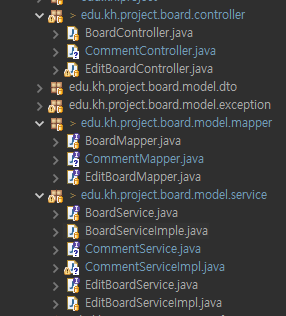
comment-mapper.xml 까지 생성
@RestController (REST API 구축을 위해서 사용하는 컨트롤러)
@Controller(요청/응답 제어 + Bean 등록) + @ResponseBody(응답 본문으로 데이터 자체 반환)
-> 모든 응답을 응답 본문(ajax)으로 반환하는 컨트롤러
(비동기 요청만을 받는 Controller)
이전에는 fetch - 비동기요청
"/comment" 요청이 오면 해당 컨트롤러에서 잡아서 처리함
@ResponseBody 를 매번 메서드에 추가 해서 사용했었음
CommentController
@RestController
@RequestMapping("comment")
@RequiredArgsConstructor
public class CommentController {

	private final CommentService service;
}
1. 댓글 조회
Comment DTO 반환하는 메서드
요청 주소 /comment + 쿼리스트링
GetMapping 에 빈문자열 작성해주면 됨
쿼리스트링으로 들어오는 값은 @RequestParam 으로 받아주면 됨
CommentController
	@GetMapping("")
	public List<Comment> select(@RequestParam("boardNo") int boardNo) {
		return service.select(boardNo);
	}
CommentServiceImpl
	// 댓글 목록 조회
	@Override
	public List<Comment> select(int boardNo) {
		return mapper.select(boardNo);
	}
DBeaver 에서 샘플데이터 INSERT
탈퇴하지 않은 회원, 댓글 0개인 게시글
INSERT INTO "COMMENT"
VALUES(SEQ_COMMENT_NO.NEXTVAL, '부모 댓글 1', DEFAULT, DEFAULT,
				2004, 1, NULL); -- 2001

INSERT INTO "COMMENT"
VALUES(SEQ_COMMENT_NO.NEXTVAL, '부모 댓글 2', DEFAULT, DEFAULT,
				2004, 1, NULL); -- 2002

INSERT INTO "COMMENT"
VALUES(SEQ_COMMENT_NO.NEXTVAL, '부모 댓글 3', DEFAULT, DEFAULT,
				2004, 1, NULL); -- 2003

COMMIT;

SELECT * FROM "COMMENT" ORDER BY COMMENT_NO DESC;

-- 부모 댓글 1의 자식 댓글
INSERT INTO "COMMENT"
VALUES(SEQ_COMMENT_NO.NEXTVAL, '부모 1의 자식 1', DEFAULT, DEFAULT,
				2004, 1, 2001);

-- 부모 댓글 1의 자식 댓글
INSERT INTO "COMMENT"
VALUES(SEQ_COMMENT_NO.NEXTVAL, '부모 1의 자식 2', DEFAULT, DEFAULT,
				2004, 1, 2001);

-- 부모 댓글 2의 자식 댓글
INSERT INTO "COMMENT"
VALUES(SEQ_COMMENT_NO.NEXTVAL, '부모 2의 자식 1', DEFAULT, DEFAULT,
				2004, 1, 2002);

-- 부모 댓글 2의 자식 1의 자식 댓글
INSERT INTO "COMMENT"
VALUES(SEQ_COMMENT_NO.NEXTVAL, '부모 2의 자식 1의 자식', DEFAULT, DEFAULT,
				2004, 1, 2006);

COMMIT;
DBEAVER 에서 계층형 쿼리 작성해보기
-- PARANT_COMMENT_NO 값이 NULL인 행을 부모 (LV.1)
START WITH PARENT_COMMENT_NO IS NULL

-- 부모의 COMMENT_NO 와 같은 PARENT_COMMENT_NO 가진 행을 자식으로 지정
CONNECT BY PRIOR COMMENT_NO = PARENT_COMMENT_NO

-- 형제 (같은 레벨 부모, 자식)들 간의 정렬 순서를 COMMENT_NO 오름 차순
ORDER SIBLINGS BY COMMENT_NO;
완성형 계층형 쿼리 작성(인라인뷰 이용, 상관커리 이용)
(자식 댓글이 있는데 삭제되면 삭제된 댓글입니다.
자식 없는 댓글이 삭제되면 그냥 삭제해줄 거)
SELECT LEVEL, C.* FROM
(SELECT COMMENT_NO, COMMENT_CONTENT,
		    TO_CHAR(COMMENT_WRITE_DATE, 'YYYY"년" MM"월" DD"일" HH24"시" MI"분" SS"초"') COMMENT_WRITE_DATE,
		    BOARD_NO, MEMBER_NO, MEMBER_NICKNAME, PROFILE_IMG, PARENT_COMMENT_NO, COMMENT_DEL_FL
		FROM "COMMENT"
		JOIN MEMBER USING(MEMBER_NO)
		WHERE BOARD_NO = 2004) C
WHERE COMMENT_DEL_FL = 'N'-- 현재 댓글이 삭제되지 않았을 때
OR 0 != (SELECT COUNT(*) FROM "COMMENT" SUB
				 WHERE SUB.PARENT_COMMENT_NO = C.COMMENT_NO
				 AND COMMENT_DEL_FL = 'N')
START WITH PARENT_COMMENT_NO IS NULL
CONNECT BY PRIOR COMMENT_NO = PARENT_COMMENT_NO
ORDER SIBLINGS BY COMMENT_NO;
계층형 쿼리 이용
comment-mapper.xml
boardNo 자리만 바꿔주면 됨
	<!-- 댓글 목록 조회 (계층형 쿼리 이용해야함) -->
	<select id="select">
		SELECT LEVEL, C.* FROM
		(SELECT COMMENT_NO, COMMENT_CONTENT,
				    TO_CHAR(COMMENT_WRITE_DATE, 'YYYY"년" MM"월" DD"일" HH24"시" MI"분" SS"초"') COMMENT_WRITE_DATE,
				    BOARD_NO, MEMBER_NO, MEMBER_NICKNAME, PROFILE_IMG, PARENT_COMMENT_NO, COMMENT_DEL_FL
				FROM "COMMENT"
				JOIN MEMBER USING(MEMBER_NO)
				WHERE BOARD_NO = #{boardNo}) C
		WHERE COMMENT_DEL_FL = 'N'
		OR 0 != (SELECT COUNT(*) FROM "COMMENT" SUB
						 WHERE SUB.PARENT_COMMENT_NO = C.COMMENT_NO
						 AND COMMENT_DEL_FL = 'N')
		START WITH PARENT_COMMENT_NO IS NULL
		CONNECT BY PRIOR COMMENT_NO = PARENT_COMMENT_NO
		ORDER SIBLINGS BY COMMENT_NO
	</select>
2. 댓글/답글 등록
Controller
	/** 댓글/답글 등록
	 * @return result
	 */
	@PostMapping("")
	public int insert(@RequestBody Comment comment) {
		return service.insert(comment);
	}
mapper.xml
동적 SQL :<if>
- else 문 없음
- test 속성 : 조건식을 작성하는 속성
	<!-- 댓글 / 자식 댓글 등록 -->
	<insert id="insert">
		INSERT INTO "COMMENT"
		VALUES(SEQ_COMMENT_NO.NEXTVAL, #{commentContent},
		DEFAULT, DEFAULT, #{boardNo}, #{memberNo},
		<!-- 자식 댓글 -->
		<if test="parentCommentNo != 0">
			#{parentCommentNo}
		</if>
		<!-- 부모 댓글 -->
		<if test="parentCommentNo == 0">
			NULL
		</if>
		)
	</insert>
3. 수정
Controller
	/** 댓글 수정
	 * @return result
	 */
	@PutMapping("")
	public int update(@RequestBody Comment comment) {
		return service.update(comment);
	}
mapper.xml
	<!-- 댓글 수정 -->
	<update id="update">
	 	UPDATE "COMMENT" SET COMMENT_CONTENT = #{commentContent}
	 	WHERE COMMENT_NO = #{commentNo}
	</update>
4. 댓글 삭제
Controller
	/** 댓글 삭제 (update)
	 * @return result
	 */
	@DeleteMapping("")
	public int delete(@RequestBody int commentNo) {
		return service.delete(commentNo);
	}
mapper.xml
	<!-- 댓글 삭제 -->
	<update id="delete">
		UPDATE "COMMENT" SET COMMENT_DEL_FL = 'Y'
	 	WHERE COMMENT_NO = #{commentNo}
	</update>