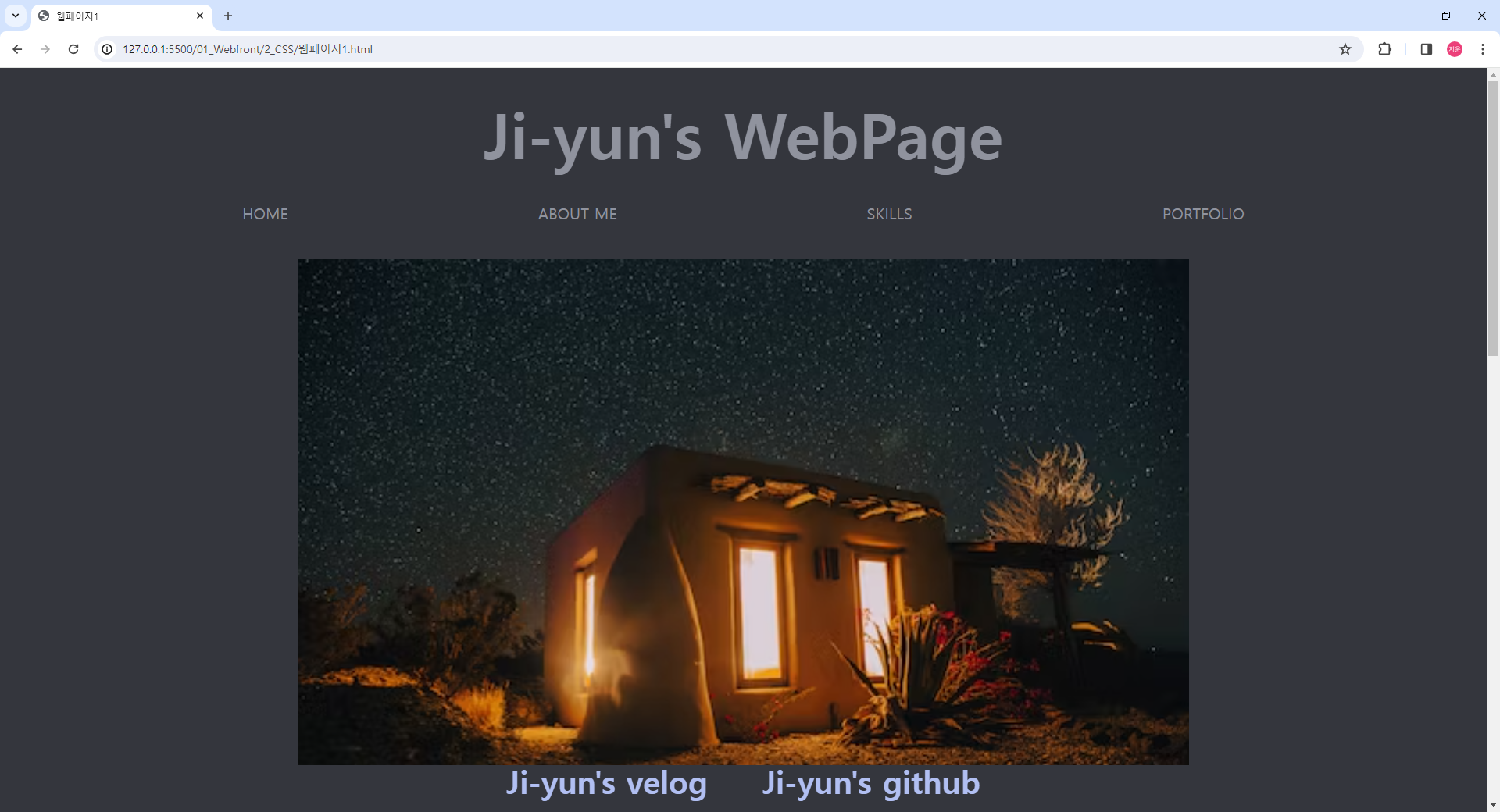
html code
<body>
    <header id="header">
        <section class="title">
            <a href="../2_CSS/웹페이지1.html">Ji-yun's WebPage</a>
        </section>
    </header>

    <main>
        <nav class="header-nav">
            <ul>
                <li><a href="#header">HOME</a></li>
                <li><a href="#profile">ABOUT ME</a></li>
                <li><a href="#skills">SKILLS</a></li>
                <li><a href="#portfolio">PORTFOLIO</a></li>
            </ul>
        </nav>
        <section class="home">
            <img src="https://images.unsplash.com/photo-1705281238460-28fe48836205?w=500&auto=format&fit=crop&q=60&ixlib=rb-4.0.3&ixid=M3wxMjA3fDB8MHxlZGl0b3JpYWwtZmVlZHwxMzl8fHxlbnwwfHx8fHw%3D" alt="home_img">
        </section>

        <section class="aboutMe" id="profile">
            <p>profile</p>
            <p>이름 : 송지윤</p>
            <p>생년월일 : </p>
            <p>E-mail : </p>
            <p>mobile : </p>
        </section>

        <section class="skills" id="skills">
            <section>
                <p>SKILLS</p>
            </section>
                <section>
                <ul>
                    <li>1.HTML</li>
                    <li>
                        <a href="../1_HTML5/01_글자관련태그.html" target="_blank">글자 관련 태그</a>
                    </li>
                    <li>
                        <a href="../1_HTML5/02_목록관련태그.html" target="_blank">목록 관련 태그</a>
                    </li>
                    <li>
                        <a href="../1_HTML5/03_연습문제1.html" target="_blank">연습 문제</a>
                    </li>
                    <li>
                        <a href="#velog">더 많은 내용은 아래 velog와 github에서 확인 가능합니다.</a>
                    </li>
                </ul>
                <ul>
                    <li>2.CSS</li>
                    <li>
                        <a href="../2_CSS/01_CSS개요,CSS선택자1.html" target="_blank">선택자</a>
                    </li>
                    <li>
                        <a href="../2_CSS/07_레이아웃스타일1.html" target="_blank">레이아웃 스타일</a>
                    </li>
                    <li>
                    <a href="../2_CSS/10_flexbox.html" target="_blank">flexbox</a>
                    </li>
                    <li>
                        <a href="#velog">더 많은 내용은 아래 velog와 github에서 확인 가능합니다.</a>
                    </li>
                </ul>
            </section>
        </section>

        <section class="portfolio" id="portfolio">
            <p>PORTFOLIO</p>
            <p>아직 빈칸입니다.</p>
        </section>
    </main>

    <footer id="velog">
        <section>
            <a href="https://velog.io/@songjiyoon/posts" target="_blank">
                <p>Ji-yun's velog</p>
            </a>
        </section>
        <section>
            <a href="https://github.com/songjiyoon9507" target="_blank">
                <p>Ji-yun's github</p>
            </a>
        </section>
    </footer>


</body>
</html>
css code
* {
    box-sizing: border-box;
    /* border: 1px solid black; */
}

body {
    margin: 0;
    background-color: #34363d;
}

header {
    margin-top: 30px;
    display: flex;
    flex-direction: column;
    align-items: center;

}

.title {
    margin-bottom: 20px;
}

.title > a {
    font-size: 80px;
    text-decoration: none;
    color: #90939e;
    font-weight: bold;
}

.title-nav {
    display: flex;
    align-items: center;
    width: 80%;
}

.header-nav {
    width: 100%;
    background-color: #34363d;
    position: sticky;
    top: 0;
}

.header-nav > ul {
    flex-basis: 80%;
    list-style: none;
    display: flex;
    justify-content: space-evenly;
    padding: 0px;
}

.header-nav a {
    color: #90939e;
    text-decoration: none;
    padding: 10px;
    font-size: 20px;
}

main {
    display: flex;
    flex-direction: column;
}

main section {
    display: flex;
    justify-content: center;
}

.home img {
    width: 60%;
    margin-top: 30px;
    margin-bottom: 100px;
}

.aboutMe {
    display: flex;
    flex-direction: column;
    align-items: center;
}

.aboutMe p:first-child {
    color: #90939e;
    font-weight: bold;
    font-size: 40px;
}

.aboutMe p:nth-child(2),
.aboutMe p:nth-child(3),
.aboutMe p:nth-child(4),
.aboutMe p:last-child {
    color: #90939e;
    font-weight: bold;
    font-size: 30px;
}

.skills {
    display: flex;
    flex-direction: column;
    margin-top: 100px;
    margin-bottom: 100px;
}

.skills p {
    font-size: 40px;
    font-weight: bold;
    color: #90939e;
}

.skills li {
    list-style: none;
    font-size: 30px;
    color: #90939e;
}

.skills a {
    text-decoration: none;
    color: #90939e;
    font-size: 20px;
}

.portfolio {
    margin-bottom: 50px;
    display: flex;
    flex-direction: column;
    align-items: center;
}

.portfolio p:first-child {
    font-size: 40px;
    font-weight: bold;
    color: #90939e;
}

.portfolio p:nth-child(2) {
    font-size: 30px;
    font-weight: bold;
    color: #90939e;
}

footer {
    display: flex;
    justify-content: center;
    align-items: center;
    position: fixed;
    height: 60px;
    bottom: 0;
    width: 100%;
    margin: 0;
    padding: 0;
    background-color: #34363d;
}

footer section {
    margin: 0;
    padding: 0;
    display: flex;
    justify-content: space-between;
}

footer a {
    display: flex;
    justify-content: center;
    align-items: center;
}

footer p {
    font-weight: bold;
    font-size: 40px;
    margin: 0;
    padding: 35px;
}

footer a {
    font-size: 20px;
    cursor: pointer;
    text-decoration: none;
    color: #b1bff2;
    padding-bottom: 20px;
}
웹페이지를 만들면서 발생한 문제점
- body 태그 -> header 태그 안에 section 태그와 nav 태그를 넣고 nav에 sticky 속성을 넣었는데 위에 붙지 않고 그냥 넘어가버림
해결방법
- 부모 태그에 height가 부족하다고 생각 header에 height 속성 넣어봤지만 해결되지 않음, body 태그에도 넣어봤지만 해결되지 않음, nav 태그 위치를 header 안에 넣는 게 아닌 main 태그 바로 아래 넣고 sticky 설정하여 해결함