[Git 만들어보기 - Geet] geet write-tree 명령어로 Staging Area에 있는 개체들 기반으로 tree 개체 만들기
Git 만들어보기 - Geet
목록 보기
6/21

2024-01-25 구현
update-index 명령어를 사용하여 Staging Area에 개체들을 올렸다면 이제 그 개체들을 기반으로 상위 Tree 개체를 만들 수 있다.
이 때 사용하는 것이 write-tree 명령어
이미 구현한 부분이 많았어서 쉽게 구현할 수 있었다.
// geet/commands/plumbing/geetWriteTree.kt
package geet.commands.plumbing

import geet.exception.BadRequestException
import geet.util.commandutil.writeTree

fun geetWriteTree(commandLines: Array<String>): Unit {
    if (commandLines.size > 1) {
        throw BadRequestException("write-tree 명령어는 다른 옵션을 지원하지 않습니다. : ${commandLines[1]}")
    }

    writeTree()
}
// geet/util/commandutil/writeTreeUtil.kt
package geet.commands.plumbing
import ..
fun writeTree(): Unit {
val indexFile = File(".geet/index") // index 파일 불러오기
if (!indexFile.exists()) {
println("index 파일이 존재하지 않습니다. 'update-index' 명령어를 통해 Staging Area에 파일을 추가하세요.")
return
}
// Json 파싱 라이브러리를 활용해 index 파일 내용을 데이터 클래스 인스턴스로 변환
val indexFileData = Json.decodeFromString(IndexFileData.serializer(), indexFile.readText())
if (indexFileData.stagingArea.isEmpty()) { // Staging Area에 아무 개체도 올라와있지 않다면
println("Staging Area에 파일이 존재하지 않습니다. 'update-index' 명령어를 통해 Staging Area에 파일을 추가하세요.")
return
}
// Staing Area 개체들로 GeetTree 클래스 인스턴스 생성
val treeObject = GeetTree(objects = indexFileData.stagingArea)
saveObjectInGeet(treeObject) // geet 저장소에 개체 저장
println(treeObject.hashString) // 해시값 출력
}위 과정을 거친 후 명령어를 실행해 보았다.

위와 같이 Tree 개체가 잘 생성되고 저장된 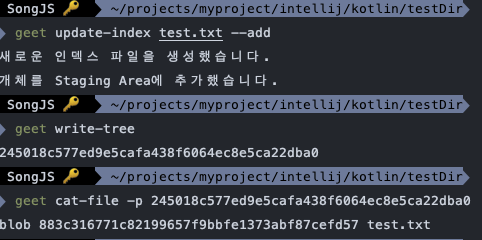
그 후 Staging Area를 비워야하나? 라는 생각도 했지만 write-tree 명령어는 Staging Area를 비우지 않고 현재의 Staging Area를 기반으로 Tree 개체를 생성하기만 하는 역할을 함