2023.10.31 Airflow Web 접근 불가 이슈 발생
- log파일의 과도한 용량이 원인으로 파악됨.
- 기존의 rmlog task를 통해 30일 이상의 로그파일은 삭제하고 있으나 30일 이전의 로그 데이터에서 특정 파일 몇몇 개가 비대한 용량을 차지하는 것을 확인.
- 비이상적인 용량을 가진 로그파일이 저장될 경우 이를 삭제하기는 위험 부담이 커서
주기적으로 압축하여 일 별 관리를 하기로 결정. - log가 저장되는 특정 폴더만 적용.
* 리눅스에서 $vi/etc/cron.daily 를 확인해보면 logrotate 설정 부분을 확인할 수 있음
1. logrotate 는 cron.daily에서 /usr/sbin/logrotate 를 호출
2. /usr/sbin/logrotate 에서 /etc/logrotate.conf 설정 파일 참조
3. /etc/logrotate.conf 설정 파일에서 /etc/logrotate.d 참조
/etc/logrotate.conf 파일 내부
# see "man logrotate" for details
# rotate log files weekly -- 로그 순환 시킬 기간에 대한 설정
weekly
# use the adm group by default, since this is the owning group
# of /var/log/syslog.
su root adm
# keep 4 weeks worth of backlogs -- 순환된 로그 파일을 보관할 기간에 대한 설정
rotate 4
# create new (empty) log files after rotating old ones -- 로그 파일 순환 후 새로운 로그 파일 생성
create
# use date as a suffix of the rotated file -- 순환된 파일의 파일명 변경 옵션 (YYYYMMDD)
#dateext
# uncomment this if you want your log files compressed -- 순환된 파일을 압축하여 보관
#compress
# packages drop log rotation information into this directory -- 로그 순환에 대한 추가 설정 파일이 저장된 디렉토리
include /etc/logrotate.d
# system-specific logs may be also be configured here.특정 폴더에 logrotate 정책 적용하는 방법
1. /etc/logrotate.d/ 디렉토리에 새 설정 파일을 만들기

$sudo vi /etc/logrotate.d/airflow

2. 파일에 내용 작성

<원하는 로그 폴더 경로>/*/*.log {
    su root root
    missingok
    size 100M
    compress
    copytruncate
    notifempty
    }


  # <원하는 로그 폴더 경로> 하위에 있는 모든 log 파일에 적용
  # options
  1. su root root : 로그파일을 소유자:그룹 을 root 로 변환.
  2. missingok : 로그 파일이 없는 경우에도 에러를 반환하지 않고 rotate
  3. size 100M : 로그 파일의 용량이 100M 넘는 경우에 이 rotation이 돈다.
  4. compress : 로그 파일을 압축하여 .gz 파일로 만든다.
  5. copytruncate : .gz로 압축한 파일과 함께 원본 로그 파일은 용량 0으로 존재
  6. notifempty : 로그 파일이 비어있으면 rotate 하지 않는다.
강제 실행
root 명령어 sudo 로 실행
$/usr/sbin/logrotate -f /etc/logrotate.conf # 전체 logrotate 실행
$/usr/sbin/logrotate -f /etc/logrotate.d/airflow # 원하는 파일만 실행
$/usr/sbin/logrotate -d /etc/logrotate.conf # 디버그 모드 --> 실제 실행 X
$/usr/sbin/logrotate -v /etc/logrotate.conf # 실행 과정 화면 출력
linux cron
- service cron status : cron 상태 확인
- service cron start : cron 데몬 실행
시행 착오
-
option compress .gz 이 만들어지지 않는 문제
-> logrotate 실행 시 원본 로그파일과 .gz파일 모두 없어지는 현상 발생
-> 특정 어딘가로 move 되는지 확인해봤으나 찾지 못했음.
-> 해결 : truncate 옵션 추가 -
It's world writable or writable by group which is not "root") Set "su" directive in config file to tell logrotate which user/group should be used for rotation.
-> error log
-> sudo 명령어로 시행시 해당 에러가 나는 것으로 판단.
-> 해결 : 옵션에 su root root 를 넣어 소유자와 그룹을 root로 지정해줌
-> compress 결과로 만들어지는 .gz 파일은 외부 프로그램을 사용하여 압축되기 때문에 root 로 생성되진 않는 것으로 판단. -
error creating output file /var/lib/logrotate/status.tmp: 허가 거부
-> error log
-> sudo 명령어로 시행하지 않으면 나는 에러로 확인
-> 해결 : sudo 명령어로 logrotate 실행 -
(read-only) 권한 에러
-> docker 에서 log 파일을 root 권한으로 저장하기 때문에 compress 할 때 권한 에러 발생
-> 해결 : docker 컨테이너 내부에서 log파일이 있는 폴더와 하위 폴더들의 소유자를 default:1000으로 변환
-> volume 처리가 되어있기 때문에 로컬상에서도 권한이 적용됨.
실행 결과
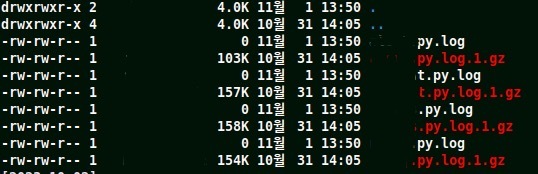
* 제대로 .gz파일이 만들어지는 것을 확인했고, 원본 log 파일의 용량은 0으로 남게됨.
* airflow 에서 rmlog task 가 돌아가고 있어서 원본 log 파일은 기간이 지나면 삭제된다.