서론
비동기 계속~
지난 글에서 XmlHttpRequest를 사용해 통신하는 방법을 알아 봤는데
그 보다 간단한 fetch, 또 그 보다 더 간단한 axios에 대해 작성할 예정!
fetch
Fetch api는 web에 기본적으로 포함 되어 있는 Ajax 구현 방법 중 하나
fetch()함수 형태로 사용- Promise 객체 기반 통신
- url 문자열 값과 통신 설정 값을 매개변수로 받음
기본 형태
const data = {
	...
}
const url = 'https://api';
const options = {
	method: 'GET',
  	headers: {
      "Content-Type": "application/json",
    },
  	body: JSON.stringify(data),
    //...
}

const promise = fetch(url, options)
promise.then((response)=>{
	// 응답 데이터 처리 로직
}).catch((error)=>{
	// 에러 발생 시 처리 로직
})
XMLHttpRequest코드랑 비교
XMLHttpRequest
- 생성, 구성, 청취, 전송 4단계로 나눠서 코드 작성
send()메서드를 실행해야 전송됨
const request = new XMLHttpRequest()
request.open('GET', 'https://api.github.com/users/soohyn/repos')
request.addEventListener('load', (e) => {
  console.log(JSON.parse(e.target.response))
  // 데이터 처리 로직
})
request.send()
fetch
- 이벤트 리스너로 청취할 필요 없이 내장된
then()메서드가 알아서 실행 됨 send()메서드를 따로 실행할 필요없이fetch()함수 실행과 동시에 생성, 구성, 전송 실행
fetch('https://api.github.com/users/soohyn/repos',{
	method: 'GET'
}).then(()=>{}).catch(()=>{})
Promise 객체
- promise 등장 이전엔 비동기를 처리하기 위해 콜백 함수를 사용 했고 콜백 속에 콜백으로 일명 콜백 지옥이 있었음
- promise의 등장으로 then을 사용함으로써 코드의 가독성이 개선 되었으며 간단해 졌다.
- 동시에 catch 메서드로 에러처리도 손쉽게 가능해 졌다
	function count(callback) {
    	if(!callback) return
    	setTimeout(console.log(n), 1000)
    }

    count(count(count(count())))
	function runEvery1000ms() {
    	return new Promise((resolve, reject)=>{
        	if(!callback) reject(new Error('error'))
          	setTimeout(resolve,1000)
        })
    }

	runEvery1000ms
      .then(runEvery1000ms)
      .then(runEvery1000ms)
      .then(runEvery1000ms)
Promise 객체 생성
new Promise((resolve, reject)=>{
	if(조건) resolve('성공!') // then 실행
	else reject('실패!') // catch 실행
})
Promise 상태
	const promise = fetch(URL) // pending
	const response = promise
                        .then(()=>{}) // fulfilled
                        .catch(()=>{}) // rejected

- pending: 초기 상태 이행/거절 이전의 상태
- fulfilled: 이행, then 함수 실행
- rejected: 거절, catch 함수 실행
fetch 통신 예시
  const promise = fetch("https:// api.github.com/users/soohyn");

	promise
      .then((response)=>{
      	if(!response.ok) throw new Error()
    	return response.json()

    }).then((data)=>{
      	// 데이터 가공 로직 삽입 가능
    	return { data }
    })catch((error)=>console.error(error))
reponse.json()
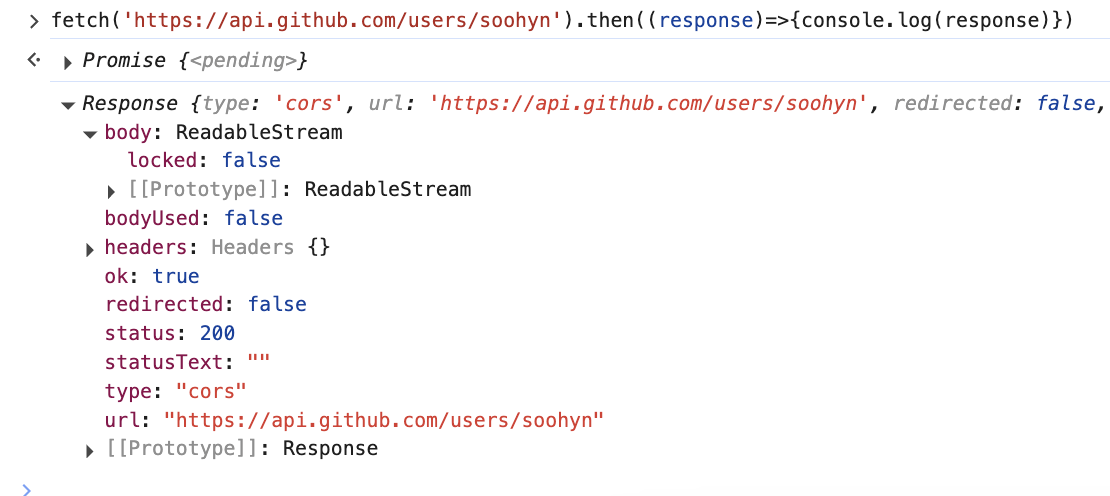
- 응답이 Body에 담겨 오는데
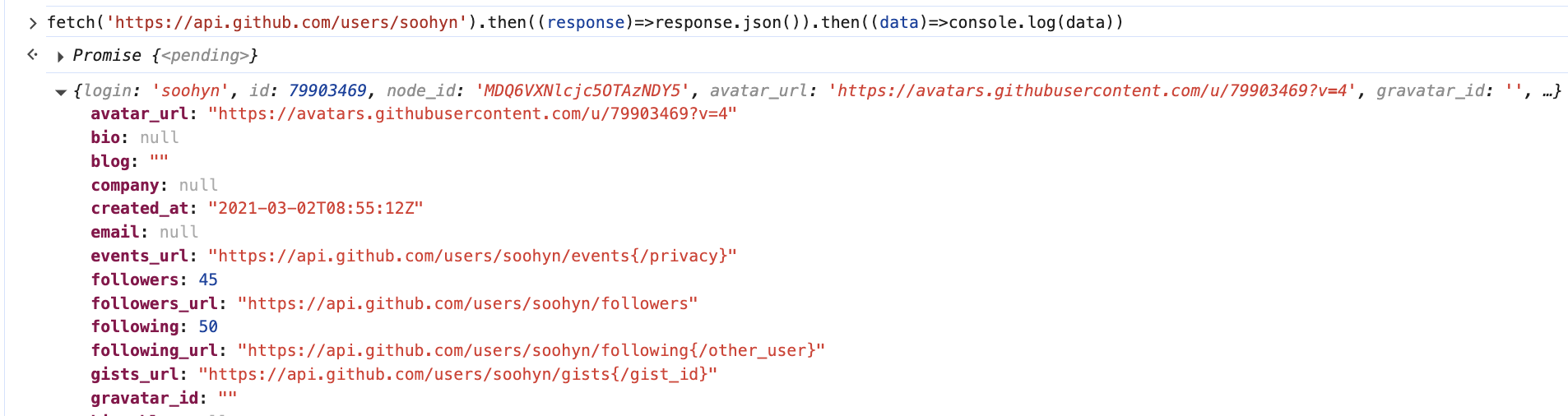
ReadableStream라는 형태로 되어있어 자바스크립트에서 사용 불가, 별도의 처리가 필요- .json() 메서드를 통해 자바스크립트에서 사용가능한 객체 형태로 변형
- .json() 외에도 .text(), blob() 과 같은 메서드도 사용 됨
.json() 메서드 사용 전
.json() 메서드 사용 후
axios
Ajax 통신을 편리하게 하기 위해 나온 라이브러리
- 라이브러리기 때문에 패키지 설치가 필요함
기본형태
import axios from 'axios'

axios.get(URL,{ params: {} })
axios.post(URL,{ name: 'soohyun', color: 'cyan' })
axios.put(URL,{ name: 'soohyn', color: 'magenta' })
axios.patch(URL,{ color: 'yellow' })
axios.delete(URL)
- GET: query parameter를 URL에 담을 수도 있지만 두번째 매개변수에 객체 형태 인수로 전달 가능
- POST: 두번째 매개변수에 객체 형태의 인수로 body 데이터 전달 가능
axios 통신
 const API_ENDPOINT = "https://dummyjson.com/products";

  const product = {
    title: "더블링 소세지",
    price: 6200,
  };

  axios
    .post(`${API_ENDPOINT}/add`,product)
    .then(({ data }) => {
      console.log(data);
    })
    .catch(console.error);
data 출력
- json() 메서드로 변형 없이 자바스크립트 객체로 잘 출력 됨
fetch 와 비교
- 같은 POST 통신인데 에러 처리와 데이터 변형으로 인해 코드가 훨씬 길다
 fetch(`${API_ENDPOINT}/add`, {
    method: "POST",
    headers: {
      "Content-Type": "application/json",
    },
    body: JSON.stringify(product),
  })
    .then((response) => {
      return response.json().then((body) => {
        if (!response.ok) return Promise.reject(body);
        return body;
      });
    })
    .catch(console.error);
fetch vs axios
- 에러 처리가 필요 없거나 무겁게 라이브러리 설치를 원치 않다면 내장되어있는 fetch api 사용
- 그 외에는 사실 자바스크립트에서 사용 가능하도록 여러 변환이 필요 없는 axio가 편해 보임
| fetch | axios | |
|---|---|---|
| 데이터 처리 | JSON.stringify 사용, json() 메서드 사용 | 자바스크립트 객체 사용 |
| 에러 처리 | 상태 코드에 따라 개발자가 직접 작성 | 에러 발생 시 알아서 catch로 보내줌 |
| 복잡도 | 비교적 복잡함 | 비교적 간편함 |
마무리
비동기도 뭔가 볼 때마다 새로운 느낌 ... 이러면 안 되는데~~

프론트엔드 개발 블로그