08_Spring_240402(화)_56일차(1) - Spring Boot - Thymeleaf - Model, th:text, th:block, th:each, th:object, th:src
8_Spring
목록 보기
4/38
1. Thymeleaf
✅ html 태그 안에 타임리프 사용 선언(xmlns:th="타임리프주소")
<!DOCTYPE html>
<html lang="en" xmlns:th="http://www.thymeleaf.org">
<head>
    <meta charset="UTF-8">
    <meta name="viewport" content="width=device-width, initial-scale=1.0">
    <title>Thymeleaf</title>
</head>
메인 컨트롤러
// Controller : 요청에 따라 알맞은 서비스 호출할지 제어
//				+ 서비스 결과에 따라 어떤 응답을 할지 제어

@Controller // IOC(제어의 역전) 요청/응답 제어 역할 명시 + Bean 등록
public class MainController {


	// "/" 주소 요청 시 해당 메서드와 매핑
	// - 메인 페이지 지정시에는 "/" 작성 가능

	@RequestMapping("/")
	public String mainPage() {

		// forward : 요청 위임

		// thymeleaf : Spring Boot에서 사용하는 템플릿 엔진

		// thymeleaf를 이용한 html 파일로 forward 시
		// 사용되는 접두사, 접미사가 존재

		// 접두사 : classpath:/templates/
		// 접미사 : .html
		// src/main/resources/templates/common/main.html


		return "common/main";
	}
}
📌 타임리프 예제 1
1) 단일 값 출력
Example 컨트롤러
@Controller // 요청/응답 제어 역할 명시 + Bean 등록
@RequestMapping("example") // example로 시작하는 주소를 해당 컨트롤러 매핑
@Slf4j // lombok 라이브러리가 제공하는 로그 객체 자동생성 어노테이션
public class ExampleController {

	/* Model
	 * - Spring에서 데이터 전달 역할을 하는 객체
	 *
	 * - org.springframework.ui 패키지
	 *
	 * - 기본 scope : request
	 *
	 * - @SessionAttributes와 함께 사용 시 session scope 변환
	 *
	 * [기본 사용법]
	 * Model.addAttribute("key", value);
	 *
	 */


	// /example/ex1 GET 방식 요청 매핑
	@GetMapping("ex1")
	public String ex1(HttpServletRequest req, Model model) {

		// scope 내장 객체 범위
		// page < request < session < application

		// request scope
		req.setAttribute("test1", "HttpServletRequest로 전달한 값");
		model.addAttribute("test2", "Model로 전달한 값");


		// 단일 값(숫자, 문자열) Model을 이용해서 html로 전달
		model.addAttribute("productName", "종이컵");
		model.addAttribute("price", 2000);


		return "example/ex1"; // templates/example/ex1.html 요청 위임
	}

}
ex1.html
<!DOCTYPE html>
<!-- th 속성 추가 네임스페이스 선언 : 본 html에서 타임리프 사용하겠다. -->
<html lang="en" xmlns:th="http://www.thymeleaf.org">
<head>
    <meta charset="UTF-8">
    <meta name="viewport" content="width=device-width, initial-scale=1.0">
    <title>타임리프 예제1</title>
</head>
<body>
    <h1>타임리프 예제1</h1>

    <pre>
        Spring EL(스프링 표현 언어)
        - ${key} : 변수, Model 등을 이용해서 세팅한 값 출력

        th:text 속성 = "속성값"
        - 타임리프를 이용해서 속성값을 작성된 태그의 내용(innerText)으로 출력

        ** th 속성은 출력된 화면(응답화면)에서 보여지지 않는다! **
        -> 해석된 후 사라지기 때문에
    </pre>

    <h4 th:text="${test1}">test1 값</h4>
    <h4 th:text="${test2}">test2 값</h4>
    <h4>이게 떠야 하는데</h4>

    <p th:text="${test1}"></p>

    <hr>

    <h3>단일 값 출력</h3>

    <pre>
        th:block 태그
        - Thymeleaf에서 제공하는 유일한 태그

        - Thymeleaf는 태그 내에 th 속성을 작성하여 정의하는게 일반적이지만
          th 속성을 작성할 태그가 존재하지 않을 때 사용

          - th : text보단 조건, 반복문과 같이 사용하는 경우가 많음
    </pre>

    <th:block th:text="${productName}">상품명</th:block>
    / <span th:text="${productName}">상품명</span>

    <br>

    price :
    <span class="price">
        <th:block th:text="${price}">가격</th:block>원
    </span>
</body>
</html>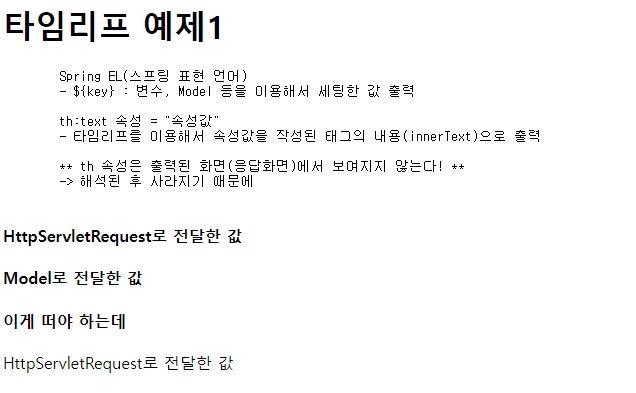

2) 복수 값 출력
// 복수 값(배열, List) Model을 이용해서 html로 전달
List<String> fruitList = new ArrayList<>();
fruitList.add("사과");
fruitList.add("딸기");
fruitList.add("바나나");

model.addAttribute("fruitList", fruitList);<h3>복수 값 출력</h3>
<pre>
th:each="item : ${List 또는 배열}"
- 향상된 for문
- List 또는 배열 길이 만큼 반복
- 매 반복시 마다 List 또는 배열의 요소를 차례대로 꺼내
item 변수에 지정(item 변수명은 자유롭게 작성)
</pre>
<ul>
<li th:text="${fruitList}">과일 목록</li>
<li th:text="${fruitList[0]}">1번 인덱스</li>
<li th:text="${fruitList[1]}">1번 인덱스</li>
<li th:text="${fruitList[2]}">1번 인덱스</li>
</ul>
<h4>th:each 사용</h4>
<ul>
<th:block th:each="fruit : ${fruitList}">
<li th:text="${fruit}">과일명</li>
</th:block>
</ul>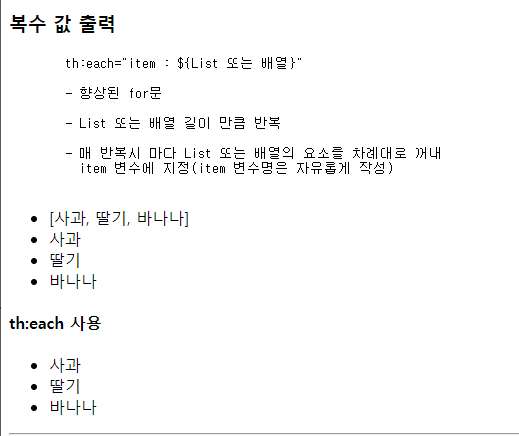
3) DTO 객체 / List 출력
DTO 생성
package edu.kh.demo.model.dto;

import lombok.AllArgsConstructor;
import lombok.Getter;
import lombok.NoArgsConstructor;
import lombok.Setter;
import lombok.ToString;

// Spring EL 같은 경우 getter가 필수로 작성되어 있어야 한다.
// - ${Student.getName()} == ${Student.name}
// Getter 대신 필드명 호출하는 형식으로 작성하는데
// 자동으로 Getter 호출하기 때문
@Getter
@Setter
@ToString
@NoArgsConstructor // 매개변수 없는 생성자 == 기본 생성자
@AllArgsConstructor // 모든 필드를 초기화하는 용도의 매개변수 생성자
public class Student {
	private String studentNo; // 학번
	private String name; // 이름
	private int age; // 나이
}
// DTO 객체 Model을 이용해서 html로 전달
Student std = new Student();
std.setStudentNo("12345");
std.setName("홍길동");
std.setAge(22);
model.addAttribute("std", std);<h3>DTO 객체 출력</h3>
<ul>
<li th:text="${std}">std 객체</li>
<li th:text="${std.studentNo}">학번</li>
<li th:text="${std.name}">이름</li>
<li th:text="${std.age}">나이</li>
</ul>th:object
<pre>
    th:object 속성  +   *{필드명}

    - th:object 속성 : 해당 태그 내에서 지정된 객체의 필드를
                        쉽게 접근하게 하는 속성

    - *{} : th:object로 지정된 객체의 필드를 접근할 때 사용하는 작성법
</pre>

<h4>th:object 사용</h4>

<ul th:object="${std}">
    <li th:text="*{studentNo}">학번</li>
    <li th:text="*{name}">이름</li>
    <li th:text="*{age}">나이</li>
</ul>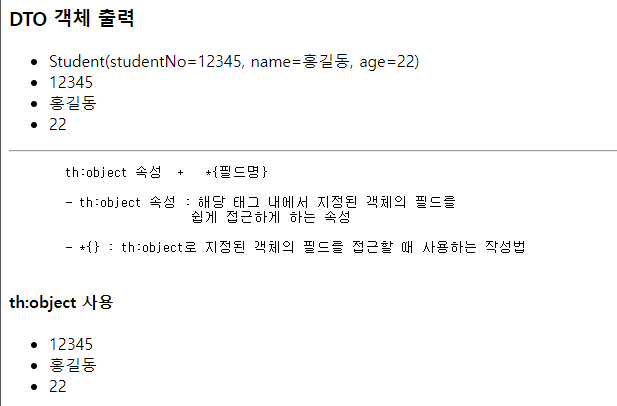
List 출력
// List<Student> 객체 Model을 이용해서 html로 전달
List<Student> stdList = new ArrayList<>();

stdList.add( new Student("11111", "김일번", 20) );
stdList.add( new Student("22222", "최이번", 20) );
stdList.add( new Student("33333", "홍삼번", 20) );

model.addAttribute("stdList", stdList);<h3>DTO가 담긴 List 출력하기</h3>
<table border="1">
<thead>
<tr>
<th>학번</th>
<th>이름</th>
<th>나이</th>
</tr>
</thead>
<tbody>
<!-- th:each가 설정된 태그 전체(tr)가 반복된다! -->
<tr th:each="std : ${stdList}" th:object="${std}">
<td th:text="*{studentNo}">학번</td>
<td th:text="*{name}">이름</td>
<td th:text="*{age}">나이</td>
</tr>
</tbody>
</table>
📌 타임리프 예제 2
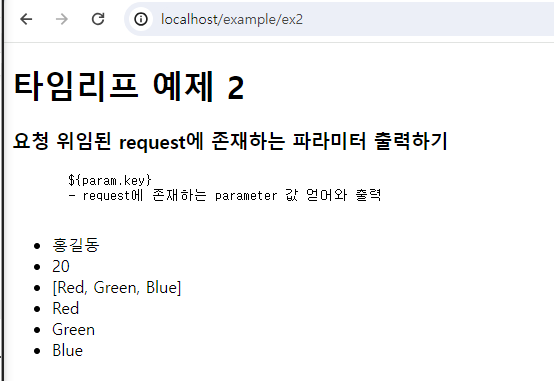
1) 요청 위임된 request에 존재하는 파라미터 출력하기
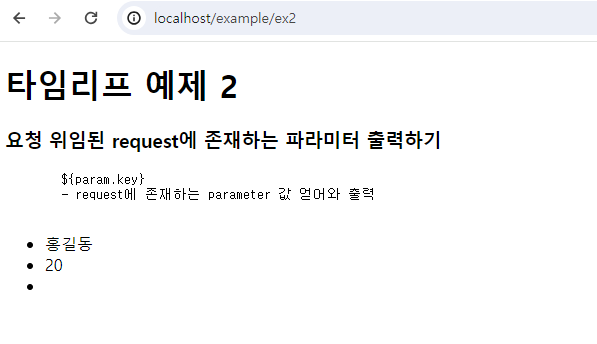
2) th:text / th:utext
@PostMapping("ex2") // /example/ex2 POST 방식 매핑
public String ex2(Model model) {
// request -> inputName = "홍길동", inputAge=20, color=[Red, Green, Blue]
model.addAttribute("str", "<h1>테스트 중 ×</h1>");
return "example/ex2"; // templates/example/ex2.html 요청 위임
}<h3>th:text / th:utext</h3>
<pre>
th:text="속성값"
- 해당 태그에 "속성값"을 내용으로 출력
- 단, html 태그, 특수문자 해석 X (innerText)
th:utext="속성값"
- 해당 태그에 "속성값"을 내용으로 출력
- 단, html 태그, 특수문자 해석 O (innerHTML)
</pre>
<div>
<h4>th:text (HTML 태그 해석 X)</h4>
<th:block th:text="${str}"></th:block>
</div>
<div>
<h4>th:utext (HTML 태그 해석 O)</h4>
<th:block th:utext="${str}"></th:block>
</div>
<hr>
<h3>
th:text / th:utext 출력 시
변수에 저장된 값이 아닌 임의 내용 작성
</h3>
<pre>
th:text="|문자열 + ${key}|"
- 해당 요소의 내용으로 "문자열" + 변수값 출력
</pre>
<p th:text="|th:text의 str => ${str}"></p>
<p th:utext="|th:utext의 str => ${str}"></p>
<hr>
<h3>th:text / th:utext 대신하는 특수 기호 (괄호)</h3>
<!--
th:text == [[...]]
th:utext == [(...)]
-->
<!-- [[...]] 사용 -->
<p>입력 받은 이름 : [[${param.inputName}]]</p>
<p th:text="|입력 받은 이름 : ${param.inputName}|"></p>
<!-- [(...)] 사용 -->
[(${str})]


3) messaige.properties 값 출력하기
src/main/resources 경로에 file 생성 후 UTF-8 설정

<h1>message.properties 값 출력하기</h1>

<h3 th:text="#{app.name}">앱 이름</h3>

<!-- th:src 속성 : 타임리프를 이용해서 경로 작성
    (옆에 작성된 값을 이용해서 src 속성 추가) -->
<img th:src="#{user.default.image}">