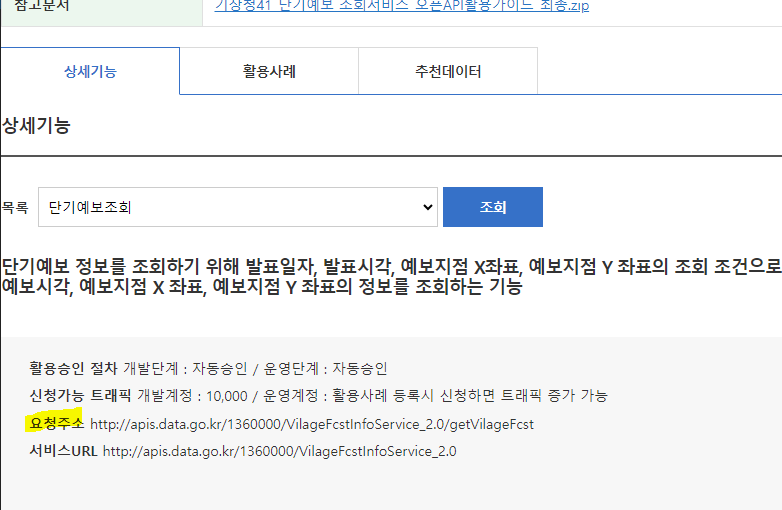
config.properties에 인코드, 디코드 인증키 등록
# 공공데이터 포털 ServiceKey encode
my.public.data.service.key.encode=인코드값

# 공공데이터 포털 ServiceKey decode
my.public.data.service.key.decode=디코드값
mainController에서 키값 꺼내서 리턴
	@Value("${my.public.data.service.key.decode}")
	private String decodeServiceKey;


	/* 공공데이터 서비스키 리턴하기
	 */
	@GetMapping("/getServiceKey")
	@ResponseBody
	public String getServiceKey() {
		return decodeServiceKey;
	}
header.js
// 공공 데이터

// async & awiat : 비동기 처리 패턴
// 비동기를 마치 동기처럼(실행 순서를 지켜서) 사용하는 방법
// async : 비동기가 수행되는 함수 정의 부분 앞에 붙여 사용하는 키워드 (비동기 요청을 수행할 것이다.)
// await : promise를 리턴하는 비동기 요청 앞에 붙여 사용하는 키워드


// 오늘 날짜를 YYYYMMDD 형식으로 리턴하는 함수
function getCurrentDate() {

    const today = new Date();
    const year = today.getFullYear(); // 2024
    const month = ('0' + (today.getMonth() + 1)).slice(-2);
    const day = ('0' + today.getDate()).slice(-2);
    return `${year}${month}${day}`;

}

// 비동기 요청 1번째 함수
// 서비스키 config.properties에서 얻어오기
async function getServiceKey() {

    try {

        const response = await fetch("/getServiceKey"); // 첫번째 then의 response(Promise) 객체 리턴
        return response.text();

        // const response = fetch("/getServiceKey");
        // const result = response.text();

        // fetch("/getServiceKey")
        // .then(resp => resp.text())
        // .then(result => {
        //     console.log(result);
        // })

    } catch(err) {
        console.log("getServiceKey의 에러 : " + err);
    }
}

// 공공데이터 날씨 API 정보를 얻어올 함수
async function fetchData() {

    const currentDate = getCurrentDate(); // 20240524
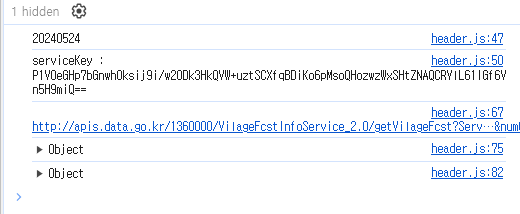
    console.log(currentDate);
    const serviceKey = await getServiceKey(); // 비동기 요청 1번째의 응답이 올 때까지 기다림

    console.log("serviceKey : ", serviceKey);

    const url = 'http://apis.data.go.kr/1360000/VilageFcstInfoService_2.0/getVilageFcst';

    // URLSearchParams : URL의 쿼리 문자열을 쉽게 다룰 수 있게 해주는 내장 객체
    // 단, 사용 시 decode 서비스키 사용 -> URLSearchParams이 데이터를 인코딩하기 때문
    const queryParams = new URLSearchParams({
        ServiceKey : serviceKey,
        pageNo : 1,
        numOfRows : 10,
        dataType : 'JSON',
        base_date : currentDate,
        base_time : '0500',
        nx: 60,
        ny: 127
    });

    console.log(`${url}?${queryParams}`);

    // fetch 요청
    try {

        const response = await fetch(`${url}?${queryParams}`)
        const result = await response.json();

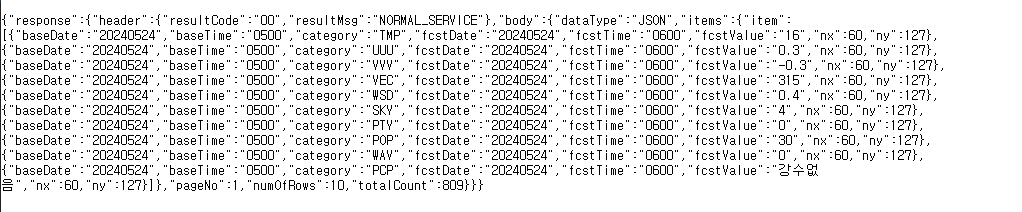
        console.log(result);

        const obj = result.response.body.items.item.reduce((acc, data) => {
            acc[data.category] = data.fcstValue;
            return acc;
        }, {});

        console.log(obj);
        const sky = {
            "1" : "맑음",
            "3" : "구름많음",
            "4" : "흐림"
        }
        // 화면에 뿌리기..
        const weatherInfo = document.querySelector(".weather-info");

        // i 요소 생성 (아이콘)
        const icon = document.createElement('i');

        // span 요소 생성 (날씨 정보)
        const span = document.createElement('span');

        // 첫 번째 p 요소 생성 (기온 정보)
        const p1 = document.createElement('p');
        // 두 번째 p 요소 생성 (비 올 확률 정보)
        const p2 = document.createElement('p');
        // 강수형태(PTY) 코드 : 없음(0), 비(1), 비/눈(2), 눈(3), 소나기(4)
        // 강수 형태에 따라 icon 지정
        if( obj.PTY == 0 ) { // 강수 없음
            switch(obj.SKY) { // SKY 상태에 따라 아이콘 지정
                case "1" :
                    icon.className = 'fa-solid fa-sun'; break;

                case "3" :
                    icon.className = 'fa-solid fa-cloud'; break;

                case "4" :
                    icon.className = 'fa-solid fa-cloud-sun'; break;

            }
        } else if(obj.PTY == 3) { // 눈 올 때
            icon.className = 'fa-solid fa-snowflake';
        } else { // 그외 비올때
            icon.className = 'fa-solid fa-cloud-rain';
        }
        // 하늘 정보
        span.innerText = sky[obj.SKY];
        // 기온
        p1.innerText = `기온 : ${obj.TMP}℃`;

        // 강수확률
        p2.innerText = `강수 확률 : ${obj.POP}%`;
        // div에 자식 요소들 추가
        weatherInfo.appendChild(icon);
        weatherInfo.appendChild(span);
        weatherInfo.appendChild(p1);
        weatherInfo.appendChild(p2);

    } catch(err) {
        console.log(err);
    }
}

fetchData();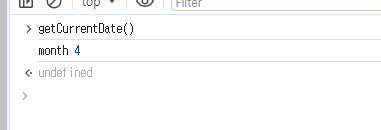
JS에서 날짜 구할 때 getMonth는 1달 전으로 나오고 1자리 수로 나옴
10보다 작으면 앞에 0 붙여서 나오게끔 처리
'0' + (today.getMonth() + 1) 의 경우 공백이 생기기 때문에 slice 처리