🗯️ 결과
아무것도 클릭하지 않았을 때
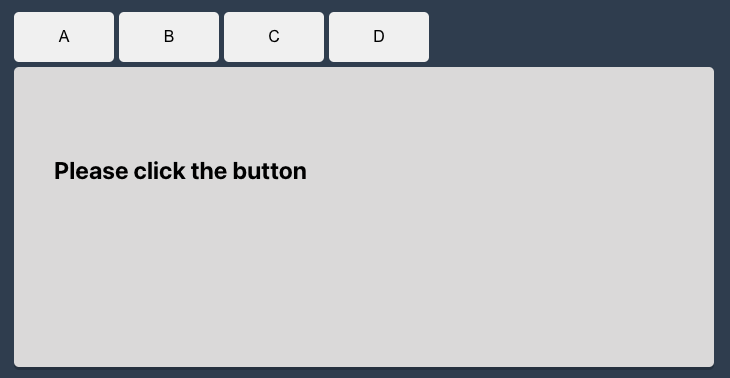
버튼 클릭했을 때
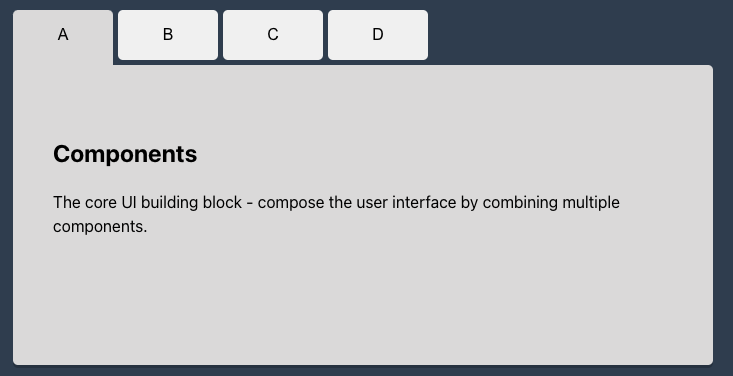
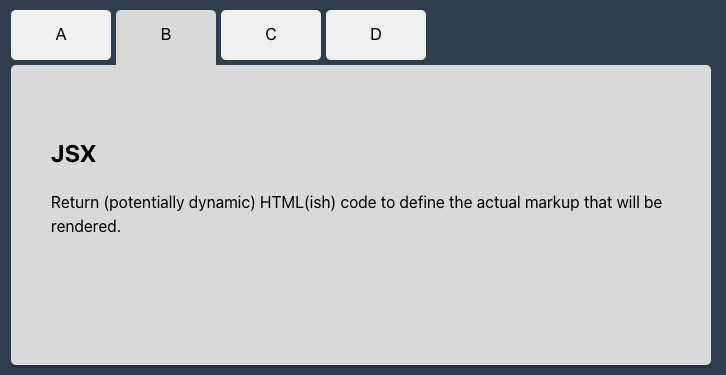
🗯️ 최종 코드
import React, { useState } from 'react';
import './App.css';

const TabArr = [
  {
    menu : 'A',
    title: 'Components',
    description: 'The core UI building block - compose the user interface by combining multiple components.',
  },
  {
    menu : 'B',
    title: 'JSX',
    description: 'Return (potentially dynamic) HTML(ish) code to define the actual markup that will be rendered.',
  },
  {
    menu : 'C',
    title: 'Props',
    description: 'Make components configurable (and therefore reusable) by passing input data to them.',
  },
  {
    menu : 'D',
    title: 'State',
    description: 'React-managed data which, when changed, causes the component to re-render & the UI to update.',
  }
]


function App() {
  const [currentTab, setCurrentTab] = useState(-1);

  const clickTabHandler = (index) => {
    setCurrentTab(index);
  }

  return (
    <div className='App'>
      <div className='tab'>
        <div className='tab-button'>
          {TabArr.map((tabItem, index) => (
            <button
              className={index === currentTab ? 'active' : ''}
              key={index}
              onClick={() => clickTabHandler(index)}>
              {tabItem.menu}
            </button>
          ))}
        </div>
        <div className='tab-contents'>
            {currentTab === -1 ? (
              <h2>
              Please click the button
              </h2>
            ) : (
              TabArr.map((tabItem, index) => (
                <div key={index} className={index === currentTab ? 'tab-content active' : 'tab-content'}>
                  <h2>{tabItem.title}</h2>
                  <p>{tabItem.description}</p>
                </div>
              ))
            )}
        </div>
      </div>
    </div>
  );
}

export default App;
✅ 버튼 명과 탭 내용을 배열로 만들었다
const TabArr = [
  {
    menu : 'A',
    title: 'Components',
    description: 'The core UI building block - compose the user interface by combining multiple components.',
  },
  {
    menu : 'B',
    title: 'JSX',
    description: 'Return (potentially dynamic) HTML(ish) code to define the actual markup that will be rendered.',
  },
  {
    menu : 'C',
    title: 'Props',
    description: 'Make components configurable (and therefore reusable) by passing input data to them.',
  },
  {
    menu : 'D',
    title: 'State',
    description: 'React-managed data which, when changed, causes the component to re-render & the UI to update.',
  }
]
✅ UI구조를 작성한다
<div className='App'>
	<div className='tab'>
        <div className='tab-button'>
            <button>버튼</button>
        </div>
        <div className='tab-contents'>
        	<div className='tab-content'>
            	<h2>타이트</h2>
                <p>내용</p>
            </div>
        </div>
	</div>
</div>
여기서 탭 버튼과 탭 내용은 TabArr=[] 요소 갯수만큼 화면에 출력이 되어야한다.
✅ map메서드를 이용하여 화면에 배열 요소들을 출력한다
<div className='tab-button'>
	{TabArr.map((tabItem, index) => (
		<button key={index}>{tabItem.menu}</button>
	))}
</div>
<div className='tab-contents'>
	{TabArr.map((tabItem, index) => (
		<div key={index}>
			<h2>{tabItem.title}</h2>
			<p>{tabItem.description}</p>
		</div>
	))
}
✅ 클릭 이벤트를 생성한다
  const [currentTab, setCurrentTab] = useState(0);
  const clickTabHandler = (index) => {
    setCurrentTab(index);
  }
<button key={index} onClick={() => clickTabHandler(index)}> {tabItem.menu} </button>useState를 이용하지 않으면 탭 버튼을 클릭해도 탭 컨텐츠가 리렌더링 되지 않음
✅ 탭을 클릭하지 않았을때 보이는 문구도 추가해준다
const [currentTab, setCurrentTab] = useState(0);<div className='tab-contents'> {currentTab === -1 ? ( <h2>Please click the button</h2> ) : ( TabArr.map((tabItem, index) => ( <div key={index} className={index === currentTab ? 'tab-content active' : 'tab-content'}> <h2>{tabItem.title}</h2> <p>{tabItem.description}</p> </div> )) )} </div>useState의 기본값을 -1로 변경해주고 currentTab이 -1일때와 아닐때의 UI를 구분하여 작성해준다.
✅ active 클래스 추가 작업을 해준다
<button
	className={index === currentTab ? 'active' : ''}
	key={index}
	onClick={() => clickTabHandler(index)}>
	{tabItem.menu}
</button>
<div key={index} className={index === currentTab ? 'tab-content active' : 'tab-content'}> <h2>{tabItem.title}</h2> <p>{tabItem.description}</p> </div>
✅ 필수 CSS
.tab-content {
  width:100%;
  height:100%;
  display: none;
}
.tab-content.active {
  display: block;
}
그 외 꾸며주는 css는 자유

개인공부