이 시리즈는 강의에서 모르는 부분을 위한 복습이기 때문에 중간마다 생략되는 부분이 있을 예정
나는 센스 기술 경험이 없으니까 이론을 파야겠다!
useState로 일기 상태 관리하기
//App.js

const [data, setData] = useState([]);

<div className="App">
	<DiaryEditor onCreate={onCreate} />
    <DiaryList data={data} />
</div>

//DiaryEditor에서 handleSubmit() 실행 되면 -> DiaryList에 리스트 생성
//DiaryEditor.js
const handleSubmit = () =>{
if(state.author.length < 1){
authorInput.current.focus();
return;
}
if(state.content.length < 5){
contentInput.current.focus();
return;
}
//handleSubmit 실행시, 현재 가지고 있는 3개의 값을 onCreate 함수로 전달함
onCreate(state.author, state.content, state.emotion);
alert('저장 성공');
//일기 저장 후 입력폼 초기화
setState({
author: "",
content: "",
emotion: "",
})
}current : useRef의 속성(property)
- const 변수명 = useRef(초기값)
- current : 초기값
//App.js

const onCreate = (author,content,emotion)  => {

//DiaryEditor에서 handleSubmit 실행시 전달받은 author, content, emotion을
  제외하고 필요한 값들은 함수 내에서 직접 정의해줌

	const created_date = new Date().getTime();

    const newItem = {
      author,
      content,
      emotion,
      created_date,
      id: dataId.current
    }

    //dataId는 1씩 증가한 값으로 매번 생성이 되어야 함
    dataId.current += 1;

    //
    setData([...data, newItem])
}
정리
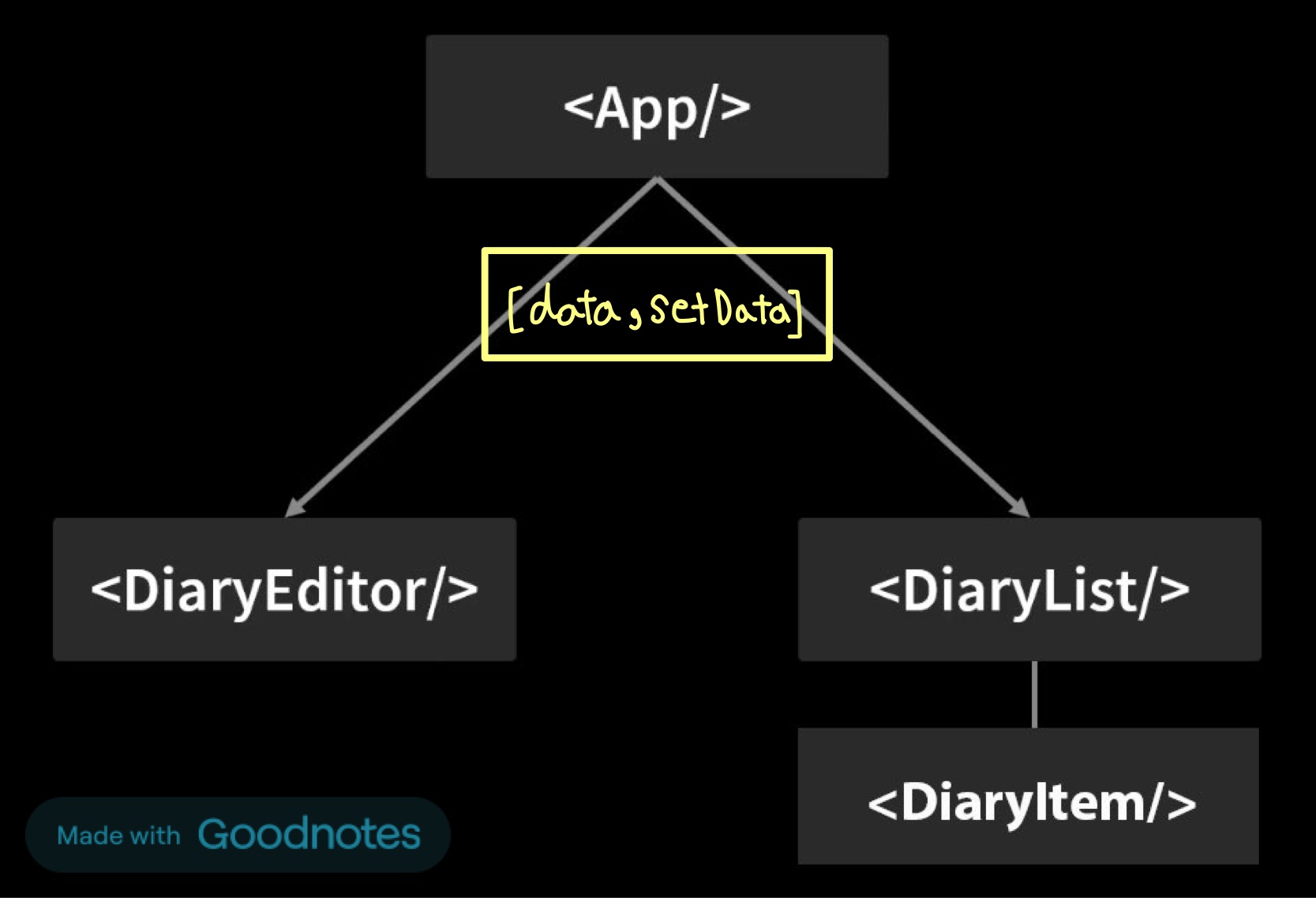
- 동위선상의 컴포넌트 간 데이터 바인딩이 안되기 때문에 공동으로 사용할 데이터는 최상위 App에 정의
- 일기의 값이 변경될때마다 리렌더링 하고 상태를 관리하기 위해 일기 값을 useState로 정의한다.
- DiaryEditor에서 저장버튼을 클릭하여 handleSubmit()을 실행시키면, App의 onCreate()가 실행되고 일기의 값이 변경된다.
onCreate()가 DiaryEditor가 아닌 App에 정의되어 있는 이유
- 주로 데이터 관리는 데이터를 사용하는 곳의 상위 컴포넌트에서 이루어지는 것이 일반적이다.
- 여러 하위 컴포넌트에서 동일한 일기 데이터 상태를 공유하고 일관성 있게 관리할 수 있다.

개인공부