Integrating Test Management Tools Into Your Workflow Without Breaking Everything
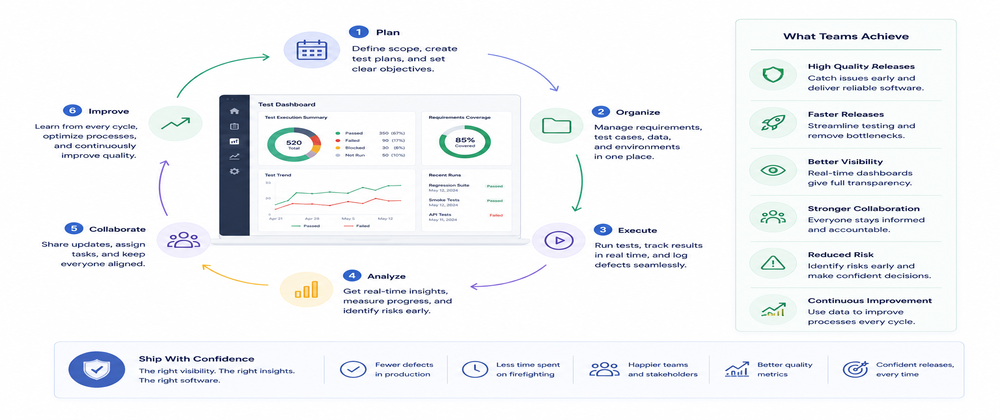
The promise of test management tools is attractive. One place to track all tests. Visibility into test health. Metrics and reporting. Everything in one system.
The reality often goes differently. You implement a test management tool and suddenly everything takes longer. Running tests requires extra steps. Creating tests requires filling out forms. Checking results requires logging into another system. Your team starts resisting. People do things outside the system. The tool becomes a burden instead of a benefit.
This does not have to happen. Integration can be smooth. But it requires thinking about workflow first and tools second.
This article is about that approach. How to integrate test management tools into your actual workflow. Not forcing your workflow to fit the tool. But making the tool fit your workflow. How to do it without disrupting your team.
Why Integration Fails
Most integration projects fail for the same reasons.
- Teams implement tools without thinking about workflow.
- They choose a tool based on features.
- They set it up according to documentation.
- They expect teams to adapt.
- Teams do not adapt.
- They work around the tool.
Teams try to change everything at once.
- They implement the tool and expect comprehensive adoption immediately.
- Teams are overwhelmed.
- They resist.
- Adoption is slow or fails.
Teams do not have buy-in from the team.
- They choose tools without input from the people who will use them.
- The tool does not fit how people actually work.
- People do not use it.
Teams underestimate the learning curve.
- They think teams will pick up the tool quickly.
- In reality, learning takes time.
- During the learning period, productivity drops.
- Teams get frustrated.
These failures are not inevitable. They are predictable. And preventable.
The Phased Approach
Integration works when you approach it in phases. Not a big bang. A gradual transition.
Phase One: Choosing Carefully
Understanding what your team actually needs. Not what the tool can do. What your team needs.
Phase Two: Starting Small
Implementing with a subset of tests or a subset of the team. Learning in a low-risk environment. Iterating based on what you learn.
Phase Three: Team Adoption
Expanding to more of the team. Building processes. Establishing standards.
Phase Four: Full Integration
The tool is part of normal workflow. Teams use it naturally. It is not an extra step.
Each phase teaches you something.
- You learn what works.
- You learn what does not work.
- You adapt before problems get large.
Phase One: Choose Carefully
Before you choose a tool, understand your actual workflow. Not the ideal workflow. The actual one.
How do developers currently write tests?
- Do they use a testing framework?
- Do they write tests in the IDE?
- Do they use templates?
How do developers currently run tests?
- Locally?
- In CI?
- Both?
How do developers currently track test results?
- Logs?
- Reports?
- Metrics?
How do developers currently communicate about tests?
- Meetings?
- Slack?
- Code reviews?
Document your actual workflow. Not the workflow you want to have. The workflow you actually have.
Now ask a different question. Where does a test management tool add value? Where does it create friction?
A tool that fits your workflow adds value. A tool that requires changing your workflow creates friction.
Choose a tool that fits your workflow. Not a tool that requires changing your workflow.
This is the most important decision. Choose wrong here and integration will fail. Choose right here and integration will be smooth.
Phase Two: Start Small
Do not implement the tool across the entire codebase with the entire team.
Start with:
- One team
- One component
- One type of test
Something small enough that the stakes are low.
Have that group use the tool for a real project. Not a demo. Real work.
Questions to evaluate:
- What works?
- What does not work?
- What is friction?
- What is valuable?
Capture these learnings. This is invaluable information.
Now iterate.
- Make changes to the process.
- Try different configurations.
- Try different workflows.
The key is learning in a low-risk environment. If it goes wrong with one team, you fix it. You do not have to do a full rollback across the organization.
Phase Three: Team Adoption
Once you know what works, expand to the rest of the team.
But do not just roll it out. Build processes. Establish standards. Provide training.
Processes should be clear.
- How does someone write a new test?
- How do they run tests?
- How do they check results?
- How do they report problems?
Standards should be documented.
- How should tests be named?
- How should they be organized?
- How should results be tracked?
Training should be practical.
Not feature training. Workflow training.
- Here is how you do your job using this tool.
Support should be available.
- Who do people ask when they have questions?
- How do they get help?
With processes, standards, training, and support, adoption goes smoothly.
Phase Four: Full Integration
Once adoption is solid, the tool becomes part of normal workflow.
- Teams use it naturally.
- It is not an extra step.
- It is how things work.
At this point, you can expand what the tool does.
- Add reporting.
- Add metrics.
- Add automation.
Build on the foundation.
Common Integration Mistakes
Several mistakes appear in almost every integration project.
Trying to change too much at once
You change the tool and the process and the training all at the same time. Too much change. Teams get overwhelmed.
Not getting team input
You choose a tool and process without asking the team. The tool does not fit how people work. People resist.
Underestimating adoption time
You expect quick adoption. In reality, adoption takes time. Plan for it.
Not providing support
You roll out the tool and expect people to figure it out.
- They have questions.
- They do not have answers.
- They stop using the tool.
Not iterating
You implement a process and expect it to work perfectly.
- It does not.
- You do not make adjustments.
- The process becomes a burden.
Not measuring success
You do not know if the tool is actually helping.
- You cannot tell if adoption is working.
- You cannot tell if the tool should stay or go.
Avoid these mistakes and integration goes smoothly.
Workflow Comes First
The key principle is workflow comes first. Tool comes second.
-
Do not choose a tool and expect your workflow to adapt to it.
-
Choose a tool that fits your workflow.
-
Do not design a process for the tool.
-
Design a process that solves your problems, then find a tool that supports that process.
-
Do not ask developers to change how they work.
-
Find a tool that works the way they already work.
This principle applies to every aspect of integration.
- Configuration
- Training
- Process
- Support
When workflow comes first, integration is smooth. When tool comes first, integration is painful.
Minimal Friction Integration
One approach that integrates smoothly is focusing on test management that requires minimal disruption to workflow. For example, some tools record actual test behavior and manage the recorded tests. Tools like Keploy, which records API behavior and manages test cases based on actual recorded behavior, minimize manual entry and disruption.
Why does this approach work? Because the tool fits naturally into the workflow.
- Developers do their work.
- The tool captures what happens.
- Developers do not have to do extra work to feed the tool data.
Approaches like this reduce friction significantly. They integrate more smoothly because they do not require developers to change how they work. The test management happens automatically based on what the system actually does, rather than requiring manual test creation and logging.
Measuring Success
How do you know if integration is working?
Do not measure by adoption rates or feature usage. Measure by whether the tool solves your original problem.
Did you want visibility into test health?
- Can you see it now?
- Is the visibility valuable?
Did you want to track which tests cover which features?
- Can you do that now?
- Is it useful?
Did you want to reduce manual testing?
- Is manual testing reduced?
Did you want to improve team communication about tests?
- Is communication improved?
These are the things that matter.
- Adoption percentage does not matter.
- Whether the tool solves your problem matters.
Scaling Integration
As you scale to more teams, integration challenges change.
Early on
- You can support teams directly.
- You can help with questions.
- You can adjust processes based on feedback.
As you scale
You need more infrastructure.
- Documentation
- Training materials
- Support channels
- Automation
The principle remains the same.
- Workflow comes first.
- Make processes that fit how teams actually work.
- Make the tool support those processes.
Different teams may have different workflows. That is okay.
- The tool should be flexible enough to support different approaches.
- Or you should be clear about which workflows the tool supports.
Common Questions
Can we use test management tools with our existing testing approach?
Probably. But choose a tool that fits your approach. Do not choose a tool and then try to change your approach to fit it.
How long does adoption take?
Longer than you think. Plan for three to six months for a team to become comfortable with a new tool. Do not expect quick adoption.
What if teams do not like the tool?
Listen to their feedback. Most resistance comes from workflow friction, not the tool itself. Address the friction and resistance often disappears.
How do we get team buy-in?
- Involve the team in choosing the tool.
- Have them try the tool before committing.
- Get their input on process.
When teams feel ownership, adoption is much better.
Conclusion
Integrating test management tools does not have to disrupt your team. But it requires thinking about workflow first.
- Choose a tool that fits your workflow.
- Start small.
- Learn from real usage.
- Iterate based on feedback.
- Build processes that make sense.
- Provide support.
- Measure success by whether the tool solves your problems.
Integration done well makes testing better.
- Teams have visibility.
- Communication improves.
- Testing becomes more systematic.
Integration done poorly makes testing worse.
- Tools become obstacles.
- Teams work around them.
- Testing becomes a burden.
The difference is not the tool. The difference is approach.
- Put workflow first.
- Choose carefully.
- Start small.
- Iterate.
- Support your team.
- Measure what matters.
Do that and integration goes smoothly. Your team will thank you.