Problem : icon(NavLink)이 active 상태일 때 하위 icon image 색이 변경되지 않음
Bottom Navigation Bar 컴포넌트의 IconLink(icon을 나타내는 NavLink)를 클릭했을 때, IconLink의 to 속성값 path로 이동하면서 IconLink의 자식 요소인 icon image와 icon text의 색이 변경되어야 합니다.
- icon text의 경우, span 태그에서 기본 color 속성값을 삭제하여
IconLink의 color값을 상속받게 했습니다.
- 그러나 icon image의 경우, image 파일 형식이어서 색을 변경할 수 없었습니다.
const NAVLINK_CLASS_VARIANTS = {
active: 'flex flex-col justify-center items-center text-teal-300',
inactive: 'flex flex-col justify-center items-center text-white',
} as const;
const RoadmapIconLink = () => {
return (
<NavLink
to="/"
className={({ isActive }) => {
return isActive ? NAVLINK_CLASS_VARIANTS.active : NAVLINK_CLASS_VARIANTS.inactive;
}}
>
<image src="/assets/images/roadmap-icon.svg" alt="roadmap" />
<span className="mt-1.5 font-sans text-xs font-medium">Roadmap</span>
</NavLink>
);
}
Solution : icon을 font로 변경
- icon의 색을 CSS로 변경할 수 있게 하기 위해서, IcoMoon 사이트를 통해 icon image를 font로 변경했습니다.
public/assets 폴더 안에 변환한 font 파일들이 담긴 fonts 폴더를 넣었습니다.
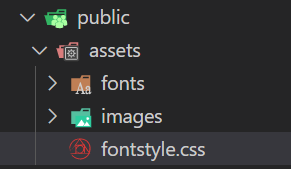
index.html 파일 안에서 fontstyle.css 파일을 link 태그로 연결하여 사용했습니다.
<!DOCTYPE html>
<html lang="en">
  <head>
    <meta charset="UTF-8" />
    <meta name="viewport" content="width=device-width, initial-scale=1.0" />
    <link rel="stylesheet" href="https://rsms.me/inter/inter.css" />
    <link rel="stylesheet" href="/assets/fontstyle.css" />
    <title>Pullanner</title>
  </head>
  <body>
    <div id="root"></div>
    <script type="module" src="/src/main.tsx"></script>
  </body>
</html>
fontstyle.css 파일에서 icon font의 기본 color 속성값을 삭제하여 부모 요소 IconLink의 color를 상속 받도록 했습니다. - figma 디자인 시안에 맞춰서 font-size를 22px로 설정했습니다.
.icon-community-icon:before {
content: "\e900";
color: #fff;
}
.icon-dashboard-icon:before {
content: "\e901";
color: #fff;
}
.icon-journal-icon:before {
content: "\e902";
color: #fff;
}
.icon-roadmap-icon:before {
content: "\e903";
color: #fff;
}
.icon-community-icon:before {
content: '\e900';
font-size: 22px;
}
.icon-dashboard-icon:before {
content: '\e901';
font-size: 22px;
}
.icon-journal-icon:before {
content: '\e902';
font-size: 22px;
}
.icon-roadmap-icon:before {
content: '\e903';
font-size: 22px;
}
- image 태그를 icon font class(예: icon-*-icon)를 사용한 i 태그로 변경했습니다.
const ICON_LINK_DATA = [
  {
    name: 'Roadmap',
    linkPath: '/',
    iconClass: 'icon-roadmap-icon',
  },
  ...
]
const IconLink = ({ iconLinkProps }: IconLinkProps) => {
  const { name, linkPath, iconClass } = iconLinkProps;

  return (
    <NavLink
      to={linkPath}
      className={({ isActive }) => {
        return isActive ? NAVLINK_CLASS_VARIANTS.active : NAVLINK_CLASS_VARIANTS.inactive;
      }}
    >
      <i className={iconClass} />
      <span className="mt-1.5 font-sans text-xs font-medium">{name}</span>
    </NavLink>
  );
};
- 이렇게 icon image를 font로 변경한 결과, color CSS 속성을 통해서 색을 변경할 수 있었습니다.