ESLint 설치하기
- eslint를 devDependencies에 설치합니다.
yarn dlx eslint --init
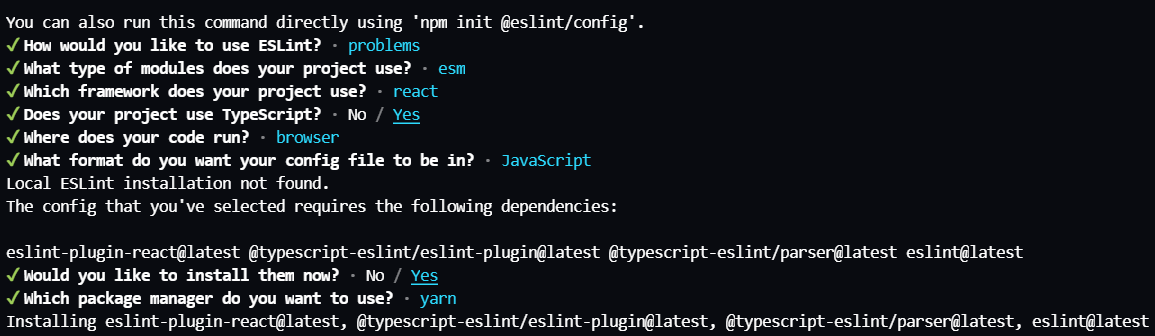
- Airbnb's eslint를 따르기로 결정했으므로,
eslint-config-airbnb를 devDependencies에 설치합니다.
yarn add -D eslint-config-airbnb
eslint-plugin-import, eslint-plugin-jsx-a11y, eslint-plugin-react-hooks를 devDependencies에 설치합니다.
eslint-config-airbnb에서 eslint, eslint-plugin-import, eslint-plugin-react, eslint-plugin-react-hooks, eslint-plugin-jsx-a11y를 필요로 하기 때문입니다.
 yarn add -D eslint-plugin-import
 yarn add -D eslint-plugin-jsx-a11y
 yarn add -D eslint-plugin-react-hooks
- TypeScript가
eslint-plugin-import를 지원하는 플러그인인 eslint-import-resolver-typescript를 devDependencies에 설치합니다.
yarn add -D eslint-import-resolver-typescript
- eslintrc.cjs 파일 만들고, 프론트엔드 회의에서 논의한 내용을 넣습니다.
prettier 설치하기
prettier를 devDependencies에 설치합니다.
yarn add -D prettier
"Failed to load module. If you have prettier or plugins referenced in package.json, ensure you have run 'npm install'"에러가 발생하므로 VSCode 관련 editor SDKs와 설정들을 설치해주어야 합니다.
yarn dlx @yarnpkg/sdks vscode
eslint-config-prettier와 eslint-plugin-prettier을 devDependencies에 설치합니다.
yarn add -D eslint-config-prettier
yarn add -D eslint-plugin-prettier
- 프론트엔드 회의에서 논의한 내용를 토대로 .prettierrc.cjs 파일 만듭니다.
storybook 설치하기
- storybook를 devDependencies에 설치합니다.
npx storybook init
$env:NODE_OPTIONS = "--openssl-legacy-provider"
- storybook 라이브러리에 필요한 의존성 라이브러리 설치합니다.
yarn add -D @storybook/preview-web
yarn add -D @storybook/client-api
yarn add -D @storybook/addon-backgrounds
yarn add -D @storybook/addon-measure
yarn ass -D @storybook/addon-outline
yarn add -D @storybook/channel-postmessage
yarn add -D @storybook/channel-websocket
yarn add -D @storybook/addons
tailwind CSS 설치하기
- tailwindCSS, postCSS, autoprefixer를 devDependencies에 설치합니다.
yarn add -D tailwindcss postcss autoprefixer
yarn add -D postcss-import
init 명령어를 통해 config 파일 생성합니다.
- p 옵션 :
tailwind.config.js와 postcss.config.js 파일을 동시에 생성하는 옵션입니다.
npx tailwindcss init -p
tailwind.config.js의 content에 tailwind class 이름을 사용하는 파일의 경로를 추가합니다.
module.exports = {
content: ['./index.html', './src/**/*.{js,ts,jsx,tsx}'],
theme: {
extend: {},
},
variants: {
extend: {},
},
plugins: [],
}
module.exports = {
plugins: {
'postcss-import': {},
tailwindcss: {},
autoprefixer: {},
}
}
// index.css
@tailwind base;
@tailwind components;
@tailwind utilities;
TanStack React Query 설치하기
- TanStack React Query를 dependencies에 설치합니다.
yarn add @tanstack/react-query
- react-query-devTools를 dependencies에 설치합니다.
yarn add @tanstack/react-query-devtools
- app.tsx에서 QueryClientProvider와 ReactQueryDevtools을 추가합니다.
import { QueryClient, QueryClientProvider } from '@tanstack/react-query';
import { ReactQueryDevtools } from '@tanstack/react-query-devtools';

import './App.css';

const queryClient = new QueryClient();

const App = () => {
  return (
    <QueryClientProvider client={queryClient}>
      <ReactQueryDevtools />
    </QueryClientProvider>
  );
};

export default App;
react-router-dom 설치
- react-router-dom를 dependencies에 설치합니다.
yarn add react-router-dom
import { router } from '@src/router';
import { QueryClient, QueryClientProvider } from '@tanstack/react-query';
import { ReactQueryDevtools } from '@tanstack/react-query-devtools';
import { RouterProvider } from 'react-router-dom';

import './App.css';

const queryClient = new QueryClient();

const App = () => {
  return (
    <QueryClientProvider client={queryClient}>
      <RouterProvider router={router} />
      <ReactQueryDevtools />
    </QueryClientProvider>
  );
};

export default App;
recoil 설치하기
- recoil을 dependencies에 설치합니다.
yarn add recoil
import { router } from '@src/router';
import { QueryClient, QueryClientProvider } from '@tanstack/react-query';
import { ReactQueryDevtools } from '@tanstack/react-query-devtools';
import { RouterProvider } from 'react-router-dom';
import { RecoilRoot } from 'recoil';
import './App.css';

const queryClient = new QueryClient();

const App = () => {
  return (
    <QueryClientProvider client={queryClient}>
      <RecoilRoot>
        <RouterProvider router={router} />
      </RecoilRoot>
      <ReactQueryDevtools />
    </QueryClientProvider>
  );
};

export default App;
axios 설치
- axios를 dependencies에 설치합니다.
yarn add axios
msw 설치하기
- msw를 devDependencies에 설치합니다.
yarn add -D msw
npx msw init public/ --save
- src 폴더 하위에 mock 폴더 생성하고 browser.ts와 handler.ts 파일을 만듭니다.
import { setupWorker } from 'msw';
import { handlers } from './handlers';
export const worker = setupWorker(...handlers);
import { rest } from 'msw';
const sampleData = [
{ name: 'MSW', url: 'https://mswjs.io/' },
{ name: 'Tailwind CSS', url: 'https://tailwindcss.com/' },
];
export const handlers = [
rest.get('/docs_list', async (req, res, ctx) => {
return res(ctx.status(200), ctx.json(sampleData));
}),
];
- main.tsx에 개발 환경일 때만 msw가 실행되도록 조건문 로직을 넣어줍니다.
import React from 'react';
import ReactDOM from 'react-dom/client';
import App from './App';
import './index.css';
ReactDOM.createRoot(document.getElementById('root') as HTMLElement).render(
<React.StrictMode>
<App />
</React.StrictMode>,
);
import React from 'react';
import ReactDOM from 'react-dom/client';
import App from './App';
import './index.css';
const root = ReactDOM.createRoot(document.getElementById('root') as HTMLElement);
const renderRoot = () => {
root.render(
<React.StrictMode>
<App />
</React.StrictMode>,
);
};
if (process.env.NODE_ENV === 'development') {
import('@src/mocks/browser')
.then(({ worker }) => {
worker.start();
})
.then(() => {
renderRoot();
});
} else {
renderRoot();
}
cypress 설치하기
- cypress를 devDependencies에 설치합니다.
yarn add -D cypress