
Git push Large file error
$   git push --set-upstream origin master

Enumerating objects: 10495, done.
Counting objects: 100% (10495/10495), done.
Delta compression using up to 12 threads
Compressing objects: 100% (10248/10248), done.
Writing objects: 100% (10494/10494), 556.38 MiB | 11.23 MiB/s, done.
Total 10494 (delta 220), reused 10494 (delta 220), pack-reused 0

remote: Resolving deltas: 100% (220/220), done.
remote: warning: File conv_autoencoder.pth is 85.10 MB; this is larger than GitHub's recommended maximum file size of 50.00 MB

remote: error: Trace: 3d91b845ce97616ae947b99fc12a813b8a5864246478cc5567cc77cd1d033f4e
remote: error: See https://gh.io/lfs for more information.
remote: error: File Save_final/weights/best.pt is 130.43 MB; this exceeds GitHub's file size limit of 100.00 MB
remote: error: File Save_final/weights/last.pt is 130.43 MB; this exceeds GitHub's file size limit of 100.00 MB
remote: error: GH001: Large files detected. You may want to try Git Large File Storage - https://git-lfs.github.com.

To https://github.com/NX2411/GUI-detection-model.git
 ! [remote rejected] master -> master (pre-receive hook declined)

error: failed to push some refs to 'https://github.com/NX2411/GUI-detection-model.git'
젠장 또 이 녀석임 내가 뭘 잘못했냐하면 .gitignore 파일을 작성하지 않았음
사실 폴더 정리가 하나도 안되어 있어서 모델 체크포인트들이 여기저기 널부러져 있는데 정리하기 귀찮음
해결책
1. git lfs 사용하기 (귀찮음)
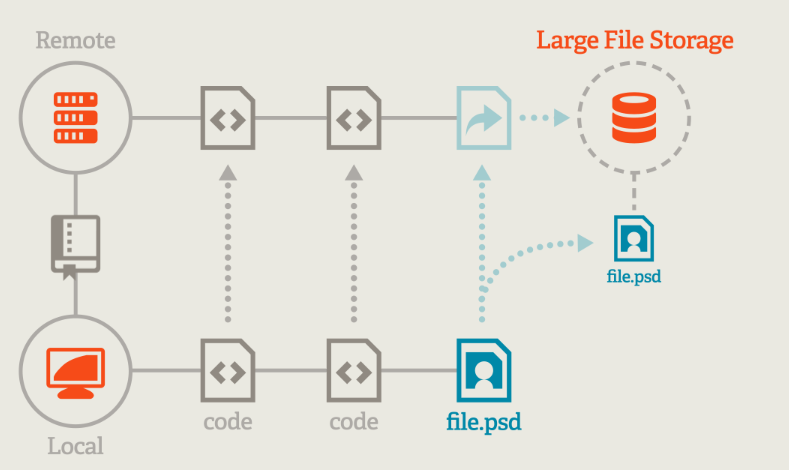
기본적으로 git 자체가 작은 소스코드 파일의 버전 컨트롤을 위한 시스템이기, 50Mb가 넘어가는 파일을 push하면 warning이 뜨고 나처럼 모델 체크포인트 같은 졸라리 큰거 100Mb가 넘어가는 걸 push라면 Error가 발생
그래도 굳이굳이 모델같은 git에 push하고 싶다면, 혹은 코드에 꼭 사용되어야 하는 큰 파일의 경우 Git LFS(Lager File Storage)를 사용해야함
git LFS 설치 및 적용
- https://git-lfs.com/ 에 접속해서 download
- git init이 되어있는 로컬 저장소의 git bash에 lfs install
git lfs install - git lfs로 관리할 파일 설정
git lfs track "*.pth" - gitattribute에 track 추가
git add .gitattribute - git add & push
git add .
 git commit -m "LFS file"
 git push origin main
사실 모델 파일을 굳이 git에 올릴 이유가 없음.
우리의 목표는 그냥 소스코드 관리이기 때문
일반적으로 내 체크포인트를 git을 통해 제공하고 싶다면 그냥 구글 드라이브를 활용하는 것이 좋을 것으로 생각됨
2. gitignore file

사실 프로젝트 시작했을 당시부터 보안 측면에 있어서는 꼭 추가했어야 하는 파일... 내가 진행하는 프로젝트에 있어서 git으로 관리할 필요가 없거나, 데이터 보안 상 github에 올라가면 안되는 것들을 꼭 관리해야함
예를 들어서 내가 API를 활용해서 프로젝트를 진행한다고 했을때, API key가 저장되어있는 파일은 git에 올리면 안되는 것...
암튼 이런 모든 파일들을 git repository에 올라가지 않도록 막아주기 위해서 .gitignore 파일을 활용함
.gitignore 작성법
-
"#" : 주석 작성 시 사용
-
"디렉토리명/" : 해당 디렉토리 하위에 있는 모든 파일을 전부 무시
-
"*" : 특정 확장자로 된 파일을 전부 무시하고 싶을때 사용
-
"!" : 에스터리스크를 사용해서 특정 확장자로 된 파일을 전부 무시할 떄, 특정 파일을 제외하고 싶을때 사용
-
"{}" : 중괄호 안에 포함된 모든 문자열에 대해서 제외
등등 외에도 꽤 많지만, 일단 이정도만 알아도 충분함
.gitignore 사용
- 프로젝트 루트 디렉토리에 .gitignore 파일 생성

- 원하는 내용에 맞게 gitignore 파일 작성
만약 헷갈리면 아래 사이트 참고해서 작성하면 됨
내가 원하는 키워드 입력하면 자동으로 작성해줌
https://www.toptal.com/developers/gitignore - 난 모델 파일만 지우면 되기 때문에 아래와 같이 작성
# 모델 파일 제외 *.pt *.pth - repository에 적용
기존 .gitignore 파일 자체가 적용되지 않은 commit이 있다면, git tracking을 풀어주고 다시 파일을 add 한 후 commit-push 해야함git rm -r --cached . git add . git commit -m "add .gitignore" git push origin master- 근데 만약 commit을 이미 올려버렸다면 ...?
이전 commit으로 돌아가서 commit하기 전의 상태로 돌려준 다음, 위의 코드를 다시 입력하면 끝git reset HEAD^
- 근데 만약 commit을 이미 올려버렸다면 ...?
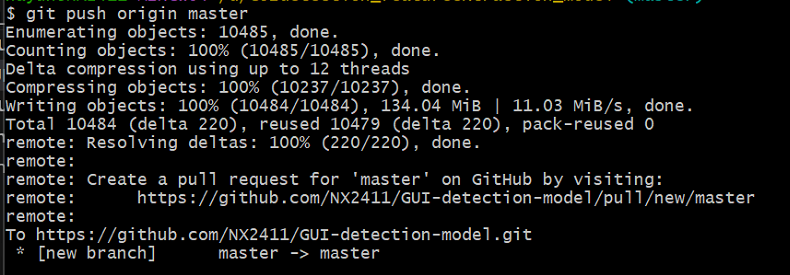
일케 하면 git에 아주 잘 올라간 것을 확인할 수 있음