
프로젝트를 진행하면서 chip을 사용해야 할 경우가 생겼다.
chip은 MATERIAL DESIGN의 Choice를 사용하였다.
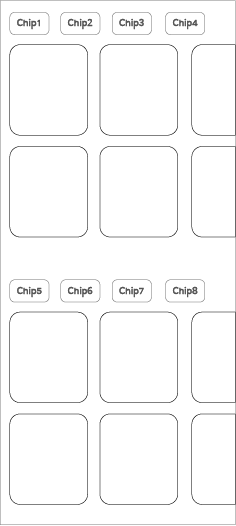
위의 형태로 칩에 따라 보여지는 리스트가 달라지는 형태이다.
위쪽과 아래쪽의 형태가 완벽하게 동일하다.
따라서 작성되는 코드의 로직또한 동일하다.
위쪽과 아래쪽의 코드를 분리시켜 작성할 수도 물론 있지만 반복된 코드가 실행되는 것이 싫어 하나로 합쳐버렸다.
위쪽의 칩들과 아래쪽의 칩들은 각각의 ChipGroup으로 묶여져 있다.
코드의 일부이므로 참고용으로만...
<com.google.android.material.chip.ChipGroup
    android:id="@+id/chip_group1"
    android:layout_width="0dp"
    android:layout_height="wrap_content"
    android:layout_marginStart="16dp"
    android:layout_marginTop="12dp"
    android:layout_marginEnd="16dp"
    android:orientation="horizontal"
    app:singleLine="true"
    app:singleSelection="true"
    app:layout_constraintEnd_toEndOf="parent"
    app:layout_constraintStart_toStartOf="parent"
    app:layout_constraintTop_toBottomOf="@id/tv_bigtitle_district">
    <com.google.android.material.chip.Chip
        android:id="@+id/chip1"
        style="@style/CustomChipChoiceHome"
        android:layout_width="wrap_content"
        android:layout_height="wrap_content"
        android:checkable="true"
        android:clickable="true"
        android:fontFamily="@font/spoqahansansneo_medium"
        android:text="수도권"
        app:chipCornerRadius="6dp"
        app:chipStrokeWidth="1dp" />
    <com.google.android.material.chip.Chip
        android:id="@+id/chip2"
        style="@style/CustomChipChoiceHome"
        android:layout_width="wrap_content"
        android:layout_height="wrap_content"
        android:checkable="true"
        android:clickable="true"
        android:fontFamily="@font/spoqahansansneo_medium"
        android:text="충청도"
        app:chipCornerRadius="6dp"
        app:chipStrokeWidth="1dp" />
</com.google.android.material.chip.ChipGroup>

<com.google.android.material.chip.ChipGroup
    android:id="@+id/chip_group2"
    android:layout_width="0dp"
    android:layout_height="wrap_content"
    android:layout_marginStart="16dp"
    android:layout_marginTop="12dp"
    android:layout_marginEnd="16dp"
    android:orientation="horizontal"
    app:singleLine="true"
    app:singleSelection="true"
    app:layout_constraintEnd_toEndOf="parent"
    app:layout_constraintStart_toStartOf="parent"
    app:layout_constraintTop_toBottomOf="@id/tv_bigtitle_district">
    <com.google.android.material.chip.Chip
        android:id="@+id/chip3"
        style="@style/CustomChipChoiceHome"
        android:layout_width="wrap_content"
        android:layout_height="wrap_content"
        android:checkable="true"
        android:clickable="true"
        android:fontFamily="@font/spoqahansansneo_medium"
        android:text="수도권"
        app:chipCornerRadius="6dp"
        app:chipStrokeWidth="1dp" />
    <com.google.android.material.chip.Chip
        android:id="@+id/chip4"
        style="@style/CustomChipChoiceHome"
        android:layout_width="wrap_content"
        android:layout_height="wrap_content"
        android:checkable="true"
        android:clickable="true"
        android:fontFamily="@font/spoqahansansneo_medium"
        android:text="충청도"
        app:chipCornerRadius="6dp"
        app:chipStrokeWidth="1dp" />
</com.google.android.material.chip.ChipGroup><style name="CustomChipChoiceHome" parent="@style/Widget.MaterialComponents.Chip.Choice">
<item name="chipBackgroundColor">@color/chip_bg</item>
<item name="android:textColor">@color/chip_txt</item>
<item name="chipStrokeColor">@color/chip_str</item>
<item name="android:textSize">13sp</item>
<item name="chipEndPadding">5dp</item>
<item name="chipStartPadding">5dp</item>
<item name="chipMinHeight">36dp</item>
</style>val chipGroup = ChipGroup.OnCheckedChangeListener { group, checkedId ->
when (checkedId) {
R.id.chip1 -> initDistrictView("Capital")
R.id.chip2 -> initDistrictView("Chungcheong")
R.id.chip3 -> initThemeView("Gangwon")
R.id.chip4 -> initThemeView("Gyeongsang")
else -> {
if(group == binding.chipDistrictGroup)
initView(allCity, "district")
else
initView(allCity, "theme")
}
}
}
binding.chipDistrictGroup.setOnCheckedChangeListener(chipGroup)
binding.chipThemeGroup.setOnCheckedChangeListener(chipGroup)OnCheckedChangeListener이 현재는 deprecated되어서 다른 형태로 사용하는 것을 권장하지만 사용은 가능하니 위의 형태로 적용시켰다.
Chip의 id에 따라 실행되는 함수 형태가 달라지는 코드이다.
각각의 함수는 리사이클러뷰로 아이템을 보여주는 함수이다.
아무런 칩도 선택되지 않는다면(else) 위쪽/아래쪽 영역에 각각 어떤 아이템을 보여줄지 정하게 된다.

앱개발 튜토리얼