
🌱Const Constructor
🌳정의
Const Constructor(상수 생성자) 는 상수 객체를 생성하는 생성자이다. 상수 개체는 값을 변경할 수 없는 개체이다. 상수 생성자는 const 키워드를 사용하여 선언한다.
클래스가 절대 변경되지 않는 객체를 생성하는 경우 이러한 객체를 compile-time constants로 만들 수 있다.
🌳사용 이유
const 로 인스턴스화 해놓으면은 앱을 실행하는동안 단한번만 그려놓으면 다음에 다시 그릴때 기억을 해두었다가 가져오게된다.
build 함수를 계속 실행하게 되는 데, const 로 선언을해두고 기억을 해두었다면 재호출을 하지않아 다시 호출할 때, 리소스 낭비할 필요없어지게 되고, 렌더링도 빨라지게되며, 효율적으로 작업을 진행할 수 있다.
🌳예제
예제코드 1
class Point {
  final int x;
  final int y;

  const Point(this.x, this.y);
}

void main() {
  // p1 and p2 has the same hash code.
  Point p1 = const Point(1, 2);
  print("The p1 hash code is: ${p1.hashCode}");

  Point p2 = const Point(1, 2);
  print("The p2 hash code is: ${p2.hashCode}");
  // without using const
  // this has different hash code.
  Point p3 = Point(2, 2);
  print("The p3 hash code is: ${p3.hashCode}");

  Point p4 = Point(2, 2);
  print("The p4 hash code is: ${p4.hashCode}");
출력결과 1
The p1 hash code is: 918939239
The p2 hash code is: 918939239
The p3 hash code is: 745146896
The p4 hash code is: 225789186
여기서 p1과 p2는 동일한 해시 코드를 가진다.
이것은 p1과 p2가 상수 개체이기 때문이다.
상수 개체의 해시 코드는 동일하다.
이는 상수 개체의 해시 코드가 컴파일 타임에 계산되기 때문이다.
상수가 아닌 개체의 해시 코드는 런타임에 계산되기 때문에 p3와 p4의 해시 코드가 다른 이유다.
예제코드 2
class Recipe {
  final List<String> ingredients;
  final int calories;
  final double milligramsOfSodium;

  const Recipe(this.ingredients, this.calories, this.milligramsOfSodium);
}
Recipe 앞에 const를 붙여 클래스가 변경되지 않는 객체의 상수 생성자를 만든다.
최적화를 위해 const 생성자를 사용한다.
컴파일러는 모든 const 객체에 대해 동일한 메모리 부분을 할당하여 객체를 불변으로 만든다.
쉽게 말하면 const 로 지정해두면 앱을 실행할 때 한 번만 생성한다는 것인데, 한 번만 만들기 떄문에 리소스 낭비를 하지 않는다는 것이다.
예제코드 3
import 'package:flutter/material.dart';
class HomeScreen extends StatefulWidget {
const HomeScreen({super.key});
State<HomeScreen> createState() => _HomeScreenState();
}
class _HomeScreenState extends State<HomeScreen> {
Widget build(BuildContext context) {
return Scaffold(
body: SizedBox(
width: MediaQuery.of(context).size.width,
child: Column(
mainAxisAlignment: MainAxisAlignment.center,
children: [
const TestWidget(label: 'test1'),
TestWidget(label: 'test2'),
ElevatedButton(
onPressed: () {
setState(() {});
},
child: Text('빌드!')
),
],
),
),
);
}
}
class TestWidget extends StatelessWidget {
final String label;
const TestWidget({required this.label, super.key});
Widget build(BuildContext context) {
print('$label 빌드 실행');
return Container(
child: Text(label),
);
}
}출력결과 3
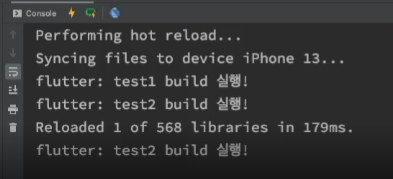
처음 빌드 때 test1과 test2가 전부 빌드 되었지만
재실행 했을 때는 const를 붙인 test1 빌드 실행 콘솔이 찍히지 않았다는 것을 확인할 수 있다.
참고 사이트
https://dart-tutorial.com/object-oriented-programming/constant-constructor-in-dart/