[ Spring Security ] SecurityFilter Chain이 적용되지 않는 오류

GIF 출처 : https://sigridjin.medium.com/spring-transaction-관리에-대한-메모-f391fd2885b4
🖥 Contents
1 ) 배경
2 ) 문제 분석
3 ) 해결 과정
4 ) 결과 및 후기
1 ) 배경
스프링으로 User 도메인을 작업하던 중에 스프링 시큐리티의 필터가 필요한 부분을 작업중이였다. 그냥 평소대로 하는 것 처럼 Filter 클래스에 @Component를 붙여서 빈으로 등록한 뒤에 사용하려고 하는데... 인증이 안된다. 계속 403Error가 발생하는데 내 코드에는 이상이 없어 보였다.
2 ) 문제 분석
chatGPT에서 코드 파일을 업로드 해서 디버깅을 먼저 시도해보았다. 그랬더니 알게된 사실이 @Component로 등록한 빈은 내가 사용하고자 하는 SpringSecurity Filter Chain이 아닌 DispatcherServlet Filter Chain 에 등록이 된 것이다.
스프링에서 필터 체인 실행 순서는 1st.DispatcherServlet Filter Chain -> 2nd. SpringSecurity Filter Chain 순으로 작동한다.
따라서 보안 체인보다 먼저 적용되어 제대로 된 인증 컨텍스트를 실행하지 못하게 된다. 이에 따라서 계속해서 403 Error가 발생한 것이다.
3 ) 해결 과정
따라서 구성한 LoginFilter.class를 다음과 같이 변경하였고 SecurityConfig.class 에서는 직접 생성자 주입을 통해 빈으로 사용하였다.
< LoginFilter.class >
package org.kangwooju.skeleton_user.common.security.filter;

import com.fasterxml.jackson.databind.ObjectMapper;
import jakarta.servlet.FilterChain;
import jakarta.servlet.ServletException;
import jakarta.servlet.http.HttpServletRequest;
import jakarta.servlet.http.HttpServletResponse;
import lombok.AllArgsConstructor;
import org.kangwooju.skeleton_user.common.security.auth.UserDetailsImpl;
import org.kangwooju.skeleton_user.common.security.dto.request.LoginRequest;
import org.kangwooju.skeleton_user.common.security.dto.response.LoginFailedResponse;
import org.kangwooju.skeleton_user.common.security.util.JwtUtil;
import org.springframework.beans.factory.annotation.Autowired;
import org.springframework.security.authentication.AuthenticationManager;
import org.springframework.security.authentication.AuthenticationServiceException;
import org.springframework.security.authentication.UsernamePasswordAuthenticationToken;
import org.springframework.security.core.Authentication;
import org.springframework.security.core.AuthenticationException;
import org.springframework.security.core.GrantedAuthority;
import org.springframework.security.web.authentication.UsernamePasswordAuthenticationFilter;
import org.springframework.stereotype.Component;

import java.io.IOException;
import java.io.InputStream;
import java.util.Collection;
import java.util.Iterator;


public class LoginFilter extends UsernamePasswordAuthenticationFilter {

    private final ObjectMapper objectMapper;


    private final AuthenticationManager authenticationManager;


    private final JwtUtil jwtUtil;

    public LoginFilter(ObjectMapper objectMapper,
                       AuthenticationManager authenticationManager,
                       JwtUtil jwtUtil){
        this.objectMapper = objectMapper;
        this.authenticationManager = authenticationManager;
        this.jwtUtil = jwtUtil;
        setAuthenticationManager(authenticationManager);
    }


    @Override
    public Authentication attemptAuthentication
            (HttpServletRequest request,
             HttpServletResponse response)
            throws AuthenticationException {

        try {

            // 스트림을 통해 JSON 형식으로 로그인 정보를 받아오는 로직
            InputStream inputStream = request.getInputStream();
            LoginRequest loginRequest =
                    objectMapper.readValue(inputStream, LoginRequest.class);

            UsernamePasswordAuthenticationToken token =
                    new UsernamePasswordAuthenticationToken(loginRequest.username(),
                                                            loginRequest.password());

            return authenticationManager.authenticate(token);


        } catch (IOException e) {
            throw new AuthenticationServiceException("JSON 파싱 오류",e);
        }
    }

    // 로그인 성공 메소드
    @Override
    protected void successfulAuthentication
            (HttpServletRequest request,
             HttpServletResponse response,
             FilterChain chain,
             Authentication authResult)
            throws IOException, ServletException {

        UserDetailsImpl userDetails = (UserDetailsImpl) authResult.getPrincipal();
        String username = userDetails.getUsername();

        Collection<? extends GrantedAuthority> authorities = authResult.getAuthorities();
        Iterator<? extends GrantedAuthority> iterator = authorities.iterator();
        GrantedAuthority grantedAuthority = iterator.next();

        String role = grantedAuthority.getAuthority();

        String token = jwtUtil.createJwt(username,role,60*60*10L);

        response.setHeader("Authorization", "Bearer " + token);
    }

    @Override
    protected void unsuccessfulAuthentication
            (HttpServletRequest request,
             HttpServletResponse response,
             AuthenticationException failed)
            throws IOException, ServletException {

        response.setStatus(HttpServletResponse.SC_UNAUTHORIZED); // 401
        response.setContentType("application/json");
        response.setCharacterEncoding("UTF-8");

        LoginFailedResponse loginFailedResponse =
                new LoginFailedResponse(false,
                                        "AUTH_FAILED", // CustomException생성시 리팩토링 예정
                                        "아이디 또는 비밀번호가 일치하지 않습니다.");

        String json = objectMapper.writeValueAsString(loginFailedResponse);

        response.getWriter().write(json); // 프론트에서 JSON 형식을 받아 사용할 수 있도록 전달
    }
}
< SecurityConfig.class >
package org.kangwooju.skeleton_user.common.config;

import com.fasterxml.jackson.databind.ObjectMapper;
import lombok.RequiredArgsConstructor;
import org.kangwooju.skeleton_user.common.security.filter.JWTFilter;
import org.kangwooju.skeleton_user.common.security.filter.LoginFilter;
import org.kangwooju.skeleton_user.common.security.util.JwtUtil;
import org.kangwooju.skeleton_user.domain.user.repository.UserRepository;
import org.springframework.beans.factory.annotation.Autowired;
import org.springframework.context.annotation.Bean;
import org.springframework.context.annotation.Configuration;
import org.springframework.http.HttpMethod;
import org.springframework.security.authentication.AuthenticationManager;
import org.springframework.security.config.annotation.authentication.configuration.AuthenticationConfiguration;
import org.springframework.security.config.annotation.web.builders.HttpSecurity;
import org.springframework.security.config.annotation.web.configuration.EnableWebSecurity;
import org.springframework.security.config.http.SessionCreationPolicy;
import org.springframework.security.crypto.bcrypt.BCryptPasswordEncoder;
import org.springframework.security.web.SecurityFilterChain;
import org.springframework.security.web.authentication.UsernamePasswordAuthenticationFilter;

import javax.crypto.SecretKey;

@EnableWebSecurity
@Configuration
@RequiredArgsConstructor
public class SecurityConfig {


    private final AuthenticationConfiguration authenticationConfiguration;
    private final ObjectMapper objectMapper;
    private final JwtUtil jwtUtil;
    private final LoginFilter loginFilter;
    private final JWTFilter jwtFilter;
    private final UserRepository userRepository;

    @Bean
    public JWTFilter jwtFilter(JwtUtil jwtUtil,UserRepository userRepository){
        return new JWTFilter(jwtUtil,userRepository);
    }


    // LoginFilter를 Config에서 bean으로 등록
    @Bean
    public LoginFilter loginFilter(ObjectMapper objectMapper,
                                   AuthenticationConfiguration authenticationConfiguration,
                                   JwtUtil jwtUtil) throws Exception{
        return new LoginFilter(objectMapper,authenticationManager(authenticationConfiguration),jwtUtil);
    }

    @Bean
    public AuthenticationManager authenticationManager
            (AuthenticationConfiguration authenticationConfiguration)
             throws Exception{

        return authenticationConfiguration.getAuthenticationManager();
    }

    @Bean
    public BCryptPasswordEncoder bCryptPasswordEncoder(){
        return new BCryptPasswordEncoder();
    }

    // 시큐리티 필터 체인 설정
    @Bean
    public SecurityFilterChain SecurityfilterChain(HttpSecurity httpSecurity,
                                                   LoginFilter loginFilter)
            throws Exception {

        httpSecurity
                .csrf((auth)->auth.disable());

        httpSecurity
                .formLogin((auth)->auth.disable());

        httpSecurity
                .httpBasic((auth)->auth.disable());

        httpSecurity
                .addFilterAt(loginFilter,
                        UsernamePasswordAuthenticationFilter.class);
        httpSecurity
                .addFilterBefore(jwtFilter, LoginFilter.class);
        // 세션을 유지하지 않도록 하는 설정 -> STATELESS
        httpSecurity
                .sessionManagement((session)->session
                        .sessionCreationPolicy(SessionCreationPolicy.STATELESS));

        // Http 주소허용 여부 설정 -> Default
        httpSecurity
                .authorizeHttpRequests((auth)->auth
                        .requestMatchers("/login", "/","/user/**").permitAll()
                        .anyRequest().authenticated()
                );

        return httpSecurity.build();
    }
}
4 ) 결과 및 후기
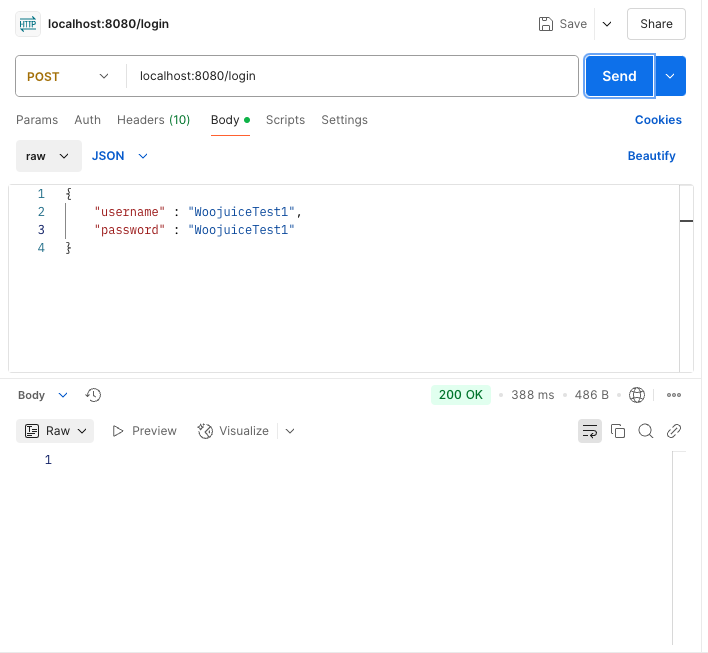 다음과 같이 로그인에 드디어 성공했다 ☺️
사실 User 도메인을 처음 만들어보는건 아니지만 그 전까지는 구현에 초점이 있어서 어떤 부분이 틀리고 맞고 , 올바른 설계인지를 판단하기 보다는 " 기능만 잘 돌아가면 되는거지~ " 라는 생각을 가지고 있었다. 스프링 코어를 공부하면서 기능 구현 보다는 설계에 초점을 맞추게 되면서 스프링에서 중요시하는 핵심 설계 원칙을 준수하고 원리를 명확하게 이해하려고 하다보니 근본적인 지식과 실력이 느는 것 같다