1. Create, Read
우리는 이때까지 데이터 송신을 GET으로 했었다.
하지만 GET은 Read할때만 쓰는것이 옳바른 방법이다.
GET은 URL을 통해 데이터 전달을 하기 때문에 제한이 있기도 하다.
이 제한을 뚫기 위해서는, HTML의 body로 데이터를 송신하는 POST를 사용해야만 한다.
POST는 Read를 제외한 Create, Update, Delete 용도로 쓰면 된다.
DB에서 POST방식으로 데이터를 받으려면 CSRF 토큰이 필요하다.
왜냐하면 DB를 바꾸는건 중요한 일이기 때문에, 맞는 클라이언트에서 요청을 보내는건지 확인이 필요하다.
+CSRF토큰은 새로고침 할 때마다 바뀌기 때문에, 탈취도 힘들고 의미가 없다.
# new.html

{% extends "base.html" %}


{% block content %}
<h1>New Article</h1>

<form action="{% url 'create' %}" method="POST">
    {% csrf_token %}
    <label for="title">제목</label>
    <input type="text" name="title" id="title"><br><br>

    <label for="content">내용</label>
    <textarea name="content" id="content" cols="30" rows="10"></textarea><br><br>

    <button type="submit">저장</button>
</form>


{% endblock content %}
def create(request):
# POST 방식으로 전달된 데이터를 받아서
title = request.POST.get("title")
content = request.POST.get("content")
# 받은 데이터를 Article 모델을 이용해서 저장
article = Article(title=title, content=content)
article.save()
context = {
"article": article,
}
return render(request, "create.html", context)2. Update, Delete
Update
Update 할 때 필요한 url과 view는 각각 2개다.
1. 수정할 글 보여주는 url과 view
2. 수정을 진행하는 url과 view
이때 사용 흐름은, 제목 또는 내용을 수정(적용url)한 뒤, 그 내용이 바꼈는지(글 디테일url) 확인할 것이다.
이때의 문제점은 적용url에서 글 디테일url로 가는것임.
저번처럼 그냥
return render(request, "articles.html", context)이렇게 썼다간 원하는 결과를 얻지 못한다.
이유는 실제로 url이 변해서 화면이 보여지는게 아니라, html만 articles로 보여지는 것이기 때문.
이때 필요한 것이 redirect이다.
return redirect("articles")urls에 추가
path("<int:pk>/edit", views.edit, name="edit"),
path("<int:pk>/update/", views.update, name="update"),
views에 추가
def edit(request, pk):
	article = Article.objects.get(pk=pk)
	context = {
	    "article": article,
	}
	return render(request, "edit.html", context)

def update(request, pk):
  article = Article.objects.get(pk=pk)
  article.title = request.POST.get("title")
  article.content = request.POST.get("content")
  article.save()
  return redirect("article_detail", article.pk)
HTML
# edit.html

{% extends "base.html" %}


{% block content %}
<h1>Update Article</h1>

<form action="{% url 'update' article.pk %}" method="POST">
	  {% csrf_token %}
    <label for="title">제목</label>
    <input type="text" name="title" id="title" value={{ article.title }}><br><br>

    <label for="content">내용</label>
    <textarea name="content" id="content" cols="30" rows="10">{{ article.content }}</textarea><br><br>

    <button type="submit">저장</button>
</form>


{% endblock content %}
디테일에 수정버튼 추가
# detail.html

<a href="{% url 'edit' article.pk %}"><button>글수정</button></a>
Delete
Delete는
1. 글 삭제 로직을 진행하는 url
2. 글 삭제하는 view
urls에 추가
# urls.py

path("<int:pk>/delete/", views.delete, name="delete"),
views에 추가
Delete할 때 url에서 GET방식으로 삭제 요청하는데 진짜로 지워지면 안되니, POST 방식일 때만 지워지도록 설정
# views.py

def delete(request, pk):
  article = Article.objects.get(pk=pk)
  if request.method == "POST":
      article.delete()
      return redirect("articles")
  return redirect("article_detail", article.pk)
HTML
html파일에선 삭제버튼을 만들어 준다.
# detail.html

{% extends "base.html" %}

{% block content %}

    <h2>글 상세 페이지</h2>
    <p>제목: {{ article.title }}</p>
    <p>내용: {{ article.content }}</p>
    <p>작성일시: {{ article.created_at }}</p>
    <p>수정일시: {{ article.updated_at }}</p>

    <a href="{% url 'articles' %}"><button>목록 보기</button></a>

    <hr>
    <form action="{% url 'delete' article.pk %}" method="POST">
        {% csrf_token %}
        <input type="submit" value="글삭제">
    </form>

{% endblock content %}
articles의 구조를 업데이트 해보자
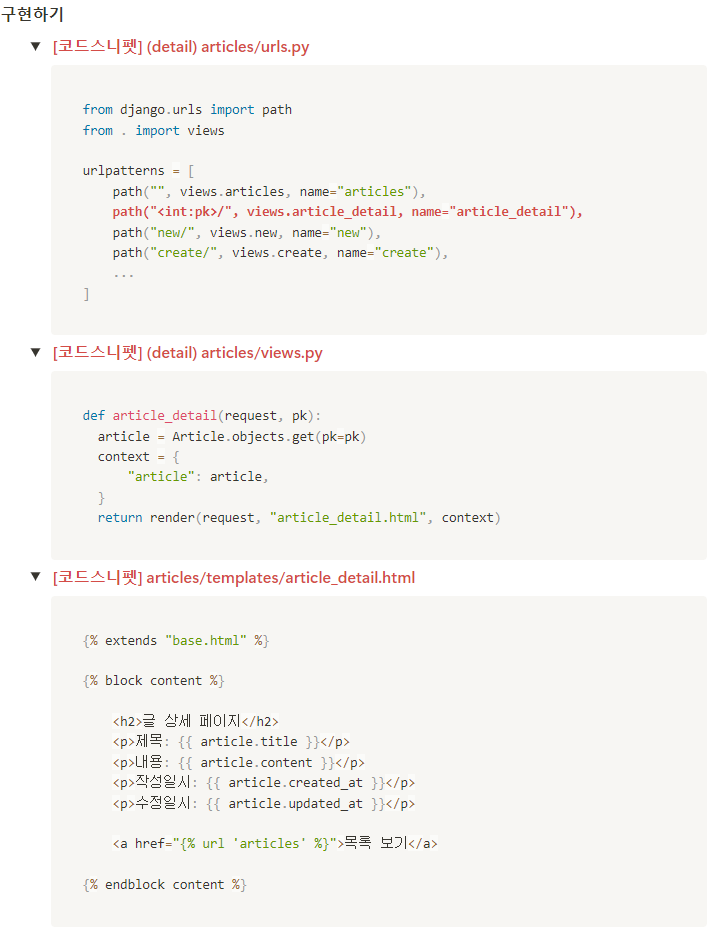
1. 제목을 누르면 제목+내용이 나오도록 하고싶어!
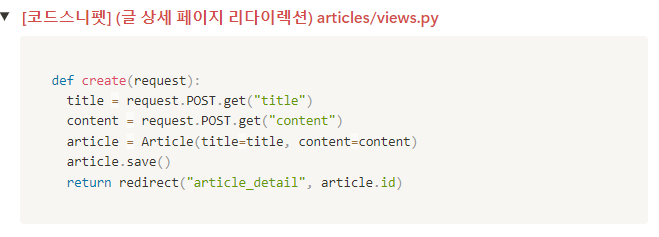
2. 게시글 작성후 상세페이지로 리다이렉트시키고 싶어!
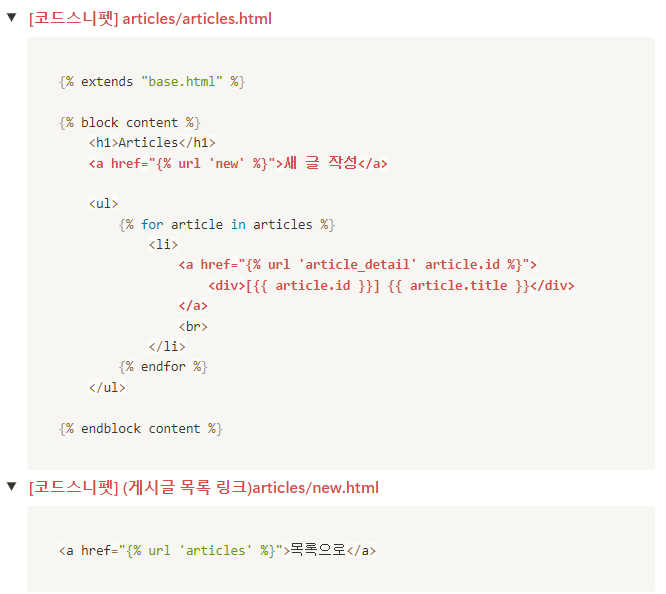
3. 글 목록에 새 글 작성 링크가 있었음 좋겠어!
보너스로 새 글 작성하다가 목록으로 돌아가는 링크도..