
# 배열
Javascript는 문자열 숫자 등 동적으로 표기 가능하다.
배열은 index[0] 부터 시작한다.
var a = [ '챌린지', 'NodeJS' , 1 , 'start' ]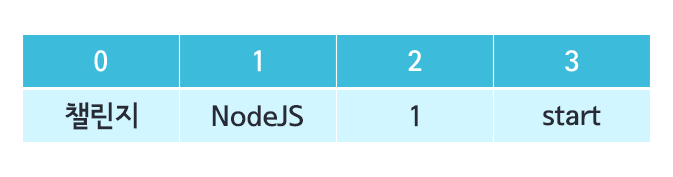
a[0] // 첼린지
a[1] // NodeJS

a[0] = "챌린지 강의" // - 배열을 지정하여 배열내용을 바꿀수 있다.
a[0] // 챌린지 강의

a.length // 4 - 배열의 갯수
a.indexOf('NodeJS') // 1 - indexOf() 내용에 해당하는 배열순서를 나타냄
# 반복문 - 원하는것을 반복횟수를 함
for(var i = 0 , 제한조건 , 증감식 )
for(var i = 0; i < 5 ; i ++){
	console.log('😀')
  	console.log(i)
}

//
'😀' 0
'😀' 1
'😀' 2
'😀' 3
'😀' 4
# 배열 반복 출력
var a = [ '챌린지', 'NodeJS' , 1 , 'start' ]

for(var i = 0; i < a.length ; i ++){
	console.log(a[i])
}

//
'챌린지'
'NodeJS'
1
'start'
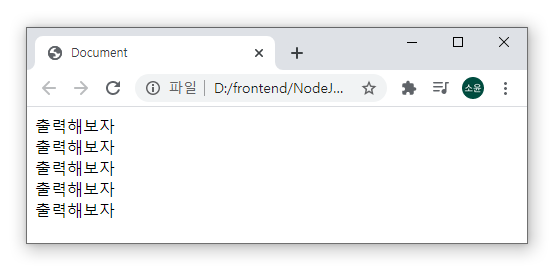
# html 화면에 출력
 for (var i = 0; i < 5; i++) {
   document.write("출력해보자");
   document.write("<br>");
 }
# while , do-while
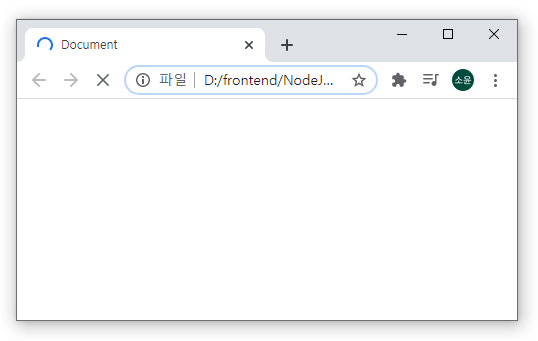
while( ){ } 기본형태, while( ) 기본은 true 이며, 제한건을 걸지않으면 무한루프를 돈다
무한루프를 돌경우 메모리에 영향을 줌
[ while문 ]
var i = 0;
while (i < 5) {
  document.write("출력해보자");
  document.write("<br>");
  i = i++;
  //i = i+1; 일경우 출력됨
}
[ 무한루프 도는 중인 상태 ]
[ do-while 문 ]
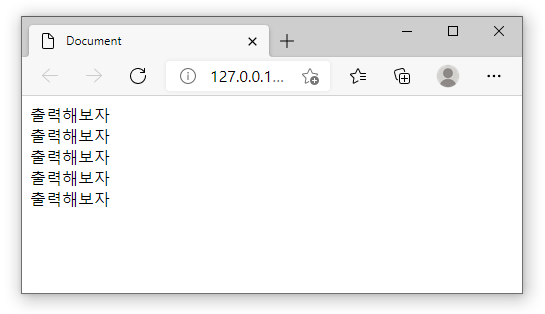
do안의 내용을 출력후 while의 제한조건을 수행
var i = 0;
do {
  document.write("출력해보자");
  document.write("<br>");
  i = i + 1;
} while (i < 5);
[ 정상 출력됨 ]
📌 [ for문 익숙해지기 ] 구구단을 외우자!
for (var i = 2; i <= 9; i++) {
  for (var j = 1; j <= 9; j++) {
    document.write(i + " * " + j + " = " + i * j);
    document.write(" | ");
  }
  document.write("<br>");
}
// 출력 결과
2 * 1 = 2 | 2 * 2 = 4 | 2 * 3 = 6 | 2 * 4 = 8 | 2 * 5 = 10 | 2 * 6 = 12 | 2 * 7 = 14 | 2 * 8 = 16 | 2 * 9 = 18
3 * 1 = 3 | 3 * 2 = 6 | 3 * 3 = 9 | 3 * 4 = 12 | 3 * 5 = 15 | 3 * 6 = 18 | 3 * 7 = 21 | 3 * 8 = 24 | 3 * 9 = 27
4 * 1 = 4 | 4 * 2 = 8 | 4 * 3 = 12 | 4 * 4 = 16 | 4 * 5 = 20 | 4 * 6 = 24 | 4 * 7 = 28 | 4 * 8 = 32 | 4 * 9 = 36
5 * 1 = 5 | 5 * 2 = 10 | 5 * 3 = 15 | 5 * 4 = 20 | 5 * 5 = 25 | 5 * 6 = 30 | 5 * 7 = 35 | 5 * 8 = 40 | 5 * 9 = 45
6 * 1 = 6 | 6 * 2 = 12 | 6 * 3 = 18 | 6 * 4 = 24 | 6 * 5 = 30 | 6 * 6 = 36 | 6 * 7 = 42 | 6 * 8 = 48 | 6 * 9 = 54
7 * 1 = 7 | 7 * 2 = 14 | 7 * 3 = 21 | 7 * 4 = 28 | 7 * 5 = 35 | 7 * 6 = 42 | 7 * 7 = 49 | 7 * 8 = 56 | 7 * 9 = 63
8 * 1 = 8 | 8 * 2 = 16 | 8 * 3 = 24 | 8 * 4 = 32 | 8 * 5 = 40 | 8 * 6 = 48 | 8 * 7 = 56 | 8 * 8 = 64 | 8 * 9 = 72
9 * 1 = 9 | 9 * 2 = 18 | 9 * 3 = 27 | 9 * 4 = 36 | 9 * 5 = 45 | 9 * 6 = 54 | 9 * 7 = 63 | 9 * 8 = 72 | 9 * 9 = 81 [ 연관성 높은 블로깅 - Javascript - 반복문 기본 ]
# 함수
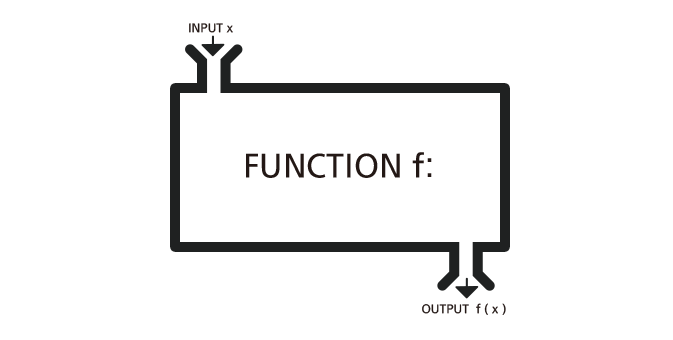
4가지의 함수 형태가 있다
1️⃣ INPUT
2️⃣ OUTPUT
3️⃣ INPUT X OUTPUT
4️⃣ INPUT X OUTPUT X
[ INPUT ]
function test(a, b){
  console.log('a는 ' + a)
  console.log('b는 ' + b)
}

test(10,'function?')

// 'a는 10'
// 'b는 function?'
[ OUTPUT ]
function sum(a, b){
  return a+b;
}

var c = sum(10, 20);
console.log(c);

// 30
[ INPUT X OUTPUT ]
function sum(){
  return 'sum 함수를 호출되나?'
}

var c = sum();
console.log(c);

// 'sum 함수를 호출되나?'
[ INPUT X OUTPUT X ]
var sum = function(){
  console.log('sum 함수를 호출되나?')
}
// 'sum 함수를 호출되나?'
# 객체함수
객체는 하나의 틀을 만들어서 함수로 사용한다.
function Car(a, b, c){
  this.name = a;
  this.color = b;
  var move = c
}

var a = new Car('현대','노랑','전진') // 객체는 하나의 틀을 찍어서 사용
console.log(a.name);
console.log(a.color);

console.log(a.move); // {} 블록내부에 변수선언시 블록 외부에서는 인식불가

var b = new Car('기아','파랑')
console.log(b.name);
console.log(b.color);
Javascript 프로토타입 기반 언어
# 프로토타입
function Car(a, b){
  this.name = a;
  this.color = b;
}
Car.prototype.move=function(){
  console.log(this.name <+ '차이고' + this.color + '색입니다')
}

var a = new Car('현대','노랑')
a.move()

var b = new Car('기아','파랑')
b.move()

// 각 결과
// '현대차이고노랑색입니다'
// '기아차이고파랑색입니다'
# 배열의 프로토타입
프로토타입의 경우 여러가지를 추가 할수 있다. ex) print() 추가
var a = [1,2,3,4,10]
Array.prototype.print = function(){
	for(var i=0;i<this.length;i++){
    	console.log(i)
    }
}

a.print()  // 0 1 2 3 4 10
# 리터럴객체
[ 연관성 높은 블로깅 - Object & 리터럴객체 이론정리 ]
리터럴개체 : 문자그대로 작성한 객체
배열과 다른점은 크게, index를 자유롭게 설정하여 사용할 수 있다.
index를 정하는 경우를 member로 칭하며, 문자열,숫자열등 자유롭다.
//객체를 선언과 동시에 실행
var a = {
	'a' : 1004,
  	'b' : 'hello',
  	'c' : function(){
    	console.log('ha?')
    }
}

a.c();  // 'ha?'
console.log(a.a) // 1004
console.log(a.b) // 'hello'

//var a = new Object() 생략되어있음  // 객체를 선언함
console.log(typeof a); //'object'


// a가 Object이므로 프로토타입사용시,
Object.prototype.sum = function(){
	console.log(this.a + 20)
}

a.sum() // 1024

-----------------------------------------------------------------------------

var aa = {
	'a' : 1004,
  	'b' : 'hello',
  	'c' : function(){
    	this.a++;
    }
}

aa.c()   // 1005
aa.c()   // 1006
console.log(aa.a)  // 1006
흔하게 객체를 만들었지만, 만든 객체가 제대로 만들어졌는지 확인하기 위해
console.log(typeof a); 를 사용한다.
20210221 - day 2
[ 02. 배열 ][ 03. 반복문 ]
[ 04. 함수 ][ 05. 프로토타입 ]
[ 06. 리터럴객체 ]
[ 챌린지 NODE강의 링크 ] -> Node.JS 강의

We have not too long ago started out any website, the knowledge an individual offer on this web site provides aided myself tremendously. Thank you regarding your entire moment & perform. IPTV GERMAN