-
시나리오
2004년 9월 20일에 일련번호가 #VLQLW인 Dell CPI 노트북이 무선 PCMCIA 카드와 집에서 만든 수제 820.11b 안테나와 함께 버려진 채로 발견. 해당 컴퓨터는 해킹 용의자인 그레그 샤르트와 관련 짓기는 쉽지 않지만 해킹 목적으로 사용되었다는 의심을 받고 있습니다. 그레그 샤르트 또한 Mr. Evil 이라는 온라인 별명을 가지고 있습니다. 그의 동료들은 그가 무선 액세스 포인트(스타벅스 혹은 그 외 T-Mobile 핫 스팟과 같은) 근처에 그의 차량을 주차하고 인터넷 트래픽을 가로채서 신용카드 번호 및 사용자 이름, 그리고 비밀번호와 같은 정보를 얻고자 했다고 전함. 해킹 소프트웨어, 사용 증거 및 생성되었을 수 있는 모든 데이터를 찾고, 의심스러운 사람, G=r=e=g S=c=h=a=r=d=t에 컴퓨터를 묶어 보십시오.
-
문제
-
#1 What is the image hash? Does the acquisition and verification hash match?
원본 이미지와 해쉬값이 일치하는지 확인하는 문항이다.
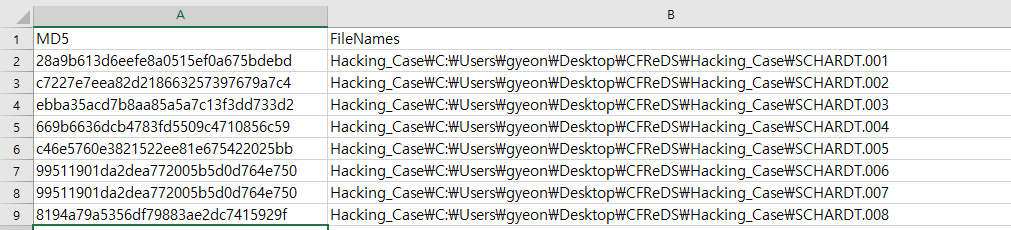
해쉬 추출 결과
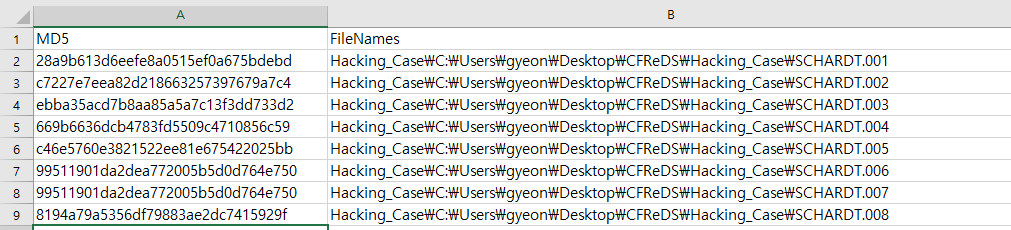
첨부파일에 있는 해쉬값과 일치하는 것을 확인할 수 있다.
-
#2 What operating system was used on the computer?
사용중인 운영체제는 레지스트리 정보에서 확인할 수 있다.
windows/system32/config/SAM
windows/system32/config/SYSTEM
windows/system32/config/SECURITY
windows/system32/config/SOFTWARE

-
#3 When was the install date?
2004-08-20 07:48:27 Fri (UTC+09:00)
레지스트리를 통해 시스템 설치 시간을 알 수 있다.
-
#4 What is the timezone settings?
타임존은 HKEY_LOCAL_MACHINE/ControlSet001/Control/TimeZonInformation 에서 확인할 수 있다.
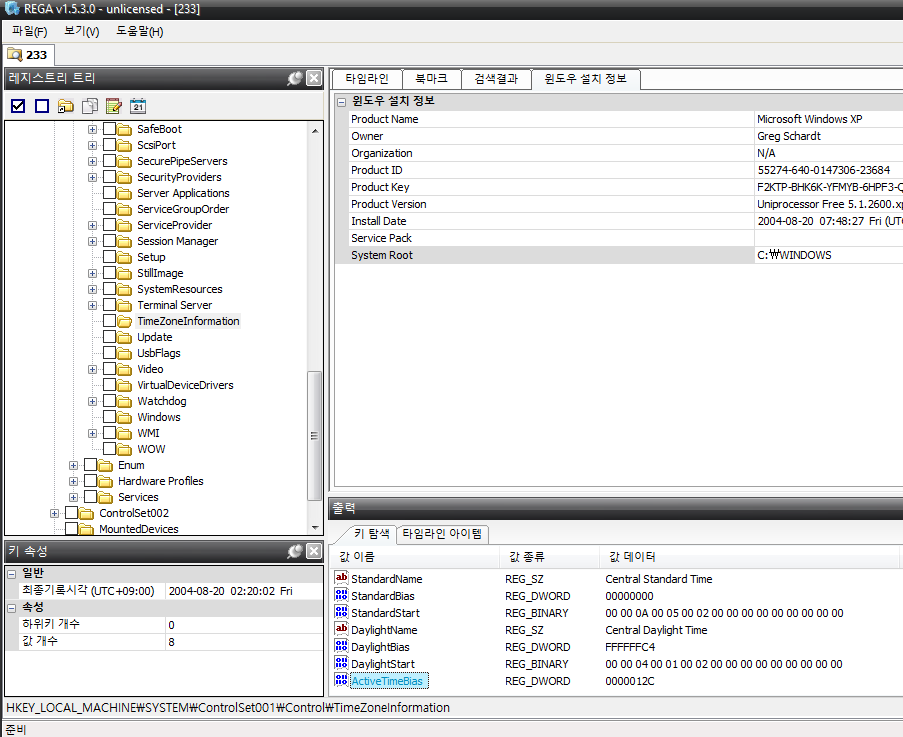
ActiveTimeBias값을 보면 12C ⇒ 300 이기 때문에 UTC-5 인 것을 확인할 수 있다.
-
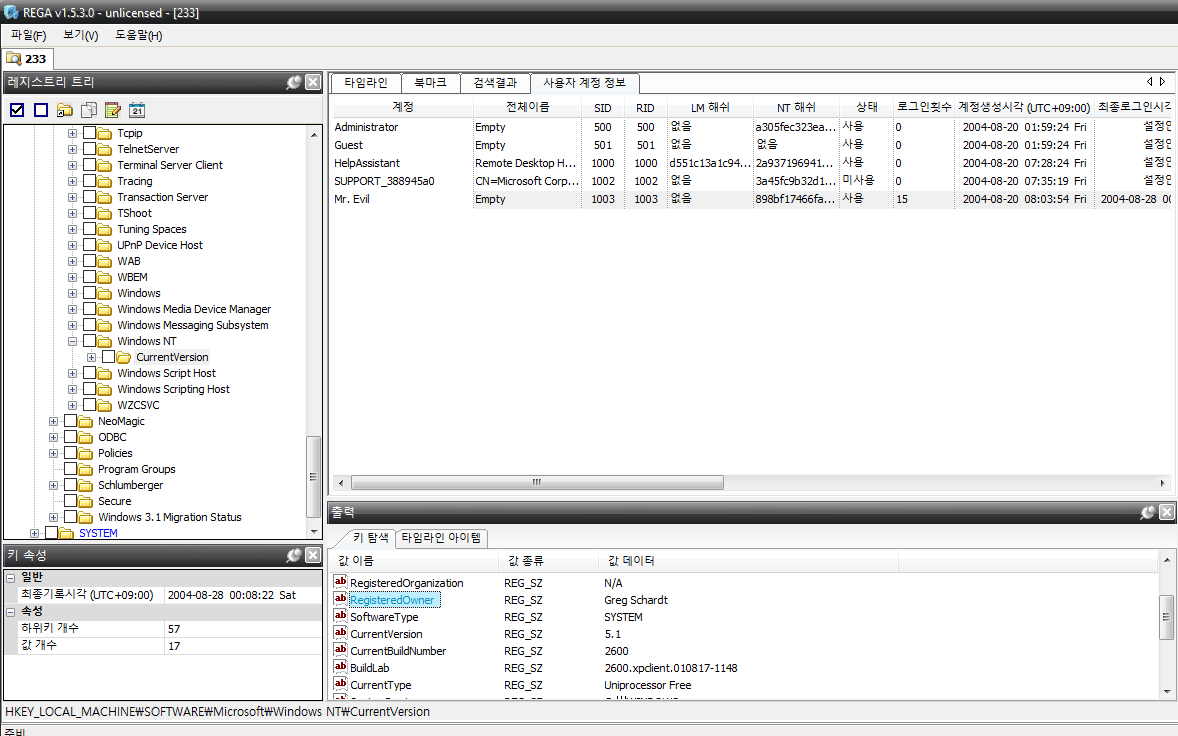
#5 Who is the registered owner?
registerd owner 은 아래 경로에서 확인할 수 있다.
HKEY_LOCAL_MACHINE\SOFTWARE\Microsoft\Windows NT\CurrentVersion
Greg Schardt
-
#6 What is the computer account name?
computer account name 은 아래 경로에서 확인할 수 있다.
HKEY_LOCAL_MACHINE\SYSTEM\ControlSet001\Control\ComputerName\ComputerName
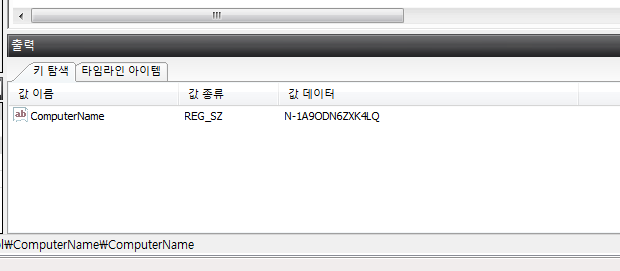
ComputerName : N-1A9ODN6ZXK4LQ
-
#7 What is the primary domain name?
-
#8 When was the last recorded computer shutdown date/time?
윈도우 ShutdownTime은 아래 경로에서 확인이 가능하다
HKEY_LOCAL_MACHINE\SYSTEM\ControlSet001\Control\Windows
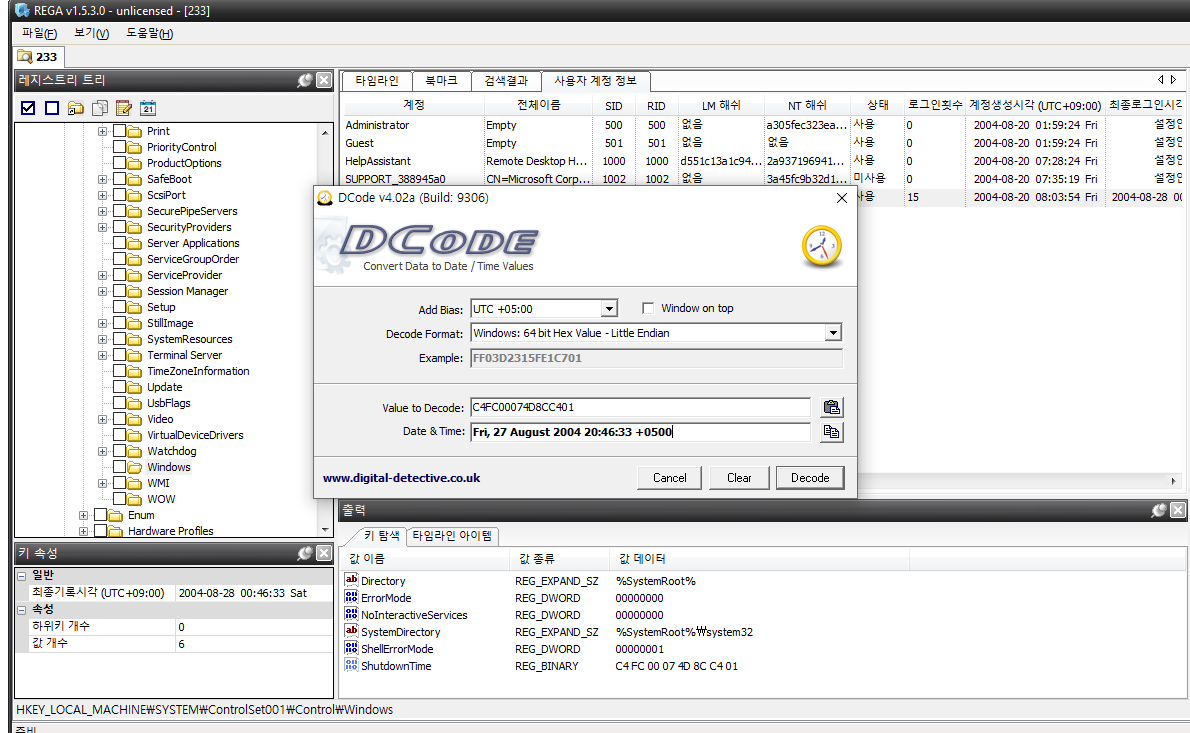
-
#9 How many accounts are recorded (total number)?
사용자 계정 정보는 아래 경로에서 확인이 가능하다.
HKEY_LOCAL_MACHINE\SAM\SAM\Domains\Account\Users\Names
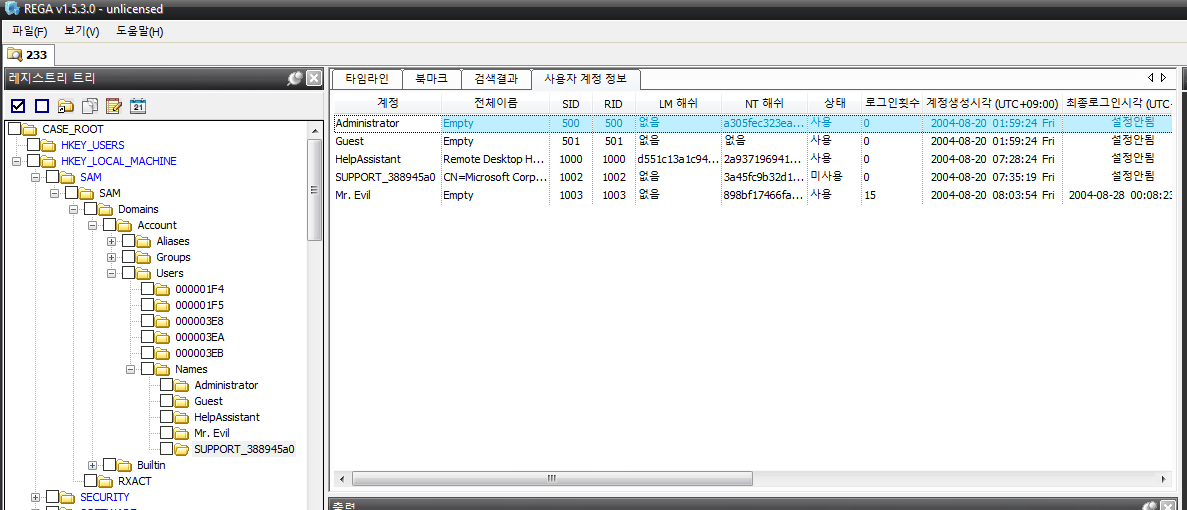
-
#10 What is the account name of the user who mostly uses the computer?
사용자 계정 정보는
SAM\SAM\Domain\Account\Users{RID}
SAM\SAM\Domain\Account\Users\Names{Accounts} 에서 확인이 가능하다.
각 사용자의 계정 정보는 Users의 하위키인 {RID}폴더에 F,V 값에 저장 되어 있다.
F값에 저장되는 계정 정보 V값에 저장되는 계정 정보 마지막으로 로그온 시간(8 ~ 15번 Byte) 로그인 계정 이름 비밀번호가 변경된 시간(24 ~ 31번 Byte) 전체 이름 계정이 만료되는 시간(32 ~ 39번 Byte) 계정 설명 로그인 실패 시간 (40 ~ 47번 Byte) LM 해쉬 RID (48 ~ 51번 Byte) NT 해쉬 계정 상태 정보 (56번 Byte) : 오른쪽 4bit가 1이면 계정이 비활성 상태, 0이면 활성 상태 국가 코드 (국제 전화에 사용되는 코드) 로그온 실패 횟수 (64 ~ 65번 Byte) 로그온 성공 횟수 (66 ~ 67번 Byte) 사용자 계정 Mr.Evil 의 F 값을 봤을 경우
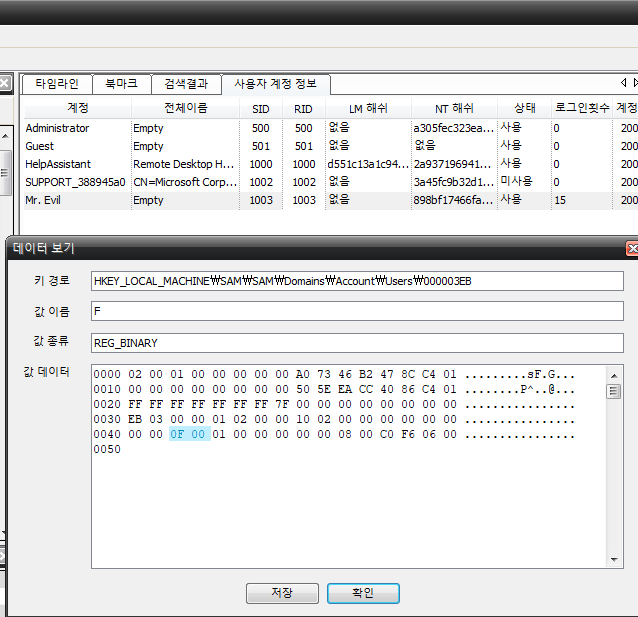
15번으로 가장 로그인 횟수가 많은 것을 알 수 있었고 계정이 활성 상태인 것을 확인 했다.
-
#11 Who was the last user to logon to the computer?
마지막으로 사용한 사용자는 아래 경로에서 확인할 수 있다.
HKEY_LOCAL_MACHINE\SOFTWARE\Microsoft\Windows NT\CurrentVersion\Winlogon
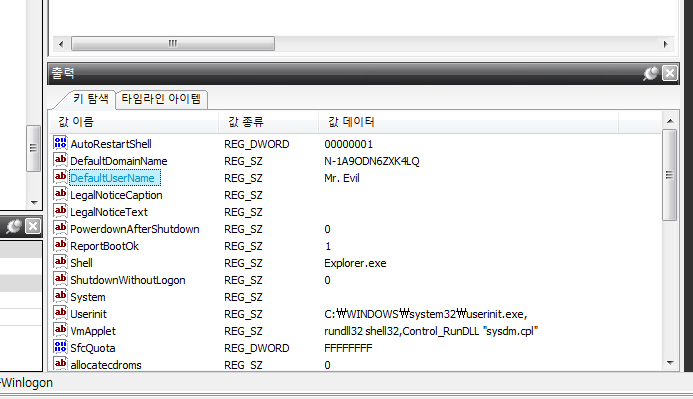
DefaultUserName 값이 마지막으로 로그인 한 사용자이다.
-
#12 A search for the name of “G=r=e=g S=c=h=a=r=d=t” reveals multiple hits. One of these proves that G=r=e=g S=c=h=a=r=d=t is Mr. Evil and is also the administrator of this computer. What file is it? What software program does this file relate to?
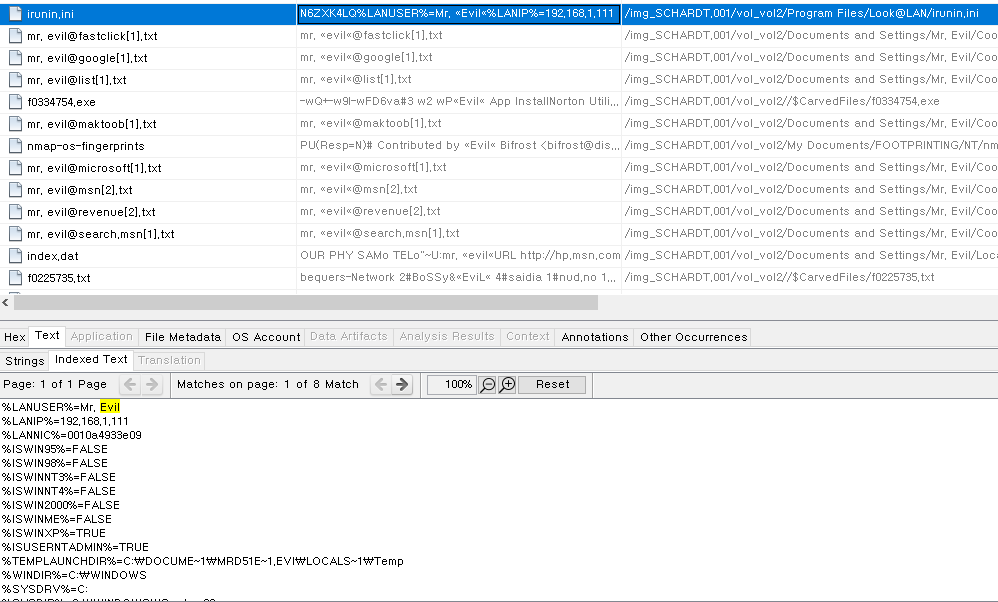
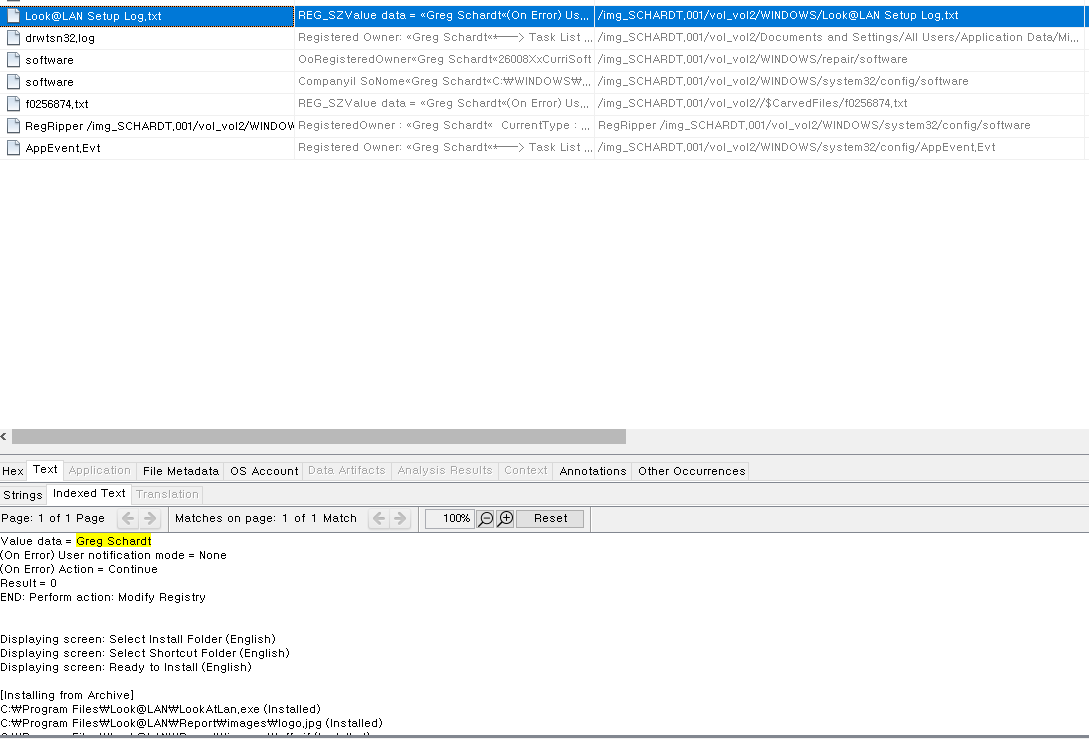
Greg Schardt와 Evil을 키워드 서치 했을 때 Look@LAN 소프트웨어 ini 파일에서 두 이름이 같이 나오는 것을 볼 수 있다 .
-
#13 List the network cards used by this computer
네트워크 카드정보는 아래 경로에서 확인 가능하다.
HKEY_LOCAL_MACHINE\SOFTWARE\Microsoft\Windows NT\CurrentVersion\NetworkCards
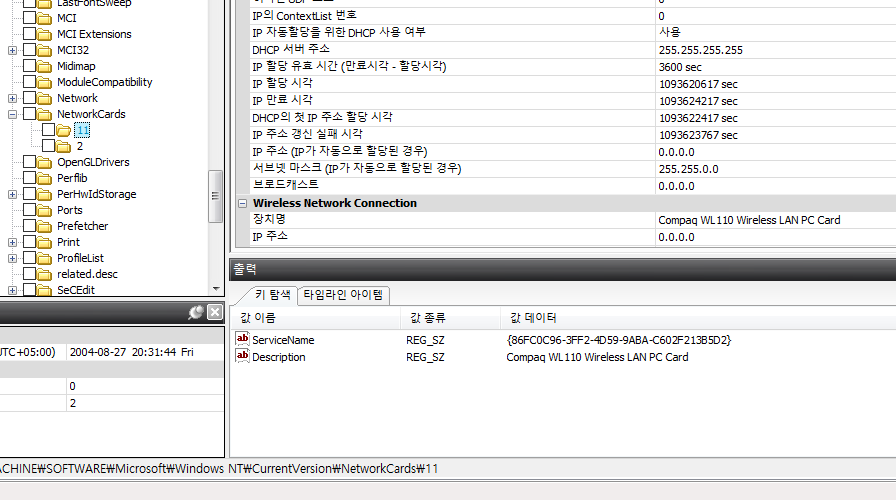
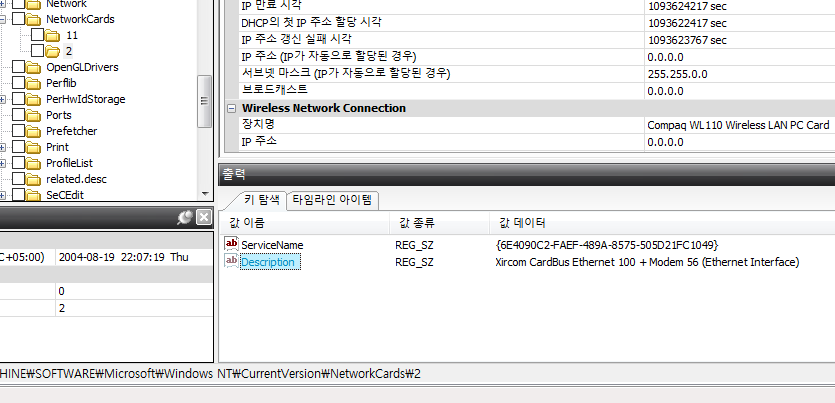
Compaq WL110 Wireless LAN PC Card , Xircom CardBus Ethernet 100 + Modem 56 (Ethernet Interface) 로 확인 된다.
-
#14 This same file reports the IP address and MAC address of the computer. What are they?
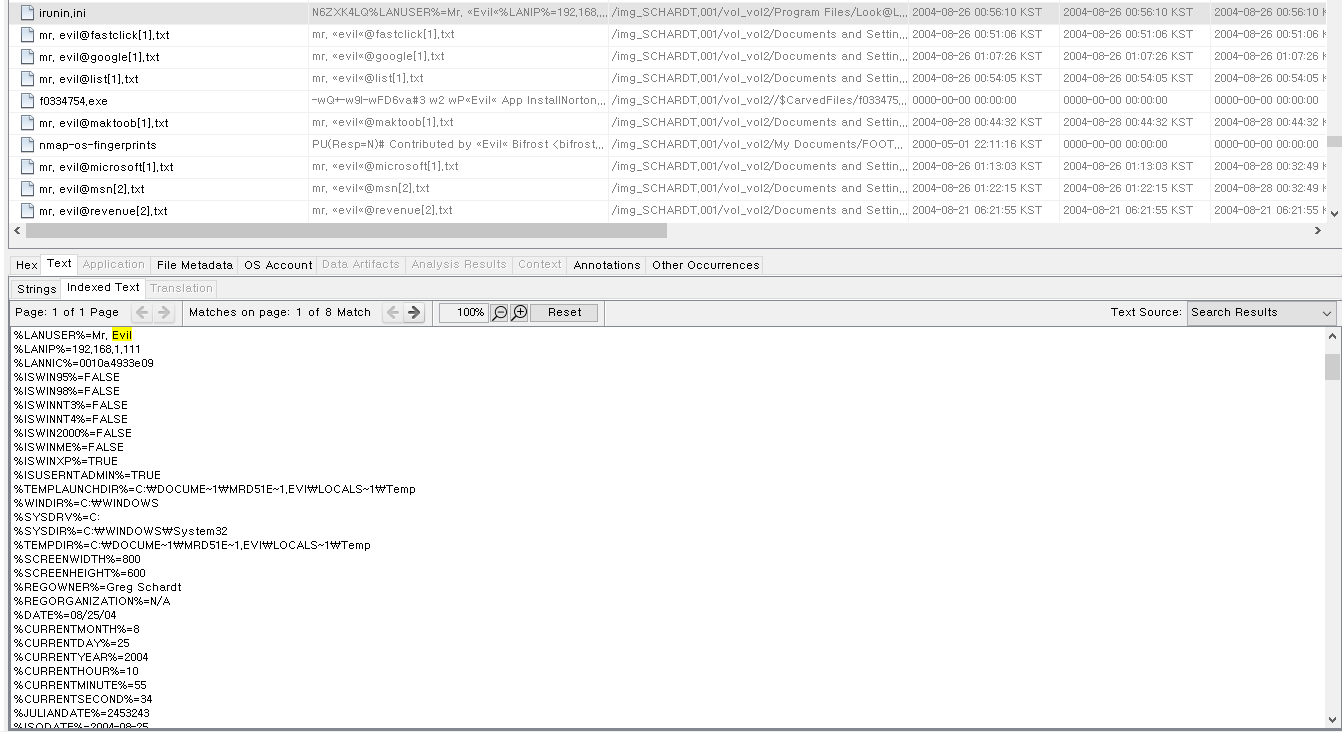
Look@LAN 의 irunin.ini 파일을 살펴보면 IP 와 MAC주소등 네트워크 정보가 담겨있다.
-
#15 An internet search for vendor name/model of NIC cards by MAC address can be used to find out which network interface was used. In the above answer, the first 3 hex characters of the MAC address report the vendor of the card. Which NIC card was used during the installation and set-up for LOOK@LAN?
LOOK@LAN 에서 기록된 MAC 주소를 확인해보면
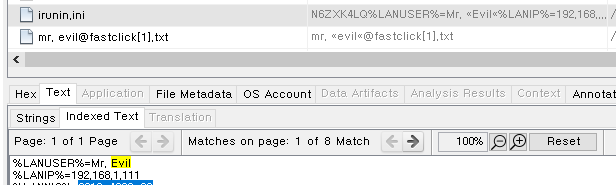
00-10-a4-93-3e-09 로 확인 할 수 있다.
mac주소 검색을 해보면
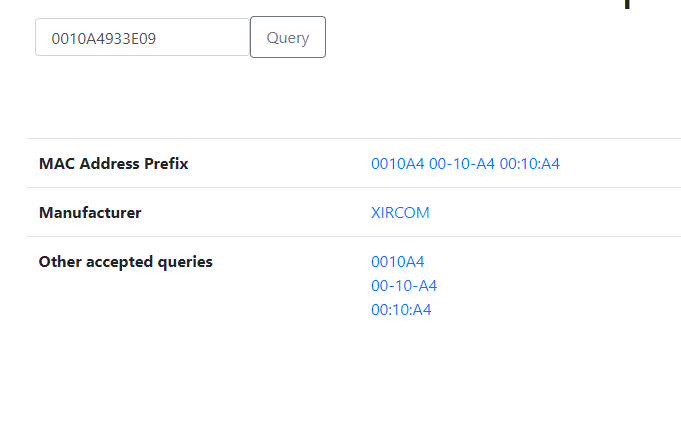
제조업체가 XIRCOM 인 것을 확인할 수 있다.
-
#16 Find 6 installed programs that may be used for hacking.
설치 된 응용 프로그램은 아래 경로에서 확인 가능하다.
HKEY_LOCAL_MACHINE\SOFTWARE\Microsoft\Windows\CurrentVersion\Uninstall
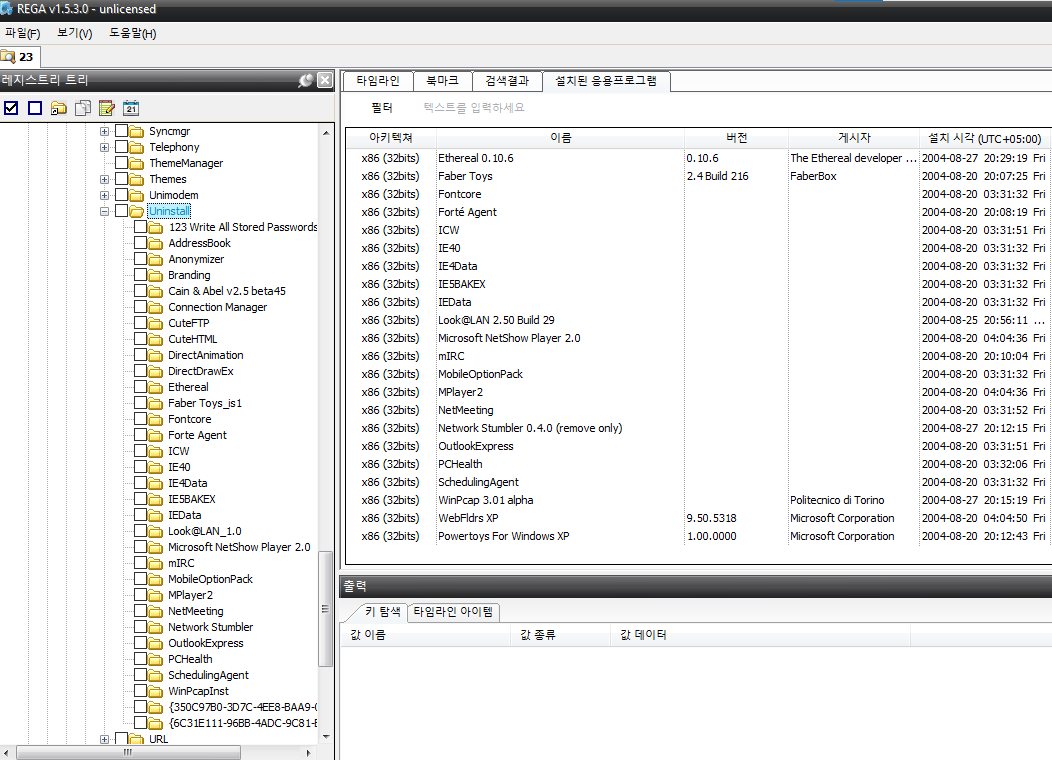
123 Write All Stored Passwords → 패스워드 크래킹
Ethereal → 네트워크 정보 수집
LOOK@LAN → 네트워크 모니터링
Anonymizer Bar → 프록시 도구
network stumbler → 스니핑
cain & abel → 카인과 아벨(Cain and Abel)은 마이크로소프트 윈도우용 암호 복구 도구이다. 네트워크 패킷 스니핑, 사전 공격, 무차별 공격, 암호 분석 공격과 같은 방법으로 다양한 암호 해시를 깨는 등의 방법으로 많은 종류의 암호를 복구할 수 있다.
-
#17 What is the SMTP email address for Mr. Evil?
아래 경로에서 메일 관련 정보를 볼 수 있다.
HKEY_LOCAL_MACHINE\SOFTWARE\Clients\Mail
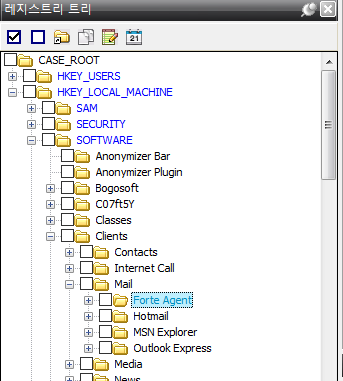
확인 결과 4개의 Mail 정보가 나와있음을 알 수 있다.
Evil의 이메일 계정과 관련된 것을 찾아야 하기 때문에 Evil 계정이 생성 된 후 설치된 파일 인
Forte Agent 의 폴더에서 관련 정보가 있을 것으로 예상하고 찾아봤더니
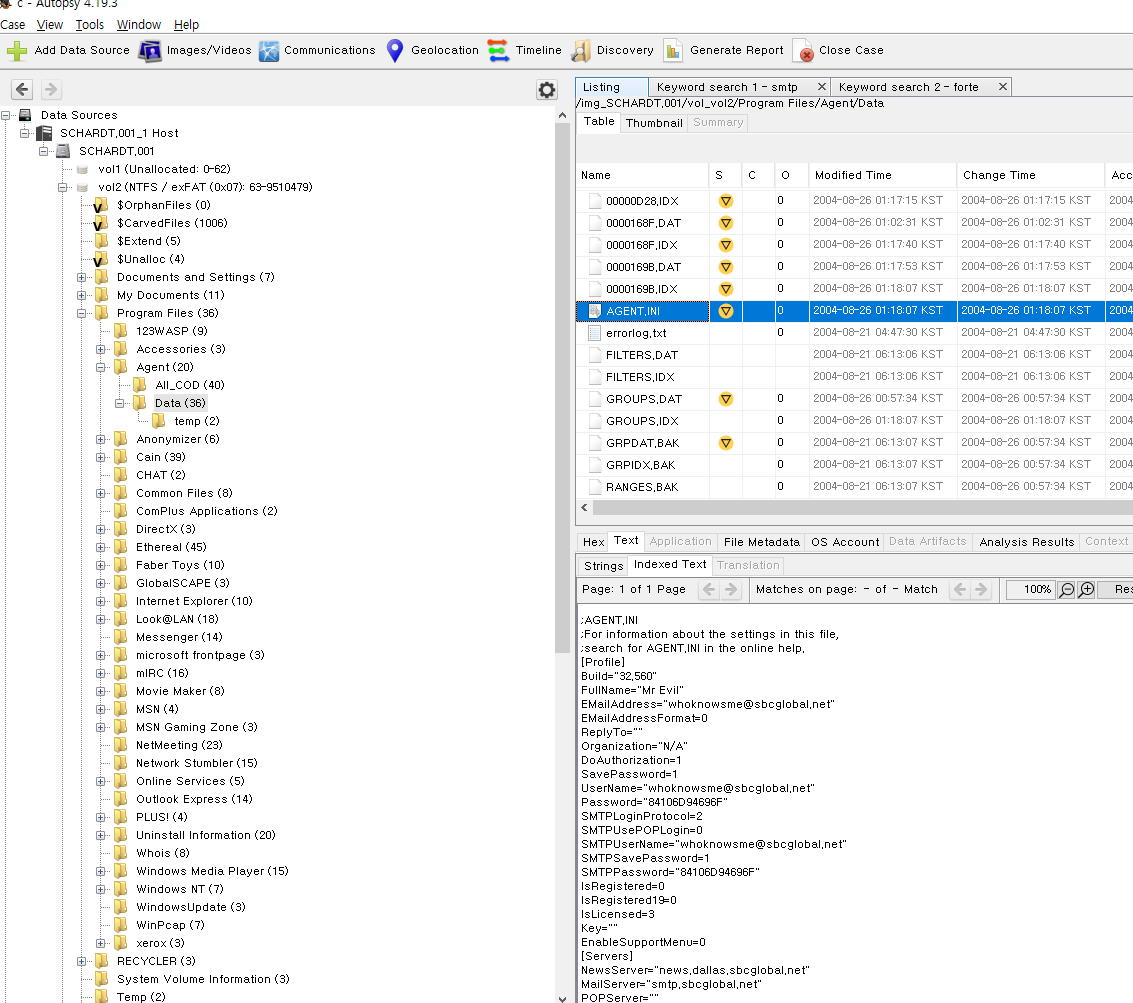
Agent.ini 설정파일에서 MR.Evil 의 이메일을 알 수 있었다.
-
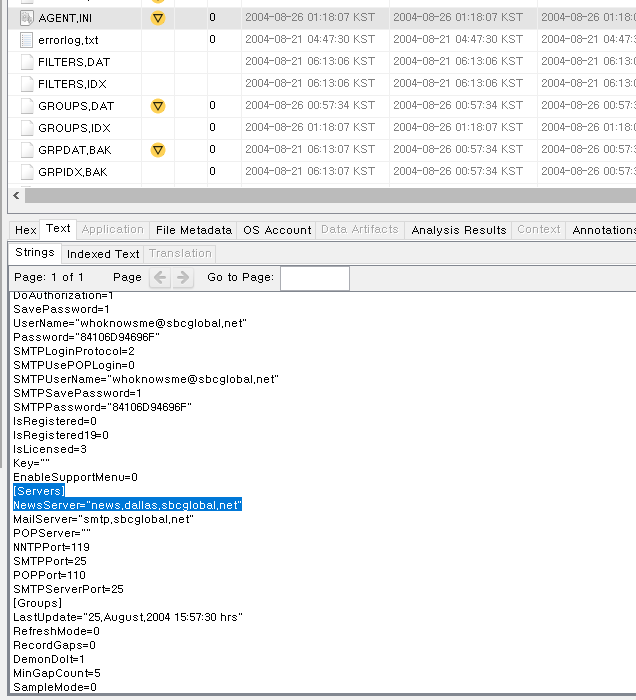
#18 What are the NNTP (news server) settings for Mr. Evil?
Agent.ini 파일에서 NNTp 서버를 알 수 있다.
-
#19 What two installed programs show this information?
-
#20 List 5 newsgroups that Mr. Evil has subscribed to?
-
#21 A popular IRC (Internet Relay Chat) program called MIRC was installed. What are the user settings that was shown when the user was online and in a chat channel?
-
#22 This IRC program has the capability to log chat sessions. List 3 IRC channels that the user of this computer accessed.
-
#23 Ethereal, a popular “sniffing” program that can be used to intercept wired and wireless internet packets was also found to be installed. When TCP packets are collected and re-assembled, the default save directory is that users \My Documents directory. What is the name of the file that contains the intercepted data?
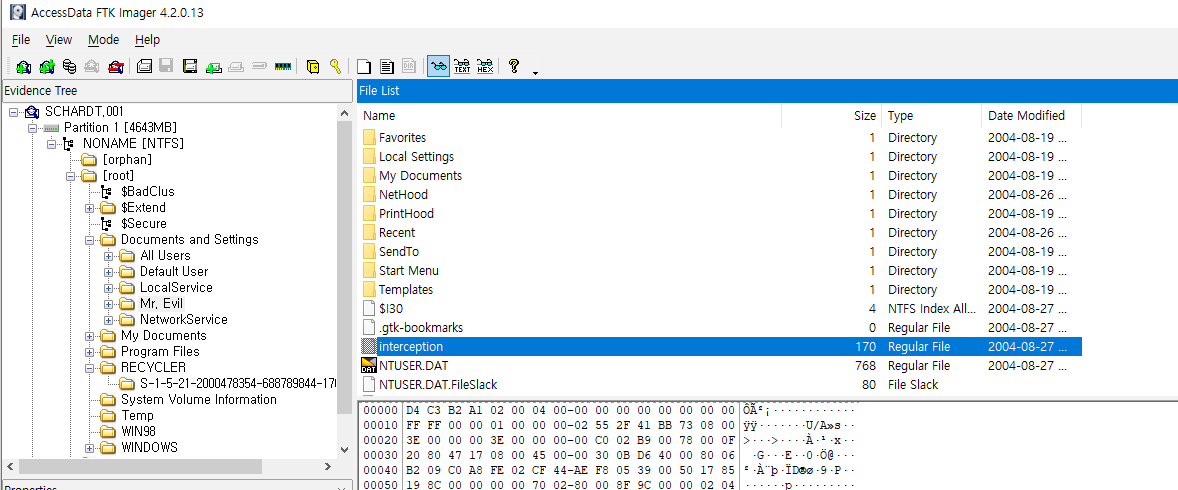
Interception
-
#24 Viewing the file in a text format reveals much information about who and what was intercepted. What type of wireless computer was the victim (person who had his internet surfing recorded) using?
Interception 파일이 어떤 파일인지 확인 해본 결과 tcpdump 캡처 파일이었다.

WireShark 로 확인 해보면 어떤 내용을 가로챘는지 , 어떤 종류의 무선 컴퓨터를 사용했는지 알 수 있을 것이다.
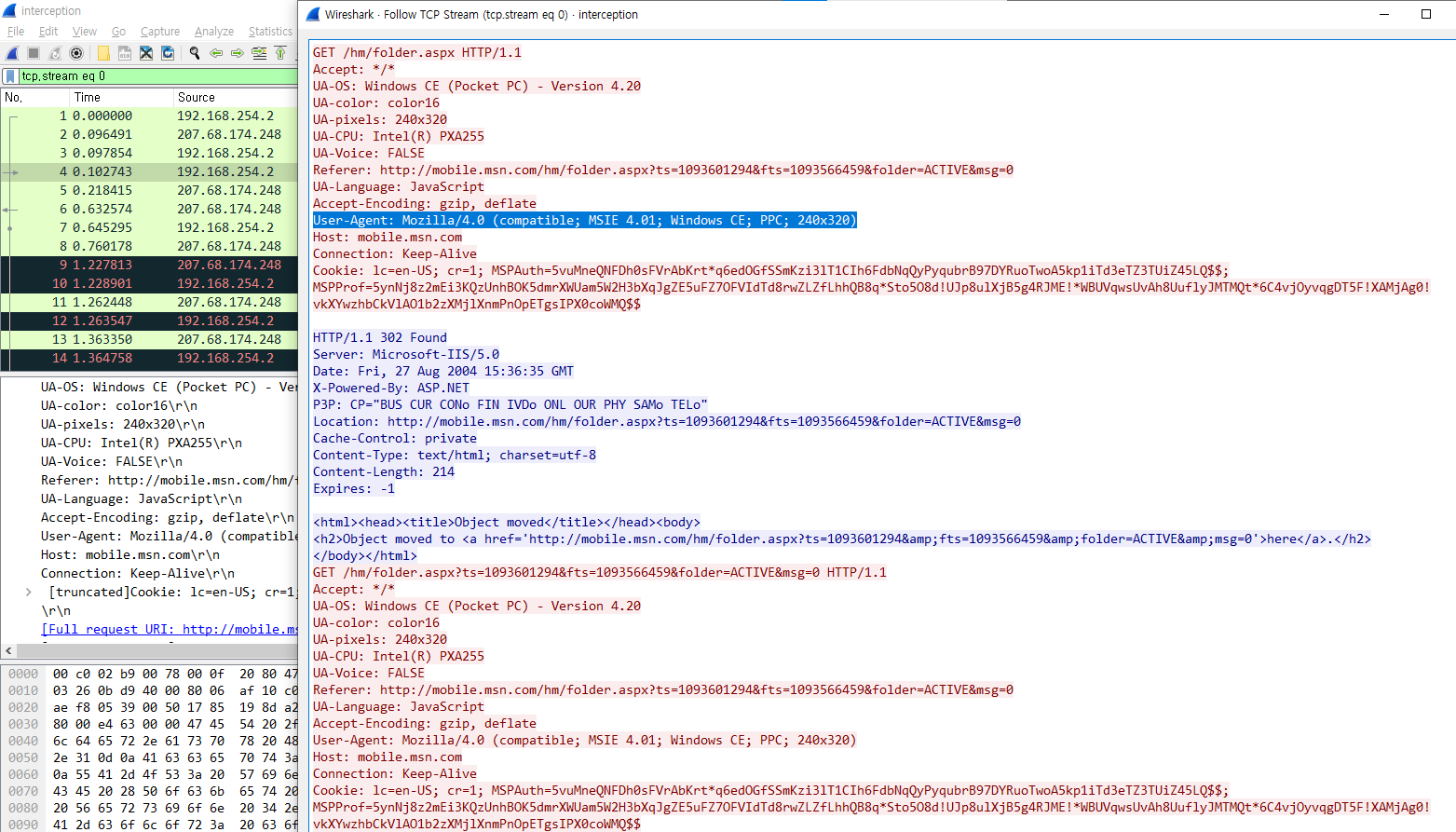
User-Agent: Mozilla/4.0 (compatible; MSIE 4.01; Windows CE; PPC; 240x320)
-
#25 What websites was the victim accessing?
네트워크 패킷에서 살펴 본 결과 아래 5가지에 접속한 것이 확인 됐다.
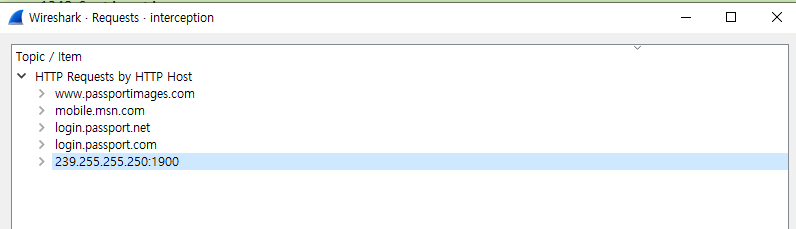
-
#26 Search for the main users web based email address. What is it?
우선 Windows XP 인 경우 인터넷 히스토리 정보는 아래에서 확인 가능하다.
Documents and Settings/Mr. Evil/Local Settings/Temporary Internet Files/Content.IE5/*
grep 명령어와 정규표현식을 활용하여 email과 관련된 정보만 sort 해봤다.
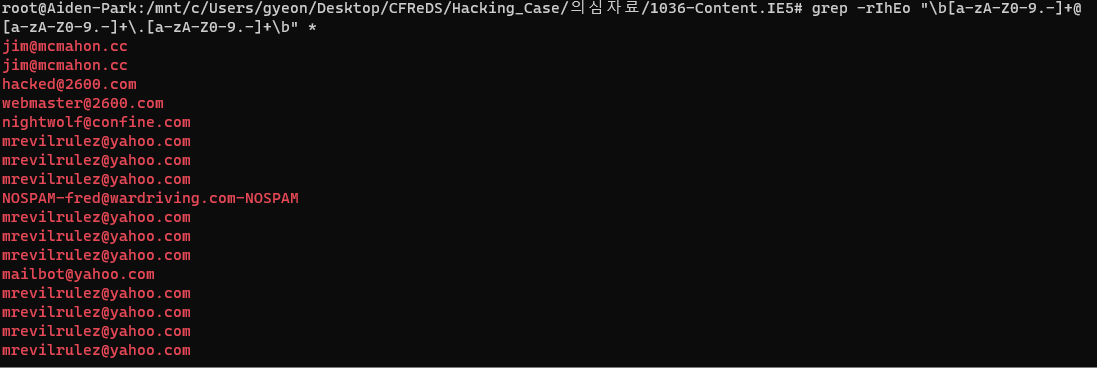
결과를 email.txt 로 저장한 후 확인해보니 mrevilrulez@yahoo.com 이메일이 가장 많은 것을 확인할 수 있었다.
-
#27 Yahoo mail, a popular web based email service, saves copies of the email under what file name?
자주 사용하는 이메일 주소로 키워드 서칭을 한 결과 html 파일이 있었다.
이 파일을 열어보니 메일 복사본이란 것을 알 수 있다.
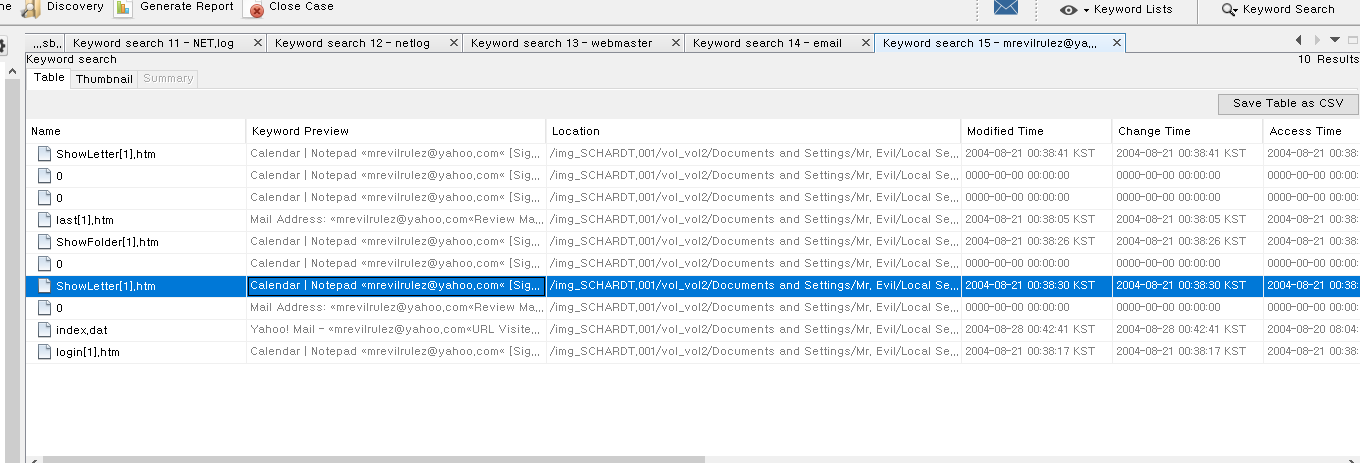
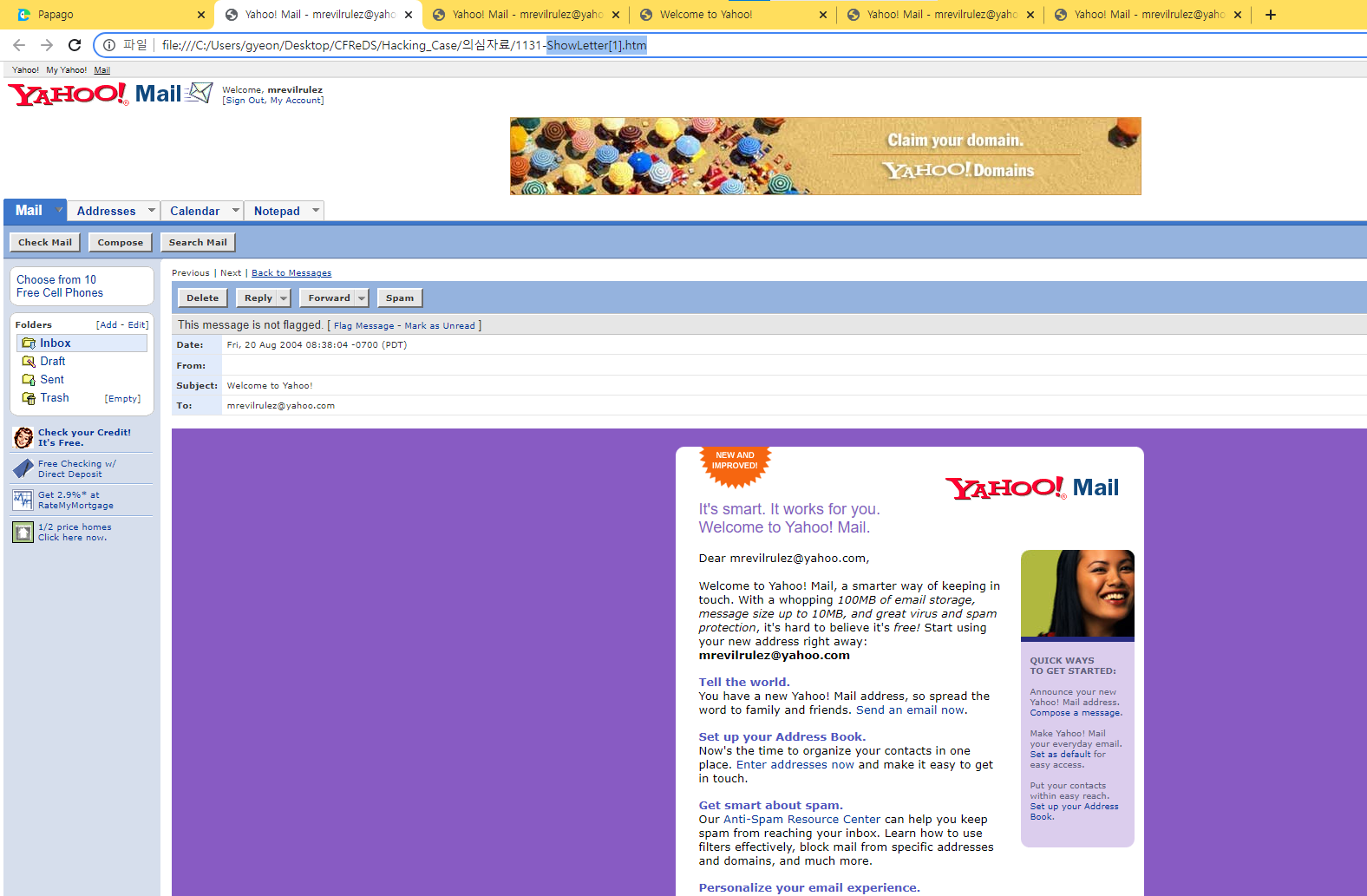
ShowLetter[1].htm
-
#28 How many executable files are in the recycle bin?
휴지통을 살펴보니 실행파일은 4개로 확인할 수 있다.
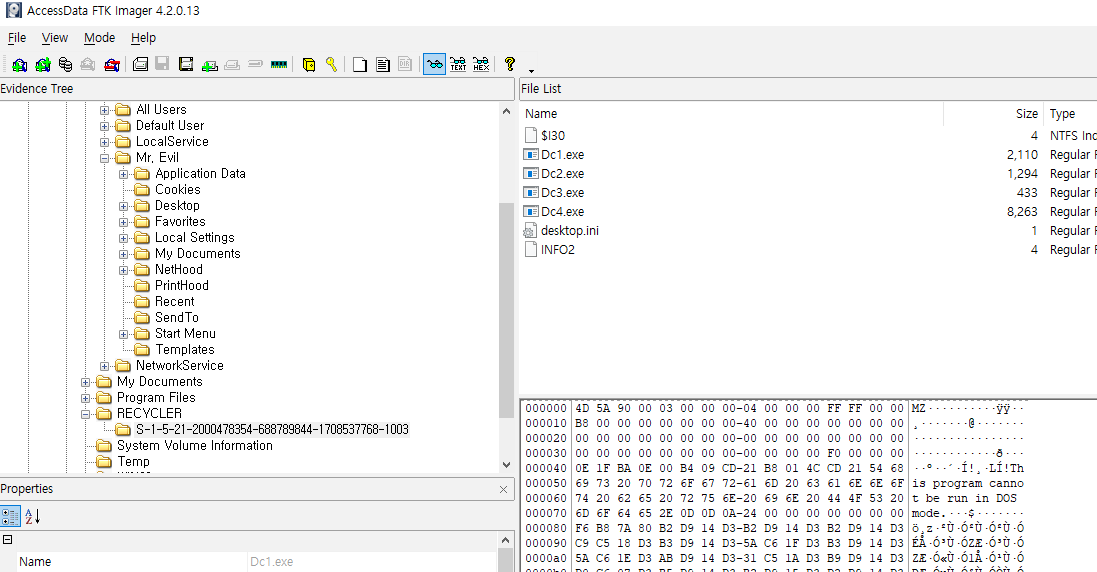
1003 은 Mr.Evil 계정의 guid 이다.
-
#29 Are these files really deleted?
휴지통에 있는 파일들 모두 복구가 가능하다.
Shift+Delete 로 지웠을 경우 MFT 데이터 영역을 통해 복구가 가능하다.
-
#30 How many files are actually reported to be deleted by the file system?
휴지통 폴더에 보면 INFO2 파일이 있는데 INFO2 파일에는 원래 경로 , 파일 크기 및 파일이 삭제된 시간이 포함된다. 이 파일의 문자열을 추출 했을 때 결과는 아래와 같다.

4개의 파일이 휴지통에서 삭제된 것을 알 수 있다.
-
#31 Perform a Anti-Virus check. Are there any viruses on the computer?
-
