오전 문제
-
클래스 앞에 final
- 인스턴스 생성 불가능
2.완전하지 않은 메소드 만들기
- ??
3.Friend 클래스를 인스턴스 생성이 되지 않는 클래스로 만들어라.
그리고 Friend 클래스의 showBasicInfo 메소드를 몸통이 없는 메소드로 선언하라.
abstract class Friend {
    String name;
    String phoneNum;
    String addr;

    public Friend(String name, String phone, String addr) {
        this.name = name;
        this.phoneNum = phone;
        this.addr = addr;
    }

    public void showData() {
        System.out.println("이름 : " + name);
        System.out.println("전화 : " + phoneNum);
        System.out.println("주소 : " + addr);
    }

    public void showBasicInfo();
}-
인스턴스 생서잉 되지 않는 클래스 > 객체를 생성할 수 없는 클래스를 의미한다.
-
abstract는 추상 클래스고, 추상 클래스는 하나 이상의 추상 메서드를 가진다. 그래서showBasicInfo();로 추상 메서드로 변경하고 이를 상속하는 클래스에서 구현을 해준다.- 상속 키워드는
extends이다
- 상속 키워드는
- abstract 클래스를 상속하는 하위 클래스에서 반드시 해야 할 일은?
다음 코드의 문제점을 찾아라.
abstract class AAA
{
void methoodOne() { . . . }
abstract void methodTwo();
}
class BBB extends AAA
{
void methodThree() { . . . }
}
-
class BBB extends AAA{ void methodThree(){} @Override void methodTwo(){} } -
AAA클래스에서
abstract키워드로 선언했기 때문에, 이를 상속하는 하위 클래스 BBB는 추상메소드를 구현해야한다. 그러므로 추상 메서드인 methodTwo를 구현해야한다.-
현재 추상 클래스인 AAA에서 methodTwo();가 추상 메소드이기 때문에
- 추상클래스를 상속받는 하위 클래스는 반드시 추상 메소드를 구현해야한다!!
-
5.홍만군은 이번 프로젝트의 실무 담당자이다. 그리고 이번 프로젝트에서 필요한 기능 중 일부를 A사에 의뢰할 생각이다. 홍만군이 의뢰한 기능을 요약하면 다음과 같다.
- 이름과 주민등록 번호를 저장하는 기능의 클래스가 필요하다.
- 이 클래스에는 주민등록 번호를 기반으로 사람의 이름을 찾는 기능이 포함되어야 한다.
그리고 이들 기능을 담당하는 메소드는 다음과 같이 정의하고자 하였다. - 주민등록번호와 이름의 저장 - void addPersonalInfo(String name, String perNum)
- 주민등록번호를 이용한 검색 - String searchName(String perNum)
홍만군이 생각한 해결방법
"클래스를 하나 정의해야겠다. 그리고 A사에는 이 클래스를 상속해서 기능을 완성해 달라고 요구하고, 난 이 클래스를 기준으로 프로젝트를 진행해야겠다.
- 홍만군이 A사에 의뢰한 내용과 홍만군이 진행한 프로젝트를 합쳐서 하나의 프로그램으로 만드시오.
package com.test.memo;

class Person {
    String name, perNum;

    public Person(String name, String perNum) {
        this.name = name;
        this.perNum = perNum;
    }

    public String getName() {
        return name;
    }

    public String getPerNum() {
        return perNum;
    }
}

class ResidentNum {// 홍만이가 의뢰한 기능

    private Person[] personalInfoArr;
    private int cnt;

    public ResidentNum(int size) {// 배열의 길이 받아와서 생성
        personalInfoArr = new Person[size];
        cnt = 0;
    }

    void addPersonalInfo(String name, String perNum) {// 주민등록번호, 이름 저장

        if (cnt < personalInfoArr.length) {// 저장 용량이 초과되면 안되니까
            personalInfoArr[cnt++] = new Person(name, perNum);// 받아온 값에 객체 생성해서 배열에 넣어주기
        } else {
            System.out.println("저장 공간이 부족합니다.");
        }
    }

    String searchName(String perNUm) {// 주민등록번호를 이용한 검색

        for (int i = 0; i < cnt; i++) {
            if (perNUm == personalInfoArr[i].getPerNum()) {
                return personalInfoArr[i].getName();
            }
        }
        return null;// 해당 주민등록번호가 없을 경우
    }
}

class Practice3 {
    public static void main(String[] args) {
        ResidentNum rn = new ResidentNum(10);
        rn.addPersonalInfo("정현지", "011030-111111");
        rn.addPersonalInfo("박홍석", "222222-222222");
        rn.addPersonalInfo("현지수", "333333-333333");

        String searchName = rn.searchName("333333-333333");
        if (searchName != null) {
            System.out.println(searchName);
        } else
            System.out.println("해당하는 주민번호가 존재하지 않습니다.");
    }
}-
주민등록번호로 이름 찾는 메소드에서 내가 == 으로 비교했는데 이는 문자의 내용을 비교하는것이 아닌, 참조하는 주소값을 비교하는것이기 때문에 equals를 쓰는게 더 좋다.
public String searchName(String perNum){
    for(Person person : personalInfoArrat){
        if(person != null && person.getPerNum().equals(perNum){//Person객체들을 순차적으로 접근하고 비교한다.
            return person.getName();
         }
     }
    return null;
}
그래서 다시 만들어봤다.
package com.test.memo;

import java.util.Scanner;

class Person {
    String name, perNum;

    Person(String name, String perNum) {
        this.name = name;
        this.perNum = perNum;
    }

    String getName() {
        return name;
    }

    String getNum() {
        return perNum;
    }
}

class InputPerNum {
    private Person[] perArr;
    private int cnt;

    public InputPerNum(int size) {
        perArr = new Person[size];
        cnt = 0;
    }

    void addPersonalInfo(String name, String perNum) {
        if (cnt < perArr.length) {
            perArr[cnt++] = new Person(name, perNum);
        } else
            System.out.println("저장 공간이 부족합니다.");
    }

    String searchName(String perNum) {
        for (Person per : perArr) {
            if (per != null && per.getNum().equals(perNum)) {
                return per.getName();
            }
        }
        return "해당하는 주민번호가 존재하지 않습니다.";
    }
}

class Practice3 {
    public static void main(String[] args) {
        InputPerNum in = new InputPerNum(5);

        in.addPersonalInfo("현지", "011030-111111");
        in.addPersonalInfo("박홍석", "222222-222222");
        in.addPersonalInfo("현지수", "333333-333333");

        String sName = in.searchName("333333-333333");
        System.out.println(sName);

    }
}- 인터페이스란?
- 추상화를 이용하여, 다중 상속과 유사한 효과를 얻게하는 개념이다. 메소드 선언만을 가지고있고, 메소드 정의는 없다. 변수를 가질 수 있지만 변수는 상수로 취급되고, 인터페이스를 구현하는 클래스에서는 이 변수를 변경할 수 없다.
-
AbstractInterface.java 를 인터페이스를 이용하는 형태로 변경시켜라
  abstract interface PersonalNumberStorage//추상 인터페이스 클래스
{
   public abstract void addPersonalInfo(String perNum, String name);//추상화메소
   public abstract String searchName(String perNum);
}

class PersonalNumInfo
{
   String name;
   String number;

   PersonalNumInfo(String name, String number)
   {
       this.name=name;
       this.number=number;
   }

   String getName(){return name;}
   String getNumber(){return number;}
}

class PersonalNumberStorageImpl implements PersonalNumberStorage//구현시키는 클래스
{
   PersonalNumInfo[] perArr;
   int numOfPerInfo;

   public PersonalNumberStorageImpl(int sz)
   {
       perArr=new PersonalNumInfo[sz];
       numOfPerInfo=0;
   }

   public void addPersonalInfo(String name, String perNum)//추상메소드 구현
   {
       perArr[numOfPerInfo]=new PersonalNumInfo(name, perNum);
       numOfPerInfo++;
   }

   public String searchName(String perNum)//추상 메소드 구현
   {
       for(int i=0; i<numOfPerInfo; i++)
       {
           if(perNum.compareTo(perArr[i].getNumber())==0)
               return perArr[i].getName();
       }
       return null;
   }
}// 상속이 아닌 , 인터페이스로 선언해주고 구현하도록 interface, implements 로 변경하면
- 두 개의 interface를 한 클래스에서 구현하시오.
package com.test.memo;

interface ClassOne {
    void method1();
}

interface ClassTwo {
    void method2();
}

class myClass implements ClassOne, ClassTwo {

    public void method1() {
        System.out.println("첫번째 클래스 메소드");
    }

    public void method2() {
        System.out.println("두번째 클래스 메소드");
    }
}

class Organize {
    public static void main(String[] args) {
        myClass mc = new myClass();
        mc.method1();
        mc.method2();

    }
}//구현 클래스에서 public 을 반드시 붙여야한다 > 그러지않으니 에러 났다. - 인터페이스를 상속하시오
package com.test.memo;

interface ClassOne {
    void method1();
}

interface ClassTwo {
    void method2();
}
interface ClassThree extends ClassOne, ClassTwo{
    void method3();
}

class myClass implements ClassThree {

    public void method1() {
        System.out.println("첫번째 클래스 메소드");
    }

    public void method2() {
        System.out.println("두번째 클래스 메소드");
    }
    public void method3() {
        System.out.println("세번째 클래스 메소드");
    }
}

class Organize {
    public static void main(String[] args) {
        myClass mc = new myClass();
        mc.method1();
        mc.method2();
        mc.method3();
    }
}
터-
새로운 인터페이스를 생성해서 두개의 인터페이스를 extends로상속(확장)받아주고, 그 상속받은 인터페이스를 클래스에서 구현해준다 > 그래도 추상메소드는 구현 클래스에서 메소드들 모두 구현해줘야한다.
- extends는 한 클래스가 다른 클래스를 확장하여 상속받는다는 의미를 가지고있다.
- 다음을 인터페이스를 이용해 변경해보시오.
public static final int Mone = 1; > class안에 모든 요일이 존재
interface ClassOne {
    int MON=1;
    int TUE=2;
    int WED=3;
    int THU=4;
    int FRI=5;
    int SAT=6;
    int SUN=7;
}-
인터페이스에서 변수를 선언하면 > 상수로 취급
- 기본적으로
public static final이라는 속성을 가진다. 그래서 굳이 붙여주지 않아도 됌.
- 기본적으로
12.System.out.println 오버로딩 된 메소드 중에 public void println(Object x)가 없다고 가정하고 문제12 폴더에 있는 ClassPrinter에 있는 class에 print 메소드를 만드시오.
class ClassPrinter
{
    static void print(Object obj){
    System.out.println(obj.toString());
    }
}

class Point
{
    private int xPos, yPos;

    Point(int x, int y)
    {
        xPos=x;
        yPos=y;
    }

    public String toString()
    {
        String posInfo="[x:"+xPos + ", y:"+yPos+"]";
        return posInfo;
    }
}

class ImplObjectPrintln
{
    public static void main(String[] args)
    {
        Point pos1=new Point(1, 2);
        Point pos2=new Point(5, 9);

        ClassPrinter.print(pos1);
        ClassPrinter.print(pos2);
    }
}-
최상위 클래스인 Object를 이용해 받아온 값을 출력해줬다.
-
Object로 인자를 받는 이유는 다형성과 관련이있다 > 최상위 클래스 이기 때문에 어떤 타입의 객체라도 받을 수 있다.
-
다양한 타입의 객체를 인자로 전달받을 수 있어서 유연성이 높아진다.
-
-
Point num을 인자로 넣고 출력도 가능하지만 Object로 사용하면 유연성 up
- 12번에 있는 문제에서 정의하고 있는 print 메소드에 다음의 기능을 추가하시오.
"인터페이스 UpperCasePrintable을 구현하는 클래스의 인스턴스가 print 메소드의 인자로 전달되면 문자열을 전부 대문자로 출력한다."
interface UpperCasePrinter{

}

class ClassPrinter
{
    public static void print(Object obj){
    String org = obj.toString();
            if(obj instanceof UpperCasePrinter){//객체가 비교하는 타입의 하위클래스인지 아닌지 비교하는 boolean형
            org = org.UpperCase();
           }
       System.out.println(org);
    }
}

class PointOne implements UpperCasePrinter
{
    private int xPos, yPos;

    Point(int x, int y)
    {
        xPos=x;
        yPos=y;
    }

    public String toString()
    {
        String posInfo="[x:"+xPos + ", y:"+yPos+"]";
        return posInfo;
    }
}
class PointTwo
{
    private int xPos, yPos;

    Point(int x, int y)
    {
        xPos=x;
        yPos=y;
    }

    public String toString()
    {
        String posInfo="[x:"+xPos + ", y:"+yPos+"]";
        return posInfo;
    }
}

class ImplObjectPrintln
{
    public static void main(String[] args)
    {
        PointOne pos1=new PointOne(1, 1);
        PointTwo pos2=new PointTwo(2, 2);
        PointOne pos3=new PointOne(3, 3);
        PointTwo pos4=new PointTwo(4, 4);

        ClassPrinter.print(pos1);
        ClassPrinter.print(pos2);
        ClassPrinter.print(pos3);
        ClassPrinter.print(pos4);
    }
}- 문제14 폴더에 있는 CompileErroExample.java에서 Computer 클래스를 인터페이스로 바꾸고 IPTV가 TV를 상속받고 Computer를 구현하는 형태로 바꾸시오.
 class TV
    {
    public void onTV()
    {
        System.out.println("영상 출력 중");
    }
    }


interface Computer
{
    public void dataReceive();
}

class ComputerImpl
{
    public void dataReceive()
    {
        System.out.println("영상 데이터 수신 중");
    }
}

class IPTV extends TV implements Computer//상속이 구현보다 앞에 와야함
{
    ComputerImpl comp=new ComputerImpl();//인터페이스의 내용과 연관있는 객체 생성해서 아래 추상메서드에서 해당 클래스 이용해서 구현해주기

    public void dataReceive()//인터페이스 추상 메서드는 반드시 구현 클래스에서 구현해야함
    {
        comp.dataReceive();
    }
    public void powerOn()
    {
        dataReceive();
        onTV();
    }

}

class MultiInheriAlternative
{

    public static void main(String[] args)
    {
        IPTV iptv=new IPTV();
        iptv.powerOn();

        TV tv=iptv;
        Computer comp=iptv;
    }

}- 인터페이스를 이용해서 상속을 대신하기 - 문제 14를 푼 후에 문제 15 폴더에 있는 MultiInheriAlternative.java에서는 다중상속을 어떻게 인터페이스가 대신하는지를 보이고 있다. 이 예제에서 보이는 내용을 참조하여, 이 예제의 IPTV 클래스를 다음의 형태로 변경하자.
class IPTV implements TV, Computer
{
. . .
}
그나마 있던 TV 클래스의 상속도 인터페이스의 구현으로 변경하라는 뜻이다. 물론 예제의 main 메소드에는 변경이 없어야 하며, 실행결과도 동일해야 한다.
interface TV
{
    public void onTV();
}

class TVImpl
{
    public void onTV()
    {
        System.out.println("영상 출력 중");
    }
}

interface Computer
{
    public void dataReceive();
}

class ComputerImpl
{
    public void dataReceive()
    {
        System.out.println("영상 데이터 수신 중");
    }
}

class IPTV implements TV, Computer
{
    ComputerImpl comp=new ComputerImpl();
    TVImpl tv = new TVImpl();

    public void dataReceive()
    {
        comp.dataReceive();
    }
    public void onTV()
    {
        tv.onTV();
    }
    public void powerOn()
    {
        dataReceive();
        onTV();
    }
}

class MultiInheriAlternative
{

    public static void main(String[] args)
    {
        IPTV iptv=new IPTV();
        iptv.powerOn();

        TV tv=iptv;
        Computer comp=iptv;
    }
}- 이렇게 인터페이스를 만들고 그 인터페이스의 기능을 수행 클래스를 따로 만들어서 이 인터페이스를 구현하는 클래스에서 기능 수행 클래스 객체 만들어서 호출하는 방법도 있고 아래와같이 바로 출력하는 방법도 있다 > 개발자 스타일 차이
interface TV
  {
    public void onTV();
  }

interface Computer
{
    public void dataReceive();
}

class IPTV implements TV, Computer
{

    public void dataReceive()
    {
     System.out.println("영상 데이터 수신 중");
    }
    public void onTV()
    {
        System.out.println("영상 출력 중");
    }
    public void powerOn()
    {
        dataReceive();//같은 클래스 안에있는 메서드 호출
        onTV();
    }

}

class MultiInheriAlternative
{

    public static void main(String[] args)
    {
        IPTV iptv=new IPTV();
        iptv.powerOn();

        TV tv=iptv;
        Computer comp=iptv;
    }

}- Inner 클래스에 대해서 설명하고 예제를 하나 작성하시오.
- Inner클래스는 Outer클래스 내부에 선언되어 있는 클래스로, Outer클래스의 멤버 변수와 메서드에 접근할 수 있다.
 class OuterClass
  {
    private String myName;
    private int num;

    OuterClass(String name)
    {
        myName=name;
        num=0;
    }

    public void whoAreYou()
    {
        num++;
        System.out.println(myName+ " OuterClass "+num);
    }

    class InnerClass
    {
        InnerClass()
        {
            whoAreYou();
        }
    }
  }

class InnerClassTest
{
    public static void main(String[] args)
    {
        OuterClass out1=new OuterClass("First");
        OuterClass out2=new OuterClass("Second");
        out1.whoAreYou();
        out2.whoAreYou();

        OuterClass.InnerClass inn1=out1.new InnerClass();
        OuterClass.InnerClass inn2=out2.new InnerClass();
        OuterClass.InnerClass inn3=out1.new InnerClass();
        OuterClass.InnerClass inn4=out1.new InnerClass();
        OuterClass.InnerClass inn5=out2.new InnerClass();
    }

}- Nested 클래스에 대해서 설명하고 예제를 하나 작성하시오.
- Nested클래스는 내부 클래스 전체를 가리킬 때 사용된다. 내부 클래스에는 static이 붙은 정적 중첩 클래스(static nested class)와 static이 붙지않은 인스턴스 중첩클래스(inner class)가 있다.
class OuterClassOne
{
    OuterClassOne()
    {
        NestedClass nst=new NestedClass();//static 클래스여서 객체 생성해서 호출 가능
        nst.simpleMethod();
    }

    static class NestedClass//얘는 Nested클래스로 static이 붙어있지만
    {
        public void simpleMethod()//이 메서드는 붙어있지 않아서 위에서 객체를 생성해서 호출해준
        {
            System.out.println("Nested Instance Method One");
        }
    }
}

class OuterClassTwo
{
    OuterClassTwo()
    {
        NestedClass nst=new NestedClass();
        nst.simpleMethod();
    }

    private static class NestedClass
    {
        public void simpleMethod()
        {
            System.out.println("Nested Instance Method Two");
        }
    }
}

class NestedClassTest
{
    public static void main(String[] args)
    {
        OuterClassOne one=new OuterClassOne();//Nested Instance Method One출력
        OuterClassTwo two=new OuterClassTwo();//Nested Instance Method Two 출력

        OuterClassOne.NestedClass nst1=new OuterClassOne.NestedClass();
        nst1.simpleMethod();//Nested Instance Method One 출력
        // OuterClassTwo.Nested nst2=new OuterClassTwo.Nested();
        // nst2.simpleMethod();
    }
}- OuterClassOne one=new OuterClassOne(); class 이름의 생성자로 객체를 생성하고 해당 클래스 안에 존재하는 메서드를 뒤에 붙인다. > 객체 생성과 동시에 메서드를 호출하는것이다.
- 객체를 생성함과 동시에 생성자 안에서 NestedClass의 simpleMethod호출하고 있어서 출력이 실행된다.
- 메인 메서드에서 주석처리하고 있는 이유는 OuterClassTwo에서 Nested클래스가 private이기 때문에 메인 메서드에서는 객체를 생성해 호출이 불가능하다.(OuterClassTwo.Nested cannot be resolved to a type)
- 그래서 OuterClassOne은 Nested클래스가 default값이기 때문에 객체를 생성해 메서드를 호출 가능한거고, OuterClassTwo의 Nested클래스는 private이기 때문에 객체를 생성할 때부터 접근할 수 없는것이다.
- 다음의 소스코드는 문제가 있는 소스이다. 소스의 문제점을 수정하시오.(문제18 폴더)
class OuterClass
{
...
public LocalClass createLocalClassInst()
{
class LocalClass
{
...
}return new LocalClass();
}
}
interface Readable
{
    public void read();
}

class OuterClass
{
    private String myName;

    OuterClass(String name)
    {
        myName=name;
    }

    public Readable createLocalClassInst()
    {
        class LocalClass implements Readable
        {
            public void read()
            {
                System.out.println("Outer inst name: "+myName);
            }
        }

        return new LocalClass();
    }
}

class LocalClassTest
{
    public static void main(String[] args)
    {
        OuterClass out1=new OuterClass("First");
        Readable localInst1=out1.createLocalClassInst();
        localInst1.read();

        OuterClass out2=new OuterClass("Second");
        Readable localInst2=out2.createLocalClassInst();
        localInst2.read();
    }
}- 문제19 폴더에 있는 소스는 문제가 있는 소스이다. 그 문제를 고치고 왜 그런지 설명하시오.
(JDK 1.8부터는 에러 아님)
interface Readable
{
    public void read();
}

class OuterClass
{
    private String myName;

    OuterClass(String name)
    {
        myName=name;
    }

    public Readable createLocalClassInst(final int instID)
    {
        class LocalClass implements Readable
        {
            public void read()
            {
                System.out.println("Outer inst name: "+myName);
                System.out.println("Local inst ID: "+instID);
            }
        }

        return new LocalClass();
    }
}

class LocalParamClassTest
{
    public static void main(String[] args)
    {
        OuterClass out=new OuterClass("My Outer Class");
        Readable localInst1=out.createLocalClassInst(111);
        localInst1.read();

        Readable localInst2=out.createLocalClassInst(222);
        localInst2.read();
    }
}- 문제20 폴더에 있는 LocalParamClassTest.java에 있는 Local 클래스를 Anonymous클래스로 만들어보자.
interface Readable
{
    public void read();
}

class OuterClass
{
    private String myName;

    OuterClass(String name)
    {
        myName=name;
    }

    public Readable createLocalClassInst(final int instID)
    {
        return new Readable()
        {
            public void read()
            {
                System.out.println("Outer inst name: "+myName);
                System.out.println("Local inst ID: "+instID);
            }
        };
    }
}

class LocalParamAnonymous
{
    public static void main(String[] args)
    {
        OuterClass out=new OuterClass("My Outer Class");
        Readable localInst1=out.createLocalClassInst(111);
        localInst1.read();

        Readable localInst2=out.createLocalClassInst(222);
        localInst2.read();
    }
}- Anonymous 클래스를 만들어보자.
interface Readable
{
    public void read();
}

class OuterClass
{
    private String myName;

    OuterClass(String name)
    {
        myName=name;
    }

    public Readable createLocalClassInst(final int instID)
    {
        return new Readable()
        {
            public void read()
            {
                System.out.println("Outer inst name: "+myName);
                System.out.println("Local inst ID: "+instID);
            }
        };
    }
}

class LocalParamAnonymous
{
    public static void main(String[] args)
    {
        OuterClass out=new OuterClass("My Outer Class");
        Readable localInst1=out.createLocalClassInst(111);
        localInst1.read();

        Readable localInst2=out.createLocalClassInst(222);
        localInst2.read();
    }
}
import문의 선언
모든 소스파일(.java)에서 import문은 package문 다음에, 그리고 클래스 선언문 이전에 위치해야 한다. import문은 package문과 달리 한 소스파일에 여러 번 선언할 수 있다.
일반적인 소스파일의 구성순서
-
package문
-
import문
-
클래스 선언
import문 선언 방법
-
import 패키지명.클래스명;
-
import 패키지명.*; > static import 문과 함께 사용 x
static import
static 멤버를 호출할 때 클래스 이름을 생략할 수 있어 특정 클래스의 static멤버를 자주 사용할 때 편리하다 > 코드도 간결해짐
import static java.lang.Integer.*; //Integer클래스의 모든 static메소드
import static java.lang.Math.random; //Math.random()만
import static java.lang.System.out; //System.out을 out만으로 참조 가능
import static java.lang.System.out;
import static java.lang.Math.*;
class StaticImportEx1 {
public static void main(String[] args) {
// System.out.println(Math.random());
out.println(random());
// System.out.println("Math.PI :"+Math.PI);
out.println("Math.PI :" + PI);
}
}-
정적 메소드를 import static을 사용해서 import한 후에 클래스명 없이 avs();처럼 바로 사용할수 있다.
- 주의할 점은 클래스 내에 동일한 이름의 메소드가 있으면, 클래스 자신의 메소드가 우선된다.
오류(Error) 와 예외(Exception)
자바 프로그램을 작성할 때 자바 문법에 맞지 않게 코드를 작성하고 컴파일하려고 하면, 자바 컴파일러는 문법 오류(syntax error)를 발생시킨다.
문법에 맞게 작성되었더라도 프로그램이 실행되면서 예상하지 못한 오류가 발생할 수 있다.
이렇게 시스템이 동작하는 도중에 예상하지 못한 사태가 발생하여 실행 중인 프로그램이 영향을 받는 것을 오류(error) 와 예외(exception) 두 가지로 구분할 수 있다.
-
오류(error) : 시스템 레벨에서 프로그램에 심각한 문제를 야기하여 실행 중인 프로그램을 종료시킨다.
- 이런 오류는 개발자가 미리 예측하여 처리할 수 없는것이 대부분이므로, 오류에 대한 처리는 할 수 없다.
-
예외(exception) : 오류와 마찬가지로 실행 중인 프로그램을 비정상적으로 종료 시키지만, 발생할 수 있는 상황을 미리 예측하여 처리할 수 있다.
- 개발자는 예외 처리(exception handling)을 통해 예외 상황을 처리할 수 잇도록 코드의 흐름을 바꿀 필요가 있다.
예외처리(Exception Handling)
java에서는 에러 발생 시 자동으로 예외객체가 생성
- 프로그램이 실행되는 도중 발생하는 예외를 처리하기 위해try / catch / finally 문을 사용할 수 있다.
try {

    //예외를 처리하길 원하는 실행 코드;

} catch (e1) {

    //e1 예외가 발생할 경우에 실행될 코드;

} catch (e2) {

    //e2 예외가 발생할 경우에 실행될 코드;

}
...

finally {

   // 예외 발생 여부와 상관없이 무조건 실행될 코드;
}-
try 블록 : 기본적으로 제일 먼저 실행되는 코드로, 여기에서 발생한 예외는 catch블록에서 처리된다.
-
catch 블록 : try 블록에서 발생한 예외 코드나, 예외 객체를 인수로 전달받아 그 처리를 담당한다.
-
finally블록 : try블록에서 예외가 발생하건 안하건 맨 마지막에 무조건 실행된다.
catch블록과 finally블록은 선택적인 옵션이다.
다른 제어문과는 달리 예외 처리문은 중괄호를 생략할 수 없다.
예외 처리 메커니즘
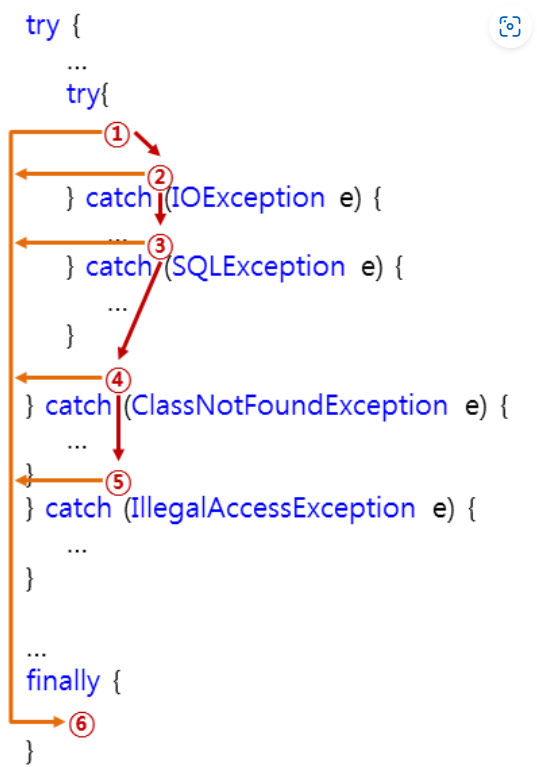
-
try 블록에 도달한 프로그램의 제어는 try 블록 내의 코드를 실행합니다.
- 이때 만약 예외가 발생(throw)하지 않고, finally 블록이 존재하면 프로그램의 제어는 바로 finally 블록으로 이동합니다.
-
try 블록에서 예외가 발생하면 catch 핸들러는 다음과 같은 순서로 적절한 catch 블록을 찾게 됩니다.
2-1. 스택에서 try 블록과 가장 가까운 catch 블록부터 차례대로 검사합니다.
2-2. 만약 적절한 catch 블록을 찾지 못하면, 바로 다음 바깥쪽 try 블록 다음에 위치한 catch 블록을 차례대로 검사합니다.
2-3. 이러한 과정을 가장 바깥쪽 try 블록까지 계속 검사하게 됩니다.
2-4. 그래도 적절한 catch 블록을 찾지 못하면, 예외는 처리되지 못합니다.
-
만약 적절한 catch 블록을 찾게 되면, throw 문의 피연산자는 예외 객체의 형식 매개변수로 전달됩니다.
-
모든 예외 처리가 끝나면 프로그램의 제어는 finally 블록으로 이동합니다.
-
finally 블록이 모두 처리되면, 프로그램의 제어는 예외 처리문 바로 다음으로 이동합니다.
-
만약 1번 try블록에서 예외가 발생하지 않고, 바깥쪽 try블록에서도 예외가 발생하지 않으면, 6번 finally블록이 바로 실행된다.
-
하지만 1번 try 블록에서 예외가 발생하면, 2번과 3번 catch블록에서 해당 예외를 처리할 수 있는지 검사하게된다.
-
만약 적절한 catch 블록을 찾지 못하면, 바깥쪽 try 블록의 4번과 5번 catch블록도 차례대로 검사하게된다.
-
이때 해당 예외를 처리할 수 있는 catch블록을 찾게되면, catch블록을 실행한 후 6번 finally 블록을 실행한다.
- 하지만 모든 catch블록이 해당 예외를 처리할 수 없으면, 예외는 처리되지 못한 채 해당 프로그램은 강제 종료될것이다.
-
예외클래스의 계층구조 (암기)
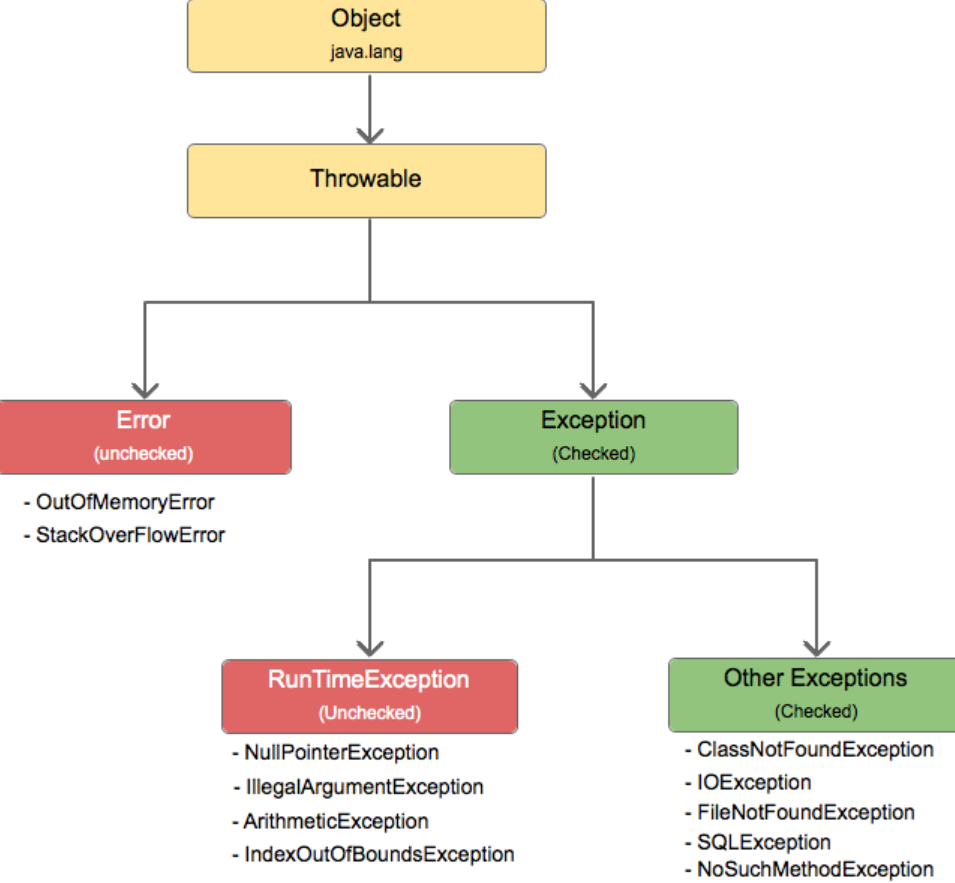
컴파일러가 예외처리를 확인하지 않는 RuntimeException 클래스들은 'unchecked 예외'라고 부르고, 예외처리를 확인하는 Exception 클래스들은 'checked예외'라고 부른다.
-
예외의 최상위 클래스는 Throwable > Object클래스의 하위
-
Error 는 un-Checked예외이고, 심각한 예외여서 try~catch문으로 예외처리가 되지않는다. 아예 코드를 다시 짜야한다.
-
Exception는 Checked예외라고 한다. 이를 RunTimeException 과 Other Exceptions가 상속받는다.
-
RunTimeException 는 un-Checked예외라고 하고, 예외를 해도그만 안해도그만인 클래스들이다.
-
Other Exceptions 는 Checked 예외라고 하는데, 반드시 예외처리를 해야하는 클래스들이다.
-
예외처리를 하지 않으면 컴파일도 되지 않는다!!! > 이클립스에서 나오는 오류가 checked예외
-
RunTimeException 이 아닌 다른 예외들이 이에 속한다.
-
-
Other Exceptions(checked)
class ExceptionEx10 {
    public static void main(String[] args) {
        throw new Exception();        // Exception을 고의로 발생시킨다.
    }
}-
'Exception 클래스들 (Exception 클래스와 그 자손들)'이 발생할 가능성이 있는 문장들에 대해 예외처리를 해주지 않으면 컴파일조차 되지 않는다.
- 그럼 무조건 try~catch 안에 무조건 넣어야한다.
RunTimeException(unChecked)
class ExceptionEx11 {
    public static void main(String[] args) {
        throw new RuntimeException();    // RuntimeException을 고의로 발생시킨다.
    }
}-
RunTimeException클래스와 그 자손(RuntimeException클래스들)'에 해당하는 예외는 프로그래머에 의해 실수로 발생하는 것들이기 때문에 예외처리를 강제하지 않는 것이다. 만일 RuntimeException 클래스들에 속하는 예외가 발생할 가능성이 있는 코드에도 예외처리를 필수로 해야 한다면, 아래와 같이 참조 변수와 배열이 사용되는 모든 곳에 예외처리를 해주어야 할 것이다.
try{
    int[] arr = new int[10];
    System.out.println(arr[0]);
} catch(ArrayIndexOutOfBoundsException ae){
    ...
} catch(NullPointerException ne) {
    ...
}
대표적인 RuntimeException의 하위 클래스(암기)
특별한 경우가 아니면 try~catch문을 이용해서 예외처리를 하지 않는다.
주로 개발자의 실수에 의한 오류이므로, 런타임 시에 발생할 수 있고, 사전에 예방할 수 있다.
-
프로그램의 로직 오류를 나타내므로, 예외 처리보다는 미리 예방하는 것이 바람직하다.
-
예방을 하지 않는 경우에도 프로그램이 적절히 종료될 수 있도록 JVM에서 자동으로 예외가 발생하게 된다.
| 예외 구문 | 이유 |
|---|---|
| ArithmeticException | 정수를 0으로 나눌경우 발생 |
| ArrayIndexOutOfBoundsExcetion | 배열의 범위를 벗어난 index를 접근할 시 발생 |
| ClassCastExcetion | 변환할 수 없는 타입으로 객체를 반환 시 발생 |
| NullPointException | 존재하지 않는 객체를 참조할때 발생 |
| IllegalArgumentException | 잘못된 인자를 전달 할 때 발생 |
| IOException - other exception | 입출력 동작 실패 또는 인터럽트 시 발생 |
| OutOfMemoryException | 메모리가 부족한 경우 발생 |
| NumberFormatException | 문자열이 나타내는 숫자와 일치하지 않는 타입의 숫자로 변환시 발생 |
| InputMismatchException | Scanner가 기대한 유형의 입력이 제공되지 않았을 때 발생 |
에러처리 구문을 사용하는 이유
-
에러를 미연에 방지할 수 있다. > 메시지를 통해서
-
시스템의 안전성을 확보할 수 있다.
-
에러발생 위치 확인이 가능하고, 적절하게 대처할 수 있다.
- 만약 발생한 에러를 프로그래머가 처리하지 않으면, 바로 java 가상머신으로 넘어가게 되고, java 가상머신은 대부분 프로그램을 중지시키는 루틴을 실행한다.
프로그램의 원치않는 정지를 막기위해서예외처리는 의무적으로 해야한다.
가상머신의 예외 처리 방법
-
getMessage 메소드를 호출한다.
-
예외상황이 발생해서 전달되는 과정을 출력해준다.
-
프로그램을 종료한다.
예외객체의 메시지 반환 메소드
에러 정보를 출력할 수 있는 메서드 > 발생한 예외를 메서드 내에서 직접 처리
-
e.getMessage(): e에서 발생하는에러 이벤트와 함께 들어오는 메세지를 출력해준다.(오류 사유만 표출) -
e.toString(): 에러 이벤트의 toString()을 호출해서 간단한 에러 메세지를 확인시켜준다.(오류 내용과 사유 표출) -
e.printStackTrace: 에러 발생 근원지를 찾아서 어디서 발생했는지, 메소드 호출의 순서, 예외의 종류 등을 자세히 보여준다.(오류 내용과 사유 표출)-
이를 이용해 개발자는 어떤 부분에서 예외가 발생했는지를 파악하고 디버깅할 수 있다.
-
예외의 전파 경로를 보여주며, 가장 최근에 호출된 메소드부터 역순으로 출력된다.
-
public static boolean divider(int num1, int num2) {
        try {//예외가 발생할 구문
            int result = num1/num2;
            System.out.println("result: " + result);
            return true;
        } catch (ArithmeticException e) {//인자에 발생오류 종류와 변수를 넣고 구문작성
            System.out.println(e); // 오류 내용과 사유 표출
            System.out.println(e.toString()); // 오류 내용과 사유 표출
            System.out.println(e.getMessage()); // 오류 사유만 표출
            return false;
        } finally {
            System.out.println("finally 영역"); // finally 영역은 오류발생여부와 상관없이 무조건 실행됨.
        }
}-
finally영역은 오류 발생 여부와 상관없이 무조건 실행된다!
-
오류가 발생하면 오류메세지가 출력되고 finally구문 실행되서 출력된다.
-
finally영역은 이름이 finally일 필요는 없지만 가독성으로 보통 finally가 쓰인다.
-
예외 처리 코드(Try ~ Catch)
try는 예외상황이 발생할만한 영역을 감싸는 용도로 사용이 되고, catch는 발생한 예외의 처리를 위한 코드를 묶어두기 위한 용도로 사용이 된다.
try{
    //에러가 발생할 수 있는 코드
    throw new Exception(); //강제 에러 출력
}catch (Exception e){
    //에러시 수행
     e.printStackTrace(); //오류 출력(방법은 여러가지)
     throw e; //최상위 클래스가 아니라면 무조건 던져주자
}finally{
    //무조건 수행
} -
try블록에는 예외가 발생할 수 있는 코드가 위치한다.
-
try 블록의 코드가 예외없이 정상 실행되면 catch블록의 코드는 실행되지 않고 finally 블록의 코드를 실행한다.
-
하지만 try 블록의 코드에서 예외가 발생하면 즉시 실행을 멈추고 catch 블록으로 이동하여 예외처리 코드를 실행한다.
-
그리고 finally 블록의 코드를 실행한다. (finally 블록은 생략 가능합니다.)
-
try catch 문을 주로 쓰는 구간은 주로 데이터베이스에 데이터를 주고받을 경우 많이사용한다.
데이터베이스를 거쳐올때는 변수가 많이 생기기 때문에 try catch문은 필수다.
public class NullPointerEx {
    public static void main(String[] args) {

        String str1 = "test";
        String str2 = null;
        String str2 = "test2";

        try {
            System.out.println(str1,toString);    //정상실행
            System.out.println(str2.toString);    //예외발생 - catch문으로 이동
            System.out.println(str2.toString);    //실행안됨
            //객체(인스턴스)가 없는데 인스턴스에 있는
            //toString()메소드를 호출시도하여 예외 발생함
        } catch (Exception e) {//Exception이 예외클래스의 최상위 객체
            System.out.println(e.getMessage());//오류메세지 출력 메서드
        }
    }
}
class Test
{
public static void main(String[] args) throws ArithmeticException
{
hi();
}
public static void hi() throws ArithmeticException
{
bye();
}
public static void bye() throws ArithmeticException
{
System.out.println(10/0); // throw new ArithmeticException()
}
}-
메인 메소드 전에는 예외를 처리해야한다 > 그렇지않으면 프로그램이 종료됌
- 메인 메소드에서도 던져짐을 명시할 수 있음 > 그러나 그건 그냥 예외처리를 하지 않겠다는 의미
 import java.util.Scanner;

class DivideByZero
{
    public static void main(String[] args)
    {
        System.out.print("두 개의  정수 입력: ");
        Scanner keyboard=new Scanner(System.in);
        int num1=keyboard.nextInt();
        int num2=keyboard.nextInt();

        try
        {
            System.out.println("나눗셈 결과의 몫: "+(num1/num2));
            System.out.println("나눗셈 결과의 나머지: "+(num1%num2));
        }
        catch(ArithmeticException e)//Throwable e 도 가능 > 예외 클래스의 최상위 클래스니까
        {
            System.out.println("나눗셈 불가능");
            System.out.println(e.getMessage());
        }

        System.out.println("프로그램을 종료합니다.");
    }

}-
예외처리를 이용해서 사용자가 0을 입력했을 때 예외 메시지를 보낼 수 있다.
- if문을 이용해서 경고 메시지를 보내는것보다 훨씬 간단해진다. > 가독성 up
import java.util.Scanner;
import java.util.InputMismatchException;

class ExceptionCase5 {
    public static void main(String[] args) {
        Scanner kb = new Scanner(System.in);

        try {
            System.out.print("a/b... a? ");
            int n1 = kb.nextInt();

            System.out.print("a/b... b? ");
            int n2 = kb.nextInt();

            System.out.printf("%d / %d = %d \n", n1, n2, n1/n2);
        }
        catch(ArithmeticException e) {
            e.getMessage();
        }
        catch(InputMismatchException e) {
    // 클래스 Scanner를 통한 값의 입력에서의 오류 상황을 의미하는 예외 클래스
            e.getMessage();
        }

        System.out.println("Good bye~~!");
    }
}- 위 코드의 catch블록을 하나로 합치면
import java.util.Scanner;
import java.util.InputMismatchException;

class ExceptionCase6 {
    public static void main(String[] args) {
        Scanner kb = new Scanner(System.in);

        try {
            System.out.print("a/b... a? ");
            int n1 = kb.nextInt();

            System.out.print("a/b... b? ");
            int n2 = kb.nextInt();

            System.out.printf("%d / %d = %d \n", n1, n2, n1/n2);
        }
        catch(ArithmeticException | InputMismatchException e) {
            e.getMessage();
        }

        System.out.println("Good bye~~!");
    }
}- 저렇게도 가능하나 어떤 예외가 발생했는지 알 수 없기때문에 자주 사용하진 않는다.
다중 catch문
하나의 try문에서 여러 예외상황이 발생할 경우에 사용한다. > 여러 catch문을 사용해 다양한 예외를 잡을 목적
- 예외가 발생하는 경우 나열된 catch 순서대로 작성된 예외객체와 비교해가면서 수행될 코드를 찾아가게된다.
- 예외 중 가장 상위클래스는 Exception이다.
- 모든 예외를 처리할 수 있기 때문에 catch문 가장 하단에 위치하여 상단에서 잡지 못하는 예외를 최종적으로 잡는다. > 예외상황의 최종관문
public class MultiCatchEx {
    public static void main(String[] args) {
        try{
            int[] intArr = new int[5];
            int[] intArr2 = null;

            //ArrayIndexOutOfBoundsException 발생 > 배열의 범위를 벗어남
            for(int i=0; i<6; i++) {
                intArr[i] = i;
            }

            //ArithmeticException 발생 > 정수를 0으로 나눌 수 x
            intArr[0] = 100/0;

            //NullPointerException 발생 > null값인 객체 참
            System.out.println(intArr2.toString());

        } catch (ArrayIndexOutOfBoundsException arrayOBE) {
            arrayOBE.getMessage();
        } catch (ArithmeticException ame) {
            ame.getMessage();
        } catch (NullPointerException npe) {
            npe.getMessage();
        } catch (Exception e) {//예외 클래스의 최상위 클래래스로 제일 하단에 위치해야 위 예외처리부분이 다돈다
            e.getMessage();
        }
    }
}
finally{}
예외발생에 상관없이 항상 수행되는 영역
-
try영역 수행중 발생한 예외를 해결하고 난뒤 반드시 수행되어야하는 코드가 finally 영역에 기술된다.
-
주로 database 연결후 자원을 해제하는 코드에 많이 사용되는 코드이다.
Throw / Throws
Throw
예외를 명시적을 ㅏ발생시킬 때 사용
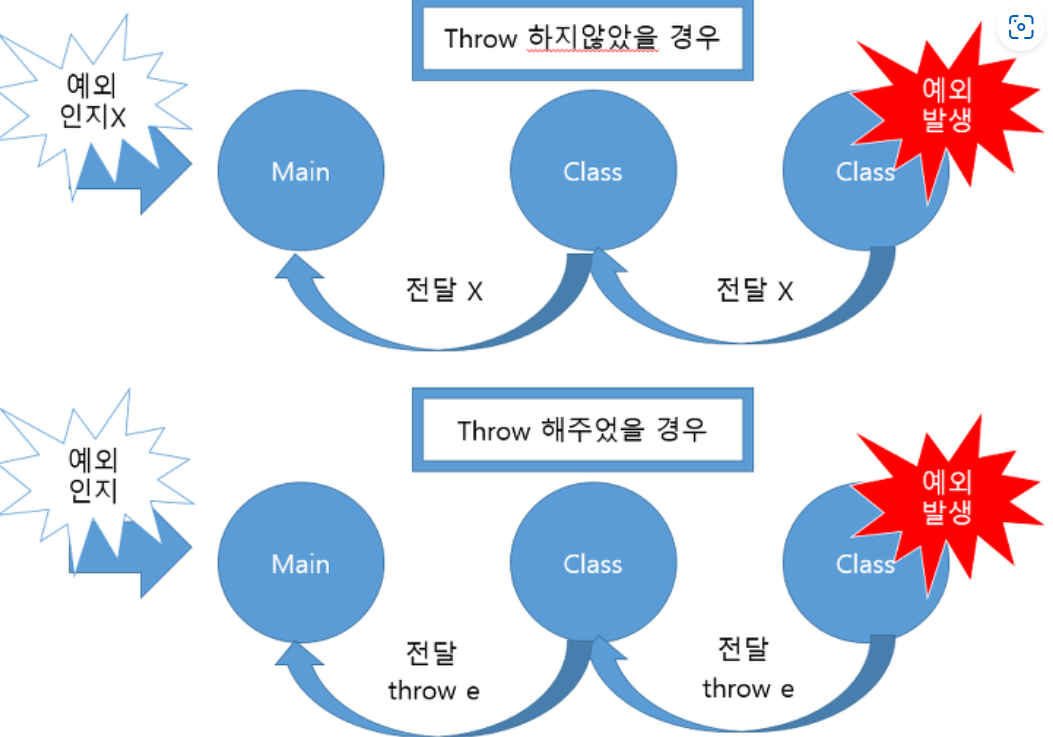
예외가 발생하는 코드를 호출한 곳으로 예외객체를 전달하여 처리를 부탁하는 것 > 객체를 생성하고 발생시키는 것
-
최상단 클래스를 제외한 나머지 클래스에서의 예외처리는 반드시 Throw를 해야한다.
- 그렇지 않으면 예외처리를 해주었음에도 불구하고 Main에서는 Exception을 전달받지 못하여 개발자가 예외를 인지못하는 경우가 생긴다.
-
throw는 예외상황이 발생되었음을 자바 가상머신에게 알리는 키워드이다.
- 이 문장이 실행되면서 자바의 예외처리 메커니즘이 동작하게된다.
throw - 명시적 예외 발생
if(조건){throw new 예외클래스("예외처리문자열);}
-
예외 클래스의 조건에 해당되지 않는데 예외를 만들고싶은 경우, 조건을 설정해서 명시적으로 예외를 발생시키는 방법이다.
-
만든 후 반드시 예외처리를 해줘야 비정상 종료를 막을 수 있다.
-
사용하고자 하는 예외클래스의 객체를 생성하고 throw로 예외를 발생시킨 뒤 throws로 넘겨서 예외처리해주고 프로그램을 종료한다.
-
package com.test.memo;

class Practice3 {
    public static void a(int num) throws ArithmeticException {
        b(num);
    }

    public static void b(int num) throws NullPointerException {

        if (num == 10) {
            // 명시적 강제적으로 특정 Exception 발생시키면서 보여줄 메세지 지정
            throw new NullPointerException("널 포인트 익셉션 발생");
            // 객체 생성하면서 에러메세지 보여주기
        }
    }

    public static void main(String[] args) {
        System.out.println("프로그램 시작");
        try {
            a(10);
        } catch (ArithmeticException e) {
            System.out.println(e.getMessage());
        }
        System.out.println("프로그램 정상종료");
    }
}
-
num이 10인 경우를 예외로 인식하는 예외클래스는 없으므로, 예외를 발생하고 싶다면 throw를 사용해 명시적으로 예외를 지정할 수 있다.
-
throw 키워드 뒤에 new로 객체생성 해주고 괄호 안에 예외처리 메세지를 적으면된다.
-
package com.test.memo;

class Practice3 {
    public static void main(String[] args) {
        ExPractic3 ex = new ExPractic3();
        try {
            ex.a(10, 0);
        } catch (Exception e) {
            System.out.println(e.getMessage());
        }
    }
}

class ExPractic3 {
    public static int a(int num1, int num2) throws ArithmeticException {
        int result = num1 / num2;
        return result;
    }
}-
객체를 생성해서 a메소드에 인자를 넣어 호출했다. 0으로 나누니까 예외가 발생한다.
- 이 예외처리를 호출한 곳으로 넘겨 메인함수로 돌아와 catch문에서 예외처리를 완료한다.
-
public class ExTest { public int a(int num1, int num2) throws ArithmeticException{ int result = 0; if(num2 == 0) { throw new ArithmeticException("0으로 나눌 수 없습니다. 다시 입력해 주세요."); }else{ result = 0; result=num1/ num2; } return result; } } class ExPractic3 { public static int a(int num1, int num2) throws ArithmeticException { int result = num1 / num2; return result; } }- 위와 같은 예외처리지만 메소드에 throws를 명시적으로 던져 직접 처리하지 않고, 호출한 측에게 처리를 던져준다.
- 인자로 받은 nu2가 0이 아니라 다른 숫자일 경우엔 else문이 실행되어 정상처리된다.
Throws
메서드 선언부에서 사용되며, 해당 메서드가 어떤 예외를 던질 수 있는지를 나타낸다.
메서드를 호출한 영역으로 예외가 전될되도록 한다. > 해당 메서드에서 예외를 처리하지않고 떠넘긴다.
-
throws키워드가 붙어있는 메소드는 반드시 try블록내에서 호출되어야 한다.
- 그리고 catch블록에서 떠넘겨 받은 예외를 처리해야한다.
-
여러 개의 예외를 나열하여 throws를 사용할 수 있다.
-
throws는 예외를 처리하는 것이 아니라, 해당 메서드에서 발생할 수 있는 예외를 선언하는 역할을 한다.
- 이후 이 메서드를 호출하는 곳에서 적절한 예외 처리를 수행해야 한다.
class Test
{
    public static void main(String[] args)
    {
        try
        {
            hi();
        }
        catch(ArithmeticException e)
        {
            System.out.println("0으로 나누면 안돼요.");
        }
    }
    public static void hi() throws ArithmeticException//던져진것을 안받는다고 한다면 메소드에 꼭 명시
    {
        System.out.println(10/0); // throw new ArithmeticException()
        System.out.println("Good");//위에서 던지기 때문에 영원히 출
    }
}-
hi메소드 호출
-
예외객체를 생성하고 던진다. > 만약 받지 않는다면(catch가 없음) 해당 메소드에
throws예외 이름을 작성 = 던져짐을 명시해줘야한다. -
그럼 호출한곳으로 다시 돌아간다
-
catch가 있기때문에= 잡기때문에 0으로 나누면안돼요 문장이 출력된다.
-
그러므로 good문장을 출력하는 부분은 사용되지 않는다
public class MultiCatchEx {
    public static void main(String[] args) {
        try {
            int x = changeToInteger("test");
            int y = printArrayElement(new int[] {1, 2, 3}, 5);
        } catch (NumberFormatException nfe){
            nfe.getMessage();
        } catch (ArrayIndexOutOfBoundsException aiob) {
            aiob.getMessage();
        } catch (Exception e) {
            e.getMessage();
        }
    }
    static int changeToInteger(String str) throws NumberFormatException{
        int number = Integer.parseInt(str);
        return number;
    }
    static int printArrayElement(int[] intArr, int index) throws ArrayIndexOutOfBoundsException{
        int number = intArr[index];
        return number;
    }
}-
예제 코드를 보면 changeToInteger() 메서드와 printArrayElement() 메서드 수행시 예외가 발생하면 호출한 곳에서
예외를 처리하도록 역할을 양도하고 있다. main 함수에서 두 함수를 호출하고 있으므로 해당 예외를 처리하는코드를 작성했다.
- 저렇게 throws를 이용해 던져주면 호출한 곳으로 다시 돌아가 catch문이 실행되는것이다.
-
메소드 선언부에
throws를 사용하여 예외를 상위 호출자에게 전파시켜야한다.- 아래 코드는 예외를 양도하는것이다. 바로 JVM에 양도하는 것을 볼 수 있다.
public class MultiCatchEx {
    public static void main(String[] args) throws Exception {
        int x = changeToInteger("test");
        int y = printArrayElement(new int[] {1, 2, 3}, 5);
    }
    static int changeToInteger(String str) throws NumberFormatException{
        int number = Integer.parseInt(str);
        return number;
    }
    static int printArrayElement(int[] intArr, int index) throws ArrayIndexOutOfBoundsException{
        int number = intArr[index];
        return number;
    }
}-
throws를 사용한 예외객체의 양도는 예외처리와는 다르다. 예외처리할 역할을 해당 코드를 호출한 곳으로 위임하는 것이기 때문에 정상적으로 코드가 실행되기 위해서는 try ~ catch문으로 예외를 적절히 해결해야한다.
그럼에도 throws 코드가 존재하는 이유는, try~catch 문 수행시 내부에서 과도한 로직처리를 막기위해서이다.
예외처리코드가 많은 경우 이를 처리하는 과정에서 과부하가 발생할 수 있다. 이를 방지하기 위해 예외처리코드를 양도한 뒤에, 최종 호출하는 곳에서 try~catch 문으로 한번에 처리해 프로그램이 무거워지지 않도록 하기 위함이다.
public static int readAge() throws AgeInputException { Scanner keyboard=new Scanner(System.in); int age=keyboard.nextInt(); if(age<0) { AgeInputException excpt=new AgeInputException(); throw excpt; } return age; } -
예외를 객체로 생성해서 보내는 부분을
throw new AgeInputException();이라고 한줄로 정의할 수 있다.
-
메소드 안에서 던질때는throw / 메소드에 던져짐을 명시할 때throws
사용자 정의 예외
자바에서 제공되는 예외 클래스외에 프로그래머가 직접 만들어야 하는 예외가 있는 경우, 예외 클래스 중에 가장 유사한 예외 클래스를 상속받아 사용자 정의 예외 클래스를 만든다.
- Exception, RuntimeException 클래스를 상속하여 만들 수 있다.
class UserException extends Exception {
    public UserException(String mesg) {
        super(mesg);
    }
}

public class Ex09_8 {
    public static void check(int num) throws UserException {
        if (num < 100) {
            throw new UserException("num 값이 100보다 작다");
        }
    }

    public static void main(String[] args) {
        System.out.println("프로그램 시작");
        try {
            check(70);
        } catch (UserException e) {
            System.out.println("예외발생: " + e.getMessage());
        }
        System.out.println("프로그램 정상 종료");
    }

}super키워드는 부모 클래스의 생성자를 호출하는 데 사용된다.- 사용자 정의 예외 클래스에서
super(mesg)를 호출하면, 부모 클래스인Exception클래스의 생성자를 호출하여 예외 메시지를 설정하게 된다.- 호출함으로써, 부모 클래스의 생성자를 호출하고 그 안에 예외 메시지를 전달함으로써, 기본적인 예외 동작을 유지하며 추가 정보를 제공할 수 있다.
public class BalanceInsufficientException extends Exception{    //Exception 상속
    public BalanceInsufficientException() {}
    public BalanceInsufficientException(String message) {
        super(message);
    }
}
public class Account {
    private long balance;

    public long getBalance() {
        return balance;
    }

    public void deposit(int money) {
        balance += money;
    }

    public void withdraw(int money) throws BalanceInsufficientException {
        if(balance < money) {
            throw new BalanceInsufficientException("잔고부족 : " + (money-balance) + " 모자람");
        }
        balance -= money;
    }
}
public class AccountMain {
    public static void main(String[] args) {
        Account account = new Account();

        account.deposit(10000);
        System.out.println("예금액 : " + account.getBalance());

        try {
            account.withdraw(30000);
        } catch (BalanceInsufficientException e) {
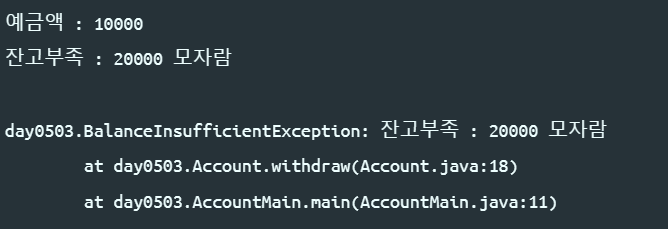
            String message = e.getMessage();//그냥 바로 syso해서 e.getMessage();도 가능
            System.out.println(message);
            System.out.println();
            e.printStackTrace();
        }
    }
}
예외처리의 오버라이딩
-
오버라이딩의 조건
-
자손 클래스에서 오버라이딩하는 메서드는 조상 클래스의 메서드와
-
이름이 같아야 한다.
-
매개변수가 같아야 한다.
-
반환타입이 같아야 한다.
-
-
-
조상 클래스의 메서드를 자손 클래스에서 오버라이딩할 때
-
접근 제어자는 조상 클래스의 메서드보다 좁은 범위로 변경할 수 없다.
-
조상 클래스의 메서드보다 많은 수의 예외를 선언할 수 없다.
-
올바른 오버라이딩
class Parent{
    void parentMethod() throws IOException, SQLException{
        ...
    }
}

class Child extends Parent {
    void parentMethod() throws IOException {
        ...
    }
}- 위의 코드를 보면, Child 클래스의 parentMethod()에 선언된 예외의 개수가 조상인 Parent 클래스의 parentMethod()에 선언된 예외의 개수보다 적으므로 바르게 오버라이 된것이다.
잘못된 오버라이딩
class Child extends Parent{
    void parentMethod() throws Exception {
        ...
    }
}-
만일 위와같이 오버라이딩 하였다면 Exception은 모든 예외의 최고 클래스이므로(Object보다 아래) 가장 많은 개수의 예외를 던질 수 있도록 선언한 것이다.
- 그래서 예외 개수는 부모 클래스보다 적거나 같아야 한다는 조건을 만족시키지 못하는 잘못된 오버라디잉 인것이다.
-
인스턴스 메서드를 static메서드로 또는 그 반대로 변경할 수 없다.
-
조상 클래스에 정의된 static메서드를 자손 클래스에서 똑같은 이름의 static메서드로 정의 가능하다.
-
그러나 이것은 각 클래스에 별개의 static메서드를 정의한 것일 뿐 오버라이딩은 아니다.
-
각 메서드는 클래스 이름으로 구별될 수 있으며, 호출할 때는 '참조변수.메서드이름()'대신 '클래스이름.메서드이름()'으로 호출하는것이 맞다.
- static멤버들은 자신들이 정의된 클래스에 묶여있다고 생각하자
-
-
clone 메소드 이용해 예외처리
clone : Object클래스에서 상속받은 메소드로, 객체를 복사하여 새로운 객체를 생성한다. > 객체를 복사할 때 사용
-
Object 클래스에서 상속받은 메소드 이기 때문에 복사할 자료형으로 형변환 해줘야한다.
-
Cloneable 인터페이스를 구현하지 않으면
CloneNotSupportedException이라는 예외를 발생시킨다.- 복제가 지원되지 않는 경우 발생할 수 있는 예외다.
- catch문으로 잡거나 따로 클래스나 메서드로 빼서 던져짐을 명시해야한다.
- 복제가 지원되지 않는 경우 발생할 수 있는 예외다.
컴파일 에러가 안나게 수정하시오.
public void simpleMethod(int n)
{
MyClass my = new MyClass();
my.clone();
...
}
-
아래와 같이 try~catch를 삽입하거나
public void simpleMethod(int n) { MyClass my = new MyClass(); try { my.clone(); } catch(CloneNotSupportedException e) { ... } ... } -
아래와 같이 throws에 의해서 던져짐을 명시해야 컴파일이 된다.
public void simpleMethod(int n) throws CloneNotSupportedException
{
  MyClass my = new MyClass();
  my.clone();
  ........
}
package com.test.joeun;

class Person implements Cloneable {//Cloneable 인터페이스를 구현해야지만 clone메서드를 사용할 수 있다.
    private String name;
    private int age;

    public Person(String name, int age) {
        this.name = name;
        this.age = age;
    }

    public void show() {
        System.out.println(name + " " + age);
    }

    @Override // alt + shift + s > v 하면 오버라이딩 간편하게 가능
    protected Object clone() throws CloneNotSupportedException {
        return super.clone();
    }

}

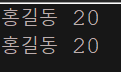
public class Extest1 {

    public static void main(String[] args) {
        Person person = new Person("홍길동", 20);
        try {
            Person cpyPerson = (Person) person.clone();//clone()의 자료형은 Object니까 형변환 시켜야한다. > 복제시에는 new 사용하지않는다.
            person.show();
            cpyPerson.show();
        } catch (CloneNotSupportedException e) {
            e.printStackTrace();
        }

    }
}
예외처리 문제
- 제수(나누는 수)가 0이 되었을 때 예외 처리하는 소스를 만드시오.
package com.test.memo;

import java.util.Scanner;

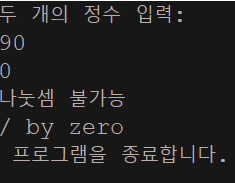
class Practice2 {
    public static void main(String[] args) {

        System.out.println("두 개의 정수 입력:");
        Scanner sc = new Scanner(System.in);

        int num1 = sc.nextInt();
        int num2 = sc.nextInt();

        try {
            System.out.print("나눗셈의 결과: " + (num1 / num2));
            System.out.print(" 나눗셈의 결과 나머지: " + (num1 % num2));
        } catch (ArithmeticException e) {
            System.out.println("나눗셈 불가능");
            System.out.println(e.getMessage());
        }
        System.out.println(" 프로그램을 종료합니다.");
    }
}
-
( )는 예외상황을 알리기 위해서 정의된(또는 앞으로 여러분이 정의할), 모든 예외 클래스들이 상속하는 ( ) 클래스에 정의되어 있는 메소드이다.모든 예외 클래스들이 ( ) 클래스를 상속.
-
getMessage
-
Throwable
-
Throwable
-
-
예외 상황을 알리는 클래스
- 배열의 접근에 잘못된 인덱스 값을 사용하는 예외상황 - ArrayIndexOutOfBounds
- 허용할 수 없는 형변환 연산을 진행하는 예외상황 - ClassCasteException
- 배열선언 과정에서 배열의 크기를 음수로 지정하는 예외상황 - NegativeArraySizeException
- 참조변수가 null로 초기화 된 상황에서 메소드를 호출하는 예외상황 - NullPointerException
- 3번에 있는 예외상황을 알리는 클래스를 이용하여 소스코드를 작성해 보시오.
package com.test.memo;

class Practice2 {
    public static void main(String[] args) {
        try {
            int[] arr = new int[3];
            arr[-1] = 20;
        } catch (ArrayIndexOutOfBoundsException e) {
            System.out.println(e.getMessage());
        }
        try {
            Object obj = new int[10];
            String str = (String) obj;
        } catch (ClassCastException e) {
            System.out.println(e.getMessage());
        }
        try {
            int[] arr = new int[-5];
        } catch (NegativeArraySizeException e) {
            System.out.println(e.getMessage());
        }
        try {
            String str = null;
            int i = str.length();

        } catch (NullPointerException e) {
            System.out.println(e.getMessage());
        }
    }
}- 폴더에 있는 소스코드는 if문을 이용한 예외처리 부분이 코드의 중간중간에 삽입되어 있다. 따라서 코드를 분석하는데 있어서 불편함이 따를 수 있다. 그러나 try~catch문을 활용하면 예외처리를 위한 코드를 완전히 별도로 묶을 수 있다. 하나의 try 영역에 둘 이상의 catch 영역을 구성할 수 있기 때문이다.문제에 있는 소스코드를 try~catch문으로 변경해 보자.
package com.test.memo;

import java.util.Scanner;

class Organize {
    public static void main(String[] args) {
        Scanner sc = new Scanner(System.in);

        int[] arr = new int[100];

        for (int i = 0; i < 3; i++) {
            try {
                System.out.print("피제수 입력: ");
                int num1 = sc.nextInt();

                System.out.print("제수 입력: ");
                int num2 = sc.nextInt();

                num2 = 0;
                System.out.print("연산결과를 저장할 배열의 인덱스 입력: ");
                int idx = sc.nextInt();

                arr[idx] = num1 / num2;
                System.out.println("나눗셈 결과는 " + arr[idx]);
                System.out.println("저장된 위치의 인덱스는 " + idx);

            } catch (ArithmeticException e) {

                System.out.println("제수는 0이 될 수 없습니다.");

            } catch (ArrayIndexOutOfBoundsException e) {
                System.out.println("유효하지 않은 인덱스 값입니다.");
                i -= 1;

            }
        }
    }
}- 다음은 컴파일에러가 발생하는 소스코드이다. 무엇이 문제인가?
try
{
    ...
}
catch(Throwable e)
{
    ...
}
catch(ArithmeticException e)
{
    ...
}-
try~catch는 구체적인 예외부터 처리 해야한다. Throwable은 예외클래스의 최상위 클래스인데 이를 제일 먼저 처리할 경우 ArithmeticException 의 예외처리가 실행되지 않는다.
-
두번째 캐치블럭에 도달할 수 없는것이다.
-
정상실행 되려면 Trowable 캐치 문이 마지막에 가야한다!
-
- 예외 상황의 발생여부와 상관없이 항상 실행되는 영역에 쓰는 키워드는 무엇이고, 그것을 이용하여 소스코드를 작성해 보시오.
package com.test.memo;

import java.util.Scanner;

class Practice3 {
    public static void main(String[] args) {
        int uNum = 0, uNum2 = 0;
        Scanner sc = new Scanner(System.in);

        System.out.print("숫자를 입력하세요: ");
        uNum = sc.nextInt();
        System.out.print(uNum + "을 나눌 숫자를 입력하세요: ");
        uNum2 = sc.nextInt();

        boolean com = comparison(uNum, uNum2);
        if (com) {
            System.out.println("연산 성공");
        } else {
            System.out.println("연산 실패");
        }
    }

    public static boolean comparison(int num1, int num2) {
        try {
            int result = num1 / num2;
            System.out.println("나눗셈 결과는: " + result);
            return true;

        } catch (ArithmeticException e) {
            System.out.println(e.getMessage());
            return false;
        } finally {
            System.out.println("finally 영역 실행");
        }

    }
}- 사용자 입력을 받아서 정수를 0으로 나누려고 하면 예외처리가 되게끔 코드를 짰당
- 나이를 입력 받았을 때 0보다 작은 값이 입력되면은 "유효하지 않은 나이가 입력되었습니다."라고 출력하도록 예외처리를 만드시오.
import java.util.Scanner;

class AgeInputException extends Exception
{
    public AgeInputException()
    {
        super("유효하지 않은 나이가 입력되었습니다.");
    }
}

class ProgrammerDefineException
{
    public static void main(String[] args)
    {
        System.out.print("나이를 입력하세요: ");

        try
        {
            int age=readAge();
            System.out.println("당신은 "+age+"세입니다.");
        }
        catch(AgeInputException e)
        {
            System.out.println(e.getMessage());
        }
    }

    public static int readAge() throws AgeInputException
    {
        Scanner keyboard=new Scanner(System.in);
        int age=keyboard.nextInt();
        if(age<0)
        {
            AgeInputException excpt=new AgeInputException();
            throw excpt;
        }

        return age;
    }
}
- ( )는 예외상황이 발생되었음을 자바 가상머신에게 알리는 키워드이다. 따라서 이 문장이 실행되면서 자바의 예외처리 매커니즘이 동작하게 된다.
- throw
- 문제8번을 메소드를 쓰지않고서 메인메소드내에서 처리해 보자.
package com.test.memo;

import java.util.Scanner;

class AgeInputException extends Exception {
    public AgeInputException() {
        super("유효하지 않은 나이가 입력되었습니다.");
    }
}

public class Practice1 {
    public static void main(String[] args) {
        Scanner keyboard = new Scanner(System.in);

        System.out.print("나이를 입력하세요: ");
        try {
            int age = keyboard.nextInt();
            if (age < 0) {
                AgeInputException excpt = new AgeInputException();
                throw excpt;//catch문 있으니까 명시적으로 메서드에 throws안넣어도
            }
            System.out.println("당신은 " + age + "세입니다.");
        } catch (AgeInputException e) {
            e.printStackTrace();
            // System.out.println(e.getMessage());
        }

    }
}-
printStackTrace()는 syso 없어도 된다.

-
만약 그냥 주석 처리한것처럼 System.out.println(e.getMessage()); 했다면

- 문제8번을 main메소드내에서도 예외상황을 처리하지 않는다면 어떻게 해야 되는가
import java.util.Scanner;

class AgeInputException extends Exception
{
    public AgeInputException()
    {
        super("유효하지 않은 나이가 입력되었습니다.");
    }
}

class ThrowsFromMain
{
    public static void main(String[] args) throws AgeInputException
    {
        System.out.print("나이를 입력하세요: ");
        int age=readAge();
        System.out.println("당신은 "+age+"세입니다.");
    }

    public static int readAge() throws AgeInputException
    {
        Scanner keyboard=new Scanner(System.in);
        int age=keyboard.nextInt();
        if(age<0)
        {
            AgeInputException excpt=new AgeInputException();
            throw excpt;
        }
        return age;
    }
}- 8번에서의 메서드 다시 만들어서 메인에서까지 명시적으로 던져준다..
-
가상머신의 예외처리 방식
-
getMessage 메소드를 호출한다.
-
예외상황이 발생해서 전달되는 과정을 출력해준다.
-
프로그램을 종료한다.
-
-
예외가 발생해서 전달되는 과정이 출력되는 메소드.
( ) 클래스에 정의되어 있는 ( ) 메소드가 이러한 유형의 메시지를 출력-
Throwable
-
printStackTrace
-
- 이름과 나이를 입력받아 저장할려고 한다.
이름은 두글자 이상을 입력받아야한다.(예외클래스에는 잘못된 이름을 저장할 수 있는 인스턴스 변수와 그 잘못된 이름을 출력하는 메소드를 만들자.)
나이는 음수값이 입력되면 안된다.
그리고 13번에 있는 메소드를 이용하여 예외상황이 전달되는 과정을 출력하도록 하자.
import java.util.Scanner;

class AgeInputException extends Exception
{
    public AgeInputException()
    {
        super("유효하지 않은 나이가 입력되었습니다.");
    }
}

class NameLengthException extends Exception
{
    String wrongName;

    public NameLengthException(String name)
    {
        super("잘못된 이름이 삽입되었습니다.");
        wrongName=name;
    }

    public void showWrongName()
    {
        System.out.println("잘못 입력된 이름: "+ wrongName);
    }
}

class PersonalInfo
{
    String name;
    int age;

    public PersonalInfo(String name, int age)
    {
        this.name=name;
        this.age=age;
    }
    public void showPersonalInfo()
    {
        System.out.println("이름: "+name);
        System.out.println("나이: "+age);
    }
}

class PrintStackTrace
{
    public static Scanner keyboard=new Scanner(System.in);

    public static void main(String[] args)
    {
        try
        {
            PersonalInfo readInfo=readPersonalInfo();
            readInfo.showPersonalInfo();
        }
        catch(AgeInputException e)
        {
            e.printStackTrace();
        }
        catch(NameLengthException e)
        {
            e.showWrongName();
            e.printStackTrace();
        }
    }

    public static PersonalInfo readPersonalInfo()
            throws AgeInputException, NameLengthException
    {
        String name=readName();
        int age=readAge();
        PersonalInfo pInfo=new PersonalInfo(name, age);
        return pInfo;
    }

    public static String readName() throws NameLengthException
    {
        System.out.print("이름 입력: ");
        String name=keyboard.nextLine();
        if(name.length()<2)
            throw new NameLengthException(name);
        return name;
    }

    public static int readAge() throws AgeInputException
    {
        System.out.print("나이 입력: ");
        int age=keyboard.nextInt();
        if(age<0)
            throw new AgeInputException();
        return age;
    }
}- Throwable을 상속하는 예외 클래스는 (Exception)과 (Error) 두 가지이다. 그런데 (Error)는 그 이름이 의미하듯이 단순히 예외라고 하기에는 심각한 오류의 상황을 표현하기 위해 정의된 클래스이다. 따라서 이 클래스를 상속하여 정의된 클래스는(이는 프로그래머가 정의하는 클래스가 아니다.) 프로그램의 실행을 멈춰야 할 정도의 매우 심각한 오류상황을 표현하는데 사용이 된다. (Error)를 상속하는 대표적인 클래스의 이름은 (VirtualMachineError) 이다.
API 문서에서는 이 클래스에 대해서 다음과 같이 설명한다.
"자바 가상머신에 문제가 생겨서 더 이상 제대로 동작할 수 없는 상황을 알리기 위해서 정의된 클래스입니다."
(Error)를 상속하는 클래스의 오류상황이 발생하면, 그냥 프로그램이 종료되도록 놔두는 것이 상책이다(프로그램이 종료된 뒤 소스코드를 수정하는 등의 방식으로 원인을 해결해야 한다.)
(VirtualMachineError)의 하위 클래스
(Error)를 상속하는 대표적인 클래스가 (VirtualMachineError)이다. 그리고 이를 상속하는 클래스 중에서 (OutOfMemoryError)라는 클래스가 있는데, 이는 메모리 공간이 부족한 상황을 표현하는 예외 클래스이다. 따라서 이러한 오류가 발생하면, 메모리가 효율적으로(또는 적절히) 사용되도록 소스코드 자체를 변경해야 한다. 이렇듯 Error와 관련 있는 오류상황은 소스코드의 변경을 통해서 해결해야 하는 경우가 대부분이다.
-
Exception을 상속하는 대표적인 클래스 두가지
-
RuntimeException
-
IOException
-
-
Exception을 상속하는 클래스의 예외 상황이 임의의 메소드 내에서 발생 가능하다면, 해당 메소드는 반드시 다음 두 가지 중 한가지 방법을 선택해서 정의되어야 한다.
-
try~catch문을 이용해서 메소드 내에서 예외를 처리하도록 정의한다.
-
throws를 이용해서 메소드를 호출한 영역을 예외가 전달되도록 정의한다.
-
- clone(Object 클래스의 인스턴스 메소드)
protected Object clone()
throws CloneNotSupportedException
Creates and returns a copy of this object.
The precise meaning of "copy" may depend on the class of the object.
위의 메소드를 호출할 때
다음과 같이 호출하면 문제가 발생한다. 무엇이 문제인가?
public void simpleMethod(int n)
{
MyClass my = new MyClass();
my.clone();
...
}
public void simpleMethod(int n)
{
    MyClass my = new MyClass();
    try
    {
        my.clone();
    }
    catch(CloneNotSupportedException e) { ... }
    ...
}- 위와 같이 try~catch를 이용해서 CloneNotSupportedException 의 예외를 처리해주거나
public void simpleMethod(int n) throws CloneNotSupportedException
{
    MyClass my = new MyClass();
    my.clone();
    ........
}-
throws에 의해 던져짐을 명시해야 컴파일이 된다.
- 처리하지 않아도 되는 (RuntimeException)의 하위 클래스
Exception의 하위 클래스 중에는 (RuntimeException)이라는 클래스가 존재한다. 그런데 이 클래스는 그 성격이 Error 클래스와 비슷하다(이는 Exception을 상속하는 다른 예외 클래스들과의 차이점이다). (RuntimeException)을 상속하는 예외 클래스도 Error를 상속하는 예외 클래스와 마찬가지로 try~catch문, 또는 throws절을 이용한 예외처리를 필요로 하지 않는다. 하지만 다음과 같이 Error의 하위 클래스들과 구분되는 특징이 있다.
- (RuntimeException)을 상속하는 예외 클래스는 Error를 상속하는 예외 클래스처럼 치명적인 상황을 표현하지 않는다.
- 따라서 예외발생 이휴에도 프로그램의 실행을 이어가기 위해서 try~catch 문으로 해당 예외를 처리하기도 한다.
- 19번 클래스를 상속하는 클래스들은 무엇이 있는가?
특별한 경우가 아니면, 이들에 대해서는 try~catch문을 이용해서 예외처리를 하지않는다.
미리 조건을 검사하고 예외 상황을 방지하는 방법을 더 선호함 > if문들을 이용해
- ArrayIndexOutOfBoundsException
- ClassCastException
- NegativeArraySizeException
- NullPointerException