암기하고 있어야 할 메서드
Integer.parseInt()> 문자열을 int로
- 이 키워드를 활용해 n진수>10진수로 바로 변환시킬 수 있다.Integer.toString()> int를 문자열로 > int만 변경 가능
- 이 키워드를 활용해 10진수>n진수로 바로 변환시킬 수 있다.String.valueOf()> int를 문자열로(정수뿐 아니라 다양한 자료형을 변경 가능.substring()> 괄호 안에 인덱스값을 넣으면 그 값 이후부터 끝까지 문자열을 가져온다.
-.substring( , )> 괄호 안에 , 를 기준으로 인덱스 값을 넣으면 왼쪽 인덱스 값부터 오른쪽 인덱스 값까지의 문자열만 가져온다.Math.floor()> 내림(double로 반환)Math.round()> 반올림(long, int로 반환)Math.ceil()> 반올림(double로 반환)Arrays.sort()> 오름차수 정렬Arrays.toString()> 배열의 값들이 다 String으로 []안에서 출력Arrays.copyOf(복사할 배열 변수명 , 몇개 복사할 지)> 배열 복사System.arraycopy(복사할 배열 변수명, 복사할 인덱스 시작점, 붙여넣기 할 변수명, 붙일 인덱스 시작점, 몇개 복사할지)> 인덱스를 지정해서 배열 복사.contains()> 해당 문자열이 인자로 주어진() 문자열을 포함하고 있는지 여부를 반환한다. 만약 포함하고 있다면 true, 그렇지 않다면 false를 반환합니다.
String mainString = "Hello, World!";
boolean containsWorld = mainString.contains("World");
System.out.println(containsWorld); // true > World가 존재하기때문에
오전 시험
- int num = 10; 을 문자열로 변환하시오.
String.valueOf(num)/Integer.toString(num)
- String numStr = "20"을 int로 변환하시오.
Integer.parseInt(numStr)
- String str = "0123456789";에서 "3456789" 문자열만 가져올려면?
str.substring(3);
- String str = "0123456789";에서 "456" 문자열만 가져올려면?
str.substring(4, 6);
- double num = 3.5를 4.0으로 반올림할려면?
-
Math.round(num);-
가장 가까운 정수로 반올림
-
소수저 첫째 자리에서 반올림
-
반환값은 'long' 또는 'int' 형태로, 소수점 이하를 버린 정수 값이 된다.(가장 가까운 정수로 반올림된 값을 반환)
-
만약 num이 3.1이면 3을 반환하고 3.6이면 4를 반환한다. > 내가 아는 일반적인 반올림시키는 키워드
-
- double num = 3.5를 3.0으로 소수점이하를 버릴려면?
-
Math.floor(num)-
주어진 숫자 이하의 가장 큰 정수를 반환한다.
-
만약 num이 3.9 라면 3.9보다 작거나 같은 가장 큰 정수인 3.0을 반환한다.
-
주어진 값 이하의 가장 큰 정수를 반환하며, 반환 타입을 double이다.
- 주어진 값보다 작은 정수 중에서 가장 큰 정수를 찾아주는 역할을 한다.
-
- double num = 3.1을 4.0으로 소수점이하를 올림할려면
-
Math.ceil(num)-
주어진 값보다 크거나 같은 가장 작은 정수를 반환한다.
-
소수점 이하에 값이 있는 경우에도 올림이 이루어진다.
-
반환값은 'double'형태로, 올림된 실수 값이 된다.(주어진 값 이상의 가장 작은 정수 반환)
-
소수점 이하가 0이 아니면 1이상이면 올림시키는 키워드이다. >
Math.round와 올림시키는 기준이 다름
-
- int[] nums = {5,4,1,3,2}; 을 정렬해서 문자열로 출력하려면?
Arrays.sort(nums)>Arrays.toString(nums)로 출력
- int[] src = {5,4,1,3,2}; / int[] dest = new int[10]; 위에 src 배열에 있는 5개의 int를 dest의 인덱스 3부터 시작해서 복사하시오.
System.arraycopy(src, 0, dest, 3, 5)
- main 메소드에 값 전달하기. MainTest라는 메인메소드가 있는 자바 클래스에 문자열 "AAA"와 "BBB"를 전달해서 출력해보기.
-
for(String arg ; args){syso(arg)}> 컴파일 할때 값 입력해서 실행하면 출력- Run아이콘 옆에 삼각형 눌러서 Run Configurations - Arguments - Program arguments에 args배열에 들어갈 값 입력하면 띄어쓰기를 기준으로 각 인덱스에 삽입된다.
-
0~9를 차례대로 배열안에 넣고, 피셔-예이츠 셔플을 이용해 섞으시오.
package com.test.memo;

class Organize {

    public static void main(String[] args) {
        int[] shuffle = new int[10];
        for (int i = 0; i < shuffle.length; i++) {//배열에 0~9까지 값넣기
            shuffle[i] = i;
        }
        for (int i = 0; i < shuffle.length; i++) {
            int nan = (int) (Math.random() * shuffle.length);//0~9난수 생성
            int temp = shuffle[i];
            shuffle[i] = shuffle[nan];
            shuffle[nan] = temp;
        }
//        for(int a : shuffle) {
//            System.out.print(a + " ");
//        }
    }
}
- 문자열을 이용하여 숫자게임 만들기
package com.test.memo;

import java.util.Scanner;

class Organize {
	private static String makeComNum() {// String배열로 컴퓨터 난수 번호 생성
		String com;
		while (true) {
			int r = (int) (Math.random() * 999 + 100);
			com = Integer.toString(r);// 문자열에 난수를 문자형으로 변경해서 대입
			if (chkNum(com))
				break;
		}
		return com;
	}

	private static boolean chkNum(String com) {// 문자열 넘겨줘서 중복 비교하는 메서드
		for (int i = 0; i < com.length() - 1; i++) {
			for (int j = i + 1; j < com.length(); j++) {
				if (com.charAt(i) == com.charAt(j)) {
					return false;
				}
			}
		}
		return true;
	}

	private static void inputUser() {// 컴퓨터 값과 사용자에게 입력받은 값을 비교해서 ball과 strike출력하기
		String comNum = makeComNum();
		String user;
		Scanner sc = new Scanner(System.in);
		System.out.println("디버깅용: " + comNum);
		while (true) {
			int strike = 0, ball = 0;
			System.out.print("3자리 수를 입력하세요 : ");
			user = sc.next();
			if (!chkNum(user) || user.length() != 3) {// 사용자 입력값이 중복되거나 3자리 수가 아니면
				System.out.println("올바른 형식으로 입력하세요.");
				continue;// 다시 입력하게끔
			}
			for (int i = 0; i < user.length(); i++) {
				if (comNum.charAt(i) == user.charAt(i)) {
					strike++;
				} else if (comNum.contains(String.valueOf(user.charAt(i)))) {
					// charAt()을 String으로 형변환 시켜서 contains()키워드로 컴퓨터 숫자에 사용자 숫자가 포함되는지 확인하는
					ball++;
				}
			}
			if (strike == 3) {
				System.out.println("홈런");
				break;
			} else if (strike == 0 && ball == 0) {
				System.out.println("out");
			} else {
				System.out.printf("strike: %d ball: %d \n", strike, ball);
			}
		}
		sc.close();
	}

	public static void main(String[] args) {
		inputUser();
	}
}- strike와 ball을 증감시킨 후 리셋시키지 않아서 자동으로 홈런이 되었다.
- 사용자값을 중복 과 3자리수로 입력했는지 검증하는 코드를 만들지 않았다.
- 컴퓨터값과 사용자 값을 비교할 때 for문을 2개로 만들어서 비교하다가 실패했다.
- 실패한 이유는 현재 값이 들어있는건 String문자열인데 char배열로만 for문 비교해서 중복을 찾는게 가능하기 때문이다.
- 그래서 contains()라는 키워드를 이용해
user.charAt(i)를 문자열로 형변환 시킨 후 컴퓨터 숫자에 사용자 숫자가 포함되는지 확인해 있다면 ball++;을 증감 시켰다.
-
커맨드라인으로부터 거슬러 줄 금액을 입력받아 계산한다 보유한 동전의 개수로 거스름돈을 지불할 수 없으면 . , ‘거스름 돈이 부족합니다.’라고 출력하고 종료한다 지불할 돈이 충분히 있으면 거스름돈을 지불한 만큼 가진 돈에서 빼고 남은 동전의 개수를 화면에 출력한다. (거스름돈은 500원5개 100원5개 50원5개 10원 5개가 있다.)
main 메소드에 인수로 넘겨주시오.package com.test.memo; class Practice2 { public static void main(String[] args) { int money = Integer.parseInt(args[0]); System.out.println("거슬러 줄 금액: " + money); int[] coinUnit = { 500, 100, 50, 5 };// 거스름돈 단위 int[] coin = { 5, 5, 5, 5 };// 각 동전의 개수 for (int i = 0; i < coinUnit.length; i++) { int coinNum = 0; coinNum = money / coinUnit[i]; // 금액을 단위로 나눠서 필요한 동전의 개수 구함 if (coin[i] >= coinNum) { coin[i] -= coinNum;// 거슬러줄 동전이 있으면 해당 동전에서 빼주고 } else { coinNum = coin[i];// 거슬러 줄 동전이 없으면 남은 coin을 0으로 초기화 coin[i] = 0; } money -= coinNum * coinUnit[i]; // 남은 거스름돈 구하기 위해서 System.out.println(coinUnit[i] + "원: " + coinNum); } if (money > 0) { System.out.println("거스름돈이 부족합니다"); System.exit(0);// 프로그램 종료 } System.out.println("=남은 동전의 개수 ="); for (int i = 0; i < coinUnit.length; i++) { System.out.println(coinUnit[i] + "원: " + coin[i]); } }
- int[] answer = { 1,4,4,3,1,4,4,2,1,3,2 };
위의 배열을 읽어서 다음과 같은 실행결과가 나오도록 하시오.
[실행결과]
3*
2
2
4**
package com.test.memo;

  class Organize {
      public static void main(String[] args) {
          int cnt1 = 0, cnt2 = 0, cnt3 = 0, cnt4 = 0;
          int[] answer = { 1, 4, 4, 3, 1, 4, 4, 2, 1, 3, 2 };
          for (int a : answer) {
              if (a == 1)
                  cnt1++;
             else if (a == 2)
                  cnt2++;
              else if (a == 3)
                  cnt3++;
              else
                  cnt4++;
          }
          System.out.print(cnt1);
          for (int i = 0; i < cnt1; i++) {
              System.out.print("*");
          }
          System.out.print(cnt2);
          for (int i = 0; i < cnt2; i++) {
              System.out.print("*");
          }
          System.out.print(cnt3);
          for (int i = 0; i < cnt3; i++) {
              System.out.print("*");
          }
          System.out.print(cnt4);
          for (int i = 0; i < cnt4; i++) {
              System.out.print("*");
          }
      }
  }
- 90도 돌려서 출력하기
class Organize {
    public static void main(String[] args) {
        char[][] star = {
                { '*', '*', ' ', ' ', ' ' },
                { '*', '*', ' ', ' ', ' ' },
                { '*', '*', '*', '*', '*' },
                { '*', '*', '*', '*', '*' }
                };
        char[][] result = new char[star[0].length][star.length];// 5,4
        for (int i = 0; i < star.length; i++) {
            for (int j = 0; j < star[i].length; j++) {
                System.out.print(star[i][j]);
            }
            System.out.println();
        }
        for (int i = 0; i < star.length; i++) {
            for (int j = 0; j < star[i].length; j++) {
                int x = j;
                int y = star.length - 1 - i;
                result[x][y] = star[i][j];
            }
        }
        System.out.println();
        for (int i = 0; i < result.length; i++) {
            for (int j = 0; j < result[i].length; j++) {
                System.out.print(result[i][j]);
            }
            System.out.println();
        }
    }
}- 암호화 코드.png를 참고하여 사용자로 부터 입력받은 문자열을 암호화 하는 프로그램을 코딩하시오.
a b c d e f g h i j k l m n o p q r s t
` ~ ! @ # $ % ^ & * ( ) - _ + = | [ ] {
u v w x y z
} ; : , . /
0 1 2 3 4 5 6 7 8 9
q w e r t y u i o p
class Organize {
    public static void main(String[] args) {
        String src = "abc456";
        String result = " ";

        for (int i = 0; i < src.length(); i++) {
            char ch = src.charAt(i);
            if (ch >= 'a' && ch <= 'z') {
                result += abcCode[ch - 'a'];
            } else if (ch >= '0' && ch <= '9') {
                result += numCode[ch - '0'];
            }
        }
    }
}- int[][] score = {
{100, 100, 100}
, {20, 20, 20}
, {30, 30, 30}
, {40, 40, 40}
, {50, 50, 50}
};
위의 2차원 배열을 이용하여 다음과 같은 실행결과가 나오도록 하자.
[실행결과]
100 100 100 300
20 20 20 60
30 30 30 90
40 40 40 120
50 50 50 150
240 240 240 720
class Organize {
    public static void main(String[] args) {
        int[][] score = {
                { 100, 100, 100},
                { 20, 20, 20 },
                { 30, 30, 30 },
                { 40, 40, 40 },
                { 50, 50, 50 }
                };
        int[][] result = new int[score.length+1][score[0].length+1];
        for(int i = 0; i < score.length; i++) {
            for(int j = 0; j < score[i].length; j++) {
                result[i][j] = score[i][j];
                result[i][score[0].length] += score[i][j];
                result[score.length][j] += result[i][j];
                result[score.length][score[i].length] += result[i][j];
            }
        }
        for(int i = 0; i < result.length; i++) {
            for(int j = 0; j < result[i].length; j++) {
                System.out.printf("%4d",result[i][j]);
            }
            System.out.println();
        }
    }
}- 2차원 배열로 영어 단어장 프로그램을 만들자.
class Organize {
    public static void main(String[] args) {
        String[][] eng = {
                { "chair", "의자" },
                { "computer", "컴퓨터" },
                { "water", "물" },
                { "hair", "머리" },
                { "game", "게임" }
                };
        int cnt = 0;
        Scanner sc = new Scanner(System.in);
        for (int i = 0; i < eng.length; i++) {
            System.out.printf("Q%d. %s의 뜻을 입력하세요: \n", i + 1, eng[i][0]);
            String user = sc.next();
            if (user.equals(eng[i][1])) {
                System.out.println("정답입니다.");
                cnt++;
            } else {
                System.out.printf("틀렸습니다. %s의 뜻은 %s입니다.\n", eng[i][0], eng[i][1]);
            }
        }
        System.out.printf("총 %d 문제를 맞추셨습니다.", cnt);
    }
}- 영단어 철자를 섞은 후, 원래 영단어를 맞추는 프로그램을 코딩하시오.
import java.util.Scanner;

class Organize {
    public static void main(String[] args) {
        String[] eng = { "television", "phone", "water", "paradise" };
        Scanner sc = new Scanner(System.in);
        for (int i = 0; i < eng.length; i++) {
            char[] ch = eng[i].toCharArray();

            for (int j = 0; j < ch.length; j++) {
                int idx = (int) (Math.random() * ch.length);
                char temp = ch[i];
                ch[i] = ch[idx];
                ch[idx] = temp;
            }
            System.out.printf("Q%d. %s의 정답을 입력하세요: ", i + 1, String.valueOf(ch));
            String useif(eng[i].equals(user.trim())){//if (user.equals(eng[i])){
                System.out.println("정답입니다.");
            } else
                System.out.printf("틀리셨습니다. 정답은 %s입니다.", eng[i]);
        }
    }
}- 사용자의 값을 trim()이용해 공백을 제거해야하는데, 주석처리한 것처럼 사용하면 trim()을 문법적으로 사용하기 힘들기때문에 지금처럼 사용해줘야 한다.
16일차 Chapter 6문제 풀이
-
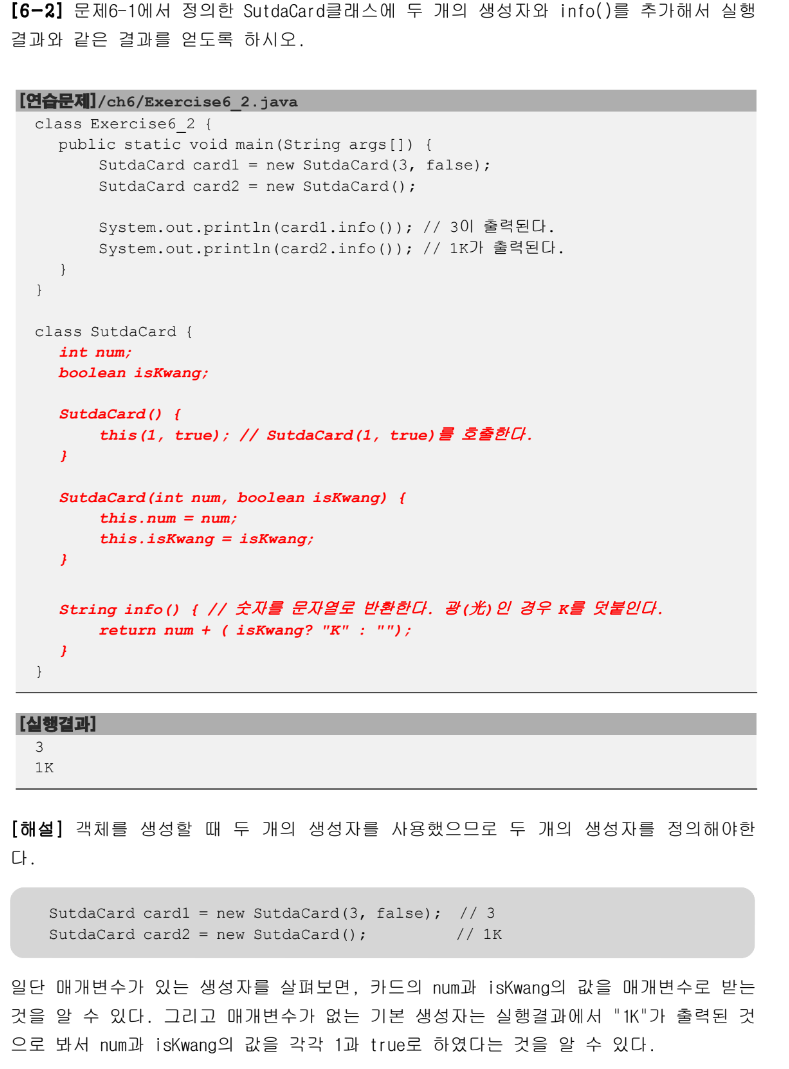
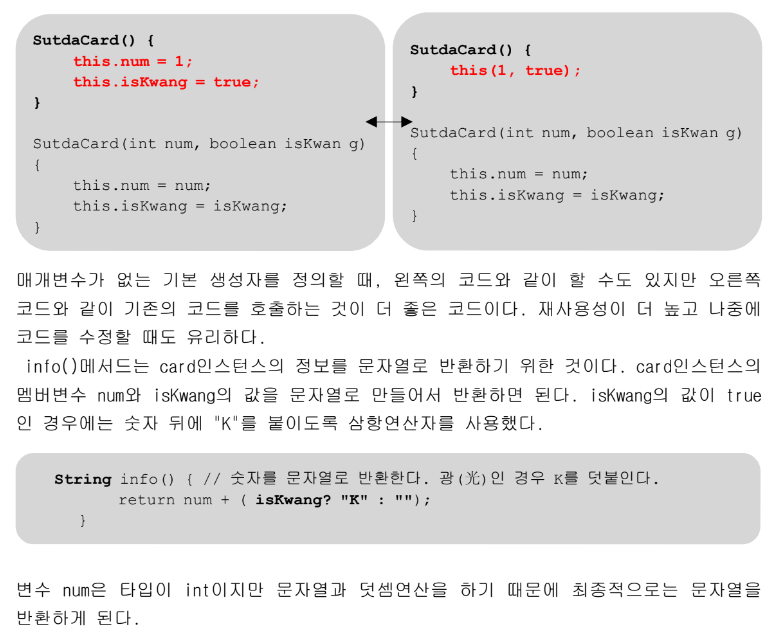
3항 연산자 사용해서 card1 은 3과 " "이 더해져서 자동형변환으로 문자열 3이 출력된다.
-
card2은 1에 true이기 때문에 1k가 출력된다.
-
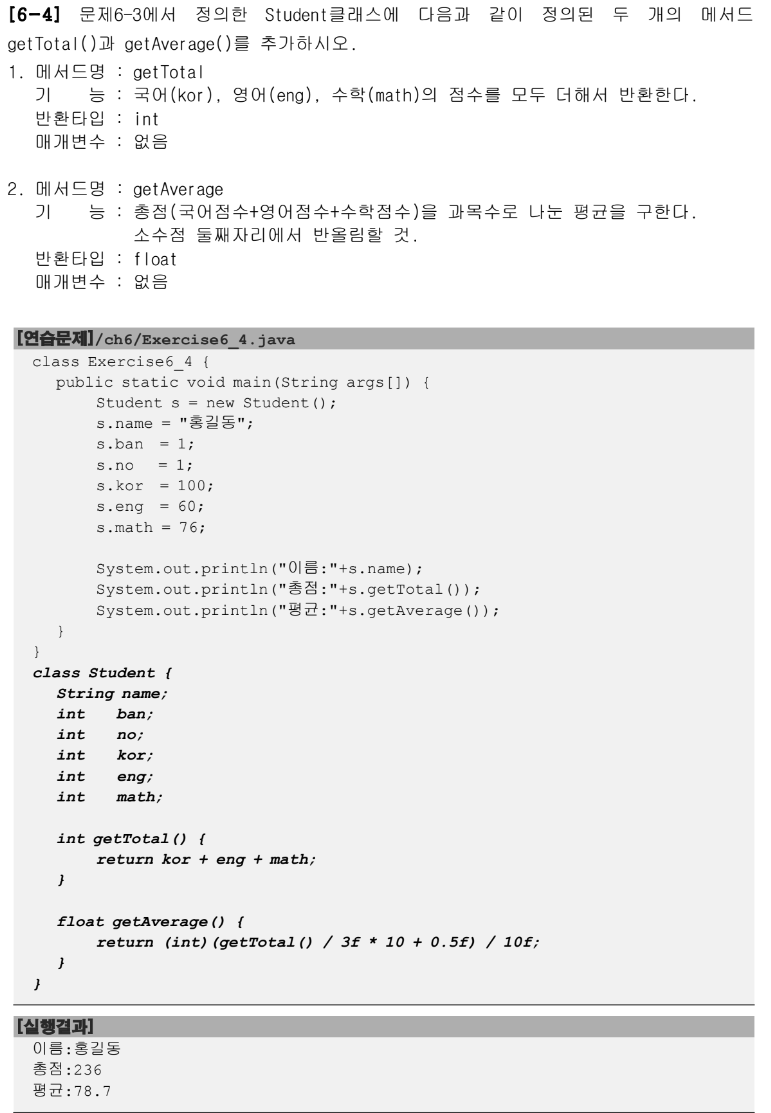
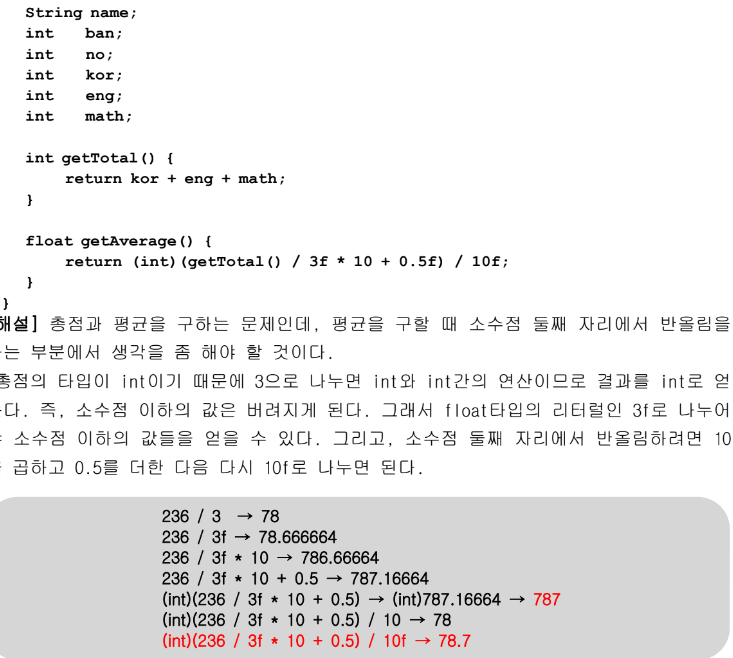
return (int)(getTotal() / 3f * 10 + 0.5f) /10f; > 3f로 정수를 float으로 형변환되서 나눠주니까 float으로 자동형변환이 일어난다.(78.666664)
-
후에 3f *10하면 786.66664 가 되고 이에 0.5를 더한 후 int로 형변환 해주니까 787이되고
- 이에 10f로 나눠주니까 78.7이 된다..(정수/float)인 상태
-
Average 구하는 법 잘 이해하기 > 소수점 이하 구하는 알고리즘
-
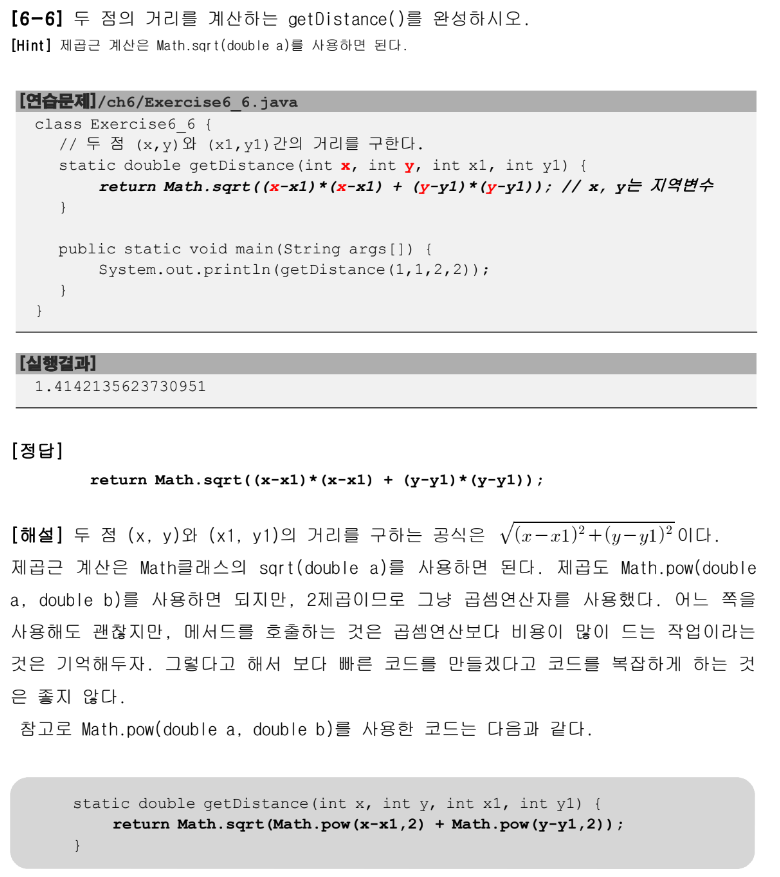
Math.sqrt()제곱근 계산 키워드Math.pow거듭제곱을 계산해준다. -
저렇게 키워드를 사용하는것은 메모리에 부하를 가하기 때문에 이런 간단한 연산자는 (x1-x) * (x2-x)형식으로 곱해주는게 낫다.
return Math.sqrt(Math.pow(x1-x,2)+Math.pow(y1-y,2));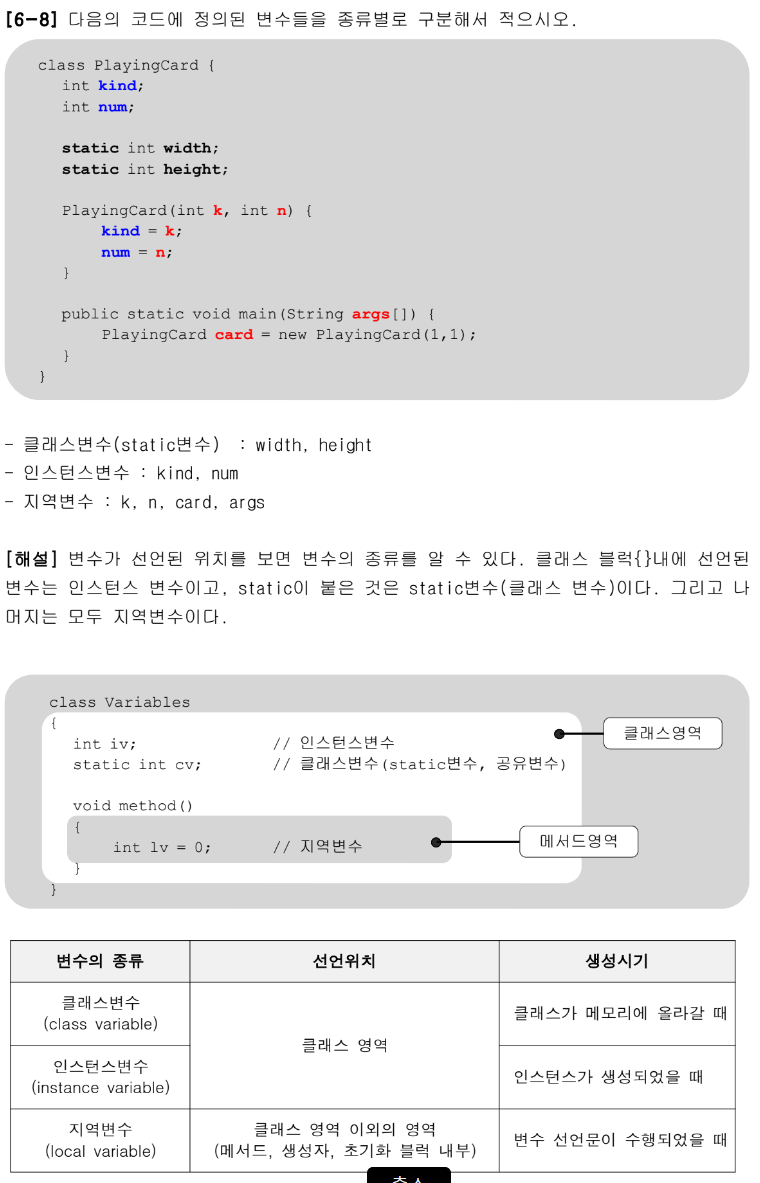
-
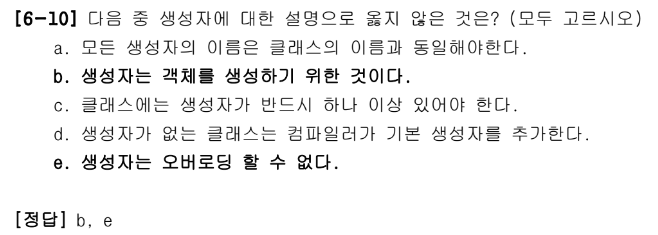
b > 생성자가 객체를 생성할 때 사용되기는 하나, 객체를 초기화할 목적으로 사용되는 것이다. 객체를 생성하는 것은 new연산자이다.
-
e > 생성장도 오버로딩이 가능해서 하나의 클래스에 여러 개의 생성자를 정의할 수 있다.
맞춘문제
-
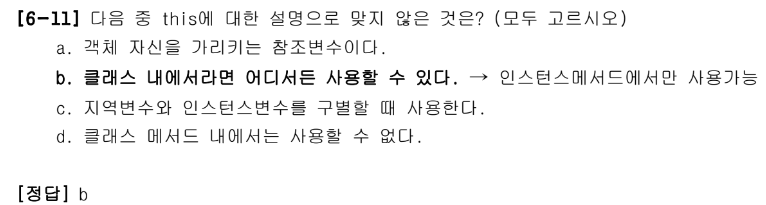
b > 클래스 멤버(Static이 붙은 변수나 메서드)에서는 사용할 수 없다.
- this는 인스턴스 자신의 주소를 저장하고 있으며, 모든 인스턴스 메서드에 숨겨진 채로 존재하는 지역변수이다. 그래서 인스턴스메서드 내에서만 사용할 수 있다.
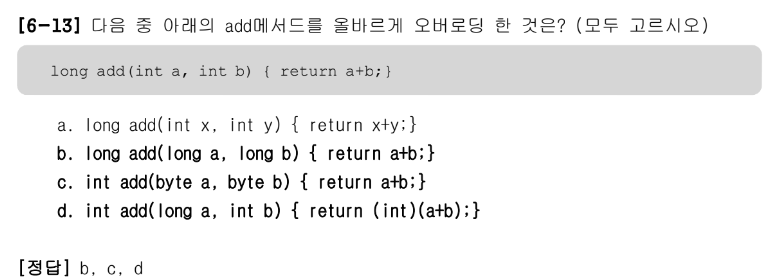
왜 int보다 작은 자료형은 안된다고 생각했지
-
메서드 이름이 같아야한다.
-
매개변수의 개수 또는 타입이 달라야 한다.
-
매개변수는 같고 리턴타입이 다른 경우는 오버로딩이 성립되지 않는다.
- 리턴타입은 오버로딩을 구현하는데 아무런 영향을 주지 못한다.
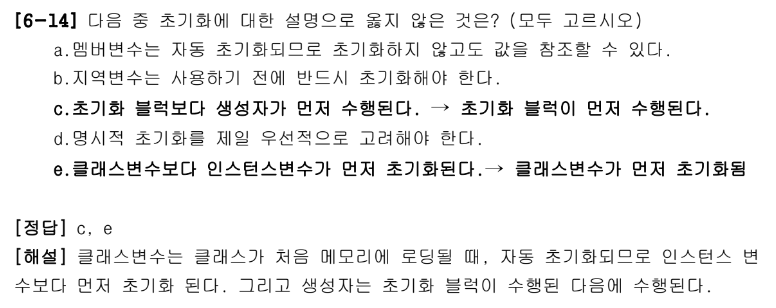
bde라고 골랐었다.
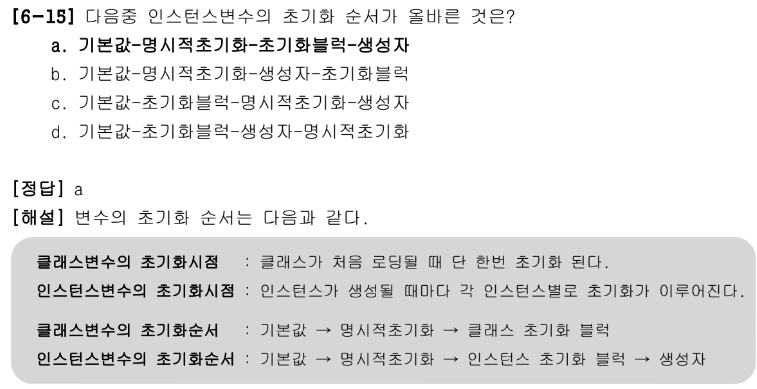
맞았다.
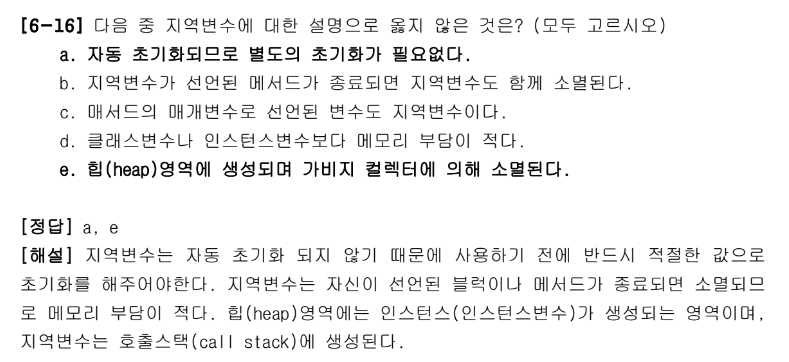
-
e: heap영역에 선언되는것을 객체다.
- 지역변수는 블록 안 메서드가 실행될 때 생성되고 종료되면 소멸
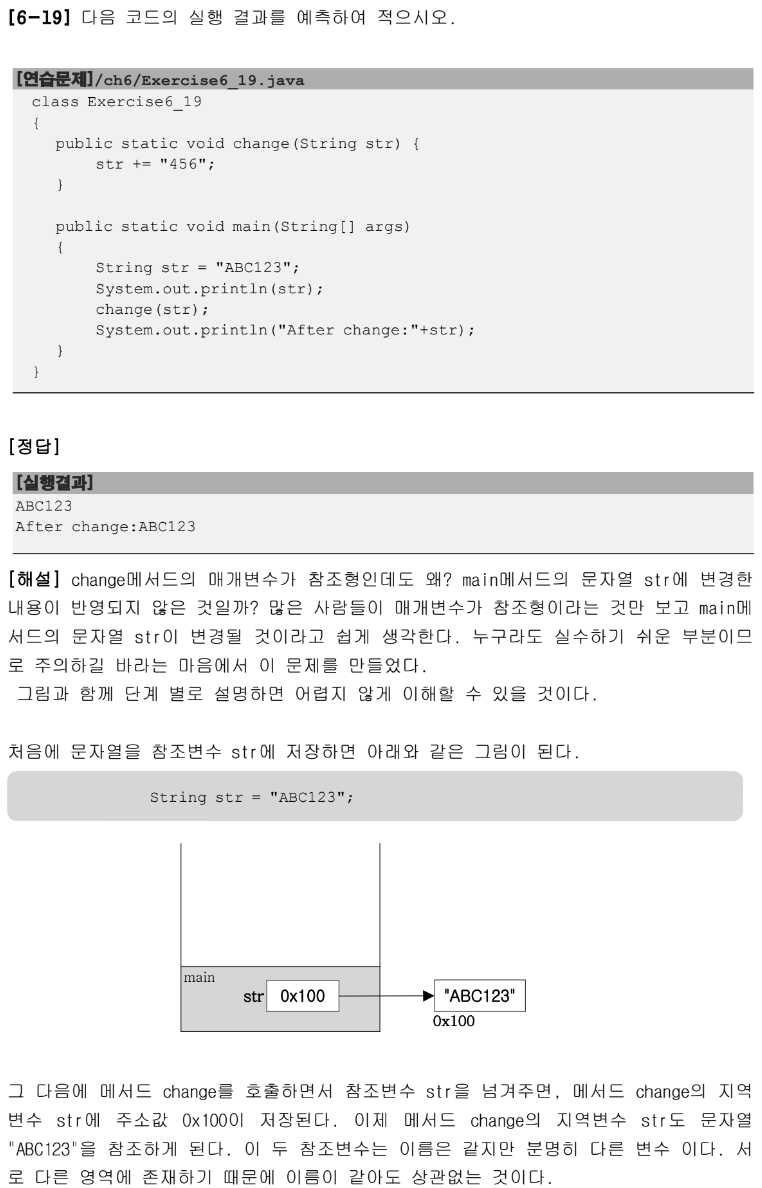
-
문자열은 변경x니까 내부적으로 새로운 문자열 객체를 만들어 그 새로운 객체의 주소값이 change(str)이고 출력하는 str은 그냥 원래 123까지만 출력된다.
- 참조하고 있는 주소값이 다르기 때문에 > 문자열은 바뀔 수 없기 때문에 새로운 객체가 생성되고, 참조하는 주소값이 바뀌는것이다.
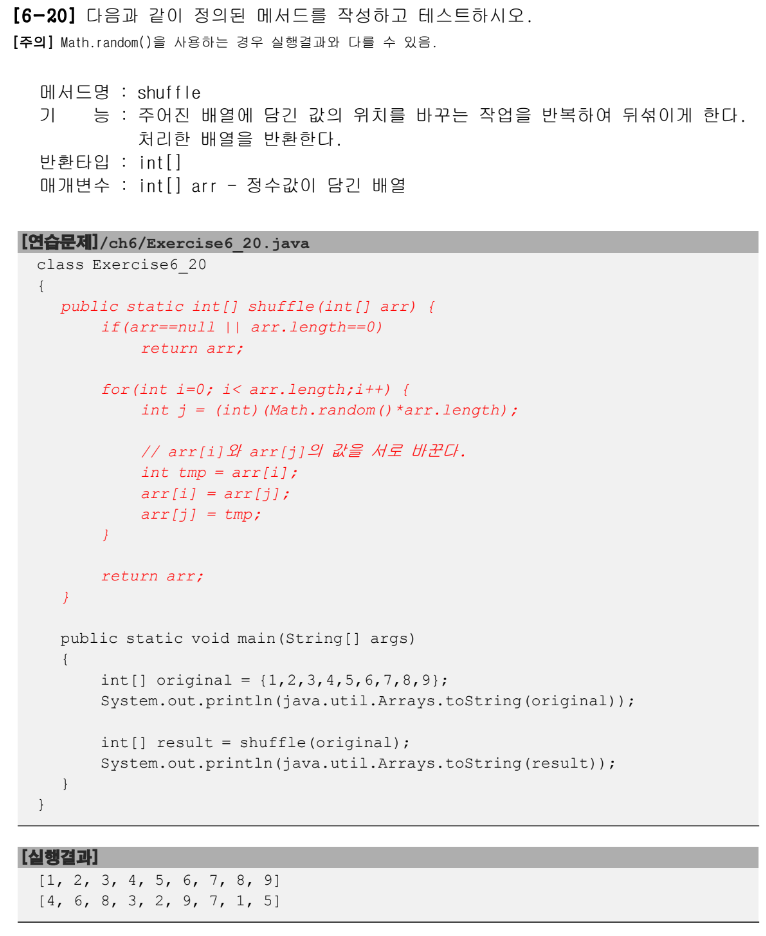
맞췄는데 if문으로 예외를 두지 않아서
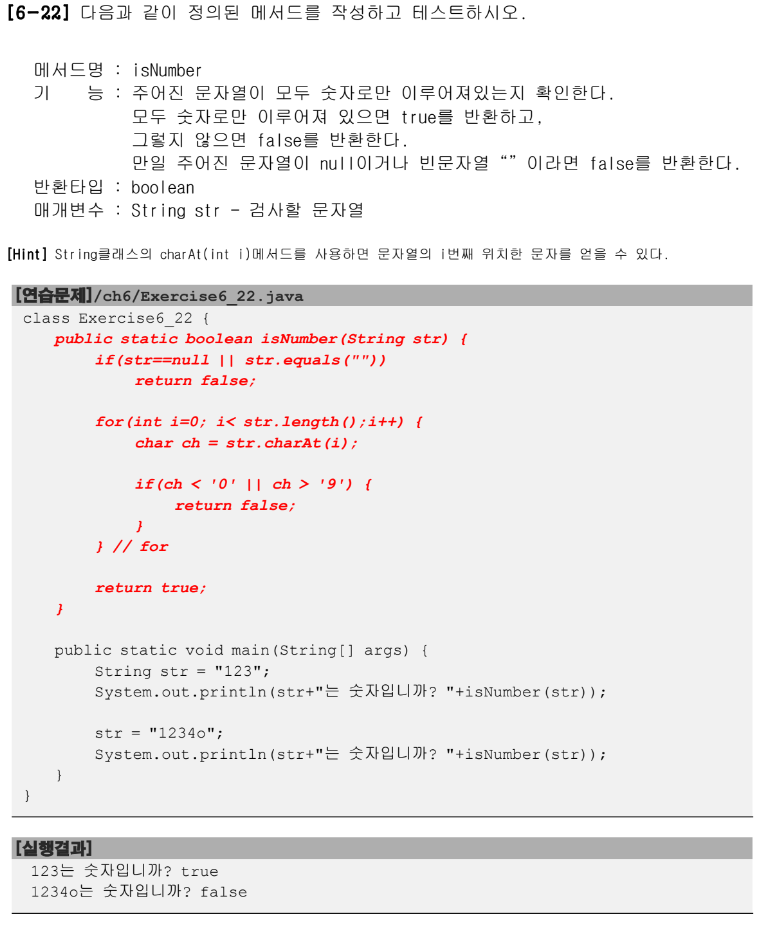
맞췄지만 기억해놓으려
실습문제 1.
16진수 문자열을 입력받으면 그 16진수에 해당하는 4자리 2진수로 출력하시오.
(대소문자 구별없이 입력받을 수 있어야 하고, 16진수가 아니면 16진수가 아니라고 출력)
실행예시
16진수 입력 : CAFE
1100101011111110
내가 한 풀이 - 정답
package com.test.memo;

import java.util.Scanner;

class Practice2 {
    public static void main(String[] args) {
        String user = null;
        Scanner sc = new Scanner(System.in);
        System.out.print("16진수 입력: ");
        user = sc.next().toUpperCase();
        for (int i = 0; i < user.length(); i++) {
            if ((user.charAt(i) > '0' && user.charAt(i) < '9') || (user.charAt(i) > 'A' && user.charAt(i) < 'F')) {
                int decimal = Integer.parseInt(user, 16);// 16진수에서 10진수로 변환
                System.out.println(Integer.toBinaryString(decimal));
                break;
            } else
                System.out.println("16진수가 아닙니다.");
        }
    }
}-
대소문자 구분 없이라고해서 사용자에게 값을 입력받을 때
toUpperCase()를 이용해서 대문자로 변환시켰다 -
for문을 이용해 문자열로 받은 사용자의 값을
.charAt()을 이용해서 16진수는 0~9와 A~F만 존재하기 때문에 if문으로 조건을 넣어줬다. -
Integer.parseInt(user, 16)> user 값을 16진수로 변환시키는 키워드로 int 변수를 만들어 값을 안에 넣어줬다. -
정수 decimal을
Integer.toBinaryString()을 이용해서 2진수로 변환시켜서 출력하고 반복문을 빠져나온다.- 만약 if문의 조건이 충족되지 않는다면 16진수가 아니라고 출력한다.
선생님 풀이
import java.util.Scanner;

public class Test16 {

    public static void main(String[] args) {
        String str;
        boolean flag = true;
        Scanner sc = new Scanner(System.in);
        System.out.println("16진수 입력");
        str = sc.next();
        String[] binary = {   "0000", "0001", "0010", "0011"
                   , "0100", "0101", "0110", "0111"
                   , "1000", "1001", "1010", "1011"
                   , "1100", "1101", "1110", "1111" };

        String result="", tmp = "";
        int len = str.length();
        for (int i=0; i < len ; i++ ) {
            char ch = str.charAt(i);
            if(ch >='0' && ch <='9') {
                result +=binary[ch-'0'];
            } else if(ch >= 'A' && ch <='F'){
                result +=binary[ch-'A'+10];
            } else if(ch >= 'a' && ch <='f'){
                result +=binary[ch-'a'+10];
            } else {
                flag = false;
                break;
            }
        }
        if(flag) System.out.println(result);
        else System.out.println("입력하신 것은 16진수가 아닙니다.");
    }
}
실습문제 2.
문자열을 입력 받아서 모르스(morse)부호로 바꾸기.
String[] morse = {".-", "-...", "-.-.","-..", "."
,"..-.", "--.", "....","..",".---"
, "-.-", ".-..", "--", "-.", "---"
, ".--.", "--.-",".-.","...","-"
, "..-", "...-", ".--", "-..-","-.--"
, "--.." };
내가 한 풀이 - 정답
package com.test.memo;

import java.util.Scanner;

public class Practice1 {
    public static void main(String[] args) {
        String[] morse = { ".-", "-...", "-.-.", "-..", ".", "..-.", "--.", "....", "..", ".---", "-.-", ".-..", "--",
                "-.", "---", ".--.", "--.-", ".-.", "...", "-", "..-", "...-", ".--", "-..-", "-.--", "--.." };

        String user = null;
        Scanner sc = new Scanner(System.in);
        System.out.print("문자열을 입력하세요: ");
        user = sc.next().toUpperCase();
        for (int i = 0; i < user.length(); i++) {
            if (user.charAt(i) >= 'A' && user.charAt(i) <= 'Z') {
                int idx = user.charAt(i) - 'A';
                System.out.print(morse[idx]);
            }else System.out.print("잘못 입력하셨습니다.");
        }
    }
}-
사용자에게 받는 입력값을
toUpperCase()를 이용해 대소문자 상관없이 기입 가능하게 한다. -
user.charAt(i)로 해서 정해진 기준 안에서 입력했는지 if문을 설정했다. -
기준점인 'A'를 빼주면서 사용자의 입력값과 배열 morse의 인덱스 값을 일치시켜주게해서 출력했다.
선생님 풀이
class ArrayEx15 {
    public static void main(String[] args) {
        String source = "SOSHELP";
        String[] morse = {".-", "-...", "-.-.","-..", "."
                        ,"..-.", "--.", "....","..",".---"
                        , "-.-", ".-..", "--", "-.", "---"
                        , ".--.", "--.-",".-.","...","-"
                        , "..-", "...-", ".--", "-..-","-.--"
                        , "--.." };

        String result="";

        for (int i=0; i < source.length() ; i++ ) {
            result+=morse[source.charAt(i)-'A'];
        }
        System.out.println("source:"+ source);
        System.out.println("morse:"+result);
    }
}
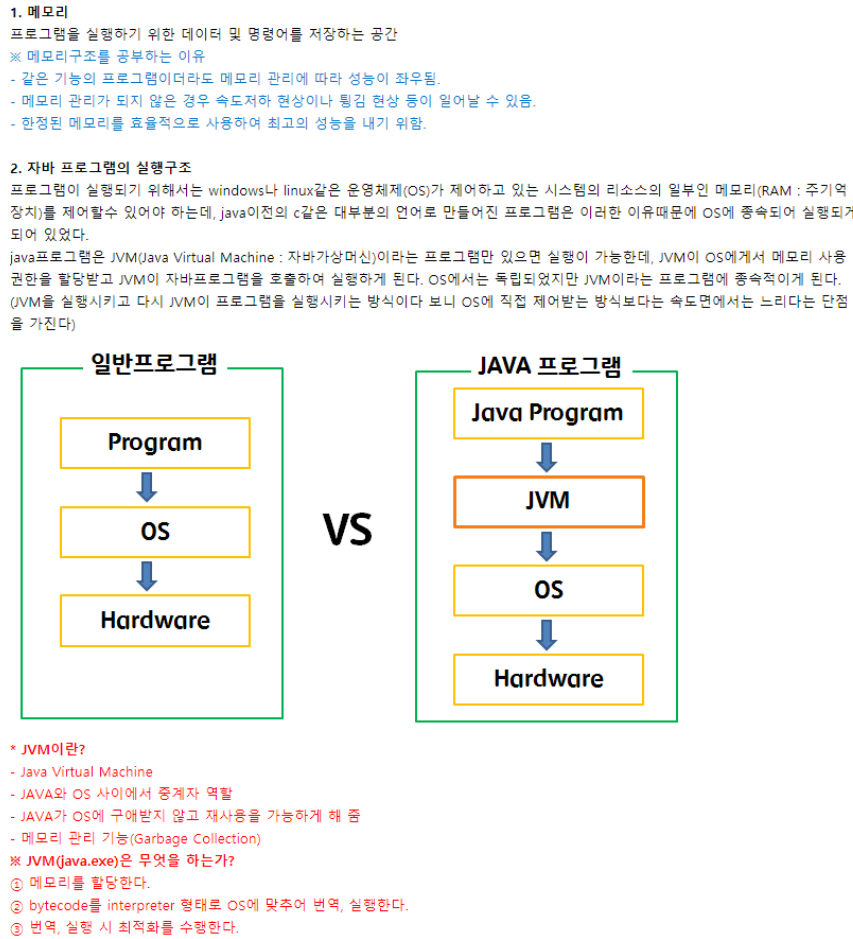
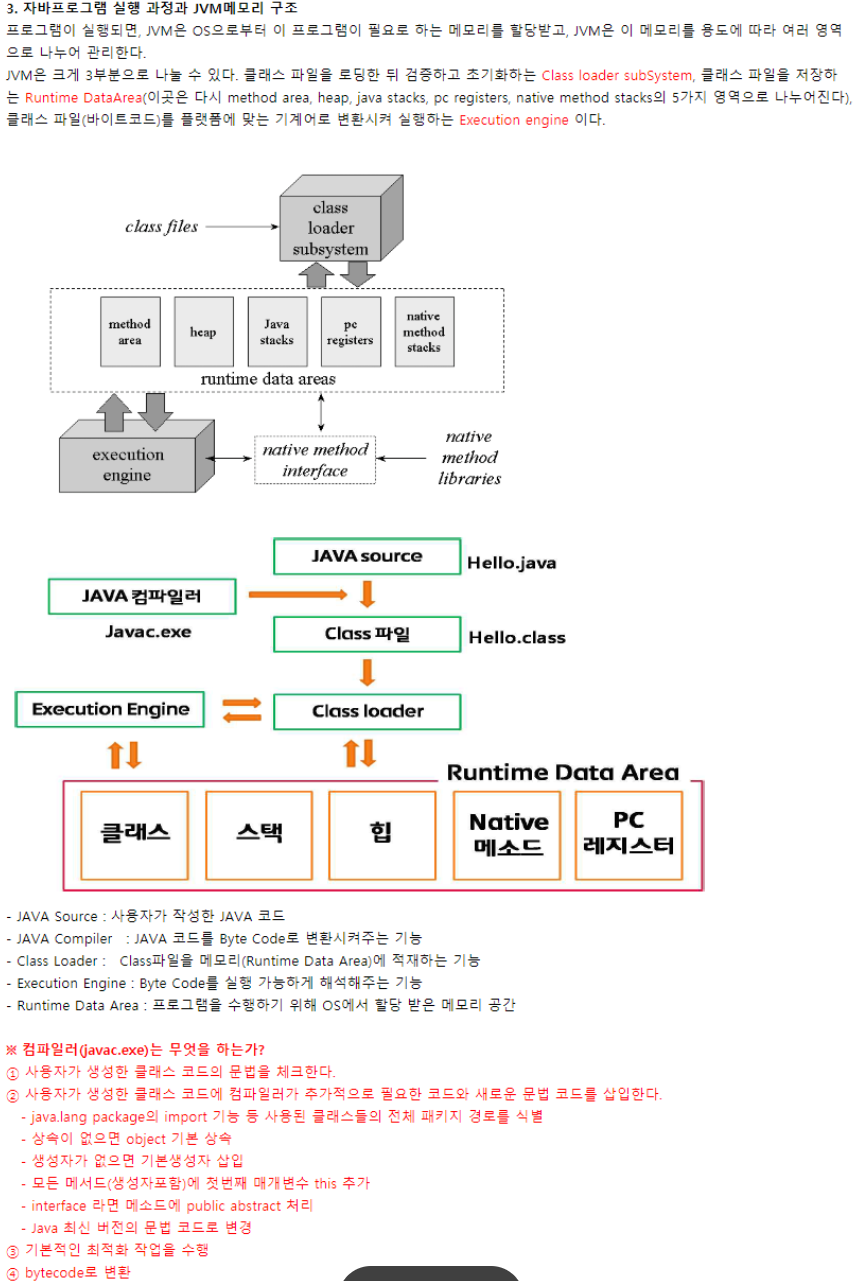
자바 메모리 구조