ActionTag
-
ActionTag : 서버나 클라이언트에게 어떤 행동을 하도록 명령하는 태그로 스크립트 태그, 주석, 디렉티브 태그와 함께 JSP 페이지를 구성하는 태그 > 특별한 선언 없이 "jsp"라는 접두어를 붙여 태그명만 명시하면 컨테이너가 인식해서 수행한다.
- JSP 페이지에서 페이지와 페이지 사이를 제어하거나, 다른 페이지의 실행 결과 내용을 현재 페이지에 포함하거나, 자바빈즈(JavaBeans) 등의 다양한 기능을 제공한다.
스크립트릿 형태의 형식이 아닌, xml형식을 사용한다. >
<jsp: .../>반드시 끝나는(종료/) 태그로 마무리 해야한다.
-
<jsp:include>: 다른 페이지의 내용을 현재 페이지에 포함시킨다. -
<jsp:forward>: 현재 요청을 다른 페이지로 전달한다. :: 실행될 때 동적으로 실행- include() 지시자로도 사용가능하다. > 자바 소스로 변환 될 때 지시자에서 지정한 페이지가 포함된다. (소스가 포함되고, 컴파일 되어 class파일이 만들어지지 않음)
-
<jsp:useBean>: 자바 객체를 생성하거나 기존 객체를 사용한다.- new명령문으로, 새로운 객체를 생성한다.
- 생성할클래스의 이름은 class속성에, 객체를 참조하는 변수의 이름은 id 속성에 지정한다.
- new명령문으로, 새로운 객체를 생성한다.
-
<jsp:setProperty>: 자바빈 속성 값을 설정한다. -
<jsp:getProperty>: 자바빈 속성 값을 가져온다. -
<jsp:param>: 요청을 다른 페이지로 전달할 파라미터를 정의한다.- name과 value를 이용해 request.getParameter(name)으로 가져올 수 있다.
-
<jsp:plugin>: 브라우저에서 자바 플러그인을 실행한다.
include지시자 <> include 액션태그 차이점
-
include 지시자 > 현재의 파일에 다른 파일을 포함시키는 지시자
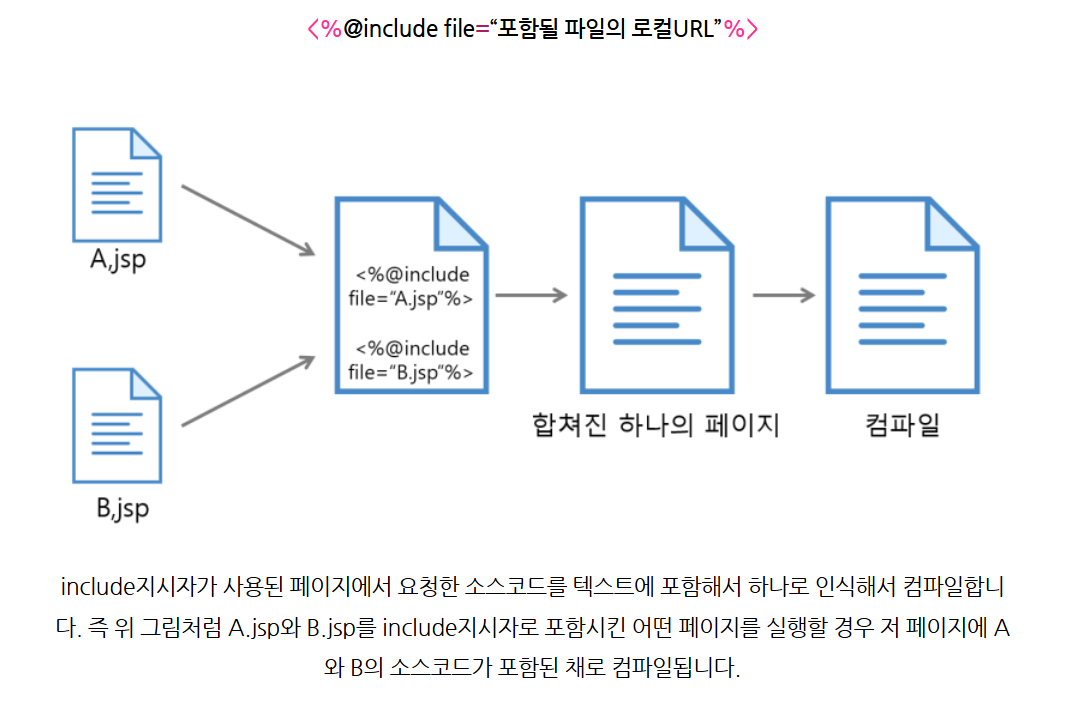
-
include 액션태그 > 현재의 파일에 다른 파일을 포함시키는 액션태그
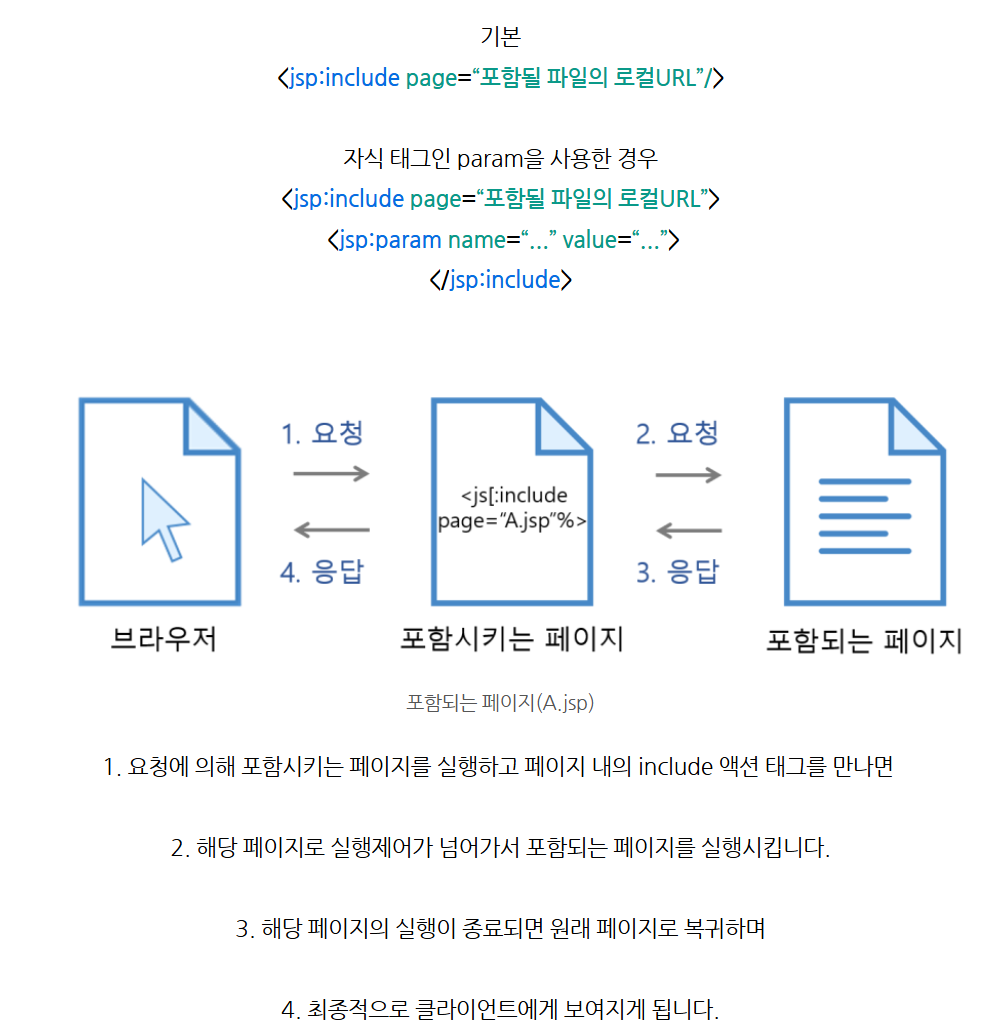
JavaBeans
데이터 표현을 목적으로 하는 자바 클래스이므로 기존의 자바 클래스를 작성하는 방법과 동일하게 작성한다
-
JavaBeans : 자바 언어에서 재사용 가능한 소프트웨어 컴포넌트를 만드는 데 사용되는 소프트웨어 디자인 패턴이다.
-
자바빈즈는 데이터를 담는 멤버 변수인 프로퍼티(property)와 데이터를 가져오거나 저장하는 메소드로 구성된다. > MVC 패턴에서 Model 담당 / JSP가 View /Controller 가 Controller
자바빈을 사용하면 코드의 재사용성과 모듈화가 증가해, 유지보수가 용이해진다.
자바빈즈를 작성할 때 따라야 하는 규칙
-
프로퍼티(Properties): 자바빈은 데이터를 저장하기 위해 프로퍼티를 사용합니다. 프로퍼티는 private 멤버 변수로 선언되고, 이에 대한 getter 및 setter 메서드가 제공된다.
-
게터(Getters) 및 세터(Setters): 자바빈은 데이터에 접근하기 위한 getter 및 setter 메서드를 제공합니다. 이 메서드들을 통해 데이터에 접근하고 수정할 수 있다.
- getter() 메소드는 멤버 변수에 저장된 값을 가져올 수 있는 메소드이고, setter() 메소드는 멤버 변수에 값을 저장할 수 있는 메소드이다.
-
직렬화(Serialization): 자바빈은 직렬화 가능해야 하며, 이는 객체를 저장하거나 네트워크를 통해 전송할 수 있도록 한다.
- java.io.Serializable 인터페이스는 생략 가능하나 자바빈즈 규약에 명시된 내용으로 자바빈즈에 저장된 프로퍼티를 포함한 채로 파일 시스템에 저장되거나 네트워크로 전송될 수 있도록 객체 직렬화를 제공해야 하므로 implement 해야 한다.
-
디폴트 생성자(Default Constructor): 자바빈은 매개변수가 없는 디폴트 생성자를 가져야 합니다. 이 생성자는 자바빈이 컴포넌트로 사용될 때 사용된다.
DAO / DTO / VO
-
DAO(Data Access Object) : 데이터베이스의 data에 접근하기 위한 객체
-
DTO(Data Transfer Object) : 계층간 데이터 교환을 위한 자바빈즈를 의미한다. >> 가변의 성격을 가진 클래스다.(setter활용)
-
VO(Value Object) : 값 오브젝트로써 값을 위해 쓰인다 DTO와 혼용해서 사용하지만 미묘한 차이 존재 >> 불변의 성격을 가졌다.
VO와 DTO의 공통점
- 넣어진 데이터를 getter를 통해 사용하므로 주 목적은 같다.
자바빈 예제
예제 1 jsp:forward
서버 측에서 클라이언트로의 리다이렉션을 수행하며, 클라이언트는 이를 알지 못한다.
- main.jsp
<%@ page language="java" contentType="text/html; charset=UTF-8"
    pageEncoding="UTF-8"%>
<!DOCTYPE html>
<html>
<head>
<title>Insert title here</title>
</head>
<body>

    <h1>main.jsp 페이지 입니다.</h1>

    <jsp:forward page="sub.jsp" />

</body>
</html>- sub.jsp
<%@ page language="java" contentType="text/html; charset=UTF-8"
    pageEncoding="UTF-8"%>
<!DOCTYPE html>
<html>
<head>
<title>Insert title here</title>
</head>
<body>

    <h5>sub.jsp 페이지 입니다.</h5> //얘만 출력 main.jsp의 h1은 출력 x

</body>
</html>
main.jsp에서 포워딩을 하면 클라이언트의 브라우저에는 main.jsp의 내용이 전송되지 않고, 서버에서 sub.jsp로 요청이 전달되어 sub.jsp의 내용만이 브라우저에 출력된다. - 페이지는 main.jsp에서 열려있고 sub.jsp페이 글만 출력
예제 2 jsp:param
- forward.jsp
<%@ page language="java" contentType="text/html; charset=EUC-KR" pageEncoding="EUC-KR"%>
<!DOCTYPE html PUBLIC "-//W3C//DTD HTML 4.01 Transitional//EN" "http://www.w3.org/TR/html4/loose.dtd">
<html>
<head>
<meta http-equiv="Content-Type" content="text/html; charset=EUC-KR">
<title>Insert title here</title>
</head>
<body>
    <h1>forward.jsp</h1>
    <jsp:forward page="forward_param.jsp">
        <jsp:param name="id" value="abcdef" />
        <jsp:param name="pw" value="1234" />
    </jsp:forward>
</body>
</html>- forward_param.jsp
<%@ page language="java" contentType="text/html; charset=EUC-KR"
    pageEncoding="EUC-KR"%>
<!DOCTYPE html PUBLIC "-//W3C//DTD HTML 4.01 Transitional//EN" "http://www.w3.org/TR/html4/loose.dtd">
<html>
<head>
<meta http-equiv="Content-Type" content="text/html; charset=EUC-KR">
<title>Insert title here</title>
</head>
<body>
    <%!
        String id, pw;
    %>

    <%
        id = request.getParameter("id");
        pw = request.getParameter("pw");
    %>

    <h1>forward_param.jsp 입니다.</h1>
    아이디 : <%= id %><br />
    비밀번호 : <%= pw %>

</body>
</html>
forward.jsp에서 forward_param.jsp로 param을 사용해 request객체에 값을 담아서 전달해 해당 페이지로 파라미터를 전달 하고, param.jsp에서 전달받은 파라미터를 화면에 출력하는 기능을 구현하고있다.
예제 3 jsp:include + flush 속성
flush 속성 : 포함될 페이지로 제어가 이동될 때 현재 포함하는 페이지가 지금까지 출력 버퍼에 저장한 결과를 처리하는 방법을 결정한다.
true : 제어가 이동될 때 현재 페이지가 지금까지 버퍼에 저장한 내용을 브라우저에 출력하고 버퍼를 비운다.
false (기본값) : 버퍼링된 출력이 즉시 클라이언트로 전송되지 않고, 페이지가 완료될 때까지 출력이 보류된다.
- include01.jsp
<%@ page language="java" contentType="text/html; charset=EUC-KR"
    pageEncoding="EUC-KR"%>
<!DOCTYPE html PUBLIC "-//W3C//DTD HTML 4.01 Transitional//EN" "http://www.w3.org/TR/html4/loose.dtd">
<html>
<head>
<meta http-equiv="Content-Type" content="text/html; charset=EUC-KR">
<title>Insert title here</title>
</head>
<body>

    <h1> include01.jsp 페이지 입니다. </h1>
    <jsp:include page="include02.jsp" flush="false" />
    <h1> 다시 include01.jsp 페이지 입니다. </h1>

</body>
</html>- include02.jsp
<%@ page language="java" contentType="text/html; charset=EUC-KR"
    pageEncoding="EUC-KR"%>
<!DOCTYPE html PUBLIC "-//W3C//DTD HTML 4.01 Transitional//EN" "http://www.w3.org/TR/html4/loose.dtd">
<html>
<head>
<meta http-equiv="Content-Type" content="text/html; charset=EUC-KR">
<title>Insert title here</title>
</head>
<body>

    <h1> include02.jsp 페이지 입니다. </h1>

</body>
</html>
flush속성이 true라면 01.jsp내용이 출력되고 난 후에 02.jsp내용이 출력된다.
false라면 01.jsp내용과 02.jsp내용이 순차적으로 출력된다.
예제 4 include + param
- include03.jsp
<%@ page language="java" contentType="text/html; charset=UTF-8" pageEncoding="UTF-8"%>
<!DOCTYPE html>
<html>
<head>
<meta charset="UTF-8">
<meta name="description" content="HTML Study">
<meta name="keywords" content="HTML,CSS,XML,JavaScript">
<meta name="author" content="Bruce">
<meta name="viewport" content="width=device-width, initial-scale=1.0">
<title>Insert title here</title>
</head>
<body>
    <h1>include03.jsp 입니다.</h1>
    <hr>
    <jsp:include page="include_param.jsp">
        <jsp:param name="id" value="abcdef" />
        <jsp:param name="pw" value="1234" />
    </jsp:include>
</body>
</html>- include_param.jsp
<%@ page language="java" contentType="text/html; charset=UTF-8"
    pageEncoding="UTF-8"%>

<!DOCTYPE html>
<html>
<head>
<meta charset="UTF-8">
<meta name="description" content="HTML Study">
<meta name="keywords" content="HTML,CSS,XML,JavaScript">
<meta name="author" content="Bruce">
<meta name="viewport" content="width=device-width, initial-scale=1.0">
<title>include_param</title>
</head>
<body>
    <%!
        String id, pw;
    %>

    <%
        id = request.getParameter("id");
        pw = request.getParameter("pw");
    %>

    <h1>include_param.jsp 입니다.</h1>
    아이디 : <%= id %><br />
    비밀번호 : <%= pw %>
</body>
</html>
2번 예제와는 달리 forward가 아닌 include를 사용하고 있다.
예제 5-1 useBean
자바빈을 사용할 때 해당 빈 객체를 생성하고 초기화하는 데 사용된다. 자바빈은 java클래스로서 특정 규칙을 따르는 객체를 말한다.
useBean 액션 태그를 사용하면 JSP 페이지에서 자바빈 객체를 생성하고 설정할 수 있다.
- useBean01.jsp
<%@ page language="java" contentType="text/html; charset=UTF-8"
    pageEncoding="UTF-8"%>

<!DOCTYPE html>
<html>
<head>
<meta charset="UTF-8">
<meta name="description" content="HTML Study">
<meta name="keywords" content="HTML,CSS,XML,JavaScript">
<meta name="author" content="Bruce">
<meta name="viewport" content="width=device-width, initial-scale=1.0">
<title>Insert title here</title>
</head>
<body>
    <jsp:useBean id = "date" class="java.util.Date" />
    //위 코드를 java코드로 하면 java.util.Date date = new java.util.Date();
    <p>
        <%
            out.print("오늘의 날짜 및 시각");
        %>
    </p>
    <p><%=date %></p> //date라는 이름으로 자바 빈 생성해 자바빈에서 가져온 현재 날짜와 시각 출
</body>
</html>-
useBean 액션 태그의 속성
-
id : 자바빈즈를 식별하기 위한 이름 > 일종의 참조 변수
-
class : 패키지 이름을 포함한 자바빈즈 이름 >> 자바빈즈는 인수가 없는 기존 생성자가 있어야 하며 추상 클래스를 사용할 수 없다.
-
scope : 자바빈즈가 저장되는 영역을 설정. page(기본 값), request, session, application 중 하나의 값을 사용
-
예제 5-2 useBean
- useBean02.jsp
  <%@ page language="java" contentType="text/html; charset=UTF-8"
    pageEncoding="UTF-8"%>


<!DOCTYPE html>

<html>
<head>
<meta charset="UTF-8">
<meta name="description" content="HTML Study">
<meta name="keywords" content="HTML,CSS,XML,JavaScript">
<meta name="author" content="Bruce">
<meta name="viewport" content="width=device-width, initial-scale=1.0">
<title>Insert title here</title>
</head>
<body>
    <jsp:useBean id = "bean" class="ch04.com.dto.Calculator" />
    <%
        int m = bean.process(5); //자바빈의 클래스 메소드를 호출해 계산
        out.print("5의 3제곱 : " + m);
    %>
</body>
</html>- Calculator.java
package com.ironMen.www;

public class Calculator {
    public int process(int n) {
        return n * n * n;
    }
}
출력 >> 5의 3제곱 : 125
- useBean 액션 태그를 이용해 id 속성으로 bean이라는 이름으로 자바 빈을 생성하고, class 속성을 통해 Calculator 클래스를 사용해 빈을 생성한다.
- Calculaor클래스는 process메서드를 가지고 입력된 숫자를 세제곱 하여 반환한다.
예제 5-3 useBean
- useBean03.jsp
<%@ page language="java" contentType="text/html; charset=UTF-8"
    pageEncoding="UTF-8"%>

<!DOCTYPE html>
<html>
<head>
<meta charset="UTF-8">
<meta name="description" content="HTML Study">
<meta name="keywords" content="HTML,CSS,XML,JavaScript">
<meta name="author" content="Bruce">
<meta name="viewport" content="width=device-width, initial-scale=1.0">
<title>Insert title here</title>
</head>
<body>
    <jsp:useBean id="person" class="com.ironMen.www.Person" scope="request" />
    <p> 아이디 : <%=person.getId() %>
    <p> 이 름 : <%= person.getName() %>
</body>
</html>- Person.java
  package com.ironMen.www;


public class Person {
    private int id = 20181004;
    private String name = "홍길순";
    public int getId() {
        return id;
    }
    public void setId(int id) {
        this.id = id;
    }
    public String getName() {
        return name;
    }
    public void setName(String name) {
        this.name = name;
    }
}
출력 : 아이디 : 20181004 이 름 : 홍길순
- useBean 액션 태그를 사용해 Person 클래스의 인스턴스를 생성하고, 이를 person이란 이름으로 지정하고 있다. scope 속성을 사용해 해당 빈의 범위를 요청(request)범위로 설정하고 있다.
예제 5-4 useBean
- useBean04.jsp
<%@ page language="java" contentType="text/html; charset=UTF-8"
    pageEncoding="UTF-8"%>

<!DOCTYPE html>
<html>
<head>
<meta charset="UTF-8">
<meta name="description" content="HTML Study">
<meta name="keywords" content="HTML,CSS,XML,JavaScript">
<meta name="author" content="Bruce">
<meta name="viewport" content="width=device-width, initial-scale=1.0">
<title>Insert title here</title>
</head>
<body>
    <jsp:useBean id="person" class="com.ironMen.www.Person" scope="request" />
    <p>아이디 : <%=person.getId() %></p>
    <p>이 름 : <%=person.getName() %></p>

    <%
        person.setId(20182005);
        person.setName("홍길동");
    %>
    <jsp:include page="useBean03.jsp" />
</body>
</html>
출력
아이디 : 20181004
이름 : 홍길순
아이디 : 20182005
이름 : 홍길동
예제 6 getProperty
getProperty 속성
name : useBean 태그에 id 속성 값으로 설정된 자바빈즈를 식별하기 위한 이름이다.
- getProperty01.jsp
<%@ page language="java" contentType="text/html; charset=UTF-8"
    pageEncoding="UTF-8"%>

<!DOCTYPE html>
<html>
<head>
<meta charset="UTF-8">
<meta name="description" content="HTML Study">
<meta name="keywords" content="HTML,CSS,XML,JavaScript">
<meta name="author" content="Bruce">
<meta name="viewport" content="width=device-width, initial-scale=1.0">
<title>Insert title here</title>
</head>
<body>
    <jsp:useBean id="person" class="com.ironMen.www.Person" scope="request"/>
    <p> 아이디 : <jsp:getProperty property="id" name="person"/>
    <p> 이 름 : <jsp:getProperty property="name" name="person"/>
</body>
</html>
출력
아이디 : 20181004
이름 : 홍길순
예제 7 setProperty
property : *를 사용하면 모든 요청 파라미터의 값을 동일한 이름의 자바빈즈 프로퍼티의 자동으로 설정해 getter()메소드에 전달됨을 의미한다. > 이름으로 지정 가능
만약 서로의 변수 이름들이 동일하지 않다면 param:"name" 이런 식으로 이름을 지정해 값을 저장해야한다.
- setProperty는 해당 자바 빈즈 클래스에 setter메서드가 반드시 존재해야한다.
<%@ page language="java" contentType="text/html; charset=UTF-8"
    pageEncoding="UTF-8"%>

<!DOCTYPE html>
<html>
<head>
<meta charset="UTF-8">
<meta name="description" content="HTML Study">
<meta name="keywords" content="HTML,CSS,XML,JavaScript">
<meta name="author" content="Bruce">
<meta name="viewport" content="width=device-width, initial-scale=1.0">
<title>Insert title here</title>
</head>
<body>
    <jsp:useBean id="person" class="com.ironMen.www.Person" />
    <jsp:setProperty name="person" property="id" value="20182005"/>
    <jsp:setProperty name="person" property="name" value="홍길동" />
    //위 코드를 자바 코드로 바꾸면 person.seName("홍길동"); > setter()메서드가 반드시 있어야 하기 때문에 setName()을 호출하는것
    <p> 아이디 : <jsp:getProperty property="id" name="person"/>
    <p> 이 름 : <jsp:getProperty property="name" name="person"/>
</body>
</html>
출력
아이디 : 20182005
이름 : 홍길동
-
Person클래스로 자바빈을 생성했지만, setProperty를 이용해 Person 객체의 id와 name프로퍼티를 setter()메서드를 호출해 값을 설정했다.
-
getProperty를 이용해 getter()메서드를 호출해 값을 가져와 출력한다.
자바 빈 문제
- com.superman.ex 패키지에 멤버변수로 name, age, grade, studentNum을 가지는 빈을 만든다.
studentInfo.jsp를 만든다.
studentInfo.jsp에서 com.superman.ex.Student 빈을 student라는 이름으로 객체를 만들고 page 영역에 저장한다.
student 객체에 액션태그로 name에 "홍길동", age에 "10", grade에 "3", studentNum에 "28"을 준다.
그리고 액션태그로 각각의 값을 가져와 출력한다.
- Student.java
package com.superman.ex;

import java.io.Serializable;

public class Student implements Serializable{
    private String name;
    private int age;
    private int grade;
    private int studentNum;

    public Student() {
    }

    public String getName() {
        return name;
    }

    public void setName(String name) {
        this.name = name;
    }

    public int getAge() {
        return age;
    }

    public void setAge(int age) {
        this.age = age;
    }

    public int getGrade() {
        return grade;
    }

    public void setGrade(int grade) {
        this.grade = grade;
    }

    public int getStudentNum() {
        return studentNum;
    }

    public void setStudentNum(int studentNum) {
        this.studentNum = studentNum;
    }
}- studentInfo.jsp
<%@ page language="java" contentType="text/html; charset=UTF-8" pageEncoding="UTF-8" %>
    <jsp:useBean id="student" class="com.superman.ex.Student" scope="page" />
    <!DOCTYPE html>
    <html>

    <head>
        <meta charset="UTF-8">
        <meta name="description" content="HTML Study">
        <meta name="keywords" content="HTML,CSS,XML,JavaScript">
        <meta name="author" content="Bruce">
        <meta name="viewport" content="width=device-width, initial-scale=1.0">
        <title>Insert title here</title>
    </head>

    <body>
        <h2>학생정보</h2>
        <jsp:setProperty name="student" property="name" value="홍길동" />
        <jsp:setProperty name="student" property="age" value="10" />
        <jsp:setProperty name="student" property="grade" value="3" />
        <jsp:setProperty name="student" property="studentNum" value="28" />

        이름 :
        <jsp:getProperty name="student" property="name" /><br>
        나이 :
        <jsp:getProperty name="student" property="age" /><br>
        학년 :
        <jsp:getProperty name="student" property="grade" /><br>
        학번 :
        <jsp:getProperty name="student" property="studentNum" /><br>
    </body>

</html>- com.superman.www 패키지에 MemberDTO 빈을 만든다.
멤버변수로 name과 id를 둔다.
memberInput.jsp를 만든다.(2-1.png 참고)
memberInputOK.jsp를 만든다.
memberInputOK.jsp에서 액션태그로 com.superman.www.MemberDTO 객체를 memberDTO라는 이름으로 만든다. memberInput.jsp에서 넘어온 값을 memberDTO에 넣는다. 그리고 각각의 값을 액션태그로 가져와 출력한다.
- MemebrDTO.java
package com.superman.www;

import java.io.Serializable;

public class MemberDTO implements Serializable{
    private String name;
    private String id;
    public MemberDTO() {
    }
    public String getName() {
        return name;
    }
    public void setName(String name) {
        this.name = name;
    }
    public String getId() {
        return id;
    }
    public void setId(String id) {
        this.id = id;
    }
}- memberInput.jsp
<%@ page language="java" contentType="text/html; charset=UTF-8"
    pageEncoding="UTF-8"%>

<!DOCTYPE html>
<html>
<head>
<meta charset="UTF-8">
<meta name="description" content="HTML Study">
<meta name="keywords" content="HTML,CSS,XML,JavaScript">
<meta name="author" content="Bruce">
<meta name="viewport" content="width=device-width, initial-scale=1.0">
<title>Insert title here</title>
</head>
<body>
    <h1>회원가입</h1>
    <form method="post" action="memberInputOK1.jsp">
        이름 : <input type="text" name="name"><br>
        아이디 : <input type="text" name="id"><br>
        <input type="submit" value="전송">
    </form>
</body>
</html>- memberInputOK1.jsp >> param을 지정해 해당 이름의 요청 파라미터를의 값을 가져와 해당 프로퍼티에 설정
<%@ page language="java" contentType="text/html; charset=UTF-8"
    pageEncoding="UTF-8"%>

<!DOCTYPE html>
<html>
<head>
<meta charset="UTF-8">
<meta name="description" content="HTML Study">
<meta name="keywords" content="HTML,CSS,XML,JavaScript">
<meta name="author" content="Bruce">
<meta name="viewport" content="width=device-width, initial-scale=1.0">
<title>Insert title here</title>
</head>
<body>
    <% request.setCharacterEncoding("utf-8"); %>

    <jsp:useBean id="memberDTO" class="com.superman.www.MemberDTO"/>

    <jsp:setProperty property="name" name="memberDTO" param="name"/>
    <jsp:setProperty property="id" name="memberDTO" param="id"/>

    이름 : <jsp:getProperty property="name" name="memberDTO"/><br>
    아이디 : <jsp:getProperty property="id" name="memberDTO"/><br>


</body>
</html>- memberInputOK2.jsp >> param을 지정하지 않고 프로퍼티와 동일한 이름의 요청 파라미터를 찾아 값을 저장
<%@ page language="java" contentType="text/html; charset=UTF-8"
    pageEncoding="UTF-8"%>

<!DOCTYPE html>
<html>
<head>
<meta charset="UTF-8">
<meta name="description" content="HTML Study">
<meta name="keywords" content="HTML,CSS,XML,JavaScript">
<meta name="author" content="Bruce">
<meta name="viewport" content="width=device-width, initial-scale=1.0">
<title>Insert title here</title>
</head>
<body>
    <% request.setCharacterEncoding("utf-8"); %>

    <jsp:useBean id="memberDTO" class="com.superman.www.MemberDTO"/>

    <jsp:setProperty property="name" name="memberDTO"/>
    <jsp:setProperty property="id" name="memberDTO"/>

    이름 : <jsp:getProperty property="name" name="memberDTO"/><br>
    아이디 : <jsp:getProperty property="id" name="memberDTO"/><br>

</body>
</html>- com.superman.www 패키지에 BoardInputValue 빈을 만든다.
멤버변수로 name, id, password, age, email을 둔다.
BoardInputValue.jsp를 만든다. (3-1.png 참고)
BoardInputValueOK.jsp를 만든다.
BoardInputValueOK.jsp에서 액션태그로 com.superman.www.BoardInputValue를 boardInputValue이라는 이름으로 객체를 만들고 page 영역에 저장한다. BoardInputValueOK.jsp에서 넘어온 모든 값을 boardInputValue에 넣고 그 각각의 값들을 액션태그로 가져와 출력한다.
- BoardInputValue.java
package com.superman.www;

import java.io.Serializable;

public class BoardInputValue implements Serializable{
    private String name;
    private String id;
    private String password;
    private int age;
    private String email;

    public BoardInputValue() {
    }

    public String getName() {
        return name;
    }
    public void setName(String name) {
        this.name = name;
    }
    public String getId() {
        return id;
    }
    public void setId(String id) {
        this.id = id;
    }
    public String getPassword() {
        return password;
    }
    public void setPassword(String password) {
        this.password = password;
    }
    public int getAge() {
        return age;
    }
    public void setAge(int age) {
        this.age = age;
    }
    public String getEmail() {
        return email;
    }
    public void setEmail(String email) {
        this.email = email;
    }
} - BoardInputValue.jsp
<%@ page language="java" contentType="text/html; charset=UTF-8" pageEncoding="UTF-8" %>

    <!DOCTYPE html>
    <html>

    <head>
        <meta charset="UTF-8">
        <meta name="description" content="HTML Study">
        <meta name="keywords" content="HTML,CSS,XML,JavaScript">
        <meta name="author" content="Bruce">
        <meta name="viewport" content="width=device-width, initial-scale=1.0">
        <title>Insert title here</title>
    </head>

    <body>
        <form method="post" action="BoardInputValueOK.jsp">
            name : <input type="text" name="name"><br>
            id : <input type="text" name="id"><br>
            password : <input type="password" name="password"><br>
            age : <input type="text" name="age"><br>
            email : <input type="email" name="email"><br>
            <input type="submit" value="전송">
        </form>
    </body>

</html>- BoardInputValueOK.jsp
<%@ page language="java" contentType="text/html; charset=UTF-8" pageEncoding="UTF-8" %>
    <% request.setCharacterEncoding("utf-8"); %>
        <!DOCTYPE html>
        <html>

        <head>
            <meta charset="UTF-8">
            <meta name="description" content="HTML Study">
            <meta name="keywords" content="HTML,CSS,XML,JavaScript">
            <meta name="author" content="Bruce">
            <meta name="viewport" content="width=device-width, initial-scale=1.0">
            <title>Insert title here</title>
        </head>

        <body>
            <jsp:useBean id="boardInputValue" class="com.superman.www.BoardInputValue" scope="page"></jsp:useBean>
            <jsp:setProperty name="boardInputValue" property="*" />
            이름 : <%=boardInputValue.getName() %><br>
                이름 :
                <jsp:getProperty property="name" name="boardInputValue" /><br>
                id : <%=boardInputValue.getId() %><br>
                    id :
                    <jsp:getProperty property="id" name="boardInputValue" /><br>
                    password :
                    <jsp:getProperty property="password" name="boardInputValue" /><br>
                    age :
                    <jsp:getProperty property="age" name="boardInputValue" /><br>
                    email :
                    <jsp:getProperty property="email" name="boardInputValue" /><br>
        </body>

        </html>
Connection Pool
FrontController
뷰와 모델 간의 인터페이스 역할을 하여 웹 브라우저의 모든 요청 URL을 받아들이고, 요청 URL과 함께 전달되는 요청 파라미터를 받아 처리하는 서블릿 클래스다.
-
Front Controller : 웹 애플리케이션의 모든 요청을 단일 진입점으로 라우팅하는 디자인 패턴이다. > MVC(Model-View-Controller) 아키텍처에서 주로 사용되며, 클라이언트의 모든 요청을 중앙 집중적으로 처리해 애플리케이션의 구조를 단순화하고 유지보수성을 향상시킨다.
-
GET방식과 POST 방식에 따라 각각 요청 작업을 수행한 후 웹 브라우저에 응답한다.
package com.superman.www;

import java.io.IOException;

import javax.servlet.ServletException;
import javax.servlet.annotation.WebServlet;
import javax.servlet.http.HttpServlet;
import javax.servlet.http.HttpServletRequest;
import javax.servlet.http.HttpServletResponse;

@WebServlet("*.do") //url 패턴이 .do로 끝나는 모든 요청을 이 서블릿이 처리한다는 의미
public class FController extends HttpServlet {
    private static final long serialVersionUID = 1L;

    public FController() {
        super();
    }

    //doGet() , doPost() 메서드에서는 모든 요청을 actionDo()메서드로 전달한다.
    protected void doGet(HttpServletRequest request, HttpServletResponse response) throws ServletException, IOException {
        System.out.println("doGet");
        actionDo(request, response);
    }

    protected void doPost(HttpServletRequest request, HttpServletResponse response) throws ServletException, IOException {
        System.out.println("doPost");
        actionDo(request, response);
    }

    //요청 URI를 분석해 어떤 요청인지 확인하고, 각 요청에 맞게 작업을 수행한다.
    private void actionDo(HttpServletRequest request, HttpServletResponse response) throws ServletException, IOException {
        System.out.println("actionDo");

        String uri = request.getRequestURI();    // 프로젝트 + 파일경로
        System.out.println("uri : " + uri);
        String conPath = request.getContextPath();    // 프로젝트 path
        System.out.println("conPath : " + conPath);
        String command = uri.substring(conPath.length());
        System.out.println("command : " + command);

        if(command.equals("/insert.do")){ // 콘솔에 출력
            System.out.println("insert");
            System.out.println("----------------");
        }else if(command.equals("/update.do")){
            System.out.println("update");
            System.out.println("----------------");
        }else if(command.equals("/select.do")){
            System.out.println("select");
            System.out.println("----------------");
        }else if(command.equals("/delete.do")){
            System.out.println("delete");
            System.out.println("----------------");
        }
    }

}- fControllerEx.jsp
<%@ page language="java" contentType="text/html; charset=UTF-8" pageEncoding="UTF-8"%>

<!DOCTYPE html>
<html>
<head>
<meta charset="UTF-8">
<meta name="viewport" content="width=device-width, initial-scale=1.0">
<title>Insert title here</title>
</head>
<body>
<a href="insert.do">insert</a>
    <hr />
    <a href="http://localhost:8080<%=request.getContextPath()%>/update.do">update</a>
    <hr />
    <a href="http://localhost:8080/FrontController/select.do">select</a>
    <hr />
    <a href="<%=request.getContextPath()%>/delete.do">delete</a>
</body>
</html>-
클라이언트가 요청한 URI를 분석하여 어떤 요청인지 확인해 콘솔창에 각각 다르게 출력
-
EX) 클라이언트가 insert.do를 요청하면, 해당 요청의 URI '/insert.do'가 된다. 이 URI는
request.getRequestURI()메서드로 얻어지며, 이를 분석하여 '/insert.do'와 같은 문자열을 얻을 수 있다. 이렇게 얻은 문자열을 비교해 코드블록을 실행한다. -
String command = uri.substring(conPath.length());>> getRequestURI() 는 전체 요청 uri를 반환한다. 그래서 프로젝트의 컨텍스트 경로를 포함하기 때문에 이를 제거하고 실제 요청한 페이지의 경로만을 추출하기위해 substring()메서드를 사용한 것이다.- 실제 요청한 페이지의 경로가 추출되어 command 변수에 저장되 이 경로를 기반으로 요청을 처리한다.