
Server와 Router의 역할
Server : Request를 받는다.
Router: Request의 URL에 따라 루트를 정해준다. → 어디로 갈지 길만 정해준다.
- 각 루트에서 할 일은 그럼 누가 할까?
Node.js에서의 라우팅이란?
Request가 날아왔을 때, 원하는 경로에 따라 적절한 방향으로 경로를 안내해주는 것
URL, method ⇒ 호출 ‘콜백함수’
- 작성했던 코드들을 하나의 파일에서 구동시켜보자
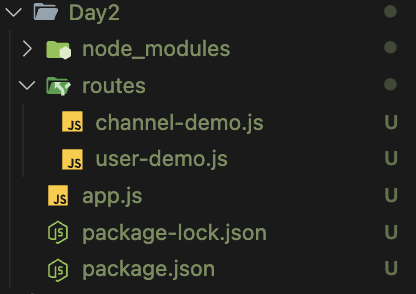
- 다음과 같이 디렉토리 셋팅을 해주고, 작성했던 코드들의 모듈화를 진행하자
const express = require('express');
const router = express.Router();

router.use(express.json()) // http 외 모듈 'json' 사용

let db = new Map();
let id = 1; //객체 식별 아이디

function isExist(obj) {
    if (Object.keys(obj).length) return true;
    else return false;
}
// 로그인
router.post('/login', function (req, res) {
    console.log(req.body); //id, pwd

    //id가 db에 저장된 회원인지 확인
    const { userId, password } = req.body;
    //let hasUserId = false;
    let loginUser = {};
    db.forEach(function (user, id) {
        //console.log(user.userId);
        if (user.userId === userId) {
            loginUser = user;
        }
    })

    if (isExist(loginUser)) {
        console.log('ID 매칭 성공');
        //넘어온 pwd가 id에 맞는 비밀번호인지
        if (loginUser.password === password) {
            console.log("password 매칭성공");
        } else {
            console.log("password 매칭 실패");
        }
    } else {
       console.log('입력하신 아이디는 없는 아이디 입니다.');
    }
})

// 회원 가입
router.post('/join', function (req, res) {
    console.log(req.body);
    // 입력된 body 객체가 비어 있지 않은지 확인
    if (Object.keys(req.body).length !== 0) {
        // 예시로 ID를 부여하는 방식을 간단히 시뮬레이션
        db.set(id++, req.body);

        res.status(201).json({
            message: `${req.body.name}님 환영합니다.`
        });
    } else {
        res.status(400).json({
            message: `입력값을 다시 확인해주세요.`
        });
    }
});

router
    .route('/users/:id')
    .get(function (req, res) {
        let { id } = req.params;
        id = parseInt(id);

        const user = db.get(id);
        if (user) {
            res.status(200).json({
                userId: user.userId,
                name : user.name
            })
        } else {
            res.status(404).json({
                message : '잘못된 아이디 번호입니다'
            })
        }
    })
    .delete(function (req, res) {
        let { id } = req.params;
        id = parseInt(id);

        const user = db.get(id);
        if (user) {
            db.delete(id);
            res.status(200).json({
            message: `${user.name}님 다음에 또 뵙겠습니다`
            })
        } else {
            res.status(404).json({
                message : '잘못된 아이디 번호입니다'
            })
        }
    })

module.exports = router // 모듈화 진행- 다음과 같이 router를 생성 후, 외부에서 사용할 수 있도록 모듈화를 진행해주자
- 이후 app.js에 다음과 같이 작성해보자
const express = require('express');
const app = express();

app.listen(7777);
const userRouter = require('./routes/user-demo')// user -demo
// channel -demo 호출해오기

app.use("/",userRouter)
const express = require('express');
const app = express();
app.listen(7777);
const userRouter = require('./routes/users')// user -demo
const channelRouter = require('./routes/channels');
app.use("/", userRouter)
app.use("/channels",channelRouter) // '/channels' 경로로 시작하는 모든 요청에 대해 channelRoutes 사용- app.use를 활용하여
‘/channels’경로로 시작하는 모든 요청에 대해 channelRouter를 할당해준다. channel.js에서는 API 설계시, URL을channels로 묶어 줬기 때문에 가능한 일이다.
const express = require('express');
const router = express.Router();
router.use(express.json());

let db = new Map();
let id = 1;

router
    .route('/')
    .get((req, res) => {
        if (db.size) {
            let channels = [];
            db.forEach(function (value, key) {
                channels.push(value);
            })
            res.status(200).json(channels);
        } else {
            res.status(404).json({
                message:'조회할 채널이 없습니다'
            })
        }
    }) //채널 전체 조회
    .post((req, res) => {
        const { channelTitle } = req.body;
        if (channelTitle) {
            db.set(id++, req.body);
            res.status(201).json({
                message: `${channelTitle}채널을 응원합니다`
            });
        } else {
            res.status(400).json({
                message : "채널명이 없습니다"
            })
        }
    }) //채널 개별 생성

router
    .route('/:id')
    .put((req, res) => {
        let { id } = req.params;
        id = parseInt(id);

        let channelInfo = db.get(id);
        let prevChannelTitle = channelInfo.channelTitle;
        if (channelInfo) {
            let newTitle = req.body.channelTitle;
            channelInfo.channelTitle = newTitle;
            db.set(id, channelInfo);

            res.json({
                message : `채널명이 정상적으로 수정되었습니다. 기존 ${prevChannelTitle} -> 수정 ${newTitle}`
            })
        } else {
            res.status(404).json({
                message : '채널 정보를 찾을 수 없습니다'
            })
        }
    }) //채널 개별 수정

    .delete((req, res) => {
        let { id } = req.params;
        id = parseInt(id);
        const channelInfo = db.get(id);
        if (channelInfo) {
            db.delete(id);
            res.status(200).json({
                message:`${channelInfo.channelTitle}님 채널이 정상적으로 삭제되었습니다`
            })
        } else {
            res.status(404).json({
                message : '채널 정보를 찾을 수 없습니다'
            })
        }
    }) //채널 개별 삭제

    .get((req, res) => {
        let { id } = req.params;
        id = parseInt(id);
        const channelInfo = db.get(id);
        if (channelInfo) {
            res.status(200).json(channelInfo);
        } else {
            res.status(404).json({
                message : '채널 정보를 찾을 수 없습니다'
            })
        }
    }) //채널 개별 조회

module.exports = router;- 이렇게 되면 원본
channel.js파일은, 기존에 설정해준route에서/channels를 제거해줘야 한다.
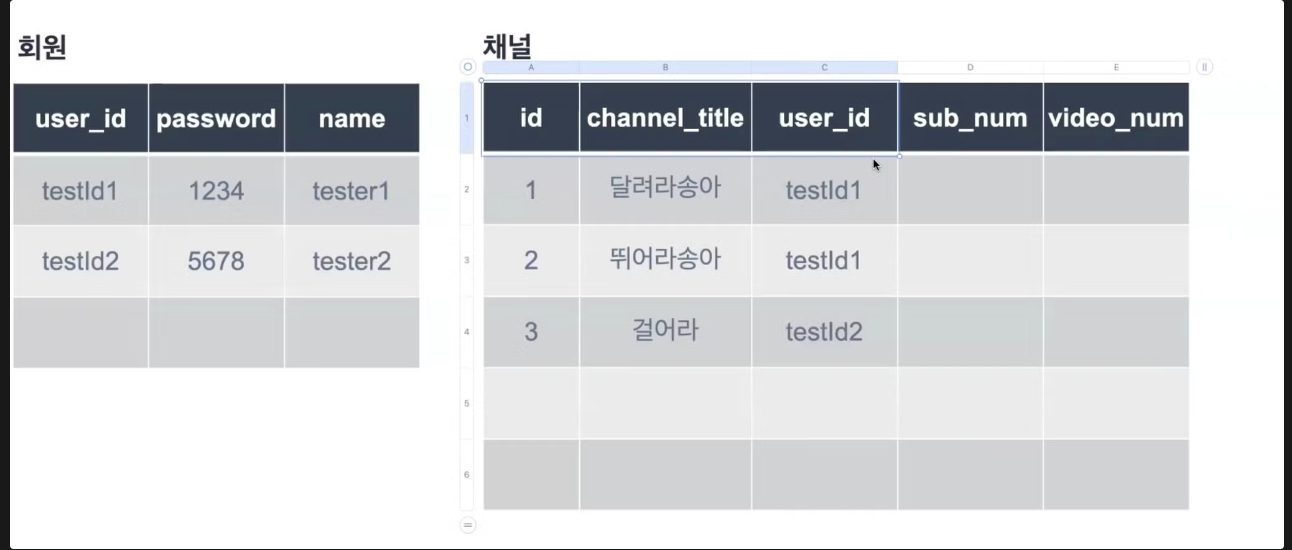
간단하게 ERD 고려해보기
채널 API 수정하기
- 채널 생성 : POST/channels
- req : body (channelTitle, userId) cf. userId는 body 가 아니라 header에 숨겨서 보낸다 Token..
- res 201 : 완료 메세지
- 채널 개별 수정: PUT/channels/:id
- req : URL (id), 수정할 데이터 (채널명)
- res 200 : 완료 메세지
- 채널 개별 삭제 : DELETE/channels/:id
- req : URL(id)
- res 200: 완료 메세지
- 해당 회원의 채널 전체 조회 : GET/channels
- req : body(userId)
- res 200: 전체 조회 데이터
- 채널 개별 조회 : GET/channels/:id
- req : URL(id)
- res 200 : 개별 조회 데이터
회원 API 수정하기
- 로그인 : POST/login
- req : body (userId, pwd)
- res :
${name}님 환영합니다
- 회원 가입 : POST/join
- req : body(userId, pwd, name)
- res :
${name}님 환영합니다
- 회원 개별 조회 : GET/users
- req : body (userId)
- res : UserId, name
- 회원 개별 삭제 : DELETE/users
- req : body(userId)
- res:
${name}님 다음에 뵙겠습니다
users.js
const express = require('express');
const router = express.Router();

router.use(express.json()) // http 외 모듈 'json' 사용

let db = new Map();
let id = 1; //객체 식별 아이디

function isExist(obj) {
    if (Object.keys(obj).length) return true;
    else return false;
}
// 로그인
router.post('/login', function (req, res) {
    console.log(req.body); //id, pwd

    //id가 db에 저장된 회원인지 확인
    const { userId, password } = req.body;
    //let hasUserId = false;
    let loginUser = {};
    db.forEach(function (user, id) {
        //console.log(user.userId);
        if (user.userId === userId) {
            loginUser = user;
        }
    })

    if (isExist(loginUser)) {

        //넘어온 pwd가 id에 맞는 비밀번호인지
        if (loginUser.password === password) {
            res.status(200).json({
                message: `${loginUser.name}님 로그인 되었습니다`
            })
        } else {
            res.status(400).json({
                message: `비밀번호가 틀렸습니다`
            })
        }
    } else {
        res.status(404).json({
            message: '입력하신 아이디는 없는 아이디 입니다.'
        })
    }
})

// 회원 가입
router.post('/join', function (req, res) {
    console.log(req.body);
    // 입력된 body 객체가 비어 있지 않은지 확인
    if (Object.keys(req.body).length !== 0) {
        // 예시로 ID를 부여하는 방식을 간단히 시뮬레이션
        const {userId} = req.body
        db.set(userId, req.body);

        res.status(201).json({
            message: `${db.get(userId).name}님 환영합니다.`
        });
    } else {
        res.status(400).json({
            message: `입력값을 다시 확인해주세요.`
        });
    }
});

router
    .route('/users')
    .get(function (req, res) {
        let { userId } = req.body;

        const user = db.get(userId);
        if (user) {
            res.status(200).json({
                userId: user.userId,
                name : user.name
            })
        } else {
            res.status(404).json({
                message : '잘못된 아이디 번호입니다'
            })
        }
    })
    .delete(function (req, res) {
        let { userId } = req.body;

        const user = db.get(userId);
        if (user) {
            db.delete(id);
            res.status(200).json({
            message: `${user.name}님 다음에 또 뵙겠습니다`
            })
        } else {
            res.status(404).json({
                message : '잘못된 아이디 번호입니다'
            })
        }
    })

module.exports = router // 모듈화 진행
channels.js
const express = require('express');
const router = express.Router();
router.use(express.json());

let db = new Map();
let id = 1;

function notFoundChannel() {
    res.status(404).json({
        message:'채널 정보를 찾을수 없습니다'
    })
}

router
    .route('/')
    .get((req, res) => {
        const { userId } = req.body;
        if (!userId) {
            return res.status(404).json({
                message: '로그인이 필요한 페이지입니다'
            });
        }

        const channels = Array.from(db.values()).filter(channel => channel.userId === userId);
        if (channels.length) {
            res.status(200).json(channels);
        } else {
            res.status(404).json({
                message: '조회할 채널이 없습니다'
            });
        }
    }) //채널 전체 조회
    .post((req, res) => {
        const channelTitle = req.body.channelTitle;
        let channel = req.body;
        if (channelTitle) {
            db.set(id++, channel);
            res.status(201).json({
                message: `${channelTitle}채널을 응원합니다`
            });
        } else {
            notFoundChannel();
        }
    }) //채널 개별 생성

router
    .route('/:id')
    .put((req, res) => {
        let { id } = req.params;
        id = parseInt(id);

        let channelInfo = db.get(id);
        let prevChannelTitle = channelInfo.channelTitle;
        if (channelInfo) {
            let newTitle = req.body.channelTitle;
            channelInfo.channelTitle = newTitle;
            db.set(id, channelInfo);

            res.json({
                message : `채널명이 정상적으로 수정되었습니다. 기존 ${prevChannelTitle} -> 수정 ${newTitle}`
            })
        } else {
            notFoundChannel();
        }
    }) //채널 개별 수정

    .delete((req, res) => {
        let { id } = req.params;
        id = parseInt(id);
        const channelInfo = db.get(id);
        if (channelInfo) {
            db.delete(id);
            res.status(200).json({
                message:`${channelInfo.channelTitle}님 채널이 정상적으로 삭제되었습니다`
            })
        } else {
           notFoundChannel();
        }
    }) //채널 개별 삭제

    .get((req, res) => {
        let { id } = req.params;
        id = parseInt(id);
        const channelInfo = db.get(id);
        if (channelInfo) {
            res.status(200).json(channelInfo);
        } else {
            notFoundChannel();
        }
    }) //채널 개별 조회

module.exports = router;
Express 구조 요약 정리
1. 라우터 구조 설정
- Express를 사용한 기본 라우팅을 설정하였으며, 각 요청(URL 및 HTTP 메서드)에 따라 적절한 경로로 요청을 안내하는 라우팅의 역할을 학습.
- 라우터 모듈화를 통해 코드의 가독성과 유지보수성을 높이는 방법을 배웠음.
2. 모듈 연결 및 라우팅 리팩토링
- channel-demo.js와 같은 파일을 활용하여, 모듈을 라우터와 연결하고, 코드의 이름과 URL을 설명하는 작업을 진행.
- 모듈화된 라우터 파일을 메인 app.js 파일에서 적절하게 연결하는 방법을 학습함.
3. 회원-채널 관계 ERD 설계
- 회원마다 채널을 가지는 관계를 ERD(Entity Relationship Diagram)로 시각화하여, 데이터베이스 구조와 각 엔티티 간의 관계를 명확히 이해.
- 회원과 채널 간의 1:N 관계를 모델링하는 방법을 학습함.
4. 채널 API 설계 및 테스트
- 채널 API 설계를 수정하고, 채널 생성에 대한 테스트를 진행.
- API 설계는 RESTful한 접근을 바탕으로, HTTP 메서드(GET, POST 등)에 따라 적절한 동작을 처리할 수 있도록 구조화함.
5. 회원 채널 조회 및 예외 처리
- 회원 채널 조회 시, userId가 없을 경우 예외 처리를 추가하여 안전한 API 설계를 학습.
- 예외 처리 흐름을 개선하여, 잘못된 요청이나 누락된 값이 있을 때 적절한 응답을 반환할 수 있도록 구현.
6. 예외 처리 if문 고도화
- if 문을 단순화하여, 조건부 처리 및 예외 처리의 가독성을 높이고 유지보수성을 향상시킴.
- 불필요한 중첩을 제거하고, 조건을 효율적으로 배치하는 방법을 학습함.
7. 백엔드 기초 마무리
- 위의 작업들을 통해 Express와 Node.js에서 백엔드 서버 구조 설계의 기초를 다짐.
- 서버의 라우팅, 예외 처리, 데이터베이스 설계 등을 종합적으로 다루며 기본적인 백엔드 개발 프로세스를 학습함.

성장해나갈 개발자