
🔎 백준 1181번 - 단어 정렬
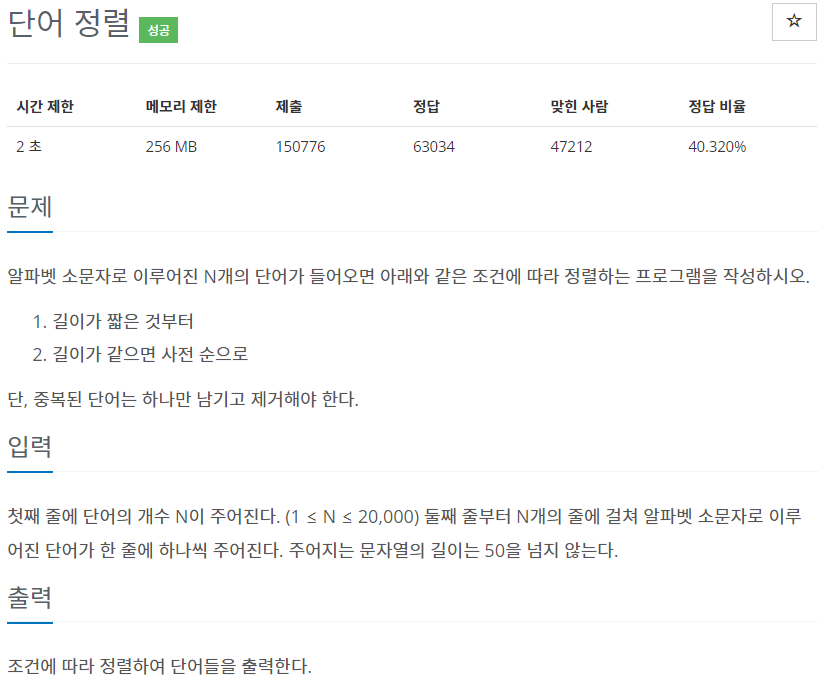
🔔 주의할 점
1. 단어 길이순으로 정렬한 뒤, 길이가 같을 경우 사전순으로 정렬해야 한다.
2. 중복되는 단어가 있을 경우 한번만 출력한다.
배열을 특정한 규칙에 의해 정렬하고 싶은 경우 Arrays.sort() 메소드에 Comparator을 구현하면 된다.
📝 풀이 코드
1차 조건은 단어 길이 순이다.
만약 단어 길이가 같을 경우 이 때 '사전순'으로 정렬하면 된다.
그러면 compare 메소드에서 if 조건문을 통해 단어 길이를 비교후 같을 경우 사전순으로 정렬하도록 하고, 그 외에는 단어 길이 순으로 정렬하면 된다.
단어 사전순 정렬은 대부분 알고 있겠지만 compareTo() 메소드를 쓰면 된다. 이 메소드 또한 리턴 반환값은 int형으로 나온다.
import java.util.Arrays;
import java.util.Comparator;
import java.util.Scanner;

public class Main {
	public static void main(String args[]) {
		Scanner sc = new Scanner(System.in);

		int n = sc.nextInt();
		sc.nextLine();
		String[] arr = new String[n];
		for(int i = 0; i < n; i++) {
			arr[i] = sc.nextLine();
		}

		Arrays.sort(arr, comp);

		System.out.println(arr[0]);

		for (int i = 1; i < n; i++) {
			// 중복되지 않는 단어만 출력
			if (!arr[i].equals(arr[i - 1])) {
				System.out.println(arr[i]);
			}
		}
	}

	public static Comparator<String> comp = new Comparator<String>() {
		@Override
		public int compare(String o1, String o2) {
			if(o1.length() == o2.length()) {
				return o1.compareTo(o2);
			}
			else {
				return o1.length() - o2.length();
			}
		}
	};
}- Comparator 표현
Arrays.sort(arr, new Comparator<String>() {
			public int compare(String s1, String s2) {
				// 단어 길이가 같을 경우
				if (s1.length() == s2.length()) {
					return s1.compareTo(s2);
				}
				// 그 외의 경우
				else {
					return s1.length() - s2.length();
				}
			}
		});
reference

항상 궁금해하기