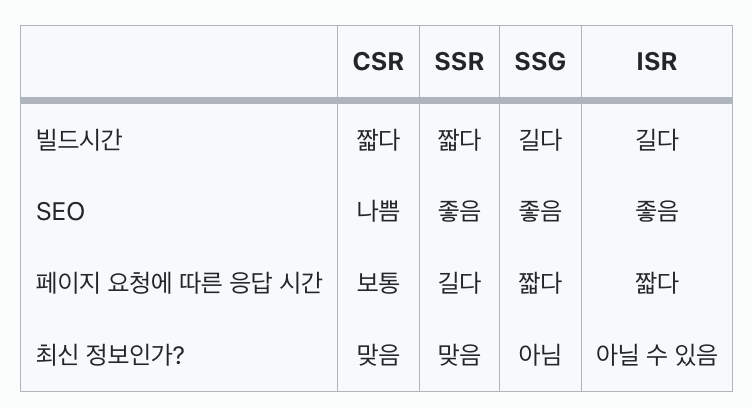
2. 4가지 주요 렌더링 기법
| CSR | SSR | SSG | ISR | |
|---|---|---|---|---|
| 빌드시간 | 짧다 | 짧다 | 길다 | 길다 |
| SEO | 나쁨 | 좋음 | 좋음 | 좋음 |
| 페이지 요청에 따른 응답 시간 | 보통 | 길다 | 짧다 | 짧다 |
| 최신 정보인가? | 맞음 | 맞음 | 아님 | 아닐 수 있음 |
1) CSR(Client Side Rendering)
구현방법
"use client;" 최상단에 사용하여 해당 컴포넌트를 서버 컴포넌트에 삽입
구현결과
요청이 있을 때 마다 지속해서 갱신 / loading에 관련된 state 제어를 통해 사용자에게 알려줄 수 있음
- 브라우저에서 JavaScript를 이용해 동적으로 페이지를 렌더링하는 방식
- 렌더링의 주체 : 클라이언트
- 장점
- 최초 로드가 끝나면, 사용자와의 상호작용이 빠르고 부드럽다
- UX 향상
- 서버 부하가 적음 - 단점
- TTV(Time to View, 첫 페이지 로딩시간)가 길다
- JavaScript가 로딩되고 실행될 때까지 페이지가 비어있어, 검색 엔진 최적화(SEO)에 불리
2) SSR(Server Side Rendering)
구현방법
fetch에 no-store 옵션 주기const ProductsPage = async () => { const response = await fetch('http://localhost:4000/products', {cache: "no-store"}); const products: Product[] = await response.json();구현결과
요청이 있을 때 마다 지속해서 갱신 / hydration이 완료되기 전까지의 시간; TTI(Time To Interactive)가 관건
- 클라이언트의 요청 시 렌더링
- 렌더링의 주체 : 서버
- 장점
- TTV가 짧아 높은 보안성 제공
- SEO 최적화 좋음
- 실시간 데이터 사용
- 마이페이지 처럼 데이터에 의존한 페이지 구성 가능 - 단점
- 요청할 때 마다 페이지를 만들어야 함
- 사이트의 콘텐츠가 변경되면 전체 사이트를 다시 빌드해야 하는데, 이 과정의 시간이 오래 걸릴 수 있음 → 서버 과부하
- CDN(Content Delivery Network) 캐싱 불가
3) SSG(Static Site Generation)
구현방법
1) fetch에 아무 옵션 주지 않기(기본값)
2) fetch에 force-cache 옵션 주기const HomePage = async () => { const response = await fetch('http://localhost:4000/products', {cache: "force-cache"}); const products: Product[] = await response.json();구현결과
아무리 새로고침을 하여도 동일한 페이지만 출력
- 서버에서 페이지를 렌더링 하여 클라이언트에게 HTML을 전달하는 방식
- 최초 빌드 시에만 생성됨
- 렌더링의 주체 : 서버
- 장점
- TTV가 짧음
- SEO에 유리
- CDN(Content Delivery Network) 캐싱 가능 - 단점
- 정적인 데이터에만 사용가능
- CSR 방법보다 사용자와의 상호작용이 느림, 서버 부하가 클 수 있음
- 마이페이지 처럼 데이터에 의존하여 화면을 그려주는 경우 사용 불가
4) ISR(Incremental Static Regeneration)
구현방법
1) fetch에 next 옵션주기const ProductsPage = async () => { const response = await fetch('http://localhost:4000/products', next: { revalidate: 5, }, ); const products: Product[] = await response.json();2) page.tsx 컴포넌트에 revalidate 추가하기(next 옵션은 지우기)
export const revalidate = 5;
const HomePage = async () => {
  const response = await fetch('http://localhost:4000/products');
  const products: Product[] = await response.json();
구현결과
주어진 시간에 한 번씩 갱신
- 정적 페이지를 먼저 보여주고, 필요(설정한 주기만큼)에 따라 서버에서 페이지를 재생성하는 방식
- 렌더링의 주체 : 서버
- 장점
- 정적 페이지를 먼저 제공하므로 사용자 경험(UX)이 좋음
- 콘텐츠가 변경되었을 때 서버에서 페이지를 재생성하므로 최신 상태를 그나마 유지가능
- CDN 캐싱 가능 - 단점
- 동적인 콘텐츠를 다루기에 한계가 있음
- 마이페이지 처럼 데이터에 의존하여 화면을 그려주는 경우 사용 불가

24.07.15 프론트엔드 개발 첫 걸음