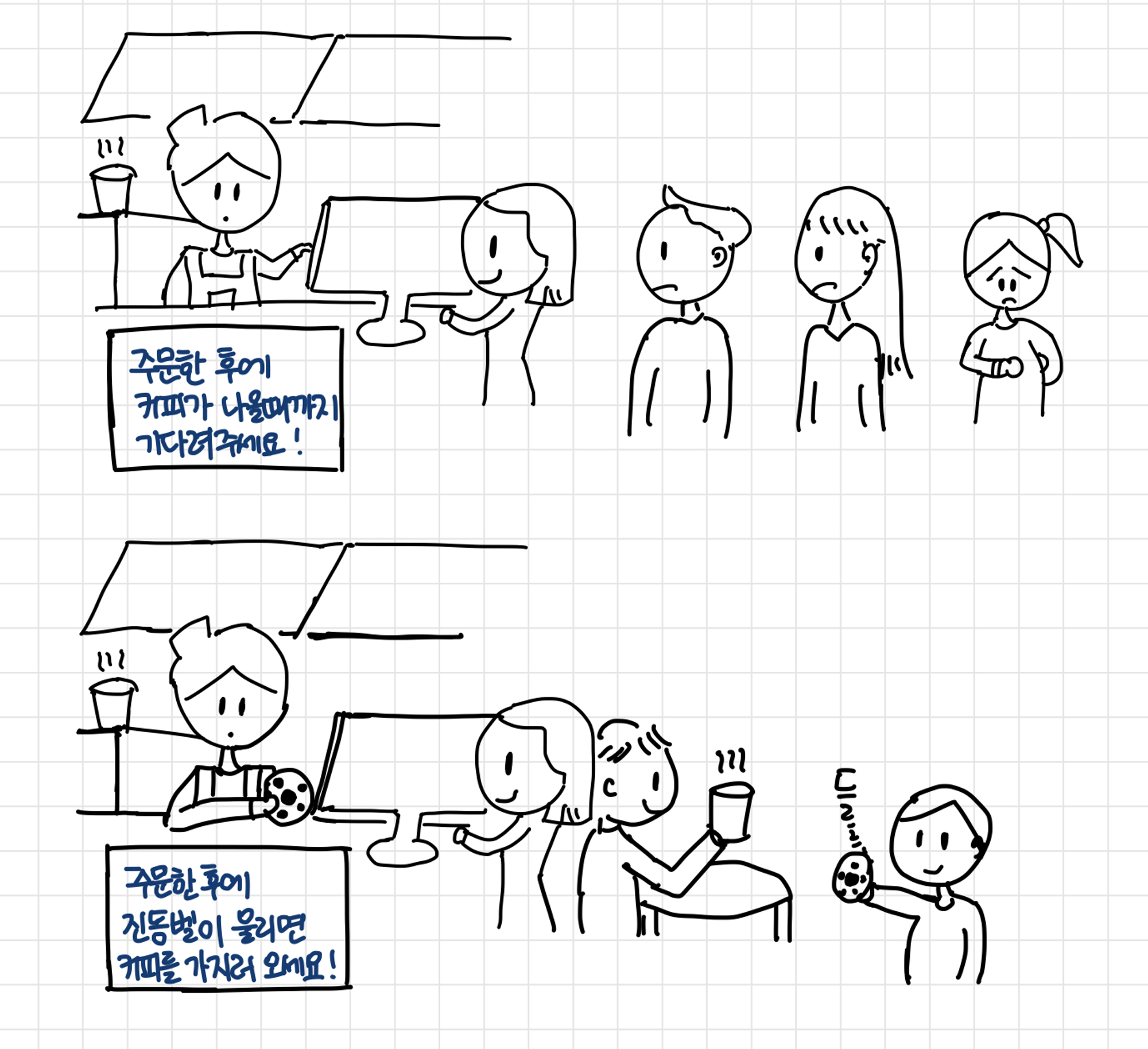
 (위)동기 (아래)비동기
동기 vs 비동기
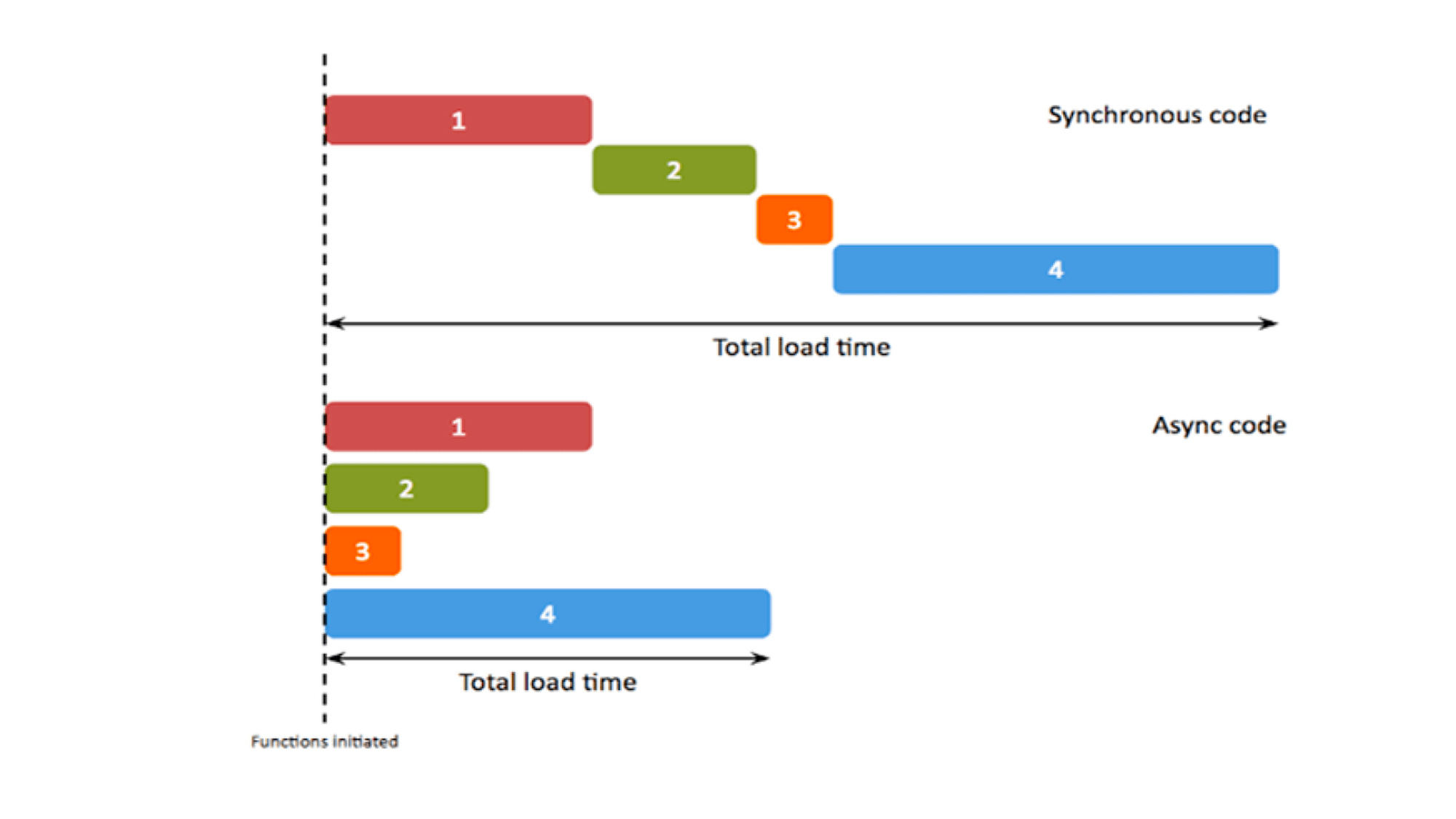
| 동기 | 비동기 |
|---|---|
| - 현재 실행중인 코드가 끝나야 다음 코드 실행 | - 실행중인 코드의 완료 여부와 무관하게 즉시 다음 코드 실행 |
| - CPU의 계산에 의해 즉시 처리가 가능한 대부분의 코드 | - setTimeout, addEventListner 등 |
| - 복잡해서 CPU가 계산하는 데에 오래 걸림 | 별도의 요청, 실행 대기, 보류 등과 관련된 코드 |
비동기적 코드의 이해
setTimeout(function () {
    console.log('AAAA')
}, 1000);

console.log('BBBB');
동기적 코드라면, AAAA -> BBBB 순으로 출력 될 것이다.
하지만 비동기적 코드라면 setTimeout의 조건(1초 후 실행)에 의해 BBBB -> AAAA 순으로 출력된다.
콜백지옥의 예시와 탈출 방법
콜백 지옥 예시
- 들여쓰기 수준 📉
- 값 전달 순서 : 아래 → 위
- 출력값

  setTimeout(
    function (name) {
        var coffeeList = name;
        console.log(coffeeList);

        setTimeout(
            function (name) {
                coffeeList += ", " + name;
                console.log(coffeeList);

                setTimeout(
                    function (name) {
                        coffeeList += ", " + name;
                        console.log(coffeeList);

                        setTimeout(
                            function (name) {
                                coffeeList += ", " + name;
                                console.log(coffeeList);
                            },
                            500,
                            "카페라떼"
                        );
                    },
                    500,
                    "카페모카"
                );
            },
            500,
            "아메리카노"
        );
    },
    500,
    "에스프레소"
);
해결방안 1 - 기명함수로 변환
- 값 전달 순서 : 위 → 아래
- 장점 : 가독성이 좋음
- 단점 : 쓸데없이 구구절절 이름이 붙음
var coffeeList = '';

var addEspresso = function (name) {
    coffeeList = name;
    console.log(coffeeList);
    setTimeout(addAmericano, 500, '아메리카노');
};

var addAmericano = function (name) {
    coffeeList += ', ' + name;
    console.log(coffeeList);
    setTimeout(addMocha, 500, '카페모카');
};

var addMocha = function (name) {
    coffeeList += ', ' + name;
    console.log(coffeeList);
    setTimeout(addLatte, 500, '카페라떼');
};

var addLatte = function (name) {
    coffeeList += ', ' + name;
    console.log(coffeeList);
};

setTimeout(addEspresso, 500, '에스프레소');
해결방안 2 - 비동기 작업의 동기적 표현
비동기 작업의 동기적 표현 (1) - Promise
- Promise ? 비동기 처리에 대해 처리가 끝나면 알려달라는 '약속'
- 내부의
resolve(또는reject) 함수를 호출하는 구문이 있는 경우, 둘 중 하나가 실행되기 전까지는 다음(then), 오류(catch) 구문으로 넘어가지 않는다.- 따라서! 비동기작업이 완료될 때 비로소 resolve, reject 호출
new Promise(function (resolve) {
    setTimeout(function () {
        var name = '에스프레소';
        console.log(name);
        resolve(name);
    }, 500);
}).then(function (prevName) {
    return new Promise(function (resolve) {
        setTimeout(function () {
            var name = prevName + ', 아메리카노';
            console.log(name);
            resolve(name);
        }, 500);
    });
}).then(function (prevName) {
    return new Promise(function (resolve) {
        setTimeout(function () {
            var name = prevName + ', 카페모카';
            console.log(name);
            resolve(name);
        }, 500);
    });
}).then(function (prevName) {
    return new Promise(function (resolve) {
        setTimeout(function () {
            var name = prevName + ', 카페라떼';
            console.log(name);
            resolve(name);
        }, 500);
    });
});
📌 위 코드의 반복부분을 함수화 한 코드는 다음과 같다!
var addCoffee = function (name) {
    return function (prevName) {
        return new Promise(function (resolve) {
            setTimeout(function () {
                var newName = prevName ? (prevName + ', ' + name) : name;
                console.log(newName);
                resolve(newName);
            }, 500);
        });
    };
};

addCoffee('에스프레소')()
    .then(addCoffee('아메리카노'))
    .then(addCoffee('카페모카'))
    .then(addCoffee('카페라떼'));
비동기 작업의 동기적 표현 (2) - Generator
- 이터러블 객체(Iterable) - 반복될 수 있는 , 반복할 수 있는
*가 붙은 함수가제너레이터 함수. 실행하면,Iterator 객체가반환(next()를 가지고 있음)- iterator 은 객체는 next 메서드로
순환할 수 있는 객체.next 메서드호출 시, Generator 함수 내부에서 가장 먼저 등장하는yield에서stop이후 다시 next 메서드를 호출하면 멈췄던 부분 -> 그 다음의yield까지 실행 후stop- 즉, 비동기 작업이 완료되는 시점마다 next 메서드를 호출해주면 Generator 함수 내부소스가 위 -> 아래
순차적으로진행
var addCoffee = function (prevName, name) {
	setTimeout(function () {
		coffeeMaker.next(prevName ? prevName + ', ' + name : name);
	}, 500);
};
var coffeeGenerator = function* () {
	var espresso = yield addCoffee('', '에스프레소');
	console.log(espresso);
	var americano = yield addCoffee(espresso, '아메리카노');
	console.log(americano);
	var mocha = yield addCoffee(americano, '카페모카');
	console.log(mocha);
	var latte = yield addCoffee(mocha, '카페라떼');
	console.log(latte);
};
var coffeeMaker = coffeeGenerator();
coffeeMaker.next();
비동기 작업의 동기적 표현 (3) - Promise + Async/await ✨
- 비동기 작업을 수행코자 하는
함수 앞에async함수- 내부에서 실질적인
비동기 작업이 필요한 위치마다await를 붙여주면 된다.- Promise ~ then과 동일한 효과 를 얻을 수 있으면서 좀 더 간결하다.
var addCoffee = function (name) {
	return new Promise(function (resolve) {
		setTimeout(function(){
			resolve(name);
		}, 500);
	});
};

var coffeeMaker = async function () {
	var coffeeList = '';
	var _addCoffee = async function (name) {
		coffeeList += (coffeeList ? ', ' : '') + await addCoffee(name);
	};
	await _addCoffee('에스프레소');
	console.log(coffeeList);
	await _addCoffee('아메리카노');
	console.log(coffeeList);
	await _addCoffee('카페모카');
	console.log(coffeeList);
	await _addCoffee('카페라떼');
	console.log(coffeeList);
};
coffeeMaker();
실습
async/await 로 리팩토링
class HttpError extends Error {
  constructor(response) {
    super(`${response.status} for ${response.url}`);
    this.name = 'HttpError';
    this.response = response;
  }
}


function loadJson(url) {
  return fetch(url)
    .then(response => {
      if (response.status == 200) {
        return response.json();
      } else {
        throw new HttpError(response);
      }
    })
}

function narutoIsNotOtaku() {
  let title = prompt("애니메이션 제목을 입력하세요.", "naruto");

    return loadJson(`https://animechan.xyz/api/random/anime?title=${title}`)
    .then(res => {
            alert(`${res.character}: ${res.quote}.`);
      return res;
    })
    .catch(err => {
      if (err instanceof HttpError && err.response.status == 404) {
        alert("일치하는 애니메이션이 없습니다. 일반인이시면 naruto, onepiece 정도나 입력해주세요!");
        return narutoIsNotOtaku();
      } else {
        throw err;
      }
    });
}

narutoIsNotOtaku();
위의 코드를 리팩토링 하면 아래와 같다.
class HttpError extends Error {
  constructor(response) {
    super(`${response.status} for ${response.url}`);
    this.name = 'HttpError';
    this.response = response;
  }
}


async function loadJson(url) {
	// promise then 부분
  let response = await fetch(url);
  if (response.status == 200) {
        return response.json();
    } else {
        throw new HttpError(response);
    }
}

async function narutoIsNotOtaku() {

  let title;
  while(true) {
    title = prompt("애니메이션 제목을 입력하세요.", "naruto");
		// promise 체이닝 catch 부분 -> try catch문 사용해서 동일 로직 시행 가능
    try {
      res = await loadJson(`https://animechan.xyz/api/random/anime?title=${title}`);
      break;
    } catch(err) {
      if (err instanceof HttpError && err.response.status == 404) {
        alert("일치하는 애니메이션이 없습니다. 일반인이시면 naruto, onepiece정도나 입력해주세요.");
      } else {
        throw err;
      }
    }
  }


  alert(`${res.character}: ${res.quote}.`);
  return res;
}

narutoIsNotOtaku();
그래서 저도 위 방법 중 3번, async/await 사용하겠습니다 🙂