현재 나의 위치
user의 위치(geolocation)를 주는 함수 : navigator
navigator와 geolocation 을 활용.
navigator.geolocation.getCurrentPosition위 코드 하나로 브라우저에서 위치좌표를 줌
getCurrentPosition은 argument가 2개 필요함.
하나는 모든게 잘 됬을때 실행될 함수
나머지는 에러가 발생했을 때 실행될 함수임.
success 함수는 GeolocationPosition object 하나를 입력 받음.
즉 자바스크립트가 GeolocationPosition object를 input parameter로 줌.
만약 위치를 받는데 성공했다면
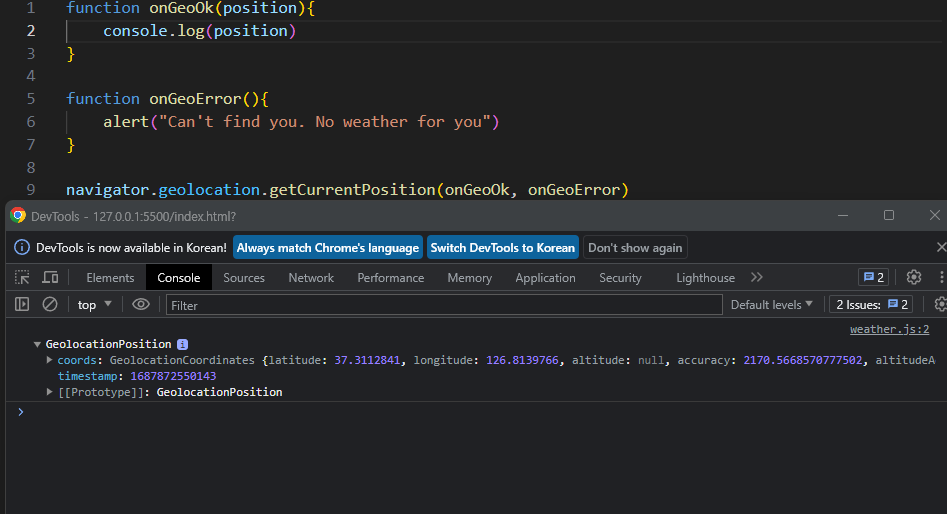
위와 같은 화면이 나오게 됨. coords를 보면 내가 있는 위도와 경도 가 나옴.
function onGeoOk(position){
    const lat = position.coords.latitude
    const lng = position.coords.longitude
    console.log("You live in ",lat, lng)
}

function onGeoError(){
    alert("Can't find you. No weather for you")
}

navigator.geolocation.getCurrentPosition(onGeoOk, onGeoError)
다음으로 이 숫자(위도와 경도)들을 장소로 바꿔줄 서비스를 사용해야 함.
날씨
openweathermap.org 라는 사이트임.
기본적으로 api는 다른 서버와 이야기할 수 있는 방법(ex. 은행 창구)
위 웹사이트에서 현재 장소와 날씨를 확인할 수 있는 URL은 다음과 같음.
https://api.openweathermap.org/data/2.5/weather?lat={lat}&lon={lon}&appid={API key}
여기서 {lat}, {lon}, {API key}를 해당 숫자로 바꿔주면 API를 부를 수 있음.
이제 자바스크립트에서 url을 부르는 방법!
const url = `https://api.openweathermap.org/data/2.5/weather?lat=${lat}&lon=${lon}&appid=${API_KEY}` // 백틱 ``으로 감싸는 것 확인.이제 url을 갖고 있음!!
그 다음은 url에서 얻어야 함.
fetch를 사용해서 url 부를 거임.
fetch(url);그러면 실제 url에 갈 필요없이 자바스크립트가 대신 url을 불렀고
아직 얻은 정보를 활용하진 않았음.
fetch는 promise임. promise는 당장 뭔가 일어나지 않고 시간이 좀 걸린 뒤에 일어나는 것.
서버에 뭔가를 물어봣는데 5분정도 걸린다고 치자 그러면 5분동안 서버의 응답을 기다려야함.
그래서 then을 사용해야 함.
fetch(url).then(response.json())이제 어떤 일이 일어나냐면 url을 fetch하고 그 다음으로 response을 받아야 함.
그리고 response의 json을 얻어야 함.
그 다음 내용을 추출했으면 data를 얻을거임.
fetch(url).then(response.json()).then(data =>{
)
그리고 console.log로 data안에 값을 찍어볼 수 있음!
console.log(data.name, data.weather[0].main그 결과 ex) seoul clouds 와 같은 식으로 표현될 수 있음.
이제 변수를 만들어주고
    fetch(url).then(response.json()).then(data =>{
        const name = data.name
        const weather = data.weather[0].main;
    })
html에서 태그를 만들고..<div id="weather">와 그 안에<span> 태그 2개.
이제 아래와 같이 코드를 입력하면 끗.
    fetch(url).then(response.json()).then(data =>{
        const weather = document.querySelector("#weather span:first-child")
        const city = document.querySelector("#weather span:last-child")
        city.innerText = data.name
        weather.innerText = data.weather[0].main;
    })
}
weather은 html에서 weather라는 id를 가진 태그 안에 span태그 중 첫번째에
그리고 city는 span 태그 중 마지막 span을 뜻하고
그 안에 들어가는 innerText는 각각 fetch로 가져온 data의 name과
data안에 weather라는 array중 1번째인 main의 값이다! 라는 의미.
온도도 표시할 수 있는데 먼저 weather은 문자열이 될거고
(날씨이름 / data.main.temp)
그래서
weather.innerText = "${data.weather[0].main }/${ data.main.temp}"위처럼 코드가 바뀌어야함.
끗!!!!!