
OCR 이란?
Optical Character Recognition으로 '광학 문자 인식 서비스'를 뜻한다.
쉽게 말하자면, 주변에서 흔히 볼수있는 이미지 내부의 텍스트를 추출하는 기능이다.
활용 예시
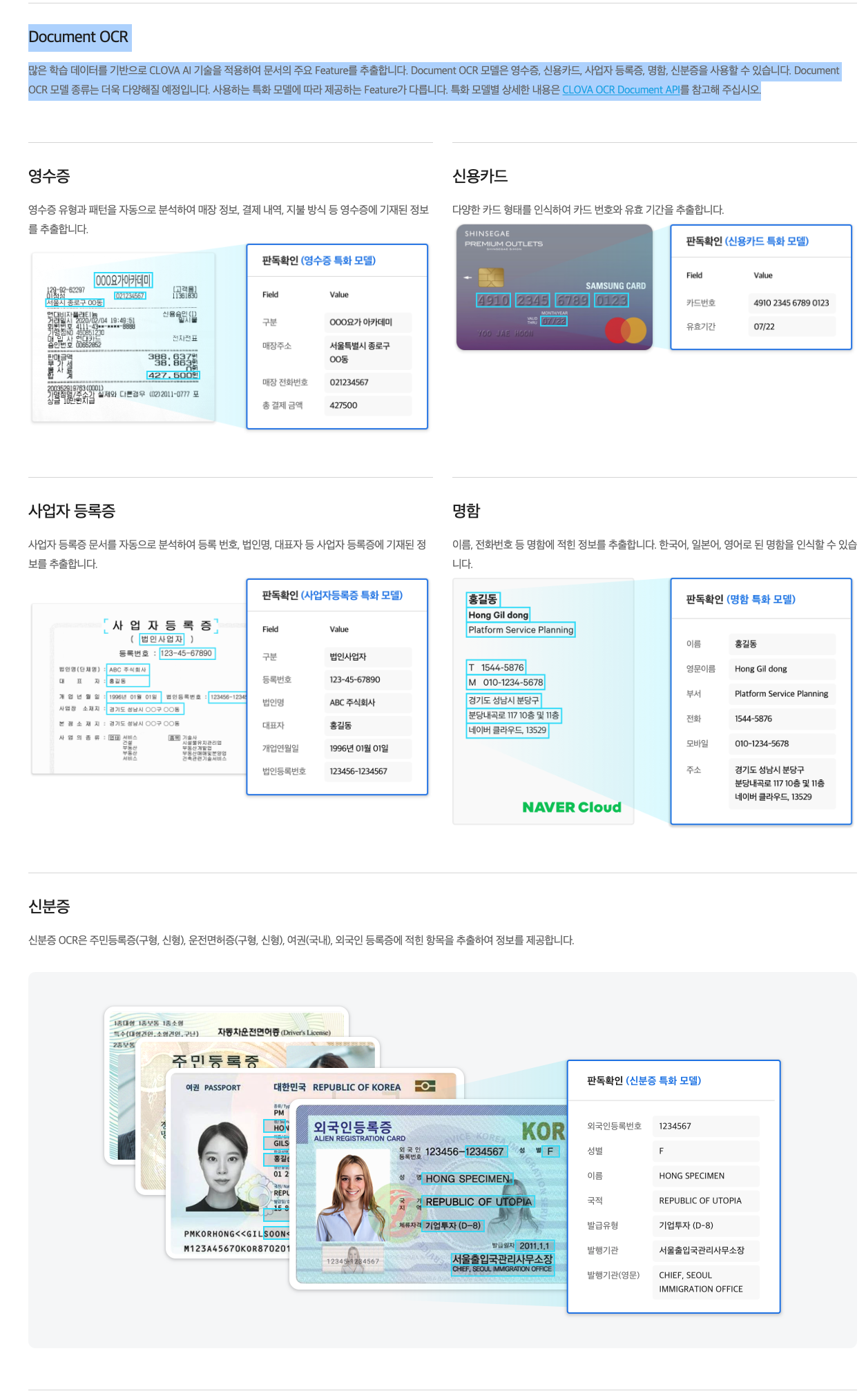
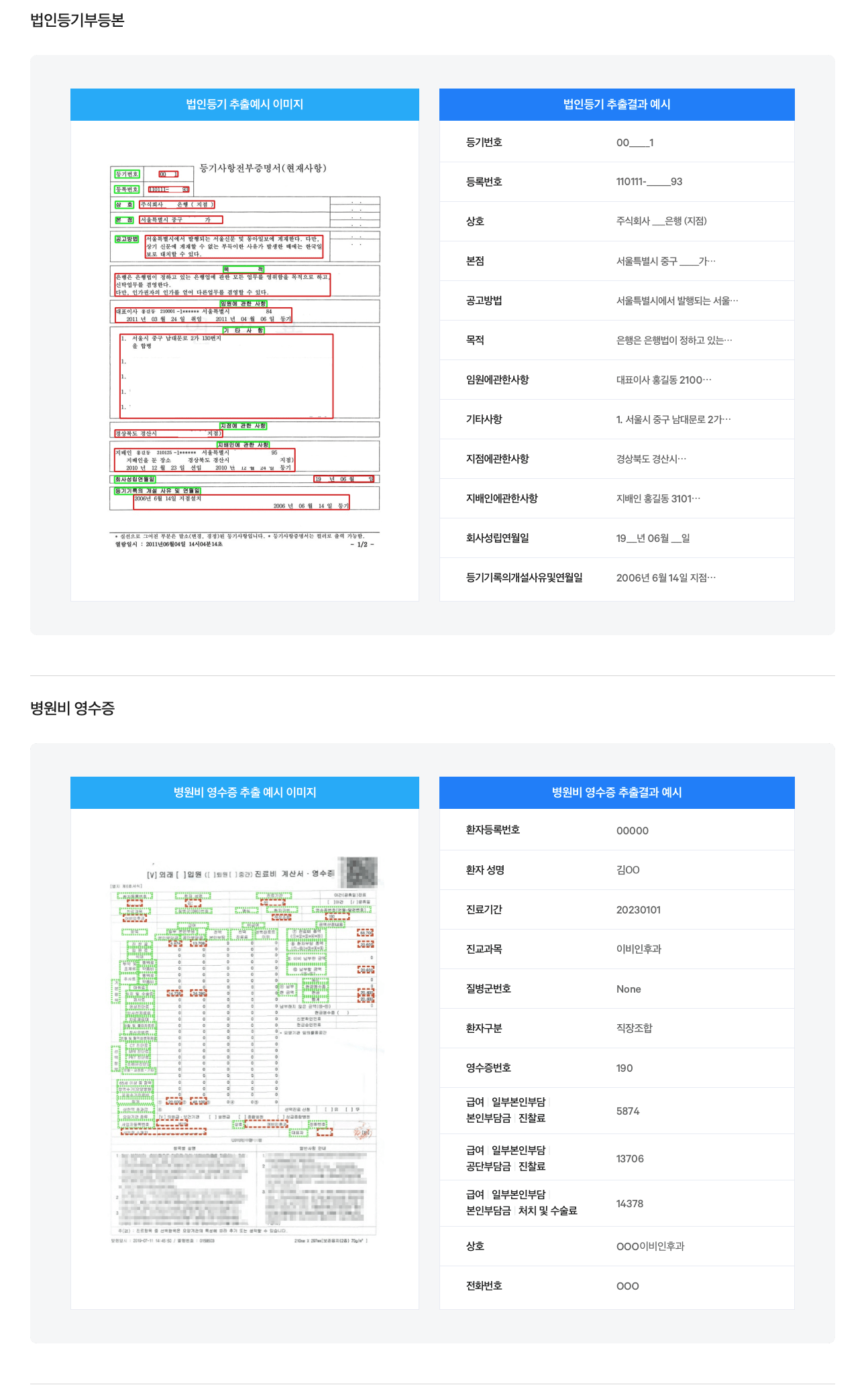
- 다양한 전표를 해당 템플릿에 맞게 분류하고 분류된 문서에서 추출한 정보를 사내 시스템과 연계하여 정보 분류 및 관리에 활용
- 다양한 청구 서류를 분류해야 하는 작업에 활용
- 다양한 형태로 정형화된 문서 인식 서비스로 활용
여러 OCR 플랫폼이 존재하지만 필자가 테스트해본 OCR 서비스는 네이버 클로바 ocr이다.
naver clova ocr (https://www.ncloud.com/product/aiService/ocr)
naver clova ocr 의 내부구현을 자세하게 설명할 순 없지만,
딥러닝 기반의 OCR의 원리는 아래와 같다.
참고 링크
-
전처리(Pre Processing)
컴퓨터는 사람처럼 직관적으로 문자를 구분하지 못하고,
이미지에서 색 분석을 통해 비슷한 밝기를 가진 픽셀을 덩어리처럼 인식해 색깔차이를 분명하게 해주어 인식률을 높인다.
전처리단계는 컴퓨터가 텍스트를 보다 쉽게 인식할 수 있도록 이미지 보정을 하는단계이다. -
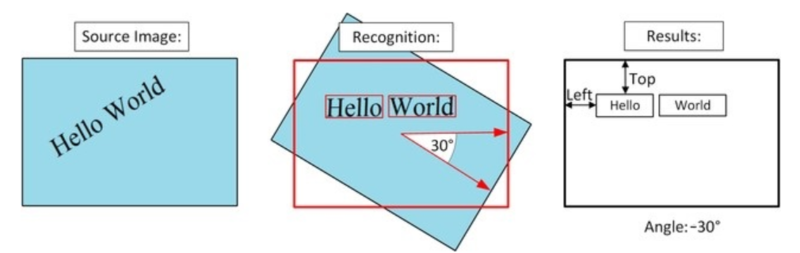
문자 검출(Text Detection)
텍스트인 영역을 골라내는 작업을 수행,
텍스트영역의 회전각도를 구하고 텍스트를 수평 형태로 만든다. 수평으로 만들어야 정확하게 글자를 인식할 수 있다.
3.글자 인식(Text Recognition)
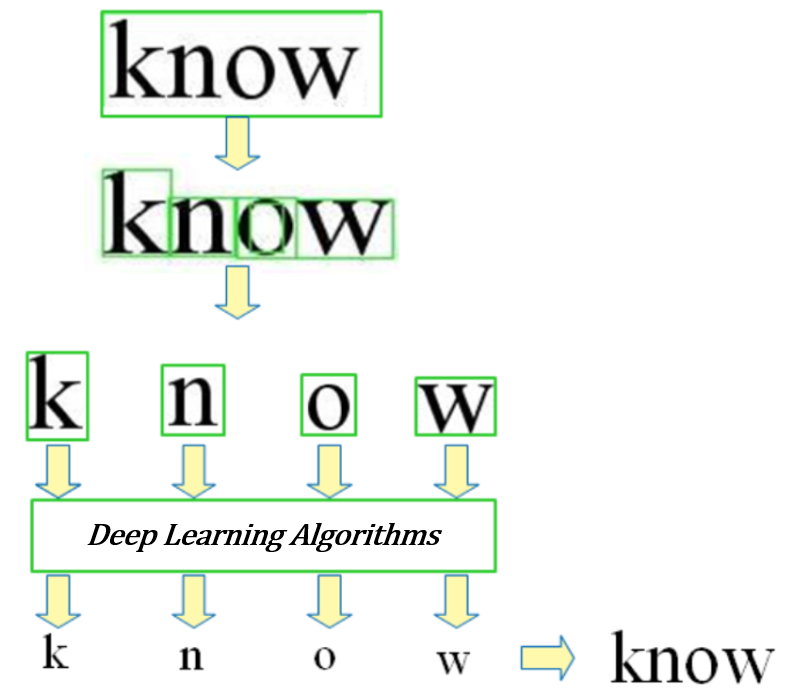
전처리와 문자검출 단계에서 문자 영역을 골라냈다면 어떤 문자인지 알아내야 한다.
텍스트 영역의 문자들을 각각 인식하고, 딥러닝 시스템을 이용해 글자를 구분하는 여러 특징을 학습해 해당 문자가 어떤 문자인지 알아낸다.
4.후처리(Post Processing)
후처리단계는 출력된 텍스트의 내용적인 부분을 따져서 부자연스로운 단어나 문자가 포함되면 이를 고침으로써 정확도를 향상하는 단계다.ex) '홋길동' 이라는 단어는 맥락상 이름이지만 '홋'이라는 성은 존재하지 않으므로 '홍길동'으로 수정
naver ocr 에는 두가지 도메인이 존재한다.
일반/템플릿
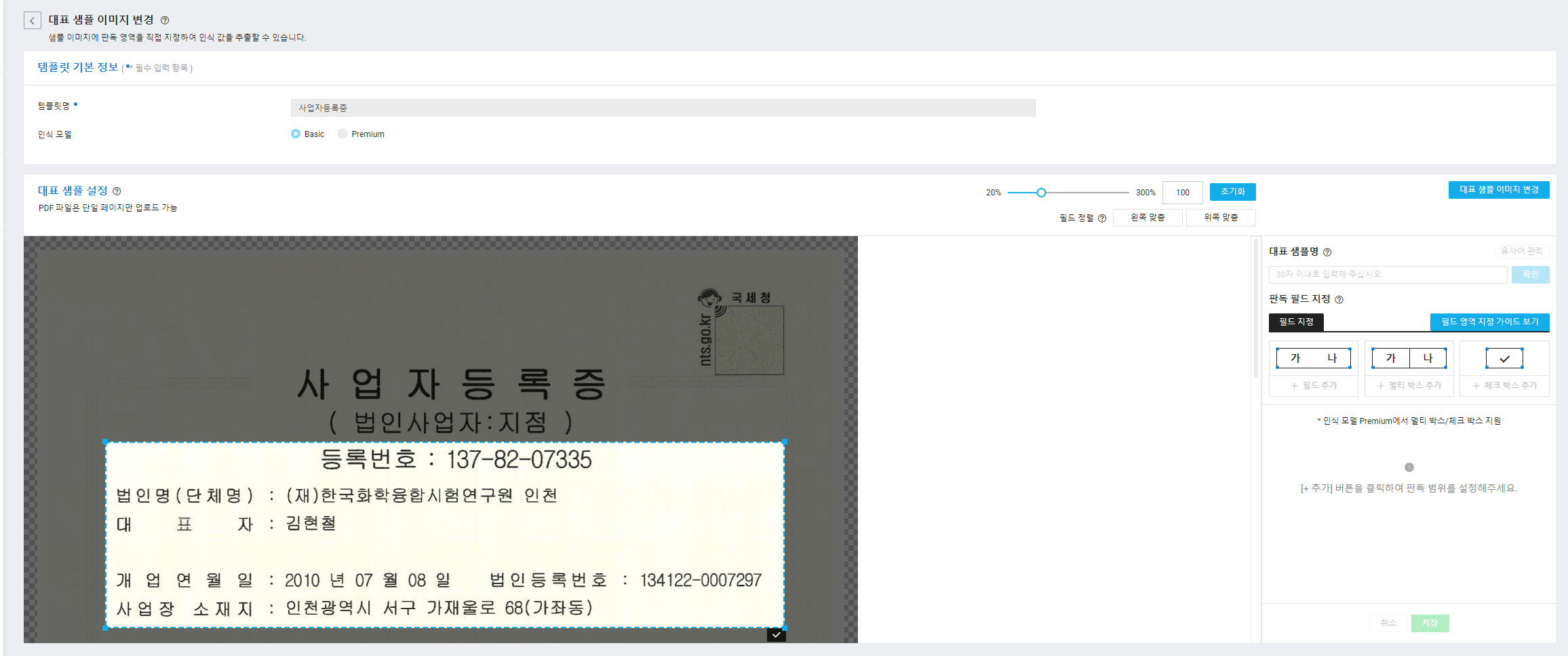
문서 내 모든 영역의 텍스트를 추출하는 일반 도메인과 판독 영역을 직접 지정하여 인식 값을 추출하는 템플릿 도메인을 생성.
- 일반 : 이미지내에 텍스트와 표를 그대로 추출
- 템플릿: 판독영역을 직접 지정
템플릿 같은경우 아래 이미지와 같이 판독영역을 직접 지정할 수 있다.
특화 모델
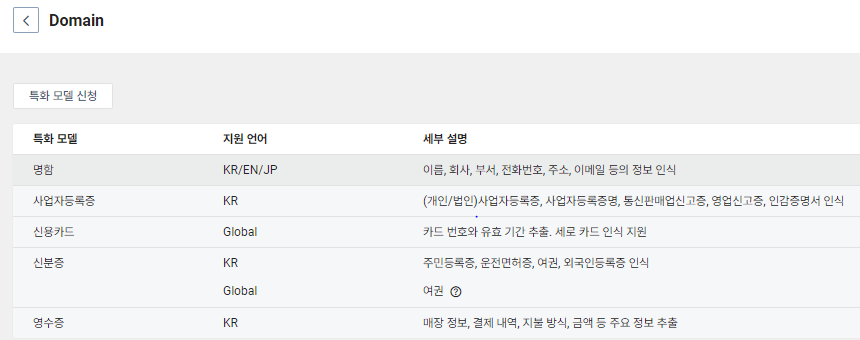
머신러닝 기반으로 문서의 의미 구조를 이해하는 특화 모델 엔진을 사용하여 입력 정보(key-value)를 자동으로 추출하는 특화 모델 도메인을 생성.
특화모델 같은경우 아래의 모델들을 사용할 수 있고, 각각의 모델을 사용하기위한 승인절차가 필요.
배치 기능
편리하게 호출하여 사용이 가능하지만 불편한점도 존재한다.
1. 한번에 10장 이상의 이미지는 추출할 수 없다.
2. PDF 파일의 경우 한장 초과하여 추출할 수 없다.
위 문제를 해결하기 위해 naver clova 에서는 batch라는 방법을 제안했다.
배치란 naver clova에서 대용량 이미지를 일괄처리하는 기능이다.
배치기능 사용 방법
-
배치기능을 사용하기 위해서는 Object Storage 라는 AWS 의 S3와 비슷한 객체 스토리지(버킷생성)를 생성해야한다.
(인식 대상 저장 경로와 결과 파일 저장 경로는 동일하거나 상위/하위 폴더에 설정할 수 없다, 필자는 버킷을 두개 생성) -
아래 이미지와 같이 기존에 생성한 ocr 기능을 사용할 도메인을 선택해 배치생성을 진행한다.
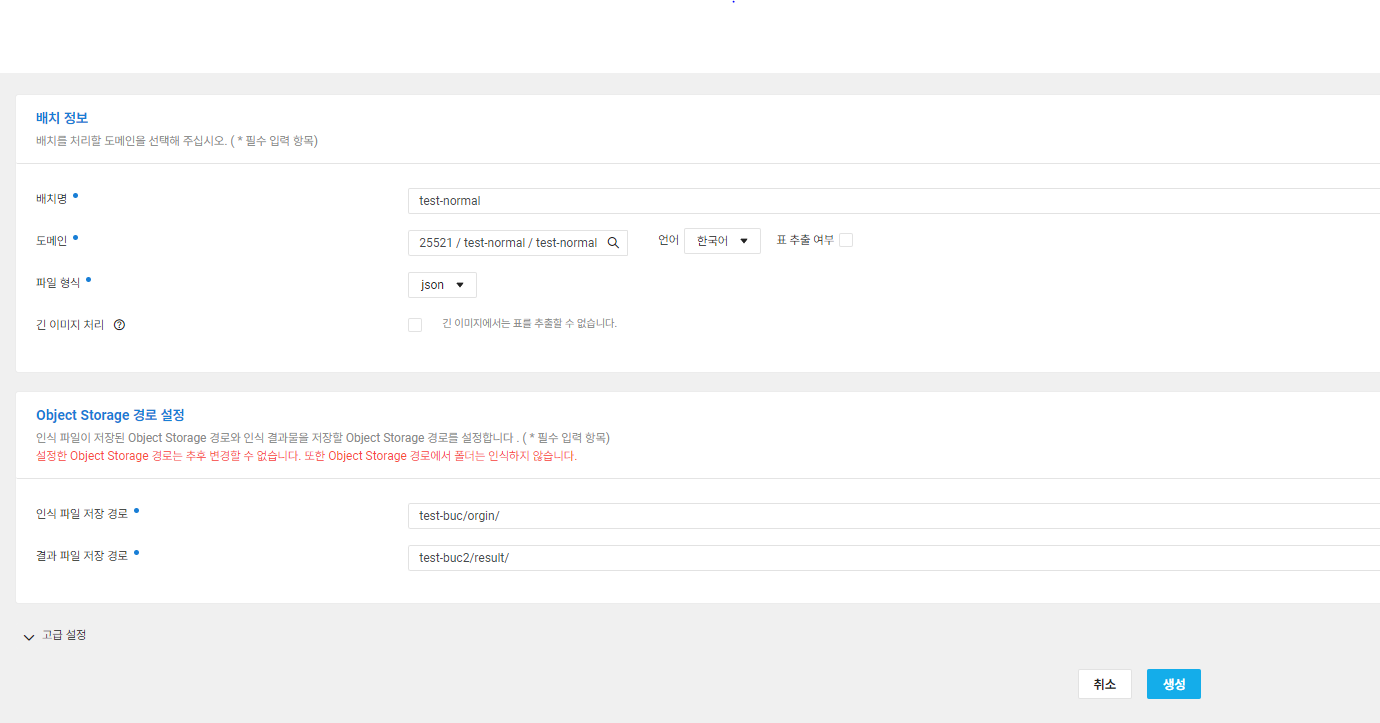
- 배치생성이 완료됐다면 인식파일 저장경로에 추출할 이미지 파일 업로드시 결과파일 저장경로에 json 형태로 ocr 결과가 생성된다.
이러한 방법으로 대용량 이미지를 처리한다.
테스트 방법
- naver clova ocr 회원가입
- 사용할 도메인 생성(필자는 특화 모델의 사업자등록증 조회 기능 사용) , Naver ocr secret key 발급
- 생성한 도메인 기능을 사용하기 위해 인터넷 게이트웨이 생성
- 플랫폼에서 지원하는 파일을 이용한 텍스트 추출
필자는 postman을 이용해 test를 진행했고,
- Headers 에 X-OCR-SECRET 키에 발급받은 secret key 입력
- 생성한 인터넷 게이트웨이 주소를 사용 (POST)
- format란에는 추출할 파일의 확장자를 작성,
아래와같은 Body 데이터를 담는데 url에 CDN을 통한 이미지 경로를 입력하거나,
data 필드에 이미지를 base64 인코딩 값을 넣은 후 api 호출을 한다.
{
    "images": [
      {
        "format": "pdf",
        "name": "medium",
        "data": null,
        "url": "https://test/11111111-1111-1234-5678-1c1111111111.pdf"
      }
    ],
    "lang": "ko",
    "requestId": "string",
    "resultType": "string",
    "timestamp": {{$timestamp}},
    "version": "V1"
}
api 호출 후 아래 코드(IBizLicenseResultDetail) 와같은 형식으로 데이터를 받아볼 수 있고
사업자등록증과 관련된 정보들을 보기쉽게 나열되어있는걸 확인할 수 있다.
아래 코드는 nestjs에서 호출하는 인터페이스를 구현한 코드.

async readRegistrationByNaverOcr(
    input: INaverOcrRegistration,
  ): Promise<IBizLicenseResultDetail[]> {
    try {
      if (input) {
        const res = await lastValueFrom(
          this.httpService.post(this.config.NAVER_OCR_IGW, input, {
            headers: {
              'X-OCR-SECRET': this.config.NAVER_OCR_SECRET,
              'Content-Type': 'application/json',
            },
          }),
        );

        const bizLicenseResultDetailList: IBizLicenseResultDetail[] =
          res?.data?.images?.map(
            (item: INaverOcrImagesResultDetailResponse) => {
              return item.bizLicense?.result;
            },
          );

        return bizLicenseResultDetailList;
      }
    } catch (error) {
      console.log(error);
      throw error
    }
  }


  export interface IBizLicenseResultDetail {
  bisAddress: IBizLicenseResultPropertyDetail[]; // ex) 서울특별시 서초구 나루터로... 주소
  bisItem: IBizLicenseResultPropertyDetail[]; // ex) 소프트웨어개발 3D프린터 제조 ...
  registerNumber: IBizLicenseResultPropertyDetail[]; // ex) 000-00-12345 사업자등록번호
  bisType: IBizLicenseResultPropertyDetail[]; // ex) 서비스 제조업 도매 및 소매업
  corpName: IBizLicenseResultPropertyDetail[]; // ex) (주) 회사명
  corpRegisterNum: IBizLicenseResultPropertyDetail[]; // ex) 법인번호 111111-5555555
  documentType: IBizLicenseResultPropertyDetail[]; // ex) 사업자등록증
  headAddress: IBizLicenseResultPropertyDetail[]; // ex) 서울특별시 서초구 나루터로 ......
  issuanceDate: IBizLicenseResultPropertyDetail[]; // ex) 2023 년 02 월 28 일
  issuanceReason: IBizLicenseResultPropertyDetail[]; // ex) 분실
  openDate: IBizLicenseResultPropertyDetail[]; // ex) 2013 년 09 월 05 일
  repName: IBizLicenseResultPropertyDetail[]; // ex) 대표자명
  taxType: IBizLicenseResultPropertyDetail[]; // ex) 법인사업자
}

  export interface INaverOcrImagesBody {
  format: string;
  name: string;
  data: string;
  url: string;
}

export interface INaverOcrRegistration {
  images: INaverOcrImagesBody[];
  lang: 'ko';
  requestId: string;
  resultType: string;
  timestamp: number;
  version: 'V1' | 'V2';
}

export interface IValidationResult {
  result: string;
}

export interface IBizLicenseMeta {
  estimatedLanguage: string; // 예시: ko
}

export interface IBizLicenseResultPropertyDetail {
  text: string;
  boundingPolys?: any[];
  formatted?: any[];
  maskingPolys?: any[];
}

export interface IBizLicense {
  meta: IBizLicenseMeta;
  result: IBizLicenseResultDetail;
}

export interface INaverOcrImagesResultDetailResponse {
  bizLicense: IBizLicense;
  uid: string; // ex) 17d2bc1e5cd24afdac4d48cf985aa7eb
  name: string; // ex) 업로드 파일 이름 사업자등록증.pdf"
  inferResult: string; // SUCCESS
  message: string; // SUCCESS
  validationResult: IValidationResult; // 예시 { result: 'NO_REQUESTED'; };
}

export interface INaverOcrImagesResultResponse {
  version: string;
  requestId: string;
  timestamp: number;
  images: INaverOcrImagesResultDetailResponse[];
}

export interface INaverOcrImagesResponseBody {
  success: boolean;
  result: INaverOcrImagesResultResponse;
  exception: any; // null
  timestamp: Date; // ex) 2023-09-08T00:23:12.297Z
}
> 테스트를 하면서 느낀점
영상처리나 이미지 처리의 프로세스를 보면서 어떻게 OCR 기능이 가능한걸까? 라는 의문점이 해소되었다.
내부구현까지 완벽하게 이해할수는 없지만 이러한 open api 기능을 파악해놓은 상태라면 비슷한 기능을 요구하는 비지니스 로직을 구성하는데 도움이 되지않을까 라는 생각을 한다.