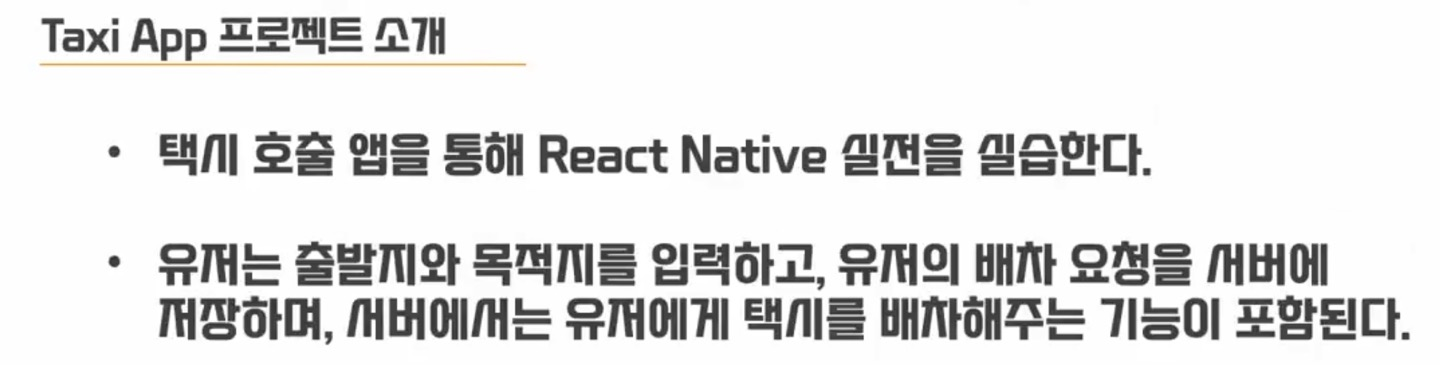
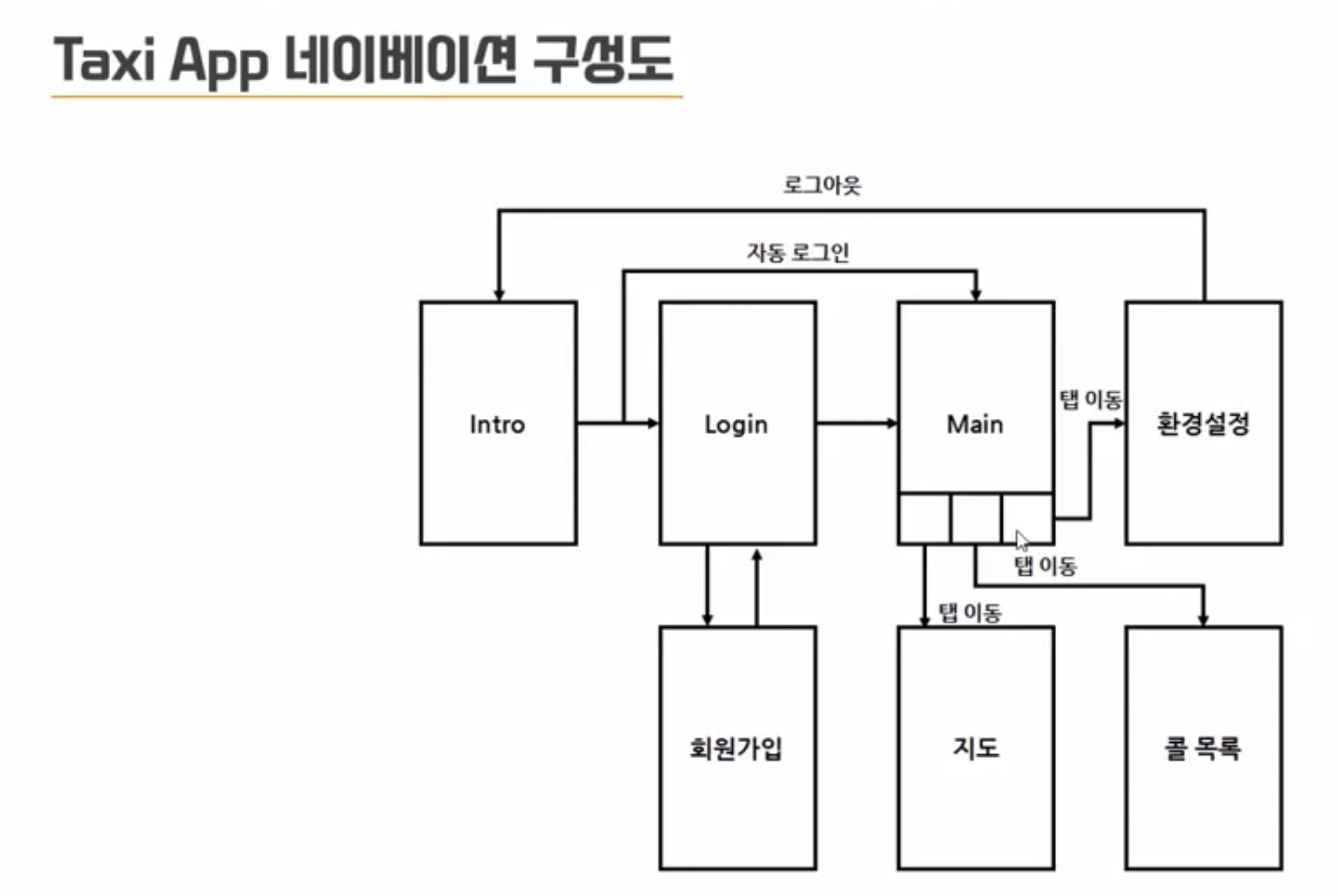
Navigation 구성

구성도
설치 패키지
1. npm install @react-navigation/native
2. npm install @react-navigation/stack
3. npm install react-native-reanimated react-native-gesture-handler react-native-screens react-native-safe-area-context @react-native-community/masked-view
4. npm install @react-navigation/bottom-tabs
app파일 안에 build.gradle에
apply from : file("../../node_modules/react-native-vector-icons/fonts.gradle") 추가
windows에서 gradle 정리명령어
gradlew clean
./gardle clean이 안됨 - 파워쉘에서 가능
Intro.tsx
import { JSX } from "react";
import { SafeAreaView, StyleSheet, Text, TouchableOpacity } from "react-native";
import { useNavigation, ParamListBase } from "@react-navigation/native";
import { StackNavigationProp } from "@react-navigation/stack";

function Intro() : JSX.Element {
    console.log("-- Intro()")

    const navigation = useNavigation<StackNavigationProp<ParamListBase>>()

    const gotoLogin = () => {
        navigation.push('Login')
    }

    return (
        <SafeAreaView>
            <Text style={styles.textBlack}>Hello React Native</Text>
            <Text style={styles.textBlue}>Intro</Text>

            <TouchableOpacity style={styles.button} onPress={gotoLogin}>
                <Text style={styles.buttonText}>로그인으로 이동</Text>
            </TouchableOpacity>
        </SafeAreaView>
    )
}

const styles = StyleSheet.create({
    textBlack: {
        fontSize: 18,
        color: 'black'
    },
    textBlue: {
        fontSize: 18,
        color: 'blue'
    },
    container: {
        flex: 1,
        justifyContent: 'center',
        alignItems: 'center'
    },
    button: {
        width: 200,
        backgroundColor: '#3498db',
        paddingVertical: 10,
        paddingHorizontal: 20,
        borderRadius: 5
    },
    buttonText: {
        color: 'white',
        fontSize: 16,
        textAlign: 'center'
    }
})

export default Intro
Login.tsx
import { JSX } from "react";
import { SafeAreaView, StyleSheet, Text, TouchableOpacity } from "react-native";
import { useNavigation, ParamListBase } from "@react-navigation/native";
import { StackNavigationProp } from "@react-navigation/stack";

function Login() : JSX.Element {
    console.log("-- Login()")

    const navigation = useNavigation<StackNavigationProp<ParamListBase>>()

    const gotoRegister = () => {
        navigation.push('Register')
    }

    const gotoMain = () => {
        navigation.push('Main')
    }

    return (
        <SafeAreaView>
            <Text style={styles.textBlack}>Hello React Native</Text>
            <Text style={styles.textBlue}>Login</Text>
            <TouchableOpacity style={styles.button} onPress={gotoRegister}>
                <Text style={styles.buttonText}>회원가입으로 이동동</Text>
            </TouchableOpacity>
            <TouchableOpacity style={[styles.button, {marginTop:5}]} onPress={gotoMain}>
                <Text style={styles.buttonText}>메인으로 이동</Text>
            </TouchableOpacity>
        </SafeAreaView>
    )
}

const styles = StyleSheet.create({
    textBlack: {
        fontSize: 18,
        color: 'black'
    },
    textBlue: {
        fontSize: 18,
        color: 'blue'
    },
    container: {
        flex: 1,
        justifyContent: 'center',
        alignItems: 'center'
    },
    button: {
        width: 200,
        backgroundColor: '#3498db',
        paddingVertical: 10,
        paddingHorizontal: 20,
        borderRadius: 5
    },
    buttonText: {
        color: 'white',
        fontSize: 16,
        textAlign: 'center'
    }
})

export default Login
Main_List.tsx
import { JSX } from "react";
import { SafeAreaView, StyleSheet, Text } from "react-native";

function Main_List() : JSX.Element {
    console.log("-- Main_List()")

    return (
        <SafeAreaView>
            <Text style={styles.textBlack}>Hello React Native</Text>
            <Text style={styles.textBlue}>Main_List</Text>
        </SafeAreaView>
    )
}

const styles = StyleSheet.create({
    textBlack: {
        fontSize: 18,
        color: 'black'
    },
    textBlue: {
        fontSize: 18,
        color: 'blue'
    }
})

export default Main_List
Main_Map.tsx
import { JSX } from "react";
import { SafeAreaView, StyleSheet, Text } from "react-native";

function Main_Map() : JSX.Element {
    console.log("-- Main_Map()")

    return (
        <SafeAreaView>
            <Text style={styles.textBlack}>Hello React Native</Text>
            <Text style={styles.textBlue}>Main_Map</Text>
        </SafeAreaView>
    )
}

const styles = StyleSheet.create({
    textBlack: {
        fontSize: 18,
        color: 'black'
    },
    textBlue: {
        fontSize: 18,
        color: 'blue'
    }
})

export default Main_Map
Main_Setting.tsx
import { JSX } from "react";
import { SafeAreaView, StyleSheet, Text } from "react-native";

function Main_Setting() : JSX.Element {
    console.log("-- Main_Setting()")

    return (
        <SafeAreaView>
            <Text style={styles.textBlack}>Hello React Native</Text>
            <Text style={styles.textBlue}>Main_Setting</Text>
        </SafeAreaView>
    )
}

const styles = StyleSheet.create({
    textBlack: {
        fontSize: 18,
        color: 'black'
    },
    textBlue: {
        fontSize: 18,
        color: 'blue'
    }
})

export default Main_Setting
Main.tsx
import { JSX } from "react";
import { SafeAreaView, StyleSheet, Text } from "react-native";
import { createBottomTabNavigator } from "@react-navigation/bottom-tabs";
import Icon from 'react-native-vector-icons/FontAwesome';

import Main_Map from "./Main_Map";
import Main_List from "./Main_List";
import Main_Setting from "./Main_Setting";

function Main() : JSX.Element {
    console.log("-- Main()")

    const BottomTab = createBottomTabNavigator()

    return (
        <BottomTab.Navigator>
            <BottomTab.Screen name="Main_Map" component={Main_Map}
            options={{headerShown: false,
                tabBarIcon: ({color, size}) => (<Icon name = "map" size={size} color={color}/>)
            }}/>
            <BottomTab.Screen name="Main_List" component={Main_List} options={{headerShown: false,
                tabBarIcon: ({color, size}) => (<Icon name = "phone" size={size} color={color}/>)
            }}/>
            <BottomTab.Screen name="Main_Setting" component={Main_Setting} options={{headerShown: true, title:'환경설정',
                tabBarIcon: ({color, size}) => (<Icon name = "map" size={size} color={color}/>)
            }}/>
        </BottomTab.Navigator>
    )
}

const styles = StyleSheet.create({
    textBlack: {
        fontSize: 18,
        color: 'black'
    },
    textBlue: {
        fontSize: 18,
        color: 'blue'
    }
})

export default Main
Register.tsx
import { JSX } from "react";
import { SafeAreaView, StyleSheet, Text } from "react-native";

function Register() : JSX.Element {
    console.log("-- Register()")

    return (
        <SafeAreaView>
            <Text style={styles.textBlack}>Hello React Native</Text>
            <Text style={styles.textBlue}>Register</Text>
        </SafeAreaView>
    )
}

const styles = StyleSheet.create({
    textBlack: {
        fontSize: 18,
        color: 'black'
    },
    textBlue: {
        fontSize: 18,
        color: 'blue'
    }
})

export default Register
TaxiApp.tsx
import { JSX } from "react";
import { SafeAreaView, StyleSheet, Text } from "react-native";
import { NavigationContainer } from "@react-navigation/native";
import { createStackNavigator } from "@react-navigation/stack";

import Intro from './Intro'
import Main from './Main'
import Login from './Login'
import Register from './Register'


function TaxiApp() : JSX.Element {

    console.log("-- TaxiApp()")

    const Stack = createStackNavigator()

    return (
       <NavigationContainer>
            <Stack.Navigator>
                <Stack.Screen name='intro' component={Intro}
                options={{headerShown:false}}/>
                <Stack.Screen name='Login' component={Login}
                options={{headerShown:true}}/>
                <Stack.Screen name='Register' component={Register}
                options={{headerShown:true, title: '회원가입'}}/>
                <Stack.Screen name='Main' component={Main}
                options={{headerShown:false}}/>
            </Stack.Navigator>

       </NavigationContainer>
    )

}

const styles = StyleSheet.create({
    textBlack: {
        fontSize: 18,
        color: 'black'
    },
    textBlue: {
        fontSize: 18,
        color: 'blue'
    }
})

export default TaxiApp
.