Largest Rectangle in Histogram문제
문제
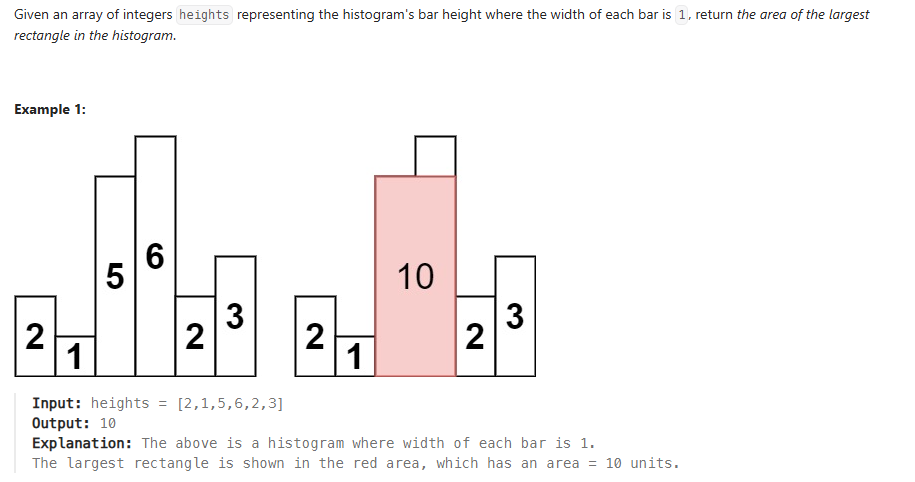
해결방법
- 스택 초기화: 비어있는 스택을 준비합니다.
- 왼쪽에서 오른쪽으로 순회: 히스토그램의 각 막대 높이를 순서대로 확인합니다.
- 스택에 추가: 현재 막대 높이가 스택 top에 있는 막대 높이보다 크거나 같으면 스택에 인덱스를 추가합니다.
- 스택에서 제거 및 넓이 계산: 현재 막대 높이가 스택 top에 있는 막대 높이보다 작으면, 스택 top에서 막대를 제거하고, 제거된 막대를 기준으로 넓이를 계산합니다. 이때, 제거되는 막대 높이에 현재 인덱스와 스택에서 다음으로 작은 인덱스 사이의 거리를 곱하여 넓이를 구합니다. 이렇게 스택이 빌 때까지 반복합니다.
5.스택 처리: 순회가 끝나고 스택에 남아있는 인덱스들도 같은 방식으로 처리합니다. - 최대 넓이 갱신: 계산된 넓이 중 가장 큰 값을 최대 넓이로 갱신합니다.
코드
using System;
using System.Collections.Generic;
public class Solution
{
public int LargestRectangleArea(int[] heights)
{
int maxArea = 0;
Stack stack = new Stack(); // Stores indices of bars
    for (int i = 0; i <= heights.Length; i++)
    {
        // Get current height (or 0 if at the end to process remaining stack elements)
        int currentHeight = (i == heights.Length) ? 0 : heights[i];

        // While the stack is not empty and the current height is less than
        // or equal to the height of the bar at the top of the stack
        while (stack.Count > 0 && currentHeight <= heights[stack.Peek()])
        {
            int h = heights[stack.Pop()]; // Height of the popped bar
            int w = stack.Count == 0 ? i : i - stack.Peek() - 1; // Width of the rectangle
            maxArea = Math.Max(maxArea, h * w); // Update maxArea
        }

        stack.Push(i); // Push the current bar's index onto the stack
    }

    return maxArea;
}
}

게임개발자 취준생입니다